5 Best Video Calling Devices Under $50 (2026)
Five budget video calling cameras with built-in screens and one-touch calls, compared for readability, setup effort and Wi-Fi needs for older family members.


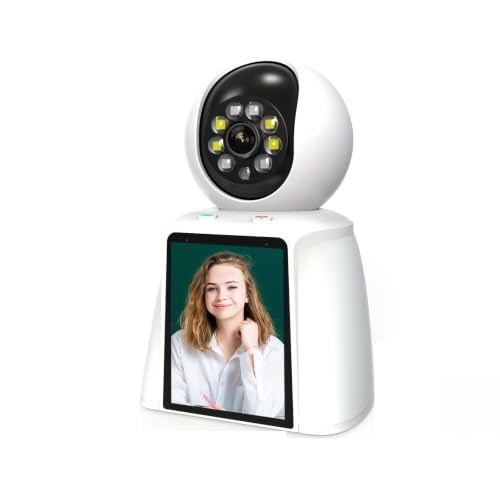


At a Glance
Video calling hardware at the lowest price tier is a different species from a tablet or a smart display. Every pick here is a small camera with its own screen, built so the person at home presses a button and your phone rings. The spread runs from the oneware camera with its single oversized call button to the Noorio CL200, which adds a 2K sensor, pan and tilt motor and dual-band Wi-Fi.
Screen size is the first compromise at this budget. The Noorio has a 2.4 inch screen, the NBKsmart a 2.8 inch screen, and the PHANSATIM a 3 inch screen, so none of them replace a tablet for reading a grandchild's face from across a room. What you get instead is a device that sits on a shelf, needs no login on the home side and costs less than most phone cases for a flagship handset.
We evaluated these five based on product specs, listing details and buyer feedback, and we dropped a docking accessory that was not a calling device at all. The ranking favors how few steps the person at home must take, then picture quality, then extras like auto-tracking or AI chat. If a parent can reliably start a call alone, the rest is a bonus.
6 Criteria to Look For Before Buying a Video Calling Devices Under $50 (2026)
Key buying criteria so you get the right fit the first time.
Who Starts the Call
The most important design question is whether the person at home can start a call alone. The oneware has a single big button, the NBKsmart and Noorio offer one-button or one-touch calling, and the Heayzoki adds voice calling by name. Devices that only answer calls you start leave a parent unable to reach you, which is a common disappointment with security cameras sold as calling tools. Rule of thumb: if the box does not say the device itself can initiate a call, assume it cannot. Test it with your phone before wrapping the gift.
Built-In Screen Size
Screens in this price tier run from the Noorio's 2.4 inch panel to the NBKsmart's 2.8 inch and the PHANSATIM's 3 inch. At those sizes a face is readable only within an arm's length or two, so these suit a nightstand or kitchen counter, not a far wall. A larger screen helps with recognizing expressions, but it still does not equal a tablet. If your parent has trouble with small displays, choose the 3 inch PHANSATIM or step up a price tier to a smart display.
Wi-Fi Band and Signal
Wi-Fi dependence is the most common reason these devices fail after setup. The Noorio supports both 2.4GHz and 5GHz networks, while many cheap cameras only join 2.4GHz, which can matter on a modern dual-band router. Always confirm signal strength at the exact shelf where the device will sit before you commit. Weak signal produces frozen calls that a parent will blame on themselves. If you are unsure, check with a phone's Wi-Fi meter at that spot first.
Home-Side Setup Burden
Fewer steps on the home side beats more features, as sources on senior video calling agree. The oneware states no app is needed to place a call, which puts all configuration on the buyer. The Heayzoki asks for names and roles to be defined first, which is easy for you but opaque for a parent. Look for devices where the parent never sees a login screen. Do the pairing at your own home, then ship or deliver it ready to power on.
Picture and Night Quality
The Noorio's 2K 3MP sensor is the sharpest here, while the NBKsmart and oneware use 1080P and the Heayzoki uses 1080P 2MP. Higher resolution matters most for the viewing side on your phone, because the small home-side screen cannot show that detail. Night vision helps if the device will also watch a hallway or living room. Do not pay extra for resolution if the main goal is a call button.
Extras That Add Noise
Motion alerts, sirens and AI chat sound useful but can create daily notifications and false alarms. The PHANSATIM lists a siren and auto tracking, and the NBKsmart lists AI detection. If the unit sits in a busy home, those alerts can drown out the one thing that matters, a ringing call. Prefer devices where extras can be switched off in the app. Decide in advance which features you will actually leave on.
5 Best Video Calling Devices Under $50 (2026)
oneware Video Calling Camera
About this pick
The oneware camera is built around a single oversized button that the person at home presses to ring your phone. The listing states that no app is needed on the home side, so the technical burden sits with you instead of with a parent. It also pairs the calling feature with Full HD video and automatic night vision, which means it doubles as an ordinary indoor camera. Its marketing is aimed at children, but that framing stops mattering once the unit sits on a living room shelf. What matters is that there is exactly one target to press and nothing else to learn. The tradeoff is that this is more camera than conversation display, so the picture the home side sees of you is limited. Plan on one short setup session where you pair it with your phone and check Wi-Fi strength at the spot where it will live. Mount it at a height where the button is reachable without bending, because a button nobody can reach defeats the purpose. Next to the Noorio CL200 it skips the 2K sensor and the pan and tilt motor, and that restraint is exactly why it is the simplest pick in this lineup.
Best for: A parent who should be able to call you with one press and no app
Check price on AmazonSpecs
- Calling: One-tap button on the device
- Video: Full HD
- Night use: Automatic night vision
- Home-side app: Not needed to place a call
Pros
- +One oversized call button, nothing else to learn
- +Home side needs no app to place a call
- +Full HD video with automatic night vision
- +Doubles as an indoor camera when idle
Cons
- −Small built-in screen limits what the home side sees
- −Child-focused marketing and look
- −No pan or tilt to follow movement
NBKsmart 2-Way Video Calling Camera
About this pick
The NBKsmart puts a 2.8 inch screen on the front, which is a size step above the Noorio's 2.4 inch panel. A dedicated one-button call lets the device ring your phone, and the listing notes it can start the call itself rather than only answering yours. The 1080P sensor keeps the live image sharp enough for you to check a room. It is marketed for pets and elderly relatives alike, and the AI detection mentioned in the title adds motion alerts when nobody is calling. That means the app on your phone will occasionally ping you about activity, so decide whether you want those alerts or want them turned off. The screen is still small, which limits how clearly a parent sees a group of people in your frame. Setup is a standard Wi-Fi pairing through the phone app, then a position check on a stable surface within reach. Compared with the PHANSATIM it has a slightly smaller screen and a lower resolution than that listing's 5MP claim. In return it keeps the interface to one button, which suits a user who dislikes menus.
Best for: A buyer who wants a screen larger than the lowest-cost models without paying for 2K
Check price on AmazonSpecs
- Screen: 2.8 inch display
- Video: 1080P Full HD
- Calling: One-button video call to phone
- Extras: AI detection, two-way audio
Pros
- +2.8 inch screen is easier to read than the 2.4 inch rival
- +One-button call plus two-way audio
- +1080P picture is sharp for room checks
- +AI detection adds motion alerts when idle
Cons
- −Screen is still too small for group calls
- −Motion alerts may be noisy in a busy home
PHANSATIM 3 Inch Screen Calling Camera
About this pick
The PHANSATIM is the cheapest listing here and still carries the largest screen at 3 inch. The title advertises 5MP video, two-way video and audio calling, 360 degree pan and tilt with auto tracking and a siren on motion alerts. That is a lot of listed capability for the lowest price tier in this guide. The listing gives very little detail beyond its title, so there is less to verify than with the oneware or Noorio. Buyer feedback on very low-priced cameras tends to vary on app polish and on how reliably calls connect, so expect a rougher app experience than the better known brands. The motor and siren are extras that a parent living alone may never use, and the siren in particular can startle a household. Treat setup as a project for you rather than for a parent, and test the call button from your phone before gifting it. Against the Noorio CL200 it offers a bigger screen and cheaper entry but a less documented ecosystem. Choose it when budget is the hard limit and you are comfortable troubleshooting it yourself.
Best for: The tightest budget when you can handle setup and support yourself
Check price on AmazonSpecs
- Screen: 3 inch
- Video: 5MP HD
- Movement: 360 degree pan and tilt, auto tracking
- Safety: AI motion detection with siren
Pros
- +Largest built-in screen in the lineup at 3 inch
- +Lowest price tier among the five
- +Pan and tilt auto tracking follows movement
- +Two-way video and audio calling
Cons
- −Thin listing detail makes it harder to verify
- −Siren and motor are extras many seniors will not use
- −App polish is unproven at this price tier
Noorio CL200 2K Calling Camera
About this pick
The Noorio CL200 has the sharpest sensor of the group, a 2K 3MP camera with up to 3x digital zoom. A one-touch call button lets a child, elderly relative or nanny ring your phone, and the same unit pans and tilts through its app for wide room coverage. Dual-band Wi-Fi support for 2.4GHz and 5GHz networks gives it more flexibility on crowded home routers. Its 2.4 inch screen is the smallest of the screened picks, so it favors the person watching on a phone over the person watching the device. Color night vision and motion tracking are genuine upgrades for room monitoring. They matter less if the only goal is a simple call from a parent. Setup involves the app, a Wi-Fi band choice and a mounting spot, so it asks more of you than the oneware. It sits at the top of this guide on price tier, and the extra cost buys sensor and motor quality more than calling simplicity. If you want a calling device and a decent indoor camera in one box, it is the strongest value-for-features choice here.
Best for: Someone who wants strong camera quality alongside one-touch calling
Check price on AmazonSpecs
- Video: 2K 3MP with 3x digital zoom
- Screen: 2.4 inch
- Wi-Fi: 2.4GHz or 5GHz
- Movement: Pan and tilt with motion tracking
Pros
- +2K sensor gives the clearest picture here
- +Works on 2.4GHz or 5GHz Wi-Fi
- +One-touch call plus pan and tilt tracking
- +Color night vision for dim rooms
Cons
- −Smallest built-in screen of the screened picks
- −Highest price tier in this guide
- −More app steps than a single-button device
Heayzoki Two-Way Video Calling Camera
About this pick
The Heayzoki camera stands apart by letting the user call a named family role or person, which makes a call feel more like speaking than pressing. It also lists an AI voice function that answers general questions and a daily clock with reminders. These touches are aimed at someone who likes talking to a device more than tapping it. The listing does not state a screen size, so treat the screen as unverified and check the product page before buying. The AI features lean toward a children's enrichment pitch and may feel gimmicky for an adult parent. Voice recognition can also misfire in a noisy kitchen, so a physical button remains the more dependable path. Setup needs you to define contacts and roles in the app, which is more work than the oneware's single button. At 1080P and 2MP it is a step down in sensor detail from the Noorio CL200. Pick it if a parent prefers speaking over pressing and you are happy to configure names in advance.
Best for: A parent who would rather say a name than press a button
Check price on AmazonSpecs
- Video: 1080P 2MP
- Calling: Call a named family role
- Voice: AI voice chat function
- Extras: Clock and reminders
Pros
- +Calls a named family member by voice
- +1080P video is adequate for room checks
- +Voice chat adds light companionship
Cons
- −Screen size is not stated in the listing
- −AI features feel aimed at kids
- −Voice commands can misfire in noisy rooms
How We Evaluated These Video Calling Devices Under $50 (2026)
Each pick was assessed across 5 criteria weighted for real-world use.
Ease of Starting a Call
We read each listing for a physical call button or voice call path on the device itself. The oneware ranked strongest here because its single button needs no app on the home side, while the Heayzoki ranked lower because it relies on setup of names. A device that cannot initiate calls was treated as a security camera and not as a calling device. Dropped listings included a charging dock for a different product.
Screen Readability
We compared stated screen sizes across the group, from the Noorio's 2.4 inch panel to the PHANSATIM's 3 inch screen. Where a listing gave no size, as with the Heayzoki, we marked the screen as unverified instead of guessing. Screens were weighed against likely viewing distance in a kitchen or bedroom. Larger always won when other factors were close.
Video and Connectivity
We looked at stated resolution, from 1080P on the NBKsmart to 2K 3MP on the Noorio, along with Wi-Fi band support. A device that joins both 2.4GHz and 5GHz networks, like the Noorio, scored higher for compatibility. Buyer feedback themes about dropped calls informed the weighting. Picture quality counted for less than call reliability.
Setup and Support Burden
We assessed how much work falls on the buyer versus the person at home. The oneware and NBKsmart keep the home side to a single button, while the Noorio and PHANSATIM add app features that you will need to configure. Brand documentation depth also mattered, because a thinner listing like the PHANSATIM is harder to troubleshoot. Lower burden ranked higher.
Value at This Price Tier
The PHANSATIM offers the most listed features for the least, while the Noorio offers the best sensor for the most. Extras like sirens were counted as neutral unless they served a calling purpose. The strongest value picks balanced simplicity and cost.
How to Choose the Right Video Calling Devices Under $50 (2026)
By Who Will Use It
Match the device to the comfort level of the person on the home end.
| Situation | Recommended pick |
|---|---|
| Parent should press one button and nothing else | oneware Video Calling Camera |
| Parent prefers saying a name aloud | Heayzoki Two-Way Video Calling Camera |
| You need a slightly larger screen without extra cost | NBKsmart 2-Way Video Calling Camera |
| You also want a sharp room camera | Noorio CL200 2K Calling Camera |
| Screen size is the priority | PHANSATIM 3 Inch Screen Calling Camera |
By Budget
Prices change often, so these tiers are relative.
| Budget tier | Recommended pick |
|---|---|
| Lowest-cost pick | PHANSATIM 3 Inch Screen Calling Camera |
| Low tier, simplest operation | oneware Video Calling Camera |
| Mid-range | NBKsmart 2-Way Video Calling Camera |
| Upper tier, voice features | Heayzoki Two-Way Video Calling Camera |
| Premium tier, best sensor | Noorio CL200 2K Calling Camera |
Button Calling vs Voice Calling
Button calling
A physical press is dependable in noisy rooms and works for users who dislike speaking commands. The oneware, NBKsmart, Noorio and PHANSATIM all rely on a button or touch to start a call. The tradeoff is that the user must reach the device. Choose the oneware for the cleanest button-only experience.
Voice calling
Calling a named family role by voice, as the Heayzoki supports, feels natural for talkers and helps when hands are busy. It depends on clear speech and quiet surroundings, and names must be configured by you first. Choose the Heayzoki only if the user already enjoys talking to devices.
If unsure, pick a button; it fails less often than speech recognition.
By Wi-Fi and Placement
| Preference | Recommended pick |
|---|---|
| Router is dual-band and busy | Noorio CL200 2K Calling Camera |
| Shelf sits near a weak Wi-Fi spot | oneware Video Calling Camera, after confirming signal |
| Device will sit on a nightstand | NBKsmart 2-Way Video Calling Camera |
| Needs to follow movement in a room | PHANSATIM 3 Inch Screen Calling Camera |
| Counter or kitchen with background noise | oneware Video Calling Camera |
For a Parent Living Alone Specifically
Look for
A device that initiates calls on its own, needs no login at home and has a screen readable from a chair. Confirm Wi-Fi strength at the placement spot, and make sure alerts do not bury the call button.
In this comparison
The oneware Video Calling Camera fits best because one press rings you and the home side needs no app. The NBKsmart is the next step up when a slightly larger screen matters.
When to Spend More
Spend more if
You want sharper video or both Wi-Fi bands, which makes the Noorio CL200 worthwhile, or you want a bigger tablet-style display and move up to a smart display tier. Spending more is also sensible when the parent has poor eyesight.
Save if
A single button is all the parent needs. The oneware or the lowest-cost PHANSATIM covers that, and the Heayzoki is a fair choice if voice calling matters more than screen size.
Frequently Asked Questions
Can these devices call a landline or a regular phone number?
No. These are Wi-Fi cameras that call through their own app on your smartphone, so you need the matching app installed. They do not dial phone numbers. If the person you want to reach has no smartphone, a different device type is needed.
Do I need a smartphone to use them?
Yes, the viewing and calling side runs through a phone app. The person at home only needs the device itself. That is why these suit a parent who has no smartphone but whose family does.
Which is best if I want the simplest possible setup for my parent?
The oneware is the simplest because the listing says the home side needs no app to place a call. You do the pairing at your own home, then the parent only presses one button. If you prefer more screen and some extras, the NBKsmart is the next simplest.
Is a higher resolution camera worth it at this price?
Only if you plan to watch the room on your phone. The small built-in screens cannot display extra detail, so the Noorio's 2K sensor helps you more than it helps the person at home. For a pure calling device, 1080P is plenty.
What do I do if calls keep dropping?
First check Wi-Fi signal at the exact placement spot, since weak signal is the leading cause of frozen calls. If your router has two bands, move the device to the stronger one or pick a model like the Noorio that supports both 2.4GHz and 5GHz. Moving the router or adding a range extender is often cheaper than replacing the device.
Are the motion alerts and siren features useful for seniors?
They can be, but they also create notifications and false alarms. The PHANSATIM lists a siren and the NBKsmart lists AI detection, and in a busy home both may ring or ping often. Turn them off in the app unless you really want them.
When should I skip this tier and buy a smart display instead?
Choose a smart display if the parent has poor eyesight or wants to see multiple people. A larger screen makes faces easier to read, and voice calling on a display removes buttons altogether. These budget cameras work best when simplicity and cost matter most.
Bottom Line
best overall: oneware Video Calling Camera - best overall pick in this roundup.
See the full rankings above for all picks with pros, cons, and best-for summaries.
Browse on Amazon
All Prime-eligible options with current pricing.
Shop on Amazon →