5 Best Video Calling Devices for Staying in Touch (2026)
Five dedicated video calling devices compared, from touchscreen displays to one-button cameras, with picks for simple setup and easy calls with family.


At a Glance
myFirst 7 inch Digital Picture Frame with Video Calling
↓ See why we picked itA dedicated video calling device takes the phone out of the equation. Instead of unlocking a screen, finding an app, and tapping the right contact, the person on the receiving end often only has to touch one button or say a name. That simplicity is why these devices appeal to active adults who want to see their grandchildren and to adult children who want an easy way to check in from far away.
We evaluated five options that cover very different approaches. The Meta Portal and Meta Portal Go are 10 inch touchscreen displays built around Messenger and WhatsApp calling, with the Go adding a battery and handle. The myFirst is a 7 inch picture frame that makes one tap calls through its Circle app, while the TMEZON and oneware are camera style devices where a screen or big button starts a call to a phone. The spread runs from a full size smart display to a small 2.8 inch screen.
Every one of these depends on Wi-Fi, so the first question is whether your signal is strong where the device will sit. After that, choose by who starts the call and how much screen you want. Based on product specs and buyer feedback, we ranked picks by ease of use, call quality, and how well each one suits a home where tech comfort varies.
6 Criteria to Look For Before Buying a Video Calling Devices for Staying in Touch (2026)
Key buying criteria so you get the right fit the first time.
Who starts the call
The most important design question is whether the person at home starts calls or only receives them. The Meta Portal and Portal Go support voice and touch controls, the myFirst offers one tap calls, and the TMEZON and oneware use a single button to ring a family phone. Sources on this category agree that fewer buttons and fewer steps beat feature richness. If the person at home is comfortable with a touchscreen, the Portal fits; if not, a one button device like the TMEZON is gentler.
Wi-Fi strength where it sits
Wi-Fi dependence is the main failure point for every device in this guide. Even the 10 inch Portal and the 7 inch myFirst will stutter or drop calls if the signal is weak at their location. Test the signal with a phone in the exact spot you plan to place the device. A mesh extender or a router moved closer is the usual fix if the room is far from the router.
Screen size and readability
Screen size changes how comfortable calls feel, especially for eyes that are not what they used to be. The Portal and Portal Go have 10 inch displays, the myFirst has 7 inches, and the TMEZON has only 2.8 inches. A larger screen shows faces and expressions, while a small one is more like a doorbell display. Pick the largest screen your space supports if the main goal is conversation with grandchildren.
App and account requirements
Each device ties you to an ecosystem. The Portal devices call through Messenger and WhatsApp, the myFirst uses its Circle app, and the TMEZON and oneware connect to a phone app on the family side. That means someone has to set up an account, which is a real step for less technical buyers. Choose the ecosystem your family already uses, and plan for a family member to do the initial setup remotely or in person.
Camera framing and audio
A camera that stays fixed forces the person to sit still, while auto framing is far more forgiving. The Portal and Portal Go use Smart Camera to follow you around, and Smart Sound reduces background noise. The myFirst relies on dual microphones and stereo speakers, and the TMEZON and oneware offer 1080P or Full HD video with two way audio. If you often move while talking, the Portal pair is the best match.
Longevity and support
Product lines in this space change quickly, and sources note that Portal TV was discontinued in 2022. That is a reminder to confirm current availability and software support for any Portal before buying. A device that depends on a cloud app can stop working if the service ends. Prefer a device whose maker is still actively updating the app, and keep a simple phone fallback in case the device fails.
5 Best Video Calling Devices for Staying in Touch (2026)
Meta Portal 10 inch Smart Video Calling Display
About this pick
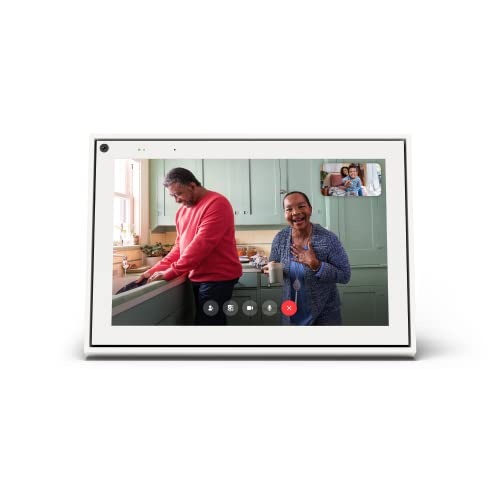
The Meta Portal is the most complete video calling device in this group. Its 10 inch touch screen sits in a sleek picture frame design, and the Smart Camera adjusts automatically so you can move around while staying in frame. Smart Sound helps your voice come through clearly, which is especially useful for people who pace the kitchen while they talk.
Calling works through apps like Messenger and WhatsApp, and the person you call does not need their own Portal. That makes it flexible for a family that already uses those apps, but it also means you need an account on one of them. Voice and touchscreen controls keep daily use simple, though the account sign in is the one setup step that can frustrate a less technical buyer.
In a living room or kitchen it works well as a permanent fixture rather than something you carry. Compared with the Portal Go, you give up the built-in battery and handle but get a steadier, always-ready setup. Compared with the myFirst frame, you get a larger display and a wider app ecosystem, at the cost of a more involved first-time setup. Confirm current availability and software support before buying, since research notes show Meta has already discontinued Portal TV.
Best for: A main-room display where family already uses Messenger or WhatsApp
Check price on AmazonSpecs
- Screen: 10 inch touch screen
- Camera: Smart Camera auto framing
- Audio: Smart Sound
- Calls via: Messenger and WhatsApp
Pros
- +Smart Camera keeps you in frame while you move
- +Works with Messenger and WhatsApp contacts
- +Voice and touchscreen controls
- +Large 10 inch screen is easy to read
Cons
- −Needs a Messenger or WhatsApp account
- −Availability and support should be confirmed first
myFirst 7 inch Digital Picture Frame with Video Calling
About this pick
The myFirst takes the picture frame idea and adds video calling to it. It is a 7 inch digital frame that makes one tap video calls through the myFirst Circle app, with dual microphones and stereo speakers handling the audio. Family can also send photos and videos directly to the frame and comment on shared items through the app.
That combination is its biggest strength, because a frame that already shows grandchildren's photos feels natural to keep on a shelf. The extras include preset ambient sounds like rain and ocean waves plus an MP3 music player, which turns it into a bedside companion as well. The trade-off is a smaller screen than the Portal, and calls run through the myFirst Circle app instead of the apps your family may already use.
Setup is lighter than a full smart display, since most of the management happens from the family member's phone. Compared with the Meta Portal, it is simpler and more focused, but you lose the auto framing camera. Compared with the TMEZON camera, it feels like a household object instead of a gadget, which matters in a living room.
Best for: A shelf or nightstand device that doubles as a photo frame
Check price on AmazonSpecs
- Screen: 7 inch frame
- Calling: One tap via myFirst Circle app
- Audio: Dual mics, stereo speakers
- Extras: Photos, white noise, MP3
Pros
- +One tap calls through a dedicated app
- +Family can send photos and videos remotely
- +Dual microphones and stereo speakers
- +Ambient sounds and MP3 player included
Cons
- −Smaller 7 inch screen than the Portal
- −Relies on the myFirst Circle app
Meta Portal Go Portable 10 inch Display
About this pick
The Portal Go is a portable take on the same idea as the standard Meta Portal. It has a 10 inch touch screen, a long lasting battery, and an integrated handle that makes it easy to carry from room to room. You can call anyone through Messenger and WhatsApp, even if they do not have a Portal themselves.
The portability changes how you use it. Instead of a fixed spot on a counter, it can follow you from the kitchen to the porch to the bedroom, which suits a household where a call might happen anywhere. The cost is that a battery device still needs charging, and a portable object is easier to forget in another room than a wall or shelf fixture.
Compared with the myFirst, it is larger and more capable, but also more involved to set up. As with the other Portal device, confirm current availability and software support before purchase.
Best for: Taking calls room to room or out on the patio
Check price on AmazonSpecs
- Screen: 10 inch touch screen
- Power: Built-in battery
- Carry: Integrated handle
- Calls via: Messenger and WhatsApp
Pros
- +Battery and handle make it easy to carry
- +10 inch screen is easy to read
- +Calls anyone on Messenger and WhatsApp
- +Stands up as a normal tabletop display
Cons
- −Battery needs recharging between uses
TMEZON 2 Pack Two Way Video Calling Camera
About this pick
The TMEZON is a different kind of device, a small camera with a 2.8 inch screen that supports two way video calling with a phone. It is sold as a two pack, and the one button call lets someone at home reach a family member's phone with a single press. The listing describes 1080P HD resolution, so the picture should be crisp on the phone side.
This is a very simple tool, and that is both its appeal and its limit. A single button is easy to understand, which suits someone who does not want a menu at all. The screen is small, however, so the person at home sees a tiny picture compared with the Portal or the myFirst, and the camera nature means it is not a general purpose display.
Because it comes as a pair, you can put one at each end or in two rooms, which is practical for a household that wants quick check ins. Compared with the oneware, it has a built-in screen so the person at home can see the caller. Compared with the Meta Portal, it is far less capable, but it is also less to learn.
Best for: A single big button for quick calls to a family phone
Check price on AmazonSpecs
- Pack size: 2 cameras
- Screen: 2.8 inch HD display
- Video: 1080P WiFi
- Calling: One button to phone
Pros
- +One button starts a call to a phone
- +Two pack covers two rooms or two homes
- +1080P video for a clear picture
- +Built-in screen shows the caller
Cons
- −Small 2.8 inch screen limits detail
- −Less capable than a full smart display
oneware Video Calling Camera with One Tap Button
About this pick
The oneware is the lowest-cost pick here and takes the simplest approach of all. It pairs indoor camera features with a big call button, so the person at home can reach you in seconds without an app. You get Full HD video, automatic night vision, and two way audio, with motion alerts and app control on your side.
The listing frames it around kids calling parents, so be aware that the marketing is not aimed at older adults. The mechanism, though, is exactly what many people want from a simple device, one large button and nothing else to learn. The trade-off is that it is more of a camera than a display, so the experience is less like a conversation on a big screen.
Compared with the Meta Portal, it is far more basic, but it can sit on a shelf and be used without any account for the person who presses the button. It is a reasonable low-cost experiment if you are not sure a dedicated device will be used.
Best for: A very low-cost test of whether a one button device will get used
Check price on AmazonSpecs
- Video: Full HD
- Calling: Big one tap button
- Night: Automatic night vision
- Audio: 2 way
Pros
- +Big call button needs no app on the home side
- +Full HD video with night vision
- +Two way audio for clear conversation
- +Lowest-cost pick in this guide
Cons
- −Marketing is aimed at children not seniors
- −More camera than conversation display
How We Evaluated These Video Calling Devices for Staying in Touch (2026)
Each pick was assessed across 5 criteria weighted for real-world use.
Simplicity of starting a call
We counted the steps between wanting to talk and seeing a face. The oneware and TMEZON need a single button, the myFirst needs one tap in its app, and the Meta Portal needs a touch or voice command. We scored fewer steps higher. The strongest pick on simplicity was the one button cameras, and the most involved was the Portal.
Screen and camera quality
We compared stated screen sizes and video specs from the listings. The 10 inch Portal and Portal Go lead on display size, the myFirst follows at 7 inches, and the TMEZON trails at 2.8 inches. Camera features such as Smart Camera auto framing and Full HD or 1080P video also counted. This is based on product specs, not our own measurement.
Setup and account burden
We looked at how much setup falls on the user versus a helper. Portal devices need a Messenger or WhatsApp account, the myFirst needs its Circle app, and the cameras need a phone app. A family member can usually handle that remotely. We gave higher scores to devices where the home side needs nothing but power and Wi-Fi.
Flexibility and extras
Extras such as the Portal Go's battery and handle, or the myFirst's photo sharing and ambient sounds, add everyday value beyond calls. We weighed those against complexity, because more features can mean more menus. The Portal Go had the most flexibility, while the oneware was the most basic. We favored extras that did not get in the way of the call.
Longevity risk
Some of these products belong to lines with a mixed track record, so we noted availability and support concerns. The Portal pair earned a caution because sources note Portal TV was discontinued in 2022, while the smaller brands carry their own small company risk. We could only judge this from listings and general market information. Treat any smart device as something you may need to replace in a few years.
How to Choose the Right Video Calling Devices for Staying in Touch (2026)
By Who Starts the Call
The person at home and the person calling often have different needs.
| Situation | Best pick |
|---|---|
| Comfortable with touch and voice | Meta Portal 10 inch Smart Video Calling Display |
| Wants one tap and a photo frame | myFirst 7 inch Digital Picture Frame with Video Calling |
| Needs a single button only | TMEZON 2 Pack Two Way Video Calling Camera |
| Wants to move the device room to room | Meta Portal Go Portable 10 inch Display |
| Wants the simplest low-cost trial | oneware Video Calling Camera with One Tap Button |
By Budget
| Budget tier | Best pick |
|---|---|
| Lowest-cost pick | oneware Video Calling Camera with One Tap Button |
| Low to mid-range | TMEZON 2 Pack Two Way Video Calling Camera |
| Mid-range | myFirst 7 inch Digital Picture Frame with Video Calling |
| Upper mid-range | Meta Portal 10 inch Smart Video Calling Display |
| Premium | Meta Portal Go Portable 10 inch Display |
Display Device vs Camera Device
This is the main fork in the road.
Display devices
The Meta Portal, Portal Go, and myFirst give you a real screen and a conversational feel. They cost more and need an account, but you see faces clearly.
Camera devices
The TMEZON and oneware are small cameras with a big button. They are simple and low-cost, but the picture on the home side is small or absent.
Recommendation
Choose the Portal or myFirst if the goal is a real conversation. Choose the TMEZON or oneware if the goal is a quick, simple check in.
By Where It Will Live
| Location | Best pick |
|---|---|
| Kitchen counter or living room | Meta Portal 10 inch Smart Video Calling Display |
| Nightstand or bookshelf | myFirst 7 inch Digital Picture Frame with Video Calling |
| Moves between rooms and porch | Meta Portal Go Portable 10 inch Display |
| Two rooms, one device each | TMEZON 2 Pack Two Way Video Calling Camera |
| Shelf near the entry | oneware Video Calling Camera with One Tap Button |
For Calling Grandchildren Specifically
Look for
A large screen, a camera that keeps faces in frame, and an app the kids already know. Grandchildren often use WhatsApp or Messenger, and children move around constantly.
In this comparison
The Meta Portal fits best because Smart Camera follows the action and it calls through Messenger and WhatsApp. The myFirst is a good second if you want photo sharing alongside calls.
When to Spend More
Spend more if
You want a real conversation display with auto framing, which the Meta Portal provides, or you need mobility, which the Portal Go adds. Spend more if the screen size matters to the viewer.
Save if
You just need a simple way to ring a family phone. The TMEZON or oneware cover that with one button, and the myFirst is a mid-tier compromise with photo sharing.
Frequently Asked Questions
How do I choose between a screen device and a camera device?
Screen devices like the Meta Portal and myFirst give you a proper conversation, with faces on both ends. Camera devices like the TMEZON and oneware are simpler, with one button and a small or no screen. Choose based on whether the goal is conversation or quick check ins.
Do these devices need Wi-Fi?
Yes, all five in this guide depend on a Wi-Fi connection. A weak signal is the most common reason calls fail. Test the signal in the exact spot you plan to place the device, and consider a mesh extender if the room is far from the router.
Is more expensive always better?
Not always. The Portal Go costs the most but adds portability that not everyone needs. For someone who only wants to ring a family phone, the TMEZON or oneware can do the job at a lower tier. Match the device to how it will actually be used.
Can the person I call use their regular phone?
On the Portal, yes. You can call people on Messenger and WhatsApp even if they do not have a Portal. The camera devices connect to a phone app, and the myFirst uses its Circle app. In each case a family member sets up the app on their phone.
What if the product line is discontinued?
Product lines in this space change often, and the Portal TV was discontinued in 2022. Confirm current availability and software support before buying any Portal device. Keep a simple phone backup so you can still reach each other if a service ends.
Are the kids' devices okay for adults?
The oneware is marketed for children, but its big button and two way audio work for anyone. The marketing language is not a technical limit. If it suits the person at home, the audience on the box does not matter.
How do I set one up for a parent remotely?
Most of these devices let a family member handle the app and account side from their own phone. The myFirst allows photos and comments to be sent remotely, and the Portal needs a Messenger or WhatsApp account. Plan a short video call to help with the first power-on and Wi-Fi step.
Bottom Line
best overall: Meta Portal 10 inch Smart Video Calling Display - best overall pick in this roundup.
See the full rankings above for all picks with pros, cons, and best-for summaries.
Browse on Amazon
All Prime-eligible options with current pricing.
Shop on Amazon →