5 Best Video Calling Devices Under $200 (2026)
Five higher-tier video calling devices, from the 10 inch Meta Portal to the Echo Show 5 and button cameras, compared for screen size, ease and setup.



At a Glance
This top tier is the first with true tablet-sized screens. The Meta Portal and Meta Portal Go both have 10 inch touch displays built for calling, the Echo Show 5 offers a 5.5 inch voice-driven screen, and the KEENLUK and NBKsmart remain as simple button-based cameras at the lower end of the group.
The screen spread is wide: 10 inch on both Portals, 5.5 inch on the Echo Show 5, 4.3 inch on the KEENLUK and 2.8 inch on the NBKsmart. The Portals add smart camera framing that follows a person around the room, and the Portal Go adds a battery and handle for carrying between rooms. Cheaper cameras trade that for a button and a lower cost.
We evaluated each pick based on product specs and buyer feedback themes, treating the Echo Show 5 as one pick because two listings are the same device in different colors. Availability for older Portal models can change, so confirm stock before buying. The ranking favors screen size, ease of starting a call and independence from the home side's setup.
6 Criteria to Look For Before Buying a Video Calling Devices Under $200 (2026)
Key buying criteria so you get the right fit the first time.
Screen Size as the Main Upgrade
The jump to this tier is mostly about the screen: both Portals have 10 inch displays, the Echo Show 5 has 5.5 inch, the KEENLUK has 4.3 inch and the NBKsmart has 2.8 inch. A larger screen shows faces and expressions better at a distance, which matters for parents with weaker vision. Use roughly 10 inches if the user sits across the room and 5 inches for a nightstand. Screen size is the one spec worth paying for at this tier. Match it to the farthest likely viewing distance.
Smart Camera Framing
The Meta Portal and Portal Go use a Smart Camera that reframes automatically, so a parent can move around the room without leaving the picture. The Echo Show 5 and the cameras use fixed lenses. For a parent who cooks or paces during calls, auto-framing is a real convenience. If the parent stays seated, it matters much less. Decide how mobile the user is.
Account and App Requirements
The Portals work with Messenger and WhatsApp and need a Meta account, the Echo Show 5 needs an Amazon account, and the cameras use their own apps. A family that dislikes either company may prefer the button cameras. Check that the people who will call can join the same system. Plan this before buying. Cross-platform support differs.
Battery and Portability
The Portal Go has a battery and a handle, while the other four are plug-in units. A battery allows moving between rooms but adds a charging habit. Parents who forget to charge will find a dead screen. For a fixed spot, a plugged-in device is more reliable. Choose portability only if it fits the routine.
Voice vs Touch vs Button
The Echo Show 5 works by voice, the Portals combine touch and voice, and the KEENLUK and NBKsmart use a physical button. A button is dependable and a voice command is hands-free. Match the method to the parent's habits, since sources agree that fewer steps beat more features. Test with the parent before committing.
Availability and Support
Portal hardware has had a shifting product line, and sources note that the Portal TV was discontinued in 2022. Confirm that a Portal is currently in stock and supported before buying. The Echo Show 5 and cameras are more widely available. A device without ongoing support can lose features over time. Check the seller and warranty.
5 Best Video Calling Devices Under $200 (2026)
Meta Portal 10 Inch Smart Display
About this pick
The Meta Portal was designed around one task, video calling, and the 10 inch touch screen shows it. Its Smart Camera pans and reframes so a parent can move around the kitchen without leaving the picture, and Smart Sound keeps voices clear. It reaches anyone on Messenger or WhatsApp, even people who do not own a Portal.
That focus is also its limit, since it is less of a smart home hub than the Echo and it requires a Meta account for full use. Some families dislike tying a parent's device to a social media company. Because it stands like a picture frame, it blends into a living room well.
Setup is quick and can be done by voice or touch, and you can prepare the account before delivery. Compared with the Echo Show 5 it has a much bigger screen and better call framing, but fewer household extras. Check current availability, since older Portal models may be limited.
Best for: A parent who wants a big screen and hands-free framing
Check price on AmazonSpecs
- Display: 10 inch touch screen
- Camera: Smart Camera keeps people in frame
- Apps: Messenger and WhatsApp
- Voice: Alexa built in
Pros
- +10 inch touch screen is the biggest in this lineup
- +Smart Camera follows movement automatically
- +Calls anyone on Messenger or WhatsApp
- +Built for calling first, with Alexa as a bonus
Cons
- −Requires a Meta account for full features
- −Fewer smart home extras than an Echo
- −Availability of older models can vary
Amazon Echo Show 5
About this pick
The Echo Show 5 is the voice-first choice, where a spoken name starts a video call with no tapping. Its 5.5 inch display shows weather, routines and compatible cameras between calls. The newest model claims twice the bass of the prior generation.
It is a smart speaker with a screen, so audio and extras come first and calling is one feature among many. A parent who finds voice assistants intrusive may prefer a dedicated device. An Amazon account and steady Wi-Fi are required, and family callers need the Alexa app or another Echo.
You can set up contacts remotely, which saves a visit. It costs less than the Portal and offers a smaller screen, and the colors listed, Charcoal and Cloud Blue, are the same product, so there is no functional difference between them. Choose it if the household already uses Alexa.
Best for: A parent who prefers speaking to tapping
Check price on AmazonSpecs
- Display: 5.5 inch
- Assistant: Alexa+ hardware
- Audio: 2x the bass of the prior generation
- Function: Video calls, routines, camera views
Pros
- +Voice calling needs no navigation
- +5.5 inch display shows weather and routines
- +Fuller sound than prior generations
- +Contacts can be configured remotely
Cons
- −Smaller screen than the Portal pair
- −Needs an Amazon account and Wi-Fi
- −Calling is one feature among many
Meta Portal Go Portable Display
About this pick
The Portal Go adds a battery and a handle to the same 10 inch calling concept, so a call can move from kitchen to porch without being interrupted. Messenger and WhatsApp let it reach family on their phones. It also stands upright as a normal tabletop display.
The battery needs recharging between uses, and a parent who forgets to dock it will find a dead screen. A handle suits users who like to carry a device.
Place the charging stand where it is easy to see, and teach the habit of putting it back. Against the standard Portal it trades the always-on convenience of being plugged in for mobility. Choose it for a larger home with several places the parent sits.
Best for: A larger home where the call moves between rooms
Check price on AmazonSpecs
- Display: 10 inch touch screen
- Power: Rechargeable battery
- Carry: Built-in handle
- Apps: Messenger and WhatsApp
Pros
- +Battery and handle allow carrying anywhere
- +10 inch screen is easy to read
- +Calls anyone on Messenger or WhatsApp
- +Also works as a normal tabletop display
Cons
- −Highest price tier in this group
- −Battery needs recharging between uses
- −Requires a Meta account
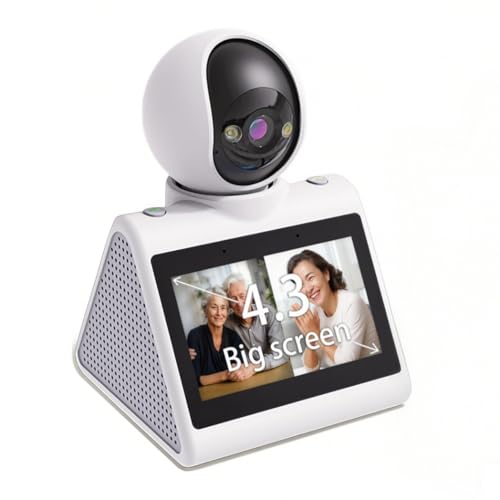
KEENLUK 4.3 Inch Calling Camera
About this pick
The KEENLUK is the best button-first camera in this tier, with a 4.3 inch screen and a single one-button call. The home unit can start the call to your phone itself. Video runs at 1080P.
It looks like a security camera and not a family appliance, and the listing is more sales copy than technical detail. For a parent who wants a physical button and no accounts, though, it avoids the Meta and Amazon ecosystems. It is also far cheaper than either display.
Setup is app-based and done by you. Place it on a stable surface where the button is reachable. Compared with the NBKsmart it has a larger screen, and compared with the Portal it has a small display and no smart framing.
Best for: A parent who wants a button and no accounts
Check price on AmazonSpecs
- Screen: 4.3 inch
- Video: 1080P HD
- Calling: One-button call
- Use: Elderly, baby and pets
Pros
- +4.3 inch screen reads well at arm's length
- +One-button call with device-initiated calling
- +No Meta or Amazon account needed
- +Much lower price tier than the displays
Cons
- −Small screen compared with the Portals
- −Security-camera look, not a family appliance
NBKsmart 2-Way Video Calling Camera
About this pick
The NBKsmart is the lowest-cost pick, with a 2.8 inch screen and a one-button call to a phone. It records at 1080P and adds AI detection and two-way audio. It aims at pet owners and elderly relatives alike.
The small screen limits what the home side can see, so it is a call-and-check device. AI motion alerts can create extra notifications on your phone. There are no display extras.
Setup is an app pairing handled by you. Place it on a shelf with a clear line of sight. Compared with the KEENLUK it has a smaller screen but a lower price, and next to the Portal it is a basic calling box for very modest needs.
Best for: A tight budget and a one-button call
Check price on AmazonSpecs
- Screen: 2.8 inch
- Video: 1080P HD
- Calling: One-button video call
- Extras: AI detection, two-way audio
Pros
- +Lowest price tier in this group
- +One-button call to your phone
- +1080P picture is clear on a phone
- +Two-way audio is included
Cons
- −2.8 inch screen is the smallest here
- −Motion alerts may add phone notifications
How We Evaluated These Video Calling Devices Under $200 (2026)
Each pick was assessed across 5 criteria weighted for real-world use.
Screen and Framing
We compared screen sizes from the Portal pair's 10 inch displays to the NBKsmart's 2.8 inch panel, and we noted the Portal's Smart Camera framing. Larger screens and auto-framing scored higher. The Echo Show 5 sat in the middle on size. Fixed-lens cameras scored lowest on this axis.
Ease of Calling
We looked at how a call starts: touch or voice on the Portals, voice on the Echo Show 5 and a button on the KEENLUK and NBKsmart. Simpler methods scored higher. The button cameras were strongest for no-account use. The Portal scored high for reaching anyone via WhatsApp.
Ecosystem Lock-In
We weighed the account each device requires, from a Meta account on the Portals to an Amazon account on the Echo. The button cameras avoided big-platform accounts and scored higher on independence. A closed ecosystem was a mild negative. Availability of support was also considered.
Portability and Placement
We checked whether each device is plug-in or battery-powered, noting the Portal Go's handle and battery. Portability earned points only when it did not add a charging burden. Fixed units scored on stability. The Portal Go scored highest for movement.
Value at This Tier
The Portal offers the most screen and framing, while the cameras offer the cheapest calling. The Echo Show 5 sits between them. Value meant matching size and price to need.
How to Choose the Right Video Calling Devices Under $200 (2026)
By Screen Size Need
| Situation | Recommended pick |
|---|---|
| Parent sits across the room | Meta Portal 10 Inch Smart Display |
| Parent moves between rooms | Meta Portal Go Portable Display |
| Parent prefers voice and a mid screen | Amazon Echo Show 5 |
| Parent wants a button and a decent screen | KEENLUK 4.3 Inch Calling Camera |
| Screen matters little | NBKsmart 2-Way Video Calling Camera |
By Budget
Tiers are relative and prices change.
| Budget tier | Recommended pick |
|---|---|
| Lowest-cost pick | NBKsmart 2-Way Video Calling Camera |
| Low tier, larger screen | KEENLUK 4.3 Inch Calling Camera |
| Mid-range, voice | Amazon Echo Show 5 |
| Upper tier, big screen | Meta Portal 10 Inch Smart Display |
| Premium tier, portable | Meta Portal Go Portable Display |
Dedicated Display vs Button Camera
Dedicated displays
The Meta Portal, Portal Go and Echo Show 5 offer bigger screens and richer interaction. They cost more and need accounts. Choose the Portal for the best picture and framing.
Button cameras
The KEENLUK and NBKsmart keep everything to a button and a small screen. They are cheaper and account-free. Choose the KEENLUK for the better screen.
Spend on a display only if the parent will actually look at a bigger screen.
By Ecosystem
| Preference | Recommended pick |
|---|---|
| Family uses WhatsApp or Messenger | Meta Portal 10 Inch Smart Display |
| Household uses Alexa | Amazon Echo Show 5 |
| Need a portable Meta device | Meta Portal Go Portable Display |
| Want no big-platform account | KEENLUK 4.3 Inch Calling Camera |
| Lowest-cost, account-light | NBKsmart 2-Way Video Calling Camera |
For a Parent Who Moves Around Specifically
Look for
Auto-framing so the parent stays in view, plus a big screen. Consider a battery if the call should follow the user.
In this comparison
The Meta Portal 10 Inch Smart Display fits best thanks to Smart Camera framing. The Meta Portal Go adds a battery and handle if the call should travel.
When to Spend More
Spend more if
Eyesight needs a big screen or movement needs auto-framing, which justifies the Meta Portal 10 Inch Smart Display. Spend more on the Portal Go only if portability is real.
Save if
A button and a clear picture suffice. The KEENLUK does this at a much lower tier, and the NBKsmart does it for the least.
Frequently Asked Questions
Is the Meta Portal still a good buy?
It remains a strong calling device, but check availability and support before buying. Sources note that the Portal TV was discontinued in 2022, so product lines can shift. Buy from a seller with a clear return policy.
Are the Echo Show 5 colors different devices?
No. The Charcoal and Cloud Blue listings are the same device with different finishes. Pick the color that suits the room.
Do I need a Meta or Amazon account?
Yes for the Portals and the Echo Show 5, respectively. The KEENLUK and NBKsmart use their own phone apps instead. Choose based on which ecosystem your family already uses.
Is a battery worth it on the Portal Go?
Only if the call should move around the home. The battery needs recharging, and a forgotten charge means a dead screen. For a fixed spot, the standard Portal is simpler.
How big should the screen be for an older parent?
Ten inches suits a parent across the room, and 5.5 inches suits a nightstand. The 4.3 inch and 2.8 inch screens are for close use only. If eyesight is a concern, favor the Portal.
Which one works best for someone who dislikes technology?
A button camera such as the KEENLUK, since it needs no account or voice. The Echo Show 5 works if the parent likes speaking. Always test a call before delivery.
Is there a reason to skip this tier?
If a parent only needs a button, the lower tiers cover it for less. Spend here only for screen size, framing or voice features. Otherwise the savings are real.
Bottom Line
best overall: Meta Portal 10 Inch Smart Display - best overall pick in this roundup.
See the full rankings above for all picks with pros, cons, and best-for summaries.
Browse on Amazon
All Prime-eligible options with current pricing.
Shop on Amazon →