5 Best Video Calling Devices Under $150 (2026)
Compare five video calling devices at the upper-mid budget tier, from an Echo Show 5 to a photo frame with calling, for seniors and the family setting them up.


At a Glance
At this budget a parent can have a real family appliance, not just a camera on a shelf. The Amazon Echo Show 5 offers voice-started calls on a 5.5 inch screen, the myFirst frame mixes a 7 inch display with one-tap calling and photo sharing, and the TMEZON arrives as a two-pack for two rooms or two homes. The MYPIN handheld and the oneware button camera fill in the simple end.
The spread tells the story of this tier. The myFirst has the largest display at 7 inch, the Echo Show 5 has the strongest software, the TMEZON has the smallest screen at 2.8 inch but doubles up, and the oneware has the single biggest button. Each trades something, so the right choice depends on whether your parent wants a picture frame, a speaker with a screen or a plain call box.
We evaluated these picks based on product specs and buyer feedback themes, and dropped the Echo Show 5 Kids edition because its parental controls and child content do not suit this audience. The ranking favors how simple a call is for the person at home, then screen size, then extras like photo sharing and ambient sound. Simplicity won ties.
6 Criteria to Look For Before Buying a Video Calling Devices Under $150 (2026)
Key buying criteria so you get the right fit the first time.
Device Style: Display, Frame or Camera
At this tier you pick a personality, not just a spec sheet. The Echo Show 5 is a smart display with a 5.5 inch screen, the myFirst is a 7 inch picture frame, and the TMEZON, MYPIN and oneware are calling cameras. Sources on senior video calling agree that matching the device to the person matters most. A parent who loves photos will take to the frame, one who likes talking will take to the Echo, and one who wants a button will take to a camera. Choose the style first, then compare specs.
Who Can Start the Call
Some devices are caller-initiated, which suits memory-care situations, while others let the parent start a call alone. The Echo Show 5 accepts a spoken command, the myFirst offers one-tap calling from its screen, and the TMEZON, MYPIN and oneware have buttons. Make sure your parent can reach you, not just receive your calls. A device that only answers is a monitor, not a phone. Verify this before buying, and test it from your phone.
Screen Size and Room Distance
The myFirst's 7 inch display beats the Echo Show 5's 5.5 inch panel, which beats the TMEZON's 2.8 inch screen. A larger display helps when a parent sits several feet away or has weaker vision. As a rule of thumb, 5 inches suits a nightstand and 7 inches suits a counter or side table. Smaller units are fine for quick checks only. Match the size to how far away the user will usually sit.
Ecosystem and Account Needs
Each device ties you to something: the Echo Show 5 needs an Amazon account, the myFirst needs the Circle app, and the cameras need their own phone apps. Family members must install the matching app or own a compatible Echo to reach the device. That lock-in is acceptable if you are the only caller, but it is awkward for a large family. Count who needs to call and confirm they can join the same system. Plan accounts before purchase.
Wi-Fi Reliability
Wi-Fi dependence is the leading failure point across all five devices. Check signal strength at the exact spot where the device will sit, since a weak signal produces frozen calls. If the signal is marginal, add a mesh node before buying a better device. Sources agree that connectivity matters more than any feature. A strong connection is the single cheapest upgrade.
Extras That Earn Their Keep
The Echo Show 5 controls smart home devices, the myFirst plays ambient sounds and MP3s, and the TMEZON adds a second unit. These extras are only worth paying for if the parent will use them. A clutter of features can intimidate a user who only wants to call. List what your parent will actually touch daily, and ignore the rest. Simpler usually wins.
5 Best Video Calling Devices Under $150 (2026)
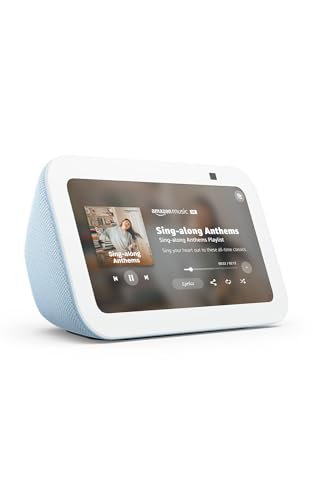
Amazon Echo Show 5
About this pick
A spoken request is all it takes to call family on the Echo Show 5, which makes it the most flexible calling device in this guide. The 5.5 inch display shows who is on the line and doubles as a window onto compatible cameras, news and weather. Newer hardware adds clearer sound and twice the bass of the prior generation.
This is a smart speaker with a screen, so it expects an Amazon account and dependable Wi-Fi. A parent who dislikes voice assistants can still use the touchscreen, though the interface is busier than a dedicated calling box. Family members need the Alexa app or another Echo to place calls.
You can prepare contacts before the device ever reaches your parent, which shortens setup at their end. Compared with the myFirst frame it has a smaller screen but a far deeper feature set, and it also controls lights and thermostats. It sits near the top of this tier on price, so choose it when you will use the extras.
Best for: A parent comfortable with voice who also wants a helpful display
Check price on AmazonSpecs
- Display: 5.5 inch
- Assistant: Alexa+ hardware
- Audio: Clearer sound with 2x the bass
- Extras: Weather, news, smart home control
Pros
- +Voice calling needs no taps or contact searching
- +Doubles as a weather, news and camera screen
- +Newer model has fuller bass and clearer speech
- +Controls compatible lights and thermostats
Cons
- −Requires an Amazon account and strong Wi-Fi
- −Interface is busier than a pure calling box
- −Needs Alexa app or Echo on the family side
myFirst 7 Inch Digital Frame with Video Calling
About this pick
The myFirst turns the calling device into something a parent already understands, a digital picture frame. Family can send photos, videos and comments straight to it through the myFirst Circle app, and a one-tap call starts from the same screen. Its 7 inch display is the largest of the group.
The frame also plays preset ambient sounds like rain or ocean waves and works as an MP3 player. Those extras make it pleasant on a bedside table, but they also add features a parent might never touch. It relies on the Circle app for everything, so you must stay inside that ecosystem.
Setup is done by you through the app, and once it hangs on a shelf it asks little of the user. Against the Echo Show 5 it has a bigger screen and warmer feel, but it cannot control a smart home. Choose it when photos from the grandchildren matter as much as the calls.
Best for: A parent who would love a frame that also takes calls
Check price on AmazonSpecs
- Display: 7 inch digital frame
- Calling: One-tap via myFirst Circle app
- Audio: Dual microphones, stereo speakers
- Extras: Photo sharing, ambient sounds, MP3 player
Pros
- +7 inch screen is the largest in this lineup
- +One-tap calls through a dedicated app
- +Family can send photos and videos remotely
- +Ambient sounds and MP3 playback included
Cons
- −Relies entirely on the myFirst Circle app
- −No smart home or voice assistant features
TMEZON 2-Pack Video Calling Camera
About this pick
The TMEZON comes as a pair, so one unit can sit in a parent's kitchen and another can stay at your own place or at a sibling's. Each camera has a 2.8 inch display and a one-button call to a phone. Video runs at 1080P, which is crisp on your phone screen.
The 2.8 inch screen is small, so the home-side picture is basic and not suited to long visual chats. It is a practical call-and-check device and not a conversation showpiece. The set is marketed for pets and grandparents together, so the app is not senior-specific.
Setup means pairing both units with your phone app, which takes longer than a single device. Place one at each location and test the call button from the phone. Compared with the oneware it adds a second unit, and compared with the myFirst it gives up screen size for flexibility.
Best for: Covering two rooms or two homes with one purchase
Check price on AmazonSpecs
- Quantity: Two units
- Screen: 2.8 inch display
- Video: 1080P Wi-Fi
- Calling: One-button call to phone
Pros
- +Two units in a single purchase
- +One-button call starts a phone call
- +1080P video is clear on your phone
- +Screen shows who is calling at a glance
Cons
- −2.8 inch screen limits detail on the home side
- −Interface is less polished than a smart display
- −Pairing two units takes extra setup time
MYPIN Handheld Video Calling Camera
About this pick
The MYPIN is built to be held, which means a conversation can follow the user around the home. It supports one-button calls to a phone in both voice and video modes. The camera captures 2K video, the sharpest in this lineup.
A portable form suits someone who paces while talking or wants to show you a garden, but it is easier to drop than a fixed unit. The listing is thin on screen size, so confirm it before you commit. Its voice mode helps when a parent would rather not be on camera.
Setup is standard Wi-Fi and app pairing handled by you. Give the handheld a permanent charging spot, since a device that wanders gets lost. Against the TMEZON pair it offers mobility and sharper video, but one unit instead of two.
Best for: A user who walks around during calls
Check price on AmazonSpecs
- Form: Handheld camera
- Video: 2K Wi-Fi
- Calling: One-button call
- Modes: Voice or video
Pros
- +Handheld shape follows the user from room to room
- +2K video is the sharpest here
- +Voice-only mode when video is unwanted
- +One-button call to your phone
Cons
- −Screen size not stated in the listing
- −Easier to drop or lose than a fixed unit
oneware One-Tap Video Calling Camera
About this pick
The oneware keeps things basic with a big call button that rings your phone and needs no app on the home side. It is the lowest-cost pick in this tier and still delivers Full HD video and night vision. Two-way audio keeps both ends clear.
Its look and wording lean toward children, and it is more camera than display, so you see the home side clearly but the home side sees little of you. That is fine for a parent who simply needs to reach you. The tradeoff is zero smart features.
You handle all setup through the phone app, then place the unit where a hand can reach the button. In this tier it is the minimalist counterpart to the Echo Show 5, trading the screen and voice for pure simplicity. Choose it if the budget is firm and the only task is a call.
Best for: A firm budget and a one-press call
Check price on AmazonSpecs
- Video: Full HD
- Calling: Big call button
- Night use: Night vision
- Audio: Two-way
Pros
- +Lowest cost in this tier
- +Big call button with no home-side app
- +Full HD video and night vision
- +Two-way audio is clear
Cons
- −Small screen shows little of the caller
- −Styled for children, not adults
- −No smart or voice features
How We Evaluated These Video Calling Devices Under $150 (2026)
Each pick was assessed across 5 criteria weighted for real-world use.
Call Simplicity
We compared how a call starts across the group: voice on the Echo Show 5, a tap on the myFirst and a button on the TMEZON, MYPIN and oneware. The oneware ranked highest on simplicity because it needs no home-side app. The Echo ranked high for hands-free use. Devices that could not start calls were excluded.
Display Size
We ranked screens from the myFirst's 7 inch panel through the Echo Show 5's 5.5 inch display down to the TMEZON's 2.8 inch screen. Where size was not stated, as with the MYPIN, we flagged it. Larger screens scored higher for older eyes. Size was weighed against price tier.
Ecosystem Fit
We looked at the apps and accounts each pick requires, from the Echo's Amazon account to the myFirst Circle app. A closed ecosystem was a mild negative for large families. The cameras' phone apps were judged on setup burden. The oneware's no-app home side scored well.
Extras and Ownership
We noted useful extras such as smart home control on the Echo, photo sharing on the myFirst and a second unit with the TMEZON. We marked down extras that add clutter without helping calls. The oneware's lack of extras counted as a strength for simplicity. Ownership burden, from setup to placement, was also weighed.
Value at This Tier
The TMEZON two-pack delivers the most units for the money, and the Echo delivers the most features. The myFirst offers the largest screen. Value meant matching the right device to the right person.
How to Choose the Right Video Calling Devices Under $150 (2026)
By Type of User
| Situation | Recommended pick |
|---|---|
| Parent likes talking to a voice assistant | Amazon Echo Show 5 |
| Parent loves family photos | myFirst 7 Inch Digital Frame with Video Calling |
| You need to cover two rooms or homes | TMEZON 2-Pack Video Calling Camera |
| Parent walks around during calls | MYPIN Handheld Video Calling Camera |
| Parent wants a single big button | oneware One-Tap Video Calling Camera |
By Budget
Tiers are relative and prices shift.
| Budget tier | Recommended pick |
|---|---|
| Lowest-cost pick | oneware One-Tap Video Calling Camera |
| Low tier, handheld | MYPIN Handheld Video Calling Camera |
| Mid-range, two units | TMEZON 2-Pack Video Calling Camera |
| Upper tier, photo frame | myFirst 7 Inch Digital Frame with Video Calling |
| Top of this tier, smart display | Amazon Echo Show 5 |
Voice and Screen vs Button and Frame
Voice or touchscreen devices
The Echo Show 5 and myFirst offer larger screens and richer interaction. They suit parents who enjoy photos, weather or smart home control. They cost more and ask the user to learn a screen. Choose the Echo for voice, the myFirst for photos.
Button cameras
The TMEZON, MYPIN and oneware reduce everything to a button. They are cheaper and simpler but offer small screens and no extras. Choose the oneware for the plainest press.
Pick the device the parent will actually touch, not the one with the longest feature list.
By Screen Size
| Preference | Recommended pick |
|---|---|
| Largest display | myFirst 7 Inch Digital Frame with Video Calling |
| Medium display with voice | Amazon Echo Show 5 |
| Compact with two units | TMEZON 2-Pack Video Calling Camera |
| Sharpest video, handheld | MYPIN Handheld Video Calling Camera |
| Screen matters less | oneware One-Tap Video Calling Camera |
For a Grandparent Who Wants Photos Specifically
Look for
A frame that accepts photos and videos remotely, with one-tap calling and a bright display. Make sure family members can install the required app easily.
In this comparison
The myFirst 7 Inch Digital Frame fits best because relatives can send photos and comments straight to it. The Amazon Echo Show 5 is the alternative if voice calling matters more.
When to Spend More
Spend more if
The parent will use voice commands or smart home control, which justifies the Amazon Echo Show 5. Spend more on the myFirst if screen size and photos are the point.
Save if
Only a call button is needed. The oneware does this for the least, and the TMEZON pair covers two locations at a modest step up.
Frequently Asked Questions
Is the Echo Show 5 or the myFirst frame better for a grandparent?
It depends on the use. The Echo Show 5 is better for voice calling and smart home extras, while the myFirst is better for receiving photos and a bigger 7 inch display. If photos from grandchildren matter most, pick the frame.
Do my relatives need a special app?
Yes, each device uses its own system. The Echo Show 5 calls through Alexa, the myFirst through its Circle app, and the cameras through their own phone apps. Check that everyone who will call can install the matching app.
Is the two-pack really useful?
It is if you want a device at each end or in two rooms. The TMEZON pair gives two 2.8 inch units that each ring a phone with one button. If you only need one location, a single device will be simpler.
How large should the screen be?
Seven inches suits a parent who sits a few feet away, while 5.5 inches suits a nightstand or counter. The 2.8 inch screens are only good for close, quick checks. If eyesight is a concern, pick the myFirst or Echo Show 5.
Can the parent place calls by themselves?
Yes on all five. The Echo Show 5 takes a spoken command, the myFirst has one-tap calling, and the other three have physical buttons. Always test a call from your phone before delivering it.
What if the Wi-Fi at their home is weak?
Fix the signal first. Check strength at the exact spot, and add a mesh node or extender if it is marginal. A better device will not cure a bad connection.
Is it worth spending more than this tier?
Only if you need a larger touchscreen or a tablet-class device. This tier already covers voice, frame and button styles well. Beyond it you mostly pay for bigger displays and polish.
Bottom Line
best overall: Amazon Echo Show 5 - best overall pick in this roundup.
See the full rankings above for all picks with pros, cons, and best-for summaries.
Browse on Amazon
All Prime-eligible options with current pricing.
Shop on Amazon →