5 Best Video Calling Devices Under $100 (2026)
Five video calling devices at a mid-budget tier, from the Echo Show 5 smart display to 4.3 inch calling cameras, compared for ease of use and screen size.



At a Glance
This tier is where video calling gets a real screen. The Amazon Echo Show 5 brings a 5.5 inch display and voice calling, while the KEENLUK and CIAJIE calling cameras both offer 4.3 inch screens with one-button calling. The MYPIN adds a handheld design with 2K video, and the oneware stays at the simple end with a single big call button.
Moving up from the lowest tier mostly buys screen area and polish. A 4.3 inch panel is noticeably easier to read than the 2.4 to 3 inch screens on cheaper cameras, and the Echo Show 5 goes further with a display that also shows news, weather and routines. What it does not buy is a guarantee of simplicity, since the smart display needs an Amazon account while the cameras need a phone app on your side.
We evaluated each pick based on product specs and buyer feedback themes, favoring devices a parent can operate without help. The ranking weighs how a call starts, how large the screen is, and how much setup falls on the buyer. A dedicated Noorio listing was dropped here in favor of the more screen-focused picks.
6 Criteria to Look For Before Buying a Video Calling Devices Under $100 (2026)
Key buying criteria so you get the right fit the first time.
Smart Display or Calling Camera
The big fork at this tier is the Echo Show 5, a smart display with voice calling, versus calling cameras like the KEENLUK and CIAJIE that rely on a button. A smart display adds a 5.5 inch screen and extras but needs an account, while a camera keeps the interface to one action. Sources on senior video calling agree that fewer buttons and fewer steps beat feature richness. Pick the display for talkers and the camera for press-and-go users. If a parent has used a smart speaker before, the Echo is a natural fit.
Screen Size and Readability
Screens span from the 4.3 inch KEENLUK and CIAJIE to the 5.5 inch Echo Show 5, with the oneware and MYPIN smaller or unstated. An extra inch matters when a parent holds the device at arm's length, because faces fill more of the frame. Use roughly 4 inches as a floor for comfortable reading, and go larger if eyesight is a concern. Check the listing for an actual size, since the MYPIN does not state one. A bigger screen also tolerates dim rooms better.
How a Call Starts
Voice calling on the Echo Show 5, a physical button on the KEENLUK and oneware, and a handheld call button on the MYPIN each suit different people. A button is dependable in noise, while voice is easier for users who cannot tap. The key rule is that the device itself must be able to start a call, not only answer yours. The KEENLUK, CIAJIE and MYPIN all advertise device-initiated calling. Test the first call before you hand the device over.
Wi-Fi Compatibility
The CIAJIE lists dual-band 5G and 2.4G support, which helps on modern routers where bands are merged. Many cheap cameras only join 2.4GHz, so a router that hides the older band can block setup. Wi-Fi dependence is the main failure point for every device in this guide. Confirm signal strength at the placement spot with your phone before buying. If the signal is weak, a mesh node or extender is a better fix than a new camera.
Setup Load on You
Every pick needs an app or account configured by the buyer. The Echo Show 5 can be set up remotely with an Amazon account, while the cameras need pairing with a phone app on your side. The oneware states that no app is needed on the home side, which reduces support calls. Do all configuration at your own place and ship a device that powers on and works. Budget an hour for a first-time setup.
Form Factor and Placement
The MYPIN is handheld, the Echo Show 5 is a tabletop display, and the others are fixed cameras that sit on a shelf. Handheld designs help users who move around but are easier to misplace. Fixed units are steadier and stay put, which helps parents find them. Think about where the device will live, and whether it needs a nearby outlet. A charging spot reduces lost-device calls.
5 Best Video Calling Devices Under $100 (2026)
Amazon Echo Show 5
About this pick
The Echo Show 5 is the only pick here that a parent can call by simply speaking, since a voice command starts a video call with no button hunting. Its 5.5 inch display is the largest in this guide, and it shows news, weather and compatible camera feeds between calls. The newest model also claims twice the bass of the prior generation, so a voice reads fuller than on cheap camera speakers.
The tradeoff is that this is a smart speaker first and a calling device second. It needs an Amazon account and a stable Wi-Fi connection, and a parent who dislikes voice assistants may find the screen busy with extras. Family members also need an Alexa app or another Echo to place calls to it.
Setup is usually fast, and you can configure contacts remotely before the device ever reaches the parent. It costs more than the lowest-cost camera in this guide, but it adds a bigger display and a far more flexible interface. Compared with the KEENLUK, it trades a dedicated physical button for the benefit of voice calling and general smart display features.
Best for: A parent who is comfortable saying a name aloud to start a call
Check price on AmazonSpecs
- Display: 5.5 inch screen
- Assistant: Alexa+ built in
- Audio: 2x the bass of the prior generation
- Calling: Video calls by voice
Pros
- +Voice calling means no button or screen hunting
- +Largest display in this lineup at 5.5 inch
- +Shows news, weather and camera feeds when idle
- +Newer model has noticeably fuller audio
Cons
- −Needs an Amazon account and good Wi-Fi
- −Screen shows extras that can distract
- −Voice can fail in a noisy room
KEENLUK 4.3 Inch Calling Camera
About this pick
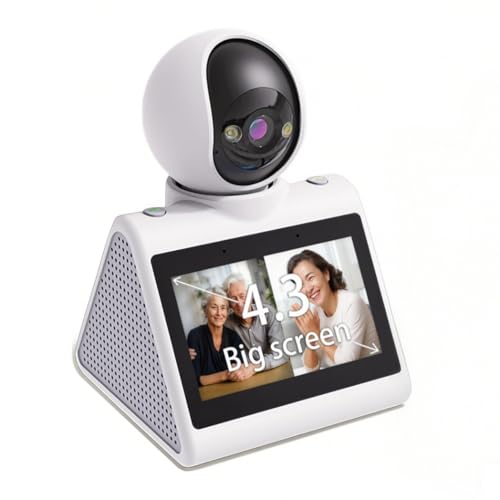
The KEENLUK is the cleanest button-based device in the guide, with a 4.3 inch screen and a one-button call designed for older users and children. The listing highlights device-to-device calling, so the home unit can ring your phone rather than only answering yours. Video runs at 1080P, which looks crisp on the larger panel.
Its looks are those of a security camera more than of a family appliance, so it will not blend into a living room like a picture frame. The listing is written in sales language and gives modest detail about app quality, so judge it as a no-frills calling box. A physical button is a clear advantage over voice for people who dislike talking to devices.
Setup involves pairing through a phone app, which falls on you instead of a parent. Place it at a stable height with a clear view, and test the call button before gifting. Against the CIAJIE, which shares the same screen size, it is less explicit about Wi-Fi band support, so check your router first.
Best for: A parent who wants one obvious button and a bigger screen
Check price on AmazonSpecs
- Screen: 4.3 inch
- Video: 1080P HD
- Calling: One-button call from device
- Use case: Elderly, baby and pet monitoring
Pros
- +4.3 inch screen reads well at arm's length
- +One-button calling made for older users
- +Home unit can start the call itself
- +1080P picture looks sharp on the larger panel
Cons
- −Looks like a security camera, not a family appliance
- −Listing is vague on Wi-Fi band support
CIAJIE 4.3 Inch Two-Way Calling Camera
About this pick
The CIAJIE pairs the same 4.3 inch screen as the KEENLUK with explicit dual-band support for 5G and 2.4G networks. That detail matters at home, because many budget cameras only join 2.4GHz and can fail on a router that has merged its bands. The device can also call a smartphone actively, which suits relatives who cannot use an app.
The listing emphasizes pets and baby monitoring, so the senior angle is secondary and the home screen is basic. Setup requires the matching phone app, and interface language may read more like translated copy than like polished software. Still, the ability to initiate calls is the feature that counts here.
Treat it as a practical choice for households with a busy Wi-Fi setup. Compared with the oneware it adds a bigger screen, though the oneware is simpler to operate for a first-time user. If your router is dual-band and you want a bigger display, this is a safe pick.
Best for: A home with a dual-band router and a need for a larger screen
Check price on AmazonSpecs
- Screen: 4.3 inch
- Wi-Fi: Dual-band 5G and 2.4G
- Calling: Calls a phone from the device
- Video: Full HD indoor
Pros
- +Explicit 5G and 2.4G dual-band support
- +4.3 inch screen with Full HD video
- +Device can call a phone on its own
- +Same screen size as pricier-looking rivals
Cons
- −Listing emphasizes pets and babies over seniors
- −App wording feels translated and less polished
MYPIN Handheld Video Calling Camera
About this pick
The MYPIN is shaped to be carried, so a call can continue while the user walks from room to room. It offers one-button calling between the device and a phone and supports both video and voice calls. The 2K video is the highest resolution in this particular group.
A handheld shape suits a user who moves around the home or who likes holding a device like a phone. It also means the device can be dropped, and it will not stand as steadily on a table as the fixed cameras. The listing gives little about screen size, so check the product page before buying.
Setup is a standard app pairing and a Wi-Fi join. Keep it on a charging spot where it is easy to find, since a handheld that wanders gets lost. Compared with the KEENLUK it is more mobile but less clearly documented, and the KEENLUK wins when you want a fixed screen on a shelf.
Best for: A user who walks around while talking
Check price on AmazonSpecs
- Form: Handheld, portable
- Video: 2K Wi-Fi camera
- Calling: One-button call to phone
- Modes: Video or voice call
Pros
- +Handheld shape allows calls while moving
- +2K video is the sharpest in this lineup
- +Supports both video and voice calls
- +One-button call to your phone
Cons
- −Screen size is not stated in the listing
- −Easier to drop or misplace than a fixed unit
oneware Video Calling Security Camera
About this pick
The oneware is the lowest-cost pick in this tier and the most basic to operate. A big call button starts a call without an app on the home side, and the camera adds Full HD video and night vision. Two-way audio keeps the conversation clear.
Its marketing leans toward kids, and it is more camera than conversation display, so the home screen does not show you as fully as the larger-screen picks. That is acceptable if the parent mainly needs to reach you, not see a detailed picture. It also keeps the interface to a single action, which cuts support calls.
Setup falls on you, and the unit works well on a nightstand or shelf at a reachable height. Compared with the Echo Show 5 it has no voice features and no smart display extras, which makes it cheaper and simpler. Choose it when the budget is firm and the only goal is a one-press call.
Best for: A tight budget and a one-press call
Check price on AmazonSpecs
- Calling: Big call button, no home-side app
- Video: Full HD
- Night use: Night vision
- Audio: Two-way
Pros
- +Lowest-cost option in this tier
- +Big call button needs no home-side app
- +Full HD video with night vision
- +Two-way audio is clear
Cons
- −Smaller screen than the 4.3 inch picks
- −Child-focused marketing and look
- −No voice or smart display features
How We Evaluated These Video Calling Devices Under $100 (2026)
Each pick was assessed across 5 criteria weighted for real-world use.
Call Initiation
We checked each listing for the ability to start a call from the device itself. The KEENLUK, CIAJIE, MYPIN and oneware all advertise this, while the Echo Show 5 uses voice. A device that could only answer calls was ruled out. The oneware scored highest for the simplest press, and the Echo scored highest for hands-free use.
Display Quality
We compared screen sizes from the 4.3 inch KEENLUK and CIAJIE to the Echo Show 5's 5.5 inch panel. Where a listing omitted size, as with the MYPIN, we marked it unverified. Resolution on the viewing side counted less than readability on the device. The Echo Show 5 led on screen area.
Wi-Fi and Compatibility
We noted dual-band support, led by the CIAJIE, and account requirements, such as the Echo's Amazon login. Buyer feedback themes about dropped calls guided the weighting. A pick that gave clear connection guidance scored higher. Devices with vague connectivity detail lost points.
Home-Side Simplicity
We judged how little the person at home must do. The oneware needs no app at home, the KEENLUK needs a single button press, and the Echo Show 5 needs a spoken name. The MYPIN handheld design asks the user to carry it. Simplicity was the heaviest weight.
Value at This Tier
The Echo adds the most in screen size and software, while the oneware gives the most value for a bare call. Mid-priced cameras balanced screen and button. Extras that did not help calling were not rewarded.
How to Choose the Right Video Calling Devices Under $100 (2026)
By How the User Prefers to Call
| Situation | Recommended pick |
|---|---|
| Parent likes saying a name to start a call | Amazon Echo Show 5 |
| Parent wants one obvious button | KEENLUK 4.3 Inch Calling Camera |
| Parent walks around while talking | MYPIN Handheld Video Calling Camera |
| Parent needs the simplest possible press | oneware Video Calling Security Camera |
| Router uses merged 5G and 2.4G bands | CIAJIE 4.3 Inch Two-Way Calling Camera |
By Budget
Tiers are relative, since prices shift.
| Budget tier | Recommended pick |
|---|---|
| Lowest-cost pick | oneware Video Calling Security Camera |
| Low tier, handheld | MYPIN Handheld Video Calling Camera |
| Mid-range, bigger screen | KEENLUK 4.3 Inch Calling Camera |
| Mid-range, dual-band | CIAJIE 4.3 Inch Two-Way Calling Camera |
| Top of this tier | Amazon Echo Show 5 |
Smart Display vs Calling Camera
Smart display
The Echo Show 5 offers a 5.5 inch screen, voice calling and everyday extras like weather and news. It needs an Amazon account and Wi-Fi and may be busy for a minimal-tech user. Choose it if the parent already uses a voice assistant.
Calling camera
The KEENLUK, CIAJIE, MYPIN and oneware keep the interface to a button and a screen. They cost less and demand less from the home side, but the displays are smaller and less capable. Choose the KEENLUK for the best balance.
When in doubt, a physical button fails less than voice.
By Screen Priority
| Preference | Recommended pick |
|---|---|
| Biggest screen available | Amazon Echo Show 5 |
| Large screen with a button | KEENLUK 4.3 Inch Calling Camera |
| Large screen plus dual-band Wi-Fi | CIAJIE 4.3 Inch Two-Way Calling Camera |
| Sharpest video | MYPIN Handheld Video Calling Camera |
| Screen matters little | oneware Video Calling Security Camera |
For a Parent Who Dislikes Technology Specifically
Look for
A single button, no login at home, and a device that can start the call itself. Avoid anything that needs menus or app updates on the home side.
In this comparison
The oneware Video Calling Security Camera is the safest choice, with a big call button and no home-side app. The KEENLUK is the upgrade when a larger screen is worth it.
When to Spend More
Spend more if
The parent will use voice, wants a large display or needs smart home controls, in which case the Amazon Echo Show 5 is worth the top-of-tier spend. Also spend more if poor eyesight demands the biggest screen.
Save if
A button and a decent picture are enough. The oneware covers that for the least, and the KEENLUK adds screen size for a modest step up.
Frequently Asked Questions
Is the Echo Show 5 or a calling camera better for a parent?
It depends on how the parent prefers to start a call. The Echo Show 5 suits someone who is happy to say a name aloud and gives a larger screen with extras. A calling camera like the KEENLUK suits someone who wants one physical button and nothing else.
Do these devices work without a smartphone?
The person at home does not need a smartphone, but the other side usually does. The cameras pair with a phone app on your end, while the Echo Show 5 calls through Alexa. If nobody on the family side has a smartphone, none of these will work well.
What screen size is comfortable for an older adult?
Roughly 4 inches is a practical floor for reading faces at arm's length, so the 4.3 inch KEENLUK and CIAJIE are sensible. The 5.5 inch Echo Show 5 is better still when eyesight is a concern. Smaller screens suit quick check-ins rather than long chats.
Will dual-band Wi-Fi matter in my house?
It can. Many cheap cameras only join 2.4GHz, and a router that merges its bands can make setup confusing. The CIAJIE explicitly lists dual-band support, which reduces that risk. If setup fails, temporarily separate the bands in your router settings.
Can I set one up remotely before it arrives?
The Echo Show 5 is the easiest for remote configuration with an Amazon account. The cameras need physical pairing with your phone on the same Wi-Fi, so it is best to set them up at your own place first. Then ship them ready to plug in.
Is the handheld MYPIN too easy to lose?
It can be, because a portable device wanders around the house. Give it a charging spot or dock position and show the parent where it lives. If misplacing things is common, a fixed unit like the KEENLUK is safer.
When is it worth paying more than this tier?
Pay more for a larger screen, better speakers or a full touch interface. If a parent struggles with small displays, a larger smart display tier will help more than any camera here. Otherwise this tier covers simple calling well.
Bottom Line
best overall: Amazon Echo Show 5 - best overall pick in this roundup.
See the full rankings above for all picks with pros, cons, and best-for summaries.
Browse on Amazon
All Prime-eligible options with current pricing.
Shop on Amazon →