6 Best Large Print Keyboards Under $40 (2026)
Six large print keyboards at a mid budget tier, wired and wireless, compared on legibility, backlighting, wrist support and layout for easier typing.



At a Glance
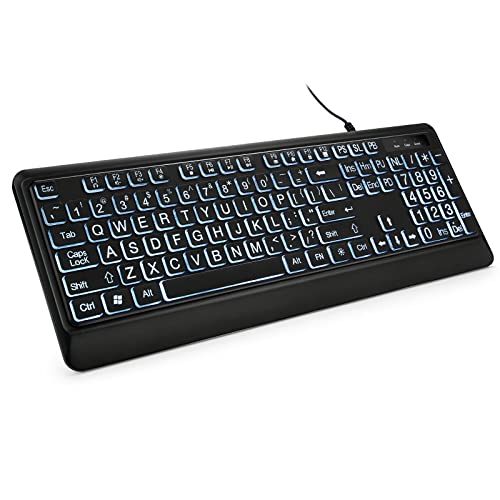
Stepping up to this budget tier buys you cleaner lighting, wrist support and, for the first time, a wireless option. The six boards here range from the TECURS with a calm white backlight and a combined USB and Type C plug to the HXMJ wireless set that bundles a keyboard and mouse. It is a good tier for anyone who wants more than the bare minimum without paying for a premium board.
The differences are practical. The TECURS and KOPJIPPOM white board use a single even white LED, the QUASIO seven color model offers four brightness levels, and the QUASIO ergonomic board adds a soft wrist rest and a 5.25 foot cable. The yellow SABLUTE relies on yellow keycaps and a palm rest, while the HXMJ measures only 14.5 by 5.8 inches and 0.2 inches thick.
We evaluated each board from product specs and buyer feedback, ranking legibility first and comfort second. The four times larger lettering claim appears on almost every listing, so we treated it as marketing and compared contrast, layout and extras instead. Keep in mind that the HXMJ needs a free USB port for its receiver and batteries for both pieces.
6 Criteria to Look For Before Buying a Large Print Keyboards Under $40 (2026)
Key buying criteria so you get the right fit the first time.
Contrast comes before letter size
Almost every board here, including the TECURS, both QUASIO models and the KOPJIPPOM, claims print four times larger than standard, which is an untested marketing figure. Contrast schemes such as black on yellow or black on white are the ones commonly cited for low vision. The yellow SABLUTE and the HXMJ set use black on yellow, while the others rely on lighting. As a rule, choose a contrast scheme first, then use lighting as a bonus.
Choose lighting you can dim
A backlight is useful at night but too bright a glow washes out the legends and causes glare. The TECURS gives seven brightness levels and the QUASIO seven color model gives four, while the KOPJIPPOM white board lists none. Some boards also reset to a default color at power up. If you type in the evening, aim for at least four brightness steps and a steady color.
Wired or wireless is a real tradeoff
The HXMJ is the only wireless pick and needs a free USB port for its receiver plus batteries in both the keyboard and mouse. Wired boards such as the TECURS and QUASIO ergonomic model avoid batteries and pairing entirely. The QUASIO cable runs 5.25 feet, which covers most desks. Choose wireless only if cable clutter bothers you more than changing batteries.
Wrist rests add depth
The QUASIO ergonomic board and the yellow SABLUTE include a rest, which helps for emails and long documents. The HXMJ, by contrast, is only 0.2 inches thick, so it needs a desk edge or separate pad for support. A deeper board needs a deeper desk, so measure before buying. As a rule of thumb, choose a rest if you type for more than 30 minutes at a time.
Check connector compatibility
The TECURS ships with a 2 in 1 USB and Type C connector, which covers modern laptops without an adapter. The other wired boards use standard USB, and the HXMJ uses a USB receiver. If your computer only has Type C ports, the TECURS is the easiest fit. Otherwise a cheap adapter works but adds one more part to lose.
Key feel affects accidental presses
Slightly spaced keys and a light, consistent press reduce double presses for stiff or arthritic fingers. The HXMJ uses quiet scissor switches with shallow travel, while standard full size boards like the KOPJIPPOM have deeper travel. Neither is better for everyone, so check the return policy. If you type with a heavy hand, a deeper travel board is usually more forgiving.
6 Best Large Print Keyboards Under $40 (2026)
TECURS Large Print Backlit Keyboard
About this pick
The TECURS keyboard has large print keys under an even white backlight with seven brightness levels. The backlight helps in dim rooms. It connects through USB and Type C in one connector.
Dedicated multimedia keys control volume and playback. The layout is full size and silent. This is a practical set up for reading and typing.
It is the best overall. Compared with the KOPJIPPOM, it adds brightness control and Type C. It suits evening computer use.
Best for: Low light typing with clear keys
Check price on AmazonSpecs
- Print: 4X larger than standard (claimed)
- Backlight: White LED, 7 brightness levels
- Connector: 2 in 1 USB and Type C
- Extras: Dedicated multimedia keys
Pros
- +Seven brightness levels
- +USB and Type C connector
- +Multimedia keys
- +Silent full size layout
Cons
- −Wired only
- −White backlight less contrast than yellow keys
- −Plastic build
QUASIO Large Print Ergonomic Keyboard with Wrist Rest
About this pick
The QUASIO has a soft wrist rest that supports long sessions. It is a silent wired USB keyboard with a 5.25 foot cable. The layout is full size and familiar.
Silent keys suit shared rooms. The cable reaches most desk setups. Large print makes keys easier to read.
It is the comfort pick. Compared with the SABLUTE, it lacks the yellow contrast. It suits writers and email users.
Best for: Long typing sessions
Check price on AmazonSpecs
- Print: 4X larger than standard (claimed)
- Comfort: Soft supportive wrist rest
- Cable: 5.25 ft USB, plug and play
- Typing: Silent keys, no latency
Pros
- +Soft wrist rest
- +Silent keys
- +5.25 foot cable
- +Full size layout
Cons
- −No backlight
- −Wired only
- −Wrist rest adds bulk
SABLUTE Yellow Large Print Keyboard with Phone Holder
About this pick
The SABLUTE has yellow keycaps with black letters, a very high contrast combination. A palm rest supports long typing. A phone holder doubles as a tablet stand.
Setup is wired plug and play. The bright yellow stands out clearly. It helps with low vision.
It is the high contrast pick. Compared with the HXMJ, it is wired but includes a holder. A thoughtful choice for readers with poor eyesight.
Best for: Low vision high contrast
Check price on AmazonSpecs
- Print: Black characters on yellow keys
- Comfort: Palm rest and bottom support
- Extra: Phone and tablet holder
- Backlight: None
Pros
- +Yellow keys, black print
- +Palm rest
- +Phone and tablet holder
- +Plug and play
Cons
- −Wired
- −No backlight
- −Yellow color may not suit every desk
HXMJ Wireless Large Print Keyboard and Mouse Set
About this pick
The HXMJ set includes a wireless keyboard and mouse. It has yellow keycaps with black letters, 102 keys and scissor switches. The body is ultra thin at about 14.5 by 5.8 inches.
Scissor switches feel smooth and quiet. Having a mouse in the box saves a purchase. It fits small desks.
It is the wireless pick. Compared with the SABLUTE, it drops the wrist rest. Good for cable free tidy desks.
Best for: Cord free setup with contrast
Check price on AmazonSpecs
- Print: Black letters on yellow keycaps
- Switches: Quiet scissor key switches
- Size: 14.5 x 5.8 x 0.2 inches, 102 keys
- Connection: Wireless with USB receiver
Pros
- +Keyboard and mouse set
- +Yellow high contrast keys
- +Quiet scissor switches
- +Ultra thin
Cons
- −Needs batteries
- −No wrist rest
- −No backlight
KOPJIPPOM White LED Large Print Keyboard
About this pick
The KOPJIPPOM has an even white LED backlight. It is full size with a QWERTY layout and foldable rear feet that tilt the board. The seller claims print four times larger.
Wired plug and play means no batteries. Tilting reduces hand fatigue. The simple light is uncluttered.
Compared with the TECURS, it has fewer brightness choices. It suits users wanting plain design.
Best for: Calm lit typing with familiar layout
Check price on AmazonSpecs
- Print: 4X larger than standard (claimed)
- Backlight: Bright, even white LED
- Layout: Full size QWERTY
- Stand: Foldable rear feet
Pros
- +Even white backlight
- +Full size QWERTY
- +Tilting rear feet
- +No batteries
Cons
- −Fewer features than TECURS
- −Wired
- −Claimed print size unverified
QUASIO 7 Color Large Print Backlit Keyboard
About this pick
The QUASIO backlit keyboard offers seven backlight colors and four brightness levels. It has a full size layout with a numeric keypad. Connection is USB wired plug and play.
It is the lowest cost pick here. Colors add a gadget feel. The numpad helps with spreadsheets.
Compared with the TECURS, it has fewer brightness levels. It suits budget buyers.
Best for: Budget backlit option with numpad
Check price on AmazonSpecs
- Print: 4X larger than standard (claimed)
- Backlight: 7 colors, 4 brightness levels
- Layout: Full size with numeric keypad
- Connection: USB wired, plug and play
Pros
- +Lowest cost in lineup
- +Seven colors, four brightness levels
- +Numeric keypad
- +Plug and play
Cons
- −Colorful lights less calm
- −Wired
- −Basic build
How We Evaluated These Large Print Keyboards Under $40 (2026)
Each pick was assessed across 5 criteria weighted for real-world use.
Legibility of the legends
We compared print size claims, key color and contrast across all six boards, because finding keys quickly is the reason to buy. The yellow SABLUTE and HXMJ lead on contrast, and the lit boards add visibility in low light. Four times larger claims were treated as marketing. This ranking is based on product specs and buyer feedback.
Lighting quality and control
We looked at backlight color, evenness and the number of brightness steps. The TECURS offers seven levels of white light, the QUASIO seven color model offers four, and the SABLUTE and QUASIO ergonomic boards have none. A board that can be dimmed ranked above one that cannot. We also noted which boards avoid distracting color effects.
Comfort and desk footprint
We scored palm rests, tilt options and overall depth. The QUASIO ergonomic and yellow SABLUTE offer a rest, the KOPJIPPOM offers a tilt, and the HXMJ is the slimmest at 0.2 inches. Deeper boards earned comfort credit but lost points for footprint. Buyer feedback on key feel shaped the order.
Connectivity and setup
We checked connector types, cable length and battery needs. The TECURS covers USB and Type C, the QUASIO ergonomic board has a 5.25 foot cable, and the HXMJ needs a receiver and batteries. The strongest pick for flexibility is the TECURS and the most demanding setup is the HXMJ. Plug and play boards scored highest.
Value at this budget
The QUASIO seven color model is the lowest cost, while the HXMJ sits at the top because it includes a mouse. The TECURS earned the best value balance of lighting, connectors and layout.
How to Choose the Right Large Print Keyboards Under $40 (2026)
By Typing Environment
| Where you type | Recommended pick |
|---|---|
| Dim room at night | TECURS Large Print Backlit Keyboard |
| Bright daytime desk | SABLUTE Yellow Large Print Keyboard |
| Shared quiet room | QUASIO Large Print Ergonomic Keyboard |
| Small desk with no cables | HXMJ Wireless Large Print Keyboard and Mouse Set |
| Plain evening glow | KOPJIPPOM White LED Large Print Keyboard |
By Budget
| Budget tier | Recommended pick |
|---|---|
| Lowest-cost pick | QUASIO 7 Color Large Print Backlit Keyboard |
| Lower mid-range | QUASIO Large Print Ergonomic Keyboard |
| Mid-range | SABLUTE Yellow Large Print Keyboard |
| Upper mid-range | KOPJIPPOM White LED Large Print Keyboard |
| Upper tier | TECURS Large Print Backlit Keyboard |
| Premium in this guide | HXMJ Wireless Large Print Keyboard and Mouse Set |
Check current pricing on Amazon.
Wired vs Wireless
Wired
A wired board needs no batteries or pairing and never drops its connection. The TECURS, both QUASIO models, the KOPJIPPOM and the yellow SABLUTE all fall here. Choose wired if reliability matters most.
Wireless
A wireless set clears the desk but needs a USB receiver and batteries. The HXMJ keyboard and mouse set is the only pick in this group. Choose wireless if cable clutter bothers you.
Recommendation: pick the TECURS for dependable wired use and the HXMJ for a cable free desk.
By Lighting Preference
| Preference | Recommended pick |
|---|---|
| Dimmable white light | TECURS Large Print Backlit Keyboard |
| Plain white light, tilt feet | KOPJIPPOM White LED Large Print Keyboard |
| Colors with four brightness steps | QUASIO 7 Color Large Print Backlit Keyboard |
| No lighting, bold contrast | SABLUTE Yellow Large Print Keyboard |
For Long Emails and Documents Specifically
Look for
Choose a wrist rest or at least a tilt, a numeric keypad if you handle forms, and a quiet, consistent key press. Avoid cycling color modes that pull your eyes from the page.
In this comparison
The QUASIO ergonomic board offers a soft wrist rest and silent keys at a low price. The yellow SABLUTE adds a palm rest with bolder contrast. The HXMJ is the weakest match for long sessions because it has no rest.
Recommendation: the QUASIO ergonomic board for most long sessions, the SABLUTE for low vision.
When to Spend More
Spend more if
You want Type C support, multimedia keys and seven dimming steps, which the TECURS provides, or you need a wireless keyboard and mouse like the HXMJ. Both sit at the upper end of this range. For Bluetooth and multi device switching, look at a higher budget guide.
Save if
You want large print and basic lighting only. The QUASIO seven color model is the lowest cost, and the QUASIO ergonomic board adds a wrist rest at a similar tier. Both cover everyday typing well.
Frequently Asked Questions
Which keyboard is best overall at this budget?
The TECURS is the best overall because of its even white backlight with seven brightness levels and the USB plus Type C connector. It also adds multimedia keys. If wrist comfort matters more than lighting, the QUASIO ergonomic board is a better fit.
Is a wireless large print keyboard worth it?
The HXMJ set is wireless and includes a mouse, which keeps the desk tidy. It does need a USB port for the receiver and batteries in both devices. If you want zero maintenance, a wired board such as the TECURS is simpler.
What is the difference between white and color backlights?
White backlights, as on the TECURS and KOPJIPPOM, are calm and even. Color backlights add variety but can distract and may bother light sensitive users. If you choose a color board such as the QUASIO seven color model, set one steady color.
How much do I give up by choosing the cheapest board?
The QUASIO seven color model gives up a wrist rest, shortcut keys and the Type C connector. It still has a numeric keypad and four brightness levels. Many buyers will not miss the extras for light daily use.
How do I clean and care for a large print keyboard?
Wipe the keys with a dry or slightly damp cloth and keep drinks away from the board. Unplug it first, and avoid soaking the cloth. Light cleaning keeps the printed legends readable for years.
Are yellow keycaps really easier to read?
Black on yellow is a high contrast scheme widely used for low vision keyboards, and some makers say it beats white on black. Individual vision differs, so it is a personal choice. The yellow SABLUTE and HXMJ both use it, so you can try one at low risk.
Will a wrist rest fit my desk?
A rest adds depth, so measure the space between your monitor stand and desk edge. The QUASIO ergonomic board and yellow SABLUTE are the deepest picks here. If your desk is shallow, the thin HXMJ is easier to fit.
Bottom Line
best overall: TECURS Large Print Backlit Keyboard - best overall pick in this roundup.
See the full rankings above for all picks with pros, cons, and best-for summaries.
Browse on Amazon
All Prime-eligible options with current pricing.
Shop on Amazon →