6 Best Large Print Keyboards Under $25 (2026)
Six wired large print keyboards compared for backlight type, wrist rests, shortcut keys and contrast, from a 107 key shortcut board to a plain white-key model.



At a Glance
A slightly higher budget ceiling buys more than bigger letters: it adds backlights, wrist rests and shortcut keys. The X9 offers 107 keys including a number pad and 12 shortcut keys with seven backlight colors, the MIKUSO uses a single white LED backlight with a wrist rest and foldable tripod, and the QUASIO ergonomic model pairs a wrist rest with quiet keys. The SABLUTE K11PRO has eight brightness levels, the QUASIO backlit board is the simplest lit option, and the S erounder is a plain 104 key board with white keys and black print.
We evaluated each keyboard based on product specs and buyer feedback, comparing legend size claims, backlight style, comfort extras and the practical difference between a lit board and a high-contrast one. Print size multipliers such as four times larger are marketing claims, so we leaned on key contrast and the listing detail. A steady white backlight is often easier on the eyes than a rainbow of colors, and adjustable brightness avoids glare.
All six are wired USB boards, which means no batteries and no pairing. The extra budget here goes mostly to lighting and wrist support, so the right pick depends on whether you type in dim rooms or for long sessions. The picks below separate the genuinely useful extras from the decorative ones.
6 Criteria to Look For Before Buying a Large Print Keyboards Under $25 (2026)
Key buying criteria so you get the right fit the first time.
Choose the backlight style
The MIKUSO uses a single white LED, while the X9, QUASIO and K11PRO offer seven colors with four to eight brightness levels. Backlighting helps in dim rooms, but it needs adjustable brightness to avoid glare. Some models reset to a default color at power-up. Choose a steady color and avoid cycling effects, which can disorient light-sensitive users.
Check contrast before size
The S erounder uses white keys with black print, and many makers cite black on yellow as another easy scheme. Multipliers such as four times larger are unverified marketing claims, so contrast is a better test. Look at the photo of the legends against the keycap color. Pick the scheme your eyes find clearest in your own room light.
Weigh shortcut keys carefully
The X9 adds 12 shortcut keys for tasks like opening a browser or changing volume. They save steps if you repeat the same actions, but they can be pressed by accident. A plainer board like the S erounder avoids that risk. Choose shortcuts only if you will really use them.
Look for wrist support
The MIKUSO and QUASIO ergonomic boards include wrist rests, and the MIKUSO adds a foldable tripod. A rest helps long sessions only if it matches your desk height. The K11PRO offers a rear stand but no rest. Consider a separate gel rest if your favorite board lacks one.
Think about key feel and noise
The QUASIO ergonomic board lists silent keys, while the MIKUSO lists quick rebound keys. A light, consistent key press is easier on sore fingers, and slight spacing can reduce double presses. Noise matters in shared rooms. Try a board in person if you can, since feel is personal.
Stay with a wired connection
All six are wired USB boards, so they need no batteries and no pairing. The QUASIO ergonomic cable is 5.25 feet long, which helps with a floor tower. Wireless boards need a USB receiver or Bluetooth. A wired board is the simplest choice for a desktop.
6 Best Large Print Keyboards Under $25 (2026)
MIKUSO Large Print Backlit Keyboard with Wrist Rest
About this pick
The MIKUSO brings a white LED backlight to the high-contrast idea. The listing says the backlight is bright and evenly distributed, so keys are easy to find in lower light. A single steady color avoids the distraction of multicolor effects, which suits readers who are sensitive to flashing light.
The high-contrast letters are claimed to be four times larger than standard, a marketing figure to treat with care. A wrist rest and a foldable tripod support posture, and quick rebound keys are meant to reduce hand fatigue. It is a full-size keyboard, so the number pad is intact.
Only one backlight color is offered, and the glow can reflect on a glossy desk. Compared with the X9 it has fewer shortcut keys but a calmer light, and compared with the QUASIO ergonomic it adds a backlight.
Best for: Evening typists who want a steady white backlight and wrist support
Check price on AmazonSpecs
- Backlight: White LED, evenly distributed
- Print: Claimed 4X larger, high contrast
- Comfort: Wrist rest and foldable tripod
- Connection: USB wired, no batteries
Pros
- +Even white backlight for low light
- +Wrist rest and tripod for posture
- +High-contrast letters are easy to find
- +USB wired with no batteries
Cons
- −Single backlight color
- −Backlight can glare on glossy desks
QUASIO Large Print Ergonomic Keyboard with Wrist Rest
About this pick
The QUASIO ergonomic board is built around comfort. A soft supportive wrist rest cushions the hands, and the keys are described as silent. The legends are claimed to be four times larger than standard.
It is plug and play with no latency according to the listing, and the 5.25 foot cable gives enough reach for a tower on the floor. The full-size layout keeps familiar spacing. There is no mention of a backlight, so it depends on room light.
A wrist rest only helps if it matches your desk height, so check that the rest is not too high. Compared with the MIKUSO it is quieter but unlit, and compared with the QUASIO backlit board it adds support instead of lighting.
Best for: Long typing sessions in a quiet room
Check price on AmazonSpecs
- Print: Claimed 4X larger fonts
- Support: Soft wrist rest
- Keys: Silent, plug and play
- Cable: 5.25 ft
Pros
- +Soft wrist rest cushions the hands
- +Silent keys
- +5.25 ft cable reaches a floor tower
- +Plug and play
Cons
- −No backlight noted
- −Four times larger claim is unverified
SABLUTE K11PRO Wired Large Print Backlit Keyboard
About this pick
The SABLUTE K11PRO is the most adjustable lit board here. Its backlight has seven colors, eight brightness levels and four modes, so you can dial the glow down until it is comfortable. The legends are claimed to be three times larger than standard.
A foldable stand on the back helps keep your wrists in a better position. It targets seniors, students, office workers and people with visual impairment. Choose one steady color and switch off any cycling mode to avoid distraction.
There is no wrist rest in the box, and the many modes take a moment to learn. Compared with the MIKUSO it offers more brightness steps and colors, and compared with the QUASIO backlit board it has finer control.
Best for: People who want to fine tune backlight brightness and color
Check price on AmazonSpecs
- Print: Claimed 3X larger than standard
- Backlight: 7 colors, 8 brightness levels
- Modes: 4 backlight modes
- Stand: Foldable rear stand
Pros
- +Eight brightness levels
- +Seven colors and four modes
- +Foldable stand improves wrist angle
- +Full-size layout
Cons
- −No wrist rest
- −Many modes take time to learn
QUASIO Large Print Backlit Keyboard
About this pick
The QUASIO backlit board is the lowest-cost lit option here. It offers a seven-color backlight with four brightness levels, which covers the basics of dim-room typing. The letters are claimed to be four times larger than standard.
A full-size layout keeps the numeric keypad, so the key arrangement stays familiar. The listing describes large print keys that provide comfort without forcing you to lean in. Four brightness steps are fewer than the K11PRO, but enough for most users.
There is no wrist rest or shortcut key row, and the build is basic compared with the higher-priced picks. Compared with the X9 it skips extras, and compared with the S erounder it adds lighting.
Best for: A low-cost lit board with the standard key layout
Check price on AmazonSpecs
- Backlight: 7 colors, 4 brightness levels
- Print: Claimed 4X larger
- Layout: Full size with numeric keypad
- Connection: USB wired
Pros
- +Lowest cost of the six
- +Four brightness levels and seven colors
- +Full-size layout with number pad
- +Plug and play wired connection
Cons
- −No wrist rest or shortcut keys
- −Basic build compared with higher-priced picks
X9 Performance Large Print Backlit Keyboard
About this pick
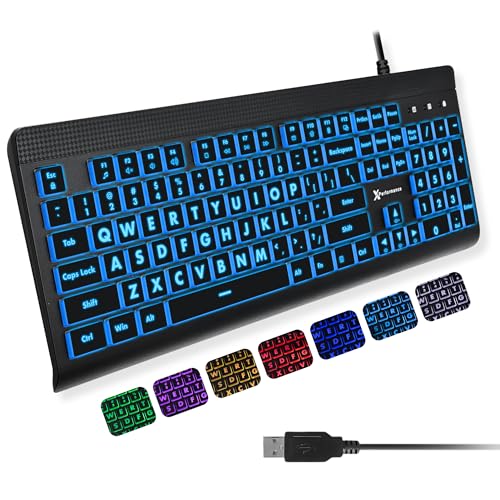
The X9 is the most feature-rich board in this guide. It has a 107 key full-size layout with a number pad and 12 shortcut keys. The shortcuts can open a browser or adjust volume with a single press, which helps if you repeat the same actions daily.
Large bold print is the headline, and a backlight with seven colors and four brightness levels helps in any light. The listing describes it as easy to see and designed for confidence while typing. It is plug and play, so no drivers are needed.
The extra shortcut keys can be pressed by accident, and no spill resistance is listed. Compared with the MIKUSO it adds shortcuts but lacks a wrist rest, and compared with the QUASIO backlit board it adds 12 keys.
Best for: Daily users who like one-press shortcuts for common tasks
Check price on AmazonSpecs
- Keys: 107 including number pad
- Shortcuts: 12 shortcut keys
- Backlight: 7 colors, 4 brightness levels
- Connection: USB wired, plug and play
Pros
- +107 keys include a number pad and 12 shortcut keys
- +Four brightness levels fine tune the backlight
- +Bold print is readable in any light
- +Plug and play with no drivers
Cons
- −Shortcut keys can be pressed by accident
- −No spill resistance listed
- −Highest cost of the six
S erounder 104 Key High Contrast Large Print Keyboard
About this pick
The S erounder keyboard is the plainest choice in this guide, and that is its appeal. White keycaps with crisp large black letters sit on a 104 key QWERTY layout with a number pad. The legends stay readable in a lit room without any electronics.
The listing says it has the largest print available in a full-size keyboard, which remains a marketing claim. There are no color modes or settings to confuse a new user. Simple USB wired setup means you plug it in and type.
There is no backlight listed, so dim rooms are harder, and it has fewer comfort features than the SABLUTE or QUASIO models. Compared with the MIKUSO it is unlit but simpler, and compared with the X9 it has no shortcut keys.
Best for: People who want a plain, high-contrast board with no settings
Check price on AmazonSpecs
- Keys: 104 QWERTY with number pad
- Contrast: White keycaps, black print
- Connection: USB wired
- Claim: Largest print on a full-size board
Pros
- +White keys with black letters read clearly in bright rooms
- +No settings to confuse a new user
- +104 keys include a number pad
- +Simple USB wired setup
Cons
- −No backlight listed, so dim rooms are harder
- −Fewer comfort features than the other picks
How We Evaluated These Large Print Keyboards Under $25 (2026)
Each pick was assessed across 5 criteria weighted for real-world use.
Readability and contrast
We compared key colors, legend style and size claims. The S erounder uses white keys with black print, while the X9 relies on bold print plus lighting. Size multipliers were treated as unverified.
Backlight quality
We looked at color options and brightness steps. The K11PRO offers eight levels, the X9 and QUASIO four, and the MIKUSO a single steady white. Adjustable, calm lighting scored highest.
Comfort and support
We assessed wrist rests, stands and key feel. The MIKUSO and QUASIO ergonomic boards include rests, and the K11PRO has a stand. Comfort scored higher when it reduced fatigue.
Layout and extras
The X9 leads with 107 keys and 12 shortcuts, while the S erounder keeps the standard 104. Extras scored well only when they were useful.
Value at this budget
We weighed features against price position, from the lowest-cost QUASIO backlit board to the X9 at the top. The MIKUSO and SABLUTE sit in the upper half and deliver strong lighting. The best value picks add a real benefit, not just more keys.
How to Choose the Right Large Print Keyboards Under $25 (2026)
By Typing Environment
Match the board to where you type.
| Environment | Recommended pick | Why |
|---|---|---|
| Dim evening room | MIKUSO Backlit Keyboard | Steady white backlight |
| Shared quiet room | QUASIO Ergonomic Keyboard | Silent keys |
| Fine control of light | SABLUTE K11PRO Keyboard | Eight brightness levels |
| Basic lit board | QUASIO Backlit Keyboard | Lowest cost with backlight |
| Daily repeated tasks | X9 Performance Keyboard | 12 shortcut keys |
| Bright, well-lit room | S erounder 104 Key Keyboard | White keys, black print |
By Budget
| Budget position | Recommended pick | What you get |
|---|---|---|
| Lowest-cost pick | QUASIO Backlit Keyboard | Seven colors and four levels |
| Low-mid range | QUASIO Ergonomic Keyboard | Wrist rest and silent keys |
| Low-mid range | SABLUTE K11PRO Keyboard | Eight-level backlight |
| Mid-range | S erounder 104 Key Keyboard | Plain high contrast |
| Upper-mid range | MIKUSO Backlit Keyboard | White backlight and wrist rest |
| Highest-cost pick | X9 Performance Keyboard | 107 keys and shortcuts |
Wrist Rest vs No Wrist Rest
This is the central tradeoff in the guide.
With wrist rest
The MIKUSO and QUASIO ergonomic boards include a rest that cushions the hands. They suit long sessions but depend on desk height. Recommendation: choose these if you type for an hour or more.
Without wrist rest
The X9, K11PRO, QUASIO backlit and S erounder boards skip the rest. They are lower profile and easier to fit on small desks. Recommendation: choose these for short sessions or add a separate rest.
Lighting Choice
A secondary axis is how much lighting you want.
| Preference | Recommended pick |
|---|---|
| I want a calm single color | MIKUSO Backlit Keyboard |
| I want many brightness steps | SABLUTE K11PRO Keyboard |
| I want lighting at the lowest cost | QUASIO Backlit Keyboard |
| I want lighting plus shortcuts | X9 Performance Keyboard |
| I want no lighting at all | S erounder 104 Key Keyboard |
For Low Vision Typing Specifically
Look for
High contrast legends, a backlight you can dim and a steady single color. Avoid flashing effects. A full-size layout with a number pad helps with forms and banking.
In this comparison
The MIKUSO is the best match with its steady white backlight, and the K11PRO leads on brightness control. The S erounder is best if you prefer printed contrast. The X9 is a good match only if you want shortcuts.
When to Spend More
Spend more if
You type often and want a steady backlight with support, which points to the MIKUSO. The X9 costs the most and suits shortcut users. For wireless or mechanical feel, look at higher budget guides.
Save if
You type occasionally. The QUASIO backlit board is the lowest-cost pick, and the QUASIO ergonomic adds a rest at a small step up. Both are enough for light use.
Frequently Asked Questions
Which large print keyboard is best overall?
The MIKUSO is the best fit for most people, with a steady white LED backlight, a wrist rest and a foldable tripod. The K11PRO is better if you want eight brightness levels. Choose based on how you type.
Are shortcut keys helpful?
The X9 adds 12 shortcut keys that open a browser or adjust volume in one press. They help with repeated tasks, but can be pressed by accident. A plain board like the S erounder avoids that.
Is white backlight better than color?
A steady white light is often easier on the eyes than a rainbow of colors, and the MIKUSO uses one. Multicolor boards like the K11PRO let you pick a single color too. Avoid cycling effects.
Do I need a wrist rest?
A rest helps in long sessions if it matches your desk height. The MIKUSO and QUASIO ergonomic boards include one. Others can use a separate gel rest.
How large is large print?
Seller claims range from three to four times larger than standard, but they are unverified. Compare the legends in photos with your current keyboard. Bold, high-contrast characters matter more than the number.
Can I use these with a tablet?
These are wired USB boards, so you need a USB port or adapter. They are best for desktops and laptops. Wireless boards suit tablets better.
Bottom Line
best overall: MIKUSO Large Print Backlit Keyboard with Wrist Rest - best overall pick in this roundup.
See the full rankings above for all picks with pros, cons, and best-for summaries.
Browse on Amazon
All Prime-eligible options with current pricing.
Shop on Amazon →