6 Best Large Print Keyboards (2026)
Six wired large print keyboards compared on key lettering, backlight options, wrist support and layout, for easier typing at home or the office.




At a Glance
S erounder Elderly Large Print Computer Keyboard
↓ See why we picked itStandard keyboards print tiny letters in a light gray that fade over time, and that is a daily annoyance for anyone past their mid fifties. Large print keyboards fix the problem by enlarging and darkening the legends, with most listings claiming letters four times larger than a standard board. This guide compares six wired models, from the Hamile 108-key full-size layout to the S erounder 104-key board with white keycaps and black letters.
The six differ in ways that matter more than the headline claim. The SABLUTE K21 Pro adds a wrist rest and phone holder, the KOPJIPPOM models offer either a seven-color or plain white LED backlight, and the yellow SABLUTE swaps the backlight for high-contrast yellow keycaps. Layouts range from 104 keys on the S erounder to 108 keys on the Hamile, so numeric keypad and function row access differ slightly.
We evaluated each keyboard from product specs and buyer feedback, since the real test is how quickly your eyes find the right key. Because the four-times-larger claim is common marketing, compare the printed key dimensions and the contrast of the legends rather than trusting the label. Wired models also avoid batteries and pairing, which is one less thing to manage.
6 Criteria to Look For Before Buying a Large Print Keyboards (2026)
Key buying criteria so you get the right fit the first time.
Check the real print size
Almost every listing claims letters four times larger than standard, and one guide notes the claim ranges from 2x to 4x and is unverified. The Hamile, both KOPJIPPOM boards and the SABLUTE K21 Pro all use that wording. Compare photos with a ruler or the key dimensions in the listing instead of trusting the number. If the legend height looks similar between models, choose on contrast and comfort instead.
Contrast scheme
The common high-contrast options are black on white, black on yellow, and yellow on black. The S erounder uses white keycaps with black letters, while the yellow SABLUTE uses yellow caps with black characters. Some low-vision makers say black on yellow is easier to read than white on black. Pick the scheme that you can read at arm's length without squinting.
Backlight quality
Backlighting helps in dim rooms, but it needs adjustable brightness to avoid glare. The SABLUTE K21 Pro offers seven brightness levels, the Hamile three, and the plain-white KOPJIPPOM one steady color. Avoid RGB modes that cycle or flash, which can disorient light-sensitive users. Some models reset to a default color at power-up, so check buyer feedback.
Key spacing and press feel
Slightly spaced keys can reduce accidental double presses for arthritic hands, and a light, consistent key press is easier on the fingers. The Hamile advertises quiet keys, while the S erounder is a simpler standard-style board. Wrist pads like the SABLUTE's can help, but a pad that is too tall can push the wrists upward. Try a board in person if possible.
Wired vs wireless
All six picks here are wired USB boards, which avoid battery charging and pairing problems. A wireless board uses a USB receiver that still takes a port, or Bluetooth that pairs with more devices. If your desk is tidy and the computer is close, wired is the most dependable. Keep the cable length in mind when you place the keyboard.
Layout and numeric keypad
A full-size layout with a numeric keypad matters for banking and spreadsheets, and the Hamile (108 keys) and S erounder (104 keys) include one. Compact boards save desk space but force you to learn new key positions. Familiar placement reduces errors more than any other feature. Choose full size unless you truly lack space.
6 Best Large Print Keyboards (2026)
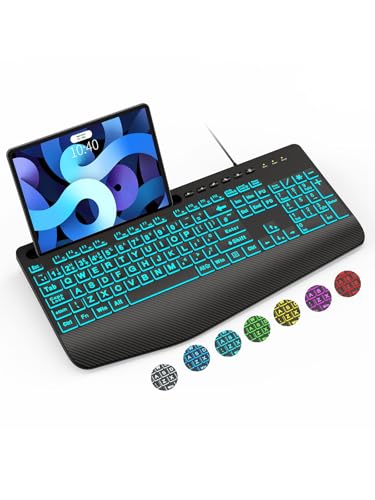
SABLUTE K21 Pro Large Print Wired Keyboard
About this pick
The SABLUTE K21 Pro is the most complete all-rounder here because it pairs oversized lettering with comfort features that long typing sessions actually need. The oversized font keys are designed to reduce eye strain and typing errors, and a built-in palm rest and bottom support aim to ease wrist fatigue. It also includes a phone holder, which is handy for keeping a recipe or video call in view.
Backlighting runs through seven colors and seven brightness levels, so you can dial the glow down to a comfortable level in a dim room. The tradeoff is that the colorful backlight is more elaborate than most people need, and users who are sensitive to color changing effects should choose one steady color and leave it. The layout is full size, but it is a fairly large board, so measure the desk space for the wrist rest.
Setup is plug and play over USB, with no batteries to charge. Compared with the plain white-lit KOPJIPPOM, the K21 Pro adds the wrist rest and holder, and compared with the Hamile, it trades a foldable stand for built-in palm support. Wipe the keys with a dry cloth, and test the backlight level at night before settling on a color.
Best for: Typists who want large print plus wrist support in one board
Check price on AmazonSpecs
- Print: Oversized font keys
- Backlight: 7 colors, 7 brightness levels
- Comfort: Wrist rest and bottom support
- Extra: Built-in phone holder
Pros
- +Oversized letters ease eye strain and typing errors
- +Wrist rest and support help during long sessions
- +Seven brightness levels let you dim the glow
- +Phone holder keeps a recipe or call in view
Cons
- −Wrist rest makes the board deep for small desks
- −Color backlight options are more than most need
Hamile Large Print Light Up Keyboard
About this pick
The Hamile gives you the fullest layout in this group, with 108 keys including a numeric keypad and function keys. That matters for anyone who does spreadsheets, online banking or lots of number entry, because a missing keypad is a real loss. The bold letters are marketed as four times larger than standard, and the keys are described as quiet.
Backlighting offers seven colors and three brightness levels, which is a simpler range than the SABLUTE's seven levels but still enough for most rooms. The foldable stand raises the back of the board to a more comfortable angle, though there is no built-in wrist rest, so a separate soft pad may help. The tradeoff is that full-size boards use a lot of desk width.
Ownership is simple: plug in the USB cord and it works, and the cord length is fixed. Compared with the SABLUTE K21 Pro, the Hamile gives up the palm rest and phone holder but adds extra keys and a quieter feel. It is the better choice if you share a desk and type in the evening while someone else is nearby.
Best for: Number-heavy work that needs a numeric keypad and function keys
Check price on AmazonSpecs
- Layout: 108-key full size with numeric keypad
- Print: Claimed 4X larger than standard
- Backlight: 7 colors, 3 brightness levels
- Stand: Foldable stand for tilt
Pros
- +108 keys include a numeric keypad and function row
- +Quiet keys suit shared rooms
- +Foldable stand tilts the board to a comfortable angle
- +Three brightness levels are easy to cycle
Cons
- −No built-in wrist rest, so a separate pad may help
- −Full-size width needs a roomy desk
KOPJIPPOM Large Print Keyboard with 7 Color Backlight
About this pick
This KOPJIPPOM model is the straightforward option for readers who want large legends and a backlight that can be tuned. The letters are marketed as four times larger than standard keyboards, and the board offers seven interchangeable colors with adjustable brightness. It connects over a wired USB cable, so there is no battery or pairing to manage.
Choosing a steady color and brightness is the key to using it well. A softer white or warm color tends to be easier on aging eyes than a bright blue, and anyone sensitive to flashing effects should avoid any cycling mode. The tradeoff is that it lacks the wrist rest and phone holder that the SABLUTE pair includes, so comfort is up to you.
Setup takes seconds, and the cable is fixed in length, so place the keyboard within reach of the port. If you like the idea of a plain backlight with no color options, the white LED version will be simpler to live with.
Best for: People who want to tune the backlight color and brightness
Check price on AmazonSpecs
- Print: Claimed 4X larger than standard
- Backlight: 7 interchangeable colors
- Connection: USB wired, no charging
- Setup: Plug and play
Pros
- +Seven backlight colors allow a comfortable glow
- +No batteries or pairing needed
- +Large legends are easier to find at a glance
- +Plug and play on common computers
Cons
- −No wrist rest or phone holder included
- −Color options are a distraction if you prefer plain light
KOPJIPPOM Large Print Backlit White LED Keyboard
About this pick
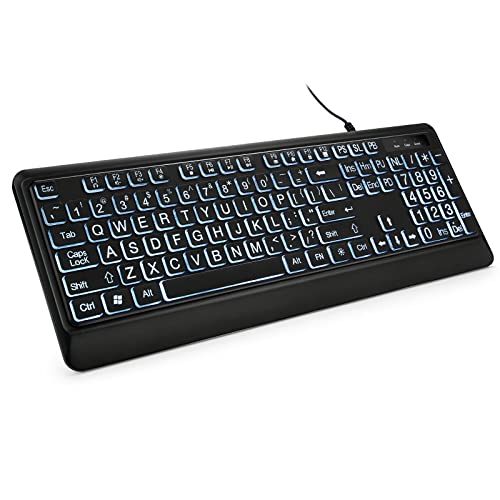
This KOPJIPPOM keeps things plain with a bright, evenly distributed white LED backlight. White light is the least distracting option for evening typing, and it suits readers who find colored lighting busy. The legends are marketed as four times larger than standard, and the full-size QWERTY layout keeps a familiar key arrangement.
The rear feet unfold to tilt the keyboard, which can reduce hand fatigue, but there is no palm rest. That tradeoff is worth it for people who already have a wrist pad or prefer a slim board. Because it offers one backlight color, there is less to adjust, which is a plus for anyone who dislikes menus.
In use, expect to plug it in and begin typing, with the cable placed to reach the port. Choose it over the SABLUTE K21 Pro if you want a clean, simple board and do not need a phone holder.
Best for: Evening typists who prefer a plain, even white backlight
Check price on AmazonSpecs
- Print: Claimed 4X larger than standard
- Backlight: White LED, evenly lit
- Layout: Full-size QWERTY
- Ergonomics: Rear feet unfold for tilt
Pros
- +Even white backlight is calm and uncluttered
- +Full-size QWERTY keeps the familiar layout
- +Rear feet tilt the board to reduce hand fatigue
- +Lower in cost than the color backlight model
Cons
- −No wrist rest included
- −Only one backlight color to choose from
S erounder Elderly Large Print Computer Keyboard
About this pick
The S erounder keyboard is the plainest choice in this guide, and that is its appeal. It uses white keycaps with crisp, large black letters on a 104-key QWERTY layout with a number pad, so the legends stay readable in a lit room without any electronics. The listing says it has the largest print available in a full-size keyboard, though that remains a marketing claim.
Because no backlight is listed, it relies on room lighting, which makes it a poor fit for a dim study at night. The upside is simplicity, since there are no color modes, no brightness settings, and fewer parts to fail. It also avoids the glare that some backlit boards create on shiny keycaps.
It is a good match for someone who wants a keyboard to just work in a bright office or kitchen desk. Compared with the Hamile's 108 keys, it has four fewer keys, though both include the numeric keypad.
Best for: Bright rooms where simple high contrast matters more than lights
Check price on AmazonSpecs
- Layout: 104-key QWERTY with number pad
- Contrast: White keycaps, black letters
- Connection: USB wired
- Backlight: None listed
Pros
- +White keys with black letters read clearly in bright rooms
- +No color modes or settings to confuse
- +104 keys include a numeric keypad
- +Simple USB wired setup
Cons
- −No backlight listed, so dim rooms are harder
- −Fewer comfort features than the SABLUTE models
SABLUTE Yellow Large Print Wired Keyboard
About this pick
The yellow SABLUTE is the high-contrast option, with yellow keycaps and bold black characters that stand out even at a glance. Yellow with black is a widely used scheme for low-vision keyboards, and some makers say it is easier to read than white on black. It also includes a palm rest for wrist fatigue and a holder for a phone or tablet.
The tradeoff is that the bright yellow caps are a strong visual statement on a desk, and they may feel loud in a formal office. It also lacks the backlight options that the K21 Pro offers, so it relies on room lighting. For many users, the bold contrast is worth more than a glowing board.
Setup is easy, and the keyboard works with Windows, macOS and Chrome. It is the lowest-cost pick in this guide, so it is a strong choice for a first purchase or a gift. Choose it over the K21 Pro if contrast matters more than backlighting, and the K21 Pro if you often type in the dark.
Best for: Low-light-sensitive typists who prefer bold yellow keys
Check price on AmazonSpecs
- Contrast: Yellow keycaps, black characters
- Comfort: Palm rest and bottom support
- Extra: Phone and tablet holder
- Setup: Plug and play USB
Pros
- +Yellow keys with black print stand out clearly
- +Palm rest helps with long typing sessions
- +Phone holder doubles as a tablet stand
- +Lowest cost in this lineup
Cons
- −No backlight, so it depends on room lighting
- −Bright yellow looks loud on a formal desk
How We Evaluated These Large Print Keyboards (2026)
Each pick was assessed across 5 criteria weighted for real-world use.
Legibility of the legends
We looked at stated print size, contrast scheme and keycap color for every board. The yellow SABLUTE and the white-keyed S erounder stood out for contrast, while the others rely on backlighting. We discounted the four-times-larger claim because it is a marketing number, not a measurement.
Backlight control
We compared the number of colors and brightness levels each board lists. The SABLUTE K21 Pro with seven levels was the most adjustable, and the S erounder with no backlight was the most basic. Steady, dimmable light scored higher than flashing effects.
Comfort and ergonomics
We evaluated palm rests, tilt stands and key spacing described in the specs and buyer feedback. The two SABLUTE boards include a wrist rest, the Hamile has a foldable stand, and the S erounder has neither. Comfort matters for long sessions.
Layout and compatibility
We checked key count, numeric keypad presence and the operating systems each board supports. The Hamile at 108 keys has the fullest layout, and all boards work by plug and play over USB. Familiar layouts earned higher marks.
Value and buyer feedback
The yellow SABLUTE is the lowest-cost pick, and the K21 Pro adds features for more.
How to Choose the Right Large Print Keyboards (2026)
By Reading Environment
| Where you type | Recommended pick |
|---|---|
| Dim study or bedroom at night | SABLUTE K21 Pro Large Print Wired Keyboard |
| Bright kitchen or office desk | S erounder Elderly Large Print Computer Keyboard |
| Evening typing with plain light | KOPJIPPOM Large Print Backlit White LED Keyboard |
| Mixed lighting with bold contrast | SABLUTE Yellow Large Print Wired Keyboard |
| Shared room where quiet matters | Hamile Large Print Light Up Keyboard |
By Budget
| Budget tier | Recommended pick |
|---|---|
| Lowest-cost pick | SABLUTE Yellow Large Print Wired Keyboard |
| Lower mid-range | Hamile Large Print Light Up Keyboard |
| Mid-range | S erounder Elderly Large Print Computer Keyboard |
| Upper mid-range | KOPJIPPOM Large Print Backlit White LED Keyboard |
| Upper tier | SABLUTE K21 Pro Large Print Wired Keyboard |
| Premium in this guide | KOPJIPPOM Large Print Keyboard with 7 Color Backlight |
Check current pricing on Amazon.
Backlit vs Non-Backlit
Backlit
A backlight keeps keys visible in dim rooms but adds glare risk and extra settings. The SABLUTE K21 Pro, Hamile and both KOPJIPPOM boards are in this group. Choose a backlit board if you type in the evening.
Non-backlit
A plain board relies on room light, which suits a bright desk and avoids color effects. The S erounder and the yellow SABLUTE fall here. Choose non-backlit if you value simplicity and bold contrast.
Recommendation: pick the K21 Pro for night use and the yellow SABLUTE for a bright room.
By Comfort Features
| Preference | Recommended pick |
|---|---|
| Built-in wrist rest | SABLUTE K21 Pro Large Print Wired Keyboard |
| Wrist rest with high contrast | SABLUTE Yellow Large Print Wired Keyboard |
| Adjustable tilt stand | Hamile Large Print Light Up Keyboard |
| Unfolding rear feet | KOPJIPPOM Large Print Backlit White LED Keyboard |
For Everyday Email and Banking Specifically
Look for
Choose a full-size layout with a numeric keypad, bold legends you can read at arm's length, and a light key press. Avoid color cycling modes that distract from the screen.
In this comparison
The Hamile Large Print Light Up Keyboard offers 108 keys with a numeric keypad and quiet keys, which suits steady email and banking. The S erounder is a simpler 104-key alternative.
When to Spend More
Spend more if
You type for long periods or at night; the SABLUTE K21 Pro adds a wrist rest, phone holder and seven brightness levels. It is the strongest all-rounder here.
Save if
You type occasionally in a bright room; the yellow SABLUTE or the S erounder cover high contrast at a lower cost. Neither needs a backlight in that setting.
Frequently Asked Questions
How do I choose between a backlit and a non-backlit large print keyboard?
Choose a backlit board like the SABLUTE K21 Pro if you type in dim rooms or in the evening. Choose a non-backlit board like the S erounder or the yellow SABLUTE if you type in a bright room and want fewer settings. Backlighting only helps if the brightness is adjustable and the color is steady.
Is a larger print always better?
Not necessarily. The four-times-larger claim is common across listings and is unverified, so contrast and key spacing matter as much as size. A well-contrasted board, such as the yellow SABLUTE, can be easier to read than a larger print with weak contrast. Compare listed key dimensions where you can.
Are large print keyboards worth the extra cost?
For most people with aging eyes, yes, because reduced eye strain and fewer typing errors add up over daily use. A large print keyboard also costs much less than a new monitor.
How long do large print letters last?
Printed legends can wear off over months of heavy use, which is a frequent buyer complaint across keyboards. Boards with laser-etched or double-shot keycaps tend to last longer, but listings often do not say. Reading verified buyer feedback on fading is the best check before you buy.
Will a large print keyboard work with my computer?
All six boards here are USB wired and described as plug and play for common systems such as Windows and Mac. Some, like the SABLUTE, also list Chrome compatibility. Confirm that your computer has a free USB-A port, since some newer laptops only have USB-C and would need an adapter.
What about colored backlights, are they safe for sensitive eyes?
Steady colors are generally fine, but flashing or color cycling modes can disorient light-sensitive users. Choose one color and leave it. The plain-white KOPJIPPOM avoids this issue entirely with a single steady backlight.
Bottom Line
best overall: SABLUTE K21 Pro Large Print Wired Keyboard - best overall pick in this roundup.
See the full rankings above for all picks with pros, cons, and best-for summaries.
Browse on Amazon
All Prime-eligible options with current pricing.
Shop on Amazon →