6 Best Large Print Keyboards Under $30 (2026)
Six wired large print keyboards at the lowest budget tier, compared on key lettering, backlight options, wrist support and layout for easier typing.



At a Glance
A standard keyboard prints small gray legends that are hard to find when your eyes tire, and a large print board fixes that without any software. At this budget tier the choice comes down to how the lettering is delivered and which extras are worth keeping. This guide compares six wired boards, from the EDJO retro round key model to the SABLUTE K21 Pro with its wrist rest and phone holder.
The spread is wider than the shared four times larger claim suggests. The S erounder and ciciglow boards use a plain 104 key layout with high contrast keys and no lighting, the KOPJIPPOM and EDJO offer a seven color backlight, and the yellow SABLUTE swaps lighting for yellow keycaps with black letters. Brightness control also varies, with three levels on the EDJO and seven on the SABLUTE K21 Pro.
We evaluated each keyboard from product specs and buyer feedback, and we ranked them on legibility first and comfort features second. Treat the four times larger wording as a marketing claim and compare real contrast, layout and desk footprint instead. Because every board here is wired, there are no batteries or pairing steps to manage.
6 Criteria to Look For Before Buying a Large Print Keyboards Under $30 (2026)
Key buying criteria so you get the right fit the first time.
Contrast beats raw letter size
Most listings, including the KOPJIPPOM, EDJO and SABLUTE, claim print four times larger than standard, but that figure is a marketing claim with no common test. Contrast does more for readability, and black on white, black on yellow and yellow on black are the schemes commonly cited for low vision. The S erounder uses black on white and the yellow SABLUTE uses black on yellow, so both lean on contrast rather than light. As a rule, pick contrast first and size second, and compare photos of the actual keycaps.
Backlight needs adjustable brightness
A backlight helps in dim rooms, but a fixed bright glow can cause glare and wash out the legends. The SABLUTE K21 Pro offers seven brightness levels, while the EDJO has three and the KOPJIPPOM lists adjustable brightness. Some boards also reset to a default color at power up, which is annoying if you chose a dim setting. Choose a board with at least three brightness steps if you type at night, and avoid flashing effects.
Skip color cycling effects
Color changing RGB modes can distract and may disorient light sensitive users, so a steady single color is safer. The K21 Pro, KOPJIPPOM and EDJO all offer seven colors, so set one color and avoid the cycling mode. The S erounder, ciciglow and yellow SABLUTE avoid the issue entirely with no lighting. If you share the computer with someone sensitive to flashing light, prefer one of those three.
Wrist support matters over long sessions
Only the two SABLUTE boards include a palm rest and bottom support among these six, which is a real advantage for emails, banking and long documents. A rest adds depth, so measure your desk before ordering the K21 Pro or yellow SABLUTE. If you pick a board without a rest, a separate gel pad is a cheap fix. As a rule of thumb, choose a rest if you type for more than 30 minutes at a stretch.
Layout and key spacing for stiff hands
The S erounder and ciciglow use a 104 key layout with a number pad, while the EDJO has round keys and a compact body that may drop the keypad. Slightly spaced keys can reduce accidental double presses for arthritic hands, and the EDJO round keys do separate each press visually. A light and consistent key press is worth more than extra shortcut keys. If you use the number pad for banking, confirm it before buying a compact board.
Wired is simplest, but check the cable
All six boards here are wired, so there are no batteries, pairing steps or USB receivers to lose. That suits first time users and shared machines, and it removes the risk of a dead keyboard mid task. The tradeoff is cable length, so check that it reaches your computer from where you sit. If you want to type from a sofa or use a tablet, move up to a wireless or Bluetooth guide at a higher budget.
6 Best Large Print Keyboards Under $30 (2026)
SABLUTE K21 Pro Large Print Keyboard
About this pick
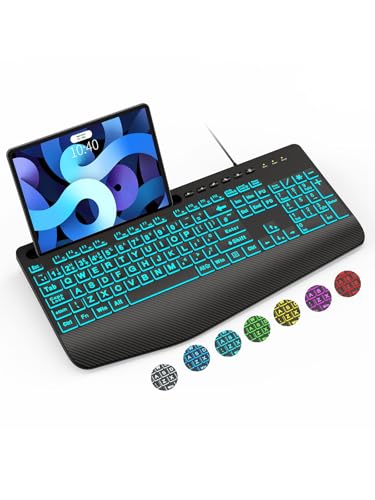
The SABLUTE K21 Pro is the most complete board in this budget lineup because it adds comfort hardware to oversized lettering. The oversized font keys are meant to ease eye strain and cut down on mistyped letters. A built in palm rest and bottom support aim to reduce wrist fatigue during long email or banking sessions.
Backlighting offers seven colors and seven brightness levels, which lets you dim the glow to a calm level in a dim room. The catch is that the color options are more than most people need, so pick one steady color and leave it alone. The wrist rest also makes the board deep, so it asks for more desk space than the compact picks here.
Setup is plug and play over USB with no batteries or pairing. The phone holder is a small extra that keeps a recipe, call or tablet in view while you type. Compared with the KOPJIPPOM seven color board, which shares the same backlight idea, the K21 Pro adds the wrist rest and holder, and that is why it sits near the top of the price range in this guide.
Best for: Typists who want large print plus wrist support in one board
Check price on AmazonSpecs
- Print: Oversized font keys
- Backlight: 7 colors, 7 brightness levels
- Comfort: Palm rest and bottom support
- Connection: USB wired, plug and play
Pros
- +Oversized letters ease eye strain and typing errors
- +Palm rest helps during long typing sessions
- +Seven brightness levels let you dim the glow
- +Phone holder keeps a recipe or call in view
Cons
- −Wrist rest makes the board deep for small desks
- −Color backlight options are more than most need
SABLUTE Yellow Large Print Keyboard
About this pick
The yellow SABLUTE is the high contrast pick, with bold black characters printed on yellow keycaps that stand out at a glance. Yellow with black is a widely used scheme for low vision keyboards, and some makers argue it reads more easily than white on black. It is aimed at older users who want legends that never depend on a backlight.
It carries the same palm rest, bottom support and phone or tablet holder as the K21 Pro, so the comfort side is covered. What it gives up is lighting, so you rely on room light or a desk lamp for evening typing. The bright yellow also looks loud on a formal desk, which matters more to some buyers than to others.
Because there are no backlight settings, there is nothing to configure and nothing to accidentally cycle through colors. It sits lower in the price range than the K21 Pro, so it is the better value if you type mostly in daylight. Compared with the S erounder, you get the same simple idea but with a wrist rest and holder added.
Best for: Daytime typists who want maximum key contrast and a wrist rest
Check price on AmazonSpecs
- Print: Black characters on yellow keys
- Comfort: Palm rest and bottom support
- Extra: Phone and tablet holder
- Backlight: None
Pros
- +Yellow keys with black print stand out clearly
- +Palm rest helps with long typing sessions
- +Phone holder doubles as a tablet stand
- +No lighting settings to manage
Cons
- −No backlight, so it depends on room lighting
- −Bright yellow looks loud on a formal desk
S erounder Large Print Keyboard
About this pick
The S erounder keyboard is the plainest choice in this guide, and that is its appeal. It uses white keycaps with crisp, large black letters on a 104 key QWERTY layout that includes a number pad. The legends stay readable in a lit room without any electronics.
The listing claims the largest print available in a full size keyboard, though that remains a marketing claim worth treating cautiously. There is no backlight listed, so dim rooms are harder, and it has no wrist rest or phone holder. If you are someone who finds colored lighting busy or confusing, that restraint is a real advantage.
The cable plugs into a USB port and works immediately, which suits a first computer or a shared family machine. Compared with the yellow SABLUTE it uses a more familiar white and black scheme but gives up the palm rest. It sits in the middle of the price range, so it is a fair buy if you want a quiet, no frills board.
Best for: Readers who want a plain, familiar board with no settings
Check price on AmazonSpecs
- Layout: 104 key QWERTY with number pad
- Contrast: Black print on white keycaps
- Connection: USB wired
- Backlight: None listed
Pros
- +White keys with black letters read clearly in bright rooms
- +No color modes or settings to confuse
- +104 keys include a numeric keypad
- +Simple USB wired setup
Cons
- −No backlight listed, so dim rooms are harder
- −Fewer comfort features than the SABLUTE models
KOPJIPPOM 7 Color Large Print Keyboard
About this pick
The KOPJIPPOM is the straightforward backlit option for readers who want large legends and a glow they can tune. The letters are marketed as four times larger than standard, and the board offers seven interchangeable colors with adjustable brightness. It connects over a wired USB cable, so there is no battery or pairing to manage.
The backlight is the reason to choose it over the plain S erounder, because evening typing becomes far easier. The trade is that the color options can be a distraction if you prefer a single plain light. There is no wrist rest or phone holder, so comfort relies on your desk setup.
It is the most expensive board in this lineup, which makes it hard to recommend over the K21 Pro for most buyers. The K21 Pro matches its seven colors and adds a wrist rest and holder for a lower price. Choose the KOPJIPPOM only if you prefer its layout and look, or if the other boards are unavailable.
Best for: Evening typists who want a tunable backlight and nothing else
Check price on AmazonSpecs
- Print: 4X larger than standard (claimed)
- Backlight: 7 colors, adjustable brightness
- Connection: USB wired
- Setup: Plug and play, no batteries
Pros
- +Seven backlight colors allow a comfortable glow
- +No batteries or pairing needed
- +Large legends are easier to find at a glance
- +Plug and play on common computers
Cons
- −No wrist rest or phone holder included
- −Priced above the K21 Pro for fewer extras
EDJO Retro Round Key Large Print Keyboard
About this pick
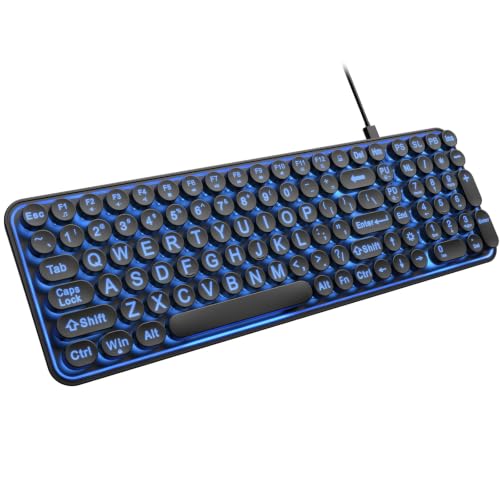
The EDJO blends vintage looks with modern function, using round keycaps in a typewriter style. The oversize legends are claimed to be four times larger than standard, and the round shape separates each key visually. It is the lowest cost pick in the guide, which makes it an easy starter board.
A seven color backlight comes with three brightness levels, fewer than the seven on the SABLUTE K21 Pro but enough for most rooms. The round keys feel unfamiliar after years on a standard layout, so expect an adjustment period of a few days. The compact body also may leave out the numeric keypad that some people use for banking and forms, which is worth checking against the listing photos.
The keys are described as quiet, which suits shared rooms. Compared with the ciciglow board, the EDJO adds lighting at a very similar price, though the ciciglow keeps a conventional shape. If you like the retro look and want the cheapest lighted board here, the EDJO is the pick.
Best for: Budget shoppers who like a retro look and a backlight
Check price on AmazonSpecs
- Keys: Retro round keycaps
- Print: 4X larger than standard (claimed)
- Backlight: 7 colors, 3 brightness levels
- Connection: USB wired
Pros
- +Round keys give clear visual separation
- +Lowest cost pick in this lineup
- +Three brightness levels with seven colors
- +Quiet keys and a compact body
Cons
- −Round keys feel unfamiliar after a standard layout
- −Compact layout may lack a numeric keypad
ciciglow 104 Key Large Print Keyboard
About this pick
The ciciglow is a no nonsense 104 key wired board made for readers with low vision or aging eyes. The listing describes oversized print and high contrast keys, and it simply needs to be plugged into a computer to work. The body is ABS plastic, a common and durable choice at this tier.
The product details are thinner than for the other boards, with no stated backlight, wrist rest or brightness settings. That means you should treat it as a basic keyboard and judge it by the photos and returns policy. The 104 key layout does keep the familiar number pad, which helps with forms and banking.
It is the second lowest cost option, so it works as a spare board for a second desk or a visiting relative. Compared with the S erounder, it offers a similar plain concept for less money, but the S erounder gives clearer detail about its white and black key scheme. Pick the ciciglow when price is the main factor and you do not need lighting.
Best for: Buyers who want a cheap spare board with a number pad
Check price on AmazonSpecs
- Layout: 104 key wired USB
- Print: Oversized high contrast letters
- Material: ABS plastic
- Setup: Plug into a USB port
Pros
- +Plug in and use with no software
- +104 keys keep the familiar number pad
- +Oversized high contrast letters aid low vision
- +Very low cost for a large print board
Cons
- −Listing gives few details on lighting or comfort
- −No wrist rest, backlight or holder
How We Evaluated These Large Print Keyboards Under $30 (2026)
Each pick was assessed across 5 criteria weighted for real-world use.
Legibility of the legends
We compared the listed print size, key color and contrast scheme of each board, since seeing the key quickly is the point of the category. The yellow SABLUTE and S erounder lead on contrast, while the ciciglow lists high contrast but gives less detail. We treated four times larger claims as marketing and did not rank on them alone.
Lighting control
We looked at how many colors and brightness levels each board offers and whether a plain lighting option exists. The SABLUTE K21 Pro has seven levels, the EDJO has three, and three boards have no backlight at all. A board that can be dimmed scored higher than one that is fixed bright. We also noted which boards avoid distracting color effects.
Comfort and desk footprint
We scored palm rests, tilt and overall depth, because comfort decides whether a board is used daily. The two SABLUTE models are the only ones with a wrist rest, while the EDJO is the most compact. A deeper board earned credit for support but lost points for desk space. Buyer feedback on key feel informed the final order.
Layout and ease of use
We checked for a numeric keypad, key count and plug and play setup. The S erounder and ciciglow list 104 keys, and every board connects by USB with no batteries. The EDJO round keys were marked down for unfamiliarity. The strongest pick here for ease of use is the K21 Pro, and the most basic is the ciciglow.
Value at this budget
The K21 Pro adds the most extras but sits high in the range, while the EDJO and ciciglow are the cheapest. The KOPJIPPOM scored lower on value because it costs more than the K21 Pro for fewer features.
How to Choose the Right Large Print Keyboards Under $30 (2026)
By Typing Environment
| Where you type | Recommended pick |
|---|---|
| Dim bedroom or den at night | SABLUTE K21 Pro Large Print Keyboard |
| Bright kitchen or sunroom desk | S erounder Large Print Keyboard |
| Mixed lighting, bold contrast wanted | SABLUTE Yellow Large Print Keyboard |
| Quiet shared room with lighting | EDJO Retro Round Key Large Print Keyboard |
| Spare desk, basic needs | ciciglow 104 Key Large Print Keyboard |
By Budget
| Budget tier | Recommended pick |
|---|---|
| Lowest-cost pick | EDJO Retro Round Key Large Print Keyboard |
| Lower mid-range | ciciglow 104 Key Large Print Keyboard |
| Mid-range | SABLUTE Yellow Large Print Keyboard |
| Upper mid-range | S erounder Large Print Keyboard |
| Upper tier | SABLUTE K21 Pro Large Print Keyboard |
| Premium in this guide | KOPJIPPOM 7 Color Large Print Keyboard |
Check current pricing on Amazon.
Backlit vs Unlit
Backlit
A backlight keeps keys visible at night but adds glare risk and extra settings. The SABLUTE K21 Pro, KOPJIPPOM and EDJO fall in this group, with seven colors each. Choose a backlit board if you type in the evening.
Unlit
An unlit board relies on room light and avoids color effects. The S erounder, ciciglow and yellow SABLUTE belong here. Choose unlit if you type in daylight and value simplicity.
Recommendation: pick the K21 Pro for night use and the yellow SABLUTE for a bright room.
By Comfort Features
| Preference | Recommended pick |
|---|---|
| Built in wrist rest with lighting | SABLUTE K21 Pro Large Print Keyboard |
| Wrist rest with maximum contrast | SABLUTE Yellow Large Print Keyboard |
| Smallest, most compact body | EDJO Retro Round Key Large Print Keyboard |
| Full number pad, no extras | S erounder Large Print Keyboard |
For Everyday Email and Banking Specifically
Look for
Choose a layout with a numeric keypad, bold legends you can read at arm's length and a light key press. Avoid color cycling modes that pull your eyes off the screen.
In this comparison
The S erounder and ciciglow both offer a 104 key layout with a number pad. The SABLUTE K21 Pro adds a wrist rest for longer sessions. The EDJO is the weakest match if you rely on the number pad.
Recommendation: the S erounder for plain banking use, the K21 Pro for long sessions.
When to Spend More
Spend more if
You want wrist support and adjustable lighting together. The SABLUTE K21 Pro and KOPJIPPOM sit at the top of this range and add the most features. If you want wireless or Bluetooth, step up to a higher budget guide.
Save if
You type in daylight and want only readable keys. The EDJO and ciciglow are the lowest cost, and the yellow SABLUTE is a mid priced pick with a wrist rest. They cover basic use well.
Frequently Asked Questions
Which large print keyboard under this budget is the best overall?
The SABLUTE K21 Pro is the best all rounder because it combines oversized lettering, a palm rest and seven brightness levels. It also includes a phone holder. If you type mostly in daylight, the yellow SABLUTE gives similar comfort with bolder contrast and a lower price.
Is a backlight necessary on a large print keyboard?
It depends on where you type. A backlight helps in dim rooms, but high contrast keys such as the yellow SABLUTE or S erounder work well in daylight. If you do choose a backlit board, make sure it has adjustable brightness so the glow does not cause glare.
Are four times larger letters actually four times larger?
That figure is a common marketing claim and there is no shared test behind it. The KOPJIPPOM, EDJO and SABLUTE listings all use similar wording. Compare photos of the keys beside a standard keyboard and judge the contrast, not just the number.
How much should I expect to spend and what do I give up?
At this tier you get wired boards only, and the cheapest options skip wrist rests and fancy lighting. The EDJO and ciciglow are the lowest cost, while the K21 Pro costs more and adds comfort extras. If you need wireless or Bluetooth, you will need a higher budget guide.
Will these keyboards last for years?
Wired keyboards avoid batteries and receivers, which removes common failure points. Wipe the keys with a dry or slightly damp cloth and keep liquids away. Buyer feedback on cheaper boards varies, so keep your order details in case a key fails early.
Do the colorful backlights cause problems?
Color cycling effects can distract and may bother light sensitive users. The K21 Pro, KOPJIPPOM and EDJO all allow a steady single color, and that setting is the safest. If you share the computer, the unlit boards avoid the issue completely.
Can I use these with a tablet or laptop?
They use a standard USB connection, so they work with most desktops and laptops that have a USB port. Tablets and some laptops may need an adapter. The SABLUTE boards include a holder that can prop a phone or small tablet beside the keys.
Bottom Line
best overall: SABLUTE K21 Pro Large Print Keyboard - best overall pick in this roundup.
See the full rankings above for all picks with pros, cons, and best-for summaries.
Browse on Amazon
All Prime-eligible options with current pricing.
Shop on Amazon →