6 Best Large Print Keyboards Under $20 (2026)
Six wired large print keyboards at a very low budget compared for backlighting, key contrast, wrist support and key shape, from yellow keys to retro round caps.



At a Glance
At the lowest budget tier, large print keyboards differ mainly in contrast, lighting and comfort extras. The SABLUTE K11PRO has a seven-color backlight with eight brightness levels and four modes, the other SABLUTE uses yellow keycaps with black print plus a wrist rest and phone holder, and the EDJO ergonomic model adds a wrist rest with quiet keys. The EDJO retro board uses round typewriter-style caps, the iMBAPrice has an orange and blue lit board, and the ciciglow is a plain 104 key wired model.
We evaluated each keyboard based on product specs and buyer feedback, comparing print size claims, key contrast, backlight control and comfort features. The common claim of letters four times larger than standard is unverified, so it is a marketing line rather than a measurement. High-contrast schemes such as black on yellow or black on white are cited as easiest to read, and backlighting helps in dim rooms only if brightness can be adjusted to avoid glare.
All six are wired, which means no batteries to replace and no pairing to manage. Spending a little more usually buys better build and a more consistent key press, but these picks cover the practical choices at this ceiling. The ranking favors steady, readable lighting over flashy effects that can distract.
6 Criteria to Look For Before Buying a Large Print Keyboards Under $20 (2026)
Key buying criteria so you get the right fit the first time.
Treat print size claims with care
The EDJO boards claim letters four times larger than standard, while the K11PRO claims three times. Guides suggest 2x to 4x is the typical range, and the numbers are unverified marketing. Compare the key legends in the photos with your current keyboard instead. Bold, clean characters matter more than the multiplier.
Pick a contrast scheme you can read
Black on yellow, as on the yellow SABLUTE, is cited as easier to read than white on black by some makers. Black on white is also common. High contrast works without electronics, so it helps in bright rooms. Choose the scheme that your eyes find clearest in your own lighting.
Judge backlight control
The K11PRO offers eight brightness levels, while the EDJO retro board has three. Backlighting helps in dim rooms but needs adjustable brightness to avoid glare. Some models reset to a default color at power-up. Avoid flashing or cycling effects, which can disorient light-sensitive users.
Look at key shape and spacing
The EDJO retro board uses round keys with clear separation, while the others use square caps. Slightly spaced keys can reduce accidental double presses for arthritic hands. A light, consistent key press matters for sore fingers. Try a keyboard in person if you can, because shape is personal.
Consider wrist support and layout
The yellow SABLUTE and the EDJO ergonomic board include wrist rests, and the K11PRO has a foldable stand. A full-size layout keeps the number pad that many people use for banking. A compact board saves space but may drop that keypad. Match the layout to the tasks you do daily.
Prefer a wired connection
All six boards are wired, so they need no batteries and no pairing. Wireless boards need a USB receiver or Bluetooth and charging. A wired board suits a desktop that stays in one place. If you want to type from the sofa, step up to a wireless guide.
6 Best Large Print Keyboards Under $20 (2026)
SABLUTE K11PRO Wired Large Print Backlit Keyboard
About this pick
The SABLUTE K11PRO is the most adjustable board in this guide. It has a backlight with seven colors, eight brightness levels and four modes, which lets you find a level that is bright enough without glare. The legends are claimed to be three times larger than a standard keyboard, a figure to treat as a marketing claim.
It is a full-size layout, so it keeps the number pad many users rely on. A foldable stand on the back raises the keyboard for a more comfortable wrist position. The listing names seniors, students, office workers and people with visual impairment as users.
With seven colors you should pick one steady color and turn off any cycling mode, since flashing effects can be distracting. Compared with the yellow SABLUTE it adds lighting but no wrist rest, and compared with the EDJO ergonomic it has finer brightness steps.
Best for: People who type in dim rooms and want fine control over backlight brightness
Check price on AmazonSpecs
- Print: Claimed 3X larger than standard
- Backlight: 7 colors, 8 brightness levels, 4 modes
- Layout: Full size
- Stand: Foldable rear stand
Pros
- +Eight brightness levels fine tune the backlight
- +Seven colors and four modes
- +Full-size layout with number pad
- +Foldable stand for wrist position
Cons
- −No wrist rest in the box
- −Color cycling modes can distract
SABLUTE Yellow Large Print Keyboard with Wrist Rest
About this pick
The yellow SABLUTE is the high-contrast option, with yellow keycaps and bold black characters that stand out at a glance. Black on yellow is a widely used scheme for low-vision keyboards, and some makers say it is easier to read than white on black. That contrast does the work that backlighting does on other boards.
It includes a palm rest to reduce wrist fatigue and a holder for a phone or tablet. The holder lets you watch a video call or follow a recipe while typing. The listing says the ergonomic layout reduces fatigue during long use.
There is no backlight, so it depends on room lighting, and the bright yellow can look loud on a formal desk. Compared with the K11PRO it has no light but better contrast and support.
Best for: Low-vision users who want the clearest key contrast and a wrist rest
Check price on AmazonSpecs
- Keys: Yellow keycaps, bold black characters
- Support: Palm rest and bottom support
- Extra: Phone and tablet holder
- Connection: Wired USB
Pros
- +Yellow keys with black print stand out clearly
- +Palm rest helps long typing sessions
- +Phone holder doubles as a tablet stand
- +No batteries needed
Cons
- −No backlight, so it relies on room light
- −Bright yellow looks loud on a formal desk
EDJO Large Print Ergonomic Keyboard with Wrist Rest
About this pick
The EDJO ergonomic board focuses on comfort. It has a soft supportive wrist rest and quiet key switches, which helps if you type in a shared room or late at night. The legends are claimed to be four times larger than standard, though that is a marketing figure.
The full-size layout keeps the usual key spacing and a number pad. A silent action reduces the clatter of typing and may feel gentler on tired fingers. The listing describes it as a premium large print ergonomic board.
There is no backlight mentioned in the listing summary, so it relies on room light. Compared with the K11PRO it is quieter and has a wrist rest, and compared with the retro EDJO it uses familiar square caps.
Best for: Quiet typing with wrist support in a shared space
Check price on AmazonSpecs
- Print: Claimed 4X larger than standard
- Support: Soft padded wrist rest
- Keys: Silent wired USB switches
- Layout: Full size
Pros
- +Padded wrist rest supports the hands
- +Quiet key switches
- +Full-size layout with number pad
- +Large print legends
Cons
- −No backlight noted
- −Four times larger claim is unverified
EDJO Retro Round Key Large Print Backlit Keyboard
About this pick
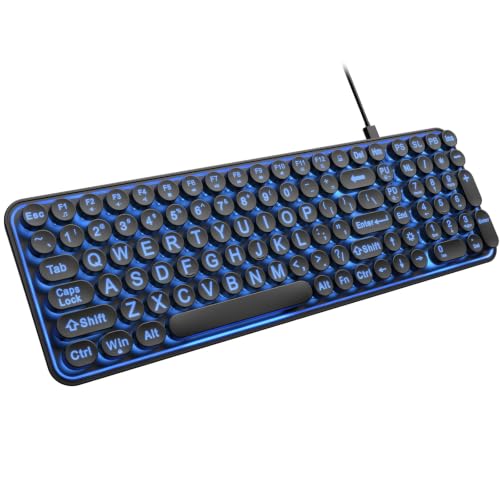
The EDJO retro board blends vintage looks with modern function. Round keycaps in a typewriter style give each key clear separation, which can help avoid hitting two keys at once. The oversize legends are claimed to be four times larger than standard.
A seven-color backlight offers three brightness levels, and the keys are described as quiet. The compact body saves desk space. Slightly spaced keys can reduce accidental double presses for people with arthritic hands.
Round keys feel unfamiliar after a standard layout, and a compact build may lack a numeric keypad. Compared with the K11PRO it has fewer brightness levels, and compared with the EDJO ergonomic it has a backlight but no wrist rest.
Best for: People who like the typewriter look and want separated keys
Check price on AmazonSpecs
- Keys: Round keycaps, typewriter style
- Backlight: 7 colors, 3 brightness levels
- Print: Claimed 4X larger than standard
- Body: Compact
Pros
- +Round keys give clear separation
- +Seven colors with three brightness levels
- +Quiet keys
- +Compact body saves space
Cons
- −Round keys feel unfamiliar
- −Compact layout may lack a number pad
iMBAPrice Large Font Backlit USB Keyboard
About this pick
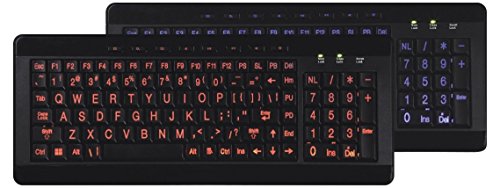
The iMBAPrice is the lowest-cost board in the guide and the most distinctive. It uses large font keys in an orange and blue scheme with a non-glare LED backlight. The listing says the large keys reduce eyestrain.
Soft silicone cushioned keys feel different from standard hard plastic, and the listing mentions anti-static and anti-interference qualities. A soft key can be gentle on the fingertips but may feel mushy for fast typers. The USB connection is plug and play.
Its bright color scheme is not for everyone, and the listing gives fewer details than the SABLUTE or EDJO boards. Compared with the yellow SABLUTE it offers a backlight but no wrist rest.
Best for: The lowest-cost backlit option for casual typing
Check price on AmazonSpecs
- Keys: Large font, orange and blue
- Backlight: Non-glare LED
- Feel: Soft silicone cushioned keys
- Connection: USB
Pros
- +Lowest cost of the six
- +Large font keys with a backlight
- +Soft silicone cushioned keys
- +Plug and play USB
Cons
- −Fewer details on the listing
- −Bright orange and blue look is not for every desk
ciciglow 104 Key Large Print High Contrast Keyboard
About this pick
The ciciglow is a plain 104 key wired keyboard with oversized print and high contrast keys. It is made for people with low vision and needs only to be plugged into the computer. That makes it an easy first large print keyboard.
The listing is thin, so details such as backlighting, wrist support and exact key size are not stated. ABS plastic is the stated material. Because specifics are limited, treat this as a no-frills choice rather than a feature leader.
Compared with the iMBAPrice it lacks a backlight, and compared with the SABLUTE yellow board it lacks a wrist rest. It suits someone who simply wants bigger letters.
Best for: A plug-in large print board with no extra features
Check price on AmazonSpecs
- Keys: 104 with oversized print
- Connection: Wired USB, plug and play
- Contrast: High contrast keys
- Material: ABS
Pros
- +Plug and play over USB
- +High contrast keys
- +Full 104 key layout
- +ABS build
Cons
- −Listing gives few details
- −No stated backlight or wrist rest
How We Evaluated These Large Print Keyboards Under $20 (2026)
Each pick was assessed across 5 criteria weighted for real-world use.
Readability
We compared key contrast, legend size claims and print style. The yellow SABLUTE leads on contrast with black on yellow, while the ciciglow gives the least detail. We treated multiplier claims as unverified.
Backlight control
We looked at brightness levels, color options and modes. The K11PRO offers eight levels and four modes, while the EDJO retro board offers three levels. Boards with no backlight, like the yellow SABLUTE, scored by contrast instead.
Comfort and support
We assessed wrist rests, stands and key feel. The yellow SABLUTE and the EDJO ergonomic board include rests, and the iMBAPrice uses soft silicone keys. Comfort scored higher when it reduced fatigue.
Key layout
We compared full-size and compact layouts and key shape. The K11PRO and EDJO ergonomic keep a number pad, while the retro board is compact with round caps. Familiar spacing scored well for easy adoption.
Value at this budget
We weighed features against price position, from the lowest-cost iMBAPrice to the SABLUTE boards at the top. The EDJO models sit in the middle and offer comfort or style. The best value picks add something readable, not only a lower price.
How to Choose the Right Large Print Keyboards Under $20 (2026)
By Vision Need
Choose the readability aid that fits your eyes.
| Need | Recommended pick | Why |
|---|---|---|
| Maximum key contrast | SABLUTE Yellow Keyboard | Black on yellow keys |
| Dim room typing | SABLUTE K11PRO Keyboard | Eight brightness levels |
| Separated, clear keys | EDJO Retro Round Keyboard | Round keycaps |
| Quiet typing with support | EDJO Ergonomic Keyboard | Wrist rest and silent keys |
| Low-cost backlit board | iMBAPrice Backlit Keyboard | Lowest cost with LED |
| Simple plug-in board | ciciglow 104 Key Keyboard | No extras |
By Budget
| Budget position | Recommended pick | What you get |
|---|---|---|
| Lowest-cost pick | iMBAPrice Backlit Keyboard | Large font with LED |
| Low-mid range | EDJO Retro Round Keyboard | Round keys and backlight |
| Mid-range | EDJO Ergonomic Keyboard | Wrist rest and quiet keys |
| Upper-mid range | ciciglow 104 Key Keyboard | Plain high contrast board |
| Upper range | SABLUTE K11PRO Keyboard | Eight-level backlight |
| Upper range | SABLUTE Yellow Keyboard | High contrast and wrist rest |
Backlit vs High Contrast
This is the central tradeoff in the guide.
Backlit
The K11PRO, EDJO retro and iMBAPrice boards light their keys, which helps in dim rooms. They need adjustable brightness to avoid glare. Recommendation: choose a backlit board if you type in the evening.
High contrast
The yellow SABLUTE and the ciciglow rely on printed contrast rather than lighting. They work in any bright room without settings. Recommendation: choose high contrast if your room is well lit and you want simplicity.
Comfort Features
A secondary axis is how much support you want.
| Preference | Recommended pick |
|---|---|
| I want a wrist rest | EDJO Ergonomic Keyboard |
| I want a wrist rest and phone holder | SABLUTE Yellow Keyboard |
| I want a tilting stand | SABLUTE K11PRO Keyboard |
| I want soft keys | iMBAPrice Backlit Keyboard |
| I want separated keys | EDJO Retro Round Keyboard |
For Low Vision Typing Specifically
Look for
Bold legends with high contrast, a backlight you can dim, and a light consistent key press. Avoid flashing color effects. A full-size layout with a number pad helps with banking and forms.
In this comparison
The yellow SABLUTE is the best match for contrast, while the K11PRO leads for adjustable lighting. The EDJO ergonomic adds quiet support. The ciciglow is the least detailed option.
When to Spend More
Spend more if
You type long sessions and want better lighting or comfort, which points to the K11PRO or the yellow SABLUTE. They sit at the top of this ranking. For mechanical feel or wireless use, step up to higher budget guides.
Save if
You type occasionally. The iMBAPrice is the lowest-cost pick, and the EDJO retro board adds round keys at a small step up. Both cover light use.
Frequently Asked Questions
Which large print keyboard is best for low vision?
The yellow SABLUTE has black print on yellow keys, a scheme some makers say is easier to read than white on black. The K11PRO adds a backlight with eight brightness levels. Choose based on your room lighting.
Are four times larger letters really that big?
The claim comes from the seller and is unverified. Guides suggest 2x to 4x is typical. Look at the photos and compare the legends with your current keyboard.
Is a backlit keyboard better?
It helps in dim rooms, but only if brightness is adjustable to avoid glare. The K11PRO offers eight levels and the EDJO retro three. In a bright room, high contrast keys are enough.
Should I avoid multicolor lighting?
Flashing or cycling effects can distract or disorient light-sensitive users. Pick one steady color and turn off any modes. The K11PRO lets you do this.
What helps with arthritic hands?
Slightly spaced keys and a light, consistent key press can reduce accidental presses. The EDJO retro board has round separated keys, and the EDJO ergonomic is quiet. A wrist rest also eases strain.
Do I need a wireless keyboard?
Not for a desktop. These wired boards need no batteries and have no pairing. Wireless boards need a USB receiver or Bluetooth and charging, which adds steps.
Bottom Line
best overall: SABLUTE K11PRO Wired Large Print Backlit Keyboard - best overall pick in this roundup.
See the full rankings above for all picks with pros, cons, and best-for summaries.
Browse on Amazon
All Prime-eligible options with current pricing.
Shop on Amazon →