5 Best Wired USB Large Print Keyboards (2026)
Compare five wired USB large print keyboards with backlit keys, wrist rests and quiet typing, picked for readability and easy plug and play setup.



At a Glance
A wired USB large print keyboard solves two problems at once: letters that are easy to read at a glance and a connection that never needs batteries, pairing or charging. That second part matters more than it sounds for anyone helping a parent or relative with a computer, because a keyboard that simply works the moment it is plugged in removes one of the most common sources of support calls. The five picks here all connect by cable and all aim at bold, easy to find lettering.
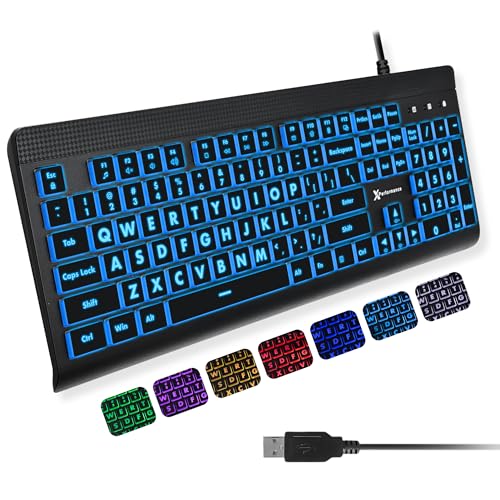
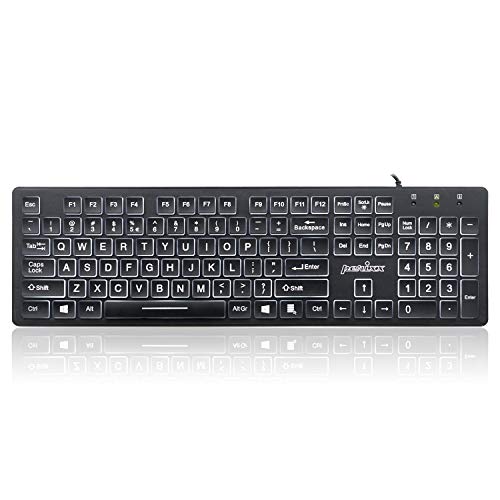
The spread inside this group is wider than the shared label suggests. The X9 Large Print Backlit keyboard and the Hamile Large Print Light Up keyboard are full size with 107 and 108 keys, a numeric keypad and seven backlight colors, while the Perixx PERIBOARD-317 is a slim low-profile board that measures 17.32 by 5.04 by 1.18 inches with a plain white backlight. The MIKUSO adds a wrist rest and a foldable tripod, and the KOPJIPPOM pairs a wrist rest with keys that are deliberately spaced a little apart.
We evaluated each listing on product specs and buyer feedback, not on claimed hands-on lab work. The order reflects how well each keyboard balances legibility, backlight control, typing comfort and simplicity for someone who wants a keyboard to behave like an appliance. Read the buying criteria first if you are unsure which trade-off matters most, then jump to the pick that matches your desk and your eyes.
6 Criteria to Look For Before Buying a Wired USB Large Print Keyboards (2026)
Key buying criteria so you get the right fit the first time.
Letter size and the 4X claim
Several listings, including the MIKUSO, Hamile and Perixx PERIBOARD-317, advertise letters four times larger than a standard keyboard. That figure is a marketing phrase with no common measurement standard, so judge legibility from the product photos instead of trusting the multiplier. Look for bold legends that fill most of each keycap, since a letter that is printed large but thin still reads poorly in dim light. As a rule of thumb, if you can read the legend from the photo at arm's length on your own screen, it will be comfortable at a real desk distance.
Contrast and backlight color
High contrast between the letter and the key matters more than raw size, and a steady white glow like the MIKUSO or the Perixx is usually easier on tired eyes than a changing rainbow. The X9 and Hamile offer seven colors, which is useful only if you pick one calm color and leave it there. Research on low-vision keyboards consistently favors simple schemes such as black on white or black on yellow over busy effects. Avoid any mode that flashes or cycles colors, since moving light can be distracting or disorienting for sensitive users.
Brightness steps and glare
A backlight is only helpful if you can turn it down, so count the brightness steps. The X9 gives four levels, the Hamile gives three, and the Perixx lets you switch the glow off entirely. A glossy desk or a white wall can bounce a bright backlight back into your eyes, which is the complaint most often raised about the MIKUSO. Aim for at least three steps, and test the lowest one in an evening room before deciding it is bright enough.
Key spacing and press feel
Spacing between keys changes how often a finger lands on the wrong one. The KOPJIPPOM deliberately spaces its large keys a little apart, while the Perixx uses a standard low-profile layout with tighter gaps. For stiff or arthritic hands, a light and consistent key press with a little air between keys reduces accidental double presses. If your hands tire quickly, favor a board with a wrist rest such as the KOPJIPPOM or MIKUSO over a flat slim model.
Wired reliability
All five picks use a USB cable, which avoids battery changes, pairing steps and receiver dongles. The X9 is described as plug and play with no drivers, which is the experience you want when setting it up for a relative. A wired board also never drops its connection mid sentence, which is the most frustrating wireless failure. Check that your computer has a free USB port and, if it only has USB-C, plan for a small adapter.
Footprint and layout
The X9 at 107 keys and the Hamile at 108 keys include a numeric keypad, which suits anyone who enters numbers or balances accounts. The Perixx measures 17.32 inches wide and only 1.18 inches tall, which makes it the easiest to store and the least intrusive on a small desk. Boards with a wrist rest, like the KOPJIPPOM and MIKUSO, add depth that can push the keyboard too close to the monitor. Measure your available desk depth and leave room for the rest before you buy.
5 Best Wired USB Large Print Keyboards (2026)
X9 Large Print Backlit Keyboard
About this pick
The X9 is the most complete wired large print keyboard in this group, and that is why it leads. It pairs bold lettering with a full 107-key layout that includes a number pad and 12 shortcut keys. The listing also promises four brightness levels, which is the control that decides whether a backlit keyboard feels helpful or glaring.
The four brightness steps are the real advantage here, because they let you dial the glow down for an evening living room and up for a dim study. That gives it finer adjustment than the Hamile, which offers three levels. The tradeoff is the row of 12 shortcut keys, which a casual typist can brush by accident, and the listing does not mention spill resistance, so keep drinks well away from it.
Setup is as simple as it gets: plug the cable into a USB port and it works without drivers. The full-size body needs a roomy desk, so it is a poorer fit for a tight laptop table than the slimmer Perixx PERIBOARD-317. Wiping the keys with a barely damp cloth is the sensible cleaning routine, and the bold legends should stay readable because they are part of the key design.
Best for: Anyone who wants the widest brightness control and a complete full-size layout.
Check price on AmazonSpecs
- Layout: Full size, 107 keys
- Backlight: 7 colors, 4 brightness levels
- Extras: 12 shortcut keys
- Connection: Wired USB, plug and play
Pros
- +Four brightness levels fine tune the glow
- +Full 107-key layout includes a number pad
- +Plug and play with no driver install
- +Bold print stays readable in dim rooms
Cons
- −Extra shortcut keys can be pressed by accident
- −No spill resistance is listed
- −Full-size body needs a roomy desk
MIKUSO Large Print Backlit Keyboard
About this pick
The MIKUSO takes the opposite approach to the colorful boards in this lineup by using a single white LED backlight that is described as bright and evenly distributed. For readers who find rainbow effects distracting, a steady white glow behind high-contrast letters is the calmer choice. The listing also advertises letters four times larger than a standard keyboard, a marketing claim worth treating as a rough guide rather than a measured fact.
The included wrist rest and foldable tripod make it friendlier for long sessions of email or video calls than a bare flat board. The compromise is that there is only one backlight color, and on a glossy desk the glow can bounce back and look harsh. It also gives up the multiple brightness steps that the X9 offers, so the lighting is simpler but less adjustable.
Ownership is easy because it is a plain wired USB keyboard with no batteries to change. The wrist rest adds depth, so measure your desk before ordering and make sure the board still sits at a comfortable distance from the screen. If you want a less cluttered look than the KOPJIPPOM, which also includes a wrist rest but adds a rainbow backlight, the MIKUSO is the quieter visual choice.
Best for: Readers who want a calm white backlight and a wrist rest without color effects.
Check price on AmazonSpecs
- Backlight: Even white LED
- Comfort: Wrist rest included
- Stand: Foldable tripod
- Connection: Wired USB
Pros
- +Even white backlight suits low light
- +Wrist rest and tripod support posture
- +High-contrast letters are easy to find
- +USB wired, so no batteries
Cons
- −Only one backlight color is offered
- −Backlight can glare on a glossy desk
- −Fewer lighting adjustments than the X9
Hamile Large Print Light Up Keyboard
About this pick
The Hamile is built for shared rooms where a loud clack would be a nuisance. It is a full-size, 108-key board with silent keys, a numeric keypad and a function row. The bold printed legends are described as four times larger than a standard keyboard, though that figure comes from the seller rather than from a measurement.
Three brightness levels and seven colors give it a flexible backlight, though it has one fewer brightness step than the X9. The foldable stands tilt the board to a more comfortable angle, which helps readers who look down at the keys. The main compromise is that it has no built-in wrist rest, so anyone with sore wrists should budget for a separate pad, and the full-size width demands a roomy desk.
Setup is plug and play, and the quiet keys make it a sensible choice for a spouse working beside a television. Compared with the MIKUSO, it trades the wrist rest for quieter typing and a wider color choice. For a mid-range outlay it covers the basics well, and it is easy to recommend when noise matters more than cushioning.
Best for: Shared rooms and quiet homes where typing noise is a concern.
Check price on AmazonSpecs
- Layout: Full size, 108 keys
- Backlight: 7 colors, 3 brightness levels
- Typing feel: Silent keys
- Stand: Foldable stands
Pros
- +Silent keys suit shared rooms
- +108 keys include keypad and function row
- +Foldable stand tilts the board comfortably
- +Three brightness levels are easy to cycle
Cons
- −No built-in wrist rest
- −Full-size width needs a roomy desk
- −Seven colors are more than most need
Perixx PERIBOARD-317 Backlit Keyboard
About this pick
The Perixx PERIBOARD-317 is the slimmest and most conventional board in the group. It measures 17.32 by 5.04 by 1.18 inches and uses low-profile keys in a standard full-size layout. The listing describes key fonts that are four times larger than standard, again a seller claim, with a bright white LED backlight that can be switched off.
That simplicity is its strength. There are no rainbow modes or shortcut rows, so it looks like an ordinary keyboard with a large print upgrade, which suits users who dislike a gadget feel. The tradeoff is that it offers no wrist rest, stand or color options, and the slim profile may feel flat to hands used to taller keys.
Because it sits low and has a clean body, it is simple to wipe down and easy to slide into a drawer. It costs less than the X9 or MIKUSO relative to what you get, which makes it the budget-friendly entry. If you want a wrist rest as well, the KOPJIPPOM is the step up, but the Perixx wins on discretion and desk footprint.
Best for: Buyers who want a plain, low-profile board with a simple white backlight.
Check price on AmazonSpecs
- Size: 17.32 x 5.04 x 1.18 in
- Backlight: White LED, switchable
- Keys: Low-profile, full-size layout
- Connection: Wired USB
Pros
- +Slim low-profile body fits small desks
- +White backlight can be turned off
- +Standard layout feels familiar
- +Lower cost than most picks here
Cons
- −No wrist rest or adjustable stand
- −Single backlight color only
- −Flat keys may feel shallow to some
KOPJIPPOM Large Print Backlit Keyboard
About this pick
The KOPJIPPOM stands out for one design choice: the large keys are slightly spaced apart. The listing says this lowers the chance of hitting the wrong key, which is a real benefit for anyone with unsteady fingers or stiff joints. It combines that spacing with big print letters, a seven color backlight and a built-in wrist rest.
The full-size body unfolds on rear feet to reduce hand fatigue, and the wrist rest makes it comfortable for longer typing sessions. The rainbow backlight is more decorative than useful for many readers, and the sheer depth of the board with its rest means it will crowd a shallow desk. It sits at the premium end of this lineup in cost, so you are paying for the spacing and cushioning rather than a feature the others lack.
Setup is plug and play with a USB cable, so there is nothing to charge. Compared with the MIKUSO, which also has a wrist rest, the KOPJIPPOM offers more color but a busier look. If error-prone keystrokes are your main frustration, the spacing makes it the one to try first.
Best for: Typists who hit neighboring keys by mistake and want a cushioned wrist rest.
Check price on AmazonSpecs
- Key layout: Slightly spaced keys
- Backlight: 7 color LED
- Comfort: Wrist rest, fold-out feet
- Connection: Wired USB
Pros
- +Spaced keys reduce wrong key presses
- +Built-in wrist rest cushions the hands
- +Fold-out feet adjust the typing angle
- +Plug and play USB connection
Cons
- −Deep body crowds shallow desks
- −Rainbow backlight is more than most need
- −Premium cost relative to the other picks
How We Evaluated These Wired USB Large Print Keyboards (2026)
Each pick was assessed across 5 criteria weighted for real-world use.
Legibility of the lettering
We looked at how each listing describes and shows its printed legends, including the claimed size multiplier and any contrast notes. Because the four times larger claim is not independently measured, we weighted visible boldness and contrast above the number. The X9 and Perixx scored well for clear presentation, while the least documented listings lost points.
Backlight control
We compared how many brightness levels and colors each board offers and whether the light can be turned off. The X9 with four levels sits at the strong end, and the Hamile with three is close behind. Simpler white-only boards like the MIKUSO scored well for calm, steady lighting even though they offer fewer adjustments.
Typing comfort
We assessed key spacing, wrist support and typing angle from product specs and buyer feedback. The KOPJIPPOM and MIKUSO earned credit for their wrist rests, and the KOPJIPPOM for its spaced keys. The Perixx, as the most basic pick with no rest or stand, scored lowest on comfort even though it is the slimmest.
Simplicity of setup
A keyboard for a family member should work the moment it is plugged in. We favored wired plug and play boards with no drivers, and the X9 explicitly promises this. We penalized extra complexity such as long shortcut rows or unused effects that a casual typist might trigger by accident.
Value and desk fit
We weighed relative cost against what each board includes, and compared footprints for small desks. The Perixx is the lowest-cost pick and the most compact, while the KOPJIPPOM sits at the premium end for its spacing and cushioning. Overall ranking balances these trade-offs so the best overall pick is the X9 and the most basic is the Perixx.
How to Choose the Right Wired USB Large Print Keyboards (2026)
By Primary Need
Start with the problem you want to fix, then match it to the pick that addresses it directly.
| Your situation | Recommended pick |
|---|---|
| Need fine control over backlight brightness | X9 Large Print Backlit Keyboard |
| Want a calm single-color glow | MIKUSO Large Print Backlit Keyboard |
| Share a room and need quiet keys | Hamile Large Print Light Up Keyboard |
| Have a small desk or want a plain board | Perixx PERIBOARD-317 |
| Hit the wrong key often | KOPJIPPOM Large Print Backlit Keyboard |
If two rows apply, favor the one tied to your most frequent frustration.
By Budget
| Budget tier | Recommended pick |
|---|---|
| Lowest-cost pick | Perixx PERIBOARD-317 |
| Mid-range, quiet typing | Hamile Large Print Light Up Keyboard |
| Mid-range, wrist rest and white glow | MIKUSO Large Print Backlit Keyboard |
| Higher tier, most adjustable backlight | X9 Large Print Backlit Keyboard |
| Premium tier, spaced keys and wrist rest | KOPJIPPOM Large Print Backlit Keyboard |
Slim Board vs Wrist Rest Board
This is the main physical trade-off in the group.
Slim board
The Perixx PERIBOARD-317 and the X9 stay compact and easy to store, with no deep palm cushion. They suit small desks and users who prefer a conventional feel. Pick this side if desk depth is limited.
Wrist rest board
The MIKUSO and KOPJIPPOM include a rest and extra support for long typing sessions. They add depth, so they need a roomier desk. Pick this side if your wrists or hands tire quickly.
Recommendation: choose the Perixx for tight spaces and the KOPJIPPOM or MIKUSO for comfort.
By Backlight Style
How much glow and color you want changes which board fits.
| Backlight preference | Recommended pick |
|---|---|
| Many brightness steps, many colors | X9 Large Print Backlit Keyboard |
| Steady white only | MIKUSO Large Print Backlit Keyboard |
| White that can be switched off | Perixx PERIBOARD-317 |
| Three simple levels and colors | Hamile Large Print Light Up Keyboard |
| Rainbow with a wrist rest | KOPJIPPOM Large Print Backlit Keyboard |
For Typing in a Dim Evening Room Specifically
Low light is where large print backlit keyboards earn their keep.
Look for
Look for a backlight with several brightness steps and a calm color, because a glow that is too bright reflects off the desk and screen. Being able to turn it down matters as much as being able to turn it up.
In this comparison
The X9 Large Print Backlit Keyboard fits best with its four brightness levels. The MIKUSO is the best alternative if you prefer a single even white light.
When to Spend More
Step up only when a specific feature solves a real annoyance.
Spend more if
Spend more if wrong key presses or wrist strain are frequent complaints, which points to the KOPJIPPOM, or if you want the most adjustable lighting, which points to the X9. These features change daily comfort.
Save if
Save if you want a plain board and mostly type short messages. The Perixx PERIBOARD-317 and the Hamile cover the essentials without extras you may never use.
Frequently Asked Questions
How do I choose between the X9 and the Hamile?
Both are full-size boards with a numeric keypad and seven backlight colors. The X9 offers four brightness levels and 12 shortcut keys, while the Hamile offers three levels and silent keys. Choose the X9 for finer lighting control and the Hamile if quiet typing matters more.
Are the 4X larger letter claims accurate?
That phrase is a seller claim and there is no shared measurement standard behind it. Different brands may be comparing against different standard keyboards. Judge readability by looking at the printed legends in the photos rather than the multiplier.
Is a wired keyboard better than wireless for seniors?
Wired is usually simpler because there are no batteries, no pairing and no receiver to lose. It also avoids dropped connections. The only cost is the cable and the need for a free USB port.
Do I need a backlight at all?
A backlight helps in dim rooms, but it is not required if you type in good light. If you do want one, choose a model with adjustable brightness so it never glares. Avoid flashing or color-cycling modes, which can distract light-sensitive users.
Which pick is best for a small desk?
The Perixx PERIBOARD-317 is the slimmest at 17.32 by 5.04 by 1.18 inches, so it takes the least room. Boards with wrist rests like the MIKUSO and KOPJIPPOM add depth. Measure your desk before ordering any of them.
How should I clean a large print keyboard?
Unplug it and wipe the keys with a barely damp cloth, never a soaking one. Because the legends are part of the keycaps, gentle cleaning should keep them readable. Keep drinks away, since the X9 listing does not mention spill resistance.
Are the color effects worth having?
For most people a single steady color is enough. The seven color boards let you pick one and leave it, which is the practical way to use them. If you find rainbow effects tiring, the MIKUSO or Perixx with a plain white glow is the calmer option.
Bottom Line
best overall: X9 Large Print Backlit Keyboard - best overall pick in this roundup.
See the full rankings above for all picks with pros, cons, and best-for summaries.
Browse on Amazon
All Prime-eligible options with current pricing.
Shop on Amazon →