6 Best Large Print Keyboards For Seniors (2026)
Six large print keyboards for seniors compared on contrast, spill protection, wrist support and wireless choices, for easier everyday typing at home.




At a Glance
Typing should not feel like a vision test, yet many seniors and the family members who buy for them squint at pale, tiny key legends every time they check email or video call a grandchild. This guide focuses on large print keyboards that make the keys readable at a glance, without pushing a medical or assisted-living angle. The six picks range from a 104-key MIKUSO with a wrist pad to a wireless HXMJ keyboard and mouse set that needs only one USB receiver.
What separates good from merely large is the combination of contrast, comfort and care. The MIKUSO wired board uses bold white letters on black keys and adds an ergonomic wrist pad, while the BOOGIIO has yellow keycaps with black print and a spill-resistant design. The X9 gives a 107-key layout with 12 shortcut keys, and the HXMJ is the one cordless pick, with a 14.5 by 5.8 inch slim body.
We evaluated each keyboard from product specs and buyer feedback and focused on what helps an active adult in their late fifties through seventies. That means clear legends, a layout that matches the keyboard they already know, minimal setup and fewer things to charge. If you are buying for a parent, a wired board is usually the safest choice because it never needs batteries or pairing.
6 Criteria to Look For Before Buying a Large Print Keyboards For Seniors (2026)
Key buying criteria so you get the right fit the first time.
Contrast over size
Most boards here claim letters four times larger than standard, and one guide says the real range is 2x to 4x and unverified. The MIKUSO wired model uses white on black, the BOOGIIO uses black on yellow, and some makers say black on yellow is easier to read than white on black. Look at the photos and pick the scheme you can read at arm's length. Contrast beats a number on the box.
Familiar layout
A standard layout reduces relearning, which is a big deal for seniors who have typed on the same board for decades. The MIKUSO wired model keeps a standard 104 keys with a numeric keypad, while the X9 adds 12 shortcut keys across 107 keys. Extra keys can be pressed by accident, so choose a standard layout if simplicity matters. A familiar board also eases the move from the old keyboard.
Wired or wireless
Wired boards avoid batteries and pairing, while wireless boards use a USB receiver or Bluetooth. The HXMJ set uses one 2.4G receiver for both keyboard and mouse, which saves a port but adds battery care. For a parent living alone, a wired board is the safest option. Wireless is better when a clean desk matters more.
Backlight type
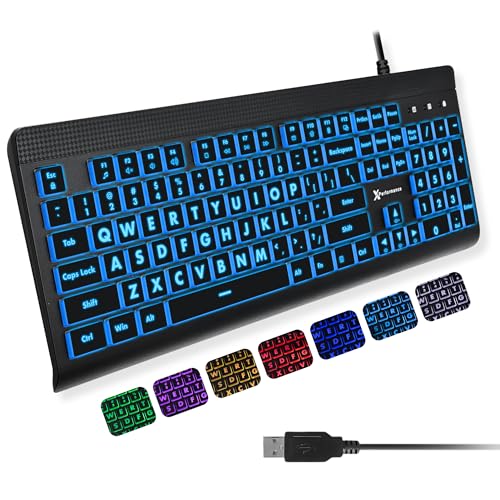
Backlighting helps in dim rooms but needs adjustable brightness to avoid glare. The X9 and QUASIO offer seven colors with four brightness levels, while the backlit MIKUSO uses steady white. Avoid flashing or cycling modes, which can disorient light-sensitive users. Choose a backlight that you can set once and forget.
Wrist and hand comfort
Slightly spaced keys can reduce accidental double presses for arthritic hands, and a light, consistent press is easier on the fingers. The MIKUSO boards include a wrist pad, while the HXMJ is slim at 0.2 inches. A pad that is too tall can push wrists upward, so check the posture. Try a board in person when possible.
Spill protection and durability
Accidents near a keyboard are common, and the BOOGIIO is designed with spill resistance to protect its electronics. Spill resistant is not waterproof, so wipe up liquids quickly. Printed legends can fade, so check verified feedback about wear. Durability matters because a replacement is another setup chore.
6 Best Large Print Keyboards For Seniors (2026)
MIKUSO Large Print Wired Keyboard for Seniors
About this pick
The MIKUSO wired keyboard is the best overall pick because it keeps the layout familiar while making the lettering far easier to see. It uses bold white letters on black keys, claimed to be four times larger than standard, on a standard 104-key QWERTY layout with a dedicated numeric keypad. Keeping the usual key positions means that typing habits carry over without relearning.
A built-in ergonomic wrist pad and quiet keystrokes round out the comfort features. The tradeoff is that there is no backlight, so it depends on room lighting, and the dark keys can show dust and fingerprints. It is also a larger board with a wrist pad, so check your desk depth.
Setup is plug and play over USB, with no software or batteries to manage. Choose this version for daytime computing, and the backlit MIKUSO if evenings are your main typing time.
Best for: Daytime email and browsing with a familiar layout and wrist support
Check price on AmazonSpecs
- Layout: Standard 104-key with numeric keypad
- Contrast: Bold white letters on black keys
- Comfort: Built-in ergonomic wrist pad
- Connection: USB wired
Pros
- +Bold white letters on black keys read at a glance
- +Standard 104-key layout with a numeric keypad
- +Wrist pad supports comfortable posture
- +Quiet keystrokes suit shared spaces
Cons
- −No backlight, so evening use relies on room light
- −Wrist pad adds depth on a small desk
MIKUSO Large Print Backlit Keyboard for Seniors
About this pick
This MIKUSO adds a white LED backlight to the same large print idea, which makes it the better choice for evening use. The light is described as bright and evenly distributed, and white is the calmest backlight color for tired eyes. The letters are claimed to be four times larger than standard, with high contrast to match.
It also includes a wrist rest and a foldable tripod, which lets you raise the back of the board to a comfortable angle. The tradeoff is that a backlight can create glare on a glossy desk, and a single color means you cannot tweak the tone.
Ownership is simple, with USB plug and play and no batteries. Compared with the X9, which offers seven colors and four brightness levels, the MIKUSO is simpler and less distracting. Pick it for a bedroom or study where the light is low, and the plain MIKUSO if you only type by day.
Best for: Evening typists who want a calm white backlight
Check price on AmazonSpecs
- Backlight: White LED, evenly lit
- Print: Claimed 4X larger, high contrast
- Comfort: Wrist rest and foldable tripod
- Connection: USB wired
Pros
- +Even white backlight suits low light without distraction
- +Wrist rest and tripod improve typing angle
- +High-contrast large print is easy to find
- +No batteries or pairing required
Cons
- −Single backlight color with no tone control
- −Backlight can glare on glossy desks
X9 Performance Large Print Backlit Keyboard
About this pick
The X9 is the most feature-rich board here, with a 107-key full-size layout including a number pad and 12 shortcut keys. The shortcut keys can speed up common tasks like opening a browser or adjusting volume, which helps if you do many of the same actions daily. Large, bold print is the headline, and the board is designed for easy reading.
Backlighting offers seven colors and four brightness levels, which is more flexible than the single white light on the MIKUSO. The tradeoff is that more settings and extra keys mean more to learn, and shortcut keys can be pressed by accident. Anyone who wants the simplest possible board should pick the plain MIKUSO instead.
Setup is plug and play, and the cable is wired USB with no batteries. Compared with the BOOGIIO, which has yellow keycaps and spill resistance, the X9 offers lighting flexibility but no spill protection is listed.
Best for: Daily users who want shortcut keys and adjustable lighting
Check price on AmazonSpecs
- Layout: 107-key full size with number pad
- Shortcuts: 12 shortcut keys
- Backlight: 7 colors, 4 brightness levels
- Connection: USB wired
Pros
- +107 keys include a number pad and 12 shortcut keys
- +Four brightness levels fine tune the backlight
- +Bold print stays readable in any light
- +Plug and play with no drivers needed
Cons
- −Extra shortcut keys can be pressed by accident
- −No spill resistance is listed
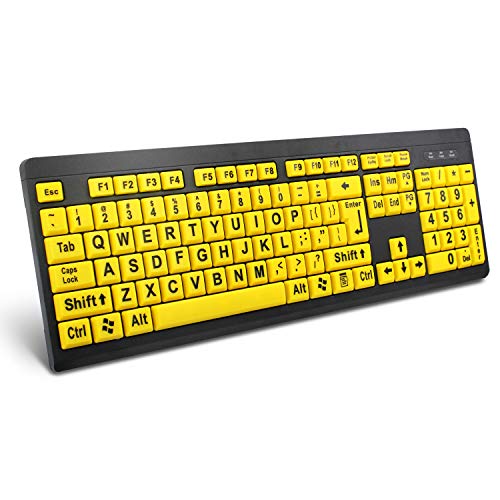
BOOGIIO Large Print High Contrast Keyboard
About this pick
The BOOGIIO is the pick for households where a coffee cup and a keyboard share a desk. It is designed with spill resistance so accidental splashes are less likely to damage the electronics. Yellow keycaps with large black print also give strong contrast, and command keys are printed in a larger, bolder font.
The tradeoff is that spill resistant does not mean waterproof, so wipe up liquid quickly and avoid soaking the board. The yellow keycaps also stand out visually on a desk, and there is no backlight. It is a good fit for brighter rooms where contrast is enough.
It is wired, so it plugs in and works without batteries. Choose it over the X9 if durability and contrast matter more than lighting options.
Best for: Kitchen or den desks where spills are a real risk
Check price on AmazonSpecs
- Contrast: Yellow keycaps with black print
- Protection: Spill-resistant design
- Print: Large letters and bold command keys
- Connection: USB wired
Pros
- +Spill-resistant design protects the electronics
- +Yellow keys with black print are very clear
- +Bold command keys help locate Enter and Shift
- +No batteries or pairing
Cons
- −No backlight for dim rooms
- −Spill resistant is not waterproof
HXMJ Wireless Large Print Keyboard and Mouse Set
About this pick
The HXMJ set is the cordless choice for those who dislike cables across the desk. A single 2.4G USB receiver serves both the keyboard and the mouse, saving a USB port. The keycaps are white with crisp black letters for high contrast, and the board is ultra-thin at about 0.2 inches.
Scissor key switches give a smooth, quiet, laptop-like feel, and the 102-key layout keeps a numeric keypad. It has no backlight listed, so it also depends on room light.
Setup is quick, since you plug in the receiver and start typing, but you will need to keep spare batteries on hand. Compared with the wired MIKUSO, it gives a tidier desk but adds a maintenance chore. Choose it if a clean look matters, and a wired board if reliability matters most.
Best for: Cable-free desks that want a keyboard and mouse together
Check price on AmazonSpecs
- Layout: 102 keys, ultra-thin
- Size: 14.5 x 5.8 x 0.2 inches
- Switches: Quiet scissor key switches
- Connection: 2.4G wireless, one USB receiver
Pros
- +One USB receiver serves both keyboard and mouse
- +Quiet scissor switches feel like a laptop
- +Ultra-thin body is easy to store
- +White keys with black print contrast well
Cons
- −Needs batteries and a USB receiver port
- −No backlight is listed
QUASIO Large Print Backlit Keyboard
About this pick
The QUASIO is the lowest-cost pick here and offers large print, a seven-color backlight and four brightness levels. It is designed to make keys easy to find, with the letters claimed to be four times larger than standard. A full-size layout with a numeric keypad keeps the usual key arrangement.
The tradeoff is fewer comfort extras, since there is no wrist rest, and budget boards can have simpler build quality. Colored backlighting is optional, so pick a steady color and avoid effects. It is a sensible first large print board for someone unsure if they will like one.
It is plug and play, with no batteries. Compared with the X9, it offers a similar backlight at a lower cost, but without the 12 shortcut keys. Choose it for a guest room or a simple replacement.
Best for: A low-cost first large print board with adjustable lighting
Check price on AmazonSpecs
- Print: Claimed 4x larger than standard
- Backlight: 7 colors, 4 brightness levels
- Layout: Full size with numeric keypad
- Connection: USB wired
Pros
- +Lowest cost in this lineup
- +Four brightness levels and seven colors
- +Full-size layout with a numeric keypad
- +Plug and play wired connection
Cons
- −No wrist rest or shortcut keys
- −Basic build compared with higher-priced picks
How We Evaluated These Large Print Keyboards For Seniors (2026)
Each pick was assessed across 5 criteria weighted for real-world use.
Legibility
We compared stated print size, key color and contrast scheme. The BOOGIIO and the MIKUSO wired model stood out for high-contrast schemes, while the QUASIO relies on a backlight. The four-times-larger claim was treated as marketing, not a measurement.
Layout familiarity
We looked at key count and whether the board keeps a standard arrangement. The MIKUSO wired model at 104 keys is the most standard, and the X9 at 107 keys adds shortcut keys. Simpler layouts scored higher for easy adoption.
Comfort and posture
We evaluated wrist pads, tilt options and key feel from specs and buyer feedback. The MIKUSO models with wrist pads ranked highest, and the HXMJ slim body ranked well for light travel. Posture matters for longer sessions.
Setup and upkeep
We scored each board on how little care it needs. Wired boards such as the MIKUSO and BOOGIIO need no batteries, while the HXMJ needs batteries and a receiver. The fewer chores, the better.
Value and feedback
The QUASIO is the lowest-cost pick and the HXMJ set the highest.
How to Choose the Right Large Print Keyboards For Seniors (2026)
By Typing Habit
| Typing habit | Recommended pick |
|---|---|
| Daytime email and browsing | MIKUSO Large Print Wired Keyboard for Seniors |
| Evening typing in a dim room | MIKUSO Large Print Backlit Keyboard for Seniors |
| Lots of repeated tasks | X9 Performance Large Print Backlit Keyboard |
| Coffee near the keyboard | BOOGIIO Large Print High Contrast Keyboard |
| Keyboard and mouse with no cables | HXMJ Wireless Large Print Keyboard and Mouse Set |
By Budget
| Budget tier | Recommended pick |
|---|---|
| Lowest-cost pick | QUASIO Large Print Backlit Keyboard |
| Lower mid-range | MIKUSO Large Print Wired Keyboard for Seniors |
| Mid-range | MIKUSO Large Print Backlit Keyboard for Seniors |
| Upper mid-range | X9 Performance Large Print Backlit Keyboard |
| High | BOOGIIO Large Print High Contrast Keyboard |
| Premium in this guide | HXMJ Wireless Large Print Keyboard and Mouse Set |
Confirm current pricing on Amazon.
Wired vs Wireless
Wired
Wired boards plug in and never need charging. The MIKUSO pair, X9, BOOGIIO and QUASIO fall here. Choose wired if you want zero maintenance.
Wireless
A wireless set clears the desk of cables and shares one receiver for keyboard and mouse. The HXMJ is the wireless pick here. Choose it if a tidy desk matters more than battery care.
Recommendation: most buyers should pick wired; pick the HXMJ for a cable-free setup.
By Lighting Preference
| Preference | Recommended pick |
|---|---|
| Calm single white light | MIKUSO Large Print Backlit Keyboard for Seniors |
| Adjust color and four brightness levels | X9 Performance Large Print Backlit Keyboard |
| Same options at a low cost | QUASIO Large Print Backlit Keyboard |
| No backlight, rely on contrast | BOOGIIO Large Print High Contrast Keyboard |
For Video Calls and Email Specifically
Look for
A familiar layout, bold legends and a light key press make email easier, and a quiet board is kinder on video calls. Skip color-cycling lighting.
In this comparison
The MIKUSO Large Print Wired Keyboard for Seniors pairs a standard 104-key layout with quiet keystrokes and bold letters, which suits email and calls well.
When to Spend More
Spend more if
You need spill protection or cable-free freedom; the BOOGIIO adds spill resistance and the HXMJ set adds wireless with one receiver.
Save if
You type a little each day; the QUASIO gives large print and a backlight at the lowest cost here, and the plain MIKUSO adds a wrist pad for a bit more.
Frequently Asked Questions
How do I choose between a wired and wireless large print keyboard?
Choose wired, such as the MIKUSO wired model, if you want no batteries and no pairing. Choose wireless, such as the HXMJ set, if cable clutter bothers you and you do not mind replacing batteries. Wireless boards also need a free USB port for the receiver.
Is a backlit keyboard necessary for seniors?
Not always. A backlight helps in dim rooms, but high contrast legends are enough in a bright room. The plain MIKUSO and BOOGIIO rely on contrast, while the X9 and QUASIO add a seven-color backlight. Choose based on where and when you type.
Are the cheaper large print keyboards worth buying?
The lowest-cost QUASIO delivers large print and a backlight at a modest cost, so it is a fair first choice. You give up extras such as a wrist rest or shortcut keys. Upgrade if comfort or spill protection matters.
Will large print letters wear off?
Printed legends can fade after months of heavy use, which is a common complaint across keyboard types. Check verified buyer feedback for each model, and avoid harsh cleaners that can strip ink. Gentle wiping with a dry or barely damp cloth is the safest care.
Is four times larger really four times larger?
The claim appears on most listings, but it is unverified and one guide suggests it ranges from 2x to 4x. Do not rely on the number. Compare photos against the keycap size and focus on contrast and spacing.
Can a large print keyboard help with arthritis?
Large print itself helps with vision, not joints, but features like slightly spaced keys, a light press and a wrist pad can ease finger and wrist strain. The MIKUSO boards include a wrist pad. If joint pain is a concern, try a board in person when possible.
Bottom Line
best overall: MIKUSO Large Print Wired Keyboard for Seniors - best overall pick in this roundup.
See the full rankings above for all picks with pros, cons, and best-for summaries.
Browse on Amazon
All Prime-eligible options with current pricing.
Shop on Amazon →