6 Best Backlit Large Print Keyboards (2026)
Six backlit large print keyboards compared on backlight type, connection, wrist support and noise, for comfortable typing in dim rooms and at night.


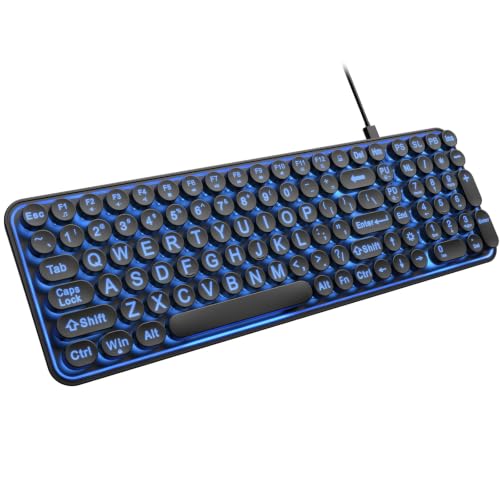
At a Glance
A large print keyboard solves half the problem, and a backlight solves the other half when the room is dim or the evening is long. The challenge is that many backlit boards pair large legends with flashy rainbow lighting that is more distracting than helpful. This guide compares six that handle both jobs, from the TECURS with a steady white LED and seven brightness levels to the Atelus with a rainbow backlight and the OMOTON with a calm white glow.
The six differ in connection and lighting style. The TECURS and OMOTON offer a dual USB and Type-C connector for old and new computers, the HeengYanson adds a wrist rest with soft-touch keys, and the KOPJIPPOM is a wireless combo with seven colors and one USB plug for keyboard and mouse. The EDJO takes a different path, with retro round keys and a typewriter look.
We evaluated each keyboard from product specs and buyer feedback, concentrating on how easy the backlight is to control and how readable the legends stay when lit. For most readers, a steady white or warm backlight is easier on aging eyes than a rainbow cycle. Choose the style you can set once and forget.
6 Criteria to Look For Before Buying a Backlit Large Print Keyboards (2026)
Key buying criteria so you get the right fit the first time.
Steady versus rainbow light
A steady white or warm backlight is easier on aging eyes than a rainbow cycle. The TECURS and OMOTON offer calm white light, while the Atelus uses rainbow lighting. Flashing or color-changing effects can disorient light-sensitive users. Choose the style you can set once and forget.
Brightness steps
Backlighting needs adjustable brightness to avoid glare. The TECURS has seven brightness levels, the EDJO three, and the HeengYanson adjustable brightness. More steps let you match the room. Some models reset to a default color at power-up, so check feedback.
Connector type
Newer laptops often have only Type C, and older desktops use USB A. The TECURS has a 2-in-1 USB plus Type C connector, and the OMOTON has dual USB C and USB A. For the OMOTON, the Type C end must stay plugged in when you use USB A. Check your port before buying.
Legend size and contrast
The four-times-larger claim is common and unverified, and one guide suggests the real range is 2x to 4x. Compare key dimensions and contrast instead. A lit legend on a dark key reads better in the dark, while bright rooms need strong contrast. Large print is a start, not a guarantee.
Comfort and noise
The HeengYanson includes a wrist rest and soft-touch keys, and the TECURS offers silent typing. Slightly spaced keys can reduce accidental double presses for arthritic hands. A tall wrist pad can push wrists upward, so check the fit. Try a board in person if possible.
Wired or wireless
Wired boards avoid battery concerns, while wireless uses a USB receiver or Bluetooth. The KOPJIPPOM combo shares one receiver for keyboard and mouse. Backlit wireless boards drain batteries faster. Choose wired for simplicity.
6 Best Backlit Large Print Keyboards (2026)
TECURS Large Print Backlit Keyboard
About this pick
The TECURS is the best overall backlit pick because it keeps the lighting calm and the setup flexible. A bright, evenly distributed white LED backlight lights the oversized legends, which are claimed to be four times larger than standard. It offers seven adjustable brightness levels, so you can fine tune the glow for the room.
The 2-in-1 connector supports both USB and Type C, so the same keyboard works with older desktops and newer laptops. Dedicated multimedia keys give quick access to volume and playback, which is handy for video calls. The tradeoff is that it has a single backlight color, so anyone who wants colors will prefer the HeengYanson or KOPJIPPOM.
Ownership is simple, with a wired plug and no batteries. Choose it over the OMOTON if you want more brightness steps and the media keys.
Best for: Evening typists who want a steady white light and flexible plugs
Check price on AmazonSpecs
- Print: Claimed 4X larger than standard
- Backlight: White LED, 7 brightness levels
- Connector: 2-in-1 USB plus Type C
- Extras: Dedicated multimedia keys, silent typing
Pros
- +Even white backlight with seven brightness levels
- +USB and Type C in one connector
- +Dedicated multimedia keys for volume and playback
- +Silent full-size layout
Cons
- −Only one backlight color
- −Wired cable limits how far you can move it
OMOTON Large Print Backlit Keyboard
About this pick
The OMOTON pairs oversize font keys with a soft white backlight, which the listing says reduces eye fatigue during long work. It carries both a USB C and a USB A connector, so it works with older PCs and newer laptops without an adapter. The letters are claimed to be four times larger than standard.
The white light is gentle, and that suits readers who find colored LEDs busy. The tradeoff is a connector quirk: if you use the USB A interface, the Type C end must stay plugged into the keyboard, so setup takes one extra look at the instructions. It also offers fewer backlight levels than the TECURS.
Compared with the HeengYanson, it lacks the wrist rest and color options. Choose it for a bedroom desk where calm light is the priority.
Best for: Calm, single-color light with both old and new ports
Check price on AmazonSpecs
- Print: Claimed 4X larger than standard
- Backlight: Soft white
- Connector: Dual USB C and USB A
- Note: Plug Type C into the board when using USB A
Pros
- +Soft white backlight reduces eye fatigue
- +Works with USB C and USB A computers
- +Oversize font keys are easy to find
- +Lower cost than most of the group
Cons
- −Connector setup needs a careful read of the note
- −No wrist rest or color options
HeengYanson Large Print Backlit Keyboard with Wrist Rest
About this pick
The HeengYanson stands out for including a wrist rest and soft-touch keys for long typing. The silent keys reduce noise, and the large print legends are lit by a seven-color backlight with adjustable brightness. It designed for hours at the desk, which is a clear advantage over the lighter boards.
The tradeoff is that colorful backlights can distract, so pick a steady color. A wrist rest also adds depth, and some users find the pad too tall.
Ownership is easy, with USB plug and play. Compared with the TECURS, it adds the wrist rest and colors but lacks the dual connector. Choose it if you type for long sessions and want the comfort built in.
Best for: Long typing sessions where wrist comfort matters
Check price on AmazonSpecs
- Backlight: 7 colors with adjustable brightness
- Comfort: Wrist rest included
- Keys: Soft-touch, silent
- Setup: USB plug and play
Pros
- +Wrist rest included for long sessions
- +Soft-touch keys are quiet
- +Seven colors with adjustable brightness
- +Simple USB plug and play
Cons
- −Wrist rest adds depth on a small desk
- −Colors can distract if not set steady
Atelus Large Print Backlit Keyboard
About this pick
The Atelus is for readers who actually like colorful lighting. The rainbow backlight illuminates the keys for typing at night, and the legends are claimed to be four times larger than standard. A full-size layout and plug and play setup keep it easy to use.
The tradeoff is that a rainbow backlight is the least calm choice here, and flashing or color changing effects can disorient light-sensitive users. It also has no wrist rest.
Setup needs no drivers. Compared with the TECURS, it offers color but fewer brightness steps. Choose it only if you enjoy color and can set a steady mode.
Best for: Typists who enjoy a colorful backlight at night
Check price on AmazonSpecs
- Print: Claimed 4 times larger than standard
- Backlight: Rainbow illuminated LED
- Layout: Full size
- Setup: Plug and play, no drivers
Pros
- +Rainbow backlight lights each key
- +Full-size layout keeps a familiar arrangement
- +No drivers needed
- +Large legends are easy to find
Cons
- −Rainbow lighting can distract or disorient
- −No wrist rest and one of the higher prices
KOPJIPPOM Large Print Wireless Keyboard and Mouse
About this pick
The KOPJIPPOM is the only wireless set in this guide, pairing a backlit large print keyboard with a mouse. One USB receiver serves both, and the receiver sits on the back of the keyboard with an indicator bar so it is hard to lose. A seven-color backlight with adjustable brightness lights the oversize letters.
The wireless link frees the desk of cables, and the combo covers Windows and Mac OS. The tradeoff is that a backlit wireless board draws battery power, so expect to recharge or replace batteries.
Setup is quick. Compared with the wired TECURS, you get a mouse and a cleaner desk, but add a battery chore. Choose it if you want a matched pair.
Best for: A matched wireless keyboard and mouse with backlight
Check price on AmazonSpecs
- Backlight: 7 adjustable colors
- Connection: One USB receiver for both
- Compatibility: Windows and Mac OS
- Set: Keyboard and mouse combo
Pros
- +Keyboard and mouse share one USB receiver
- +Receiver has an indicator and a spot on the board
- +Seven colors with adjustable brightness
- +Works with Windows and Mac
Cons
- −Backlit wireless drains batteries
- −Highest cost in this lineup
EDJO Large Print Retro Round Key Keyboard
About this pick
The EDJO blends vintage looks with modern function, featuring round keycaps in a typewriter style. The oversize legends are claimed to be four times larger than standard, and a seven-color backlight offers three brightness levels. It is the lowest-cost pick in the guide.
Round keys have a distinctive feel, and some users like the clear separation between keys. The tradeoff is that round keycaps present a smaller target than flat ones and can feel unfamiliar after years on a standard board. The compact body may also lack a numeric keypad.
It connects by USB. Compared with the OMOTON, it adds a retro look at a lower cost. Choose it for style, or as a second keyboard.
Best for: Style-minded typists who like a typewriter look
Check price on AmazonSpecs
- Keys: Retro round keycaps, typewriter style
- Backlight: 7 colors, 3 brightness levels
- Print: Claimed 4X larger than standard
- Typing: Quiet keys, compact body
Pros
- +Round keys give clear separation
- +Lowest cost in this lineup
- +Three brightness levels with seven colors
- +Quiet keys and a compact body
Cons
- −Round keys feel unfamiliar after a standard layout
- −Compact layout may lack a numeric keypad
How We Evaluated These Backlit Large Print Keyboards (2026)
Each pick was assessed across 5 criteria weighted for real-world use.
Backlight quality
We compared color options, brightness steps and the calmness of each light. The TECURS with seven brightness levels led, and the Atelus rainbow lighting ranked lower for distraction. Steady light scored higher than effects.
Legend readability
We looked at print size claims, key color and lit contrast. All boards claim four times larger print, so we treated that as marketing. Contrast and backlight evenness mattered more.
Connectivity
We checked connector types and wireless options. The TECURS and OMOTON have dual connectors, and the KOPJIPPOM is wireless. Flexible connectors scored higher.
Comfort
We evaluated wrist rests, key feel and noise from specs and buyer feedback. The HeengYanson led on wrist support and the EDJO has quiet round keys. Comfort matters for evening sessions.
Value
The EDJO is the lowest cost and the KOPJIPPOM combo the highest.
How to Choose the Right Backlit Large Print Keyboards (2026)
By Backlight Style
| Preference | Recommended pick |
|---|---|
| Calm white with many brightness steps | TECURS Large Print Backlit Keyboard |
| Soft white only | OMOTON Large Print Backlit Keyboard |
| Seven colors plus wrist comfort | HeengYanson Large Print Backlit Keyboard with Wrist Rest |
| Rainbow lighting | Atelus Large Print Backlit Keyboard |
| Retro style with colors | EDJO Large Print Retro Round Key Keyboard |
By Budget
| Budget tier | Recommended pick |
|---|---|
| Lowest-cost pick | EDJO Large Print Retro Round Key Keyboard |
| Lower mid-range | OMOTON Large Print Backlit Keyboard |
| Mid-range | TECURS Large Print Backlit Keyboard |
| Upper mid-range | HeengYanson Large Print Backlit Keyboard with Wrist Rest |
| High | Atelus Large Print Backlit Keyboard |
| Premium in this guide | KOPJIPPOM Large Print Wireless Keyboard and Mouse |
Confirm current pricing on Amazon.
White Light vs Color Light
White light
A single white backlight is calm and avoids color effects. The TECURS and OMOTON fall here. Choose white if you want the lowest distraction.
Color light
Seven-color or rainbow lights add style and can be set to a comfortable hue. The HeengYanson, Atelus, KOPJIPPOM and EDJO fall here. Choose color if you enjoy it and set a steady mode.
Recommendation: pick the TECURS for calm, the HeengYanson for comfort and color.
By Computer Port
| Your computer | Recommended pick |
|---|---|
| Newer laptop with Type C only | TECURS Large Print Backlit Keyboard |
| Mixed old and new computers | OMOTON Large Print Backlit Keyboard |
| Desktop with USB A and a mouse needed | KOPJIPPOM Large Print Wireless Keyboard and Mouse |
| Standard USB A desktop | HeengYanson Large Print Backlit Keyboard with Wrist Rest |
For Night Reading and Typing Specifically
Look for
Choose a steady, dimmable backlight and a quiet key press. Avoid cycling colors.
In this comparison
The TECURS Large Print Backlit Keyboard offers seven brightness levels, a calm white LED and silent typing, which suits night use best.
When to Spend More
Spend more if
You want comfort and extras; the HeengYanson adds a wrist rest, and the KOPJIPPOM adds a wireless mouse.
Save if
You just want large print in the dark; the OMOTON and EDJO do that at a lower cost.
Frequently Asked Questions
How do I choose between white and colored backlights?
White is calmer and distracts less, which suits most older eyes. Colors add style and can help if one hue reads better for you. The TECURS and OMOTON use white, while the HeengYanson and Atelus offer colors.
Are backlit keyboards worth the extra cost?
If you type in dim rooms, yes. The backlight lets you see the legends without turning on a bright lamp. In a bright room, high contrast may be enough.
Will the backlight wear out?
LED backlights usually last for years, but verified buyer feedback is the best guide for each model. Some models may reset color or brightness at power-up. Avoid heavy pressure on the keys.
Is rainbow lighting safe for sensitive eyes?
Steady colors are fine, but flashing or cycling effects can disorient light-sensitive users. If you buy the Atelus, choose one color and leave it. A white light is safer.
Which connector should I choose?
Check your computer first. The TECURS and OMOTON cover both USB and Type C. If you only have USB A, any wired board works.
Do backlit boards use more power?
Wired boards draw power from the computer, so there is no battery to manage. Wireless backlit boards like the KOPJIPPOM combo drain batteries faster. Turn the backlight off when you do not need it.
Bottom Line
best overall: TECURS Large Print Backlit Keyboard - best overall pick in this roundup.
See the full rankings above for all picks with pros, cons, and best-for summaries.
Browse on Amazon
All Prime-eligible options with current pricing.
Shop on Amazon →