6 Best Wi Fi Extenders Under $20 in 2026
Six plug-in Wi Fi extenders compared on band support, Ethernet ports, claimed coverage and setup, with honest notes on what budget boosters can do.


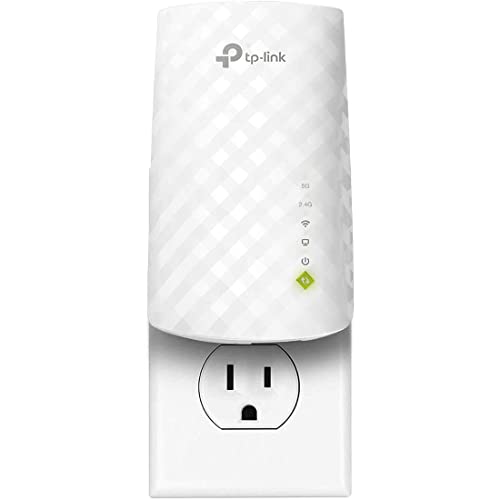


At a Glance
A plug-in Wi Fi extender picks up your router's signal and rebroadcasts it into a dead room, which is useful for a back bedroom, a garage or an upstairs office. At this budget you get an inexpensive box that plugs into a wall outlet, and the real differences are band support, Ethernet ports and how honestly the coverage figures are stated.
We evaluated each extender from its product page and specs, looking at single-band versus dual-band design, the number of Ethernet ports, device limits and operating modes. This page is weighted toward the more capable end of the budget, so most picks add a wired port or a dual-band radio instead of being a bare single-band repeater.
Treat every coverage figure as a best case. Walls, floors and distance cut real range, and an extender placed in a spot that already has a weak signal will only repeat that weak signal. Use the notes below to match the box to your router, your devices and the room you want to fix.
6 Criteria to Look For Before Buying a Wi Fi Extenders Under $20
Key buying criteria so you get the right fit the first time.
Single-band versus dual-band
A single-band extender like the Auomiliya shares one 2.4GHz radio for everything, which halves throughput when repeating. Dual-band units such as the Tilstongy, TP-Link and UWDFH add a 5GHz band that can carry faster traffic. If you stream video, choose dual-band. If you only need phones and smart plugs online, a simple single-band unit can be enough.
Ethernet ports
A wired port bypasses the wireless link for a device that needs a steady connection. The Tilstongy has two LAN/WAN ports, while the Auomiliya, TP-Link, Uppoon and Jancane each list one. Wired connections help smart TVs and consoles. If you want to connect two devices, the Tilstongy is the clearest fit.
Realistic coverage
Maker figures are best-case numbers. TP-Link claims 1200 square feet, Jancane 5800, Uppoon and UWDFH 10,000 and Tilstongy 15,000. The smaller number is the more believable one for a typical home. Walls and floors cut real range, so judge by room count, not square feet.
Operating modes
Modes change what the box can do. The Uppoon lists five modes, including repeater, bridge and access point, and the Jancane lists repeater and AP. Access point mode lets a wired jack feed a wireless signal. If you plan to use the box in different ways, more modes are worth having.
Supported standards
Older standards limit speed. The Jancane lists 802.11 N, B and G, which suits older gear but limits streaming, while the dual-band picks target faster use. Check that your router can talk to the extender. Mixed old and new networks can still work but run at the slower speed, and in some setups an older device on the network can drag the whole extender down to the lowest common standard. Where possible, keep an old gadget on the Ethernet port instead of its Wi Fi radio.
Setup and placement
The Uppoon lists one-tap pairing and the Auomiliya uses browser setup. Placement matters more than any feature: put the extender where the router signal is still good, roughly halfway to the dead room. Put it in the dead room itself and it will repeat a weak signal. Test with a phone before settling on a socket. Also keep the extender off power strips with surge protectors where possible, because a direct wall socket gives the cleanest power and the best antenna orientation. If the first spot is poor, moving the unit a single room closer to the router often fixes it.
6 Best Wi Fi Extenders Under $20 in 2026
Auomiliya 300Mbps WiFi Extender with Ethernet
About this pick
Auomiliya sells a straightforward single-band extender that supports up to 300Mbps on the 2.4GHz band. It has an Ethernet port, and setup is done from a phone or computer by connecting to its WiFi and entering your router password. The listing claims coverage of up to 9995 square feet, a best-case figure that is not realistic for a typical home.
The 2.4GHz band travels well through walls but is slower and more crowded than 5GHz, so this suits email, browsing and smart-home gear more than heavy streaming. The Ethernet port lets you wire a TV or console for a steadier connection. The main limit is that it is single-band, so everything shares one radio.
Ownership is simple: plug it in about halfway between the router and the dead zone, then run the setup page. Compared with the Tilstongy it is slower and has one fewer port, while against the TP-Link it lacks a 5GHz band. It is best for light use in a small trouble spot.
Best for: Light browsing and smart-home devices in one weak-signal room.
Check price on AmazonSpecs
- Speed: Up to 300Mbps, 2.4GHz
- Wired port: Ethernet
- Setup: Phone or PC browser
- Claimed coverage: Up to 9995 sq ft
Pros
- +Ethernet port wires one device directly
- +2.4GHz band penetrates walls well
- +Setup through a browser, no app needed
- +Plug-in design takes no desk space
Cons
- −Single band shares one slower radio
- −Coverage claim is clearly a best case
Tilstongy 1200Mbps Dual-Band WiFi Extender
About this pick
Tilstongy offers the most hardware in this group: a dual-band design with 867Mbps on 5GHz and 300Mbps on 2.4GHz, six 2dBi antennas and two Ethernet ports. It switches between bands automatically and offers three operating modes. The listing claims 15,000 square feet of coverage, which is a best-case figure.
Two Ethernet ports are the standout, because they let you connect a TV and a console or a desktop at the same time. Dual-band operation means the 5GHz side can carry faster traffic for streaming, while the 2.4GHz side reaches further. The bulk of six antennas makes it a larger unit than a slim plug-in, and the claimed speeds are theoretical maxima.
Place it where the router signal is still strong, not at the edge of coverage. It outclasses the Auomiliya on bands and ports, while the TP-Link is more compact. If you need wired connections as well as Wi Fi, this is the most flexible pick on the list.
Best for: A room with a TV and a console that both need a wired connection.
Check price on AmazonSpecs
- 5GHz speed: Up to 867Mbps
- 2.4GHz speed: Up to 300Mbps
- Antennas: 6 omnidirectional, 2dBi
- Ports: 2 LAN/WAN
Pros
- +Dual-band design adds a 5GHz option
- +Two Ethernet ports for wired devices
- +Auto band switching needs little tuning
- +Three modes cover repeater and bridge use
Cons
- −Larger body blocks a neighbouring outlet
- −Listed speeds are theoretical maximums
TP-Link Dual-Band WiFi Extender with Ethernet Port
About this pick
TP-Link keeps its claims modest: a dual-band extender that the maker says offers up to 44 percent more bandwidth than single-band N300 extenders, covering up to 1200 square feet. It has an Ethernet port, supports 5GHz and 2.4GHz and uses a compact body.
The smaller coverage claim is more believable than the 10,000-plus figures on competitors, which makes planning easier. A compact body fits behind furniture and stays clear of nearby sockets. The listing does not give an explicit 5GHz speed figure, so you will not know the exact ceiling, and 1200 square feet is the smallest coverage in the lineup.
Setup is typical for the class: plug in, connect and follow the prompts. Against the Tilstongy it has one Ethernet port instead of two but a more realistic range, and against the Auomiliya it adds a 5GHz band. It is the better pick for a small flat or a single awkward room.
Best for: A single room or small flat where a believable range claim matters.
Check price on AmazonSpecs
- Bands: 5GHz and 2.4GHz
- Coverage: Up to 1200 sq ft
- Port: 1 Ethernet
- Bandwidth claim: 44% over single-band N300
Pros
- +Modest coverage claim is easy to trust
- +Dual-band beats older single-band units
- +Compact body leaves neighbouring outlets free
- +Ethernet port serves a TV or console
Cons
- −Smallest stated coverage in this list
- −Listing omits a 5GHz speed figure
Uppoon WiFi Extender with Ethernet and 5 Modes
About this pick
Uppoon offers five working modes, including repeater, bridge and access point, with an Ethernet port and one-tap pairing. The listing says setup finishes within minutes and is suited to beginners and seniors, with no complex network configuration. It claims coverage of up to 10,000 square feet.
The mode range makes it more versatile than most, since access point mode can turn a wired jack into a wireless network. One-tap pairing helps anyone who dislikes setup pages. The listing does not say whether it is dual-band, so check for 5GHz support before assuming it, and the coverage claim is a best-case figure.
It is a good gift for a relative who wants a boost without fiddling. Compared with the Auomiliya it offers more modes and an easier pairing step, while the Tilstongy brings a clear dual-band spec. Pair it only with routers that support the one-tap method.
Best for: A first-time user who wants easy pairing and flexible modes.
Check price on AmazonSpecs
- Modes: Repeater, bridge, AP and more
- Pairing: One-tap
- Port: Ethernet
- Claimed coverage: Up to 10,000 sq ft
Pros
- +One-tap pairing keeps setup short
- +Five modes include bridge and access point
- +Ethernet port serves a wired device
- +Plug-and-play suits non-technical users
Cons
- −Listing does not state dual-band support
- −Coverage figure reads as a best case
Jancane WiFi Extender for 55 Devices
About this pick
Jancane supports up to 55 devices and works with 802.11 N, B and G networks. It has an Ethernet port and two modes, repeater or access point, and the listing claims coverage of up to 5800 square feet. The access-point mode turns a wired connection into a wireless one.
Compatibility with older standards makes it friendly to older routers and gadgets, and the access-point mode is handy for a home office with a wired jack. The older standard also limits speeds, which will not suit modern streaming, and the coverage claim reads as a best case. Treat 55 devices as a connection ceiling, not a performance promise.
It is a quiet workhorse for low-demand setups such as sensors, printers and phones. Compared with the Tilstongy it is much slower, and against the UWDFH it lacks a dual-band claim. If your devices are older, it is a pragmatic pick.
Best for: Older routers and low-demand gadgets in a home office or workshop.
Check price on AmazonSpecs
- Devices: Up to 55
- Standards: 802.11 N/B/G
- Modes: Repeater or AP
- Claimed coverage: Up to 5800 sq ft
Pros
- +Access-point mode makes a wired jack wireless
- +Works with older 802.11 N/B/G gear
- +Supports as many as 55 devices
- +Ethernet port serves a TV or desktop
Cons
- −Older standard limits modern streaming speed
- −Coverage claim reads as a best case
UWDFH 1200Mbps Dual-Band WiFi Extender
About this pick
UWDFH lists a dual-band design with 1200Mbps total speed, 300Mbps on the 2.4GHz band and support for more than 50 devices. The listing says it extends coverage to basements, attics, garages and patios and claims a range of 10,000 square feet.
The device count suits a household with many phones, tablets, cameras and smart speakers. Dual-band operation gives the 5GHz side room for faster work while 2.4GHz handles reach. The headline speed is a combined theoretical figure, and the big coverage number is best case.
As a result it works best as a whole-home helper for a busy network. It is closer in spirit to the Tilstongy, though it lacks the stated six antennas and two ports, and it beats the Jancane on speed. Place it halfway to the dead zone and avoid pushing it into the weakest corner.
Best for: A busy household with many phones, tablets and smart devices.
Check price on AmazonSpecs
- Total speed: Up to 1200Mbps
- 2.4GHz speed: 300Mbps
- Devices: 50 or more
- Claimed coverage: Up to 10,000 sq ft
Pros
- +Dual-band design with 1200Mbps total
- +Listing supports 50 or more devices
- +Aimed at basements, garages and patios
- +5GHz side gives room for streaming
Cons
- −Headline speed is a combined theoretical figure
- −Port details are thin on the listing
How We Evaluated These Wi Fi Extenders Under $20
Each pick was assessed across 5 criteria weighted for real-world use.
Band and speed design
We compared single-band and dual-band layouts and the speed figures on each listing. The Tilstongy and UWDFH lead with dual-band designs, followed by the TP-Link. The Auomiliya and Jancane were scored as lighter-duty boxes.
Wired connectivity
We counted Ethernet ports and checked mode support. The Tilstongy leads with two ports, and the Uppoon and Jancane add access point modes. A wired link was treated as a real advantage for TVs and consoles.
Claim credibility
We read the coverage numbers critically, since every listing states a best case. The TP-Link's 1200 square feet is the most plausible, while the 10,000 and 15,000 figures are theoretical. Based on specs and buyer feedback, we penalised vague or inflated language.
Setup simplicity
We looked at how setup is described. The Uppoon's one-tap pairing and the Auomiliya's browser setup are straightforward. We noted that placement choice affects every model equally.
Value at this budget
We asked what each extender delivers compared with a bare repeater and what you would get by spending more. The lineup positions the Tilstongy as the feature leader, the TP-Link as the credible compact option and the Auomiliya as the basic fallback.
How to Choose the Right Wi Fi Extenders Under $20
By Home Size
Pick by the number of rooms you need to reach.
| Situation | Pick | Why |
|---|---|---|
| Small flat, one weak room | TP-Link Dual-Band WiFi Extender with Ethernet Port | Realistic 1200 sq ft claim |
| Two-storey house with many devices | UWDFH 1200Mbps Dual-Band WiFi Extender | Dual-band and 50+ device support |
| Garage or workshop | Jancane WiFi Extender for 55 Devices | Handles older gear in repeater or AP mode |
| Home with TV and console in one room | Tilstongy 1200Mbps Dual-Band WiFi Extender | Two Ethernet ports |
| Light use in one corner | Auomiliya 300Mbps WiFi Extender with Ethernet | Simple single-band repeater |
By Budget
Inside the cap, tiers separate by band support and ports.
| Tier | Pick | What you get |
|---|---|---|
| Entry within the cap | Auomiliya 300Mbps WiFi Extender with Ethernet | Single-band with one port |
| Lower-mid | Jancane WiFi Extender for 55 Devices | Older standards and AP mode |
| Upper-mid | TP-Link Dual-Band WiFi Extender with Ethernet Port | Dual-band from a known brand |
| Top of the cap | Tilstongy 1200Mbps Dual-Band WiFi Extender | Dual-band, six antennas, two ports |
The Uppoon and UWDFH sit between the middle tiers, depending on whether you value modes or capacity.
Repeater vs Access Point Mode
Repeater mode
The extender grabs your router's Wi Fi and rebroadcasts it. The Auomiliya, TP-Link, Tilstongy, Uppoon, Jancane and UWDFH can all do this. It is easiest when you have no cable in the dead room.
Access point mode
The extender plugs into a wired Ethernet jack and turns it into Wi Fi. The Uppoon and Jancane list this. It is more reliable than repeating if you have a jack available.
By Device Type
What you connect decides the band you need.
| Device | Pick | Reason |
|---|---|---|
| Streaming TV | Tilstongy 1200Mbps Dual-Band WiFi Extender | 5GHz band plus wired port |
| Phones and tablets | UWDFH 1200Mbps Dual-Band WiFi Extender | Dual-band with broad device support |
| Smart plugs and sensors | Auomiliya 300Mbps WiFi Extender with Ethernet | 2.4GHz band is enough |
| Older printer or laptop | Jancane WiFi Extender for 55 Devices | Supports 802.11 N/B/G |
For Easy Setup Specifically
Look for
One-tap pairing or a clear browser guide, plus a plain explanation of placement. Avoid models that need several apps.
In this comparison
The Uppoon lists one-tap pairing, the Auomiliya uses a browser page, and the TP-Link follows a standard prompt. All of them benefit from careful placement.
When to Spend More
| Spend more if | Save if |
|---|---|
| You need Wi Fi 6 speeds or a mesh system for a big home | A single weak room is the problem, so the TP-Link is enough |
| You stream 4K video far from the router | You browse and email, so the Auomiliya will do |
| You want a unit with a dedicated backhaul band | You are happy with the Tilstongy dual-band design |
| You need a sleek unit with an app and diagnostics | A plain plug-in box suits you |
Frequently Asked Questions
Where should I plug in a Wi Fi extender?
Place it roughly halfway between the router and the weak area, where the router signal is still decent. If the extender sits in the dead zone, it can only repeat a poor signal. Test with a phone before settling, walking from the router to the dead room with a speed test open and noting where the bars start to drop. Most extenders have a signal light that turns from red to white or green when the spot is good, so use it as a quick guide. Avoid sockets behind large furniture or next to a microwave, which can interfere with the 2.4GHz band.
Will an extender make my internet faster?
No, it extends reach, not your plan's speed. A repeater can even reduce speed on a single-band design, because it shares one radio. Dual-band units such as the Tilstongy reduce that penalty by using one band to talk to the router and another to serve your devices, though budget models rarely dedicate a band to that job. If a room is only a little weak, a better router position or a wired connection to the dead room may help more than any extender.
Are the coverage claims real?
They are best-case figures, not what you will see in a typical home. The TP-Link's 1200 square feet is the most modest here. Count rooms and walls instead, and assume each solid wall or floor costs you a large share of range. Brick, concrete and foil-backed insulation are the worst offenders, so a house with those materials may get only a fraction of the stated figure. An honest rule is to plan for one extender per trouble spot, not per house.
What does an Ethernet port do?
It lets you plug a TV, console or desktop into the extender with a cable. That avoids the wireless hop for that device. The Tilstongy has two ports and the others list one.
Do I need dual-band?
If you stream or video call, yes, because 5GHz carries more data. If you only run smart plugs and email, a single-band Auomiliya may be fine. Check what your router offers, since an extender cannot add a band your router does not broadcast. Many routers combine both bands under one name, which can leave a device on the slower band, so naming them separately in the router settings gives you more control over which band your TV connects to.
Can an old router work with these?
Usually yes, especially the Jancane, which lists 802.11 N, B and G. The connection runs at the slower standard. Update router firmware where possible.
When should I buy a mesh system instead?
If you have a large home with several dead zones, mesh gives smoother roaming than one extender. An extender suits a single trouble spot. Mesh costs more than this lineup, but it uses one network name and hands devices between nodes without you reconnecting, which is a real convenience when you walk around the house on a video call.
Bottom Line
best overall: Auomiliya 300Mbps WiFi Extender with Ethernet - best simple single-band pick pick in this roundup.
See the full rankings above for all picks with pros, cons, and best-for summaries.
Browse on Amazon
All Prime-eligible options with current pricing.
Shop on Amazon →