6 Best Large Print Keyboard Stickers (2026)
Compare six large print keyboard sticker sets with high contrast lettering to make an existing keyboard easier to read, with picks for every typing setup.




At a Glance
Large print keyboard stickers are the cheapest way to make a keyboard readable without buying new hardware. The six sets here run from the BLEWAY, which advertises a font four times larger than regular stickers on a yellow and black scheme, to the Online-Welcome white and black set and the CaseBuy matte vinyl set that stay closer to a conventional look. Colors split three ways: black on white, black on yellow, and bold blue on black.
The real differences are contrast, sticker count and how forgiving the install is. The MUBUY-GOL pack gives 120 pieces across two sheets, each small key sticker measuring 0.51 by 0.43 inches, which leaves room for mistakes. The Softamm kit adds tweezers for placing tiny labels, while the imComor set sells two sheets in bright fluorescent yellow.
We evaluated each set from its listed specs and buyer feedback, not from hands-on use, and ranked them on legibility, durability and ease of application. Whichever you choose, measure your own keycaps first, because a sticker that is too big for a laptop key will overlap its neighbor and look worse than the faded legend it replaced.
6 Criteria to Look For Before Buying a Large Print Keyboard Stickers (2026)
Key buying criteria so you get the right fit the first time.
Contrast color scheme
Contrast matters more than raw size, because a large letter in a weak color pair is still hard to read. Common high contrast schemes are black on white, black on yellow and yellow on black, and the BLEWAY uses yellow with black text while the Online-Welcome uses black on white. The Softamm blue on black is less common and may suit people who find bright keys glaring. A good rule is to match the sticker color to how you sit: yellow for dim rooms, white for bright ones.
Stated letter size
Many listings say their font is 4 times larger than usual, but that claim is unverified, so compare printed key dimensions where you can. The MUBUY-GOL states key stickers at 0.51 by 0.43 inches, while the BLEWAY advertises a 4x font without a measurement. A sticker larger than the keycap will overlap its neighbors and look messy. Measure your own keycaps first, then choose the largest legend that still fits.
Finish and glare
A matte finish reduces reflections from a desk lamp or window, which is a real advantage for older eyes. The BLEWAY, Softamm and CaseBuy all mention matte coatings or matte vinyl. Glossy stickers can bounce light and make bold letters harder to read at an angle. Choose matte as a default rule of thumb unless you only type in a dark room.
Durability under daily typing
Stickers wear out first on the keys you use most, such as the space bar, vowels and Enter. The BLEWAY lists a scratch resistant, wear proof coating, while the CaseBuy and Softamm mention durable vinyl. Cheaper unlaminated prints can fade within months of heavy use. Expect to replace frequently used keys sooner and buy a set with spares like the 120 piece MUBUY-GOL if you type all day.
Kit contents and spares
Misaligned stickers are the most common first-time mistake, so spares and tools matter. The MUBUY-GOL provides 120 pieces, the imComor gives two sheets, and the Softamm adds tweezers. A single sheet set leaves no room for error on a 100 key board. Rule of thumb: buy at least one spare set if you are applying stickers yourself.
Keyboard compatibility and layout
Stickers do not change what a key does, only how it looks, so the layout must match your keyboard. The Online-Welcome is clearly labelled English US, and the imComor and CaseBuy list English layouts for laptops and desktops. Laptop chiclet keys are smaller than desktop keys, so check that the sticker size fits. Press a few keys to confirm they are flat enough, because heavily curved caps can make stickers lift at the edges.
6 Best Large Print Keyboard Stickers (2026)
BLEWAY Large Print Computer Keyboard Sticker
About this pick
The BLEWAY is built around the strongest large print claim in this group, a font described as four times larger than regular keyboard stickers. It pairs that size with a yellow background and black text, the combination low vision keyboards most often rely on. The matte coating adds a scratch resistant finish that also feels less slippery under the fingertip. The tradeoff is that oversized legends still have to fit on a standard keycap, so flat, full size keys are the best match. It suits low vision typists and anyone who squints at a faded keyboard in a dim room. Application is peel and stick, so wipe each cap clean and take your time aligning them. Compared with the imComor set, which is also yellow but leans on a fluorescent tone, the BLEWAY relies on a matte finish for a calmer look. The Softamm kit lists tweezers, which makes tiny keys easier to place, so a pair from a toolbox helps with the BLEWAY too.
Best for: Low vision typists who want the biggest letters and highest contrast
Check price on AmazonSpecs
- Font size: Described as 4x regular stickers
- Colors: Yellow background, black text
- Finish: Premium matte coating
- Wear: Scratch resistant, wear proof
Pros
- +Oversized letters on a yellow and black high contrast scheme
- +Matte finish resists scratching and wear
- +Aimed squarely at low vision users
- +Calm color tone, not glaring neon
Cons
- −Larger legends need flat, full size keycaps
- −Upper price tier among these six sets
imComor 2-Pack Large Letters Keyboard Stickers
About this pick
The imComor set uses a fluorescent yellow tone so letters look more vivid than on standard stickers. Two sheets come in the pack, which means a spare if you misalign a key or want to cover a second keyboard. The listing says it fits laptops, notebooks and desktop boards. Its strength is easy swapping, since the stickers are described as removable with no glue residue. That matters if the keyboard is shared or if you want to peel them off before selling a laptop. The downside is that a glowing yellow can feel loud for some people, and the listing is vague on exact letter size compared with the BLEWAY. Applying it is straightforward, and the second sheet makes the first attempt low stakes. In this lineup it ranks above the white and black Online-Welcome set for brightness but below the BLEWAY for stated letter size. It is a mid-range choice that suits anyone who wants high visibility yellow without paying the top tier.
Best for: Shared or temporary keyboards where easy removal matters
Check price on AmazonSpecs
- Quantity: 2 pieces
- Color: Bright yellow fluorescent
- Fit: Laptops, notebooks, desktops
- Removal: No glue left behind
Pros
- +Vivid fluorescent yellow makes letters pop
- +Two sheets give a spare for mistakes
- +Described as removable without sticky residue
- +Fits laptops and desktop keyboards
Cons
- −Letter size is not specified as clearly as the BLEWAY
- −Bright yellow may feel harsh to some
Online-Welcome Large Letters Keyboard Stickers
About this pick
The Online-Welcome set takes the classic approach of bold black uppercase letters on a white background. Black on white is the highest familiarity scheme, which suits people who find yellow or colored keys distracting. The listing is specific that the layout is English US and that the letters are meant for low vision. Its limits are practical. The lettering is large but the listing gives no letter size multiple, so it will not match the claimed scale of the BLEWAY. This set works best on dark or worn keycaps where white stickers give a big boost in contrast. On an already white keyboard the effect is smaller. Compared with the Softamm blue on black option, it is the plainer and more conventional choice, and the MUBUY-GOL pack gives far more spare pieces for less.
Best for: Typists who prefer classic black print on white keys
Check price on AmazonSpecs
- Colors: White background, black letters
- Letters: Bold uppercase
- Layout: English US
- Intended for: Low vision
Pros
- +Familiar high contrast black on white scheme
- +Bold uppercase letters for low vision
- +Clear English US layout labelling
Cons
- −Highest price tier in this comparison
- −No stated letter size multiple
Softamm 5-in-1 Large Print Keyboard Sticker Kit
About this pick
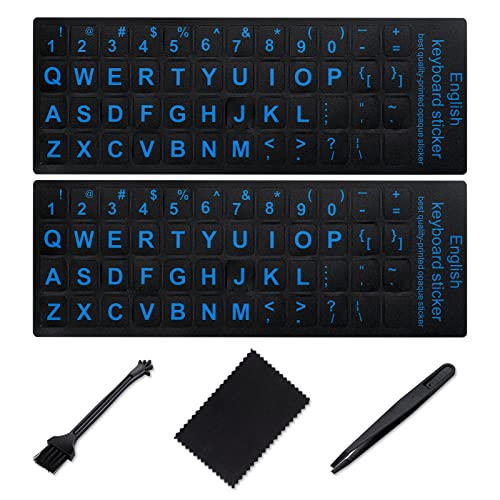
The Softamm kit is the most complete package in the group, bundling stickers with tweezers so you can place small keys accurately. It uses bold blue lettering on a black background, which is a distinctive scheme but still reads clearly for many people. The matte vinyl texture is intended to feel comfortable and resist wear. It works well for restoring faded or worn legends on a keyboard you already like. Blue on black is not as universally recommended as yellow on black or black on yellow, so it suits those who find bright keys glaring rather than those who need the absolute maximum contrast. The price sits in the middle of the ranking. The tweezers are the real selling point, because tiny stickers on narrow keys such as function and modifier keys are fiddly by hand. Compared with the CaseBuy set, which uses similar matte vinyl, the Softamm adds that tool and a stronger color choice. For top legibility the BLEWAY still wins, but the Softamm is a smart pick for first time appliers.
Best for: First time appliers who want tools in the box
Check price on AmazonSpecs
- Colors: Bold blue lettering on black
- Material: Durable matte vinyl
- Tool: Tweezers for placement
- Use: Restores faded keys
Pros
- +Tweezers make small key placement easier
- +Matte vinyl feels comfortable under the fingers
- +Blue on black reduces glare for some users
- +Good for reviving faded keyboards
Cons
- −Blue on black is not the highest contrast scheme
- −Letter size is not quantified in the listing
MUBUY-GOL 2-Pack Big Letter Keyboard Stickers
About this pick
The MUBUY-GOL pack is about volume and published dimensions. It gives 120 pieces across two sets, and the listing states each sheet is 7.09 by 2.56 inches with individual key stickers at 0.51 by 0.43 inches. That makes it the easiest set in the group to check against your own keycaps before buying. It uses a black background with large lettering and is pitched for desktops, laptops and notebooks. The listing also mentions two language use, which is useful if a family member switches layouts. The tradeoff is that black backgrounds suit light keycaps best, and the letters are large rather than extra large. Among the cheaper end of this ranking, it is a strong value pick because spare stickers matter on a first attempt. Compared with the CaseBuy set, also low priced, the MUBUY-GOL gives clearer measurements. If you need maximum letter size, the BLEWAY remains the better choice, but this pack suits budget minded buyers who want room for error.
Best for: Budget buyers who want spares and published sizes
Check price on AmazonSpecs
- Quantity: 2 packs, 120 pieces
- Sheet size: 7.09 x 2.56 in
- Key sticker: 0.51 x 0.43 in
- Background: Black
Pros
- +Stated dimensions make fit checking simple
- +Large pack gives spares for misaligned stickers
- +Works for bilingual or language learning use
- +Low price tier for the quantity
Cons
- −Letters are large but not marketed as extra large
- −Black backgrounds suit light keycaps best
CaseBuy English Large Print Keyboard Letter Stickers
About this pick
The CaseBuy set is the lowest cost pick here and keeps things simple. It is made of non-transparent matte vinyl with a durable coating, so the original key legend underneath does not show through. The listing says it fits desktops, laptops and notebooks. Its limits are clear. The listing does not state a letter size multiple or the exact color scheme as plainly as others, so you are relying on the large print label. That makes it a better choice for those who just want a cheap refresh than for someone with serious low vision. Application is peel and stick, and the stickers are described as coming off with no residue. For the same budget, the MUBUY-GOL gives clearer dimensions and more pieces, while the Softamm adds tweezers. Choose the CaseBuy if price is the top concern and the keyboard just needs readable replacements.
Best for: Anyone refreshing a worn keyboard at the lowest cost
Check price on AmazonSpecs
- Material: Non-transparent matte vinyl
- Coating: Durable, long lasting
- Fit: Desktops, laptops, notebooks
- Removal: No residue
Pros
- +Lowest cost among these six sets
- +Non-transparent vinyl hides old legends
- +Peel and stick with no sticky residue
- +Matte surface resists wear
Cons
- −Letter size and color details are less specific
- −Fewer extras than the Softamm or MUBUY-GOL
How We Evaluated These Large Print Keyboard Stickers (2026)
Each pick was assessed across 5 criteria weighted for real-world use.
Legibility
We looked at the stated letter size, color scheme and finish for each set. The BLEWAY scored highest for its advertised 4x font and yellow with black text, while the CaseBuy scored lowest because it gives the fewest specifics. We rated schemes known for contrast above weaker pairs.
Durability
We evaluated coating and material claims, such as the BLEWAY scratch resistant matte finish and the matte vinyl on the Softamm and CaseBuy. Durable claims were weighted higher where the listing named a specific coating. Buyer feedback was used to flag fading on heavily used keys. No set is permanent, so we favored those with spares.
Ease of application
Application scores reflect extras and clarity. The Softamm earned points for including tweezers, the MUBUY-GOL for its large piece count and published dimensions, and the imComor for removability. Sets with single sheets and no tools ranked lower. This criterion matters most for first time users.
Fit and compatibility
We checked which keyboards each listing says it supports and how clear the layout is. The Online-Welcome stood out for explicit English US labelling and the MUBUY-GOL for dimensions you can compare to your keys. The strongest pick is the BLEWAY overall, while the most basic is the CaseBuy. We downgraded sets that gave no size clues.
Value for the tier
The MUBUY-GOL and CaseBuy sit at the lower end and offer volume or simplicity. The BLEWAY sits higher but justifies it with stated large print features. We rated value as a balance, not a lowest-price contest.
How to Choose the Right Large Print Keyboard Stickers (2026)
By Vision Need
How much help you need from the sticker should drive the pick.
| Situation | Recommended pick |
|---|---|
| Significant low vision, want the biggest letters | BLEWAY Large Print Computer Keyboard Sticker |
| Need very bright, vivid letters | imComor 2-Pack Large Letters Keyboard Stickers |
| Prefer black print on white keys | Online-Welcome Large Letters Keyboard Stickers |
| Mild fading, want a refresh | Softamm 5-in-1 Large Print Keyboard Sticker Kit |
| Want published sizes to check fit | MUBUY-GOL 2-Pack Big Letter Keyboard Stickers |
By Budget
| Budget tier | Recommended pick |
|---|---|
| Lowest-cost pick | CaseBuy English Large Print Keyboard Letter Stickers |
| Low price with many spare pieces | MUBUY-GOL 2-Pack Big Letter Keyboard Stickers |
| Mid-range with tools included | Softamm 5-in-1 Large Print Keyboard Sticker Kit |
| Mid-range bright yellow | imComor 2-Pack Large Letters Keyboard Stickers |
| Premium for maximum size | BLEWAY Large Print Computer Keyboard Sticker |
Yellow vs White Backgrounds
The choice between a yellow and a white sticker is mostly about room lighting and personal comfort.
Yellow background
Yellow with black text stands out in dim light and is widely used for low vision keyboards. The BLEWAY and imComor fall in this group. Pick yellow if you type in the evening or find white too stark.
White or black background
Black print on white is the most familiar and works in bright rooms, as on the Online-Welcome, while black background sets like the MUBUY-GOL and Softamm suit lighter keycaps. Pick these if you dislike colored keys.
Recommendation: choose BLEWAY for yellow and Online-Welcome for white.
By Application Skill
| Preference | Recommended pick |
|---|---|
| Want tweezers in the box | Softamm 5-in-1 Large Print Keyboard Sticker Kit |
| Want extra pieces for mistakes | MUBUY-GOL 2-Pack Big Letter Keyboard Stickers |
| Want a removable, no residue option | imComor 2-Pack Large Letters Keyboard Stickers |
| Want simple peel and stick | CaseBuy English Large Print Keyboard Letter Stickers |
For Aging Eyes Specifically
Look for
Bold uppercase letters, a matte finish to cut glare, and a high contrast color pair. Check that the letters fit your keycaps, since oversized print that overlaps neighbors is harder to read.
In this comparison
The BLEWAY fits best, with a 4x larger font, yellow with black text and a scratch resistant matte coating. The Online-Welcome is the pick if you prefer classic black on white.
When to Spend More
Spend more if
You have real low vision, type daily, or want the largest legends. The BLEWAY justifies its higher tier with oversized letters and a wear proof coating, and the Online-Welcome adds a trusted black on white scheme.
Save if
You just need to refresh worn keys. The CaseBuy and MUBUY-GOL cover that at the lowest tiers, and the MUBUY-GOL adds 120 pieces for spares.
Frequently Asked Questions
How do I choose between yellow and white large print stickers?
Yellow with black text is widely used for low vision and tends to stand out in dim rooms. White with black print is more familiar and suits bright rooms. If you are unsure, try a yellow set like the BLEWAY on a few keys first, or choose the Online-Welcome for classic black on white.
Will large print stickers fit my laptop keys?
Many sets say they fit laptops, notebooks and desktops, but laptop keys are smaller. Check the sticker dimensions against your keycaps, as the MUBUY-GOL lists 0.51 by 0.43 inches per key. If the sticker is larger than the cap, it will overlap and peel.
How much should I spend on keyboard stickers?
These sets sit at different tiers, but the lowest-cost pick, the CaseBuy, is enough if you only want a readable refresh. Spend more on a set like the BLEWAY if you need maximum letter size and a wear resistant coating. Extra spares often matter more than a premium label.
How long do keyboard stickers last?
Stickers wear fastest on frequently used keys such as space and Enter. A scratch resistant matte coating, as on the BLEWAY, helps, but nothing is permanent. Keep a spare sheet, as the MUBUY-GOL provides, to replace worn keys.
Do large print stickers change how the keyboard works?
No. They only change how the key looks and do not alter layout or function. Make sure the sticker layout, such as English US on the Online-Welcome, matches the keys beneath.
Can I remove stickers later without damage?
Some listings say stickers remove with no residue, such as the imComor and CaseBuy. Slow peeling and a hair dryer on low can help loosen adhesive. Results depend on the keycap material, so test one key first.
Is a sticker as good as a large print keyboard?
Stickers are a cheap fix, but they do not change key spacing, feel or backlighting. A purpose built large print keyboard may still suit severe low vision. For mild to moderate vision loss, a set like the BLEWAY is a practical and low-cost step.
Bottom Line
best overall: BLEWAY Large Print Computer Keyboard Sticker - best overall pick in this roundup.
See the full rankings above for all picks with pros, cons, and best-for summaries.
Browse on Amazon
All Prime-eligible options with current pricing.
Shop on Amazon →