5 Best Wi-Fi 7 Extenders in 2026
Compare five Wi-Fi 7 range extenders from NETGEAR, ASUS and VIELECT by speed tier, coverage and router pairing before you buy one.
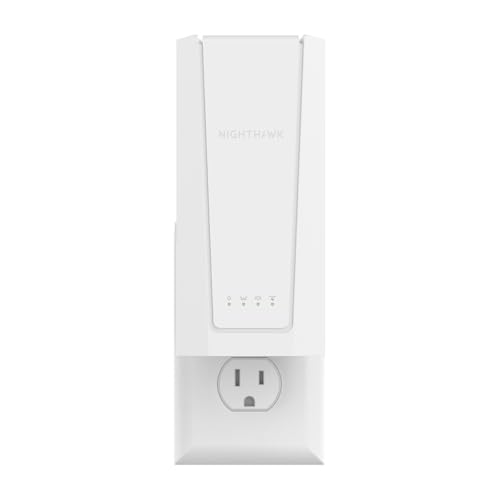


At a Glance
Wi-Fi 7 extenders are the newest and thinnest class of range extenders, and most people who spot the BE badge on a box are really asking one question: will this fix my weak room, or just cost more than the Wi-Fi 5 unit that would have done the job? This lineup answers that with five dual-band models from NETGEAR, ASUS and VIELECT, ranked by speed tier, stated coverage and how smoothly each one joins an existing network. We evaluated them from product specs and buyer feedback, so every number below comes straight from the listings.
An extender cannot make your internet plan faster, and none of these listings claims otherwise. What a Wi-Fi 7 unit can do is carry a cleaner signal into a bedroom, garage or den, and when the router is also Wi-Fi 7 it can use Multi-Link Operation and 4096-QAM to move data more efficiently. The NETGEAR Nighthawk EXS27 leads on rated speed at 5 Gbps, while the VIELECT BE3600 and the ASUS RP-BE58 both sit in the 3.6 Gbps class.
Every pick here is dual-band, so the extender splits its radios between listening to your router and talking to your devices. That is the honest tradeoff of this price class, and the buying sections below explain how placement can reduce it.
6 Criteria to Look For Before Buying a Wi-Fi 7 Extender
Key buying criteria so you get the right fit the first time.
Match Your Router Generation
An extender can only use the features your router also supports, so a Wi-Fi 7 extender behind an older router will mostly act like a faster-looking Wi-Fi 6 or Wi-Fi 5 unit. Check the router label for the BE prefix or the words Wi-Fi 7 before paying for a newer class. The VIELECT BE3600 is described as optimized for a Wi-Fi 7 router, and the ASUS RP-BE58 leans on Multi-Link Operation that needs a capable partner at both ends. If your router is older, the NETGEAR Nighthawk EXS18 at 3.6 Gbps is a sensible ceiling because the 5 Gbps of the NETGEAR Nighthawk EXS27 will go largely unused.
Read the Rated Speed Correctly
Rated speeds such as 5 Gbps, 4.5 Gbps and 3.6 Gbps are combined best cases across both bands, not what one phone will see. In this group the NETGEAR Nighthawk EXS27 leads at 5 Gbps, the NETGEAR Nighthawk EXS25 follows at 4.5 Gbps, and three units cluster at 3.6 Gbps or 3600 Mbps. Treat gaps under 1 Gbps as a tiebreaker rather than a reason to switch brands. Your internet plan and the signal strength reaching the extender decide what you actually experience.
Compare Coverage Against Walls
Square-footage claims assume open space, and every wall, floor and appliance trims the real number. A good rule is to treat the stated figure as roughly the ceiling and plan on losing a meaningful share of it in a house with plaster, brick or multiple floors. The NETGEAR Nighthawk EXS18 claims 1,200 sq ft, the NETGEAR Nighthawk EXS25 and EXS27 claim 1,500 sq ft, and the VIELECT BE3600 claims 2,500 sq ft. The ASUS RP-BE58 gives no square-footage figure, so you will need to judge its reach from placement tests.
One Network Name or Two
A single network name lets phones and tablets roam without you tapping through a second Wi-Fi list, which is a real convenience for guests and older devices. The NETGEAR models advertise Smart Roaming that keeps your existing network name, and the ASUS RP-BE58 offers AiMesh for the same effect on a compatible ASUS router. Without those tools, an extender often broadcasts its own name and you choose between the two by hand. If the household includes people who dislike fiddling with settings, put this near the top of your list.
Accept the Dual-Band Tradeoff
All five picks are dual-band, which means the same radios that talk to your devices also receive from the router. That roughly cuts the usable throughput in the far room, so a 5 Gbps rating translates to a lower real figure at the edge of coverage. Reduce the penalty by placing the extender about halfway between the router and the weak area, where the incoming signal is still strong. The NETGEAR Nighthawk EXS27 and the VIELECT BE3600 both benefit from this placement as much as any other unit here.
Check Setup and Listing Detail
A buyer who is comfortable with a phone app will find the NETGEAR Nighthawk EXS27, EXS25 and EXS18 straightforward, since each offers guided app setup or a WPS press on both devices. WPS needs the router to support it, so confirm that before ordering. The ASUS RP-BE58 follows the AiMesh path on ASUS routers, while the VIELECT BE3600 listing offers less setup detail and four antennas to aim. Fewer steps and clearer instructions matter more than an extra 0.5 Gbps for most households.
5 Best Wi-Fi 7 Extenders in 2026
NETGEAR Nighthawk EXS27 Wi-Fi 7 Extender
About this pick
The Nighthawk EXS27 is the top rung of NETGEAR's Wi-Fi 7 extender ladder, rated at 5 Gbps with coverage up to 1,500 sq ft. It is a dual-band BE5000 design, and one listing counts up to 45 devices on it at the same time. Smart Roaming keeps your existing network name, so phones and tablets move to the strongest signal without you choosing a second network by hand.
Because the unit is dual-band, it has no separate radio reserved for the link back to the router, and the speed you see in the far room will sit well under the 5 Gbps headline. That headline is a combined best case, not what one laptop will receive. It suits a home whose router is already Wi-Fi 7 and whose weak spot is one or two rooms away rather than a whole sprawling floor plan.
Setup runs through the Nighthawk app or a WPS press on both the router and the extender, which is about as easy as extender installation gets. Next to the Nighthawk EXS25 at 4.5 Gbps it offers the same 1,500 sq ft footprint, so extra speed is the only reason to step up. Against the VIELECT BE3600, which claims 2,500 sq ft, it covers less area on paper but arrives with a guided app.
Best for: Wi-Fi 7 router owners who want the highest rated speed from a simple, app-guided extender.
Check price on AmazonSpecs
- Standard: Wi-Fi 7, BE5000 dual-band
- Rated speed: 5 Gbps
- Coverage: Up to 1,500 sq ft
- Devices: Up to 45
- Setup: Nighthawk app or WPS
Pros
- +Highest rated speed in the lineup at 5 Gbps
- +Smart Roaming keeps one network name at home
- +Guided Nighthawk app setup or one-press WPS pairing
- +Listing supports up to 45 connected devices at once
Cons
- −Dual-band design shares radios with the router link
- −Coverage is rated at 1,500 sq ft, below the VIELECT claim
- −Same footprint as the EXS25 despite the higher speed
NETGEAR Nighthawk EXS25 Wi-Fi 7 Extender
About this pick
The EXS25 is the middle step in the Nighthawk Wi-Fi 7 range, rated at 4.5 Gbps with coverage up to 1,500 sq ft. Like its siblings it relies on Smart Roaming to keep your current network name, which means no second network to join and no manual switching. It is aimed at the rooms your router struggles to reach, such as a bedroom, garage, basement or backyard.
The speed gap to the EXS27 is 0.5 Gbps on paper, and that gap shows up only when a Wi-Fi 7 router and a Wi-Fi 7 device are both strong enough to use it. In a home with an older router, much of that headroom goes unused. This is the choice for someone who wants the NETGEAR experience and a Wi-Fi 7 badge without stepping to the top speed tier.
Setup follows the same app-guided flow or WPS push used across the NETGEAR line, so a first-time installer can usually finish within a few minutes. At 1,500 sq ft it matches the Nighthawk EXS27 for coverage, and it exceeds the Nighthawk EXS18's 1,200 sq ft by 300 sq ft. Compared with the ASUS RP-BE58 at 3600 Mbps it offers 0.9 Gbps more rated speed, but it has no AiMesh integration, which is an ASUS router feature.
Best for: Households that want Wi-Fi 7 and a larger footprint than the entry model without the top speed tier.
Check price on AmazonSpecs
- Standard: Wi-Fi 7, dual-band
- Rated speed: 4.5 Gbps
- Coverage: Up to 1,500 sq ft
- Roaming: Smart Roaming, one network name
- Setup: Nighthawk app or WPS
Pros
- +Sits between the EXS18 and EXS27 on rated speed
- +Keeps your existing network name through Smart Roaming
- +Guided app setup plus a simple WPS pairing route
- +Covers 300 sq ft more than the EXS18 on paper
Cons
- −Speed edge over the EXS18 needs a Wi-Fi 7 router to matter
- −Still dual-band, so no dedicated link back to router
- −Only 0.5 Gbps below the EXS27 with identical coverage
NETGEAR Nighthawk EXS18 Wi-Fi 7 Extender
About this pick
The EXS18 is the entry point of the Nighthawk Wi-Fi 7 extender line, rated at 3.6 Gbps and up to 1,200 sq ft. It brings Wi-Fi 7 to a single weak area, with the same one-network-name approach as the larger models. That makes it a tidy fit for a small house or an apartment where just one room needs help.
Its 1,200 sq ft rating is the smallest in this group, so it is a poor match for a long ranch layout or a multi-story home with several dead rooms. The 3.6 Gbps figure is a combined best case, and the speed you get will track how strong the signal is when it reaches the extender. A buyer who only wants a steady connection for a streaming box or a tablet in one room will rarely miss the extra headroom.
Setup is through the Nighthawk app or WPS, with no browser configuration to wrestle with. At 3.6 Gbps it ties the VIELECT BE3600 on rated speed but covers 1,300 sq ft less than that unit's 2,500 sq ft claim. Compared with the Nighthawk EXS25, you give up 300 sq ft and 0.9 Gbps in exchange for staying inside the same app at the lowest tier of the family.
Best for: Apartment and small-home owners who need Wi-Fi 7 help for a single weak room.
Check price on AmazonSpecs
- Standard: Wi-Fi 7, dual-band
- Rated speed: 3.6 Gbps
- Coverage: Up to 1,200 sq ft
- Roaming: Smart Roaming, one network name
- Setup: Nighthawk app or WPS
Pros
- +Wi-Fi 7 support in the lowest tier of the NETGEAR line
- +Smart Roaming keeps one network name across the home
- +App-guided setup suits first-time installers
- +3.6 Gbps rating matches pricier-looking rivals on paper
Cons
- −Lowest coverage rating in the lineup at 1,200 sq ft
- −Not suited to homes with several dead rooms
- −Rated speed matches the VIELECT despite less coverage
VIELECT BE3600 Wi-Fi 7 Range Extender
About this pick
The VIELECT BE3600 is a dual-band, four-stream Wi-Fi 7 extender with 3.6 Gbps of total bandwidth. The listing highlights Multi-Link Operation and 4096-QAM, and it claims coverage up to 2,500 sq ft for as many as 66 devices. Four adjustable beamforming antennas let you aim the signal at the problem corner rather than hoping a fixed pattern lands in the right place.
The coverage figure is the largest of the Wi-Fi 7 group, but it is a best-case, open-space number and walls cut into it quickly. The 66-device claim is useful for a smart-home household full of small gadgets, yet the shared dual-band radios still set the real ceiling. The listing also gives less setup detail than the NETGEAR or ASUS pages, so read the instructions before planning an install.
Aiming four antennas takes a few minutes of trial and error, which is a small chore on top of the usual pairing step. On rated speed it matches the Nighthawk EXS18 and the ASUS RP-BE58 at 3.6 Gbps, but its 2,500 sq ft claim is 1,000 sq ft above the Nighthawk EXS27 and EXS25. If you want the largest stated footprint and are comfortable adjusting antennas, it is the one to pick from this comparison.
Best for: Larger or more cluttered homes where a bigger stated footprint and aimable antennas matter most.
Check price on AmazonSpecs
- Standard: Wi-Fi 7, BE3600 dual-band
- Total bandwidth: 3.6 Gbps, 4-stream
- Coverage: Up to 2,500 sq ft
- Devices: Up to 66
- Features: Multi-Link Operation, 4096-QAM
Pros
- +Largest coverage claim of the Wi-Fi 7 group at 2,500 sq ft
- +Four adjustable beamforming antennas let you aim the signal
- +Lists Multi-Link Operation and 4096-QAM support
- +Supports a stated 66 devices on a dual-band unit
Cons
- −Coverage figure is an open-space best case
- −Listing gives thinner setup detail than NETGEAR or ASUS
- −Antennas need aiming, which adds a setup step
ASUS RP-BE58 BE3600 Wi-Fi 7 Extender
About this pick
The ASUS RP-BE58 is a BE3600 dual-band Wi-Fi 7 range extender rated at up to 3600 Mbps. It uses 4096-QAM to pack more data into a single band and Multi-Link Operation to link to multiple bands at once for steadier transfers. The listing also describes it as an AiMesh extender, so it can join an ASUS mesh and present one seamless network.
The listing states that it works with virtually any Wi-Fi router, modem or cable gateway, so you are not locked into ASUS gear. Its biggest advantage appears when the main router is an ASUS model with AiMesh, because that is where the mesh features come together. A buyer on another brand's router still gets a capable Wi-Fi 7 extender, just without the mesh integration.
A coverage figure is not given in the listing, so size the purchase by the 3600 Mbps rating and your layout rather than a square-footage promise. That makes it harder to compare directly with the Nighthawk EXS27's 1,500 sq ft or the VIELECT BE3600's 2,500 sq ft. Against the Nighthawk EXS18, it shares the same 3.6 Gbps class but adds the AiMesh path, which is the reason to choose it over the NETGEAR entry model.
Best for: Anyone already running an ASUS router who wants to fold a Wi-Fi 7 extender into AiMesh.
Check price on AmazonSpecs
- Standard: Wi-Fi 7 (802.11be), dual-band
- Rated speed: Up to 3600 Mbps
- Features: Multi-Link Operation, 4096-QAM
- Mesh: AiMesh extender
- Compatibility: Virtually all Wi-Fi routers
Pros
- +AiMesh extender role for ASUS router households
- +Multi-Link Operation links to multiple bands at once
- +Works with virtually any router, modem or gateway
- +4096-QAM raises throughput on a single band
Cons
- −No coverage figure in the listing to size against
- −Mesh benefits mostly need an ASUS main router
- −Dual-band design shares radios for the router link
How We Evaluated These Wi-Fi 7 Extenders
Each pick was assessed across 5 criteria weighted for real-world use.
Wi-Fi 7 feature set
We compared which standards features each listing states, including Multi-Link Operation and 4096-QAM. The VIELECT BE3600 and ASUS RP-BE58 name both, while the NETGEAR models focus on speed and roaming. We did not credit a feature the listing did not mention. This keeps the comparison grounded in published specs and buyer feedback.
Rated speed tier
We ranked the picks by their combined rated speeds, from the 5 Gbps NETGEAR Nighthawk EXS27 down to the 3.6 Gbps class. We treated differences under 1 Gbps as modest because they are best-case numbers. Where a listing reported a different unit, such as 3600 Mbps for the ASUS RP-BE58, we converted it for a fair side-by-side.
Coverage and placement flexibility
We looked at stated square footage, from 1,200 sq ft on the NETGEAR Nighthawk EXS18 to 2,500 sq ft on the VIELECT BE3600, and at whether antennas can be aimed. We assumed claims reflect open space and discounted them for walls. Units without a stated figure were scored on design cues instead.
Network integration
We assessed how each extender fits an existing network, including Smart Roaming on the NETGEAR units and AiMesh on the ASUS RP-BE58. Keeping one network name earned credit because it removes a common source of confusion. Compatibility with any router counted as a plus.
Setup clarity and listing transparency
We favored picks with app-guided setup or a WPS route and with complete specifications in the listing. The NETGEAR family led on guided setup, while the VIELECT BE3600 offered less detail. Positioning, then, is the NETGEAR Nighthawk EXS27 for speed, the VIELECT BE3600 for footprint and the ASUS RP-BE58 for mesh.
How to Choose the Right Wi-Fi 7 Extenders
By Router Brand and Generation
The router you already own decides most of the value in a Wi-Fi 7 extender, so start there.
| Your router | Best pick | Why |
|---|---|---|
| ASUS router with AiMesh | ASUS RP-BE58 BE3600 Wi-Fi 7 Extender | It joins AiMesh and shares one network name |
| Wi-Fi 7 router, want top speed | NETGEAR Nighthawk EXS27 Wi-Fi 7 Extender | It carries the 5 Gbps rating, the highest here |
| Wi-Fi 7 router, moderate needs | NETGEAR Nighthawk EXS25 Wi-Fi 7 Extender | 4.5 Gbps and 1,500 sq ft cover most homes |
| Older router, one weak room | NETGEAR Nighthawk EXS18 Wi-Fi 7 Extender | 3.6 Gbps is plenty when the router is the limit |
| Any router, large house | VIELECT BE3600 Wi-Fi 7 Range Extender | Its 2,500 sq ft claim is the largest listed |
If you are unsure what generation your router is, look at the label on its base for BE, AX or AC.
By Budget
Tiers are relative, and the lineup spreads across a narrow band.
| Tier | Pick | Reason |
|---|---|---|
| Entry | NETGEAR Nighthawk EXS18 Wi-Fi 7 Extender | Lowest speed and coverage tier of the NETGEAR family |
| Mid | VIELECT BE3600 Wi-Fi 7 Range Extender | Largest footprint claim at the 3.6 Gbps class |
| Mid | ASUS RP-BE58 BE3600 Wi-Fi 7 Extender | Adds AiMesh at the same 3600 Mbps class |
| Upper-mid | NETGEAR Nighthawk EXS25 Wi-Fi 7 Extender | Extra 0.9 Gbps over the entry unit |
| Premium | NETGEAR Nighthawk EXS27 Wi-Fi 7 Extender | 5 Gbps and a 45-device listing |
Check current availability on Amazon, since tiers here describe positioning rather than any set figure.
Smart Roaming vs AiMesh
Both aim at one network name, but they get there differently.
Smart Roaming
NETGEAR's Smart Roaming keeps your existing network name and moves each device to the strongest signal automatically. It works without any particular router brand, which suits mixed households. The NETGEAR Nighthawk EXS27, EXS25 and EXS18 all use it. Choose this side if your router is not from ASUS.
AiMesh
AiMesh lets an ASUS extender become part of a mesh managed from the ASUS router, so settings and roaming sit in one place. The ASUS RP-BE58 BE3600 Wi-Fi 7 Extender is the only AiMesh pick here. It still works with other routers but loses the mesh benefit. Choose this side if your router is already an ASUS model.
Pick Smart Roaming for flexibility and AiMesh only when you already own a matching ASUS router.
By Home Size
Stated footprints are best cases, so leave a margin.
| Home situation | Pick | Reason |
|---|---|---|
| Studio or small apartment | NETGEAR Nighthawk EXS18 Wi-Fi 7 Extender | 1,200 sq ft is enough for one weak room |
| Two-bedroom home, one dead room | NETGEAR Nighthawk EXS25 Wi-Fi 7 Extender | 1,500 sq ft with a higher speed ceiling |
| Detached garage or basement run | NETGEAR Nighthawk EXS27 Wi-Fi 7 Extender | Top speed helps when the link is long |
| Large two-story house | VIELECT BE3600 Wi-Fi 7 Range Extender | 2,500 sq ft claim and aimable antennas |
| ASUS mesh being expanded | ASUS RP-BE58 BE3600 Wi-Fi 7 Extender | AiMesh role adds coverage without a new network |
Place any of these about halfway between the router and the dead zone for the best result.
For Video Calls in a Far Bedroom Specifically
Calls care about steadiness more than raw speed.
Look for
Look for one network name, a clean signal reaching the extender and Multi-Link Operation or similar steadiness features. A moderate speed rating is enough for a call, so do not overpay for headroom. Placement halfway to the room matters more than the speed class.
In this comparison
The NETGEAR Nighthawk EXS25 Wi-Fi 7 Extender gives 4.5 Gbps with Smart Roaming, while the ASUS RP-BE58 BE3600 Wi-Fi 7 Extender adds Multi-Link Operation at 3600 Mbps. The NETGEAR Nighthawk EXS18 Wi-Fi 7 Extender is plenty for a single call at 3.6 Gbps.
When to Spend More
Moving up the ladder only helps in particular situations.
| Spend more if | Save if |
|---|---|
| You own a Wi-Fi 7 router and want 5 Gbps from the NETGEAR Nighthawk EXS27 Wi-Fi 7 Extender | Your router is older, so the NETGEAR Nighthawk EXS18 Wi-Fi 7 Extender already exceeds what it can send |
| You need the 2,500 sq ft claim of the VIELECT BE3600 Wi-Fi 7 Range Extender for a large house | One weak room is the whole problem and 1,200 sq ft is enough |
| You run an ASUS mesh and want the ASUS RP-BE58 BE3600 Wi-Fi 7 Extender to join it | You have no ASUS router, so AiMesh would sit unused |
| You want 4.5 Gbps from the NETGEAR Nighthawk EXS25 Wi-Fi 7 Extender for many Wi-Fi 7 devices | Most of your devices are Wi-Fi 5 or Wi-Fi 6 and cannot use the extra speed |
Frequently Asked Questions
Do I need a Wi-Fi 7 router to use a Wi-Fi 7 extender?
No, the extender will still work with an older router, but it will run at the older router's level on the link back. The special features such as Multi-Link Operation need support at both ends. If your router is Wi-Fi 5 or Wi-Fi 6, a lower tier like the NETGEAR Nighthawk EXS18 Wi-Fi 7 Extender is usually enough. Upgrading the router first often delivers more than upgrading the extender.
Which of these is best if I already own an ASUS router?
The ASUS RP-BE58 BE3600 Wi-Fi 7 Extender is built for AiMesh, which lets it join an ASUS router as part of one managed network. That removes the second network name and keeps settings in one place. It is also described as working with virtually any router, so you are not stuck if you change brands later. Check that your ASUS router model supports AiMesh before you buy.
Will a Wi-Fi 7 extender make my internet faster?
No, an extender improves coverage and not the speed of the plan you pay for. Your plan limits the top speed, and the extender can only pass along what the router receives. It can make a weak room feel faster by giving it a stronger signal. A speed test beside the router tells you the true ceiling.
Where should I plug it in for the best result?
Plug it into a wall outlet roughly halfway between the router and the dead zone, where the signal is still strong. Chest height and clear of large metal objects or a microwave works best. Placing it inside the dead zone only rebroadcasts a weak signal. The VIELECT BE3600 Wi-Fi 7 Range Extender lets you angle its four antennas once it is in position.
Are the square-footage numbers realistic?
They are best-case figures in open space, so walls, floors and appliances reduce them. A 2,500 sq ft claim does not mean a two-story home with plaster walls will be fully covered. Treat the number as a ceiling and plan on losing some of it. Two extenders in different areas often work better than one unit pushed to its limit.
Is a mesh system better than an extender?
A mesh system is usually the better answer when several rooms are weak, because the units work together under one name. An extender is a lower-cost fix for one or two weak areas. The NETGEAR Smart Roaming feature and the ASUS AiMesh role narrow the gap for a single added unit. If more than two rooms struggle, consider mesh instead.
How do I know whether WPS setup will work?
WPS needs a button or a setting on the router, and most routers have one. Press it on the router, then press the WPS button on the extender within the time window. If your router lacks WPS, use the Nighthawk app on the NETGEAR models or the browser route on others. A reset on the extender usually clears a failed attempt.
Bottom Line
best overall: NETGEAR Nighthawk EXS27 Wi-Fi 7 Extender - best overall pick in this roundup.
See the full rankings above for all picks with pros, cons, and best-for summaries.
Browse on Amazon
All Prime-eligible options with current pricing.
Shop on Amazon →