6 Best NETGEAR Wi-Fi Extenders in 2026
Six NETGEAR and Nighthawk Wi-Fi extenders compared across Wi-Fi 5, Wi-Fi 6 and Wi-Fi 7, with coverage, speed and setup notes for each.

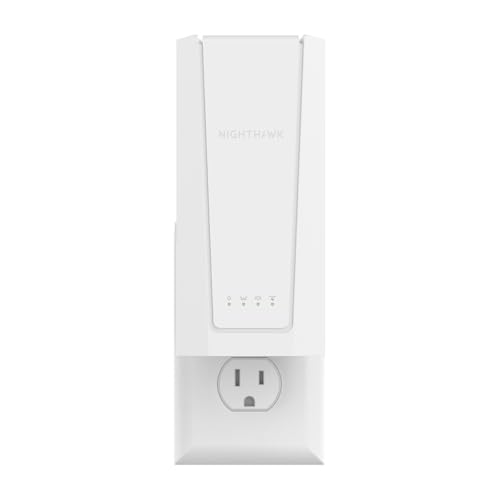


At a Glance
NETGEAR sells extenders across three Wi-Fi generations, and the model names alone (EX5000, EAX15, EXS27) can leave a buyer guessing which one fits. The differences come down to a few clear specs: which Wi-Fi generation the box speaks, how many square feet it claims to reach, and whether it keeps your network name when you move from room to room.
The six picks here run from the entry Wi-Fi 5 EX5000 at 1.2 Gbps up to the Nighthawk Wi-Fi 7 EXS27 at 5 Gbps. Every one plugs into a wall outlet and pairs through the Nighthawk app or a WPS button, so the work of choosing is mostly about matching the extender to the router you already own.
We evaluated them from NETGEAR's published specs and feature lists, then ordered them by how well each suits a household that wants a dead room fixed without a long afternoon of setup.
6 Criteria to Look For Before Buying a NETGEAR Wi-Fi Extender
Key buying criteria so you get the right fit the first time.
Match the extender to your router
An extender cannot be faster than the router feeding it, so pairing a Wi-Fi 7 box with an older router wastes the upgrade. The NETGEAR Nighthawk EXS27 at 5 Gbps is built for a Wi-Fi 7 router, while the EAX15 at 1.8 Gbps fits a Wi-Fi 6 router and the EX5000 at 1.2 Gbps suits Wi-Fi 5. Look for the standard printed on your router's label before you choose a generation. When you are unsure, aim one tier below the top rather than overspending.
One network name or two
The Nighthawk models carry Smart Roaming, which keeps your existing network name and moves each device to the strongest signal. The EAX17, EAX15, EXS25 and EXS27 all list this, while the Wi-Fi 5 EX5000 and EX6400 do not mention it. Without it, a phone can cling to the weak router signal while you stand next to the extender. If anyone in your home walks around during video calls, a roaming-capable model is worth the step up.
Coverage claims versus real rooms
Stated coverage is a best-case area in open space. The EX6400 lists 2,100 sq ft and every other model here lists 1,500 sq ft, but walls, floors and appliances reduce both. Count the rooms you need to cover instead of trusting the number, and place the unit between the router and the weak area. If your home is a long two-story layout, the EX6400's extra 600 sq ft over the EX5000 is the clearest reach upgrade in this group.
How much speed you can actually use
Headline speeds such as 5 Gbps on the EXS27 and 4.5 Gbps on the EXS25 are combined radio totals, not what a single phone will see. Your internet plan and your device both set a ceiling below those numbers. A home streaming HD video and making calls rarely needs more than the 1.8 Gbps of the EAX15, so the top-tier models are best saved for homes with many connected devices. Put the money toward the right Wi-Fi generation, not the largest figure.
Setup that fits the person installing
Every model listed here uses either the Nighthawk app for guided steps or WPS push-button pairing. The app suits anyone comfortable with a phone, and WPS suits anyone who prefers pressing a button on the router and the extender in turn. If the extender is going into a parent's home, confirm the router has a working WPS button or that the Nighthawk app can be installed first. A five-minute setup call is easier when both options are available, as they are on the EX5000.
Wired and mesh alternatives
An extender fixes one weak area, but a home with dead spots in several rooms often does better with a mesh system. The Nighthawk extenders such as the EAX17 narrow the gap by keeping one network name, yet they still repeat a single signal. If you can run a network cable to the far room, a wired access point beats any extender. Consider this before buying a second EX6400 to cover a second floor.
6 Best NETGEAR Wi-Fi Extenders in 2026
NETGEAR Nighthawk WiFi Extender EAX17
About this pick
The EAX17 is the Wi-Fi 6 Nighthawk that most homes will want from this brand. It lists speeds up to 3 Gbps and coverage up to 1,500 sq ft, aimed at the bedrooms, garage and basement where a router signal tends to give out. Smart Roaming keeps your existing network name and moves each device to the strongest signal, so there is no second network to join.
The single network name is a bigger deal than it sounds. On a basic extender you often end up with a second network, and phones stay stuck on the weaker one while you walk around. Here the handoff is automatic, which helps video calls that move with you from the kitchen to the porch. It does not stretch past 1,500 sq ft, though, so it is not the pick for the biggest houses.
Setup uses the Nighthawk app for guided steps, or WPS on the router and extender. Against the EAX15 at 1.8 Gbps, the EAX17 offers a much higher speed ceiling for the same stated coverage. Against the Wi-Fi 7 EXS27 at 5 Gbps, it gives up future-proofing but fits a Wi-Fi 6 router without paying for headroom the router cannot use.
Best for: Wi-Fi 6 households wanting one network name and fast pairing.
Check price on AmazonSpecs
- Wi-Fi standard: Wi-Fi 6
- Speed: Up to 3 Gbps
- Coverage: Up to 1,500 sq ft
- Roaming: Smart Roaming, one network name
Pros
- +Wi-Fi 6 with speeds up to 3 Gbps listed
- +Smart Roaming keeps your current network name
- +Guided Nighthawk app setup removes guesswork
- +Aimed at bedrooms, garages and basements
Cons
- −Coverage tops out at 1,500 sq ft
- −Wi-Fi 6 speed needs a matching router
NETGEAR Nighthawk WiFi 7 Extender EXS27
About this pick
The EXS27 is NETGEAR's top Wi-Fi 7 extender in this group, listing speeds up to 5 Gbps and coverage up to 1,500 sq ft. It is the model to consider if you already own a Wi-Fi 7 router, or expect to buy one in the next few years. Smart Roaming keeps one network name across the house.
The reality check is that Wi-Fi 7 only pays off when the router, the extender and the device all speak it. Most phones, tablets and TVs in a typical home do not yet, so for now the EXS27 behaves like a fast Wi-Fi 6 extender with room to grow. Its stated 1,500 sq ft is the same as the EAX17 and the EX5000, so you are paying for speed and standard, not for reach.
Pairing runs through the Nighthawk app or WPS. Compared with the EXS25 at 4.5 Gbps, it adds a half-gigabit of headroom at the same coverage, a small gap for most households. Choose this one when the router is Wi-Fi 7 and you plan to keep the setup for years, and pick the EAX17 when your router is Wi-Fi 6 and the extra headroom would go unused.
Best for: Wi-Fi 7 router owners who want the fastest extender here.
Check price on AmazonSpecs
- Wi-Fi standard: Wi-Fi 7
- Speed: Up to 5 Gbps
- Coverage: Up to 1,500 sq ft
- Roaming: Smart Roaming
Pros
- +Wi-Fi 7 with up to 5 Gbps of listed speed
- +Highest speed ceiling among the six picks
- +Smart Roaming keeps a single network name
- +Guided app and WPS setup routes
Cons
- −Same 1,500 sq ft reach as cheaper models
- −Wi-Fi 7 gains need a Wi-Fi 7 router and devices
NETGEAR WiFi Extender EX6400
About this pick
The EX6400 is the one NETGEAR extender here that claims more than 1,500 sq ft, listing coverage up to 2,100 sq ft. It is a Wi-Fi 5 AC1900 unit with speeds up to 1.9 Gbps and a feature called FastLane, which NETGEAR pitches for demanding HD streaming and online gaming across the home.
That larger footprint suits a two-story house or a long ranch layout where the dead room sits at the far end. It is an older Wi-Fi 5 design, so it lacks the Smart Roaming single network name found on the Nighthawk models, and you may see a second network to join. For a buyer more interested in reach than in the newest standard, that tradeoff is fair.
Setup is the familiar mix of Nighthawk app steps or a WPS press on the router and the extender. Next to the EX5000 at 1.2 Gbps and 1,500 sq ft, the EX6400 adds 600 sq ft and a higher speed figure. Against the Wi-Fi 6 EAX17 at 3 Gbps, it offers more reach but less speed, which is the clearest tradeoff in this lineup.
Best for: Large or two-story homes on a Wi-Fi 5 router.
Check price on AmazonSpecs
- Wi-Fi standard: Wi-Fi 5 (AC1900)
- Speed: Up to 1.9 Gbps
- Coverage: Up to 2,100 sq ft
- Setup: Nighthawk app or WPS
Pros
- +Highest stated coverage of the six at 2,100 sq ft
- +1.9 Gbps listed speed with FastLane for streaming
- +Guided Nighthawk app setup or WPS pairing
- +Good fit for long layouts and two floors
Cons
- −Wi-Fi 5 only, so no Smart Roaming name
- −Older design than the Wi-Fi 6 and 7 models
NETGEAR Nighthawk WiFi Extender EAX15
About this pick
The EAX15 gives you the Nighthawk Wi-Fi 6 experience at a lower speed tier, with a listed 1.8 Gbps and the same 1,500 sq ft coverage as its bigger sibling. It carries Smart Roaming, so your phone moves to whichever signal is stronger without you switching networks by hand.
For many homes this is the practical middle. A household with a Wi-Fi 6 router and a modest internet plan will often never exceed what 1.8 Gbps of wireless capacity can carry, so the faster EAX17 would sit partly unused. It is also a sensible step up from the Wi-Fi 5 EX5000, since it adds the single network name and the newer standard for a similar footprint.
Setup is through the Nighthawk app or WPS, and the unit plugs straight into a wall outlet. Compared with the EAX17 at 3 Gbps, the EAX15 trades about 1.2 Gbps of headroom for a simpler, less expensive tier. Compared with the EX6400 at 2,100 sq ft, it covers less area but carries a modern Wi-Fi standard.
Best for: Wi-Fi 6 router owners who do not need the fastest tier.
Check price on AmazonSpecs
- Wi-Fi standard: Wi-Fi 6
- Speed: Up to 1.8 Gbps
- Coverage: Up to 1,500 sq ft
- Roaming: Smart Roaming
Pros
- +Wi-Fi 6 with Smart Roaming keeps one network name
- +1.8 Gbps listed speed suits typical home plans
- +Same 1,500 sq ft coverage as pricier Nighthawks
- +Guided Nighthawk app setup
Cons
- −Lower speed ceiling than the EAX17
- −Less reach than the 2,100 sq ft EX6400
NETGEAR WiFi Extender EX5000
About this pick
The EX5000 is the entry point into this lineup, a Wi-Fi 5 dual-band extender at 1.2 Gbps with coverage up to 1,500 sq ft. NETGEAR describes it as a way to bring Wi-Fi to bedrooms, the garage, the basement and the backyard, and it keeps HD streaming and video calls smooth where the signal was weak.
It makes the most sense for an older Wi-Fi 5 router and a small home with one trouble spot. You will not get Smart Roaming, and a second network name may appear, but for a single-room fix those are small costs. Related models like the EX6120 and EX6170 list the same 1.2 Gbps and 1,500 sq ft, so they work as alternates rather than separate choices.
Setup via the Nighthawk app is guided, and WPS on both the router and the extender is the shortcut. Beside the EX6400 at 2,100 sq ft, the EX5000 reaches 600 sq ft less. Beside the EAX15 at 1.8 Gbps, it gives up Wi-Fi 6 and the single network name, which is the price of being the cheapest way into the family.
Best for: Small homes with an older router and one weak room.
Check price on AmazonSpecs
- Wi-Fi standard: Wi-Fi 5 (AC1200)
- Speed: Up to 1.2 Gbps
- Coverage: Up to 1,500 sq ft
- Setup: Nighthawk app or WPS
Pros
- +Simplest and most direct entry into the lineup
- +1.2 Gbps across two bands for HD streaming
- +Guided app steps and a WPS shortcut
- +Covers up to 1,500 sq ft in the listing
Cons
- −No Smart Roaming single network name
- −Wi-Fi 5 limits newer devices on the far side
NETGEAR Nighthawk WiFi 7 Extender EXS25
About this pick
The EXS25 is NETGEAR's second Wi-Fi 7 Nighthawk here, rated at 4.5 Gbps and 1,500 sq ft. It shares the Smart Roaming feature, so one network name follows you through the house, and it offers the same Wi-Fi 7 standard as the EXS27 at a slightly lower speed tier.
For households that want a Wi-Fi 7 extender but do not need the top number, this is the sensible stop. The 0.5 Gbps gap to the EXS27 will rarely show up in day-to-day use, while the standard itself is what matters when your router is Wi-Fi 7. Like all the Nighthawk models, its stated coverage is 1,500 sq ft, so a large home still needs the EX6400 or a mesh system.
Pairing goes through the Nighthawk app or WPS. Compared with the EAX17 at 3 Gbps, the EXS25 adds Wi-Fi 7 and 1.5 Gbps more headroom for the same coverage. Compared with the EXS27, it is the better choice when you want Wi-Fi 7 but would rather not pay for the last bit of speed.
Best for: Wi-Fi 7 setups where the top speed tier is not needed.
Check price on AmazonSpecs
- Wi-Fi standard: Wi-Fi 7
- Speed: Up to 4.5 Gbps
- Coverage: Up to 1,500 sq ft
- Roaming: Smart Roaming
Pros
- +Wi-Fi 7 standard with up to 4.5 Gbps listed
- +Smart Roaming keeps one network name
- +Only a half gigabit behind the EXS27
- +Guided app setup or WPS pairing
Cons
- −Reach is limited to 1,500 sq ft
- −Needs a Wi-Fi 7 router to show its benefit
How We Evaluated These NETGEAR Wi-Fi Extenders
Each pick was assessed across 5 criteria weighted for real-world use.
Wi-Fi generation and future fit
We sorted the six picks into Wi-Fi 5, Wi-Fi 6 and Wi-Fi 7 tiers and judged how long each would stay useful. The EXS27 and EXS25 are Wi-Fi 7, the EAX17 and EAX15 are Wi-Fi 6, and the EX5000 and EX6400 are Wi-Fi 5. A newer standard earned credit only when the listing's other features supported it.
Coverage area
We compared each unit's stated reach, which is 1,500 sq ft for most of the lineup and 2,100 sq ft for the EX6400. We treated those figures as best-case and favored models that suit common home layouts. Extra reach counted for a lot in two-story homes, where the EX6400 leads.
Speed ceiling
We reviewed the listed speeds from 1.2 Gbps on the EX5000 to 5 Gbps on the EXS27. Because real devices rarely reach those numbers, we scored the ceiling against likely home use rather than rewarding the biggest figure. The EAX15 at 1.8 Gbps scored well for fitting typical plans.
Roaming and network name
Smart Roaming, which keeps one network name and moves devices to the strongest signal, was weighed heavily. The Nighthawk models list it, while the EX5000 and EX6400 do not. This feature is often the difference between an extender that feels invisible and one that needs manual network switching.
Setup and ownership ease
We looked at the guided Nighthawk app, the WPS option, and how little maintenance each unit asks for. All six share the same setup routes, so the ranking leans on the other criteria. Our conclusions come from specs and buyer feedback, not from lab measurement.
How to Choose the Right NETGEAR Wi-Fi Extenders
By Router Generation
The generation of your router is the first filter, because it sets how much speed an extender can pass on.
| Your router | Pick | Why |
|---|---|---|
| Older Wi-Fi 5 router, small home | NETGEAR WiFi Extender EX5000 | 1.2 Gbps and 1,500 sq ft match an older router. |
| Wi-Fi 5 router, large or two-story home | NETGEAR WiFi Extender EX6400 | Up to 2,100 sq ft and 1.9 Gbps. |
| Wi-Fi 6 router, modest plan | NETGEAR Nighthawk WiFi Extender EAX15 | 1.8 Gbps with Smart Roaming. |
| Wi-Fi 6 router, many devices | NETGEAR Nighthawk WiFi Extender EAX17 | Up to 3 Gbps for busy households. |
| Wi-Fi 7 router | NETGEAR Nighthawk WiFi 7 Extender EXS27 | 5 Gbps keeps pace with the newest routers. |
By Budget
Tiers here are relative within the NETGEAR family.
| Tier | Pick | What you get |
|---|---|---|
| Entry | NETGEAR WiFi Extender EX5000 | Wi-Fi 5 at 1.2 Gbps and 1,500 sq ft. |
| Entry for reach | NETGEAR WiFi Extender EX6400 | Wi-Fi 5 at 1.9 Gbps and 2,100 sq ft. |
| Mid | NETGEAR Nighthawk WiFi Extender EAX15 | Wi-Fi 6 with a single network name. |
| Upper mid | NETGEAR Nighthawk WiFi Extender EAX17 | Wi-Fi 6 at 3 Gbps. |
| Premium | NETGEAR Nighthawk WiFi 7 Extender EXS25 | Wi-Fi 7 at 4.5 Gbps. |
| Top | NETGEAR Nighthawk WiFi 7 Extender EXS27 | Wi-Fi 7 at 5 Gbps. |
Nighthawk vs Standard EX Models
The Nighthawk label separates models with Smart Roaming from the older EX line.
Nighthawk models
Nighthawk units keep your network name and move devices to the strongest signal automatically. The EAX15, EAX17, EXS25 and EXS27 fall on this side. They suit people who walk around the house on calls or streams, and they cost more than the EX line.
Standard EX models
The EX5000 and EX6400 are straightforward Wi-Fi 5 extenders without the roaming feature, and a second network name may appear. They suit fixed devices such as a TV or a desktop that stay in one room. Pick Nighthawk for mobile use and EX for a single fixed spot.
By Home Layout
Layout decides whether reach or speed matters more.
| Layout | Pick | Reason |
|---|---|---|
| Apartment with one weak bedroom | NETGEAR WiFi Extender EX5000 | 1,500 sq ft is ample for a small space. |
| Long ranch house | NETGEAR WiFi Extender EX6400 | 2,100 sq ft covers the far end. |
| Two-story home with a Wi-Fi 6 router | NETGEAR Nighthawk WiFi Extender EAX17 | Roaming plus 3 Gbps for both floors. |
| Home office plus living room streaming | NETGEAR Nighthawk WiFi Extender EAX15 | 1.8 Gbps is enough for both uses. |
For Walking Around the House Specifically
Mobile devices behave best when the network name stays the same.
Look for
A model with Smart Roaming that keeps your current network name, so phones and tablets switch to the stronger signal without you touching settings. Without it, devices often stay attached to the weak one.
In this comparison
The EAX15, EAX17, EXS25 and EXS27 all list Smart Roaming. The EAX15 at 1.8 Gbps is the simplest, and the EXS27 at 5 Gbps is the fastest. The EX5000 and EX6400 do not list the feature.
When to Spend More
Stepping up only pays when a specific limit applies to you.
| Spend more if | Save if |
|---|---|
| You own a Wi-Fi 7 router and will keep it: the EXS27 at 5 Gbps fits. | Your router is Wi-Fi 6: the EAX15 at 1.8 Gbps does the job. |
| Family members walk the house on calls: choose a Nighthawk with Smart Roaming. | Devices stay in one room: the EX5000 is enough. |
| Your home is large: the EX6400 reaches 2,100 sq ft. | Your home is under 1,500 sq ft: any other pick covers it. |
| You expect many devices on one extender: the EAX17 at 3 Gbps has headroom. | You mostly browse and watch HD video: the EAX15 is plenty. |
Frequently Asked Questions
Which NETGEAR extender is best for most homes?
For a Wi-Fi 6 router, the Nighthawk EAX17 is the strongest all-round choice, with up to 3 Gbps and Smart Roaming. If your router is older Wi-Fi 5, the EX5000 covers most small homes without extra cost. Match the extender to the generation of your router and the size of the area you need to fix.
Is the Wi-Fi 7 EXS27 worth it?
It is worth it when your router is Wi-Fi 7 and you want the headroom for years ahead. If your router is Wi-Fi 6, the extra speed sits unused, and the EAX17 or EAX15 is a better match. Most household devices today do not yet use Wi-Fi 7, so the benefit is mainly future-facing.
Do I need the Nighthawk app?
No, the app is optional. Every model here also supports WPS, where you press the button on the router and then on the extender to pair them. The app provides guided steps and a way to check the connection, which many people find reassuring. Use whichever method feels easier for the person doing the install, and keep the router password nearby in case the app asks for it. If the router has no WPS button, the app route is the one to use.
Will an extender fix slow internet?
An extender helps a far room reach the signal your router already has, but it does not make the plan itself faster. If your internet is slow even next to the router, the cause lies with the plan or the router, not the coverage. Test the speed beside the router first, then decide whether you have a coverage problem.
What is the difference between the EX5000, EX6120 and EX6170?
NETGEAR lists all three at 1.2 Gbps and up to 1,500 sq ft, so they are close cousins and function as alternates. Choose whichever is on offer, and check that the listing says Wi-Fi 5 AC1200. The more important choice is between this class and the Nighthawk models with Smart Roaming, which cost more but keep one network name. Treat the three as one decision, not three.
Where should I put the extender?
Plug it in about halfway between the router and the weak room, where it still receives a strong signal. Putting it in the dead zone only repeats a poor signal. Keep it away from large metal objects and microwaves, and move it one outlet at a time if the signal light reads weak.
Should I choose mesh instead of an extender?
Choose mesh when several rooms have weak signal or when you want a single system to replace the router's coverage. Choose an extender such as the EAX15 when only one area needs help. Nighthawk extenders narrow the gap with Smart Roaming, but they still repeat a single signal and do not form a full mesh. Counting your weak rooms before you shop settles the question quickly. One or two rooms points to an extender, and three or more points to a different system.
Bottom Line
best overall: NETGEAR Nighthawk WiFi Extender EAX17 - best overall pick in this roundup.
See the full rankings above for all picks with pros, cons, and best-for summaries.
Browse on Amazon
All Prime-eligible options with current pricing.
Shop on Amazon →