5 Best Tablet Stands for Video Calls (2026)
Five tablet stands for video calls compared on height, tilt, base weight and fit, so the camera sits near eye level and the picture stays steady.


At a Glance
Video calls fail on a tablet for a simple reason: the camera sits too low. Most stands leave the tablet at chest height, so family and friends see a chin and a ceiling. The picks here fix that with height. The COOPER TabStand adjusts across 13 to 20 inches, the tounee from 11.81 to 18.11 inches, and the SAMHOUSING tripod from 16.7 to 65 inches.
Stability and size range matter just as much. The COOPER holds 4.4 pounds on a weighted base, the tounee supports 3.5 pounds and devices from 4.7 to 15.6 inches, and the ROADOM spans 4.7 to 17.3 inches with a 360 degree swivel. The Lamicall is the simpler low-profile dock for a standard desk.
We evaluated each stand based on product specs and buyer feedback, scoring camera height, steadiness when you tap or reposition, and how easy the angle is to adjust. The advice is written for active adults who video chat with family and for the relatives helping them pick a setup.
6 Criteria to Look For Before Buying a Tablet Stands for Video Calls (2026)
Key buying criteria so you get the right fit the first time.
Camera height
For video calls the camera should sit near eye level, otherwise the other person sees a chin and a ceiling. The COOPER adjusts 13 to 20 inches, the tounee 11.81 to 18.11 inches, and the SAMHOUSING reaches 65 inches. The Lamicall sits low and may need a boost. If you call often, buy for height first.
Load capacity
The COOPER holds 4.4 pounds and the tounee 3.5 pounds. Cases add weight, and manufacturers note heavier devices or cases may need a heavier base. A 12.9 or 13 inch iPad Pro in a rugged case can approach those limits. Check your tablet weight with its case before buying.
Base stability
A tall stand behaves like a lever, so a weighted base matters. The COOPER and ROADOM use weighted bases and the SAMHOUSING relies on tripod legs. Research on floor and tall stands puts roughly 4.5 pounds as a sensible minimum base for a full-size iPad at full extension. Test for wobble when you tap the screen to answer.
Screen size range
The ROADOM supports 4.7 to 17.3 inches, the tounee 4.7 to 15.6 inches, and the Lamicall 4 to 13 inches. Supported ranges commonly stop near 13 inches. Pick a stand that covers your largest device with its case on. Oversized stands still need a firm clamp.
Angle and swivel
The ROADOM offers 360 swivel, 180 tilt and a 150 degree pillar, while the SAMHOUSING rotates 360 degrees. Calls often involve turning the screen toward a different seat. Multi-joint arms must lock without drooping. Prefer joints that hold position when you let go.
Ease for older users
Few listings document one-handed adjustment or reach from a chair. The SAMHOUSING remote, the Lamicall's simple dock and the tounee's clamp are easier than multi-step locks. Try a stand for a week and return it if it needs two hands. Simplicity beats features for daily calls.
5 Best Tablet Stands for Video Calls (2026)
COOPER TabStand 20 inch
About this pick
The COOPER TabStand reaches a 20 inch height and adjusts from 13 to 20 inches, which brings a tablet camera toward eye level. It holds 4.4 pounds on a weighted base. It supports everything from an iPad mini to an iPad Pro 13 inch to heavier 17 inch portable monitors.
Height is exactly what a video call needs. The tradeoff is footprint and weight, since a stand this tall needs a stable base and takes desk space. It suits people who call regularly from a desk and want the camera at face level.
There is little to assemble, and the weighted base resists a wobble when you adjust it. It is less portable than the Lamicall. Compared with the tounee, it reaches higher at 20 inches against 18.11 and carries a stated 4.4 pound load.
Best for: Regular callers who want camera height and a steady base
Check price on AmazonSpecs
- Height range: 13 to 20 inches
- Load: Holds 4.4 pounds
- Base: Weighted
- Devices: iPad mini to iPad Pro 13, up to 17 inch portable monitors
Pros
- +Adjusts 13 to 20 inches for eye-level camera
- +Weighted base holds 4.4 pounds
- +Fits iPad mini to 13 inch Pro
- +Also holds portable monitors
Cons
- −Tall base takes desk space
- −Not designed to travel
tounee Height Adjustable Tablet Stand
About this pick
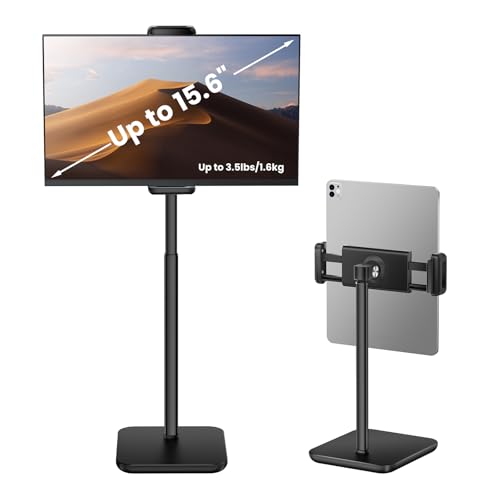
The tounee Height Adjustable Tablet Stand raises a device from 11.81 to 18.11 inches and supports up to 3.5 pounds. An extra-wide clamp, 4.7 to 9.44 inches, fits devices from 4.7 to 15.6 inches. It is case-friendly, allowing up to 17 millimeters of thickness.
Its selling point is neck relief, since lifting the device prevents looking down. The tradeoff is the 3.5 pound ceiling, which is lower than the COOPER, so very heavy tablets in rugged cases need checking. It suits most iPad and Android tablet users.
The slim, portable profile makes it easy to store. It is a good middle ground between the Lamicall and the tall COOPER. Compared with the ROADOM, it has fewer rotation options but a clearer weight spec.
Best for: Neck-friendly calls with a cased tablet
Check price on AmazonSpecs
- Height range: 11.81 to 18.11 inches
- Load: 3.5 pounds (1.6 kg)
- Clamp width: 4.7 to 9.44 inches
- Case thickness: Up to 17 mm
Pros
- +Raises the screen from 11.81 to 18.11 inches
- +Case-friendly up to 17 mm
- +Fits 4.7 to 15.6 inch devices
- +Slim and portable
Cons
- −Lower 3.5 lb load than the COOPER
- −Not as tall as the COOPER or tripod
SAMHOUSING iPad Tripod Floor Stand
About this pick
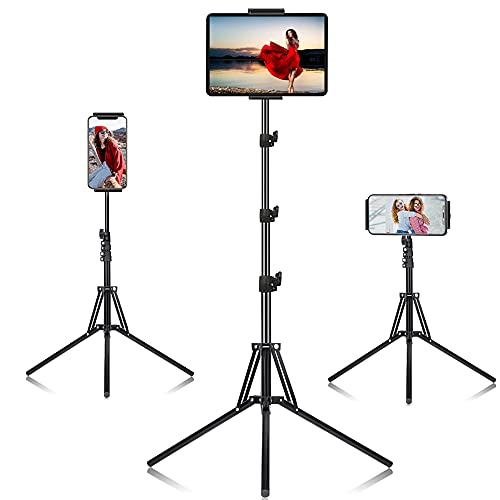
The SAMHOUSING iPad Tripod Stand extends from 16.7 to 65 inches across four height levels. The holder rotates 360 degrees and a remote is included. That height lets you place the camera at face level while standing or sitting back in a chair.
It is a different idea from a desk dock. It stands on the floor, so you can video chat from an armchair or while moving around, but it needs open floor space. It suits people who want their hands free and a wide framing.
Setup means extending the legs and picking a level. It stands upright when stored. Compared with the COOPER, it reaches much higher, while the Lamicall is the compact desk alternative.
Best for: Standing or recliner calls with hands free
Check price on AmazonSpecs
- Height range: 16.7 to 65 inches
- Height levels: 4 settings
- Rotation: 360 degrees
- Extras: Remote included
Pros
- +Extends up to 65 inches
- +Four height levels
- +360 degree rotation
- +Includes a remote
Cons
- −Needs floor space
- −Tripod legs can be a trip hazard
ROADOM 360 Swivel Aluminum Stand
About this pick
The ROADOM stand supports devices from 4.7 to 17.3 inches, so it works with phones through large tablets. It offers a 360 degree swivel, 180 degree tilt and a 150 degree pillar adjustment. The build is aluminum alloy with a weighted base.
That freedom is useful for calls, because you can angle the camera precisely. The tradeoff is more joints to set and keep tight. It suits people who share a tablet across a room and like to turn it.
A metal body wipes clean, and the weighted base helps resist tipping. It is a fixed desk stand, not a travel stand. Compared with the tounee, it has more rotation but less clear weight data, and the COOPER is taller.
Best for: Shared tablets that need turning and tilting
Check price on AmazonSpecs
- Device size: 4.7 to 17.3 inches
- Swivel: 360 degrees
- Tilt: 180 degrees
- Build: Aluminum alloy and weighted base
Pros
- +Supports 4.7 to 17.3 inch devices
- +360 swivel and 180 tilt
- +Aluminum alloy with weighted base
- +Pillar adjusts through 150 degrees
Cons
- −More joints to tighten
- −Stated load limit is not clear
Lamicall Adjustable Tablet Stand
About this pick
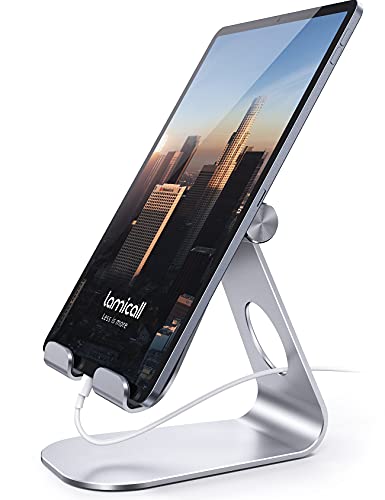
The Lamicall Adjustable Tablet Stand is a straightforward aluminum dock for 4 to 13 inch devices. It supports portrait and landscape viewing, and rubber pads and feet protect the tablet. It works well on a standard desk or kitchen table.
It does not add height, so the camera will sit lower than with the COOPER or tounee. The 18 millimeter hook width also limits very thick cases. It suits people who do short calls and want the simplest setup.
Setup is instant, and the metal wipes clean. Pair it with a stack of books if you need extra height. Compared with the ROADOM, it is simpler and lower, and compared with the SAMHOUSING it is far smaller.
Best for: Short calls on a normal desk
Check price on AmazonSpecs
- Device size: 4 to 13 inches
- Orientation: Portrait and landscape
- Hook width: 18 mm
- Material: Aluminum with rubber pads
Pros
- +Quick setup with no tools
- +Portrait and landscape both supported
- +Rubber pads protect the device
- +Sturdy aluminum body
Cons
- −Does not raise the camera much
- −18 mm hook limits thick cases
How We Evaluated These Tablet Stands for Video Calls (2026)
Each pick was assessed across 5 criteria weighted for real-world use.
Camera height
We compared adjustable ranges, from the COOPER at 13 to 20 inches to the SAMHOUSING at 65 inches. Higher reach scored better for eye-level calls. The Lamicall, with no extra height, ranked lowest on this.
Stability under adjustment
We looked at base weight and structure, such as the COOPER weighted base and the ROADOM aluminum build. Stands that stay still while you reposition scored higher.
Load and case fit
We compared stated limits like 4.4 pounds on the COOPER and 3.5 pounds on the tounee. We also noted the 17 millimeter case allowance. Stands with clear numbers ranked higher.
Angle control
We looked at swivel, tilt and rotation, from the ROADOM at 360 degrees to the Lamicall's simple hooks. Easy, secure locks scored best. The most basic angle control is on the Lamicall.
Value for the price tier
The Lamicall is the lowest-cost pick while the ROADOM sits at the top. Picks that justified their cost with height or load scored well.
How to Choose the Right Tablet Stands for Video Calls (2026)
By Call Setup
| Scenario | Recommended pick |
|---|---|
| Desk calls with camera at face level | COOPER TabStand 20 inch |
| Neck relief with a cased tablet | tounee Height Adjustable Tablet Stand |
| Armchair or standing calls | SAMHOUSING iPad Tripod Floor Stand |
| Shared tablet turned across a room | ROADOM 360 Swivel Aluminum Stand |
| Short calls, simple dock | Lamicall Adjustable Tablet Stand |
By Budget
| Budget tier | Recommended pick |
|---|---|
| Lowest-cost pick | Lamicall Adjustable Tablet Stand |
| Low-to-mid | SAMHOUSING iPad Tripod Floor Stand |
| Mid-range | tounee Height Adjustable Tablet Stand |
| Upper-mid | COOPER TabStand 20 inch |
| Premium swivel | ROADOM 360 Swivel Aluminum Stand |
Desk Stand vs Floor Tripod
Desk stand
The COOPER, tounee, ROADOM and Lamicall sit on a desk. They keep the tablet close and steady. Height is limited to about 20 inches.
Floor tripod
The SAMHOUSING reaches 65 inches and rotates 360 degrees. It needs floor space. It suits armchair or standing calls.
Choose the COOPER for desk calls and the SAMHOUSING for hands-free calls from a chair.
By Tablet Weight
| Tablet | Recommended pick |
|---|---|
| Heavy, up to 4.4 lb | COOPER TabStand 20 inch |
| Up to 3.5 lb with thick case | tounee Height Adjustable Tablet Stand |
| Large up to 17.3 inches | ROADOM 360 Swivel Aluminum Stand |
| Light tablet or phone | Lamicall Adjustable Tablet Stand |
| Any size, floor mounted | SAMHOUSING iPad Tripod Floor Stand |
For Family Video Chats Specifically
Look for
A camera near eye level, a base that does not shift when you tap the screen, and an angle you can change easily. Avoid stands that tilt back and hide your face.
In this comparison
The COOPER TabStand reaches 20 inches and the tounee offers case-friendly neck relief. The Lamicall is fine for quick chats.
When to Spend More
Spend more if
You call daily or use a large iPad Pro. The COOPER adds height and a 4.4 pound load, and the ROADOM adds swivel.
Save if
You call occasionally. The Lamicall is the lowest-cost pick and the SAMHOUSING gives big height for less.
Frequently Asked Questions
How high should the camera be for a video call?
The camera should sit near eye level so faces look natural. A low tablet shows chins and ceilings. Stands such as the COOPER at up to 20 inches or the SAMHOUSING at up to 65 inches reach that height.
How much does a good video call stand cost?
Prices run from the lowest-cost Lamicall to the premium ROADOM. You pay more for height, swivel and weight capacity. A mid-range option like the tounee suits most callers.
Will the stand tip when I tap the screen?
A light base can. The COOPER and ROADOM use weighted bases to resist that. Research notes that tall arms act like levers, so heavier devices need heavier bases.
Can I use a case?
Yes, within limits. The tounee allows up to 17 millimeters of thickness and the Lamicall has an 18 millimeter hook width. Measure your tablet with the case on.
Is a tripod better than a desk stand?
It depends on where you sit. A tripod such as the SAMHOUSING suits armchair or standing calls, while a desk stand is steadier for tabletop use. Pick by location.
Can I use these for other things?
Yes. The COOPER holds portable monitors up to 17 inches, and the ROADOM covers 4.7 to 17.3 inches. They also work for recipes or reading.
Bottom Line
best overall: COOPER TabStand 20 inch - best overall pick in this roundup.
See the full rankings above for all picks with pros, cons, and best-for summaries.
Browse on Amazon
All Prime-eligible options with current pricing.
Shop on Amazon →