6 Best Tablet Stands for Seniors (2026)
Six steady, easy-adjust tablet stands for older adults, from weighted desk holders to floor stands, chosen for reading, calls and recipes.


At a Glance
For many older adults a tablet is the main window to family video calls, photos, e-books and recipes, yet holding it for an hour strains wrists and shoulders. A stand fixes that, but only if it is steady, simple to adjust and does not need a screwdriver. This guide ranks six stands on those practical points rather than on novelty.
The picks differ in more than looks. The COOPER TabStand adjusts from 13 to 20 inches and holds up to 4.4 lb on a weighted base, while the Lamicall folds to 0.59 inches. The SAMHOUSING floor stand reaches from 27.5 to 53 inches, and the tounee supports screens up to 16.9 inches, the largest range here.
We evaluated each stand based on product specs and buyer feedback, giving extra weight to stability, one-handed adjustment and how easily a person can set it up alone. There is no single best stand for everyone, so we explain which pick suits a desk, a recliner or a kitchen counter. Use the sections below to match the design to the way the tablet is actually used.
6 Criteria to Look For Before Buying a Tablet Stands for Seniors (2026)
Key buying criteria so you get the right fit the first time.
Stability under real use
A senior-friendly stand must not wobble when the screen is tapped or swiped. The COOPER TabStand uses a weighted base rated to hold 4.4 lb, and the Elekpopu uses a 5 lb metal base. Floor stands with arms act like levers, and research puts roughly 4.5 lb as the minimum base for a full size iPad at full extension. If your tablet wears a case, add its weight to the load before you decide.
One-handed, low-force adjustment
Stiff hands make fiddly joints frustrating. The tounee has a locking mechanism for height and angle, the Lamicall relies on two hinges, and the LISEN uses a tri-fold with a truss rod. Fewer adjustment points means less effort, so a simple hinge dock beats a many-jointed arm for daily use. Joints must also lock without drooping, so check that the stand holds your tablet's weight.
Screen size and case fit
The Elekpopu supports devices from 4.7 to 11 inches and under 1.5 lb, the SAMHOUSING reaches 13 inches, and the tounee handles up to 16.9 inches. Measure your tablet with its case on, because supported ranges usually refer to the bare device. A stand that is too small for the tablet will not hold it securely, and an oversize tablet strains the arm. A good rule of thumb is to leave a little margin on both size and weight.
Eye-level height
A screen held low pushes the neck forward, so raising it toward eye level eases strain. The COOPER lifts to 20 inches and the SAMHOUSING extends up to 53 inches, which gets the screen up where it belongs. For video calls the camera should sit near eye level, because a low tablet shows chins and ceilings. Pick height range deliberately instead of settling for a flat dock.
Where the stand is used
Desk stands such as the Lamicall and COOPER sit on a table, while the SAMHOUSING and Elekpopu stand on the floor. Floor stands have a base that should press against a bed frame or chair for stability, and they need floor space. Decide whether the tablet lives at a table, a recliner or a bedside before you shop. Choosing the wrong style is the most common mistake.
Setup difficulty
Many seniors prefer no assembly at all. The Lamicall and tounee need little to no setup, while the SAMHOUSING and Elekpopu go together without tools following a manual. The LISEN adds a truss rod to set. A stand that can be unboxed and used in five minutes is more likely to be used daily.
6 Best Tablet Stands for Seniors (2026)
Lamicall Ultra-Slim Foldable Tablet Stand
About this pick
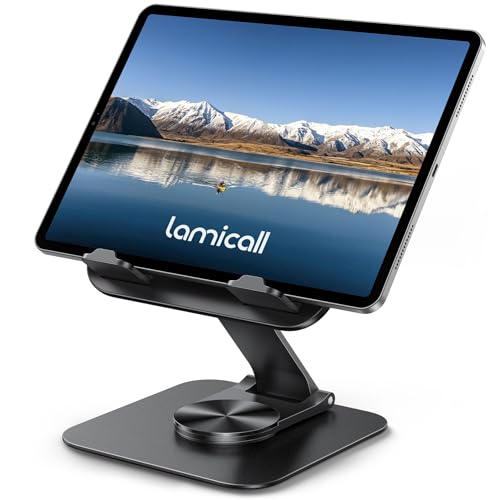
The Lamicall is the easiest stand here to recommend to a parent who does not want fuss. It sits on a heavy-duty metal base, and two hinges let you tilt the screen and raise it to a comfortable height. The base also turns a full 360 degrees, so the screen can face someone sitting next to you without lifting the tablet.
The hinges are the only learning curve. Once you set the angle they hold, but you have to adjust two points instead of one, which can feel fiddly if your hands are stiff. It is also overbuilt for a small phone, so it makes the most sense with a tablet or e-reader.
It folds flat to 0.59 inches, which means it stores in a drawer or travels in a bag. Cleaning is a wipe with a dry cloth. Compared with the COOPER it is far more portable, though the COOPER has the taller reach and a weighted base for rougher use.
Best for: Everyday desk and table use where the stand also needs to go in a bag
Check price on AmazonSpecs
- Folded thickness: 0.59 inches
- Base: Heavy-duty metal, 360 degree rotation
- Adjustment: Two hinges for tilt and height
- Best use: Video calls, reading, streaming
Pros
- +Folds flat to just 0.59 inches
- +Heavy-duty metal base stays put
- +Base rotates 360 degrees for sharing
- +Hinges hold tilt and height firmly
Cons
- −Two hinges to set instead of one
- −Overbuilt for a small phone
COOPER TabStand 20 Inch Adjustable Stand
About this pick
The COOPER TabStand is the pick for people who want the screen high and steady. It lifts a device from 13 up to 20 inches, which brings it closer to eye level than a flat dock can. The weighted base is rated to hold up to 4.4 lb, so it carries a full size iPad or even a portable monitor up to 17 inches.
The cost of that stability is size and weight. It is a desk piece you leave in place rather than something to toss in a purse, and it needs clear table space. Because the listing positions it for desk work, kitchen recipes and video calls, it fits home offices and counters better than beds.
There is little to clean beyond dusting the base. Next to the Lamicall it is better for long sessions at one spot, since the height reaches eye level without stacking books. If a parent video calls from the same chair every day, this is the stand that stays out of the way.
Best for: Raising a large tablet toward eye level on a desk or kitchen table
Check price on AmazonSpecs
- Height range: 13 to 20 inches
- Load: Holds 4.4 lb
- Base: Weighted
- Devices: iPad mini to 13 inch iPad Pro, 17 inch portable monitors
Pros
- +Adjusts from 13 to 20 inches tall
- +Weighted base holds up to 4.4 lb
- +Fits iPad mini up to 13 inch iPad Pro
- +Helps keep the camera near eye level
Cons
- −Not designed to be carried around daily
- −Needs more desk space than a slim dock
SAMHOUSING Adjustable Tablet Floor Stand
About this pick
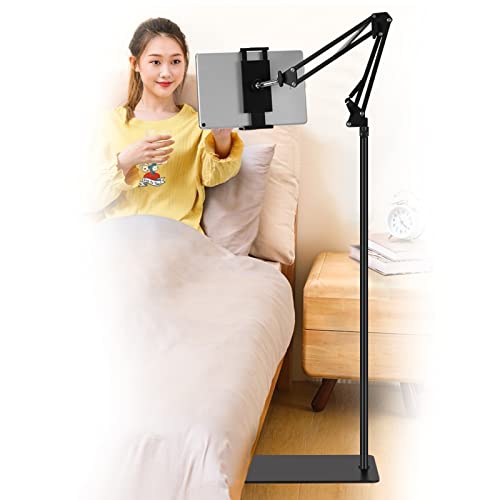
The SAMHOUSING is a floor stand that lets a tablet hover where you need it, whether you sit in a chair or lie in bed. Its height adjusts from 27.5 to 53 inches, and the bracket rotates 360 degrees so switching between portrait and landscape is simple. It holds devices from 4.7 to 13 inches and goes together without tools.
A floor stand takes space and is not meant to be carried between rooms. It sits in the upper cost tier of this roundup, which is the main drawback beyond its footprint. Pressing the base against a chair leg or bed frame adds stability, and keeping the arm short helps when the tablet is large.
Setup means following a manual for a few minutes and then adjusting once. Compared with the Elekpopu it offers a higher maximum height and a verified 13 inch device range, though the Elekpopu has a stated 5 lb metal base. For reading in a recliner it is a straightforward choice.
Best for: Reading or watching from a recliner, sofa or bed without holding the tablet
Check price on AmazonSpecs
- Height range: 27.5 to 53 inches
- Device size: 4.7 to 13 inches
- Rotation: 360 degrees
- Assembly: No tools, follow the manual
Pros
- +Height adjusts from 27.5 to 53 inches
- +Holds devices from 4.7 to 13 inches
- +Rotates 360 degrees between orientations
- +Assembles without tools
Cons
- −Takes floor space and is not portable
- −Higher cost than the desk docks
Elekpopu Tablet Floor Stand with 5 lb Metal Base
About this pick
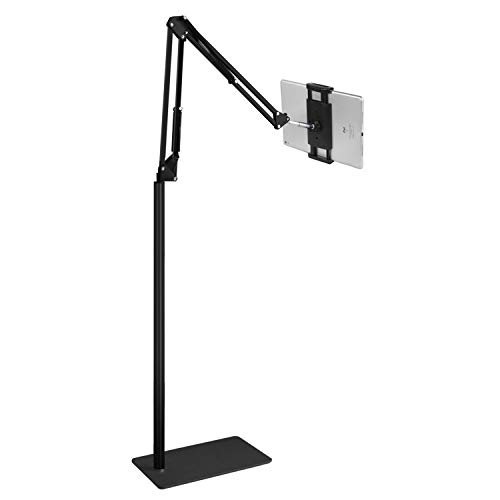
The Elekpopu is built for the person who reads or watches lying down or sitting on a sofa. It has a 5 lb metal base and an adjustable overhead arm, which keeps the screen above you so your hands stay free. The listing covers phones and tablets from 4.7 to 11 inches that weigh less than 1.5 lb.
That device limit is the one to watch. A large 12.9 inch tablet in a heavy case will exceed the listed size or weight, so check the numbers before you buy.
Assembly needs no tools, and cleaning is a dry wipe of the arm. Relative to the SAMHOUSING it supports smaller devices, but the heavier-feeling 5 lb base suits lighter tablets and e-readers well. If the target use is a bedside tablet for a parent, it is a reasonable fit.
Best for: A lightweight tablet or phone held over a bed or sofa
Check price on AmazonSpecs
- Base: 5 lb metal
- Device size: 4.7 to 11 inches
- Device weight: Under 1.5 lb
- Setup: No tools, installation manual
Pros
- +Metal base weighs 5 lb
- +Arm positions the screen overhead
- +Assembles without tools
- +Works on sofas, beds and nightstands
Cons
- −Limited to devices under 1.5 lb
- −Tops out at 11 inch screens
tounee Dual-Rod Aluminum Tablet Stand
About this pick
The tounee is the stand for large screens. Its listing supports devices from 4.7 up to 16.9 inches, which is wider than any other stand in this roundup. A locking mechanism lets you set the height and angle and have them stay put, which is the behavior that matters when a heavy tablet is on top.
The all-metal alloy base adds confidence on a desk, though it is a fixed-position stand rather than a floor arm. It is also more of a desk piece than a bed piece. Expect a slightly larger footprint than the ultra-slim Lamicall, and give it a flat surface.
There is little maintenance beyond occasional tightening and a dust wipe. Against the COOPER it covers larger devices but does not state a weight rating, so review your tablet's weight with the case on. For someone with a big tablet or a small laptop-sized screen it is the most accommodating option.
Best for: Large tablets and hybrid screens on a desk
Check price on AmazonSpecs
- Device size: 4.7 to 16.9 inches
- Design: Dual rod aluminum
- Adjustment: Locking height and angle
- Base: All-metal alloy
Pros
- +Supports screens up to 16.9 inches
- +Locking height and angle controls
- +Sturdy all-metal alloy base
- +Dual rod design looks tidy
Cons
- −No weight rating on the listing
- −Bulkier than a foldable dock
LISEN Aluminum Rotating Tablet Stand
About this pick
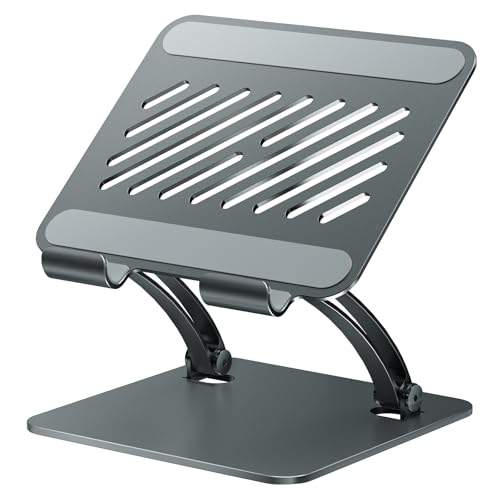
The LISEN is a tri-fold aluminum stand that rotates 360 degrees and is among the lower cost picks in this guide. It uses an Al-Ti alloy body, and an included bridge screw truss rod is meant to keep the stand extended and stable rather than collapsing under a tablet's weight. The rotation makes it easy to turn the screen toward a person next to you.
The tri-fold design means three sections to set, which is more steps than the single-hinge docks. The truss rod needs adjusting to the height you pick, and that takes a little patience. It is best used by someone comfortable with a small adjustment now and then.
Cleaning is a wipe with a dry cloth. Compared with the Lamicall it costs less but asks for more fuss when setting angles, and the Lamicall is the one to choose if you want the simplest hinge setup. For a spare stand or a second room, the LISEN is a sensible lower cost addition.
Best for: A second stand for another room when keeping costs low
Check price on AmazonSpecs
- Material: Al-Ti alloy
- Rotation: 360 degrees
- Fold: Tri-fold adjustable
- Support: Bridge screw truss rod included
Pros
- +Alloy build with a 360 degree rotating head
- +Truss rod helps keep it extended
- +Lower cost than most stands here
- +Folds for storage
Cons
- −Tri-fold design takes more steps to set
- −Truss rod needs adjusting each time you change height
How We Evaluated These Tablet Stands for Seniors (2026)
Each pick was assessed across 5 criteria weighted for real-world use.
Stability
We compared base weight and design: the Elekpopu lists a 5 lb metal base and the COOPER a weighted base that holds 4.4 lb. The foldable LISEN and Lamicall were judged against how a hinged dock behaves on a firm table. Findings are based on product specs and buyer feedback, not hands-on measurement.
Ease of adjustment
We looked at how many points a person must set to change height or angle. The tounee's locking mechanism and Lamicall's two hinges rank well, while the LISEN's tri-fold and truss rod ask for more steps. We also counted whether a task can be done with one hand.
Device compatibility
We checked the stated screen-size range for each stand. The tounee leads at 4.7 to 16.9 inches and the Elekpopu is the narrowest at 4.7 to 11 inches with a device weight limit under 1.5 lb. Case fit is flagged because it is the most common cause of poor fit.
Height reach
We compared adjustable height ranges: the COOPER at 13 to 20 inches for desks and the SAMHOUSING at 27.5 to 53 inches for floor use. Slim docks like the Lamicall only tilt the screen. Stronger height range scores better for video calls and comfortable viewing.
Value and setup effort
We weighed price tier against what each stand includes without quoting figures. The Lamicall is the lowest-cost pick and folds to 0.59 inches, while the Elekpopu is the highest. We considered setup time too, since a stand that is easy to set up is used more often.
How to Choose the Right Tablet Stands for Seniors (2026)
By Where the Tablet Is Used
Location is the biggest decision for older users.
| Where it is used | Recommended pick |
|---|---|
| Desk or kitchen table, high screen | COOPER TabStand 20 Inch Adjustable Stand |
| Desk plus travel bag | Lamicall Ultra-Slim Foldable Tablet Stand |
| Recliner or sofa | SAMHOUSING Adjustable Tablet Floor Stand |
| Lightweight tablet by the bed | Elekpopu Tablet Floor Stand with 5 lb Metal Base |
| Big tablet on a desk | tounee Dual-Rod Aluminum Tablet Stand |
| Second room on a tight budget | LISEN Aluminum Rotating Tablet Stand |
By Budget
| Budget tier | Recommended pick |
|---|---|
| Lowest-cost pick | Lamicall Ultra-Slim Foldable Tablet Stand |
| Low to mid-range | LISEN Aluminum Rotating Tablet Stand |
| Mid-range | tounee Dual-Rod Aluminum Tablet Stand |
| Upper mid-range | COOPER TabStand 20 Inch Adjustable Stand |
| Premium | SAMHOUSING Adjustable Tablet Floor Stand |
| Highest-cost pick | Elekpopu Tablet Floor Stand with 5 lb Metal Base |
Foldable Dock vs Weighted Stand
Foldable docks
The Lamicall and LISEN fold flat and travel easily. They are simple and cheaper, but they rely on hinges and a firm table. They do not raise the screen much, so they suit calls and reading at a desk.
Weighted stands
The COOPER, Elekpopu and SAMHOUSING use heavier bases for stability and reach. They stay put, hold heavier devices and raise the screen higher. They are bulkier and not meant for travel.
Our recommendation
Pick the Lamicall if the stand needs to move, and the COOPER or SAMHOUSING if it stays put and the tablet is big or heavy.
By Adjustment Preference
| Preference | Recommended pick |
|---|---|
| Lock it once and forget it | tounee Dual-Rod Aluminum Tablet Stand |
| Two simple hinges | Lamicall Ultra-Slim Foldable Tablet Stand |
| Raise a weighted desk stand | COOPER TabStand 20 Inch Adjustable Stand |
| Tall floor adjustment | SAMHOUSING Adjustable Tablet Floor Stand |
| Arm over the bed | Elekpopu Tablet Floor Stand with 5 lb Metal Base |
| Tri-fold with a truss rod | LISEN Aluminum Rotating Tablet Stand |
For Video Calls With Grandchildren Specifically
Look for
Look for a stand that places the camera near eye level and does not shake when someone taps the screen. A base heavy enough to resist tipping matters, and so does a way to turn the screen toward a person beside you.
In this comparison
The COOPER TabStand raises the screen to 20 inches on a weighted base, which keeps the camera near eye level. The Lamicall's 360 degree base lets you share the screen with someone sitting next to you.
When to Spend More
Spend more if
Spend more if the tablet is large or heavy or if the user is reclining. The COOPER's weighted base holds 4.4 lb and the SAMHOUSING reaches 53 inches, both of which add real reach and stability.
Save if
Save if the stand will rest on a table and a small tablet will be used a few times a week. The Lamicall and LISEN cover that with lower cost and folding storage.
Frequently Asked Questions
Which tablet stand is easiest for older hands to adjust?
Stands with a locking mechanism or two simple hinges are easiest. The tounee locks height and angle in place, and the Lamicall uses two hinges that hold their setting. Avoid stands with many joints if grip strength is limited. Test the adjustments before buying if you can.
How much should I spend on a tablet stand for a parent?
A lower-cost foldable such as the Lamicall or LISEN is enough for a desk. Spend more on a weighted stand like the COOPER or a floor stand like the SAMHOUSING if the tablet is large or used for hours. The extra cost buys base weight and height range, not more features.
Will a floor stand tip over?
Heavier bases resist tipping. The Elekpopu lists a 5 lb metal base, and research puts roughly 4.5 lb as a minimum for a full size iPad at full extension. Press the base against a bed frame or chair, keep the arm short and avoid heavy cases. If the stand still feels wobbly, a heavier model is the fix.
Does my tablet case matter?
Yes, because cases add weight and thickness. The Elekpopu is limited to devices under 1.5 lb, so a heavy case may exceed the limit. Measure width and thickness with the case on and compare with the listing. If in doubt, choose a stand with a larger supported range like the tounee.
Is a desk stand or floor stand better for reading?
A desk stand works if you sit at a table. A floor stand such as the SAMHOUSING works better for reclining or lying down because it holds the screen over you. Many people end up using both in different rooms. Pick based on where the reading actually happens.
How high should the screen be?
Raise the screen toward eye level so your neck stays upright. The COOPER lifts to 20 inches and the SAMHOUSING to 53 inches, which reaches that level more easily than a flat dock. For video calls the camera should also sit near eye level.
How do I maintain the stand?
Wipe it with a soft cloth and check hinges or clamps occasionally. Tighten anything that loosens, especially on the LISEN truss rod or tounee locks. Fold the Lamicall and LISEN gently rather than forcing the joints. A little care keeps joints from drooping over time.
Bottom Line
best overall: Lamicall Ultra-Slim Foldable Tablet Stand - best overall pick in this roundup.
See the full rankings above for all picks with pros, cons, and best-for summaries.
Browse on Amazon
All Prime-eligible options with current pricing.
Shop on Amazon →