6 Best Tablet Stands (2026)
Six tablet stands compared for reading, video calls and recipes, from slim desk docks to floor stands with long arms, with picks for every room.


At a Glance
A good tablet stand turns a device you hold into a screen you simply look at. That matters for reading, video calls with family, recipes in the kitchen and shows in bed, because holding a tablet at arm's length gets tiring quickly. The six stands here cover three very different designs, so the first job is deciding where the stand will live.
The spread is wide. The UGREEN folds to a pocketable 4.7 by 4.2 inches and fits devices from 4 to 11 inches, while the OMOTON TA04 folds to just 0.63 inches thick. At the other end, the BluuSuuk floor stand carries a base that was doubled from 3.3 lb to 6.6 lb, and the SAMHOUSING tripod extends from 16.7 inches up to 65 inches with four height levels.
We evaluated each pick based on product specs and buyer feedback, weighing stability, adjustment range, device fit and how easy the stand is to set up without help. Desk docks like the Lamicall and UGREEN are the simplest to use every day, while the floor and tripod models win when you want the screen above a bed or recliner. Read the sections below before buying, because the best stand for a desk is rarely the best stand for a bedside.
6 Criteria to Look For Before Buying a Tablet Stands (2026)
Key buying criteria so you get the right fit the first time.
Base weight and tipping
Any stand with an arm acts like a lever, so base weight decides whether it stays upright. The BluuSuuk was reworked from a 3.3 lb base to a 6.6 lb base, while the LanPavilion relies on a wide 1.8 kg base. Research on floor stands puts roughly 4.5 lb as a minimum base for a full size iPad at full extension. A heavier base matters even more when your tablet wears a case, because cases add weight at the end of the arm.
Device size and case fit
Check the supported screen range against your tablet with its case on. The UGREEN covers 4 to 11 inches and caps total thickness at 0.55 inches, while the Lamicall and LanPavilion reach 13 inches. A 12.9 inch iPad will not fit the UGREEN, and a thick rugged case can fail the Lamicall's 18mm hook. A good rule is to measure width and thickness with the case, then leave a little margin.
Height and eye level
A screen held low on the chest pushes the neck forward, so raising the display toward eye level makes long sessions easier. The SAMHOUSING tripod reaches from 16.7 to 65 inches, which covers seated and standing viewers, while desk docks like the UGREEN only tilt. For video calls the camera should sit near eye level, because a low tablet shows chins and ceilings. If you will use the stand for calls, favor a model with real height range.
Adjustment you can do one handed
Flexible joints are only helpful if they hold their position. The LanPavilion gooseneck bends by hand without knobs, the OMOTON TA04 uses two hinges that you set once, and the SAMHOUSING uses flip locks for height. Joints that droop under load are a common complaint, so check that the arm holds your tablet and case. One handed adjustment is worth prioritizing if you have stiff hands or limited grip.
Where the stand will live
Desk docks, bedside arms and floor tripods solve different problems. The Lamicall and UGREEN are desk and table pieces, while the BluuSuuk and SAMHOUSING stand on the floor. Pillow style holders offer fixed angles for lap use, and arm stands reach farther but need the base pressed against the bed frame. Decide on one primary location first, then accept compromises elsewhere.
Portability versus stability
The OMOTON TA04 folds to 0.63 inches and the UGREEN to about 4.7 by 4.2 inches, so both disappear into a bag. That portability comes with a lighter build than a heavy base like the BluuSuuk's 6.6 lb. If a stand never leaves the house, favor weight and stability. If it travels, accept a lighter dock but use it on a firm flat surface.
6 Best Tablet Stands (2026)
Lamicall Adjustable Aluminum Tablet Stand
About this pick
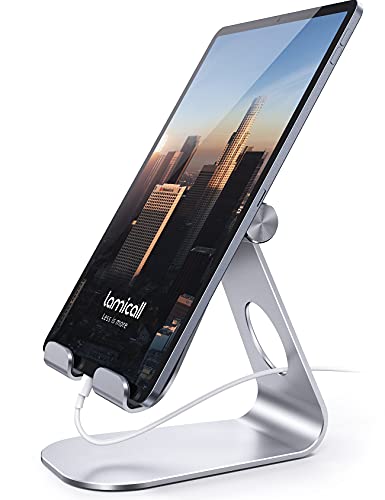
The Lamicall is the stand we would hand to most people first, because it keeps the idea simple. It is a sturdy aluminum dock that holds anything from a phone to a 13 inch iPad Pro, and it adjusts so the screen can sit upright for video calls or lean back for reading. Rubber pads on the cradle and feet protect the device from scratches and keep the stand from sliding on a smooth table.
The tradeoff is that this is a desk and table stand, so it will not lift a screen above a bed. The cradle hook is 18mm wide, and the listing tells you to make sure your device and case fit that hook before you buy. A thick rugged case can be the one thing that stops a tablet from seating properly, so measure with the case on.
In daily ownership there is almost nothing to maintain beyond wiping the metal with a cloth. It needs no assembly, which makes it a good gift for a parent who does not want a manual. Next to the UGREEN it covers larger tablets up to 13 inches rather than 11, and next to the OMOTON it is more of a fixed workhorse than a travel foldable.
Best for: Everyday desk, kitchen counter and side table use with phones or full size tablets
Check price on AmazonSpecs
- Device size: 4 to 13 inches
- Material: Sturdy aluminum
- Hook width: 18mm
- Orientation: Vertical and horizontal
Pros
- +Fits devices from 4 up to 13 inches
- +Aluminum body feels solid on a desk
- +Rubber pads protect the device and table
- +Works in portrait or landscape
- +No assembly needed
Cons
- −Hook is 18mm, so thick cases may not fit
- −Does not raise a screen above a bed
BluuSuuk Tablet Floor Stand with Double Weight Base
About this pick
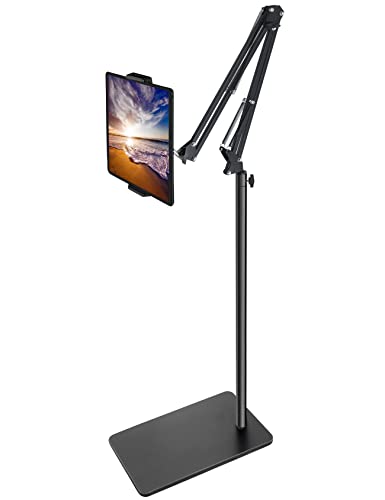
The BluuSuuk is built for the person who wants a screen hovering over a bed or recliner without holding anything. Its arm extends toward you, and the claw grips a phone or iPad, so you can lie back and watch or read hands-free. The maker doubled the base from 3.3 lb to 6.6 lb after buyer complaints about tipping, which is the right fix for an arm that acts like a lever.
It asks for more room than a desk dock because the base sits on the floor beside the furniture. Pressing the base against the bed frame or chair leg adds to stability, and heavier tablets or thick cases lean harder on the arm. It is also not something you would carry around the house all day.
Ownership is mostly a matter of positioning it once and leaving it. There is little to clean beyond dusting the arm and wiping the grip. Compared with the Lamicall it reaches places a desk dock cannot, but it gives up the grab and go convenience, and compared with the SAMHOUSING tripod it is the lower and simpler setup for someone who is mostly seated or reclined.
Best for: Hands-free viewing from a bed, recliner or sofa
Check price on AmazonSpecs
- Style: Floor stand with stretchable arm
- Base weight: 6.6 lb, doubled from 3.3 lb
- Best spots: Beds, recliners, tabletops
- Grip: Claw for phones and iPads
Pros
- +Doubled 6.6 lb base resists tipping
- +Stretchable arm reaches over a bed
- +Claw grip holds phones and iPads
- +Useful on tabletops as well
Cons
- −Takes up floor space beside the furniture
- −Arm leverage strains with heavy cased tablets
- −Not a portable pick
LanPavilion Gooseneck Tablet Floor Stand
About this pick
The LanPavilion pairs a 15.7 inch gooseneck arm with a wide, heavy base that weighs 1.8 kg. The gooseneck bends by hand, so you can point the screen exactly where your eyes land without loosening any knobs. It holds phones and tablets between 4.7 and 13 inches, which covers nearly every iPad and Galaxy Tab.
A gooseneck is easy to use but it has limits. With a large tablet in a case the arm can sag over time, so it suits lighter use such as reading or recipe checking better than all day streaming. The wide base does help, and it keeps the stand steadier than narrow tube designs.
Setup is quick and cleaning is a wipe. We would put it between the Lamicall and the BluuSuuk in character: it is more flexible than a desk dock but less commanding than the 6.6 lb BluuSuuk arm. For a nightstand or kitchen counter where a screen needs to bend toward you, it is a sensible middle choice.
Best for: Bending a screen into position with one hand on a nightstand or counter
Check price on AmazonSpecs
- Arm: 15.7 inch flexible gooseneck
- Base weight: 1.8 kg wide base
- Device size: 4.7 to 13 inches
- Material: Metal holder
Pros
- +15.7 inch gooseneck bends by hand
- +Wide 1.8 kg base for steadier hold
- +Fits devices from 4.7 to 13 inches
- +No knobs to loosen or lose
Cons
- −Gooseneck can droop under heavy cased tablets
- −Lighter base than the BluuSuuk
UGREEN Foldable Tablet Stand
About this pick
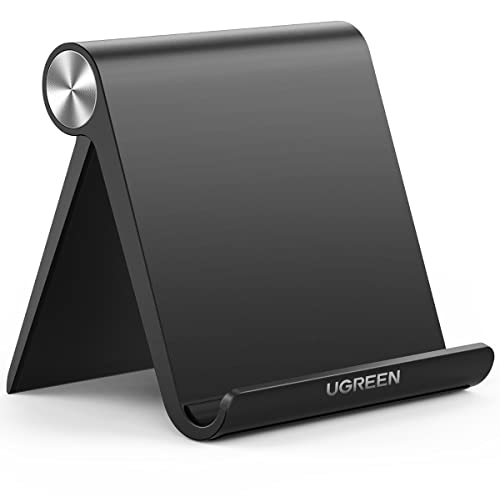
The UGREEN is the stand you can keep in a handbag, a kitchen drawer and a suitcase without noticing it. It folds to roughly 4.7 by 4.2 inches and opens into a multi-angle dock with positions from 15 to 100 degrees. That range covers a nearly flat typing angle and an upright video call angle.
The limits are clear on the listing. It fits devices from 4 to 11 inches, and the maximum thickness including a case is 0.55 inches, so large 12.9 inch iPads and chunky protective cases are out. It is also a lightweight stand, so it works best on a firm flat surface rather than a soft cushion.
There is nothing to clean or assemble. Versus the Lamicall, it gives up size range and heft in exchange for portability, and versus the OMOTON TA04 it lacks the rotating base. If you travel with an 11 inch tablet or e-reader, it is the lowest effort way to prop it up.
Best for: Travel, kitchen drawers and smaller tablets or e-readers up to 11 inches
Check price on AmazonSpecs
- Device size: 4 to 11 inches
- Folded size: 4.7 x 4.2 inches
- Viewing angles: 15 to 100 degrees
- Max thickness: 0.55 inches with case
Pros
- +Folds to a pocketable 4.7 x 4.2 inches
- +Angles from 15 to 100 degrees
- +Fits phones, e-readers and 11 inch tablets
- +Nothing to assemble
Cons
- −Not for 12.9 inch tablets
- −Case plus device limited to 0.55 inches thick
OMOTON TA04 Ultra-Slim Swivel Stand
About this pick
The OMOTON TA04 is the lowest cost pick here, and it still offers a metal base that rotates a full 360 degrees. That swivel is useful when you want to turn the screen toward someone sitting beside you, such as when sharing photos. The dual hinge design lets you adjust tilt and height independently.
Its big advantage is thinness: it folds down to just 0.63 inches, so it slips into a laptop bag or carry-on. The tradeoff is a lighter build than the Lamicall, since the listing describes a metal base paired with plastic parts. Heavy tablets in thick cases are better on the sturdier Lamicall.
In use there are two hinges to set, which takes a minute to learn but then holds. Cleaning is a quick wipe. Compared with the UGREEN it adds rotation and a similar travel footprint, so if you share the screen often it is the more flexible of the two compact folding stands.
Best for: Travelers and anyone who shares a screen across a table
Check price on AmazonSpecs
- Folded thickness: 0.63 inches
- Base: 360 degree rotating metal base
- Adjustment: Dual hinge angle and tilt
- Uses: Calls, streaming, reading, drawing
Pros
- +Folds to only 0.63 inches thick
- +Base rotates 360 degrees
- +Dual hinges set tilt and height
- +Lowest cost pick in this guide
Cons
- −Lighter plastic and metal build
- −Two hinges take a moment to set
SAMHOUSING Tripod Tablet Stand with Remote
About this pick
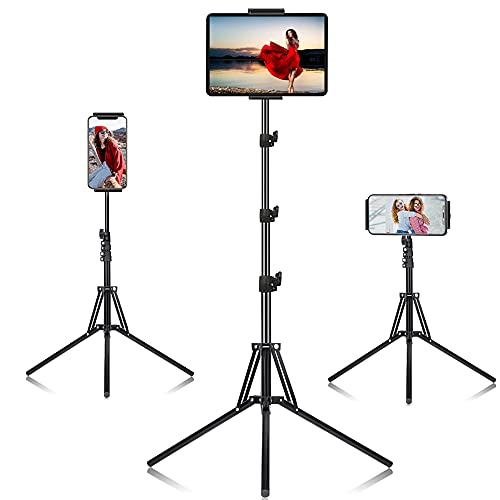
The SAMHOUSING is a tripod floor stand that extends from 16.7 inches to 65 inches across four height levels. That reach lets it serve a seated viewer, a standing cook and a person lying on a bed. The 360 degree rotating head switches between portrait and landscape, and an included remote helps with video calls and photos.
The flip side of tall reach is a bigger footprint and more setup than a desk dock. Tripod legs spread on the floor, so you need clear space, and the taller you extend it the more the screen can wobble. Choose the lower heights when you can.
It is a stand to position once and leave in a room rather than carry daily. Against the BluuSuuk it is lighter in feel and more adjustable in height, but it lacks that stand's heavy weighted base. If you want one stand to move between a chair, a kitchen and a bedside, the tripod is the most versatile option on this list.
Best for: Sharing one stand between a chair, kitchen and bedside at different heights
Check price on AmazonSpecs
- Height range: 16.7 to 65 inches
- Height levels: 4 adjustments
- Head: 360 degree rotating
- Extra: Remote included
Pros
- +Extends from 16.7 to 65 inches
- +Four height levels for any posture
- +Remote helps with calls and photos
- +360 degree head for portrait or landscape
Cons
- −Wide tripod footprint needs floor space
- −Wobbles more at full height
How We Evaluated These Tablet Stands (2026)
Each pick was assessed across 5 criteria weighted for real-world use.
Stability
We looked at base weight, base width and how far the arm extends. The BluuSuuk with its 6.6 lb base and the LanPavilion with a wide 1.8 kg base sit near the top, while the foldable OMOTON TA04 and UGREEN are judged as desk docks that need a firm surface. This is based on product specs and buyer feedback, not on lab measurement.
Adjustment range
We compared how much height and angle each stand offers. The SAMHOUSING extends from 16.7 to 65 inches, while the UGREEN offers viewing angles from 15 to 100 degrees. A broader range earned credit only when the adjustment mechanism looked simple to operate.
Device compatibility
We checked supported screen sizes and case allowances. The Lamicall and LanPavilion reach 13 inches, while the UGREEN tops out at 11 inches and a 0.55 inch thickness limit. We also considered whether listings warned about case fit, since that is where many buyers run into trouble.
Ease of setup and daily use
We asked whether an adult could unbox the stand and use it without help. The Lamicall and UGREEN need no assembly, while floor stands like the SAMHOUSING involve legs and locks. The strongest pick on ease is the Lamicall and the most involved is the tripod.
Value for the job
We weighed each stand's price tier relative to what it does without quoting figures. The OMOTON TA04 is the lowest cost pick yet still rotates 360 degrees, while the BluuSuuk and SAMHOUSING are higher cost options that justify themselves only if you need floor reach. Our assessment is editorial, based on specs and buyer feedback.
How to Choose the Right Tablet Stands (2026)
By Where You Will Use It
The location decides the design more than any spec. Match your main spot below first.
| Where you will use it | Recommended pick |
|---|---|
| Desk or kitchen counter | Lamicall Adjustable Aluminum Tablet Stand |
| Bed or recliner, hands-free | BluuSuuk Tablet Floor Stand |
| Nightstand where it must bend toward you | LanPavilion Gooseneck Tablet Floor Stand |
| Travel bag or suitcase | OMOTON TA04 Ultra-Slim Swivel Stand |
| Handbag or kitchen drawer with a small tablet | UGREEN Foldable Tablet Stand |
| Moving between standing, seated and lying positions | SAMHOUSING Tripod Tablet Stand with Remote |
If you will use the stand in two very different places, pick for the harder one, which is usually the bed.
By Budget
| Budget tier | Recommended pick |
|---|---|
| Lowest-cost pick | OMOTON TA04 Ultra-Slim Swivel Stand |
| Low to mid-range | UGREEN Foldable Tablet Stand |
| Mid-range | Lamicall Adjustable Aluminum Tablet Stand |
| Upper mid-range | LanPavilion Gooseneck Tablet Floor Stand |
| Premium | BluuSuuk Tablet Floor Stand |
| Highest-cost pick, most reach | SAMHOUSING Tripod Tablet Stand with Remote |
Desk Dock vs Floor Stand
These two families solve different problems.
Desk docks
A desk dock sits on the surface in front of you and tilts the screen. The Lamicall, UGREEN and OMOTON TA04 fall here. They are simple, portable and need no assembly, but they cannot lift a screen above a bed. Choose one if your use is a desk, counter or side table.
Floor stands
A floor stand brings the screen to you. The BluuSuuk, LanPavilion and SAMHOUSING fall here, with arms or tripod legs that reach over furniture. They need floor space and a heavy base, and they are not portable. Choose one if you read or watch lying down or reclining.
Our recommendation
Pick the Lamicall for a desk life and the BluuSuuk for a bed or recliner life. If you need both, buy the Lamicall plus a floor stand rather than forcing one stand to do both jobs.
By Adjustment Style
How a stand adjusts affects how easy it is for stiff hands.
| Preference | Recommended pick |
|---|---|
| Bend by hand, no knobs | LanPavilion Gooseneck Tablet Floor Stand |
| Hinges set once and held | OMOTON TA04 Ultra-Slim Swivel Stand |
| Flip locks for height | SAMHOUSING Tripod Tablet Stand with Remote |
| Simple multi-angle dock with no joints to loosen | UGREEN Foldable Tablet Stand |
| Stretch the arm toward you | BluuSuuk Tablet Floor Stand |
| Sturdy fixed multi-angle dock | Lamicall Adjustable Aluminum Tablet Stand |
For Video Calls With Family Specifically
Look for
A stand that puts the camera near eye level, because a low tablet shows chins and ceilings. You also want a stable base so the picture does not shake when you touch the screen. A swivel or rotating head helps when someone sits beside you.
In this comparison
The SAMHOUSING tripod reaches 65 inches and includes a remote, so it raises the camera to eye level for a standing or seated caller. On a desk, the Lamicall holds the tablet upright and steady. For sharing the screen with a person beside you, the OMOTON TA04 swivels 360 degrees.
When to Spend More
Spend more if
Spend more if you will use the stand in bed every day or hold a large cased tablet. The BluuSuuk with its 6.6 lb base and the SAMHOUSING with its 65 inch reach cost more because they solve harder problems. A heavier base is the main thing the extra cost buys.
Save if
Save if the stand will live on a desk or travel in a bag. The OMOTON TA04 folds to 0.63 inches and still rotates, and the UGREEN fits tablets up to 11 inches in a pocket sized fold. Either gets the job done for a fraction of what a floor stand costs.
Frequently Asked Questions
How do I choose between a desk stand and a floor stand?
Start with where you will look at the screen. A desk stand such as the Lamicall tilts a tablet on a table, while a floor stand such as the BluuSuuk brings it over a bed or recliner. If you only use a tablet at a table, a floor stand is unnecessary. If you read lying down, a desk stand will not help.
How much should a tablet stand cost?
Stands span a wide range, from the OMOTON TA04 and UGREEN at the lowest tiers to the BluuSuuk and SAMHOUSING at the higher tiers. The extra cost mostly buys base weight, reach and extra parts like a remote. For a desk, a lower cost foldable is usually enough, and floor stands justify themselves for daily bed use.
Will my tablet fit if it has a thick case?
Check the listing's supported size and thickness with the case on. The UGREEN limits total thickness to 0.55 inches, and the Lamicall's hook is 18mm wide. Rugged cases can exceed these limits, so measure first. When in doubt, choose a stand with a clamp style holder like the floor models.
Why does my tablet stand tip or droop?
Arm style stands act like levers, so a light base or a heavy cased tablet can pull them over. Research suggests roughly 4.5 lb as a minimum base for a full size iPad at full extension. Press the base against the bed frame, shorten the arm and avoid extra weight on the end. Joints can also loosen with age, so retighten them periodically.
Can one stand work for both a desk and a bed?
A floor stand like the BluuSuuk can sit on a tabletop, but desk docks cannot reach over a bed. The SAMHOUSING tripod is the most flexible single choice because it ranges from 16.7 to 65 inches. Still, it is bulkier than a desk dock. Many households end up with one of each.
How do I keep a tablet at a comfortable height?
Raise the screen toward eye level so your neck does not tilt forward. The SAMHOUSING tripod and LanPavilion gooseneck can do this, while desk docks mostly tilt the screen. For video calls, the camera should be near eye level as well. If a stand does not reach that height, a small riser under it can help.
How do I clean and care for a tablet stand?
Wipe metal and plastic parts with a soft damp cloth and dry them. Check hinges, clamps and grip pads occasionally because worn rubber loses grip. Fold stands such as the OMOTON TA04 and UGREEN should be folded gently rather than forced. A stand that is kept clean and tight lasts for years.
Bottom Line
best overall: Lamicall Adjustable Aluminum Tablet Stand - best overall pick in this roundup.
See the full rankings above for all picks with pros, cons, and best-for summaries.
Browse on Amazon
All Prime-eligible options with current pricing.
Shop on Amazon →