5 Best Tablet Stands for Desk (2026)
Five desk tablet stands compared by fit, adjustment and stability, from ultra-slim foldables to arm stands for video calls and recipes.


At a Glance
A desk tablet stand does a quiet job: it holds the screen at a comfortable angle so your wrists, neck and shoulders are not doing the work. For video calls, recipes on a kitchen table or reading at a home office, the right stand makes the tablet feel like a small monitor. The five picks here share that purpose but differ in how they adjust and how much screen they can carry.
The spread is meaningful. The Lamicall ultra-slim folds to 0.59 inches, the LISEN weighs 15.2 ounces and relies on a gravity-based grip, and the Urmust arm stand reaches 4.7 to 15.6 inches in device size. The LOXP supports screens up to 16.9 inches, and the Lamicall dock uses an 18mm hook that you should check against your case.
We evaluated each pick based on product specs and buyer feedback, paying attention to stability, how many hinges you must set, and device and case fit. Foldable stands are best for people who move the tablet around, while arm and weighted stands suit a permanent spot. The sections below help you decide quickly.
6 Criteria to Look For Before Buying a Tablet Stands for Desk (2026)
Key buying criteria so you get the right fit the first time.
Tilt versus height
Some stands only tilt and others also raise the screen. The Lamicall dock tilts, the ultra-slim Lamicall adds two hinges for tilt and height, and the Urmust arm adjusts both. A screen held low pushes the neck forward, so raising it toward eye level helps. For video calls, the camera should sit near eye level. Choose a stand with real height range if you sit at a desk for hours.
Device and case fit
The Lamicall dock fits 4 to 13 inch devices but has an 18mm hook, and the LOXP covers up to 16.9 inches. The Urmust handles 15.6 inches. Always measure the tablet with its case, because a thick case may not seat in a narrow hook. If the listing lists a thickness limit, treat it as firm.
Base stability
The ultra-slim Lamicall and LOXP both use heavy-duty bases, while the LISEN weighs only 15.2 ounces total. Research suggests roughly 4.5 lb as a minimum base for a full size iPad on a floor arm, so lighter desk stands rely on keeping the tilt low. A heavier base matters for typing and drawing on the screen. Check that the stand does not slide on a smooth desk.
Joint tightness
The Urmust ships with a wrench to retighten the joint, which signals that arm joints can loosen. The Lamicall ultra-slim uses two hinges that hold once set. Joints that droop under load are a common complaint. Choose a stand where you can fix the problem yourself.
Portability
The ultra-slim Lamicall folds to 0.59 inches and the LISEN folds flat at 15.2 ounces. The Urmust is tabletop only and is not meant to travel. If your stand moves between rooms, choose a foldable. If it stays on one desk, weight and stability are more important.
Ease of setting up
The Lamicall dock needs no setup, the ultra-slim Lamicall needs two hinge settings, and the LISEN needs a truss rod adjustment. Fewer adjustments make a stand easier for stiff hands. A stand that is quick to set is used more. Test the adjustments if you can.
5 Best Tablet Stands for Desk (2026)
Lamicall Ultra-Slim Foldable Desk Stand
About this pick
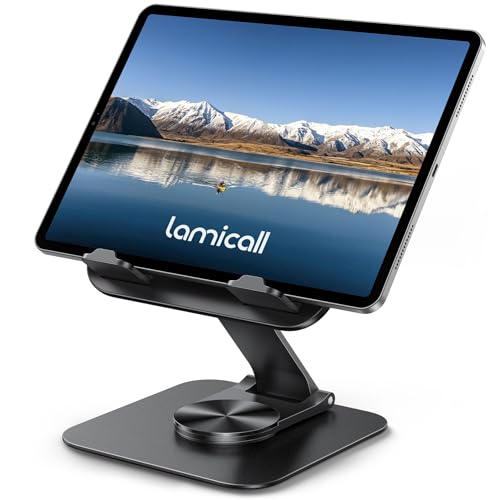
The Lamicall ultra-slim is the best all-round desk stand because it combines a heavy metal base with a design that folds nearly flat. Two adjustable hinges handle tilt and height, which covers video calls, drawing, reading and streaming. The base rotates 360 degrees, so you can swing the screen toward a colleague or family member without lifting the tablet. The two hinges are the one extra step, since each needs setting before it holds. It is also overbuilt for a small phone, so the stand makes more sense with a tablet. The metal base keeps it steadier than pad-style foldables on a smooth desk. It folds to 0.59 inches for storage in a bag or drawer, and cleaning is a wipe. Compared with the Lamicall adjustable dock it is more flexible but more complex, and compared with the LOXP it is slimmer to store. For most desks it is the right call.
Best for: A desk stand that also folds flat for travel
Check price on AmazonSpecs
- Folded thickness: 0.59 inches
- Base: Heavy-duty metal, 360 degree rotation
- Hinges: Two for tilt and height
- Uses: Video calls, drawing, reading, streaming
Pros
- +Folds to just 0.59 inches
- +Heavy-duty base rotates 360 degrees
- +Two hinges set tilt and height
- +Suits calls, drawing and reading
Cons
- −Two hinges to set each session
- −Overbuilt for a small phone
Lamicall Adjustable Aluminum Tablet Dock
About this pick
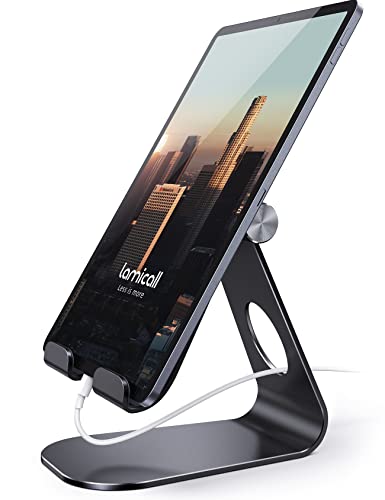
The Lamicall dock is the simplest desk stand here: a sturdy aluminum cradle that adjusts to a few angles and holds a tablet in portrait or landscape. It supports devices from 4 to 13 inches, including recent iPad Pro, Air and Mini models. Rubber pads and feet protect the device from scratches and the desk from sliding. The hook width is 18mm, and the listing tells you to make sure your device and case fit that hook. A thick rugged case may not seat properly, which is the main fit check. It also does not raise the screen much, so it is a tilt dock rather than a height solution. There is nothing to assemble, and cleaning is a wipe. Against the ultra-slim Lamicall it has fewer parts and fewer settings, and against the LOXP it is simpler but less adjustable. If you want a no-fuss desk dock, this is it.
Best for: A no-fuss aluminum dock for a desk or office counter
Check price on AmazonSpecs
- Device size: 4 to 13 inches
- Material: Sturdy aluminum
- Hook width: 18mm
- Orientation: Vertical and horizontal
Pros
- +Sturdy aluminum cradle
- +Fits 4 to 13 inch devices
- +Rubber pads protect the device and desk
- +Nothing to assemble
Cons
- −18mm hook can block thick cases
- −Tilts but gives little height
LOXP Adjustable Tablet Stand with Heavy-Duty Base
About this pick
The LOXP has the widest device range among the hinge stands, covering 4.7 to 16.9 inches. Its dual adjustable hinges change both height and tilt, and the base rotates 360 degrees. A heavy-duty weighted metal base is meant to prevent tipping and protect your device. The listing does not publish a base weight, so you must trust the description of a heavy-duty base. Hinge stands also rise less than telescoping ones, and two hinges mean two adjustments to learn. It positions itself for travel as well as a desk. Cleaning is a wipe. Compared with the ultra-slim Lamicall it handles larger screens on paper, but it does not publish a folded thickness.
Best for: Large tablets on a desk where a wider device range matters
Check price on AmazonSpecs
- Device size: 4.7 to 16.9 inches
- Hinges: Dual for height and tilt
- Uses: Travel, desk, office
Pros
- +Supports screens up to 16.9 inches
- +Dual hinges for height and tilt
- +Weighted metal base
- +Base rotates 360 degrees
Cons
- −No published base weight
- −Two hinges to adjust
Urmust Adjustable Aluminum Tablet Arm Stand
About this pick
The Urmust is an aluminum arm stand for tabletops, supporting devices from 4.7 to 15.6 inches. The height and angle are fully adjustable, and it rotates 360 degrees for portrait or landscape use. An anti-slip base keeps the device steady, and an included wrench lets you tighten the joint if the tablet starts to sag. The listing is firm that it is for tabletop use only, on a flat, stable surface such as a desk or table. That wrench note is a useful admission: arm joints can loosen over time, and you may need to retighten. Cleaning is a wipe of the arm and base. Compared with the LOXP it offers an arm rather than hinges, and compared with the Lamicall dock it gives more height and angle flexibility. It suits a permanent desk spot.
Best for: A permanent desk spot where the screen needs to float at eye level
Check price on AmazonSpecs
- Device size: 4.7 to 15.6 inches
- Rotation: 360 degrees
- Arm: Sturdy aluminum
- Mounting: Flat, stable surfaces only
Pros
- +Supports 4.7 to 15.6 inch devices
- +Arm adjusts height and angle
- +Included wrench retightens the joint
- +Rotates 360 degrees
Cons
- −Tabletop use only
- −Highest cost in this guide
LISEN Foldable Gravity Tablet Desk Stand
About this pick
The LISEN is the lowest-cost pick among the desk stands here and it weighs only 15.2 ounces. It uses a gravity-based system with no clips or magnets, which relies on the back tilt of the stand to keep the tablet secure. A bridge screw truss rod is included to keep the stand extended and stable. No clips means nothing grips the tablet, so it must lean back at the right tilt and rest on a flat desk. That is a fair tradeoff for something this light, but it asks more care than a clamp. The truss rod needs to be set to your height each time. It folds flat for travel, and cleaning is a wipe. Compared with the ultra-slim Lamicall it is lighter but less secure, and compared with the Urmust it has no joint wrench. It is a good second stand for a spare room.
Best for: A lightweight, low-cost stand for a spare desk
Check price on AmazonSpecs
- Weight: 15.2 ounces
- Grip: Gravity-based, no clips or magnets
- Support: Bridge screw truss rod
- Fold: Folds flat for travel
Pros
- +Light at 15.2 ounces
- +Truss rod keeps it extended
- +Lowest-cost pick here
Cons
- −Gravity grip needs the right tilt
- −Truss rod needs setting each time
How We Evaluated These Tablet Stands for Desk (2026)
Each pick was assessed across 5 criteria weighted for real-world use.
Stability on the desk
The ultra-slim Lamicall and LOXP use heavy-duty metal bases, while the LISEN weighs only 15.2 ounces. This is based on specs and buyer feedback, not lab measurement.
Adjustment range
We looked at tilt, height and rotation options. The Urmust arm and ultra-slim Lamicall adjust both height and tilt, while the Lamicall dock mainly tilts. More range scored better when joints held firmly.
Device compatibility
We compared the supported sizes, from the Lamicall dock's 4 to 13 inches to the LOXP's 4.7 to 16.9 inches. The 18mm hook on the dock was flagged for case fit. Fit determines whether the stand is usable.
Portability
We considered folded size and weight. The ultra-slim Lamicall folds to 0.59 inches and the LISEN weighs 15.2 ounces. The Urmust is a tabletop piece.
Value
We weighed price tier against features without quoting figures. The LISEN and ultra-slim Lamicall are at the lowest tier, and the Urmust is the highest.
How to Choose the Right Tablet Stands for Desk (2026)
By Desk Use
Match the stand to how you use the desk.
| Desk use | Recommended pick |
|---|---|
| Video calls and sharing the screen | Lamicall Ultra-Slim Foldable Desk Stand |
| Simple reading and recipes | Lamicall Adjustable Aluminum Tablet Dock |
| Large tablet or drawing | LOXP Adjustable Tablet Stand with Heavy-Duty Base |
| Permanent eye-level spot | Urmust Adjustable Aluminum Tablet Arm Stand |
| Spare room on a budget | LISEN Foldable Gravity Tablet Desk Stand |
By Budget
| Budget tier | Recommended pick |
|---|---|
| Lowest-cost pick | LISEN Foldable Gravity Tablet Desk Stand |
| Also lowest tier, more robust | Lamicall Ultra-Slim Foldable Desk Stand |
| Mid-range | Lamicall Adjustable Aluminum Tablet Dock |
| Upper mid-range | LOXP Adjustable Tablet Stand with Heavy-Duty Base |
| Highest-cost pick | Urmust Adjustable Aluminum Tablet Arm Stand |
Foldable vs Fixed Arm
Foldable stands
The ultra-slim Lamicall and LISEN fold flat and travel easily. They cost less and store anywhere, but joints can slip. Choose one if the stand moves.
Fixed arm stands
The Urmust and LOXP are sturdier and hold larger tablets, but they stay put. Choose one if the stand lives on a single desk.
Our recommendation
Pick the ultra-slim Lamicall for most people, and the Urmust if you want a permanent eye-level setup.
By Adjustment Style
| Preference | Recommended pick |
|---|---|
| Two simple hinges | Lamicall Ultra-Slim Foldable Desk Stand |
| Fixed dock, no joints | Lamicall Adjustable Aluminum Tablet Dock |
| Dual hinges, large screen | LOXP Adjustable Tablet Stand with Heavy-Duty Base |
| Arm with wrench retighten | Urmust Adjustable Aluminum Tablet Arm Stand |
| Truss rod and gravity grip | LISEN Foldable Gravity Tablet Desk Stand |
For Video Calls Specifically
Look for
Look for a stand that places the camera near eye level and holds steady when you tap. A rotating base helps you share the screen.
In this comparison
The Urmust arm adjusts height and angle for eye-level calls, and the ultra-slim Lamicall rotates 360 degrees to share the screen.
When to Spend More
Spend more if
Spend more if you use a large tablet daily. The Urmust and LOXP support up to 15.6 and 16.9 inches.
Save if
Save if you use a standard tablet occasionally. The LISEN and ultra-slim Lamicall cover that.
Frequently Asked Questions
How do I choose a desk tablet stand?
Start with where the tablet sits and how large it is. A foldable like the ultra-slim Lamicall suits most desks, while an arm like the Urmust suits a permanent spot. Then check case fit and height range.
How much should a desk stand cost?
Prices range from the LISEN at the lowest tier to the Urmust at the highest. The extra cost buys a sturdier arm or a wider device range. A foldable is enough for most desks.
Why does my tablet sag in the stand?
Joints loosen over time. The Urmust includes a wrench to retighten the joint, and hinge stands like the Lamicall hold once set. If it sags, tighten the joint and check the weight of your case.
Will my case fit?
Check the listing. The Lamicall dock has an 18mm hook, so thick cases may not fit. Measure your case, and choose a wider cradle if needed.
Is a gravity stand secure?
The LISEN relies on back tilt rather than clips or magnets. It works when the tablet leans back correctly on a flat desk. Do not use it on a soft or sloped surface.
What height is best?
Raise the screen toward eye level so your neck stays upright. Stands with real height range, such as the Urmust, help. For calls the camera should be near eye level too.
How do I clean the stand?
Wipe it with a dry or slightly damp cloth. Check hinges and the base pads occasionally. Fold gently to avoid stressing joints.
Bottom Line
best overall: Lamicall Ultra-Slim Foldable Desk Stand - best overall pick in this roundup.
See the full rankings above for all picks with pros, cons, and best-for summaries.
Browse on Amazon
All Prime-eligible options with current pricing.
Shop on Amazon →