5 Best Height Adjustable Tablet Stands (2026)
Five height adjustable tablet stands for eye-level viewing, from desk risers to floor stands that reach 59 inches, compared for stability and ease.



At a Glance
TabHolderix Tablet Floor Stand with 4.5 lb Base
↓ See why we picked itHeight is the feature that separates a comfortable tablet setup from a neck-straining one. When the screen sits low on a table you look down for the whole session, and raising it toward eye level is the simplest fix. These five stands all offer real height adjustment, but they raise the screen in very different ways and by very different amounts.
The spread is large. The OMOTON CA04 adjusts from only 5.7 to 9 inches, while the tounee desk stand rises from 11.81 to 18.11 inches and the ODOSOLA starts at 9.45 inches. The TabHolderix floor stand reaches from 27.5 to 59.05 inches, which is the highest range here and puts a screen above a bed or recliner.
We evaluated each pick based on product specs and buyer feedback, paying attention to how much real lift it offers, how steady it stays at full height and how easily it adjusts. Short-range desk stands are quick and tidy, while floor stands give far more reach but take space. The sections below help you decide which category matches your routine.
6 Criteria to Look For Before Buying a Height Adjustable Tablet Stands (2026)
Key buying criteria so you get the right fit the first time.
Actual height gained
Ranges vary enormously, so compare numbers rather than the word adjustable. The OMOTON CA04 adjusts only 5.7 to 9 inches, the tounee 11.81 to 18.11 inches, and the TabHolderix 27.5 to 59.05 inches. A desk stand that rises only a few inches gives tilt, not eye-level viewing. Pick the range that matches the distance between your tablet's resting height and your eyes.
Base weight and leverage
The higher a screen goes, the more leverage works against the base. The TabHolderix uses a 4.5 lb metal base, which sits just at the roughly 4.5 lb research suggests for a full size iPad at full extension. The LOXP and ODOSOLA use weighted bases but publish no weight figure. Heavier devices or thick cases may need a heavier base than the listing implies.
Device weight and size limits
The tounee supports 3.5 lb and screens up to 15.6 inches, while the TabHolderix tops out at 1.5 lb and 12.9 inches. The LOXP lists screens up to 16.9 inches. Always weigh your tablet with its case on, because cases add weight at the end of the arm. If you exceed the limit, the stand will droop or tip.
Case fit and clamp width
The tounee clamp spans 4.7 to 9.44 inches and accepts devices up to 17mm thick, so most protective cases fit. The OMOTON CA04 supports 4 to 11 inch devices. A case that is too thick for the cradle is a common return reason, so measure before you buy. Choose a wide clamp if you use a rugged case.
Ease of adjusting
Telescoping stands like the tounee raise the screen with one motion, hinge stands like the LOXP need two settings, and floor stands like the TabHolderix need a position and a lock. Stiff hands do best with the fewest adjustment points. Test whether the joints hold position without drooping. A wobbly joint at full height is the most common reason buyers return these stands.
Where the extra height is needed
Eye-level viewing at a desk and eye-level viewing in bed are different problems. The tounee and ODOSOLA solve the desk, while the TabHolderix solves bed and recliner. For video calls the camera should sit near eye level, because a low tablet shows chins and ceilings. Choose by location first, then by height range.
5 Best Height Adjustable Tablet Stands (2026)
tounee Height Adjustable Tablet Stand
About this pick
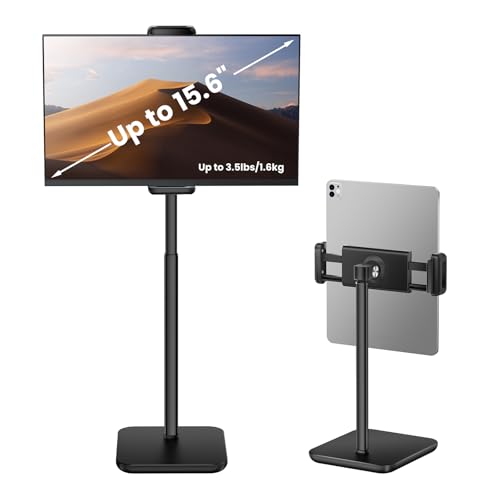
The tounee is the clearest answer to the eye-level problem on a desk. It lifts a device from 11.81 to 18.11 inches, which is enough to bring most tablets from chest height up toward your face. The listing says it supports up to 3.5 lb, which covers most tablets and slim portable monitors up to 15.6 inches.
It is designed around real-world gear. The extra-wide clamp spans 4.7 to 9.44 inches, and the case-friendly design accepts devices up to 17mm thick, so a protective case is less likely to block it. The tradeoff is that it is a desk stand, so it will not lift a screen over a bed, and 18 inches of rise only goes so far.
Setup is simple, and there is nothing to clean except dust. Compared with the OMOTON CA04 it raises the screen much higher and carries more weight, though the OMOTON is smaller and cheaper. For a home office or kitchen desk it is our top height-adjustable choice.
Best for: Raising a tablet or slim portable monitor toward eye level on a desk
Check price on AmazonSpecs
- Height range: 11.81 to 18.11 inches
- Max support: 3.5 lb (1.6 kg)
- Clamp width: 4.7 to 9.44 inches
- Case limit: Up to 17mm thick
Pros
- +Rises from 11.81 to 18.11 inches
- +Supports up to 3.5 lb of device
- +Clamp fits cases up to 17mm thick
- +Wide clamp covers 4.7 to 15.6 inch screens
Cons
- −Desk only, cannot reach over a bed
- −Adds more height than a tilt dock but still limited to 18 inches
TabHolderix Tablet Floor Stand with 4.5 lb Base
About this pick
The TabHolderix has the greatest height range of any stand in this guide, adjusting from 27.5 to 59.05 inches. That reach allows it to hang a screen over a bed, a recliner, a sofa or a gym corner. A 4.5 lb heavy metal base and a 360 degree rotating head keep it grounded while you move between portrait and landscape.
The listing supports devices from 4.7 to 12.9 inches that weigh up to 1.5 lb, which is the rule that matters most. A large tablet in a thick case may exceed the weight limit, and an overhead arm acts like a lever, so keep the arm short. It takes floor space and is better left in one room.
It works in the office, bedroom, kitchen or on a nightstand according to the listing, and cleaning is a dry wipe. Compared with the tounee it lifts the screen far higher, but it gives up the extra weight capacity and the tidy desk footprint. If your tablet needs to float above a reclining viewer, this is the pick.
Best for: Holding a light tablet above a bed, recliner or sofa
Check price on AmazonSpecs
- Height range: 27.5 to 59.05 inches
- Base weight: 4.5 lb metal
- Device size: 4.7 to 12.9 inches, up to 1.5 lb
- Rotation: 360 degrees
Pros
- +Height reaches 59.05 inches
- +Heavy 4.5 lb metal base
- +Rotates 360 degrees between orientations
- +Works from nightstand to recliner
Cons
- −Devices limited to 1.5 lb
- −Needs floor space and is not portable
LOXP Adjustable Tablet Stand with Heavy-Duty Base
About this pick
The LOXP uses two adjustable hinges to change both the height and the tilt of the screen, and it sits on a weighted metal base. Its listing supports screens from 4.7 to 16.9 inches, which makes it one of the more accommodating stands for large tablets. The base rotates 360 degrees so you can turn the screen toward a person sitting beside you.
Hinge stands rise less than telescoping or floor stands, since the height comes from folding the arms upward. The weighted base is meant to prevent tipping, but the listing does not publish a numeric weight, so treat the load limit with care. Two hinges also mean two adjustments to set at the start of each session.
Cleaning is a wipe, and the stand is useful for travel as well as the desk. Against the tounee it costs less and handles bigger screens on paper, though it does not offer the same defined height range. It is the lowest-cost pick in this roundup among the stands with a rotating base.
Best for: A lower-cost adjustable stand for large tablets on a desk
Check price on AmazonSpecs
- Adjustment: Dual hinges for height and tilt
- Base: Heavy-duty weighted metal, 360 degree rotation
- Device size: 4.7 to 16.9 inches
- Best uses: Travel, desk, office
Pros
- +Dual hinges adjust height and tilt
- +Fits screens from 4.7 to 16.9 inches
- +Weighted metal base resists tipping
- +Base rotates 360 degrees
Cons
- −Hinge height gain is smaller than a telescoping rise
- −No published base weight or load limit
OMOTON CA04 Aluminum Tablet and Phone Stand
About this pick
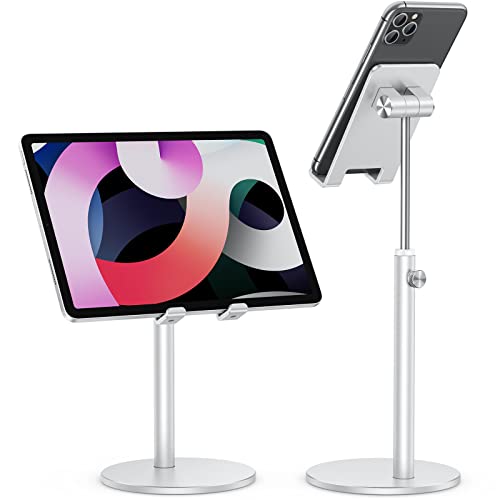
The OMOTON CA04 is a small aluminum stand that adjusts from 5.7 to 9 inches in height and tilts up to 45 degrees. It fits phones and tablets from 4 to 11 inches, so it covers most modern devices short of a large iPad. A built-in charging hole at the base lets you plug in while streaming, following a workout or cooking from a video.
Its height gain is modest, and the 9 inch maximum means it is a tilt and mild lift stand rather than a true eye-level solution. That is fine for a small tablet on a kitchen counter or a phone on a nightstand. Larger tablets above 11 inches will not fit.
The silver aluminum finish wipes clean and the stand needs no assembly. Compared with the tounee it rises roughly half as high but costs less and takes up less space. It is the sensible pick when you want a bit of lift and the convenience of charging.
Best for: Small tablets and phones with charging on a counter or nightstand
Check price on AmazonSpecs
- Height range: 5.7 to 9 inches
- Tilt: Up to 45 degrees
- Device size: 4 to 11 inches
- Extra: Charging hole in the base
Pros
- +Adjusts from 5.7 to 9 inches
- +Tilts up to 45 degrees
- +Charging hole in the base
- +Aluminum build wipes clean
Cons
- −Fits only up to 11 inch screens
- −Modest height gain compared with taller stands
ODOSOLA Height and Angle Adjustable Tablet Stand
About this pick
The ODOSOLA is a desktop stand built to raise the screen to eye level, starting from 9.45 inches and extending upward. Its heavy, solid metal base and nonslip bottom are meant to prevent tipping, which matters more as the arm rises. The cradle holds phones and tablets in a dock style grip.
The maximum height is cut off in the listing text we have, so confirm the full range before buying if you need a specific eye line. It is the highest-cost desk stand in this roundup by price tier, so it makes sense only if the weighted base appeals. It also stays at a desk rather than moving between rooms.
Care is simple: wipe the base and keep the nonslip pad clean. Compared with the tounee it offers a solid base, but the tounee states a clearer height range and weight rating. If a sturdy, quiet desk stand matters most, the ODOSOLA is worth a look.
Best for: A solid weighted desk stand for a home office
Check price on AmazonSpecs
- Minimum height: 9.45 inches
- Base: Heavy weighted metal
- Grip: Nonslip bottom
- Use: Home office, eye-level viewing
Pros
- +Heavy solid metal base
- +Nonslip bottom stays put
- +Lifts the screen toward eye level
- +Suits a home office desk
Cons
- −Listing does not clearly state the full height range
- −Higher cost than the tounee for a desk stand
How We Evaluated These Height Adjustable Tablet Stands (2026)
Each pick was assessed across 5 criteria weighted for real-world use.
Height range
We compared the published adjustment range of every stand. The TabHolderix at 27.5 to 59.05 inches leads, the tounee at 11.81 to 18.11 inches is the strongest desk option, and the OMOTON CA04 at 5.7 to 9 inches is the most basic. A wider usable range scored better.
Stability at height
We looked at base weight, base design and how the stand is described. The TabHolderix lists a 4.5 lb metal base and the ODOSOLA a heavy solid base with a nonslip bottom. Stands without published base weight, like the LOXP, were treated more cautiously.
Device and case compatibility
We compared supported sizes and weights, including the tounee's 3.5 lb limit and 17mm case allowance. The TabHolderix and its 1.5 lb device limit were scored as a stricter fit. Case fit matters because thick cases are the most common source of poor fit.
Adjustment effort
We evaluated how many steps it takes to change the height. Telescoping and hinge designs rank well when joints lock firmly, while stands that need repeated tightening score lower. We also considered whether the stand can be adjusted with one hand.
Value
We judged each stand's price tier relative to its lift and stability. The LOXP is the lowest-cost pick here, while the ODOSOLA is the highest. Our scores are editorial and based on specs and buyer feedback.
How to Choose the Right Height Adjustable Tablet Stands (2026)
By How Much Height You Need
Match the lift to the distance between your tablet and your eyes.
| Height need | Recommended pick |
|---|---|
| A few inches of lift and tilt | OMOTON CA04 Aluminum Tablet and Phone Stand |
| Chest to face level on a desk | tounee Height Adjustable Tablet Stand |
| Hinged lift for a large screen | LOXP Adjustable Tablet Stand with Heavy-Duty Base |
| Solid desk stand for eye-level viewing | ODOSOLA Height and Angle Adjustable Tablet Stand |
| Over a bed or recliner | TabHolderix Tablet Floor Stand with 4.5 lb Base |
By Budget
| Budget tier | Recommended pick |
|---|---|
| Lowest-cost pick | LOXP Adjustable Tablet Stand with Heavy-Duty Base |
| Low to mid-range | OMOTON CA04 Aluminum Tablet and Phone Stand |
| Mid-range | tounee Height Adjustable Tablet Stand |
| Upper mid-range | TabHolderix Tablet Floor Stand with 4.5 lb Base |
| Highest-cost pick | ODOSOLA Height and Angle Adjustable Tablet Stand |
Desk Stand vs Floor Stand
Desk stands
The tounee, LOXP, OMOTON CA04 and ODOSOLA sit on a table. They are compact, quick to adjust and sturdy for their size, but they cap out at about 18 inches of rise. Choose one if your screen lives on a desk or counter.
Floor stands
The TabHolderix reaches 59.05 inches and floats a screen over a bed or recliner. It needs floor space, a heavy base and a lighter device. Choose it if you read or watch while reclining.
Our recommendation
Pick the tounee for desks and the TabHolderix for beds. If you need both, buy one of each.
By Adjustment Style
| Preference | Recommended pick |
|---|---|
| One telescoping motion | tounee Height Adjustable Tablet Stand |
| Two hinges for height and tilt | LOXP Adjustable Tablet Stand with Heavy-Duty Base |
| Simple tilt and small lift | OMOTON CA04 Aluminum Tablet and Phone Stand |
| Floor stand with 360 degree head | TabHolderix Tablet Floor Stand with 4.5 lb Base |
| Heavy base and fixed cradle | ODOSOLA Height and Angle Adjustable Tablet Stand |
For Reading Without Neck Strain Specifically
Look for
Look for a stand that lifts the screen to eye level or slightly below it without wobbling. Check the maximum height and that the base is heavy enough for the tablet and case.
In this comparison
The tounee lifts to 18.11 inches and supports 3.5 lb, which fits most tablets. For reading in a recliner, the TabHolderix reaches 59.05 inches on a 4.5 lb base.
When to Spend More
Spend more if
Spend more if you need a lot of reach or a heavier tablet. The TabHolderix reaches 59.05 inches and the tounee supports 3.5 lb. Those spec gains are what the higher cost buys.
Save if
Save if the stand only needs a bit of tilt and lift for a phone or small tablet. The OMOTON CA04 and LOXP cover that for less.
Frequently Asked Questions
How do I choose between a desk riser and a floor stand?
Choose by where the screen is used. A desk stand like the tounee lifts a tablet to 18 inches, while a floor stand like the TabHolderix reaches 59.05 inches. If you only use a tablet at a table, a floor stand is unnecessary. If you read in bed, a desk stand will not help.
Do height adjustable stands cost much more?
Prices vary by reach and base weight. The LOXP and OMOTON CA04 are at the lower tiers, while the TabHolderix and ODOSOLA are higher. The extra cost mostly buys more height range and a heavier base.
Will a thick case fit?
It depends on the clamp. The tounee accepts devices up to 17mm thick, and the OMOTON supports 4 to 11 inch devices. Measure your tablet with its case before buying, and choose a wide clamp if you use a rugged case.
Why does an adjustable stand droop?
As the height increases, leverage grows and joints can slip. Heavier devices and thick cases make this worse. A base near 4.5 lb helps with a full size iPad at full extension, and keeping the arm short reduces strain.
What height is eye level?
Eye level is where the top of the screen sits near your eyes while you sit upright. A low screen pulls the neck forward. For video calls the camera should also be near eye level. Use the stand's range to get as close as possible.
Can I use a height adjustable stand for a portable monitor?
Some can. The tounee lists support for 15.6 inch portable monitors up to 3.5 lb. Check weight and clamp width first, because monitors are heavier than tablets. The TabHolderix is limited to 1.5 lb devices.
How do I keep the stand stable?
Use it on a flat surface, keep the arm as short as it can be and avoid adding weight. Press floor stand bases against furniture. Tighten joints regularly so they do not slip.
Bottom Line
best overall: tounee Height Adjustable Tablet Stand - best overall pick in this roundup.
See the full rankings above for all picks with pros, cons, and best-for summaries.
Browse on Amazon
All Prime-eligible options with current pricing.
Shop on Amazon →