6 Best Trackball Mice for Seniors in 2026
Six easy-to-live-with trackball mice for older adults, compared by setup steps, pairing, battery routine, wrist support and hand fit for relaxed computer use.


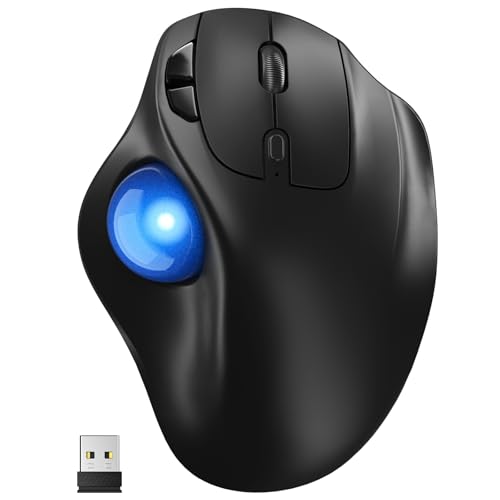


At a Glance
Kensington Orbit Trackball with Scroll Ring K75327WW
↓ See why we picked itMany people who start using a trackball later in life say the same thing: the first day felt strange and the second week felt like relief. Instead of gripping a mouse and swinging the arm across a crowded desk, you rest the hand and roll a ball with a thumb or a few fingers. For active adults who enjoy email, photos, video calls and online shopping, that quiet, still posture can make the computer more pleasant. It also suits kitchen tables and recliners where there is no room to slide a mouse.
This guide compares six trackballs picked for ease of setup and daily comfort. The Logitech Ergo M575S is a wireless thumb model with three customizable buttons. The two Kensington Orbit models are compact and ambidextrous, one with a wrist rest and scroll ring and one plain and wired. The Yadkbo runs on ordinary AAA batteries, the Nulea M501 recharges, and the Logitech MX Ergo S is the premium, tilted option.
We evaluated each pick from product specifications and buyer feedback patterns, and we looked at how much setup it asks of a family member who may be helping, how often it needs power, and whether it suits either hand. None of this is medical advice. If hand discomfort is an ongoing worry, an occupational therapist or your doctor can suggest the best fit, and these trackballs give you comfortable, forgiving options to try.
6 Criteria to Look For Before Buying a Trackball Mice for Senior
Key buying criteria so you get the right fit the first time.
How easy it is to set up
The best trackball is the one that works without a long session of menus. The wired Kensington Orbit K64327F needs only a plug, the Logitech Ergo M575S includes a Logi Bolt receiver you can plug in, and the Bluetooth models need a short pairing. A family helper can finish any of these in minutes. Skip complicated multi-slot devices if no one will use more than one computer.
Handedness
Both Kensington Orbit models are ambidextrous, so a left-handed reader or a shared computer is covered. The Logitech Ergo M575S, MX Ergo S, Yadkbo and Nulea M501 are shaped for the right hand. A trackball that does not suit your dominant hand will feel awkward from day one. Check this before anything else.
Battery or no battery
Power is a recurring job. The Kensington Orbit K64327F has none, the Logitech Ergo M575S takes an AA cell, the Yadkbo two AAA cells, and the Logitech MX Ergo S and Nulea M501 recharge. Pick the one that matches your habits. If you keep batteries in a drawer, a cell model is easy, and if you prefer a cable, charge.
Wrist and hand support
A supported hand tires less. The Kensington Orbit with Scroll Ring has a detachable wrist rest, the Logitech MX Ergo S tilts to 20 degrees, and the Logitech Ergo M575S has a sculpted shell. Flat plain designs leave support to your desk and chair. Add a small cushion or rest if the device lacks one.
Pointer speed and patience
A fast pointer is hard to control at first. The Yadkbo offers five DPI levels, the Nulea M501 four, and any trackball lets you slow the pointer in the computer settings. Start slow and speed up as your hand learns. Expect a week of mild clumsiness, and be patient.
Scrolling style
How pages move matters for reading. The Kensington Orbit with Scroll Ring uses a ring around the ball, and the others use a wheel or ring depending on design. A ring feels smooth but is different from a wheel. If you read long articles daily, try to picture which is easier before you commit.
6 Best Trackball Mice for Seniors in 2026
Logitech Ergo M575S Wireless Trackball Mouse
About this pick
The M575S is the easiest trackball to recommend to a first-time user. It includes a small Logi Bolt receiver that can simply be plugged in, and it also supports Bluetooth for computers that prefer it. Once connected, the hand rests on a supportive shell and the thumb rolls the ball, so the device never moves across the desk. Three buttons can be customized if someone later wants shortcuts.
The adjustment is the thumb. For the first few days precise clicking feels unfamiliar, and it helps to lower the pointer speed in the computer settings. It is shaped for the right hand, so left-handers should look at the Kensington Orbit models. An AA battery powers it, which is easy to replace but needs to be bought.
Once a family member has set it up, it needs little attention. The battery lasts a long while, the ball lifts out for a wipe, and the connection holds well. Compared with the MX Ergo S it is lighter and simpler, and compared with the Kensington Orbit it moves the work to the thumb. It is the calm, dependable default.
Best for: Right-handed first-time trackball users who want a simple plug-in or Bluetooth setup.
Check price on AmazonSpecs
- Link: Bluetooth or Logi Bolt
- Power: AA battery
- Control: Thumb ball
Pros
- +Receiver or Bluetooth connection
- +Supportive shell takes the load
- +Replaceable AA battery
- +Three customizable buttons
Cons
- −Right-handed design only
- −Thumb needs a few days to adapt
- −Battery must be bought
Kensington Orbit Trackball with Scroll Ring K75327WW
About this pick
The Orbit with Scroll Ring is a gentle, compact trackball that works for either hand. The ball sits in the center and is rolled with the fingers or palm, a scroll ring around it moves through web pages and documents, and a detachable wrist rest softly cushions the hand. Optical tracking aims for accurate movement with less hand motion, which helps when you are reading a long article or flipping through photos.
The listing is sparse on details such as ball size and wireless features, so treat it as a straightforward wired-style device and check the page before ordering. Scrolling with a ring takes a little time to learn, and some people prefer a wheel. There is no tilt hinge or precision button, so fine aiming relies on the ball itself.
The wrist rest and symmetrical body are the real reasons to own it. Two people at the same table can use it, whichever hand they favor. Against the plain wired Orbit it adds the scroll ring and cushioning, and against the Logitech Ergo M575S it suits people who prefer palm and finger control to the thumb.
Best for: Shared or left-handed desks that want a compact, cushioned trackball.
Check price on AmazonSpecs
- Scroll: Ring
- Rest: Detachable wrist rest
- Hand: Ambidextrous
Pros
- +Wrist rest cushions the hand
- +Ambidextrous body
- +Scroll ring for pages
- +Compact footprint
Cons
- −Few specs in the listing
- −Ring scrolling takes practice
- −No tilt or precision button
Kensington Orbit Trackball Mouse K64327F
About this pick
The wired Orbit is the least fussy choice. Plug the cable into the computer and the pointer works, with no pairing steps, no battery and no software. A medium 40mm ball is read by internal red optics, and the ambidextrous shape suits either hand. The compact design uses far less desk space than a mouse, which suits a kitchen table or a small writing desk.
It leaves out the comfort extras. There is no wrist rest, scroll ring or tilt mentioned in the listing, and the cord limits how far the computer can sit. A medium ball needs more finger travel to cross a big screen, so raising the pointer speed in settings helps. It needs a USB-A port or an adapter.
For ownership, nothing can run out or lose pairing. A family member can set it up in a minute and rarely return. Compared with the Nulea M501 it avoids charging, and compared with the Kensington Orbit with Scroll Ring it is simpler and cheaper. It is ideal where reliability matters most.
Best for: Anyone who wants a no-battery, no-pairing trackball for either hand.
Check price on AmazonSpecs
- Ball: 40mm
- Link: Wired USB
- Hand: Ambidextrous
Pros
- +Nothing to charge or pair
- +Ambidextrous shape
- +Compact desk footprint
- +Easy to clean ball
Cons
- −No wrist rest or scroll ring
- −Cord limits placement
- −Medium ball needs more finger travel
Yadkbo Ergonomic Wireless Trackball Mouse
About this pick
The Yadkbo takes two ordinary AAA batteries and has no internal pack, so refreshing it is as familiar as changing a remote control. It connects by Bluetooth or a 2.4G receiver and stores three connections, and the listing gives a range of about 33 feet. Five DPI levels let someone tune the cursor speed, and the thumb controls replace wrist and arm movement.
The batteries are not included, which is worth knowing before the day it arrives. Without a charging cable the device is easy to use, but running out mid-task means keeping spares nearby. The listing describes quiet operation, the finish is simple, and there is no tilt or wrist rest.
Its appeal is familiarity. Pair it once, choose a comfortable pointer speed, and swap batteries as needed. Compared with the Nulea M501 it uses cells instead of charging, and compared with the Logitech Ergo M575S it offers more connection slots at a plainer finish. It suits a household that already keeps batteries in a drawer.
Best for: Households comfortable swapping common AAA batteries who want a simple wireless thumb ball.
Check price on AmazonSpecs
- Power: 2 AAA batteries
- DPI: 5 levels
- Range: About 33 feet
Pros
- +Two AAA cells swap in seconds
- +Three connection slots
- +Five DPI levels
- +Range of about 33 feet
Cons
- −Batteries not included
- −No tilt or wrist rest
- −Plain finish
Nulea M501 Wireless Trackball Mouse
About this pick
The Nulea M501 is the wireless trackball for people who would rather charge than buy batteries. It pairs over Bluetooth or a USB dongle, remembers up to three devices through a button on the bottom, and offers four DPI levels. The thumb ball is smooth, and the base stays where you put it.
It is a simple, less refined device. There is no tilt, no wrist rest and no software polish, and the device switch sits underneath where it is easy to miss. A rechargeable battery requires remembering to plug it in, and the shape is for the right hand.
It works well as a low-risk trial. The lower DPI levels slow the pointer for careful clicking, and the three-device memory covers a laptop and a tablet. Against the Yadkbo it charges instead of using cells, and against the Logitech MX Ergo S it keeps the cost down. A good first trackball for someone who is only curious.
Best for: Curious beginners who want a low-cost, rechargeable wireless thumb ball.
Check price on AmazonSpecs
- Power: Rechargeable
- Devices: 3
- DPI: 4 levels
Pros
- +Rechargeable battery
- +Bluetooth or dongle link
- +Four DPI levels
- +Remembers three devices
Cons
- −No tilt or wrist rest
- −Switch is on the underside
- −Plain finish
Logitech MX Ergo S Advanced Wireless Trackball Mouse
About this pick
The MX Ergo S is the most comfortable and the most complicated trackball in this group. A hinge sets a 20 degree tilt that turns the forearm toward a handshake posture, a toggle button switches between speed and precision, and clicks are described as much quieter than before. It charges over USB-C, so there are no cells to buy.
Those extras are more than a first-time user needs. The hinge needs experimenting, the toggle needs explaining, and the charging cable is another thing to manage. It is heavier and larger than the others, and it costs the most. The shape is right-handed and thumb-driven.
For someone who spends many hours at the computer, the comfort pays off. Once a family member helps set the angle and show the toggle, it runs quietly in the background. Against the Logitech Ergo M575S it adds tilt and charging, and against the Kensington Orbit it keeps the hand narrower. Choose it only if long sessions are common.
Best for: Long daily sessions where a tilted, rechargeable, quiet thumb trackball is worth the setup.
Check price on AmazonSpecs
- Tilt: 20 degrees
- Charging: USB-C
- Toggle: Speed or precision
Pros
- +20 degree tilt hinge
- +Precision toggle for small targets
- +USB-C rechargeable
- +Quieter clicks
Cons
- −Highest cost
- −More settings to learn
- −Right-handed design only
How We Evaluated These Trackball Mice for Seniors
Each pick was assessed across 5 criteria weighted for real-world use.
Setup effort
We began with how little each trackball asks of a helper. The wired Kensington Orbit K64327F and the receiver on the Logitech Ergo M575S scored well for quick starts, while multi-slot Bluetooth models scored lower for simplicity. Our reading comes from listing details and buyer feedback patterns, not hands-on bench work.
Comfort and support
We looked at shell shape, wrist rests and tilt. The Kensington Orbit with Scroll Ring earned credit for a detachable rest, and the Logitech MX Ergo S for its tilt. Plain flat bodies scored lower for long sessions but remain gentle for short ones. None of this is medical advice.
Handedness and sharing
Ambidextrous designs received credit, since a household often shares a computer. Both Kensington Orbit models are symmetrical, while the others suit the right hand.
Power routine
We compared AA, AAA, rechargeable and wired approaches. The wired Orbit demands nothing, and the others each need a chore. We favored routines that an older user or a helper can maintain without special tools.
Lineup positioning
The Logitech Ergo M575S leads for balance, the Kensington Orbit with Scroll Ring for cushioned sharing, the wired Orbit for simplicity, the Yadkbo for familiar batteries, the Nulea M501 for rechargeable value and the MX Ergo S for premium comfort.
How to Choose the Right Trackball Mice for Seniors
By Who Is Using It
Match the trackball to the person and the room.
| Situation | Pick | Why |
|---|---|---|
| First trackball for a parent | Logitech Ergo M575S Wireless Trackball Mouse | Plug-in receiver and a supportive shell. |
| Left-handed or shared computer | Kensington Orbit Trackball with Scroll Ring K75327WW | Ambidextrous with a wrist rest. |
| Kitchen table, nothing to charge | Kensington Orbit Trackball Mouse K64327F | Wired, no batteries. |
| Household that keeps AAA batteries | Yadkbo Ergonomic Wireless Trackball Mouse | Two AAA cells. |
| Hours of daily use | Logitech MX Ergo S Advanced Wireless Trackball Mouse | Tilted, quiet and rechargeable. |
By Budget
Tiers are relative inside this lineup.
| Tier | Pick | What you get |
|---|---|---|
| Entry | Kensington Orbit Trackball Mouse K64327F | A plain wired trackball for either hand. |
| Entry | Nulea M501 Wireless Trackball Mouse | Rechargeable wireless. |
| Mid | Yadkbo Ergonomic Wireless Trackball Mouse | Three connections and AAA power. |
| Mid | Kensington Orbit Trackball with Scroll Ring K75327WW | Wrist rest and scroll ring. |
| Premium | Logitech Ergo M575S Wireless Trackball Mouse | Dependable, polished thumb design. |
| Premium | Logitech MX Ergo S Advanced Wireless Trackball Mouse | Tilt, precision toggle and USB-C charging. |
Wired vs Wireless
Seniors and helpers often disagree on this, so weigh it carefully.
Wired
The Kensington Orbit K64327F plugs in and works, with nothing to charge or replace. The cord restricts placement, and the plug needs a port. Choose wired when reliability and a quick setup matter most, such as a shared family computer.
Wireless
The Logitech Ergo M575S, Yadkbo, Nulea M501 and Logitech MX Ergo S free the desk of a cable and suit recliners and trays. They need batteries or charging. Choose wireless if you move the computer around or dislike cable clutter.
In short, wired for certainty, wireless for freedom to move.
By Power Routine
Pick the chore you are most likely to keep up with.
| Preference | Pick | Reason |
|---|---|---|
| No power chores | Kensington Orbit Trackball Mouse K64327F | Cable provides power. |
| Replace a single AA cell | Logitech Ergo M575S Wireless Trackball Mouse | Easy AA swap. |
| Replace two AAA cells | Yadkbo Ergonomic Wireless Trackball Mouse | Common AAA batteries. |
| Charge it now and then | Nulea M501 Wireless Trackball Mouse | Internal rechargeable battery. |
| Charge with a USB-C cable | Logitech MX Ergo S Advanced Wireless Trackball Mouse | USB-C rechargeable. |
For Video Calls and Photos Specifically
Calls and photo albums reward a steady pointer and easy scrolling.
Look for
Choose a device with a calm pointer speed, a smooth scrolling method and a steady connection so the cursor does not wander when you click mute or camera buttons. A wrist rest helps if calls run long.
In this comparison
The Kensington Orbit with Scroll Ring suits photo albums with its ring and wrist rest, and the Logitech Ergo M575S handles calls with a steady connection. The Yadkbo offers five DPI levels for gentle clicking on small buttons.
When to Spend More
| Spend more if | Save if |
|---|---|
| You use the computer for hours, which makes the Logitech MX Ergo S's tilt worth it. | You use it for short sessions, so the Nulea M501 is enough. |
| You want a cushioned, shared device like the Kensington Orbit with Scroll Ring. | A plain wired Orbit works for one user. |
| You value a polished shell and optional software on the Logitech Ergo M575S. | A Yadkbo covers the basics. |
| You move the computer around the house. | The computer stays on one table. |
Frequently Asked Questions
How do I choose between a thumb trackball and a palm trackball?
Think about which part of the hand feels easier. A thumb model like the Logitech Ergo M575S is compact and quick to learn but loads the thumb. A palm model like the Kensington Orbit spreads the load and suits either hand. If you cannot decide, start with the one that fits your dominant hand.
How long does it take to get used to a trackball?
Most people feel comfortable within a week or two. The first days can feel clumsy, especially when clicking small buttons. Lower the pointer speed, take your time and use short sessions at first. If it still feels wrong after two weeks, try the other style.
Which trackball is the simplest to set up?
The wired Kensington Orbit K64327F is the simplest, because it only needs to be plugged in. The Logitech Ergo M575S is nearly as easy with its included receiver. Bluetooth models need a short pairing step that a family helper can do.
Are trackballs good for shaky or tired hands?
Many people find them calmer because the device does not move and nothing needs gripping. They are a comfort tool and not a treatment, so ongoing hand concerns deserve a conversation with your doctor or an occupational therapist. A slower pointer speed also makes careful clicking easier.
How do I clean a trackball?
Push the ball out, wipe it with a lint-free cloth and swab the small supports inside. Do this every few weeks or when the pointer stutters. A clean ball rolls smoothly and needs less pressure.
Can a trackball work on any surface?
Yes, because it never moves. That makes it handy on a lap tray, a recliner arm or a cluttered table. It only needs a stable spot and, for wireless models, a steady connection.
What if I am left-handed?
Choose one of the Kensington Orbit models, which are ambidextrous. The Logitech Ergo M575S, MX Ergo S, Yadkbo and Nulea M501 are shaped for the right hand. Left-handers should avoid right-hand designs, since the shape and buttons would feel awkward.
Bottom Line
best overall: Logitech Ergo M575S Wireless Trackball Mouse - best overall pick in this roundup.
See the full rankings above for all picks with pros, cons, and best-for summaries.
Browse on Amazon
All Prime-eligible options with current pricing.
Shop on Amazon →