6 Best Computer Mice for Seniors in 2026
Six simple, comfortable computer mice for older adults, compared by plug-in setup, button feel, body size and battery or cord, with no complicated menus.



At a Glance
The best mouse for an older adult is rarely the cleverest one. It is the one that works the moment it is plugged in, sits comfortably under a relaxed hand, and never asks for a software download, a pairing screen or a charging routine. Many people over 55 use a computer every day for email, photos, video calls with grandchildren and banking, and they want a mouse that fades into the background instead of becoming a project.
This guide compares six mice built around that idea. The Logitech M185 and M510 are wireless models that use a tiny USB receiver instead of Bluetooth. The Logitech B100, Lenovo 300 and TECKNET wired mouse use a cord and need no battery. The Acer Wireless Mouse is a plain plug-in option with page buttons. Most are ambidextrous or at least simple in shape, which helps families that share a computer.
We evaluated each pick from product specifications and buyer feedback patterns, and we focused on ease: how little setup it needs, how forgiving the body is, and how rarely it asks for care. This is not medical advice. If you or a relative has a specific hand concern, an occupational therapist can suggest more targeted grips, and the mice here are sensible, comfortable starting points for everyday use.
6 Criteria to Look For Before Buying a Computer Mice for Senior
Key buying criteria so you get the right fit the first time.
Setup that needs no thought
Ease starts the moment the mouse leaves the box. The Logitech M185 and Acer Wireless Mouse use a USB-A receiver that works the moment it is plugged in, and the wired Logitech B100 and Lenovo 300 need nothing at all. Bluetooth models require pairing, which is a screen of menus many people dislike. Choose a receiver or a cord, unless you already enjoy Bluetooth.
Body size and hand fit
A mouse should match the hand under it. The Logitech M185 is compact, the Acer is a travel-friendly size, and the Logitech M510 and Lenovo 300 are full size. Measure from the wrist crease to the middle fingertip and compare it with the listing's dimensions. Small hands should avoid oversized shells, because stretching to reach buttons causes the very fatigue you are trying to avoid.
Ambidextrous or single-handed
If a computer is shared, or the user is left-handed, symmetry matters. The Logitech M185, B100 and Lenovo 300 are ambidextrous. The Logitech M510 has a contoured shape with a few buttons that favor right-handers, and the TECKNET wired and Acer follow right-hand oriented shapes. Match the shape to the hand that will actually use it.
Battery or cord
Power is the chore you will repeat. The Logitech M185 lists up to a year of battery and the M510 up to two years, so they seldom need attention, while the Logitech B100, Lenovo 300 and TECKNET wired never need a battery. A cord limits placement but removes risk. If a battery dying mid-task would frustrate you, the corded mice are the stress-free option.
Pointer speed and DPI
DPI sets how far the cursor travels per hand movement. The Logitech B100 sits at a calm 800 DPI, the Lenovo 300 runs at 1600, and the TECKNET wired reaches 6400 at its top step. Higher is not better for careful clicking, because a fast pointer is harder to aim. Look for a mouse that lets you stay in the 800 to 1600 range.
Extra buttons and scrolling
Forward and back buttons, tilt scrolling and zoom can save time or cause confusion. The Acer and TECKNET wired add page buttons, and the Logitech M510 adds tilt-to-scroll. The Logitech M185 keeps things plain with a line-by-line wheel. If a user is likely to press extra buttons by accident, choose fewer of them.
6 Best Computer Mice for Seniors in 2026
Logitech M185 Compact Wireless Mouse
About this pick
The M185 is the mouse you give a family member and rarely hear about again. It uses a small USB-A receiver that stays plugged in, so there is no Bluetooth menu to open and no pairing code to remember. The body is a compact ambidextrous contour, which means it feels fine in the left or right hand, and the scroll wheel moves line by line so pages do not jump away from the reader.
The maker lists up to one year of battery life thanks to a smart sleep mode, so the single battery rarely needs a thought. It works on Windows and Mac computers, though a newer laptop with only USB-C ports will need an adapter for the receiver. The compact size suits average and small hands best, and a person with a large palm may prefer the Logitech M510 instead.
In daily ownership it asks for almost nothing. The receiver stays in the port, the mouse sleeps when idle, and it wakes with a nudge. Against the M510 it is smaller and lighter, and against the wired picks it frees the desk from a cord. For a first mouse or a replacement for a worn one, it is the easiest recommendation in this group.
Best for: Anyone wanting a plug-in wireless mouse that works in either hand and rarely needs attention.
Check price on AmazonSpecs
- Connection: 2.4 GHz USB-A receiver
- Battery: Up to 1 year
- Shape: Ambidextrous compact
Pros
- +Receiver plugs in with no pairing steps
- +Ambidextrous shape suits either hand
- +Battery listed up to one year
- +Line-by-line scrolling keeps text steady
Cons
- −Compact body may feel small to large hands
- −Needs a USB-A port or adapter
- −Basic, with no extra buttons
Logitech M510 Full Size Wireless Mouse
About this pick
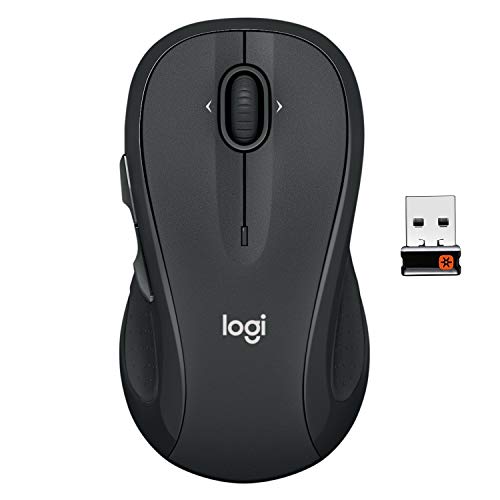
The M510 is the roomy choice. Its contoured shell has soft rubber grips and a gentle curve, so the whole hand can rest on it instead of pinching a small body. It carries a longer battery life, with the maker quoting up to two years and an on and off switch that saves power when you put it away. The same USB-A nano receiver approach keeps setup to a single plug-in step.
The extra buttons are the double-edged part. Tilt-to-scroll and the back and forward keys are useful for photo albums and web pages, yet the listing notes that some of them favor right-handed use, so a left-hander may find a few controls awkward. A full-size mouse is also heavier and larger in a bag, so it is a desk mouse more than a travel mouse. People who dislike extra buttons may find the plain M185 less confusing.
In ownership the main task is keeping the receiver plugged in and remembering the on switch. It feels more substantial than the Logitech M185 and more refined than the Lenovo 300, and the soft grips make long sessions of reading or photo browsing pleasant. If your hand is average to large, this is the comfortable option.
Best for: Average to large hands that want a roomy, cushioned shell and a very long battery life.
Check price on AmazonSpecs
- Size: Full size
- Battery: Up to 2 years
- Connection: USB-A nano receiver
Pros
- +Full-size body suits larger hands
- +Soft rubber grips feel gentle
- +Battery quoted up to two years
- +On and off switch saves power
Cons
- −Some buttons favor right-handed use
- −Bulky for travel
- −More buttons than a first-time user needs
Logitech B100 Ambidextrous Wired Mouse
About this pick
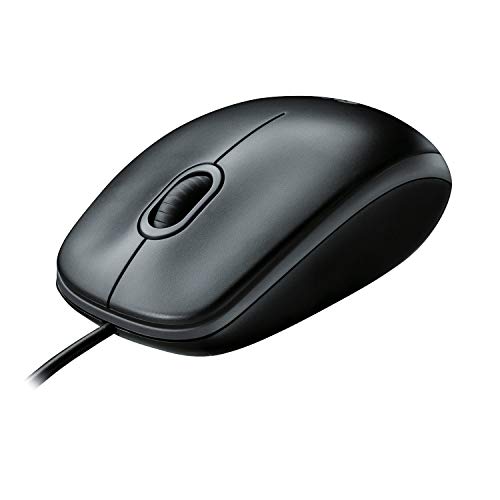
The B100 is the plainest mouse here, which is exactly its charm. It is a corded USB mouse with a comfortable ambidextrous shape, so nothing needs charging, pairing or replacing. At 800 DPI, the cursor moves at a measured pace, which suits careful reading and clicking on small links. The listing also mentions side-to-side scrolling and zoom, helpful for spreadsheets and large photos.
The limits are what you would expect. The cord can snag on a cluttered desk and restricts how far you can sit from the screen. It has a single, low sensitivity, so there is no way to speed the pointer up if a large monitor makes it feel slow. A newer laptop with only USB-C ports needs an adapter, and the body is basic, with no soft grips or thumb support.
As a gift or a spare, it is hard to beat. Plug it in and it works immediately, and nothing in it can run out. Against the Lenovo 300, the B100 is simpler and lower in sensitivity, and against the wireless Logitech models it trades freedom for certainty. Choose it for a household desktop where steady, no-surprise operation matters most.
Best for: A shared home desktop where nothing should ever need charging or pairing.
Check price on AmazonSpecs
- Connection: Wired USB
- DPI: 800
- Shape: Ambidextrous
Pros
- +Nothing to charge, pair or replace
- +Ambidextrous body suits left or right hands
- +Measured 800 DPI pace aids careful clicking
- +Zoom and side-to-side scrolling included
Cons
- −Cord limits placement
- −Only one sensitivity setting
- −Plain body with no soft grips
Lenovo 300 USB Wired Mouse
About this pick
The Lenovo 300 is a full-size wired mouse built for long, steady use. Its microswitches are rated for up to 20 million clicks, which is a durability promise well above a typical budget mouse, and it tracks at 1600 DPI for a faster, more responsive pointer. The ambidextrous full-size shell gives a larger palm a proper place to rest, and the USB-A cord means no batteries at any point.
Two cautions apply. A full-size shell can feel big in a small hand, so check the dimensions, and 1600 DPI is quick enough that some people want it slowed down in the operating system settings. The cord shares the desk with everything else, and a laptop with only USB-C ports needs an adapter. The body is plain, without soft grips.
Ownership is about as easy as it gets. There is nothing to maintain, and the stated durability suggests it will outlast cheaper alternatives. Compared with the Logitech B100 it is larger and faster, and compared with the Logitech M510 it has no battery to think about. For a person who clicks all day on a home desktop, it is a sturdy, practical pick.
Best for: Heavy daily clickers who want a roomy, durable wired mouse with no batteries.
Check price on AmazonSpecs
- DPI: 1600
- Click rating: 20 million
- Size: Full size
Pros
- +Switches rated for up to 20 million clicks
- +Full-size shell suits larger hands
- +Faster 1600 DPI tracking
- +Ambidextrous shape works in either hand
Cons
- −Large for small hands
- −Cord adds desk clutter
- −Pointer may feel fast without adjustment
Acer Wireless Mouse 2.4GHz 1600 DPI
About this pick
The Acer Wireless Mouse covers the basics in a familiar name. It uses 2.4GHz plug-and-play connectivity, which means a USB-A receiver goes into the port and the pointer works at once. Three DPI choices of 800, 1200 and 1600 let you slow the cursor down for careful clicking or speed it up for big screens, and forward and back buttons make moving through web pages a thumb flick.
The body is a compact, travel-friendly size, so larger hands may find it small. The listing does not describe soft grips or a contoured palm rest, and the receiver needs a USB-A port. It is not ambidextrous, so left-handers should read the dimensions and shape first. Expect a solid, basic mouse, not a polished one.
Once set up, it asks little. The receiver stays in, the buttons do their job, and the DPI button lets a family member change the speed if it feels wrong. Compared with the Logitech M185 it gives you two extra buttons and DPI steps, and compared with the TECKNET wired mouse it frees you from a cord. It suits someone moving up from an ancient wired mouse who wants one step of modern convenience.
Best for: People upgrading from a wired mouse who want page buttons and a speed switch without complexity.
Check price on AmazonSpecs
- Connection: 2.4GHz USB-A
- DPI: 800/1200/1600
- Buttons: Forward and back
Pros
- +Plug in the receiver and it works
- +Three DPI steps adjust pointer speed
- +Forward and back buttons ease browsing
- +Compact enough for a laptop bag
Cons
- −Small body for large hands
- −No soft grips described
- −Right-hand oriented shape
TECKNET USB Wired Mouse with Forward and Back Keys
About this pick
The TECKNET wired mouse brings quiet clicks to a corded design. Silent click buttons are gentler on the ear in a shared home, and soft rubber side grips give the thumb and fingers something to hold. There are four DPI levels of 1000, 1600, 3200 and 6400, with the lowest being the calmest for careful pointing, and six buttons including forward and back keys for browsing. A five-foot cord reaches comfortably around most desks.
Some of that is more than a beginner needs. The top DPI settings are very fast, and extra buttons can be pressed by accident until you learn where they are. The shaped body is built with a right-handed grip in mind, so left-handers should look at the symmetrical Logitech B100 or Lenovo 300 instead. A USB-A plug is required, and a USB-C only laptop will need an adapter.
Ownership is easy, because it never needs a battery. If a relative wants a quieter click than a standard wired mouse, this is the upgrade. Compared with the Lenovo 300 it is quieter and more adjustable, while the Lenovo is bigger and rated for very long button life. Start on the lowest DPI step and raise it only if the pointer feels sluggish.
Best for: Quiet households wanting a corded mouse with soft side grips and page buttons.
Check price on AmazonSpecs
- DPI: 1000/1600/3200/6400
- Cord: 5 feet
- Buttons: 6
Pros
- +Silent click buttons suit shared rooms
- +Rubber side grips help hold
- +Four DPI levels adjust pointer speed
- +No battery needed
Cons
- −Right-handed shape
- −Extra buttons can confuse beginners
- −Cord and USB-A plug required
How We Evaluated These Computer Mice for Seniors
Each pick was assessed across 5 criteria weighted for real-world use.
Ease of setup
We started with how quickly each mouse starts working. Receiver and wired models like the Logitech M185 and B100 scored well because they need no pairing. Bluetooth-only designs would score lower for this audience. The judgment comes from listing details and buyer feedback patterns, not from a hands-on bench.
Comfort and fit
We compared body size, grip surfaces and shape. The Logitech M510's soft rubber grips and full-size shell gave it credit for large hands, while the compact Logitech M185 and Acer suit smaller ones. Ambidextrous designs earned extra for shared computers.
Maintenance burden
Batteries and cords were weighed as chores. The Logitech M510 lists up to two years of battery and the M185 up to a year, while the wired models need nothing. We marked down any design that would leave a user stranded by a dead battery without warning.
Button feel and noise
We considered clicks that are gentle and predictable. The TECKNET wired mouse offers silent click buttons, and the Lenovo 300 lists switches rated for 20 million clicks. We also noted that extra buttons help some users and hinder others, and we treated simplicity as a feature.
Lineup positioning
The Logitech M185 leads on easy wireless, the M510 on full-size comfort, the B100 on plain wired simplicity, the Lenovo 300 on durability, the Acer on basic plug-in value and the TECKNET wired on quiet clicks. That spread allows each reader to land on a clear first choice.
How to Choose the Right Computer Mice for Seniors
By Who Is Using It
Match the mouse to the person and the computer, not to the feature list.
| Situation | Pick | Why |
|---|---|---|
| First wireless mouse for a parent | Logitech M185 Compact Wireless Mouse | Plug in the receiver and it works, with a year-long battery. |
| Large hands, long reading sessions | Logitech M510 Full Size Wireless Mouse | Full-size shell with soft rubber grips. |
| Shared family desktop with a left-hander | Logitech B100 Ambidextrous Wired Mouse | Ambidextrous, wired and nothing to charge. |
| Heavy daily clicking | Lenovo 300 USB Wired Mouse | Switches rated for up to 20 million clicks. |
| Quiet home with a sleeping partner | TECKNET USB Wired Mouse with Forward and Back Keys | Silent click buttons. |
By Budget
Tiers are relative within this lineup.
| Tier | Pick | What you get |
|---|---|---|
| Entry | Lenovo 300 USB Wired Mouse | A full-size durable wired mouse. |
| Entry | Logitech B100 Ambidextrous Wired Mouse | The simplest, most reliable cord option. |
| Mid | Acer Wireless Mouse 2.4GHz 1600 DPI | Wireless basics with page buttons. |
| Mid | TECKNET USB Wired Mouse with Forward and Back Keys | Quiet clicks and four DPI levels. |
| Premium | Logitech M185 Compact Wireless Mouse | A trusted compact wireless design. |
| Premium | Logitech M510 Full Size Wireless Mouse | Soft grips and up to two years of battery. |
Wired vs Wireless Receiver
Both avoid Bluetooth, so the choice is cord versus battery.
Wired
A cord means no battery and no signal to drop. The Logitech B100, Lenovo 300 and TECKNET wired mouse fall here. The cost is a cable across the desk and a fixed distance from the computer. Choose wired for a permanent desktop setup where you never want to think about power.
Wireless receiver
A receiver mouse removes the cord but adds a battery. The Logitech M185, M510 and Acer Wireless Mouse use a tiny USB-A receiver that stays plugged in. The M185 and M510 list up to a year and two years of battery. Choose this when a clean desk matters and you can handle an occasional battery swap.
In short, wired for certainty, receiver for a tidy desk.
By Button Complexity
More buttons help some users and confuse others.
| Preference | Pick | Reason |
|---|---|---|
| As few buttons as possible | Logitech M185 Compact Wireless Mouse | Plain buttons and a line-by-line wheel. |
| Page back and forward | Acer Wireless Mouse 2.4GHz 1600 DPI | Dedicated forward and back buttons. |
| Tilt scrolling for photos | Logitech M510 Full Size Wireless Mouse | Tilt-to-scroll and back and forward keys. |
| Speed controls within reach | TECKNET USB Wired Mouse with Forward and Back Keys | Four DPI levels on a six-button body. |
| Calm, slow pointer | Logitech B100 Ambidextrous Wired Mouse | A measured 800 DPI pace. |
For Video Calls and Photos Specifically
Browsing family photos and joining calls rewards smooth scrolling and steady pointing.
Look for
Choose a comfortable shape, a steady connection and a scroll wheel that does not jump. A low or adjustable DPI helps with careful clicking on small buttons like mute and camera. Tilt scrolling and zoom make photo albums easier.
In this comparison
The Logitech M510 suits photo browsing with tilt-to-scroll and a cushioned full-size shell, and the Logitech M185 is the easier choice for video calls with simple buttons. The Logitech B100 adds zoom and a calm 800 DPI pace for careful clicking.
When to Spend More
| Spend more if | Save if |
|---|---|
| You want a very long battery and soft grips, which the Logitech M510 provides. | You are happy with a cord, where the Lenovo 300 delivers durability for less. |
| Your computer is shared and a left-hander uses it, where the ambidextrous Logitech M185 shines. | One right-handed person uses it, so the Acer is enough. |
| Noise matters, which the TECKNET wired mouse answers. | Noise is not a concern, so the Logitech B100 is fine. |
| You travel with the mouse, making the compact M185 worth it. | It stays on one desk, where any wired model works. |
Frequently Asked Questions
How do I choose between wired and wireless for an older relative?
Wired is the most forgiving, since nothing ever dies or loses a connection, and the Logitech B100 and Lenovo 300 fit that role. Wireless with a USB receiver, like the Logitech M185, is nearly as simple and cleans up the desk. Avoid Bluetooth-only models unless the person is comfortable pairing devices.
Which mouse is easiest for someone who has never used one?
The Logitech M185 or B100 is the safest start. Both have plain buttons, a line-by-line scroll wheel and a shape that works in either hand. Plug it in, move the pointer, and the computer recognizes it without drivers. Fewer buttons means fewer accidental clicks.
Does a bigger mouse mean more comfort?
Only if it matches the hand. The Logitech M510 and Lenovo 300 suit average to large palms, but a small hand will stretch and tire on them. The Logitech M185 and Acer suit smaller hands. Measure your palm length and compare it with the dimensions on the listing.
How often will I need to replace the battery?
Not often. The Logitech M185 lists up to one year and the M510 up to two years, with sleep modes stretching that further. Using the on switch on the M510 when you put it away helps. Wired mice never need a battery at all.
Will these work on a Mac or a newer laptop?
Most work on Windows and Mac, but check the listing. Receiver and wired models use USB-A, and newer laptops often have only USB-C ports, so you may need a small adapter. The Logitech M185 states Windows and Mac compatibility, and the others are standard USB devices.
What pointer speed is best for careful clicking?
A moderate setting. Around 800 to 1600 DPI suits most monitors, and the Logitech B100 at 800 DPI is calm. Very fast settings, like the 6400 top step on the TECKNET wired mouse, make small buttons hard to hit. If the pointer feels too quick, lower the speed in the computer settings.
Are there tips for sore hands while using a mouse?
Keep the wrist straight, rest the forearm on the desk, and take short breaks. A well-fitted mouse helps, but posture and breaks matter as much. If you have ongoing discomfort, ask your doctor or an occupational therapist for guidance, since they can suggest options beyond what any shopping guide can.
Bottom Line
best overall: Logitech M185 Compact Wireless Mouse - best overall pick in this roundup.
See the full rankings above for all picks with pros, cons, and best-for summaries.
Browse on Amazon
All Prime-eligible options with current pricing.
Shop on Amazon →