6 Best Trackball Mice for Arthritis in 2026
Six low-effort trackball mice for stiff or sore hands, compared by grip demand, ball size, wrist support and wired or wireless setup for easy daily use.




At a Glance
A regular mouse asks you to grip it, hold it off the desk, and drag it around with the whole arm. A trackball lets go of nearly all of that. The device stays put, the palm or fingers rest on it, and only a thumb or a few fingers move the ball. For people whose hands feel stiff in the morning or sore by afternoon, trading a gripping, sliding motion for a light rolling motion can make the computer feel much friendlier.
This guide compares six trackballs chosen for low effort and ease of use. The Logitech Ergo M575S and MX Ergo S are thumb models with supportive shells. The Kensington Expert and the two Kensington Orbit models use a central ball rolled by the fingers or palm, with detachable wrist rests on several. The Nulea M501 is the wireless budget entry.
We evaluated each pick from product specifications and buyer feedback patterns, and we looked at how much squeezing, reaching and pressing each one demands. None of this is medical advice. Persistent hand pain deserves a conversation with your doctor or an occupational therapist, who can suggest options suited to you. The trackballs below are comfortable, easy-to-use candidates to discuss and try.
6 Criteria to Look For Before Buying a Trackball Mice for Arthriti
Key buying criteria so you get the right fit the first time.
How much gripping is required
The point of a trackball is to let go of the mouse. Every pick here stays on the desk, but the thumb models need a light thumb push while the Kensington Expert and Orbit spread the effort across the fingers and palm. If your fingers feel stiff when pinching, a body that you rest on instead of hold is a major relief. Rest your hand on a candidate and see whether anything needs squeezing.
Which digit does the work
Thumb trackballs like the Logitech Ergo M575S, MX Ergo S and Nulea M501 put the load on the thumb, while the Kensington Expert and both Orbit models use the fingers or palm. Pick based on which joint feels better. If the base of the thumb is sensitive, the Kensington designs are the safer test. If the fingers are stiffer, a thumb model may feel kinder.
Wrist and palm support
A supported wrist stays straighter than a floating one. The Kensington Expert and the Orbit with Scroll Ring include detachable wrist rests, and the Logitech MX Ergo S tilts the hand to 20 degrees. Flat designs leave the wrist to your desk height. Look for a rest that can be removed for cleaning and adjusted to your chair.
Cursor speed and precision
Slower settings mean smaller, gentler movements. The Nulea M501 offers four DPI levels, and the Logitech MX Ergo S has a precision toggle for detailed targets. A lower speed lets the thumb or fingers cover the screen with less effort per click. A fast setting may force tiny, tense motions.
Wired or wireless
A cord is dependable but limits placement, and wireless is tidy but needs power. The wired Kensington Orbit K64327F has nothing to charge, the Logitech Ergo M575S uses an AA battery, and the Logitech MX Ergo S and Nulea M501 charge. Choose the routine that would frustrate you least on a tired day. A cord also never runs flat in the middle of a task.
Cleaning and upkeep
A sticky ball forces extra pressure, which defeats the purpose. Most balls pop out for a quick wipe, and the three small supports inside need a dry swab. Clean every few weeks. The big ball on the Kensington Expert gathers dust faster, while the thumb models tend to stay cleaner longer.
6 Best Trackball Mice for Arthritis in 2026
Logitech Ergo M575S Wireless Trackball Mouse
About this pick
The M575S asks very little of the hand. Your palm rests on a sculpted shell, the fingers lie loose over the buttons, and the thumb does the steering by nudging the ball. Nothing needs gripping or lifting, and the device never moves across the desk. The maker states that it is built with ergonomics experts, and the three customizable buttons let you assign the clicks you use most.
Its main difficulty is that the thumb becomes the busy digit. Someone whose thumb joint is the sore one may find constant rolling tiring, so this is not the answer for everyone. It runs on an AA battery, which is easy to swap but must be bought, and the shape is right-handed. The ball and button resistance feel light, which most people find gentle.
In daily ownership it is calm and fuss free. Wireless pairing is quick, the ball lifts out for a wipe, and the shell keeps the wrist from bending. Compared with the Kensington Orbit it moves the work to the thumb instead of the palm, and compared with the MX Ergo S it is lighter and simpler. It is the starting point for most readers.
Best for: Right-handed users whose thumb is comfortable and whose arm tires from sliding a mouse.
Check price on AmazonSpecs
- Control: Thumb ball
- Link: Bluetooth or Logi Bolt
- Power: AA battery
Pros
- +Nothing to grip or drag
- +Sculpted shell supports the palm
- +Wireless over Bluetooth or receiver
- +Three buttons can be customized
Cons
- −Thumb does all the steering
- −Right-hand shape only
- −Uses an AA battery
Logitech MX Ergo S Advanced Wireless Trackball Mouse
About this pick
The MX Ergo S adds a tilt hinge and a precision toggle to the thumb trackball formula. The 20 degree angle lets the forearm roll toward a handshake, and the maker says the shape is certified by ergonomists. A single button switches between a fast mode and a precise mode, so small targets can be hit with gentle thumb pressure rather than tense, tiny movements. The clicks are also described as much quieter than before, which reads as softer to the touch.
It is the heaviest and largest of the thumb models, and it sits at the top of the cost range. The hinge is a one-time setup, and you should try it at several angles before settling. Because a tilted posture is unfamiliar, expect a few days of adjustment. It charges over USB-C, so it needs a cable and a habit of topping up.
Ownership is calm once configured. A full charge lasts a good while, the tilt stays where you set it, and the precision toggle is a small kindness for tired hands. Next to the Logitech Ergo M575S it is more supportive but heavier, and next to the Kensington Expert it keeps the hand narrower. Spend here if you use the computer for long stretches daily.
Best for: Long daily sessions where a tilted hand position and a precision toggle reduce strain.
Check price on AmazonSpecs
- Tilt: 20 degrees
- Charging: USB-C
- Toggle: Speed or precision
Pros
- +20 degree tilt rolls the forearm
- +Precision toggle eases small targets
- +USB-C rechargeable battery
- +Quieter, softer clicks
Cons
- −Higher cost than the others
- −Larger and heavier body
- −Right-handed thumb design
Kensington Expert Trackball Mouse K64325
About this pick
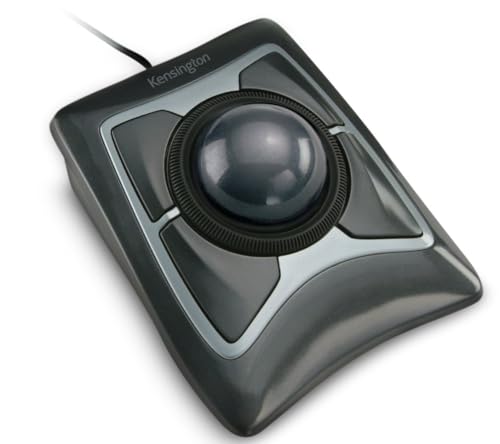
The Kensington Expert lets the whole palm and fingers do light work. A 55mm ball is rolled with the fingers, a patented scroll ring around it moves pages, and a detachable wrist rest cradles the hand and wrist. Four buttons surround the ball, and the maker lists them as customizable through Kensington software. Because the thumb is not the main actor, this suits readers whose thumb joint is the sore spot.
Its size is the cost. The footprint, about five inches wide and under six deep, wants a real desk, and a lap tray will feel crowded. The scroll ring and four buttons take time to learn, and the listing notes that the software has limits on Windows ARM-based computers. A large ball needs regular cleaning to keep rolling smoothly.
In use, the wrist rest and ambidextrous shape make it a comfortable fixture for a shared or left-handed desk. Compared with the Kensington Orbit it has the bigger ball and more reach, and compared with the Logitech thumb models it spreads effort across more fingers. It is a sturdy classic for readers who want gentle, broad-handed control.
Best for: Readers whose thumb tires and who want broad finger or palm control with a wrist rest.
Check price on AmazonSpecs
- Ball: 55mm
- Rest: Detachable wrist rest
- Hand: Ambidextrous
Pros
- +Large 55mm ball rolled with fingers or palm
- +Detachable wrist rest cradles the hand
- +Ambidextrous layout
- +Scroll ring for pages
Cons
- −Large desk footprint
- −Software limits on Windows ARM
- −Learning curve for the scroll ring
Kensington Orbit Trackball with Scroll Ring K75327WW
About this pick
The Orbit with Scroll Ring is the gentler, more compact Kensington. The ball is rolled by the fingers or palm, a scroll ring around it moves through web pages and documents, and a detachable wrist rest softly cushions the hand. Optical tracking promises precise movement with less hand motion, and the design suits either hand. With so little to grip, the device mostly just supports the hand while it works.
The listing does not give a ball size or any wireless feature, so treat it as a simple wired-style device and confirm on the page. Scrolling with a ring is different from a wheel, and some people love it while others find it fiddly. The body is plain, with no tilt hinge and no precision toggle, so fine aiming relies on the ball itself.
The wrist rest is the reason to own it. It cleans or removes easily, and the symmetrical body lets two people with different dominant hands share it. Compared with the Kensington Expert it is smaller and calmer, and compared with the other Orbit it adds the scroll ring and rest. It fits a modest desk where comfort matters more than a dazzling feature list.
Best for: Modest desks and shared computers that need a compact, cushioned, ambidextrous trackball.
Check price on AmazonSpecs
- Scroll: Ring
- Rest: Detachable
- Hand: Ambidextrous
Pros
- +Wrist rest cushions the hand
- +Ambidextrous body for either hand
- +Scroll ring replaces a wheel
- +Compact footprint
Cons
- −Few specs in the listing
- −Ring scrolling takes practice
- −No tilt or precision toggle
Kensington Orbit Trackball Mouse K64327F
About this pick
The wired Orbit is the plainest trackball here, and that is its appeal. A medium 40mm ball is tracked by internal red optics, and the ambidextrous body works with either hand. The connection is wired USB only, with simple installation and nothing to charge. The compact design uses far less desk space than a standard mouse.
What it lacks is the comfort extras. The listing mentions no wrist rest, scroll ring or tilt, and the cord ties it to the computer. A medium ball needs more finger travel than a big one for large moves, though the DPI of a modern computer can be tuned in settings. People who need extra cushioning should look at the other Kensington models.
Its value is in reliability and simplicity. Plug it in and it works, with no software, no battery and no pairing, and the ball lifts out for cleaning. Against the Nulea M501 it avoids charging, and against the Kensington Expert it takes far less room. It is a good pick for a family desk where you want one dependable device.
Best for: A simple, no-battery, shared-desk trackball for either hand.
Check price on AmazonSpecs
- Ball: 40mm
- Link: Wired USB
- Hand: Ambidextrous
Pros
- +Nothing to charge or pair
- +Ambidextrous body
- +Compact footprint
- +Red optics track the 40mm ball
Cons
- −No wrist rest or scroll ring
- −Cord limits placement
- −Medium ball needs more finger travel
Nulea M501 Wireless Trackball Mouse
About this pick
The Nulea M501 is the wireless entry for readers who want to try a thumb trackball without a big commitment. It connects over Bluetooth or a USB dongle, remembers up to three devices, and charges instead of using cells. Four DPI levels help you slow the cursor for gentle, small thumb movements, and the smooth ball keeps the arm and wrist still.
It is a simpler device than the Logitech pair. The finish is basic, there is no tilt, and the underside switch for changing devices is easy to miss. A rechargeable battery is another thing to remember, and a flat one interrupts work. The shape is right-handed, and there is no wrist rest.
In ownership, the lower DPI settings are a quiet help, because a slower cursor means less thumb effort for each task. Compared with the Logitech Ergo M575S it is plainer and often easier on the budget, and compared with the wired Orbit it adds wireless freedom. It suits a trial run before spending more.
Best for: Readers who want a trial trackball with wireless freedom and slow DPI settings.
Check price on AmazonSpecs
- Power: Rechargeable
- Devices: 3
- DPI: 4 levels
Pros
- +Rechargeable battery
- +Bluetooth or dongle link
- +Four DPI levels
- +Remembers up to three devices
Cons
- −No wrist rest
- −Device switch is on the underside
- −Basic finish
How We Evaluated These Trackball Mice for Arthritis
Each pick was assessed across 5 criteria weighted for real-world use.
Effort and grip
We began by asking how much effort each trackball demands. Resting-hand designs scored highest, and any need to hold or lift the device scored low. The Logitech Ergo M575S and Kensington Expert rely on supported palms. Our view comes from listing details and buyer feedback patterns, not hands-on bench work, and none of it is medical advice.
Support and posture
We looked at wrist rests, tilt hinges and body shape. The Kensington Expert and Orbit with Scroll Ring provide detachable rests, and the Logitech MX Ergo S tilts to 20 degrees. Designs with no support scored lower for long sessions.
Speed and precision tools
Slow, controlled cursor movement saves effort. The Nulea M501 gives four DPI levels and the Logitech MX Ergo S gives a precision toggle. We favored models that let a tired hand work with smaller motions.
Setup and upkeep
Simple setup mattered. The wired Kensington Orbit K64327F needs nothing, the Logitech Ergo M575S needs an AA battery and the others charge. Cleaning is also a chore, so we noted how easily the ball comes out.
Lineup positioning
The Logitech Ergo M575S leads for balance, the MX Ergo S for tilt and precision, the Kensington Expert for a big ball and rest, the Orbit with Scroll Ring for compact cushioning, the wired Orbit for plain reliability and the Nulea M501 for wireless value.
How to Choose the Right Trackball Mice for Arthritis
By Which Joint Needs Rest
Match the trackball to the part of the hand that feels tired.
| Situation | Pick | Why |
|---|---|---|
| Pinching a mouse is the problem | Logitech Ergo M575S Wireless Trackball Mouse | Nothing to grip, the palm rests on the shell. |
| Thumb joint is sensitive | Kensington Expert Trackball Mouse K64325 | Fingers and palm roll the large ball. |
| Wrist bends or twists | Logitech MX Ergo S Advanced Wireless Trackball Mouse | A 20 degree tilt rolls the forearm. |
| Wrist wants cushioning | Kensington Orbit Trackball with Scroll Ring K75327WW | Detachable wrist rest. |
| Arm tires from sliding | Nulea M501 Wireless Trackball Mouse | Stays put while the thumb steers. |
By Budget
Tiers are relative inside this lineup.
| Tier | Pick | What you get |
|---|---|---|
| Entry | Kensington Orbit Trackball Mouse K64327F | Wired, compact and ambidextrous. |
| Entry | Nulea M501 Wireless Trackball Mouse | Rechargeable wireless thumb ball. |
| Mid | Kensington Orbit Trackball with Scroll Ring K75327WW | Wrist rest and scroll ring. |
| Mid | Logitech Ergo M575S Wireless Trackball Mouse | The balanced thumb design. |
| Premium | Kensington Expert Trackball Mouse K64325 | A large ball with a wrist rest. |
| Premium | Logitech MX Ergo S Advanced Wireless Trackball Mouse | Tilt, precision toggle and rechargeable. |
Thumb Control vs Finger or Palm Control
This choice decides which part of your hand does the work.
Thumb control
The Logitech Ergo M575S, MX Ergo S and Nulea M501 let the thumb steer while the fingers rest. The devices are compact and easy to place. The thumb works hard, so this suits readers whose thumb is comfortable. Choose it if you have limited desk space.
Finger or palm control
The Kensington Expert and both Orbit models put a central ball under the fingers or palm. The load spreads across more of the hand and left- or right-handed use is equal. They need more desk space. Choose them if your thumb is the sore spot.
In short, thumb for compact desks, fingers and palm for spreading the load.
By Support Features
Extras that help the wrist and forearm stay relaxed.
| Preference | Pick | Reason |
|---|---|---|
| Wrist rest included | Kensington Expert Trackball Mouse K64325 | Detachable wrist rest cradles the hand. |
| Rest in a smaller body | Kensington Orbit Trackball with Scroll Ring K75327WW | Compact with a detachable rest. |
| Tilted forearm | Logitech MX Ergo S Advanced Wireless Trackball Mouse | A 20 degree hinge. |
| Slow, gentle cursor | Nulea M501 Wireless Trackball Mouse | Four DPI levels. |
| Nothing to charge | Kensington Orbit Trackball Mouse K64327F | Wired USB only. |
For Morning Stiffness and Short Sessions Specifically
Some days the hand needs the easiest possible tool.
Look for
Choose a trackball that needs no gripping, has light buttons and rolls smoothly. A slow DPI setting and a wrist rest help when the hand is stiff, and wireless freedom lets you move to a comfortable chair.
In this comparison
The Logitech Ergo M575S is the easiest to pick up and use, and the Kensington Orbit with Scroll Ring adds a cushioned rest for a stiff wrist. The Nulea M501 offers slow DPI settings at a gentle cost.
When to Spend More
| Spend more if | Save if |
|---|---|
| You use the computer for hours and want the Logitech MX Ergo S's tilt and precision toggle. | You use it briefly, where the Nulea M501 is enough. |
| You want a big ball and rest as on the Kensington Expert. | A compact Kensington Orbit does the job. |
| You want a polished thumb design from the Logitech Ergo M575S. | A plain wired Orbit gives reliability for less. |
| Your desk is shared by left- and right-handed people. | One person uses it, so any single-handed model works. |
Frequently Asked Questions
How do I choose between a thumb and a finger trackball?
Ask which joint feels better under light work. A thumb model like the Logitech Ergo M575S is compact and easy to place but loads the thumb. A finger or palm model like the Kensington Expert spreads the load. If you are unsure, borrow or try one of each, since the answer is personal.
Will a trackball cure arthritis pain?
No, it is a comfort tool and not a treatment. Many people find a still arm and a light rolling motion easier than gripping and sliding a mouse. For ongoing pain, speak with a doctor or occupational therapist, who can recommend exercises, posture changes and equipment suited to you.
Are trackballs hard to learn?
They take about a week to feel natural. Start at a low DPI, use light touches and take short breaks. Fine targets feel clumsy at first, and the Logitech MX Ergo S precision toggle can help. If it still feels wrong after two weeks, try the other style.
Is a wrist rest worth having?
Often yes. A rest keeps the wrist straight and reduces pressure under the hand, as on the Kensington Expert and Orbit with Scroll Ring. Make sure it can be removed for cleaning, and adjust your chair so the rest sits at a comfortable height.
How do I keep the ball rolling smoothly?
Remove the ball every few weeks, wipe it with a lint-free cloth, and swab the small supports. A dirty ball needs more pressure, which defeats the purpose. The big ball on the Kensington Expert may need cleaning more often.
Which is easier, wired or wireless?
Wired like the Kensington Orbit K64327F needs nothing but a port. Wireless like the Nulea M501 or Logitech models tidies the desk but needs charging or batteries. On days when your hands are sore, fewer chores is better, so choose wired if you tend to forget to charge.
Can left-handed people use these?
The Kensington Expert and both Orbit models are ambidextrous. The Logitech Ergo M575S, MX Ergo S and Nulea M501 are right-handed designs. Left-handers should favor the Kensington models or search for left-hand thumb trackballs.
Bottom Line
best overall: Logitech Ergo M575S Wireless Trackball Mouse - best overall pick in this roundup.
See the full rankings above for all picks with pros, cons, and best-for summaries.
Browse on Amazon
All Prime-eligible options with current pricing.
Shop on Amazon →