5 Best Tablet Stands Under $50 (2026)
Five tablet stands compared for screen range, joint strength and portability, from an aluminum dual-rod desk stand to a bed gooseneck and a slim travel fold.



At a Glance
Stepping up to a higher budget ceiling changes what a tablet stand can do. This group includes the tounee dual-rod aluminum stand rated for 4.7 to 16.9 inch screens, the Urmust aluminum arm that supports 4.7 to 15.6 inches, the Lamicall gooseneck built for beds and desks, the LISEN gravity-hold stand that weighs 15.2 oz, and the OMOTON TA04 that folds to just 0.63 inches thick.
What separates these from the cheapest stands is mostly range and hold. Several of them accept screens well beyond 11 inches, which is the usual wall for budget docks, and several lock the height and angle with a tightening joint or a bridge screw instead of relying on a friction hinge. At the same time, none is a floor stand, so the real question is how you will use it: on a desk, clamped to a bed, or tucked into a bag.
We evaluated each pick based on product specs and buyer feedback, with weight given to stability, adjustment range and how comfortable the set-up is for active adults who may not want to fuss with tools. We also point out where each stand falls short, such as tabletop-only use or a lighter build, so the ranking reflects honest tradeoffs and not just the longest feature list.
6 Criteria to Look For Before Buying a Tablet Stands Under $50 (2026)
Key buying criteria so you get the right fit the first time.
Supported screen range
Budget docks usually top out near 11 inches, but this group goes much higher, with the Urmust at 4.7 to 15.6 inches and the tounee at 4.7 to 16.9 inches. Check the range against your own tablet with its case on, because supported size and thickness are different limits. A large tablet on a stand rated near its maximum leans the weight further from the base, so more headroom is safer. If your device is under 11 inches, you do not need to pay for the widest range.
Locking and joint hold
Multi-joint arms let you switch between portrait and landscape, but the joints must lock without drooping. The tounee uses a locking mechanism for height and angle, and the Urmust includes a wrench to retighten the joint if it sags. The Lamicall relies on a flexible gooseneck, which is easier to adjust but can sag more under weight. Joint hold is rarely published as a number, so favor designs with a visible way to tighten or lock.
Base weight and tipping
A stand that raises a tablet acts like a lever, so base weight and base material decide stability. The tounee uses an all-metal alloy base, while the LISEN weighs 15.2 oz and relies on a bridge screw rod for support. Research on floor stands suggests several pounds of base for a full-size iPad at full extension, and desk stands benefit from the same logic. Lighter stands work fine for reading but wobble more when you draw or tap.
Where it mounts
Desk, bed and table use call for different designs. The Urmust is explicitly tabletop only, whereas the Lamicall clamps onto desks, beds and tables with a 360 degree clamp. For bed use, check that the clamp opening fits your headboard or nightstand, since a thick edge may not fit. A clamp that cannot reach the edge you want is a wasted purchase.
Portability
If the stand will travel, folded thickness and weight matter most. The OMOTON folds to 0.63 inches, the LISEN folds flat at 0.95 lb, and the tounee and Urmust are better treated as home stands. Folding stands often trade stability for size, so decide whether travel is a regular need or an occasional one. A stand that does both is rare at any budget.
Eye level and ergonomics
Raising a screen toward eye level lets you sit more upright, while a screen low on the chest pushes the neck forward. Height-adjustable stands like the tounee and Urmust give you control over this, whereas a slim dock gives mostly tilt. For video calls, camera height matters too, since a low tablet shows chins and ceilings. Pick a stand that lifts the screen to a comfortable height, not just tilts it.
5 Best Tablet Stands Under $50 (2026)
tounee Dual Rod Aluminum Tablet Stand
About this pick
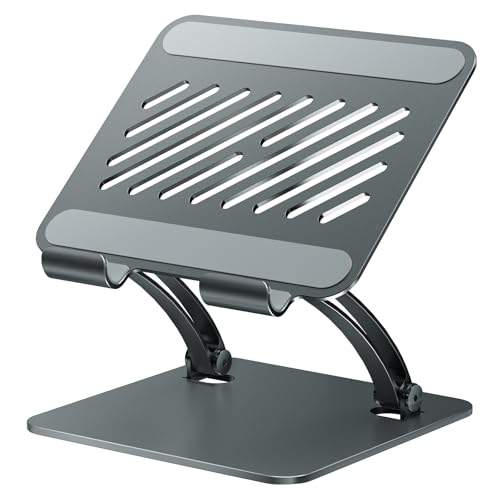
The tounee is the most capable desk stand in this group, and its dual-rod design is the reason. Two aluminum rods carry the tablet, and a locking mechanism lets you set both height and angle so it stays where you put it. The listing says it supports screens from 4.7 up to 16.9 inches, which is wider than any other pick here.
That range matters if your tablet is large or if you also use a Surface-style device. The all-metal alloy base adds the weight needed to resist wobble when you tap or draw. The tradeoff is that it is heavier and less portable than a folding dock, and the locking steps take a little longer than flipping a single hinge.
Set-up is a one-time job: unfold it, adjust the rods, lock them, and leave it on the desk. Compared with the OMOTON, which folds to 0.63 inches, the tounee is a home stand first and a traveler second. Against the Urmust, which tops out at 15.6 inches, the tounee supports slightly larger screens and does not need an included wrench to stay tight.
Best for: A desk or table where the stand stays and a large or mixed set of devices share it
Check price on AmazonSpecs
- Device size: 4.7 to 16.9 inch
- Design: Dual rod, aluminum
- Adjustment: Locking height and angle
- Base: All-metal alloy
Pros
- +Supports screens from 4.7 up to 16.9 inches
- +Locking height and angle hold their setting
- +All-metal alloy base adds stability
- +Works with tablets and larger devices
Cons
- −Heavier and less portable than folding docks
- −More adjustment steps than a simple dock
- −Not designed for bed or lap use
Urmust Adjustable Aluminum Tablet Arm
About this pick
The Urmust pairs a sturdy aluminum arm with an anti-slip base and lets you adjust height and angle freely. It supports 4.7 to 15.6 inch devices and rotates through 360 degrees, so you can flip a tablet from landscape to portrait without picking it up. The listing is blunt that it is for flat, stable surfaces like desks and tables only.
A useful touch is the included wrench in the box, which you use to tighten the joint if the tablet starts to sag or fall. That is a practical fix for the common complaint that arm stands droop over time, though it does mean one more tool to keep track of. The tradeoff is that it is the highest in cost within this group and cannot clamp to a bed, so it is a desk specialist, not an all-rounder.
Ownership involves an occasional retightening and a wipe of the aluminum. Compared with the Lamicall gooseneck, which bends by hand without tools, the Urmust holds its position more firmly but needs the wrench to adjust the joint. Next to the tounee, it handles a slightly smaller maximum screen of 15.6 inches, though both are comfortable with typical tablets.
Best for: A fixed desk setup where you want an arm with 360 degree rotation
Check price on AmazonSpecs
- Device size: 4.7 to 15.6 inch
- Rotation: 360 degrees
- Arm: Aluminum, height and angle adjust
- Use: Flat, stable tabletop
Pros
- +Supports 4.7 to 15.6 inch devices
- +Arm adjusts height and angle freely
- +Included wrench retightens a sagging joint
- +Rotates 360 degrees between orientations
Cons
- −Tabletop use only, no bed clamping
- −Highest cost in this guide
- −Needs a wrench for tightening
Lamicall Gooseneck Tablet Holder
About this pick
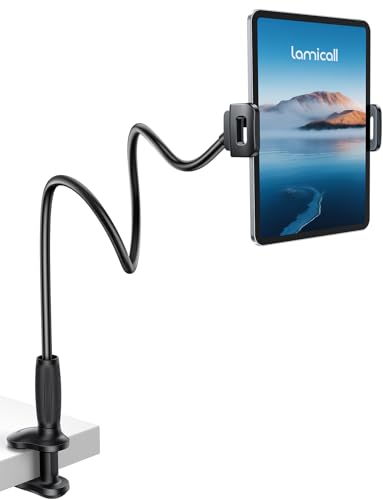
The Lamicall is a gooseneck holder that clamps rather than stands, which makes it the most flexible option here for bed use. A tapered, flexible arm bends into position by hand with no tools, and the wider base clamp grips desks, beds and tables. A clamp that rotates 360 degrees lets you swing the screen from one orientation to another.
The flexible arm is the main attraction, because you can angle a tablet over a pillow or beside a reading chair and let go. The tradeoff is that gooseneck arms bend slightly under weight, so a heavy tablet in a thick case can sag more than it would on a rigid stand. The clamp also needs an edge to grip, which a free-standing stand does not.
Set-up takes seconds: tighten the clamp onto the headboard or desk edge and bend the arm to suit. Compared with the Urmust, which is tabletop only, the Lamicall can go places the Urmust cannot, though it is less rigid. If your edge is a thick headboard, check the clamp opening before you buy.
Best for: Reading or watching from bed with a tablet clamped to the headboard or desk
Check price on AmazonSpecs
- Arm: Tapered flexible gooseneck
- Clamp: Rotates 360 degrees
- Mounting: Desks, beds and tables
- Adjustment: Bends by hand, no tools
Pros
- +Clamp mounts to desks, beds and tables
- +Flexible arm bends by hand with no tools
- +360 degree clamp swivels between orientations
- +Tapered arm designed to resist drooping
Cons
- −Gooseneck can sag with heavy tablets and cases
- −Needs a suitable edge to clamp onto
- −Less rigid than a dual-rod stand
LISEN Foldable Tablet Stand
About this pick
The LISEN uses gravity instead of clips or magnets, so the tablet rests against the stand and is held in place by its own back tilt. It weighs 15.2 oz, or about 0.95 lb, which gives it more heft than a plastic dock without being a burden to carry. A bridge screw rod supports the extension and helps it stay stable when it is lifted higher.
Height and angle are both adjustable, and the stand folds flat for a bag or drawer. The catch with a gravity hold is that you have to place it on a firm surface and set the back tilt correctly, or the tablet can slide forward. It will not grip a tablet at a steep, near-vertical angle the way a clip would.
There is no tool needed, though the bridge screw takes a moment to set. Against the OMOTON, which folds slimmer to 0.63 inches, the LISEN is thicker but steadier because of its weight. Compared with the tounee, it handles smaller and more typical tablet sizes and trades the metal base for portability.
Best for: A tablet used on a firm table, with a stand that folds flat for travel
Check price on AmazonSpecs
- Weight: 15.2 oz (0.95 lb)
- Hold: Gravity-based, no clips
- Support: Bridge screw rod
- Storage: Folds flat
Pros
- +Gravity hold needs no clips or magnets
- +Bridge screw rod adds extension stability
- +Folds flat for bags and drawers
- +Weighs 15.2 oz, steadier than plastic docks
Cons
- −Needs correct back tilt on a firm surface
- −At 0.95 lb it is heavier than dock stands
- −Not for steep, near-vertical angles
OMOTON TA04 Ultra-Slim Tablet Stand
About this pick
The OMOTON TA04 is the slimmest stand in the group, folding down to only 0.63 inches thick. That thickness lets it slide into a backpack, laptop bag or carry-on beside a tablet without adding bulk. The metal base rotates through 360 degrees, which helps when you want to turn the screen to share it with someone beside you.
A dual hinge sets both tilt and height, giving more flexibility than a single-hinge dock, and the listing says it works for video calls, drawing, streaming and reading. The tradeoff is the mix of plastic and metal parts, which feels lighter than the tounee's all-metal build, and two hinges take a moment to set. If you use a heavy case, it is worth checking that the hinge holds the angle you choose.
Ownership is easy since there is nothing to assemble and it stores almost flat. Compared with the LISEN, which weighs 15.2 oz, the OMOTON is lighter and slimmer but less planted on a desk. It is the lowest-cost pick here, which makes it a sensible second stand for a bag even if you own a desk stand already.
Best for: Travel and carry-on use, or a second stand for a bag
Check price on AmazonSpecs
- Folded thickness: 0.63 inch
- Base: Metal, rotates 360 degrees
- Hinges: Dual hinge for tilt and height
- Devices: Tablets and phones
Pros
- +Folds to only 0.63 inches thick
- +Metal base rotates a full 360 degrees
- +Dual hinges set tilt and height
- +Lowest-cost pick in the group
Cons
- −Lighter plastic and metal build
- −Two hinges take a moment to set
- −Check hinge hold with heavy cases
How We Evaluated These Tablet Stands Under $50 (2026)
Each pick was assessed across 5 criteria weighted for real-world use.
Stability and base build
We compared base materials and weights, from the all-metal tounee base to the 15.2 oz LISEN. We looked at whether each stand has a way to lock or tighten its joints, such as the Urmust wrench. Picks with a clear stabilizing feature scored higher than those that rely on a light friction hinge.
Screen range and device fit
We compared stated screen ranges, from the tounee at 4.7 to 16.9 inches to the Urmust at 4.7 to 15.6 inches. We also noted whether phones are supported, as the OMOTON lists. A stand that quietly excludes large or cased tablets lost points.
Adjustment and mounting flexibility
We compared how each stand adjusts height, angle and rotation, including the Lamicall gooseneck and the OMOTON dual hinge. We also considered where each mounts, noting the Urmust is tabletop only. Stands that adjust by hand without tools scored well for ease of use.
Portability
We weighed folded size and weight for each pick, with the OMOTON at 0.63 inches thick as the most portable and the tounee as the most fixed. The LISEN folds flat but is heavier than a plastic dock. Each stand was judged against the way it is likely to be used.
Value at this budget
We compared how much each stand adds over a basic dock. The strongest pick, the tounee, adds wide screen support and a metal base, while the most basic, the OMOTON, adds slim folding and low cost. We favored stands where the spec upgrade matched the price position.
How to Choose the Right Tablet Stands Under $50 (2026)
By Where You Use It
| Situation | Recommended pick |
|---|---|
| Desk use with a large tablet | tounee Dual Rod Stand |
| Desk use where you want 360 degree rotation | Urmust Aluminum Arm |
| Headboard or bedside use | Lamicall Gooseneck Holder |
| Firm table plus occasional travel | LISEN Foldable Stand |
| Bag or carry-on travel | OMOTON TA04 |
By Budget
These tiers describe position within this group, without naming figures.
| Budget tier in this guide | Recommended pick |
|---|---|
| Lowest-cost, slim travel fold | OMOTON TA04 |
| Lower mid-range, gravity-hold foldable | LISEN Foldable Stand |
| Mid-range, widest screen range | tounee Dual Rod Stand |
| Upper tier, flexible bed and desk clamp | Lamicall Gooseneck Holder |
| Highest in the group, rotating desk arm | Urmust Aluminum Arm |
Rigid Stand vs Flexible Gooseneck
Rigid stands
The tounee, Urmust and LISEN hold a fixed position more reliably and handle tapping better. They suit desks and tables where you want a steady screen.
Flexible gooseneck
The Lamicall bends by hand and clamps to a bed or desk, so it reaches places a rigid stand cannot. It can sag a little under a heavy tablet.
Recommendation
Choose the tounee for a desk and the Lamicall for a bed.
By Screen Size
| Your device | Recommended pick |
|---|---|
| Large tablet near 16 inches | tounee Dual Rod Stand |
| Tablet up to 15.6 inches | Urmust Aluminum Arm |
| Standard tablet or phone | OMOTON TA04 |
| Standard tablet on a firm table | LISEN Foldable Stand |
| Tablet for bed use | Lamicall Gooseneck Holder |
For Reading in Bed Specifically
Look for
A clamp or gooseneck that reaches the bed edge and holds the screen near eye level. Check the clamp opening against your headboard thickness.
In this comparison
The Lamicall Gooseneck Holder is the match, with its 360 degree clamp and tool-free bend, and the Urmust is the one to avoid since it is tabletop only.
When to Spend More
Spend more if
You want a rigid, large-screen desk stand. The tounee and the Urmust both cost more than the OMOTON because they add metal build and a wider range up to 16.9 and 15.6 inches.
Save if
You mostly travel or only use a standard tablet. The OMOTON TA04 and the LISEN cover that with slim, flat folds.
Frequently Asked Questions
Which of these is best for a large tablet?
The tounee is rated for 4.7 to 16.9 inch devices and has an all-metal alloy base, so it is the best fit for a large tablet. The Urmust supports up to 15.6 inches and is another strong choice. Smaller stands like the OMOTON are better for standard tablets.
Is a gooseneck holder stable enough?
It is stable for most reading and video use, but a flexible arm bends slightly under weight. The Lamicall uses a tapered arm and a wide clamp to reduce that. If you draw or tap a lot, a rigid stand like the tounee will feel firmer.
What does gravity-based hold mean?
It means the stand has no clips or magnets and holds the tablet using the tablet's own back tilt. The LISEN works this way. It needs a firm surface and correct angle, or the tablet can slide forward.
Can I use these stands with a phone?
Some can. The OMOTON lists phone use, and many stands accept devices from 4.7 inches. Check the lower size limit and thickness before buying, particularly if you use a thick phone case.
How do I stop an arm stand from sagging?
Tighten the joint, which is why the Urmust includes a wrench for that purpose. Make sure the stand is on a flat, stable surface and keep the arm as short as the task allows. If it still droops with your tablet and case, a heavier base like the tounee's is the fix.
Is it worth paying more for a metal stand?
For a desk stand that stays put, yes, because metal adds weight and holds adjustments better. For a stand that rides in a bag, a lighter slim fold like the OMOTON is more practical. Match the build to the job instead of assuming the heaviest stand is best.
Bottom Line
best overall: tounee Dual Rod Aluminum Tablet Stand - best overall pick in this roundup.
See the full rankings above for all picks with pros, cons, and best-for summaries.
Browse on Amazon
All Prime-eligible options with current pricing.
Shop on Amazon →