5 Best Tablet Stands Under $25 (2026)
Five budget tablet stands compared for stability, adjustability and ease of use, from weighted desk arms to pocket docks, with picks for kitchen, bed, travel.


At a Glance
A low budget ceiling forces a real choice in tablet stands: you can have weight and reach, or you can have a stand that folds into a coat pocket, but rarely both. This lineup spans the weighted COOPER TabHolder with its 7 to 10 inch telescoping arm, the SAMHOUSING floor stand with a listed 6 lb base, the Tonmom dual-shaft folding stand, the UGREEN dock that folds to about 4.7 by 4.2 inches, and the Accessonico two-pack that supports 4 to 11 inch devices.
The spread matters because the jobs are different. Reading a recipe on a kitchen counter wants a stand that does not slide, watching a show from bed wants an arm that reaches over a mattress, and carrying a tablet to a hotel or a friend's house wants something that disappears into a bag. A stand that is excellent at one of those is usually mediocre at the others, so we ranked each pick by the situation it handles best.
Every pick here was evaluated based on product specs and buyer feedback, with extra attention to the things that decide daily comfort for active adults: how steadily the base holds when you tap the screen, whether the joints can be set with one hand, and whether your tablet fits once it is inside its case. We also note honestly where spending more would add something, such as a heavier base or a wider screen range, so you can decide whether the budget ceiling is the right one for you.
6 Criteria to Look For Before Buying a Tablet Stands Under $25 (2026)
Key buying criteria so you get the right fit the first time.
Base weight and stability
A stand that holds a tablet at height behaves like a lever, so the weight at the bottom decides whether it tips. Research on floor stands puts roughly 4.5 lb as a minimum base for a full-size iPad at maximum extension, and listed bases run about 5 to 6.6 lb, which makes the SAMHOUSING at 6 lb well inside the sensible range. The COOPER uses a weighted metal base with EVA non-slip pads, which is why it holds steady on a tap. The Accessonico, in plastic, trades that stability for low cost, so keep it for lighter tablets and gentle touch use.
Screen size and case thickness
Check your tablet against the stand with its case on, because the published size is only half the story. The UGREEN and Accessonico both cap thickness at 0.55 inch including a case, which excludes many rugged covers. Both are rated for 4 to 11 inches, so an 11 inch iPad Pro fits but a 12.9 inch does not, whereas the COOPER explicitly names the iPad Pro 12.9. Measure the thickness of the tablet in its case before ordering and you avoid the most common return reason for small stands.
Viewing height and eye level
A screen held low on the chest pushes the head forward, and raising it toward eye level is gentler on the neck. The COOPER offers a 7 to 10 inch telescoping range, which is the clearest height gain in this group. A flat fold dock like the UGREEN gives angle, from 15 to 100 degrees, but very little lift, so it is more of a tilt than a rise. For video calls, a camera near eye level avoids the unflattering chin-and-ceiling shot, so favor height when calls matter.
Joints that hold position
Multi-joint arms let you switch between portrait and landscape, but the joints must lock without drooping, and it helps if you can set them one-handed. The Tonmom's two rotating shafts give more positions than a single-hinge dock, which is useful, yet each joint is a place that can loosen. The SAMHOUSING adds a stretchable arm, so the more it extends the more its joints have to resist. Arm load limits are rarely published, so a quick check that the stand holds your own tablet at a chosen angle for a few minutes is worth more than any spec.
Bed or desk use
Where the stand lives changes which design works. Pillow-style holders offer fixed angles, while arm stands reach farther but need the base pressed against the bed frame to stay upright, which is exactly how the SAMHOUSING is meant to be used with its 6 lb base. For a desk or counter, a base that sits under the screen like the COOPER or Tonmom is the better match. Buying an overhead arm for desk use, or a small dock for bed use, is the classic mismatch to avoid.
Portability and storage
If the stand travels, folded size matters more than almost anything else. The UGREEN folds to about 4.7 by 4.2 inches and the Tonmom folds fully flat, so both tuck into a bag, while the weighted COOPER and the floor-standing SAMHOUSING are better left at home. The Accessonico pack is light enough to keep one in a travel bag and one at home. Decide up front whether you want a fixed home stand or a traveler, because at this budget one product rarely does both well.
5 Best Tablet Stands Under $25 (2026)
COOPER TabHolder Telescoping Tablet Stand
About this pick
The COOPER TabHolder is the most desk-ready stand in this budget group because it pairs a telescoping arm with a weighted base. The arm extends across a 7 to 10 inch range, which lifts a screen toward eye level instead of leaving it flat on the table. A 270 degree tilt range lets you steer away glare from a window or lamp without moving the whole stand. The weighted metal base and EVA non-slip surfaces are what keep it planted when you tap or swipe. Listings name the iPad Pro 12.9, the Kindle Oasis and Samsung Galaxy Tab models as compatible, so it covers larger tablets than the fold-flat docks in this comparison. The tradeoff is bulk, since a weighted telescoping stand is heavier than a pocket dock and is not something you slip into a purse. Ownership is simple: unfold it, set the height and tilt, and leave it parked at the kitchen counter or desk. Wipe the telescoping joint now and then so grit does not stop it sliding smoothly. Next to the Tonmom, which folds flat for carrying, the COOPER trades portability for the steadier 7 to 10 inch height range, so it suits a fixed spot better than a travel bag.
Best for: A kitchen counter or desk where the tablet stays put and needs to sit higher than flat
Check price on AmazonSpecs
- Height range: 7 to 10 inch telescoping
- Tilt: 270 degrees
- Base: Weighted metal with EVA grip
- Fits: Up to iPad Pro 12.9
Pros
- +Telescoping arm raises the screen toward eye level
- +Weighted base resists tipping on a tap
- +270 degree tilt helps cut window glare
Cons
- −Heavier and bulkier than folding docks
- −Telescoping joint needs occasional wiping
- −Not a stand you carry around daily
SAMHOUSING Overhead Tablet Floor Stand
About this pick
The SAMHOUSING is the only true floor stand here, built so an arm reaches over a bed or a recliner and holds the tablet in front of your face. That overhead design means your hands are free and your neck is not craning down toward a screen resting on your lap. Height and angle are both adjustable, and the arm stretches so you can set the screen where it is comfortable for reading or a video call. The listed 6 lb base is the number that matters, because an arm that reaches out acts like a lever and needs weight at the bottom to stay upright. Six pounds is a reasonable anchor for a standard tablet, but a heavy case or a large screen will test it more than a light one would. Buyers who want the base pushed hard against the bed frame or chair leg will get the steadiest result, since the stand is designed to be set beside the furniture, not under it. Setup is a matter of assembling the arm and tightening the joints, and it takes up floor space that a desk stand does not. Compared with the COOPER, which is a desktop piece with a 7 to 10 inch rise, the SAMHOUSING reaches far further but is a bigger, less tidy object to store. It is the right pick if the main use is lying down, and the wrong one if the tablet lives on a table.
Best for: Reading or watching from bed or a recliner with hands free
Check price on AmazonSpecs
- Base weight: 6 lb listed
- Design: Overhead floor stand
- Adjustment: Height and angle
- Arm: Stretchable
Pros
- +Overhead arm suits lying down or reclining
- +Listed 6 lb base anchors the reach
- +Height and angle both adjust
- +Stretchable arm positions the screen close
Cons
- −Takes floor space and is awkward to store
- −Heavy cases test the base at full reach
- −Fewer published specs than the COOPER
Tonmom Foldable Tablet Stand
About this pick
The Tonmom takes a middle path between the weighted desk stand and the pocket dock. It uses two rotating shafts so you can set both height and angle, and it rests on a heavy-duty metal base meant to stop shaking and tipping. When you are done, it folds fully flat, which is a real convenience if the same stand has to move between a desk and a bag. The two-shaft design gives more positions than a simple one-hinge dock, which is useful for switching between typing at a shallow angle and watching video at a steeper one. The tradeoff is that every joint is a place that can loosen over time, so it is worth checking that it holds your tablet at the angle you set. The listing does not give a screen size range or a weight, so it is best matched to ordinary tablet sizes and not the largest models. There is nothing to assemble, and the flat fold means it stores easily in a drawer or laptop bag. Compared with the UGREEN, which also folds small but relies on a lighter build, the Tonmom puts more metal under the tablet and therefore feels steadier on a desk. It does not reach the height of the COOPER, so it is a good compromise rather than a specialist.
Best for: Someone who wants a steadier metal stand that still folds flat for a bag
Check price on AmazonSpecs
- Joints: Two rotating shafts
- Base: Heavy-duty metal
- Storage: Folds fully flat
- Use: Desk and travel
Pros
- +Two rotating shafts give flexible positions
- +Metal base steadies the tablet on a desk
- +Folds fully flat for drawers and bags
- +No assembly or tools needed
Cons
- −Screen size range and weight not published
- −Two joints can loosen with heavy use
- −Lower reach than the telescoping COOPER
UGREEN Adjustable Tablet Stand
About this pick
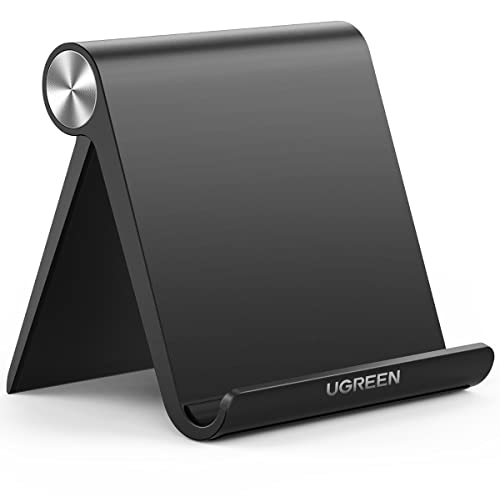
The UGREEN dock is built for people who carry a tablet or e-reader and want a stand that vanishes when not in use. It folds to roughly 4.7 by 4.2 inches, small enough for a coat pocket, and opens to a wide 15 to 100 degree range. That range covers a nearly flat typing angle and a near-upright video call position. The compatibility numbers are the part to read carefully. It is rated for devices from 4 to 11 inches, which takes in an iPad mini through an 11 inch iPad Pro, but the listed maximum thickness of 0.55 inch includes any case. A thick rugged case can push a tablet past that limit, and a 12.9 inch iPad is simply too big. There is no setup, and cleaning is a wipe-down. Compared with the Accessonico two-pack, which lists the same 4 to 11 inch and 0.55 inch limits, the UGREEN is the single, better-finished option, whereas the Accessonico is the cheaper way to leave a spare in a second room. It is lighter than the Tonmom, so it suits a tablet on a hotel desk more than a tablet on a wobbly table.
Best for: Travel, a bag or a pocket, with tablets up to 11 inches in slim cases
Check price on AmazonSpecs
- Device size: 4 to 11 inch
- Angle range: 15 to 100 degrees
- Folded size: About 4.7 x 4.2 inches
- Max thickness: 0.55 inch with case
Pros
- +Folds to about 4.7 x 4.2 inches
- +Wide 15 to 100 degree viewing range
- +Fits devices from 4 to 11 inches
- +Easy to carry from room to room
Cons
- −Case plus tablet must stay under 0.55 inch
- −No support for screens above 11 inches
- −Lighter build than the Tonmom or COOPER
Accessonico 2 Pack Adjustable Tablet Stand
About this pick
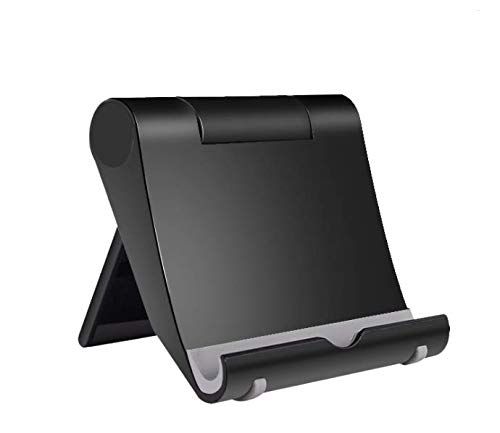
The Accessonico is the lowest-cost way to put a stand in more than one room, since the pack includes two. Each stand supports devices from 4 to 11 inches, and the listing names Fire HD 8, Galaxy Tab and Kindle Paperwhite models along with the Nintendo Switch. It gives you a hands-free angle for reading, recipes or a video call without a large outlay. The plastic construction is where the savings come from, and it is also the limit. The 0.55 inch thickness cap includes a case, so a bulky protective cover will not fit, and the stands are too small for a 13 inch tablet. Plastic hinges and a light body also mean the stand can slip on a smooth surface if you press hard on the screen. There is nothing to set up, and you can keep one on the nightstand and one in the kitchen. It does the same job as the UGREEN on paper, but the UGREEN feels more finished, whereas this pack is the pick for value and spare stands. It is the weakest of the five for stability and the strongest for sheer count, so treat it as a practical extra, not a long-term desk setup.
Best for: Spare stands for a nightstand and kitchen on the tightest budget
Check price on AmazonSpecs
- Quantity: Two stands
- Device size: 4 to 11 inch
- Material: Plastic
- Max thickness: 0.55 inch with case
Pros
- +Two stands in a single pack
- +Fits 4 to 11 inch devices
- +Works with Fire HD and Kindle models
- +Lowest cost of the group
Cons
- −Case thickness limited to 0.55 inch
- −Plastic build feels basic
- −Too small for 13 inch tablets
How We Evaluated These Tablet Stands Under $25 (2026)
Each pick was assessed across 5 criteria weighted for real-world use.
Stability under a tap
We looked at base weight, base material and non-slip surfaces to judge how well each stand resists tipping or sliding when the screen is touched. The weighted COOPER and the 6 lb SAMHOUSING scored strongest, while the plastic Accessonico pack scored lowest. Listings that publish a weight were rewarded, since a number lets a buyer compare.
Adjustment range and holding power
We compared height ranges, such as the COOPER at 7 to 10 inches, and angle ranges, such as the UGREEN at 15 to 100 degrees. We also weighed how many joints each stand has, since more positions help but more joints can loosen. Stands that adjust with one hand scored better for older users.
Device and case fit
We checked the stated screen range and thickness limit of each stand, including the 0.55 inch case-inclusive cap on the UGREEN and Accessonico. We then noted which picks cover larger tablets, with the COOPER naming the iPad Pro 12.9. A stand that quietly excludes common cases lost points.
Build and portability
We compared the metal base of the Tonmom and COOPER with the plastic body of the Accessonico, and weighed folded size for travel. The UGREEN at about 4.7 by 4.2 inches folded is the most portable, while the SAMHOUSING floor stand is the bulkiest. We scored each pick against the job it is meant to do.
Value at a low budget
We compared what each stand delivers against its place in the budget order, since the lowest-cost pick is not always the best deal. The strongest overall pick, the COOPER, adds real height and weight, while the most basic, the Accessonico, adds only a second stand. We favored stands where the extra cost bought something tangible.
How to Choose the Right Tablet Stands Under $25 (2026)
By Where You Use It
The room you use the stand in narrows the field faster than any spec.
| Situation | Recommended pick |
|---|---|
| Kitchen counter recipes, stays in place | COOPER TabHolder |
| Reading in bed or from a recliner | SAMHOUSING Floor Stand |
| Desk plus an occasional trip | Tonmom Foldable Stand |
| Pocket or carry-on travel | UGREEN Adjustable Stand |
| Spare stand for a second room | Accessonico 2 Pack |
By Budget
Within a low ceiling, the order below reflects relative position in this group, not exact figures.
| Budget tier in this guide | Recommended pick |
|---|---|
| Lowest-cost, two stands for the money | Accessonico 2 Pack |
| Lower mid-range, metal base that folds | Tonmom Foldable Stand |
| Mid-range, small and portable | UGREEN Adjustable Stand |
| Upper end, best desk stability and height | COOPER TabHolder |
| Highest in the group, bed arm with a heavy base | SAMHOUSING Floor Stand |
The most expensive pick here is only worth it if you will actually use the overhead reach.
Weighted Desk Stand vs Folding Dock
Weighted desk stands
The COOPER and the Tonmom use heavier metal bases that resist tipping and give more height or positions. They are better for a spot that stays the same, such as a counter or desk, though they take more room to store.
Folding docks
The UGREEN and Accessonico fold small, cost less to carry and set up in seconds, but their light build gives less stability and no real height gain. They suit travel and secondary rooms.
Recommendation
Pick the COOPER for a fixed home spot and the UGREEN if the stand has to travel with you.
By Screen Size
| Your tablet | Recommended pick |
|---|---|
| Large tablet such as an iPad Pro 12.9 | COOPER TabHolder |
| 11 inch tablet in a slim case | UGREEN Adjustable Stand |
| Fire HD 8 or Kindle Paperwhite | Accessonico 2 Pack |
| Standard tablet wanting more joints | Tonmom Foldable Stand |
| Mid-size tablet used lying down | SAMHOUSING Floor Stand |
For Video Calls and Recipes Specifically
Look for
A stand that raises the camera or screen toward eye level and does not slide when you tap. A telescoping rise and a weighted base matter more than portability here.
In this comparison
The COOPER TabHolder, with its 7 to 10 inch telescoping arm and 270 degree tilt, is the best match, with the Tonmom as the folding alternative.
When to Spend More
Spend more if
You use a tablet over 11 inches daily or want the SAMHOUSING-style overhead reach but with a heavier base. A pricier floor stand adds weight and a wider screen range that the 6 lb SAMHOUSING and the 11 inch limit of the UGREEN cannot match.
Save if
You only need a casual stand for a Kindle or Fire HD. The Accessonico 2 Pack and UGREEN do that job well, and the COOPER is already the stability upgrade within the budget.
Frequently Asked Questions
How do I choose between a weighted stand and a folding dock?
Decide whether the stand stays in one place or travels. A weighted stand like the COOPER gives a steadier hold and 7 to 10 inches of lift, while a folding dock like the UGREEN fits a pocket but is lighter. If the tablet mostly lives on a counter or desk, buy the weighted one, and if you carry it daily, buy the dock.
Is it worth paying more within this budget?
Often yes, but only when the extra cost buys something you will use. The COOPER adds a heavier base and real height, and the Tonmom adds a metal base that still folds flat. If all you want is a stand for a Kindle on a nightstand, the Accessonico two-pack is plenty and extra spending adds little.
Will my tablet fit if it has a thick case?
It depends on the stand. The UGREEN and Accessonico both list a maximum thickness of 0.55 inch including the case, so rugged covers often will not fit. The COOPER names the iPad Pro 12.9 as compatible, which is a better choice for large or cased tablets, and you should always measure before buying.
Can a tablet stand help with neck strain?
It can, because holding a screen low on the chest tilts the head forward. Raising the screen toward eye level with a telescoping stand such as the COOPER lets you sit more upright. A flat dock gives angle but little lift, so it helps less if neck comfort is your main goal.
Do overhead floor stands tip over?
They can if the base is too light for the tablet and arm reach. Research puts roughly 4.5 lb as a minimum base for a full-size iPad at full extension, and the SAMHOUSING lists 6 lb. Pushing the base against a bed frame or chair leg, and keeping the arm shorter, improves stability further.
How do I keep a folding stand working for years?
Wipe the hinges to keep grit out and avoid forcing them past their stop. Check that the joints still hold your tablet at the angle you set, since loosened joints are the usual failure. Plastic stands like the Accessonico are more likely to wear, so replace them if the hold weakens instead of tightening with tape.
Bottom Line
best overall: COOPER TabHolder Telescoping Tablet Stand - best overall pick in this roundup.
See the full rankings above for all picks with pros, cons, and best-for summaries.
Browse on Amazon
All Prime-eligible options with current pricing.
Shop on Amazon →