6 Best Quiet Computer Mice in 2026
Six quiet-click computer mice compared by noise reduction, wired or wireless setup, battery life and size, for shared rooms, late nights and calm offices.



At a Glance
A mouse click is a small sound, but it repeats thousands of times a day. In a shared living room, a quiet library, a bedroom at night or an office where a partner is on a call, that tick starts to feel loud. Quiet mice use softened switches so the press still registers with the same feel, yet the sharp clack is mostly gone. The difference is easy to notice the first evening you use one, and almost impossible to go back from.
This guide compares six quiet mice that cover different needs. The Logitech M240 is a Bluetooth model with no receiver. The HP 280 and SABLUTE both use a 2.4GHz USB receiver, and several listings promise up to 90 percent less click sound. The Lenovo WL310 is Bluetooth with three DPI steps, the Rapoo is a wired quiet mouse for either hand, and the Afaartcci is a rechargeable dual-mode model.
We evaluated each pick from product specifications and buyer feedback patterns, and we weighed noise reduction first, then fit, connection and battery. Noise figures here come from the makers' listings, so treat them as claims about the buttons rather than room measurements. Scroll wheels also make a little sound, and we mention that where it matters.
6 Criteria to Look For Before Buying a Quiet Computer Mice
Key buying criteria so you get the right fit the first time.
How much quieter it really is
Makers describe silent buttons differently. The Logitech M240, HP 280 and SABLUTE cite roughly 90 percent less click sound, while the Lenovo WL310 and Afaartcci call their clicks silent without a figure. A stated percentage is easier to compare, though it describes the button switch, not the whole mouse. Scroll wheels and the sound of the mouse sliding on a desk still make small noises, so a mouse pad helps.
Whether the click still feels good
Quieting a switch can make it feel mushy if it is done badly. The better designs keep the same tactile bump and just soften the end of the press, which is what the Logitech M240 and Rapoo describe. If a click feels uncertain you may press harder, which cancels some of the quiet benefit. Look for wording like same click feel, and check buyer feedback for complaints about spongy buttons.
Wired, receiver or Bluetooth
Connection style affects both convenience and reliability. The Rapoo is wired and never needs pairing, the HP 280 and SABLUTE use a 2.4GHz USB receiver, and the Logitech M240 and Lenovo WL310 use Bluetooth with no dongle. A receiver takes a USB-A port, which thin laptops often lack, so the SABLUTE's included USB-C adapter is a real convenience. Bluetooth leaves ports free but needs a compatible computer.
Size and handedness
A quiet mouse is useless if it hurts your hand. The Logitech M240 and SABLUTE are compact and suit small to medium palms, while the HP 280 offers a roomier right-handed contour. The Rapoo is symmetrical, so left-handers can use it, and the SABLUTE and HP 280 are right-hand only. Check the dimensions in the listing against your palm before buying.
Battery or charging routine
Battery life changes how often you think about the mouse. The Logitech M240 lists up to 18 months with auto sleep, so it seldom needs attention, while the Afaartcci runs over seven days per charge and needs a regular plug-in. A wired Rapoo needs nothing at all. Pick the routine that you will actually follow, because a dead mouse during a video call is more annoying than a loud one.
DPI steps and surface
DPI controls how far the cursor moves for each bit of hand motion. The Lenovo WL310 offers 1000, 1200 and 1600, and the Rapoo sits at one fixed 1000, which is fine for most monitors but fast on very large ones. A slower step helps if you want calm, small movements. Pair any mouse with a plain mouse pad, since glass or glossy desks can confuse inexpensive sensors.
6 Best Quiet Computer Mice in 2026
Logitech M240 Compact Silent Bluetooth Wireless Mouse
About this pick
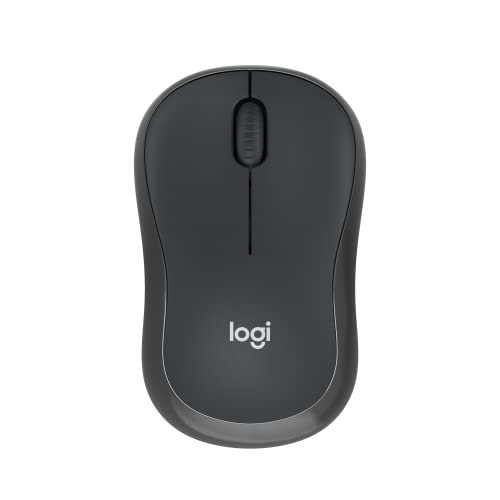
The M240 is the cleanest answer to a loud mouse. The maker says the clicks are about 90 percent quieter while keeping the same feel, so you do not lose the satisfying response of a real button, only the clatter. It connects over Bluetooth with no USB receiver, which means no dongle sticking out of the laptop and no port taken. Pairing takes a few seconds.
The compact body suits small to medium hands and travels well, and it is not the mouse for someone with a large palm who wants a full shell to rest on. Battery life is listed at up to 18 months with an auto sleep feature, so you can set it up and forget about it for a long while. The tradeoff is that Bluetooth requires a computer that has it, which nearly every modern laptop does, but some older desktops lack.
In ownership it is almost maintenance free. There is no charging cable to misplace, only an occasional battery swap, and the neutral shape works in either hand for lighter use. Against the HP 280 it is smaller and receiver free, and against the SABLUTE it trades the included adapter for pure Bluetooth. For most readers wanting quiet without fuss, this is the first one to try.
Best for: Anyone who wants proven quiet clicks, no dongle and a battery that lasts for months.
Check price on AmazonSpecs
- Click noise: 90% reduced
- Connection: Bluetooth
- Battery: Up to 18 months
Pros
- +Click sound cut by about 90 percent per the maker
- +Pairs by Bluetooth without a USB receiver
- +Battery listed up to 18 months
- +Compact body travels easily
Cons
- −Too small for large palms
- −Needs a computer with Bluetooth
- −Plain, basic button layout
HP 280 Silent Wireless Mouse
About this pick
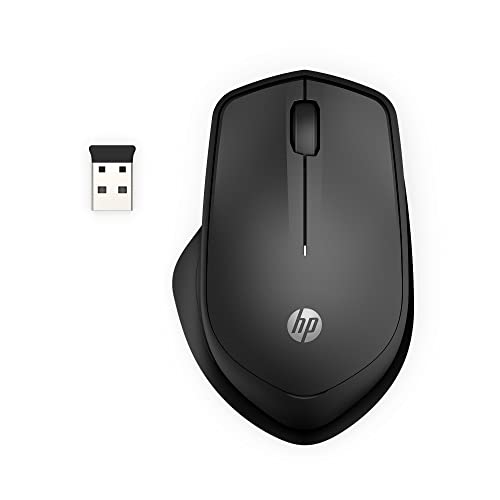
The HP 280 is a full-feeling mouse that happens to be quiet. The left and right buttons are described as cutting noise by up to 90 percent while keeping the same click feel, and the body is an ergonomic right-handed shape with three buttons and an integrated scroll wheel. A 2.4GHz USB-A receiver handles the connection with a stated range of about 33 feet, and the nano receiver stores inside the mouse when you travel.
Because it is right-handed, left-handers cannot use the shape well. It also relies on a USB-A port, so a thin laptop with only USB-C ports needs an adapter, and there is no Bluetooth mode to fall back on. The shell is more contoured than the Logitech M240, which suits people who like to rest the palm and not pinch the sides.
Ownership is simple. You plug the receiver in and begin, and tuck it away when the day is done, which keeps it from being lost. It runs on a battery rather than an internal charger, so you will swap one now and then. If you compare it with the SABLUTE, the HP is larger and calmer in the hand, while the SABLUTE is smaller and easier to throw into a bag.
Best for: Right-handed users who want a roomy shape with quiet buttons and a stowable receiver.
Check price on AmazonSpecs
- Click noise: Up to 90% reduced
- Connection: 2.4GHz USB-A
- Range: About 33 feet
Pros
- +Quiet buttons keep a familiar click feel
- +Receiver stores inside the mouse
- +Ergonomic right-handed contour
- +Stated range of about 33 feet
Cons
- −Right-hand shape only
- −No Bluetooth mode
- −Needs a USB-A port or adapter
SABLUTE Quiet Wireless Mouse with USB-C Adapter
About this pick
SABLUTE solves a small problem that many newer laptops share, which is the lack of a USB-A port. The listing includes a USB-C adapter alongside the USB-A receiver, so the mouse plugs into either kind of laptop. The body measures roughly four by under three inches and just over an inch tall, and it has a built-in thumb rest. The maker says the quiet clicks cut sound by up to 90 percent with the same click feel.
The compact, asymmetrical shape is meant for right-handed small and medium hands, which also means larger hands may feel cramped and left-handers are left out. As a 2.4GHz receiver mouse it talks to one computer at a time and does not offer Bluetooth, so it is not the tool for switching among several devices. The thumb rest helps for casual use, but heavy all-day sessions may favor a bigger shell.
When you own it, the adapter is the item to keep track of, because tiny parts can disappear into a bag. Compared with the Logitech M240 it is a touch more bulky because of the receiver, and compared with the HP 280 it is smaller and easier to pack. It suits readers who carry one laptop to cafes, libraries or a family member's house and want no noise complaints.
Best for: Right-handed travelers with a USB-C laptop who want quiet clicks in small spaces.
Check price on AmazonSpecs
- Click noise: Up to 90% reduced
- Connection: 2.4GHz with USB-C adapter
- Size: About 4 by 2.7 inches
Pros
- +Includes a USB-C adapter for newer laptops
- +Quiet buttons for libraries and shared rooms
- +Built-in thumb rest
- +Small enough for a laptop bag
Cons
- −Right-hand only
- −Adapter is easy to misplace
- −No Bluetooth for multi-device use
Lenovo WL310 Bluetooth Silent Mouse
About this pick
The Lenovo WL310 keeps the quiet idea straightforward. Its clicks are described as silent, which suits late-night projects and shared rooms, and it connects through Bluetooth 5.0 so there is nothing to plug in. Three DPI steps of 1000, 1200 and 1600 are all in the practical range for documents, email and web pages, with the lowest step giving slower, easier aiming.
The listing does not publish a percentage for the noise reduction, so there is less specific evidence than for the Logitech M240 or HP 280. It is also a Bluetooth only device, so a computer without Bluetooth needs an add-on. The ergonomic shape is a modest contour, not an upright design, and it lacks extras like a stowable receiver. Think of it as a tidy basic pick.
Day to day it does exactly what you ask. You pair it, press the DPI button if the pointer feels too quick, and carry on. Against the Afaartcci it is simpler and less decorated, with no lights, no dual mode and no rechargeable cell to manage. It is the one to choose when you want a quiet Bluetooth mouse from a familiar computer maker without extra bells.
Best for: Bluetooth laptop users who want a plain silent mouse with three sensible DPI steps.
Check price on AmazonSpecs
- Connection: Bluetooth 5.0
- DPI: 1000/1200/1600
- Clicks: Silent
Pros
- +Silent clicks suit shared rooms
- +Bluetooth 5.0 needs no receiver
- +Three practical DPI steps
- +Portable size
Cons
- −No stated noise percentage
- −Bluetooth only
- −Contour is modest, not upright
Rapoo Silent Wired Mouse 1000 DPI
About this pick
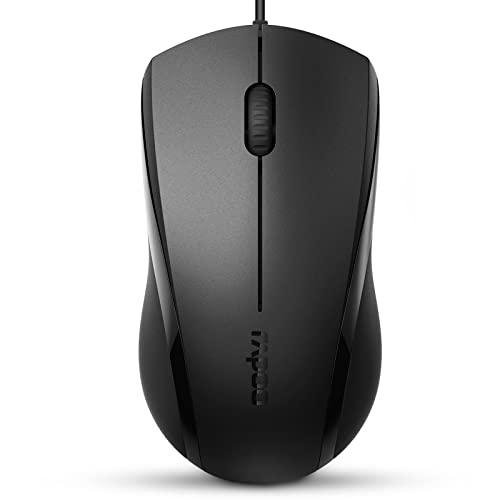
The Rapoo is the pick for people who want quiet without a battery or pairing step. It is a wired optical mouse with a five-foot cord and 1000 DPI tracking. The buttons are described as quiet with the same click feel, and the symmetrical shape works equally well in the left or right hand. The listing cites a durability level of five million clicks, a useful sign that the button is built for steady daily work.
The cord is the cost of that reliability. It can drag on a tidy desk, and the USB-A plug needs a port or an adapter. With a single 1000 DPI setting there is no way to slow the cursor further, which may feel quick on a large monitor. It has no thumb rest or upright shape, so comfort relies on the symmetrical body fitting your palm.
For ownership, this is the lowest maintenance choice here, because nothing is ever dead or unpaired. Compared with the Logitech M240 it never needs a battery, and compared with the Lenovo WL310 it cannot be used cordless. It suits a home desktop used by several family members, including left-handers, where one steady quiet mouse stays plugged in all year.
Best for: Desktop users, and left-handers, who prefer a cord to batteries and pairing.
Check price on AmazonSpecs
- Cord: 5 feet
- DPI: 1000
- Handedness: Left or right
Pros
- +Never needs a battery or pairing
- +Symmetrical shape suits left or right hands
- +Quiet buttons keep the same click feel
- +Five million click durability rating
Cons
- −Cord can drag on a tidy desk
- −Single 1000 DPI setting
- −Needs a USB-A port
Afaartcci Rechargeable Silent Bluetooth Mouse
About this pick
The Afaartcci pairs a quiet mouse with an internal rechargeable battery, so you never buy cells. The listing says a two hour charge gives over seven days of use and about 30 days on standby. It also has dual modes, with one device on Bluetooth 5.2 and another on the 2.4G receiver, so a laptop and a desktop can share the same mouse. The ergonomic shell is described in general terms.
Two features are worth knowing. The color-changing LED breathing light is cosmetic, and some people like it while others find it distracting in a dark room, which matters for a mouse bought for quiet. The listing does not give a percentage for noise reduction, so the silent claim is less specific than the Logitech M240's. Seven days of use also means a weekly charging habit.
For ownership, the habit is the whole story. Plug it in when the light says so, and it will run again within a couple of hours. Next to the Lenovo WL310 it adds dual modes and charging, and next to the Rapoo it trades the cord for a battery chore. It suits someone with two computers who would rather charge a mouse than hunt for AA cells.
Best for: Two-computer households who prefer charging a mouse over buying batteries.
Check price on AmazonSpecs
- Battery: 500mAh
- Charge time: 2 hours
- Modes: Bluetooth 5.2 and 2.4G
Pros
- +Rechargeable, so no battery purchases
- +Dual modes serve two devices
- +Charges in about two hours
- +Silent buttons for shared rooms
Cons
- −Needs weekly charging
- −No stated noise percentage
- −Color LED light may distract
How We Evaluated These Quiet Computer Mice
Each pick was assessed across 5 criteria weighted for real-world use.
Click noise claims
We began with what each listing says about its buttons. The Logitech M240, HP 280 and SABLUTE state roughly 90 percent noise reduction, which earned them more weight than the Lenovo WL310 and Afaartcci, whose silent wording lacks a figure. We did not measure sound ourselves, so rankings reflect the clarity of the claims and the pattern of buyer comments.
Click feel
A quiet mouse still needs a clear, confident press. We checked whether listings promise the same click feel and whether buyers describe the buttons as mushy. The Rapoo and Logitech M240 specifically mention preserved feel. Mice that cut noise but feel vague would lose points, since uncertain clicks cause harder presses.
Connection and ports
We compared receiver, Bluetooth and wired designs. The SABLUTE's USB-C adapter and the Logitech M240's receiver-free Bluetooth stood out for modern laptops, while the Rapoo's cord stands out for reliability. We marked down designs that need a USB-A port without saying how to cope when the computer lacks one.
Fit and comfort
Quiet is a poor reward for a cramped hand. We considered body size, handedness and shape. The HP 280 offers the roomier contour, the Logitech M240 and SABLUTE are compact, and the Rapoo suits both hands. Each pick was judged against the people it is likely to fit.
Lineup positioning
The Logitech M240 leads for no-fuss quiet, the HP 280 for comfort, the SABLUTE for travel with USB-C, the Lenovo WL310 for simple Bluetooth, the Rapoo for wired reliability and the Afaartcci for rechargeable dual mode. That spread lets a buyer match the mouse to their computer and habits.
How to Choose the Right Quiet Computer Mice
By Where You Use It
The best quiet mouse depends on the room you want to protect.
| Situation | Pick | Why |
|---|---|---|
| Bedroom or late-night browsing | Logitech M240 Compact Silent Bluetooth Wireless Mouse | Click sound is cut by about 90 percent and there is no dongle. |
| Library or cafe with a USB-C laptop | SABLUTE Quiet Wireless Mouse with USB-C Adapter | The adapter fits newer laptops and the body is small. |
| Home office desktop | Rapoo Silent Wired Mouse 1000 DPI | No batteries or pairing to manage. |
| Shared living room laptop | Lenovo WL310 Bluetooth Silent Mouse | Silent clicks with simple Bluetooth. |
| Two computers on one desk | Afaartcci Rechargeable Silent Bluetooth Mouse | Dual modes serve both machines. |
By Budget
Tiers compare picks inside this lineup only.
| Tier | Pick | What you get |
|---|---|---|
| Entry | Rapoo Silent Wired Mouse 1000 DPI | Quiet wired reliability for either hand. |
| Entry | Afaartcci Rechargeable Silent Bluetooth Mouse | Rechargeable dual-mode convenience. |
| Mid | SABLUTE Quiet Wireless Mouse with USB-C Adapter | Travel size with an included adapter. |
| Mid | Lenovo WL310 Bluetooth Silent Mouse | A plain Bluetooth mouse with three DPI steps. |
| Premium | Logitech M240 Compact Silent Bluetooth Wireless Mouse | Stated noise cut and long battery life. |
| Premium | HP 280 Silent Wireless Mouse | A roomier contour with a stowable receiver. |
Wired vs Wireless
Neither is better, they simply ask different chores of you.
Wired
A cord never needs charging or pairing, and the sensor wakes instantly. The Rapoo is the wired pick here, with a five-foot cable and a symmetrical shape. The cost is a cable on the desk and a USB-A port. Choose wired for a fixed desktop where reliability beats tidiness.
Wireless
Wireless removes cable drag and suits laptops. The Logitech M240 and Lenovo WL310 use Bluetooth, the HP 280 and SABLUTE use a receiver, and the Afaartcci offers both. You trade a battery chore for freedom. Choose wireless for travel, for a clean desk or for sharing the mouse across rooms.
In short, wired for a fixed desk, wireless for everything that moves.
By Power Preference
Decide how you want to handle the battery.
| Preference | Pick | Reason |
|---|---|---|
| Never think about power | Rapoo Silent Wired Mouse 1000 DPI | The cord powers it. |
| Change a battery once in a long while | Logitech M240 Compact Silent Bluetooth Wireless Mouse | Listed at up to 18 months. |
| Charge instead of buying cells | Afaartcci Rechargeable Silent Bluetooth Mouse | A two hour charge covers days of use. |
| Receiver parked inside the mouse | HP 280 Silent Wireless Mouse | The nano receiver stores in the body. |
| Light bag with fewer parts | Lenovo WL310 Bluetooth Silent Mouse | No receiver to keep track of. |
For Video Calls and Sleeping Households Specifically
A quiet mouse matters most when someone else is listening.
Look for
Choose stated noise reduction, soft button feel and a dependable connection so you are not tapping repeatedly. Remember that scroll wheels and sliding add some sound, so a cloth mouse pad is a cheap partner for any silent button.
In this comparison
The Logitech M240 is the safest choice because of its stated 90 percent click reduction and no dongle. The HP 280 offers the same claim in a roomier shape, and the SABLUTE adds a USB-C adapter for newer laptops used in a bedroom.
When to Spend More
| Spend more if | Save if |
|---|---|
| You want a stated noise figure and months of battery, which the Logitech M240 provides. | You only want softer clicks, since the Lenovo WL310 does that simply. |
| You prefer a roomier palm shape, which the HP 280 offers. | Your hands are small and the compact SABLUTE fits well. |
| You switch between two computers, where the Afaartcci dual modes pay off. | You use one desktop, where the Rapoo costs less to own. |
| You are on a USB-C laptop and want the SABLUTE adapter included. | Your computer has USB-A, so any receiver model works. |
Frequently Asked Questions
How do I choose between wired and wireless for quiet use?
Think about where the mouse lives. A wired model like the Rapoo needs no pairing or battery and suits a fixed desk, while the Logitech M240 or Lenovo WL310 suit laptops and tidy desks. Neither type is quieter in the click itself. The difference is in convenience, so pick whichever removes the most hassle from your routine.
Are silent mice slower or less accurate?
No, the sensor is separate from the click switch. The Lenovo WL310 and Rapoo track with the same kind of optical engine as ordinary mice at 1000 to 1600 DPI. Only the button mechanism is softened. If cursor precision matters, look at the DPI steps and a good mouse pad, not the silent claim.
Does a silent click feel different?
A little. Good silent switches keep the tactile bump but remove the sharp snap at the end of the press, so the click feels softer. Some people find it takes a day to adjust. If a particular model feels mushy, that is usually a sign of a weaker switch, and it is worth reading buyer feedback before buying.
Will a quiet mouse be completely silent?
No. The makers' claims describe a reduction in click sound, such as about 90 percent for the Logitech M240, not an absence of it. Scroll wheels, side buttons and the mouse sliding across a hard desk still make faint noise. A cloth mouse pad and a light touch get you closest to silence.
How long should a wireless mouse battery last?
It varies widely. The Logitech M240 lists up to 18 months, while the rechargeable Afaartcci lists over seven days per charge. Auto sleep features stretch battery life by shutting the sensor off when idle. Treat these as best-case maker figures and turn the mouse off for long trips.
Do these mice work on Mac and Windows?
Most Bluetooth and receiver mice work with both, but check each listing. The Lenovo WL310 mentions Windows, and the Logitech M240 uses standard Bluetooth. A USB-A receiver needs an adapter on newer Macs, which have only USB-C ports. The SABLUTE includes a USB-C adapter for that reason.
Is it worth upgrading a mouse just for quiet?
If you share a space or work while others sleep or listen, yes. A quiet mouse is a small, inexpensive change that removes a daily annoyance, and it costs about the same as a standard model. If you work alone in a noisy room you probably will not notice the difference.
Bottom Line
best overall: Logitech M240 Compact Silent Bluetooth Wireless Mouse - best overall pick in this roundup.
See the full rankings above for all picks with pros, cons, and best-for summaries.
Browse on Amazon
All Prime-eligible options with current pricing.
Shop on Amazon →