6 Best Computer Mice for Mac in 2026
Six computer mice that work well with a Mac, from Apple Magic Mouse to Bluetooth and USB-C friendly picks, compared by gestures, battery, size and ports.




At a Glance
Mac owners have two small problems that Windows users rarely think about. Many newer MacBooks have only USB-C ports, which makes a classic USB-A receiver awkward, and macOS has its own gestures, scrolling habits and settings that some mice handle gracefully while others ignore. A mouse that pairs over Bluetooth, charges cleanly and respects the Mac way of scrolling saves a lot of small irritations.
This guide compares six mice that suit a Mac. The Apple Magic Mouse is the native choice with a touch surface for swipes. The Logitech MX Master 4 for Mac is the premium, customizable option with haptic feedback. The Logitech M240 is a compact quiet Bluetooth model, the Logitech M720 Triathlon is a full-size multi-device workhorse, the PEIBO adds a USB-C adapter, and the Amazon Basics wired mouse is the plain budget backup.
We evaluated each pick from product specifications and buyer feedback patterns, focusing on connection style, battery routine, gesture support and hand fit. Gestures and software features come from the listings, so check that the version you buy matches your macOS release. For ordinary pointing and clicking, any of these will serve, and the differences show up in comfort, charging and extras.
6 Criteria to Look For Before Buying a Computer Mice for Mac
Key buying criteria so you get the right fit the first time.
Connection that suits Mac ports
Recent MacBooks often have only USB-C, so a receiver mouse needs an adapter. The Logitech M240 uses Bluetooth with no receiver, the PEIBO includes a USB-C adapter, and the Amazon Basics mouse states plainly that USB-C only computers need an extra adapter. If you use a desktop Mac with USB-A ports, any receiver works. Bluetooth is the cleanest choice for a thin laptop.
Gestures versus buttons
macOS supports swipes between pages and apps, and the Apple Magic Mouse lets you do it on the mouse surface. Physical-button mice such as the Logitech MX Master 4 for Mac and the M720 rely on side buttons and a wheel instead. Decide whether you love finger swipes or prefer clicking a button. The Magic Mouse suits the first, and the Logitech models suit the second.
Shape and long-day comfort
The Magic Mouse has a low, flat profile that some hands find tiring, while the Logitech M720 and MX Master 4 for Mac have sculpted bodies that support a palm grip. A compact model like the Logitech M240 suits small hands. Check the size in the listing against your palm, because the wrong shape causes more fatigue than any missing feature. Fit first, features second.
Battery and charging routine
Power habits differ across the lineup. The Apple Magic Mouse lasts about a month per charge, the Logitech MX Master 4 for Mac charges over USB-C while in use, the Logitech M240 lists up to 18 months and the M720 up to 24 months. A long-life cell fits a forgetful user, and a rechargeable mouse fits someone who does not mind a monthly routine. Either way, decide before you buy.
Software and customization
Extra features need software. The Logitech MX Master 4 for Mac depends on Logi Options+ for macOS to unlock its haptics and Actions Ring, which is a plus for power users and a minus for people who dislike installing apps. The M240 and Amazon Basics mouse need nothing at all. Pick a mouse whose software demands match how much you want to tinker.
Multi-device switching
If you use a Mac with an iPad or a second computer, switching matters. The Logitech M720 Triathlon is built for multi-device use, and the PEIBO offers Bluetooth and 2.4G modes. The Magic Mouse is happiest with one Mac, and the Amazon Basics mouse moves only by unplugging. Choose multi-device support only if you will really use it.
6 Best Computer Mice for Mac in 2026
Apple Magic Mouse
About this pick
The Magic Mouse is built by the company that makes the Mac, and it shows in the details. The whole top surface is a touch panel, so you swipe between web pages and scroll through documents with simple finger gestures instead of reaching for a wheel. It is wireless and rechargeable, with the maker saying a charge lasts about a month or more, and the feet are shaped to glide smoothly across a desk.
It is not for everyone. The low, flat profile asks the hand to lie almost flat, which some people find less comfortable over a long day than a contoured shell. There is no physical scroll wheel, so a person who loves a clicking wheel will miss it. Because it charges through a port on the underside, it cannot be used at that moment while plugged in, an oddity many owners know well.
Ownership is quiet and low effort. You pair it once with the Mac, and it usually reconnects as soon as you open the lid. Compared with the Logitech MX Master 4 it is lighter, simpler and cleaner on the desk, and compared with the Logitech M240 it adds gestures at the cost of a flat shape. For anyone who values the integrated feel above all, it is the obvious starting point.
Best for: Mac users who love swipe gestures and want the most seamless integration.
Check price on AmazonSpecs
- Control: Multi-Touch surface
- Power: Rechargeable
- Charge life: About a month or more
Pros
- +Touch surface handles swipes and scrolling
- +Rechargeable with about a month per charge
- +Pairs easily with a Mac
- +Smooth glide feet move cleanly
Cons
- −Flat profile can tire some hands
- −No physical scroll wheel
- −Underside charging port blocks use while charging
Logitech MX Master 4 for Mac
About this pick
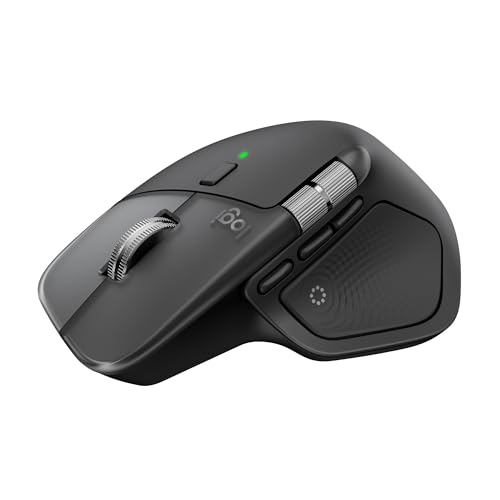
The MX Master 4 for Mac is the most capable mouse in this group. It is finished to match Apple colors, and it works with Logi Options+ for macOS so buttons and gestures can be tailored per application. A Haptic Sense Panel gives customizable feedback for chosen actions, shortcuts and notifications, and an Actions Ring overlay places favorite tools under the cursor. USB-C charging works while you keep using it, which solves the Magic Mouse's awkward port.
That power comes with a learning curve. There are many buttons and settings, and a casual user may never touch most of them. It is a full-size, substantial mouse, so smaller hands may find it a stretch and travelers may find it bulky. It also sits at the top of the price ladder in this lineup. The haptics and ring also depend on the Logi Options+ software, so features are not available until that app is installed.
In ownership, you install the software once, set up a few shortcuts, and let it run. Compared with the Logitech M720 it is more refined and rechargeable, and compared with the Magic Mouse it offers real buttons and a thumb rest. For a Mac user who edits photos, writes long documents or juggles many apps, the extra control pays off.
Best for: Power users and creatives who want customizable buttons, haptics and fast app shortcuts.
Check price on AmazonSpecs
- Feedback: Haptic Sense Panel
- Charging: USB-C
- Software: Logi Options+ for macOS
Pros
- +Haptic feedback on chosen actions
- +Actions Ring puts tools under the cursor
- +USB-C charging while still in use
- +Finish matches Apple colors
Cons
- −Full-size body is large for small hands
- −Many settings can overwhelm casual users
- −Features depend on installing software
Logitech M240 Compact Silent Bluetooth Mouse
About this pick
For a MacBook that has given up USB-A ports, the M240 is a tidy answer. It connects over Bluetooth with no receiver, so nothing sticks out of the laptop and no adapter is needed. The maker says clicks are about 90 percent quieter with the same feel, a nice touch in a cafe or a quiet house. Battery life is listed at up to 18 months, helped by an auto sleep feature.
Its compact size is both strength and limit. It slips into a bag easily, yet a large palm will find it cramped, and there is no software or extra buttons to customize. Scrolling is a basic wheel and not a gesture surface, so Mac habits like swiping between pages are not part of the package. It is a plain, dependable pointer, nothing more.
To own, you pair it once and forget it for most of a year. Against the Magic Mouse it gives you a real wheel and a quieter click, though no gestures. Against the PEIBO it uses Bluetooth only and leaves out the extra adapter, which keeps the setup simpler. For a casual Mac user who wants calm and portability, it is an easy yes.
Best for: MacBook users who want a small, quiet, receiver-free Bluetooth mouse for travel.
Check price on AmazonSpecs
- Connection: Bluetooth
- Click noise: 90% reduced
- Battery: Up to 18 months
Pros
- +Bluetooth means no USB adapter
- +Click sound cut by about 90 percent per the maker
- +Battery listed up to 18 months
- +Small enough for a laptop sleeve
Cons
- −Small for large hands
- −No gestures or extra software
- −Basic button layout
Logitech M720 Triathlon Multi-Device Mouse
About this pick
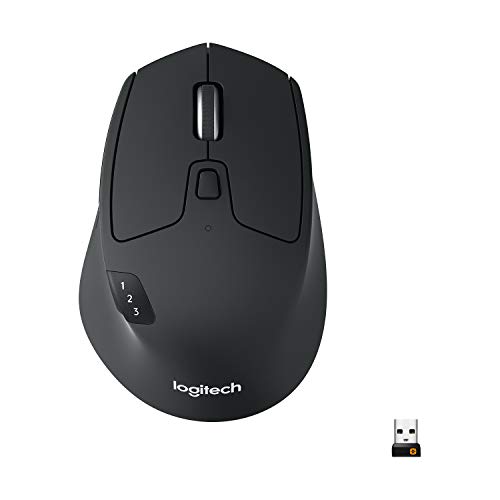
The M720 Triathlon is the one for people who move between a Mac, an iPad and perhaps another computer. The listing says it works with computers, laptops and tablets across systems, and it connects through Bluetooth or the included USB-A receiver. A 24-month battery is by far the longest quoted here. The rubber body and sculpted palm grip make it comfortable in a full-size hand, and a hyper-fast scroll wheel with an instant-stop feature races through long documents.
There are a few catches. It is made for the right hand and is a full-size mouse, so small palms and left-handers should look elsewhere. The USB-A receiver needs an adapter on a newer MacBook, though the Bluetooth path avoids that. It also uses replaceable cells rather than USB-C charging, and it lacks the Mac-specific polish and haptics of the MX Master 4 for Mac.
When you own it, setup is straightforward and the long battery life means weeks and months of forgetting about it. Next to the Magic Mouse it provides physical buttons and a real wheel, and next to the M240 it is bigger, more capable and better for multiple devices. It suits a desk that handles more than one computer.
Best for: Right-handed users who switch among a Mac, tablet and another computer.
Check price on AmazonSpecs
- Battery: 24 months
- Connection: Bluetooth or USB-A
- Size: Full size
Pros
- +Bluetooth or receiver connection
- +Battery listed at 24 months
- +Rubber body gives a secure grip
- +Fast scroll wheel with instant stop
Cons
- −Right-handed full-size only
- −Receiver needs a USB-C adapter
- −No Mac-specific finish or haptics
PEIBO Bluetooth Wireless Mouse with USB-C Adapter
About this pick
The PEIBO is the flexible budget pick. It offers Bluetooth 5.2 and 3.0, a 2.4G USB receiver and a USB-C adapter, so it can pair with a MacBook, an iPad, a Chromebook or a Windows desktop. Three DPI steps of 800, 1200 and 1600 cover typical screens, and an auto sleep mode saves power. The listing names Mac, iPad and Windows among supported devices.
The cost of flexibility is polish. The finish is simpler than the Logitech models, and the shape is basic and compact. It uses a battery rather than a long-life design, and the listing does not promise Mac gestures or software support. The various modes can also confuse a newcomer, since it takes a moment to learn which switch does what.
Day to day it works well for someone who wants one mouse for a laptop and a tablet. Compared with the Logitech M240 it adds a receiver and an adapter, and compared with the Amazon Basics mouse it removes the cord. It is not the most refined mouse here, but it is the most adaptable at its level.
Best for: Shoppers with a MacBook and an iPad who want one adaptable mouse and a bundled adapter.
Check price on AmazonSpecs
- Connection: Bluetooth 5.2/3.0 and 2.4G
- DPI: 800/1200/1600
- Adapter: USB-C included
Pros
- +Includes a USB-C adapter for newer Macs
- +Bluetooth and 2.4G modes available
- +Three DPI steps for pointer speed
- +Auto sleep helps save power
Cons
- −Simpler finish than premium mice
- −Multiple modes take a moment to learn
- −No Mac gestures or software
Amazon Basics 3-Button USB Wired Mouse
About this pick
The Amazon Basics mouse is the no-fuss backup. It is a three-button wired mouse with 1000 DPI optical tracking, and it is plug and play with Windows and Mac. The listing notes that if your computer only supports USB-C, an additional adapter will be required, so it is best for an iMac or older Mac with USB-A ports, or a MacBook with a hub.
It does the job and nothing more. There are no gestures, no Bluetooth, no software and no extra buttons beyond the basics. The cord ties it to the desk and takes a port. The shape is a standard, basic mouse, so comfort over a long day depends on how well your hand fits it, and it has no thumb support or soft grips.
For ownership, nothing can go wrong with power. It never needs charging or pairing. Compared with the PEIBO it costs you freedom but spares you modes and batteries, and compared with the Magic Mouse it trades elegance for simplicity. Keep it in a drawer as a dependable spare for the day a Bluetooth battery dies.
Best for: A dependable spare or a fixed desk where a cord is acceptable.
Check price on AmazonSpecs
- Connection: Wired USB-A
- DPI: 1000
- Buttons: 3
Pros
- +Plug and play with Windows and Mac
- +No battery or pairing required
- +1000 DPI is a sensible everyday pace
- +Simple three-button layout
Cons
- −Needs USB-A or an adapter on newer Macs
- −Cord limits placement
- −No gestures or comfort extras
How We Evaluated These Computer Mice for Mac
Each pick was assessed across 5 criteria weighted for real-world use.
Mac port compatibility
We began with how each mouse connects to a modern Mac. Bluetooth models like the Logitech M240 earned credit for needing no adapter, the PEIBO for including one, and the Amazon Basics mouse was noted for needing one on USB-C only machines. Judgments rely on listing details and buyer feedback patterns.
macOS fit
We looked at features that matter on a Mac, such as touch gestures on the Apple Magic Mouse and macOS support in Logi Options+ for the Logitech MX Master 4 for Mac. Mice that rely only on generic drivers were judged as dependable but plain. We avoided claims we could not support from the listing.
Comfort and size
Body shape and size were weighed against typical hand sizes. The sculpted Logitech M720 and MX Master 4 for Mac suit larger palms, the Logitech M240 and PEIBO suit smaller ones, and the low Magic Mouse shape is a matter of preference.
Power and upkeep
We compared battery life and charging. The Logitech M720 lists 24 months and the M240 up to 18 months, the Magic Mouse about a month per charge, and the MX Master 4 for Mac charges over USB-C. The Amazon Basics mouse needs no power plan.
Lineup positioning
The Magic Mouse leads on integration, the Logitech MX Master 4 for Mac on features, the M240 on quiet portability, the M720 on multi-device battery life, the PEIBO on bundled adaptability and the Amazon Basics mouse on simplicity. Each pick earns a place by leading in one area.
How to Choose the Right Computer Mice for Mac
By Mac Setup
Your Mac's ports and your habits narrow the field quickly.
| Situation | Pick | Why |
|---|---|---|
| Thin MacBook with USB-C only | Logitech M240 Compact Silent Bluetooth Mouse | Bluetooth means no receiver or adapter. |
| Love swipe gestures | Apple Magic Mouse | The touch surface handles swipes and scrolling. |
| Heavy creative or office work | Logitech MX Master 4 for Mac | Haptics, Actions Ring and macOS software. |
| Mac plus iPad on one desk | PEIBO Bluetooth Wireless Mouse with USB-C Adapter | Bluetooth and 2.4G modes with an adapter. |
| iMac with free USB-A ports | Amazon Basics 3-Button USB Wired Mouse | A plug-and-play wired spare. |
By Budget
Tiers are relative within this lineup.
| Tier | Pick | What you get |
|---|---|---|
| Entry | Amazon Basics 3-Button USB Wired Mouse | A basic wired mouse that just works. |
| Entry | PEIBO Bluetooth Wireless Mouse with USB-C Adapter | Flexible connections and a bundled adapter. |
| Mid | Logitech M240 Compact Silent Bluetooth Mouse | Quiet clicks and a long battery. |
| Mid | Logitech M720 Triathlon Multi-Device Mouse | Multi-device use with a 24-month battery. |
| Premium | Apple Magic Mouse | Native gestures and a rechargeable cell. |
| Premium | Logitech MX Master 4 for Mac | The most feature-rich option for macOS. |
Gesture Surface vs Physical Buttons
This is the real philosophical split in Mac mouse choice.
Gesture surface
The Apple Magic Mouse replaces the scroll wheel and side buttons with a touch panel. Swiping left and right or scrolling with one finger feels natural to many Mac users, and the body stays clean and simple. The tradeoff is a flat shape and no physical wheel. Pick it if you value elegance and gestures.
Physical buttons
The Logitech MX Master 4 for Mac, M720 and M240 give you real wheels and buttons. The MX Master 4 adds haptics and an Actions Ring, the M720 adds a fast wheel and multi-device switching, and the M240 keeps it basic and quiet. Pick physical buttons if you want tactile control and a more supportive shell.
In short, the Magic Mouse for gestures, a Logitech for tactile control.
By Battery Preference
Pick the power routine that fits your habits.
| Preference | Pick | Reason |
|---|---|---|
| Forget about power for two years | Logitech M720 Triathlon Multi-Device Mouse | Battery listed at 24 months. |
| Replace a cell about once a year or so | Logitech M240 Compact Silent Bluetooth Mouse | Listed up to 18 months. |
| Charge monthly | Apple Magic Mouse | About a month or more per charge. |
| Charge while working | Logitech MX Master 4 for Mac | USB-C charging while you use it. |
| Never think about power | Amazon Basics 3-Button USB Wired Mouse | The cord supplies power. |
For Photo Editing and Long Documents Specifically
Heavy work rewards control and a supportive shape.
Look for
Choose a mouse with a sculpted shell, a fast wheel for long pages and customizable buttons for repeated actions. A rechargeable battery that charges while working avoids interruptions, and macOS-aware software helps map shortcuts.
In this comparison
The Logitech MX Master 4 for Mac is the strongest fit with its haptics, Actions Ring and USB-C charging while working. The Logitech M720 offers a fast wheel and a rubber grip for less money, and the Apple Magic Mouse suits light scrolling through documents with finger swipes.
When to Spend More
| Spend more if | Save if |
|---|---|
| You edit photos or video and want the Logitech MX Master 4 for Mac's shortcuts. | You mostly browse, so the Logitech M240 is enough. |
| You love gestures and want the Apple Magic Mouse's native feel. | You prefer a real wheel, which any Logitech here offers. |
| You switch devices often, where the Logitech M720 earns its keep. | You use one Mac, where the PEIBO or Amazon Basics works. |
| You travel and want quiet, small and receiver free. | You stay at a desk with USB-A ports and a cord is fine. |
Frequently Asked Questions
How do I choose between the Magic Mouse and a Logitech?
Decide whether you want gestures or buttons. The Apple Magic Mouse offers a touch surface for swipes and a smooth, flat design, while the Logitech M720 and MX Master 4 for Mac offer real wheels, side buttons and a sculpted grip. Try to picture a long afternoon of work, because comfort over hours usually decides the winner.
Do I need an adapter for a MacBook?
Only for receiver or wired mice. The Logitech M240 uses Bluetooth and needs nothing, and the PEIBO bundles a USB-C adapter. The Amazon Basics mouse and the Logitech M720 receiver are USB-A, so a newer MacBook needs an adapter or a hub. Bluetooth avoids the problem.
Are third-party mice as good as Apple's?
For pointing and clicking, yes. Gestures are the main gap, since they are tied to the Magic Mouse surface. Logitech adds its own software on the Logitech MX Master 4 for Mac to fill that role with customizable buttons. Plain models like the Amazon Basics mouse simply act as a standard pointer.
Can I use a Windows mouse on a Mac?
Usually yes. Standard USB and Bluetooth mice work without drivers, though side buttons may need software to do anything useful. The listings for the Amazon Basics mouse and Logitech M185 style models say they work on Windows and Mac. Gestures and haptics need dedicated software.
Why can't I use the Magic Mouse while it charges?
The charging port sits on the underside, so the mouse lies on its back to charge. A short top-up can give hours of use, which helps, but it is a known quirk. The Logitech MX Master 4 for Mac charges over USB-C while in use, which avoids the issue.
How do I make the scrolling feel right on a Mac?
macOS has natural scrolling on by default, which moves content in the direction of your finger. External mice with wheels often feel reversed, and you can flip the direction in System Settings. Dedicated apps like Logi Options+ for macOS also let you adjust speed for supported Logitech models.
Which mouse is best for a small desk or travel?
The Logitech M240 is compact, quiet and receiver free, so it slips into a laptop bag. The PEIBO also travels well and includes an adapter. Larger mice like the Logitech M720 and MX Master 4 for Mac are better at a permanent desk, where their comfort and extras have room to shine.
Bottom Line
best overall: Apple Magic Mouse - best native experience pick in this roundup.
See the full rankings above for all picks with pros, cons, and best-for summaries.
Browse on Amazon
All Prime-eligible options with current pricing.
Shop on Amazon →