6 Best Chromebooks Under $300 in 2026
Six Chromebooks at or under $300 compared on screen, storage, processor and size for school, email, video calls and everyday browsing at home.


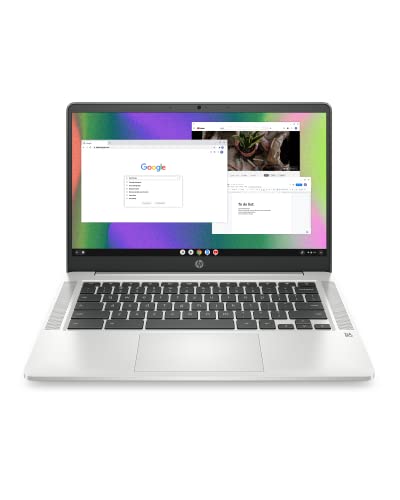


At a Glance
A Chromebook under the lower cap is a simple proposition: a laptop that does web browsing, email, documents, video calls and streaming, and does not ask much of you in return. The catch is that cheap models vary a lot in the places that matter, namely the screen, the storage and the amount of memory behind the browser tabs.
The six machines here cover every common size, from an 11.6 inch student model to a 15.6 inch laptop with a full keyboard. Some have touchscreens, some fold into tablets, and one has a sharper full HD panel. We evaluated each from the specs and buyer feedback in its listing, and we call out where the pages leave a detail unspecified, because a vague listing is a risk at this level.
The practical question is what you can safely give up. Many buyers can live with a basic screen or modest storage, but few are happy with 16 GB of flash or a cramped 11.6 inch panel once the novelty fades. We point out which compromises are comfortable and which are traps. As a rule, resolution and storage are the two that cannot be fixed later, while a slightly slow chip can be worked around by keeping fewer tabs open. Keep that rule in mind as you read the picks, and use the later sections to match a model to the person who will actually use it, whether that is a student, a parent or a grandparent.
6 Criteria to Look For Before Buying a Chromebooks Under $300
Key buying criteria so you get the right fit the first time.
Screen resolution and panel type
A full HD panel at 1920 x 1080 is noticeably sharper than the 1366 x 768 screens common at this level. The Lenovo Flagship and Acer both offer FHD, while the HP Chromebook 14, Dell and Lenovo 300e use the lower resolution. IPS panels, like the 300e's, improve viewing angles. If you read a lot, put resolution near the top of your list. Also look at the size of the bezel and the finish: anti-glare coatings, like the one on the HP Chromebook 14, cut reflections near windows, while glossy panels look punchier but struggle in bright rooms.
Storage you can live with
Chrome OS leans on the cloud, but updates, offline files and Android apps still take space. The Dell has 16GB, the 300e up to 32GB and the others 64GB. Anything under 32GB gets crowded fast. Plan on 64GB if you store photos or documents locally. Even cloud-first users benefit from headroom, because a drive that is nearly full slows updates and can fail to install new apps without warning.
Processor and memory
A quad-core Intel N4120, as in the two HP models, feels livelier with tabs than the dual-core Celeron in the Acer or the N4020 in the Dell. The Kompanio 520 in the Lenovo Flagship is efficient. All six use 4GB of RAM, so tabs are the limit, not the chip. Closing unused tabs and pausing background Android apps recovers more speed than any processor difference between these models, and a quick restart once a week keeps memory tidy.
Size and portability
Screen sizes range from 11.6 inch (Dell, 300e) to 14 inch (Lenovo Flagship, both HPs) and 15.6 inch (Acer). Smaller screens are lighter but cramp documents. A 14 inch panel is the best balance for most people, while the Acer suits a mostly stationary setup.
Touch and convertible designs
A touchscreen helps with Android apps, reading and drawing. The Lenovo Flagship offers touch on a laptop body, and the 300e flips into tablet mode. If you only type and browse, skip touch and spend the budget on a better display.
Battery life and webcam
Battery claims vary with workload. The HP 14 student model lists 14 hours, while others do not state a figure. A webcam matters for video calls, and the HP 14 includes one. Check the listing for the specific hardware before buying, and remember that rated hours come from light-use tests, so a video-heavy day will drain it sooner than the headline number suggests.
6 Best Chromebooks Under $300 in 2026
Lenovo Flagship 14 Inch FHD Touchscreen Chromebook
About this pick
Lenovo gives this Chromebook the best screen in the group, a 14 inch full HD touchscreen with 1920 x 1080 resolution. Under the hood is a MediaTek Kompanio 520, an eight-core design with four A73 cores and four A53 cores at 2.0GHz, paired with 4GB of RAM and 64GB of eMMC storage. The sharper display is what you notice every day, since text is crisper and video looks better than on the typical 1366 x 768 panels at this level. The processor is designed for battery life as much as speed, which suits a laptop used for browsing and documents. The touchscreen is a plus for tapping through Android apps and for anyone who prefers direct input. Compared with the Acer, it trades screen size for portability, and compared with the HP 14 at N4120 it offers a better display but no stated battery figure. Its main limit is 4GB of RAM, so keep tab counts reasonable. It is a strong all-rounder for students and adults alike.
Best for: Anyone who wants the sharpest screen and a touchscreen.
Check price on AmazonSpecs
- Display: 14 inch, 1920 x 1080 touch
- Processor: MediaTek Kompanio 520
- Memory: 4GB
- Storage: 64GB eMMC
Pros
- +Full HD touchscreen sharper than rivals
- +Eight-core MediaTek Kompanio 520 chip
- +64GB storage gives room for files
- +Slim 14 inch body suits travel
Cons
- −4GB RAM limits heavy tab use somewhat
- −MediaTek chip behaves unlike Intel
- −Battery hours are not stated on the listing
Acer 15.6 Inch FHD Chromebook with Numeric Keypad
About this pick
Acer takes the opposite approach to the compact models: a 15.6 inch full HD display, a full-size keyboard with a dedicated numeric keypad, and a dual-core Intel Celeron processor. It ships with 64GB of storage, WiFi 6 and a carrying sleeve, and runs ChromeOS with built-in Gemini AI features. The big screen and numpad make it ideal for spreadsheet work, long documents and anyone who needs to see more on screen. Dual-core processors are fine for web apps but slower than quad-core options, so heavy multitasking will stretch it. Size also means weight, and a 15.6 inch laptop is less comfortable to carry than the 11.6 inch models. Next to the Lenovo Flagship it offers a larger screen but no touch, and next to the HP 14 N4120 it has the bigger display with a weaker processor. It suits a home-base laptop that sits on a desk or kitchen table more than a backpack.
Best for: Home users who want a big screen and a numeric keypad.
Check price on AmazonSpecs
- Display: 15.6 inch, 1920 x 1080
- Processor: Dual-core Intel Celeron
- Storage: 64GB
- Wireless: WiFi 6
Pros
- +Large 15.6 inch full HD display
- +Full-size keyboard with numeric keypad
- +WiFi 6 and a carrying sleeve included
- +64GB storage leaves room for local files
Cons
- −Dual-core Celeron is the slowest chip
- −Bulkier to carry than 14 inch models
- −No touchscreen mentioned on the listing
HP 14 Inch HD Chromebook for Students N4120
About this pick
HP builds this 14 inch student model around a quad-core Intel Celeron N4120, with a 1.1GHz base clock that boosts up to 2.6GHz. It comes with 4GB of RAM, 64GB of eMMC storage, a webcam and an HDMI port, and a rated battery life of 14 hours. The webcam and long rated battery make it a natural pick for video calls with family or for a student who moves between classes. The processor offers four cores and threads, so it feels more responsive than the dual-core Acer when you open several tabs. The display is a standard HD panel, which is serviceable rather than sharp. Compared with the Lenovo Flagship, it has a plainer screen but a more conventional Intel chip and a stated battery figure. Against the Dell at 11.6 inches, it offers far more storage and a larger display. It is the safe middle choice for users who want dependable basics.
Best for: Students and seniors who value battery life and video calls.
Check price on AmazonSpecs
- Processor: Intel Celeron N4120, 4 cores
- Speed: 1.1GHz base, up to 2.6GHz
- Memory: 4GB
- Storage: 64GB eMMC
Pros
- +Quad-core N4120 handles several tabs
- +Rated for 14 hours of battery life
- +Webcam and HDMI port built into the body
- +64GB storage is generous at this level
Cons
- −HD screen is plain compared with FHD
- −4GB RAM limits heavy multitasking
- −Not a touchscreen or convertible design
HP Chromebook 14 Intel Celeron N4120
About this pick
This HP Chromebook 14 shares the quad-core N4120 and the 4GB and 64GB combination with its student sibling, but it pitches itself at home, work and school with a thin design and custom-tuned stereo speakers. The micro-edge, anti-glare 14 inch display runs at 1366 x 768. The anti-glare finish helps in bright rooms and near windows, which makes it more pleasant than a glossy panel for long sessions. The speakers are a small upgrade for streaming and calls. The resolution is the weak spot: text and video are less crisp than on a full HD screen, which you notice most on documents. Placed next to the HP student model, it is almost the same machine in spec terms, so choose by design and features. Compared with the Lenovo Flagship, it gives up resolution and touch but keeps a familiar Intel platform. It is a practical choice for households that want dependable basics.
Best for: Households that want a thin, anti-glare laptop for daily use.
Check price on AmazonSpecs
- Processor: Intel Celeron N4120
- Memory: 4GB
- Storage: 64GB eMMC
- Display: 14 inch HD, 1366 x 768
Pros
- +Anti-glare screen helps in bright rooms
- +Quad-core N4120 with 64GB storage
- +Custom-tuned stereo speakers on board
- +Thin design is easy to carry around
Cons
- −1366 x 768 display lacks sharpness
- −4GB RAM is tight with many tabs
- −Almost identical to the HP student model
Lenovo 300e 11.6 Inch Touchscreen 2-in-1 Chromebook
About this pick
The 300e is a classroom-style convertible with an 11.6 inch IPS touchscreen that supports 10-point multitouch, a quad-core MediaTek 8173C at 2.1GHz, 4GB of LPDDR3 memory and up to 32GB of eMMC storage. The 2-in-1 design flips the screen around for tablet use. The IPS panel offers wider viewing angles than basic displays, and the flip hinge makes it handy for reading, drawing and shared viewing. The processor is older than the Intel and Kompanio chips in this lineup, and 32GB of storage fills up quickly with downloads. It is best viewed as a light, flexible secondary device. Compared with the Dell, it offers a touchscreen and double the storage, though both share an 11.6 inch size. Next to the HP 14 models, it trades screen size and speed for flexibility. It is a good fit for kids, couches and anyone who wants a tablet-style Chromebook without a separate tablet.
Best for: Kids and casual users who like a flip-over touchscreen.
Check price on AmazonSpecs
- Display: 11.6 inch IPS, 1366 x 768
- Processor: MediaTek 8173C, 2.1GHz
- Memory: 4GB LPDDR3
- Storage: Up to 32GB eMMC
Pros
- +Flips into tablet mode for reading
- +IPS panel offers wide viewing angles
- +10-point multitouch for drawing and play
- +Compact 11.6 inch size suits small hands
Cons
- −Older MediaTek chip feels slower
- −32GB storage ceiling fills up quickly
Dell Chromebook 11 3100 with Celeron N4020
About this pick
Dell's 3100 is the smallest and most basic machine in this lineup. It pairs an Intel Celeron N4020 with 4GB of RAM and 16GB of flash storage behind an 11.6 inch display at 1366 x 768. It runs ChromeOS, and the compact size is designed for classroom use. The small body makes it easy to carry and stow in a crowded bag, and the plain feature list means there is little to learn or troubleshoot. The big compromise is storage: 16GB is tight even by Chromebook standards, and updates plus a few Android apps will leave little room for downloads. You will rely on cloud storage for almost everything. Compared with the HP 14 models, it offers a smaller screen and a third of the storage, which is the price of compactness. It is a reasonable pick for someone who treats it as a browser terminal and keeps files in the cloud, but a poor choice for offline use.
Best for: Cloud-first users who prize a small, light laptop.
Check price on AmazonSpecs
- Display: 11.6 inch, 1366 x 768
- Processor: Intel Celeron N4020
- Memory: 4GB
- Storage: 16GB flash
Pros
- +Compact 11.6 inch size is easy to carry
- +Celeron N4020 handles basic browsing
- +Classroom-oriented model with a plain feature set
- +ChromeOS keeps boot and updates simple
Cons
- −16GB storage is very tight for updates
- −Small display with low resolution
- −Weakest configuration in the group
How We Evaluated These Chromebooks Under $300
Each pick was assessed across 5 criteria weighted for real-world use.
Display quality
We compared resolution, size and panel type. The Lenovo Flagship and Acer led with 1920 x 1080, the 300e earned credit for IPS, and the Dell and HP 14 Chromebook scored lower at 1366 x 768.
Processor and memory
We weighed the cores and clock speeds listed: quad-core N4120 on both HPs, the eight-core Kompanio 520 on the Lenovo, dual-core Celeron on the Acer and N4020 on the Dell. All sit at 4GB of RAM, so no model scored highly for multitasking.
Storage
We favored 64GB on the Lenovo Flagship, Acer and both HPs, and penalized 32GB on the 300e and 16GB on the Dell, since storage is hard to fix after purchase.
Portability and design
We considered weight cues, size and form factor. The 300e's flip hinge and the Dell's compact body scored for portability, while the Acer's 15.6 inch size scored for desk use.
Everyday extras
We counted webcams, speakers, ports and battery claims. The HP 14 student model's webcam and 14 hour rating stood out, and the Acer's WiFi 6 and numeric keypad added value. Where a listing left out the battery rating or port list, we did not credit the model, since an unstated feature cannot be relied on when the order arrives.
How to Choose the Right Chromebooks Under $300
By Primary Use
Start with what you will do most often.
| Use | Pick | Reason |
|---|---|---|
| School and note taking | HP 14 Student N4120 | Webcam, HDMI and 14 hour rating |
| Spreadsheets and long documents | Acer 15.6 Inch | Numeric keypad and big FHD screen |
| Reading and drawing | Lenovo 300e | Flip hinge and IPS touchscreen |
| Streaming and general use | Lenovo Flagship 14 | FHD touchscreen and Kompanio 520 |
Pick the screen that fits your main task.
By Budget
Inside the cap, tiers separate by screen and storage.
| Tier | Pick | What you get |
|---|---|---|
| Entry | Dell Chromebook 11 | Compact body but only 16GB storage |
| Lower mid | Lenovo 300e | Touch 2-in-1 with up to 32GB |
| Upper mid | HP Chromebook 14 | 64GB and quad-core N4120 |
| Top of the cap | Lenovo Flagship 14 | FHD touchscreen and 64GB |
Tiers show relative position within the cap.
Intel vs MediaTek
The two chip families behave differently.
Intel Celeron
Intel chips like the N4120 and N4020 are familiar and support Linux apps well. The HP models, Acer and Dell use Intel. They suit users who like predictable performance.
MediaTek
MediaTek chips are designed for battery life and low heat. The Lenovo Flagship's Kompanio 520 and the 300e's 8173C use this family. They suit users focused on browsing and Android apps.
Neither family replaces a mid-range laptop for heavy work.
Screen Size and Carry
A second axis is how the laptop travels.
| Habit | Pick | Reason |
|---|---|---|
| Daily backpack carry | Dell Chromebook 11 | Smallest and most portable |
| Couch and tablet use | Lenovo 300e | Flips into tablet mode |
| Balanced home and travel | HP Chromebook 14 | 14 inch anti-glare in a thin body |
| Mostly on a desk | Acer 15.6 Inch | Biggest screen and full keyboard |
Bigger screens trade carry ease for readability.
For Video Calls Specifically
Calls reward a webcam, decent speakers and stable battery.
Look for
A built-in webcam, good speakers, a sharp enough screen to see faces and a battery that survives a long call.
In this comparison
The HP 14 student model lists a webcam and 14 hour battery, and the HP Chromebook 14 adds stereo speakers. The Acer's WiFi 6 helps connection stability.
Test the webcam in a bright room before the first important call.
When to Spend More
A higher budget changes the experience in specific ways.
| Spend more if | Save if |
|---|---|
| You want 8GB of RAM beyond the six here at 4GB | You keep a handful of tabs open |
| You need an aluminum build or a brighter display | You use the Dell or HP for light browsing |
| You want longer software support promises | You plan to replace it in a couple of years |
| You work on spreadsheets all day | You mostly stream and read email |
Higher caps add memory and build quality more than raw speed.
Frequently Asked Questions
Which Chromebook under this cap is the best overall?
The Lenovo Flagship 14 inch is the best all-rounder because of its full HD touchscreen, 64GB of storage and an efficient Kompanio 520 chip. The HP 14 student model is the better choice if battery life and a webcam matter most.
Is 4GB of RAM enough?
For browsing, documents and streaming, yes, if you keep tab counts reasonable. All six here use 4GB, so tab hoarders will slow down regardless of chip. If you work with many windows, consider spending more for 8GB.
Is 16GB of storage a problem?
On the Dell it is tight. Chrome OS updates and Android apps use space, leaving little for offline files. Use cloud storage and an SD card if the port exists, or choose a 64GB model.
Should I choose a touchscreen?
Only if you will use it. Touch helps with Android apps, reading and drawing, and the Lenovo Flagship and 300e offer it. For typing and browsing, a better non-touch display is a smarter use of the budget.
How long will a budget Chromebook receive updates?
Chromebooks receive updates for a fixed period from the platform's release, and older models stop sooner. Check Google's automatic update expiration for the exact model before buying, especially for older chips like the 300e's.
Can I use these for Microsoft Office?
Yes, through web versions and Android apps, though features are more limited than desktop software. Documents, sheets and slides open fine for typical use, but advanced macros will not run.
What is the biggest mistake buyers make here?
Choosing on size or color and ignoring storage and resolution. A cheap model with 16GB or a dim 1366 x 768 screen becomes frustrating within months. Compare the three numbers: resolution, storage and RAM. It also pays to check the auto update expiration date for the exact model, since a laptop that stops getting updates early becomes a security risk long before it stops working.
Bottom Line
best overall: Lenovo Flagship 14 Inch FHD Touchscreen Chromebook - best overall pick in this roundup.
See the full rankings above for all picks with pros, cons, and best-for summaries.
Browse on Amazon
All Prime-eligible options with current pricing.
Shop on Amazon →