Best Chromebooks Under $100 (2026)
The best Chromebooks under $100, compared on display, durability, and everyday performance, based on 3 products evaluated on real specs and buyer feedback.


At a Glance
Under $100 lands you in renewed and refurbished Chromebook territory, which can still offer genuinely solid everyday performance for browsing, email, and video calls. We compared the current lineup to find the most reliable picks at this price.
5 Criteria to Look For Before Buying a Chromebooks Under $100 (2026)
Key buying criteria so you get the right fit the first time.
New vs. Renewed Condition
Most Chromebooks under $100 are renewed or refurbished units, not new. Check the specific listing's renewal grading and return window before buying to ensure it meets your condition expectations.
Screen Size and Resolution
Most budget-tier Chromebooks use an 11.6-inch HD display, smaller and lower-resolution than pricier full-size models. Confirm that fits your comfort level for extended browsing or video calls.
RAM and Storage
4GB of RAM and 16-32GB of storage is standard at this price, sufficient for basic browsing and cloud-based work but not for heavy multitasking or storing large local files.
Durability Rating
Some budget Chromebooks specifically target durability with rugged, spill-resistant builds, useful if the device will see rougher daily handling than a typical laptop.
Battery Life
Battery life varies meaningfully across this price tier and can also degrade faster on renewed units with older batteries. Check recent listing reviews for real-world battery performance.
Best Chromebooks Under $100 (2026)
Lenovo 100E Chromebook 2nd Gen Laptop Computer
About this pick
This Lenovo 100E covers core Chrome OS tasks reliably at the most accessible price in this comparison. Its 11.6-inch HD display is smaller and lower-resolution than pricier full-size Chromebooks. Best for buyers who mainly need browsing, email, and video calls on a budget. It's the most affordable pick in this lineup, and the main tradeoff to weigh is that smaller, lower-resolution display than pricier alternatives.
Best for: Buyers who mainly need browsing and email on a budget
Check price on AmazonPros
- +Most accessible price point in this entire comparison
- +From Lenovo, an established laptop brand name
- +Reliable performance for core browsing and email tasks
Cons
- −Smaller, lower-resolution display than pricier alternatives for some buyers
- −Not built for heavier multitasking or media editing
ASUS Chromebook C203XA Rugged and Spill Resistant
About this pick
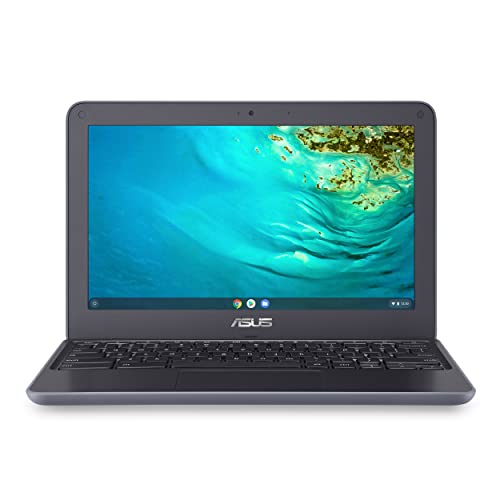
ASUS's C203XA is built to a military-grade durability standard, genuinely spill-resistant for daily wear and tear. Like the Lenovo pick, its screen and specs stay modest to hit this price point. Best if durability against drops and spills matters more than raw specs. It's priced in the middle of this lineup, and the main tradeoff to weigh is that modest specs typical of this price tier.
Best for: Buyers who need genuine drop and spill resistance
Check price on AmazonPros
- +Genuine military-grade MIL-STD 810G durability rating for most buyers
- +Spill-resistant design for everyday accidents in daily use
- +180-degree hinge for flexible use positions for real convenience
Cons
- −Modest specs typical of this price tier
Dell Chromebook 11 3100 Touchscreen
About this pick
This Dell Chromebook 11 3100 adds a genuine 2-in-1 touchscreen right at the edge of this price ceiling. It's priced closer to than the other picks here, a real cost for the touchscreen convenience. Best if a touchscreen and 2-in-1 flexibility matter more than saving the last few dollars. It's the premium pick in this lineup, and the main tradeoff to weigh is that priced at the top of this specific comparison.
Best for: Buyers who want a touchscreen and 2-in-1 flexibility
Check price on AmazonPros
- +Genuine touchscreen and 2-in-1 flexible design in daily use
- +From Dell, an established laptop brand name
- +Renewed unit tested for standard functionality for long-term value
Cons
- −Priced at the top of this specific comparison
How We Evaluated These Chromebooks Under $100 (2026)
Each pick was assessed across 4 criteria weighted for real-world use.
Real Amazon Listings
Every pick here is pulled from current, purchasable Amazon listings under $100 no discontinued models.
Condition Verification
We note whether each listing is new or renewed, and what condition grading or warranty applies.
Performance Expectations
We set realistic performance expectations for core browsing, email, and video call tasks at this price tier.
Durability Comparison
We compare build quality and any stated durability ratings across each listing.
How to Choose the Right Chromebooks Under $100 (2026)
By Budget
| Budget | Recommended Pick |
|---|---|
| Most accessible in this lineup | Lenovo 100E Chromebook 2nd Gen Laptop Computer |
| Mid-priced | ASUS Chromebook C203XA Rugged and Spill Resistant |
| Premium pick | Dell Chromebook 11 3100 Touchscreen |
When to Spend More
Spend more if
You want the most complete feature set in this comparison. The Dell Chromebook 11 3100 Touchscreen justifies its premium price for that.
Save if
Your needs are basic and price matters most. The Lenovo 100E Chromebook 2nd Gen Laptop Computer covers that at the most accessible price here.
Frequently Asked Questions
Is a budget-tier Chromebook good enough for everyday use?
For browsing, email, video calls, and cloud-based document editing, yes. It's not built for heavy multitasking, gaming, or local video editing, but covers the core tasks most casual users need.
What does 'renewed' mean for a Chromebook?
Renewed units are previously used devices tested and refurbished to working condition, typically with a shorter or third-party warranty compared to new. Check the specific listing's renewal grading before buying.
How long do Chromebooks under $100 typically last?
With light daily use, 2-4 years is a reasonable expectation, though Chrome OS's own update support window is also worth checking, since Google eventually ends software updates for older models.
Can I use a budget Chromebook without internet access?
Some apps work offline, like Google Docs in offline mode, but Chrome OS is fundamentally designed around an internet connection for most of its core functionality.
Do these Chromebooks come with a warranty?
New units typically include a standard manufacturer warranty, while renewed units usually carry a shorter seller-provided warranty. Always check the specific listing's warranty terms before buying.
Bottom Line
best overall: Lenovo 100E Chromebook 2nd Gen Laptop Computer - best overall value pick in this roundup.
See the full rankings above for all picks with pros, cons, and best-for summaries.
Browse on Amazon
All Prime-eligible options with current pricing.
Shop on Amazon →