6 Best Book Stands for Desks in 2026
Six desk book stands compared on footprint, weight rating, rotation, page clips and folding, from a compact metal stand to rotating and acrylic desktop risers.


At a Glance
A desk book stand lives in a tight space, usually next to a keyboard, a lamp and a cup. That means footprint, stability and how fast it folds away matter as much as tilt. A stand that is too big crowds the monitor, and one that is too light slides when you turn a page.
This guide compares six distinct desk stands: the LOXP and OPTIXCELL rotating metal stands, the BESIGN BS02 board, the BYMECOST clear acrylic riser, the Reodoeer lightweight collapsible stand with a stated 10 lb rating, and the compact Camelmother. We evaluated footprint, weight ratings, rotation, clips and folding based on product specs and buyer feedback, and we make no claim about any health benefit.
We skipped lap cushions and thumb rings because they are not desk tools. Where a listing gives no number, we do not guess one.
6 Criteria to Look For Before Buying a Book Stands for Desk
Key buying criteria so you get the right fit the first time.
Footprint on a crowded desk
Desk space is the main constraint. The Camelmother measures 8.3 x 6.3 inches, while the BESIGN board is 13.4 x 9.4 inches and the BYMECOST panel is 13.42 x 9.25 inches. A larger panel holds bigger books but pushes into the keyboard zone. Measure the free space beside your monitor before you choose.
Stated weight rating
A rating tells you what the stand will carry. The Reodoeer lists up to 10 lb, the BESIGN 8 lb (4 kg), and the LOXP 5 kg (11 lb). Other listings give no number. Weigh your heaviest book and keep it below the rating, because a stand that sags on a page turn is a nuisance.
Rotation for shared desks
Rotation helps when you share the page or swing between a keyboard and a book. The LOXP, OPTIXCELL and BYMECOST all rotate 360 degrees. Fixed stands such as the BESIGN and Camelmother need the whole stand moved. Choose rotation if you switch views often.
Page clips and thick books
Clips decide whether pages stay open. The OPTIXCELL has spring-loaded clips, the Reodoeer has two strong clips and the LOXP has a page clip with 3 cm deep clamps. The BESIGN and BYMECOST visible listings describe none. Thin clips may fail on thick books, so test yours.
Material and slide resistance
Desk surfaces vary. The LOXP uses silicone pads, the BESIGN uses anti-slip rubber pads, the Camelmother has four skid-proof pads, and the Reodoeer is PVC and ABS plastic. Acrylic on the BYMECOST looks clean but can scratch. Pick pads that grip your desk surface.
Folding and storage
A stand that folds clears the desk when you finish. The Reodoeer is collapsible and the BYMECOST folds as a desktop riser, while the LOXP and OPTIXCELL stay put. If your desk doubles as a dining table, folding matters. Choose it if you clear the desk every night.
6 Best Book Stands for Desks in 2026
LOXP 360 Rotating Book Stand with Page Clip
About this pick
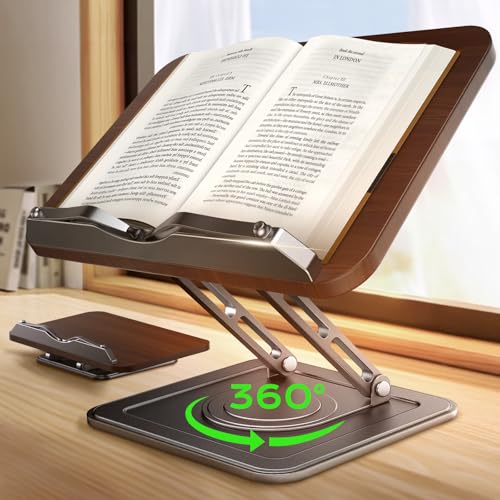
The LOXP is the strongest all-round desk stand here. The base rotates 360 degrees and the panel tilts from 0 to 180 degrees through 15 locking positions, so it can lie flat for writing or stand upright for reading. The frame is aluminum with a wood veneer that the maker says resists stains and wipes clean.
Deep 3 cm non-slip clamps and silicone pads hold textbooks up to 5 kg (11 lb) and screens up to 15.6 inches. That is a higher stated limit than both the BESIGN at 8 lb and the Reodoeer at 10 lb. The tradeoff is size: the base takes real desk space, and there is no tray.
Against the Camelmother with six positions it offers fine control, and against the OPTIXCELL it lacks a tray but gives a published rating. Choose it for a study desk where you read heavy books.
Best for: Students and desk readers who want fine tilt control and a stated 5 kg load limit.
Check price on AmazonSpecs
- Rotation: 360 degrees horizontal
- Tilt: 0 to 180 degrees, 15 locking positions
- Clamps: 3 cm deep, non-slip, silicone pads
- Capacity: Up to 5 kg (11 lb)
Pros
- +15 locking positions across 0 to 180 degrees
- +Full 360 degree rotating base for shared desks
- +Stated 5 kg (11 lb) limit suits heavy textbooks
- +Deep clamps and silicone pads resist slipping
Cons
- −Base takes noticeable desk space beside a keyboard
- −No storage tray or reading light is included
BESIGN BS02 Adjustable Book Stand
About this pick
The BESIGN BS02 is a desk stand with published numbers. The board is 13.4 by 9.4 inches (34 by 24 cm) and the listing says it is compatible with tablets and laptops from 7 to 14 inches and books from A5 to A3. It supports up to 8 lb (4 kg) and has anti-slip rubber pads.
The listing says the stand elevates a book or laptop to a better viewing level and helps reduce neck strain. That makes it the pick for a desk where you alternate between a book and a laptop. The tradeoff is that the visible listing describes no page clips, so you may need a bookmark or small weight to keep pages flat.
Compared with the LOXP it has no rotation but a similar board size. Against the Reodoeer at 10 lb it is rated lower but gives a firmer panel. Choose it if the desk has to carry both laptops and books.
Best for: Desk users who switch between a book and a laptop or tablet.
Check price on AmazonSpecs
- Board: 13.4 x 9.4 inches (34 x 24 cm)
- Compatibility: Tablets and laptops 7 to 14 inches, A5 to A3 books
- Capacity: Up to 8 lb (4 kg)
- Base: Anti-slip rubber pads
Pros
- +Stated 8 lb (4 kg) capacity is easy to check
- +13.4 x 9.4 inch board fits A5 to A3 books
- +Also fits 7 to 14 inch tablets and laptops
- +Anti-slip rubber pads grip a smooth desk
Cons
- −Visible listing describes no page clips at all
- −No rotation and fewer adjustment steps than the LOXP
OPTIXCELL 360 Rotating Book Stand with Page Clips
About this pick
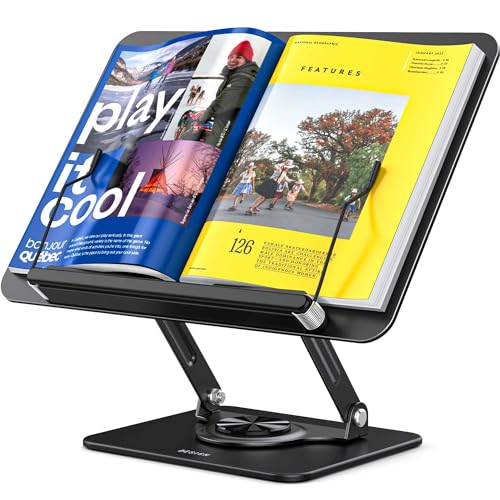
The OPTIXCELL is a metal stand with a 360 degree rotating base, spring-loaded page clips and a tray built into the base. The tray holds pens, sticky notes, earbuds and reading glasses, so small desk items stay on the stand's own footprint. The listing says the frame holds thick books, tablets and laptops up to 13 inches.
Spring clips hold cookbooks, textbooks and magazines open for hands-free use. The built-in tray is the desk-friendly feature, because it clears space beside the keyboard. The tradeoff is that the listing gives no weight limit or tilt step count, so the numbers are thinner than the LOXP's 5 kg and 15 positions.
Against the Camelmother it takes more room but includes clips. Against the BYMECOST acrylic stand it is sturdier but less minimal. Choose it for a crowded desk where pens and glasses keep wandering.
Best for: Crowded-desk users who want spring clips and a tray on the same base.
Check price on AmazonSpecs
- Rotation: 360 degree base
- Clips: Spring-loaded
- Storage: Integrated base tray
- Frame: Metal, holds laptops up to 13 inches
Pros
- +Spring-loaded clips hold thick books open
- +Built-in tray keeps glasses and pens off the desk
- +Metal frame also supports a 13 inch laptop
- +360 degree base shares the book across the desk
Cons
- −No weight limit or tilt step count is published
- −Tray makes the base deeper than a bare frame
Reodoeer Portable Collapsible Book Stand
About this pick
The Reodoeer is a collapsible book stand made of PVC and ABS plastics that the listing says holds up to 10 lb. The angle adjusts through 180 degrees, so it can sit nearly flat or upright. Two strong clips hold the pages in place.
It is described as light and space-friendly for taking to class, the library or other places. That makes it the lightest stand in this guide, and it states a 10 lb limit, above the BESIGN at 8 lb. The tradeoff is that plastic can feel less planted than metal or wood on a slick desk, and the listing does not describe the base.
Against the LOXP at 5 kg (11 lb) it is close on capacity, but lacks rotation and the locking steps. Against the Camelmother it holds more and folds, though it has no simple notches. Choose it for a desk that doubles as a library bag companion.
Best for: Students who carry a stand between class, library and desk.
Check price on AmazonSpecs
- Adjustment: 180 degree angle
- Material: PVC and ABS
- Capacity: Up to 10 lb
- Clips: Two strong paper clips
Pros
- +Stated 10 lb capacity is above the BESIGN at 8 lb
- +Two strong clips hold the pages in place on thick books
- +Collapsible and light enough for a backpack
- +180 degree adjustment covers flat to upright
Cons
- −Plastic feels less planted on a slick desk
- −Base design is not described on the listing
BYMECOST Clear Acrylic Book Stand
About this pick
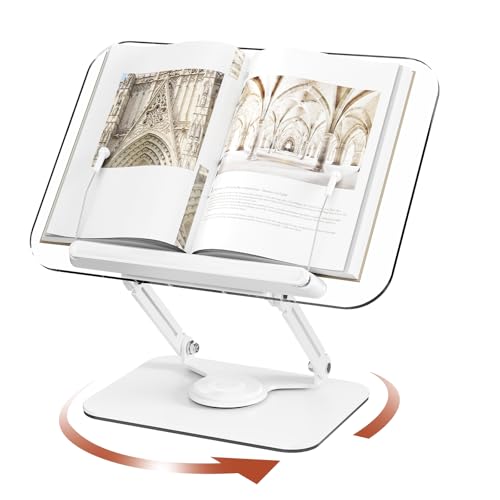
The BYMECOST is a clear acrylic desktop riser. The support panel is 0.2 inches thick and 13.42 by 9.25 inches, held up by steel alloy dual arms. The listing says it rotates 360 degrees and folds as a desktop riser, and the clear material keeps the desk looking open.
The acrylic gives a sense of space on a crowded workstation, and the rotation lets you share the page with a colleague across the desk. The tradeoff is that acrylic scratches more easily than wood or metal, and the listing text we could see gives no weight limit or page clip description.
Against the BESIGN, whose board is 13.4 by 9.4 inches, the panel size is similar but clear and rotating. Against the OPTIXCELL it has no tray or spring clips. Choose it for a minimalist desk where a bulky stand would feel out of place.
Best for: Minimalist desks where a clear, rotating stand keeps the workspace tidy.
Check price on AmazonSpecs
- Panel: 13.42 x 9.25 inches
- Thickness: 0.2 inch clear acrylic
- Arms: Steel alloy, dual
- Rotation: 360 degrees
Pros
- +Clear acrylic keeps the desk looking open
- +13.42 x 9.25 inch panel suits large books
- +Steel alloy dual arms support the clear panel well
- +360 degree rotation lets you share the page
Cons
- −Acrylic can scratch with daily use on a busy desk
- −No weight limit or clip description in the listing
Camelmother Metal Adjustable Book Holder
About this pick
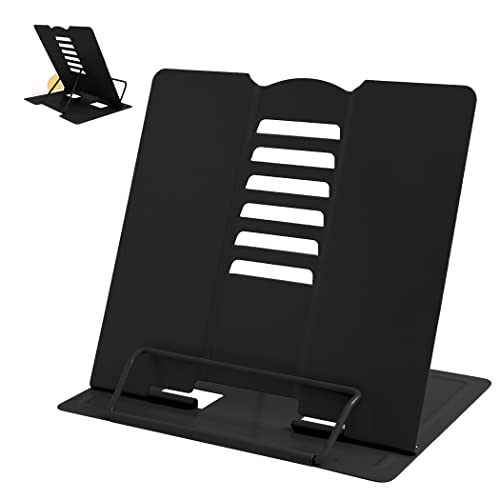
The Camelmother is the smallest stand in this guide. It measures 8.3 by 6.3 inches, and notches on the backrest give six reading positions that adjust both height and angle. Four skid-proof pads are glued to the base, so it grips a desk or kitchen counter.
Its footprint is the main reason to choose it, because a desk with a keyboard and a monitor has little room to spare. There are no clips, no rotation and no tray, and the listing gives no weight limit. The tradeoff is that a stand this small suits paperbacks and mid-size books better than a large, heavy hardcover.
Against the LOXP with 15 positions it has far fewer steps, but it takes much less room. Against the Reodoeer it is metal and more planted, though it holds less on paper. Choose it for a small desk.
Best for: Small desks and dorm rooms that need a compact, adjustable stand.
Check price on AmazonSpecs
- Positions: Six, via backrest notches
- Footprint: 8.3 x 6.3 inches
- Base grip: 4 skid-proof pads
- Material: Metal
Pros
- +Compact 8.3 x 6.3 inch footprint saves desk room
- +Six backrest notches set height and angle
- +Four skid-proof pads grip smooth surfaces
- +Metal construction feels planted for its size
Cons
- −No clips, tray or rotation is included with it
- −Weight limit not listed, so favor lighter books
How We Evaluated These Book Stands for Desks
Each pick was assessed across 5 criteria weighted for real-world use.
Footprint
We compared published sizes. The Camelmother is 8.3 x 6.3 inches, the BESIGN board is 13.4 x 9.4 inches and the BYMECOST panel is 13.42 x 9.25 inches. Smaller footprints scored better for tight desks.
Capacity
We scored stated ratings. The Reodoeer lists 10 lb, the BESIGN 8 lb and the LOXP 5 kg. Picks with no number were scored cautiously for heavy books.
Adjustment and rotation
We looked at tilt and turn. The LOXP has 15 locking positions and 360 degrees, the Reodoeer adjusts 180 degrees, and the Camelmother has six notches. The OPTIXCELL and BYMECOST rotate 360 degrees.
Page holding and extras
We counted clips and trays. The OPTIXCELL has spring clips and a tray, the Reodoeer two strong clips, and the LOXP deep clamps. Extras counted only if they save desk room.
Lineup positioning
The LOXP leads on control, the BESIGN on laptop fit, the OPTIXCELL on tray and clips, the Reodoeer on rating and portability, the BYMECOST on a clean look and the Camelmother on size.
How to Choose the Right Book Stands for Desks
By Desk Size
Space decides the shortlist.
| Situation | Best pick | Why |
|---|---|---|
| Tiny desk or dorm | Camelmother Metal Adjustable Book Holder | 8.3 x 6.3 inch footprint |
| Standard desk with a keyboard | BESIGN BS02 Adjustable Book Stand | 13.4 x 9.4 inch board doubles as a laptop riser |
| Large study desk | LOXP 360 Rotating Book Stand | 15 locking positions and 5 kg rating |
| Crowded desk with clutter | OPTIXCELL 360 Rotating Book Stand | Built-in tray for pens and glasses |
| Minimalist desk | BYMECOST Clear Acrylic Book Stand | Clear 0.2 inch acrylic panel |
By Budget
Tiers are relative, with no prices quoted.
| Tier | Pick | What you get |
|---|---|---|
| Entry | Camelmother Metal Adjustable Book Holder | Six notches and a small footprint |
| Entry to mid | Reodoeer Portable Collapsible Book Stand | 10 lb rating and two clips |
| Mid | BESIGN BS02 Adjustable Book Stand | 8 lb rating and rubber pads |
| Mid to premium | BYMECOST Clear Acrylic Book Stand | Rotating clear panel |
| Premium | OPTIXCELL 360 Rotating Book Stand | Spring clips, tray and rotation |
| Premium precision | LOXP 360 Rotating Book Stand | 15 locking positions and 5 kg rating |
Rotating vs Fixed Stands
Rotating stands
A rotating base turns the book without moving the stand, which helps when you share a page or swing between screens. The LOXP, OPTIXCELL and BYMECOST all rotate 360 degrees. They take a larger footprint. Pick one if you switch views often.
Fixed stands
A fixed stand stays where you put it and is simpler. The BESIGN, Camelmother and Reodoeer do not rotate. They suit a desk where the book always faces you. Pick one for a compact setup.
If you share the page with a colleague, rotation matters more than a few extra tilt steps.
By Use at the Desk
What you do at the desk shapes the extras you need.
| Use | Best pick | Reason |
|---|---|---|
| Copying notes while reading | LOXP 360 Rotating Book Stand | Tilts flat to 0 degrees for writing |
| Reading beside a laptop | BESIGN BS02 Adjustable Book Stand | Fits 7 to 14 inch devices |
| Library and class carrying | Reodoeer Portable Collapsible Book Stand | Collapsible and light |
| Reference books with pens and glasses | OPTIXCELL 360 Rotating Book Stand | Tray holds pens, notes and glasses |
For Textbooks Specifically
Look for
Look for a stated weight rating above your heaviest textbook, clips that reach across a thick spine, and a base with pads that grip. A flat tilt helps for taking notes.
In this comparison
The Reodoeer lists 10 lb with two clips, the LOXP lists 5 kg with 3 cm deep clamps, and the OPTIXCELL uses spring-loaded clips on a metal frame.
Desk Setup Checklist
A stand works best when the desk is set up around it.
| Check | Applies to | What to do |
|---|---|---|
| Measure free desk depth | Camelmother Metal Adjustable Book Holder | Keep the 8.3 x 6.3 inch base clear of cables and the keyboard tray |
| Weigh your heaviest book | LOXP 360 Rotating Book Stand | Stay under 5 kg (11 lb) so the clamps and tilt locks hold |
| Check the laptop size | BESIGN BS02 Adjustable Book Stand | Stay within 7 to 14 inches and under 8 lb (4 kg) |
| Clear space for the tray | OPTIXCELL 360 Rotating Book Stand | Leave room beside the base for pens, notes and glasses |
| Check the desk surface | BYMECOST Clear Acrylic Book Stand | Use a smooth, clean desk and avoid dragging the stand across it |
Set the stand at the edge of your normal reading position and tilt it until your head stays level.
When to Spend More
| Spend more if | Save if |
|---|---|
| You read heavy books at one desk, so choose the LOXP | You carry a stand around, so the Reodoeer is enough |
| You want tray and clips, so choose the OPTIXCELL | You keep a desk tidy already, so the Camelmother works |
| You use a laptop and books, so choose the BESIGN | You only read books, so a smaller stand is fine |
Frequently Asked Questions
What is the best book stand for a desk?
The LOXP 360 Rotating Book Stand is our overall pick because it has 15 locking positions, 360 degree rotation and a stated 5 kg rating. The Camelmother is better for a tiny desk, and the BESIGN is better if you also use a laptop. Measure your free desk space first.
How big a footprint should a desk stand have?
Match it to your free desk space. The Camelmother is 8.3 x 6.3 inches, while the BESIGN board is 13.4 x 9.4 inches and the BYMECOST panel is 13.42 x 9.25 inches. A panel larger than the space beside your keyboard will crowd you. Check that the book fits the panel.
Do I need a stated weight rating?
It is worth having if you read heavy books. The Reodoeer lists 10 lb, the BESIGN 8 lb and the LOXP 5 kg. Stands without a stated rating are safer with paperbacks. Weigh your heaviest book to compare.
Is an acrylic stand strong enough?
The BYMECOST uses a 0.2 inch acrylic panel held up by steel alloy dual arms, which is meant to be sturdy for a desk. Acrylic can scratch with daily use, and the visible listing gives no weight limit. For heavy books, a rated metal stand like the LOXP is the safer choice.
Can a desk stand hold a laptop?
Some can. The BESIGN is stated to work with 7 to 14 inch laptops, the OPTIXCELL holds laptops up to 13 inches, and the LOXP lists screens up to 15.6 inches. Always check the limit before loading a heavy laptop.
How do I stop a stand sliding on a desk?
Use it on a clean, flat surface and check the pads. The BESIGN has rubber pads, the LOXP silicone pads and the Camelmother four skid-proof pads. A thin non-slip mat helps on glossy desks.
Where should a desk book stand sit relative to the monitor?
Place it beside the monitor, not in front of it, so you can glance between the two without turning your head far. Keep the top of the page close to your eye level when seated. A rotating stand like the LOXP or OPTIXCELL lets you angle the page toward you. If the desk is shallow, choose the compact Camelmother.
Which stands fold flat for storage?
The Reodoeer is described as collapsible and light, and the BYMECOST folds as a desktop riser. The LOXP, OPTIXCELL, BESIGN and Camelmother are better treated as permanent desk fixtures. If you clear your desk daily, choose a folding model. Check the folded size against your drawer.
Bottom Line
best overall: LOXP 360 Rotating Book Stand with Page Clip - best overall pick in this roundup.
See the full rankings above for all picks with pros, cons, and best-for summaries.
Browse on Amazon
All Prime-eligible options with current pricing.
Shop on Amazon →