6 Best Amplified Phones With Photo Buttons in 2026
Six amplified landline phones with picture buttons compared by key count, boost, ringer and mode switches, for people who dial better by face than by number.



At a Glance
A photo button turns a phone number into a face. Slide a picture of a daughter or a neighbor into a window beside a large key, program the number behind it, and a call becomes one press. For people who find numbers, names or small screens hard to manage, that simple change can mean the difference between calling often and avoiding the phone altogether.
Six amplified phones in this guide offer picture keys. They range from a set with six photo buttons and a permanent amplification switch to a wall-mountable picture phone with ten memories and a speakerphone. The counts, the sizes of the picture windows and the way each handles the rest of the controls differ, and these details decide which phone suits which household.
We evaluated the listings and buyer feedback and did not test the phones. Photo keys are a convenience for dialing, not a medical aid, and if remembering names or numbers has become a regular difficulty, a conversation with a doctor is worthwhile. Amplified phones sit alongside that advice, not in place of it.
6 Criteria to Look For Before Buying a Amplified Phones With Photo Button
Key buying criteria so you get the right fit the first time.
How many photo keys you need
The Assistive Technology Services picturephone offers ten memories, the Sacumea nine, the VTech SN1127 and Uvital eight, and the SMPL six. More keys serve a larger circle, but each extra key adds something to learn. Count the people who are called every month and add one or two for growth. If the circle is small, six keys with larger pictures is plenty. It also helps to leave one or two keys free for a neighbor or a doctor's office, since the list of people who matter tends to change over a few years.
One-touch versus two-touch behavior
On the Assistive Technology Services picturephone, a switch lets you choose between one-touch and normal modes. One-touch dials at once with a single press, which is quick but can lead to an accidental call if a button is bumped. Two-touch asks for a confirming press, which prevents mistakes. Pick the behavior that suits the person who will use the phone. If the phone sits on a table where a cat or a grandchild might press keys, the confirming press is worth the extra second. Ask the user which mistake would bother them more, a missed call or an accidental one.
Picture window size and labeling
A photo only helps if you can see it. Look at how large the picture window is, whether there is a name label and whether the photo can be swapped easily. A clear close-up of a face with a name written beneath is better than a distant family group. Print the photos on matte paper to avoid glare. Check whether the window is covered by clear plastic that can be wiped clean, because greasy fingers will smudge a card within weeks.
Amplification and how it is stated
The Serene Innovations phone states 26dB, the SMPL has a three-level switch without a figure and the Sacumea quotes volumes above 90dB. The Uvital lists an earpiece up to 90dB. Different ways of describing sound make comparison hard. Ask the maker how each number is measured and test the phone with a familiar caller. A phone with a switch, like the SMPL, lets the family set a level once and leave it, which avoids fiddling mid-call.
Ringer and extra alerts
The Uvital lists a ringtone up to 120dB, the Sacumea above 110dB, the VTech SN1127 90dB with a flashing light and the Serene Innovations 85dB. A louder ring helps in a big house, while a flash helps when sound is not enough. Match the ringer to the space and to the person's habits. Many households turn the ringer down at night, so a flashing light on the base becomes the only warning of a late call. Test both settings from the farthest chair.
Warranty and durability
The SMPL lists a five-year limited warranty and a six-foot drop test, which are strong signals for a phone that may be knocked off a table. The others do not state warranty terms in the text. A longer warranty matters more for a phone used daily by someone who relies on it. Ask the seller who handles repairs in the first year, and keep the receipt with the manual so a claim is simple to make.
6 Best Amplified Phones With Photo Buttons in 2026
Assistive Technology Services Picturephone
About this pick
This picture phone has the largest set of memory keys here and the most useful mode switch. The listing offers ten one-touch or two-touch memory picture keys, a two-way high level speakerphone with a slide volume control and a wall-mount option. A Normal or One-touch switch lets you change how the keys behave, and the maker presents the one-touch setting as the simplest.
The mode switch is the clever part. In one-touch mode, a press on a picture key dials immediately, which leaves little room for error. In normal mode the phone works like a standard keypad phone, which helps when someone else needs to dial a number that is not stored. That flexibility suits households where more than one person uses the phone.
Compared with the Sacumea, it offers ten memories against nine and a mode switch. Compared with the VTech SN1127, it has a speakerphone but no answering machine. The text we have does not state an amplification figure, so check the manual for the level. It is the pick for a family that wants the most contacts under one finger each. Print fresh photos at the size the windows need, and write each name in marker on the card so visitors can use the phone too.
Best for: People who want the most picture keys and a simple mode switch.
Check price on AmazonSpecs
- Memory keys: 10 picture keys
- Modes: Normal or one-touch switch
- Speaker: 2-way high level speakerphone
- Volume: Slide control
- Mounting: Wall-mountable
Pros
- +Ten picture memory keys
- +One-touch or normal mode switch
- +Speakerphone with slide volume
- +Wall-mountable
Cons
- −Amplification level not stated in the text
- −No answering machine listed
- −Limited detail on ringer volume
VTech SN1127 Amplified Corded Photo Phone
About this pick
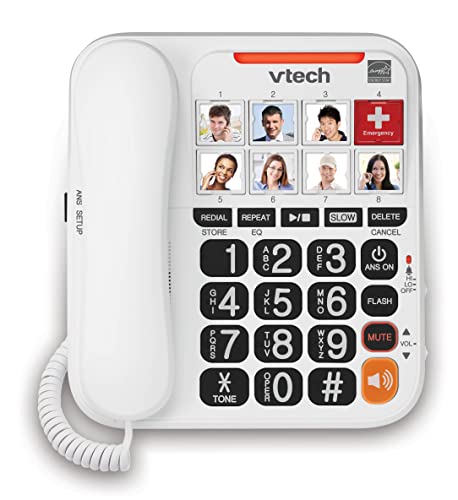
The VTech SN1127 pairs eight large photo speed dial keys with a built-in answering machine, a 90dB extra-loud ringer and a flashing indicator. The listing describes the keys as ideal for one-touch calling to family and friends, and says the corded design works during power outages. It is a set built for people who want the phone to do the ringing, the recording and the dialing without fuss.
The keys accept a small photo of each contact, and the large buttons are easy to find. Eight slots is enough for a household with a handful of regular callers, and fewer slots can be an advantage because there is less to learn. The listing does not give an amplification figure for the earpiece, so check the manual.
Compared with the Assistive Technology Services picturephone, the VTech trades two memory keys and a speakerphone for an answering machine and a louder ringer. Compared with the Uvital, it has no SOS key. It suits a bedside table or a kitchen counter. Print the pictures on matte paper so ceiling lights do not bounce off the cards.
Best for: A photo-key phone that also records messages.
Check price on AmazonSpecs
- Photo keys: 8
- Answering: Built in
- Ringer: 90dB, adjustable
- Alert: Bright flashing indicator
- Type: Corded, outage-ready per listing
Pros
- +Eight large photo keys
- +Answering machine
- +90dB ringer with flashing light
- +Corded design
Cons
- −Earpiece boost not quantified
- −Fewer keys than the leader
- −Cord limits placement
Sacumea Amplified Photo Phone
About this pick
The Sacumea phone puts nine picture memory keys on a corded amplified set and adds a very loud ringtone, listed at over 110dB. The earpiece volume exceeds 90dB, and three independent volume settings let you adjust ringer, handset and speaker separately. A hands-free calling option helps people who find holding a handset hard.
The photo keys work in the same way as on the other phones: you place a picture and program a number. The main attraction is the combination of nine one-touch contacts and a ringer that carries through a house. A listing note suggests fewer standard features, such as call blocking, are included.
Compared with the VTech, it has one more key and a louder ringer but no machine. Compared with the Serene Innovations, it has more keys and more volume. It is a sensible value pick for a household that wants loud and plain. Test each key after loading the pictures so the face and the number always agree.
Best for: Households that need a loud ringer and nine one-touch contacts.
Check price on AmazonSpecs
- Memory keys: 9 picture one-touch
- Ringtone: Over 110dB
- Earpiece: Over 90dB
- Volume: 3 independent settings
- Speaker: Hands-free calling
Pros
- +Nine picture memory keys
- +Ringtone over 110dB
- +Independent volume settings
- +Hands-free calling
Cons
- −No call block named
- −No answering machine listed
- −Boost stated as volume, not added dB
Uvital Big Button Photo Phone with SOS
About this pick
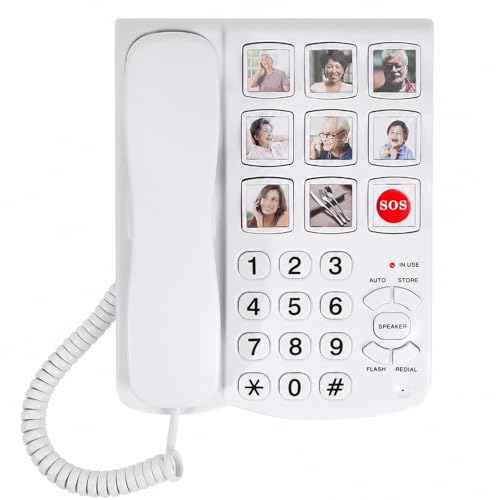
Uvital's corded phone gives eight one-touch big buttons and one SOS key, and the listing says the buttons can carry photos of family and friends. The ringtone reaches up to 120dB and the earpiece up to 90dB, with three independent volume settings. It also supports one-touch hands-free calling, which helps people with limited mobility.
The SOS key is a one-touch calling feature, not a monitored service, so decide whom it should call and test it. Because the phone requires an existing landline, check that your service has a working jack before ordering. The buttons are described as big, which helps those with low vision.
Compared with the Sacumea, it has an SOS key and a louder maximum ringer but one fewer photo slot. Compared with the Assistive Technology Services picturephone, it has fewer memories but a clear emergency button. It fits a home where one trusted number must be reachable at once. Tape a card with the SOS contact's name nearby so everyone in the house knows who the key calls.
Best for: People who want photo dialing plus one dedicated emergency-call key.
Check price on AmazonSpecs
- One-touch keys: 8 plus 1 SOS
- Photos: Customizable button photos
- Ringtone: Up to 120dB
- Earpiece: Up to 90dB
- Speaker: One-touch hands-free
Pros
- +Eight one-touch photo-ready buttons
- +SOS key for a chosen contact
- +Ringtone up to 120dB
- +Hands-free calling
Cons
- −SOS is not a monitored service
- −Needs an existing landline
- −No answering machine listed
SMPL Photo Memory Big Button Phone
About this pick
SMPL stands out for how it talks about durability and support. The listing says the phone is built to last, tested to withstand drops from up to six feet, and covered by a five-year limited warranty. It offers six dedicated memory keys for photos, a loud ringer and a handset with a three-level amplification switch that is described as permanent.
Permanent amplification means the boost does not reset after each call, so the user does not need to press anything to get it. The three levels let a family set the strength once and leave it. The listing also says the phone is VoIP compatible, which matters for homes that use internet calling.
Compared with the Assistive Technology Services picturephone, it has fewer keys but a stronger warranty. Compared with the Serene Innovations, it offers a multi-level switch. It suits a buyer who values support and durability over the largest number of memories. Pick a level on day one, and write it on a note so any visitor can restore it after a change.
Best for: Buyers who want a long warranty and a permanent boost switch.
Check price on AmazonSpecs
- Photo keys: 6
- Amplification: 3-level switch, permanent
- Ringer: Loud
- Warranty: 5-year limited
- Line: VoIP compatible
Pros
- +Five-year limited warranty
- +Permanent three-level amplification
- +VoIP compatible
- +Drop-tested design per the listing
Cons
- −Only six photo keys
- −No decibel figure for the levels
- −No answering machine listed
Serene Innovations 26dB Photo Button Phone
About this pick
Serene Innovations offers a plain corded phone with 26dB of amplification and photo buttons that you load with a portrait. The ringer is listed at 85dB, and the buttons are large. The listing frames the phone around visual, hearing and memory difficulties, which we treat as the maker's positioning rather than a claim we can verify.
The benefit is simplicity. With 26dB of boost, it is a modest amplified phone, and with no screen, no machine and no batteries, there is little to confuse. The photo buttons convert a number into a face. The listing does not state how many photo buttons there are in the text we have, so check the count.
Compared with the Sacumea, it has less boost and a quieter ringer. Compared with the SMPL, it has a simpler design but no stated warranty or multi-level switch. It fits someone who wants the fewest things to learn. With only a few parts, there is little to set up beyond plugging in the cord and loading the photos.
Best for: Someone who wants a plain phone with photo buttons and modest boost.
Check price on AmazonSpecs
- Amplification: 26dB
- Dialing: Photo buttons
- Ringer: 85dB
- Keys: Large
- Type: Corded
Pros
- +Photo speed dial buttons
- +Plain corded design
- +26dB amplification
- +No charging needed
Cons
- −Photo key count not in the text
- −Quieter 85dB ringer
- −No machine or screen
How We Evaluated These Amplified Phones With Photo Buttons
Each pick was assessed across 5 criteria weighted for real-world use.
Photo key requirement
We kept amplified phones with picture or photo memory keys. We set aside the VTech SN1117 because its listing does not state amplification, and we left out ringer-only boxes.
Key count and behavior
We compared the number of keys and how they dial. The Assistive Technology Services picturephone leads with ten and a mode switch, the Sacumea has nine, the VTech and Uvital eight, and the SMPL six.
Amplification and ringer
We noted stated boost and ringer loudness. The Uvital reaches a 120dB ringtone, the Sacumea over 110dB, the VTech 90dB and the Serene Innovations 85dB with 26dB of amplification.
Support and build
We looked for warranty and durability statements. The SMPL's five-year warranty and drop test stand out, while others are silent.
Gaps in the listings
Where the listing omitted the photo count or an amplification figure, we flagged it. The Serene Innovations and the Assistive Technology Services picturephone carry the most such gaps.
How to Choose the Right Amplified Phones With Photo Buttons
By Number of Contacts
Let the size of the family guide the key count.
| Contacts | Recommended pick | Reason |
|---|---|---|
| Ten or more regular numbers | Assistive Technology Services Picturephone | Ten picture memory keys |
| Nine regulars | Sacumea Amplified Photo Phone | Nine picture keys |
| Eight regulars | VTech SN1127 Amplified Corded Photo Phone | Eight photo keys and a machine |
| Six regulars | SMPL Photo Memory Big Button Phone | Six keys with a long warranty |
A smaller number of clear keys is easier to learn.
By Budget
Relative tiers in this group.
| Tier | Pick | What you get |
|---|---|---|
| Entry | Sacumea Amplified Photo Phone | Nine keys and a loud ringer |
| Entry to mid | Uvital Big Button Photo Phone with SOS | Eight keys and an SOS key |
| Mid | Assistive Technology Services Picturephone | Ten memories and a mode switch |
| Mid to upper | SMPL Photo Memory Big Button Phone | Warranty and permanent boost |
| Upper | VTech SN1127 Amplified Corded Photo Phone | A machine and a flashing light |
| Upper | Serene Innovations 26dB Photo Button Phone | A plain corded phone |
Check the live order, since it shifts.
One-Touch vs Confirmed Dialing
A question of speed versus safety.
One-touch
The Assistive Technology Services Picturephone in one-touch mode, the Uvital Big Button Photo Phone with SOS and the VTech SN1127 Amplified Corded Photo Phone dial on the first press. They are the quickest. Choose them if hesitation is the problem.
Two-touch or normal
The Assistive Technology Services Picturephone also offers two-touch and normal modes, which add a confirming press or a regular keypad. Choose these settings if accidental calls are the problem.
The mode switch lets one phone serve both needs.
By Extras
Pick the extras that matter beyond the photo keys.
| Extra | Recommended pick | Reason |
|---|---|---|
| Answering machine | VTech SN1127 Amplified Corded Photo Phone | Built-in machine |
| SOS key | Uvital Big Button Photo Phone with SOS | Dedicated emergency key |
| Warranty | SMPL Photo Memory Big Button Phone | Five-year limited warranty |
| Wall mount | Assistive Technology Services Picturephone | Wall-mountable |
For Memory Support Specifically
Photo keys often help people who find names hard to recall.
Look for
Large clear picture windows, a small number of keys and a mode that prevents accidental calls. Involve the user in choosing the photos.
In this comparison
The Assistive Technology Services Picturephone offers a mode switch, and the SMPL Photo Memory Big Button Phone keeps the key count small at six with a permanent boost.
Ask a doctor for advice on memory concerns.
When to Spend More
Spend for the feature that fits.
| Spend more if | Save if |
|---|---|
| You want a machine on the VTech SN1127 Amplified Corded Photo Phone | You do not need to record messages and can use the Sacumea Amplified Photo Phone |
| You want a warranty from the SMPL Photo Memory Big Button Phone | A simple Serene Innovations 26dB Photo Button Phone is enough |
| You want ten memories and a mode switch on the Assistive Technology Services Picturephone | Six to eight keys cover the family |
Frequently Asked Questions
How do photo buttons work?
Each button has a small window where you slide a picture of a person. You then program the person's number into that button. When the user presses it, the phone dials. Test each button at setup.
Can I change the photos later?
Yes, the pictures are paper inserts, so you can replace them whenever a contact changes. Reprogram the number behind the key at the same time. Keep spare prints so changes are quick.
Why does the VTech SN1117 not appear here?
Its listing has eight photo speed dial keys and talking digits but does not state amplification in the text we reviewed. We kept to phones that advertise a boost. If you want a non-amplified photo phone, it is worth a look.
Is the SOS key on the Uvital a safety service?
No. It is a one-touch key that dials a number you choose and is not a monitored service. Decide whom it calls and test it with the family.
Are photo phones suitable for people with memory difficulties?
Many families find that picture buttons help, because recognizing a face is easier than recalling a name or a number. The phones here are simple tools, and we make no medical claim. Talk to a doctor about wider support.
Do these phones work with internet phone service?
The SMPL listing says it is VoIP compatible. The others expect a standard phone line, though adapters may work. Check with your provider before ordering.
How loud should the ringer be?
Loud enough to hear from the room where the person spends most time. The Uvital lists up to 120dB and the Serene Innovations 85dB. A flashing light helps if sound is not enough.
Where is the best place to put a photo button phone?
Put it on a stable table within easy reach of the chair or bed the person uses most, with the cord clear of walkways. A wall-mounted unit like the Assistive Technology Services picturephone suits a kitchen or hallway. Keep the photos in good light so faces are easy to recognize.
Bottom Line
best overall: Assistive Technology Services Picturephone - best overall pick in this roundup.
See the full rankings above for all picks with pros, cons, and best-for summaries.
Browse on Amazon
All Prime-eligible options with current pricing.
Shop on Amazon →