5 Best Flip Phones With Big Buttons in 2026
Six flip phones with large keys compared on key count, spacing, speed dial and screen text, from Jitterbug and artfone models to a Verizon prepaid TCL.


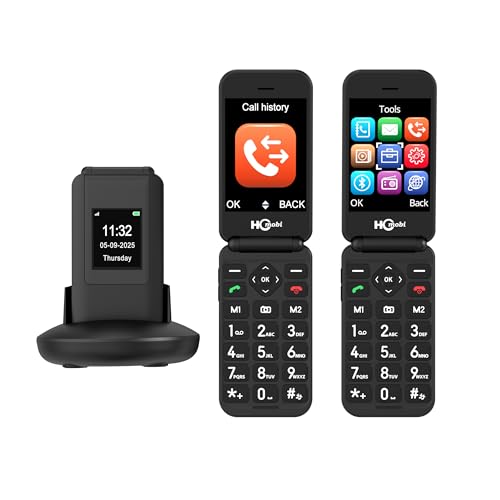
At a Glance
Big buttons sound like a single feature, but in practice three different things hide behind the phrase. There is the physical size of each key, the gap between keys that decides whether a thumb lands on one or two, and the feedback you feel when you press, whether a clear click or a mushy squash. A phone can win on one and lose on the others, which is why two listings that both say big buttons can feel nothing alike in the hand. This guide uses the listing text to separate the three.
The five picks are the artfone G3 with 21 large keys, two Lively Jitterbug flips (Flip2 and Flip3) built around big buttons and a high-contrast screen, the Verizon prepaid TCL Go Flip 7 with large tactile buttons and a SilisoundTek dual-screen flip that stresses large fonts. They differ in carrier and in whether the phone folds, so the carrier notes matter as much as the keys.
We evaluated these from listing text and buyer feedback and did not claim hands-on testing. No listing gives key dimensions, so size comparisons rely on what the maker says and on the key count.
6 Criteria to Look For Before Buying a Flip Phones With Big Button
Key buying criteria so you get the right fit the first time.
Key size versus key spacing
A big key that sits shoulder to shoulder with its neighbors can be as easy to misdial as a small one, because what matters is the gap and the shape. The artfone G3 lists 21 large buttons, but none of the listings gives spacing or millimeter sizes. Look at product photos, and where possible handle a unit in a store. Raised or domed keys help your thumb find the edge. A good test with any phone is to dial a familiar number without looking, ten times in a row, and count the errors.
Tactile feedback
Feedback is the click or travel you feel when a key registers. The Verizon Prepaid TCL Go Flip 7 explicitly describes tactile buttons, while the Jitterbug phones describe big buttons without naming feel. A clear press tells you a digit was entered without looking. If you have a light touch, favor a phone with firm feedback. A faint backlight also helps in dim rooms, though the excerpts here do not describe backlighting in detail.
Distinct call and end keys
Mixing up the answer and hang-up keys is a common source of dropped calls. Flip-to-answer and close-to-hang-up reduce button presses, and flip-to-answer behavior, where a listing states it, saves a press. Look for colored call and end keys, and speed dial slots such as the one-touch speed dial on the Jitterbug phones. One press is better than five. If a family member shares the phone, agree where the speed dial keys point so nobody dials the wrong person in a hurry.
Large fonts and screen contrast
Big buttons help the hands, and big text helps the eyes. The SilisoundTek stresses large fonts, and the Jitterbug phones list a high-contrast screen. The artfone G3 has a 2.4-inch screen, which keeps text modest in size. Match text support to the person's needs. Contrast matters at least as much as size, because pale text on a pale screen is hard to read at any size. Ask for the largest font setting during setup and leave it there.
Outer screen and fewer presses
An outer screen lets you see the caller without opening the phone. The Go Flip 7 has a 1.77-inch external display and the SilisoundTek has a 1.5-inch one, while the artfone G3 has none. Fewer presses mean fewer chances to hit the wrong key. Decide whether you want to see the caller first. On a bright day a small outer screen can be hard to see, so test it outdoors if you can. Closing the flip also ends the call, which removes the need to find a hang-up key.
Service and support
Big buttons matter less if the phone cannot be activated. The Lively Jitterbug phones work only with Lively service and come with a support team, the Go Flip 7 needs a Verizon plan, and the artfone phones are unlocked with a T-Mobile recommendation. Think about who will help with setup. If you are the one setting up the phone for a parent, ask yourself how many calls to a help desk you are willing to field. A bundled support line takes some of that burden off the family.
5 Best Flip Phones With Big Buttons in 2026
artfone G3 4G VoLTE Flip Phone
About this pick
The artfone G3 is the keypad that the listing describes most fully, with 21 large physical buttons including an SOS key and speed dial on a 2.4-inch clamshell. A physical keypad design is the point of the phone, and the 4G VoLTE support in the title means it is built for today's networks. For a person who types numbers by feel, a full set of distinct keys is easier than a touch panel.
Beyond the keys, the listing mentions a Hearing Enhancement Mode that you switch on by long-pressing the camera button once earphones or a hearing device are connected. There is no outer screen, so you open the phone to see the caller. The listing also favors T-Mobile as the best match, so check the bands for any other carrier.
It is the pick when key count and distinct buttons matter most. Next to the Lively Jitterbug Flip3 it is unlocked, so you choose the plan, but it lacks the Lively support team. Next to the SilisoundTek it drops the outer screen in favor of a bigger set of keys. Because every key is separate and the layout is a conventional keypad, the muscle memory carries over from older phones, which is a quiet advantage for people changing from a basic handset of ten years ago. Compared with the Jitterbug phones, the trade is support for flexibility: you handle the plan, but you also keep the choice of carrier.
Best for: Typing and dialing by feel with a full set of large keys.
Check price on AmazonSpecs
- Keys: 21 large physical buttons
- Screen: 2.4 inch
- Network: 4G VoLTE
- Safety: SOS button
- Audio: Hearing Enhancement Mode
Pros
- +21 large physical buttons
- +SOS key and speed dial
- +4G VoLTE support
- +Hearing Enhancement Mode
Cons
- −No outer screen
- −Listing favors T-Mobile
- −Key dimensions are not given
Lively Jitterbug Flip3 for Seniors
About this pick
The Jitterbug Flip3 is built on a simple premise: big buttons, a high-contrast screen, simple menus, a powerful speaker and one-touch speed dial. The listing says it works only with Lively service, with a U.S.-based support team available around the clock once activated. For many families, that mix of large keys and human help is the main draw.
The listing does not give key sizes or a key count, so you are trusting the brand's reputation for plain controls. It is also tied to Lively, which means you cannot take it to another carrier. A buyer who prefers choosing their own plan should look at an unlocked phone instead.
The Flip3 and Flip2 carry identical feature wording in the excerpts, so choose based on availability and any differences on the product page. Against the artfone G3, it offers service and support but not the hearing mode or the explicit key count. Ask whoever sets it up to test the speaker volume and the ringer in the room where the phone will live, since a loud, clear ring is part of what these phones are bought for.
Best for: Big-button simplicity with a support team behind it.
Check price on AmazonSpecs
- Keys: Big buttons
- Screen: High contrast
- Menus: Simple
- Speed dial: One-touch
- Service: Lively only
Pros
- +Big buttons and simple menus
- +High-contrast screen
- +One-touch speed dial
- +Support team described as available around the clock
Cons
- −Works only with Lively service
- −No key dimensions listed
- −Plan cost sits on top of the phone
Lively Jitterbug Flip2 for Seniors
About this pick
The Jitterbug Flip2 shares nearly all its listing language with the Flip3: big buttons, a high-contrast screen, simple menus, a powerful speaker and one-touch speed dial. It, too, is only compatible with Lively phone service, and the listing says the same around-the-clock U.S.-based support applies once it is activated. In the excerpt, nothing separates the two models, so the practical difference is price rank and stock.
It ranks at the low end of the group on price, which makes it the least expensive way into a big-button flip with a service behind it. The same lock-in applies, so make sure Lively's plans suit the person who will use it. The excerpt gives no key count, screen size or battery capacity.
If a Flip3 is unavailable or costs more than you want to spend, the Flip2 is the sensible alternative. Against the Verizon prepaid TCL Go Flip 7, both Jitterbugs offer a dedicated support team, while the TCL offers a standard carrier and a visible outer display. Because both Jitterbugs use the same service, you can start on the Flip2 and move to the Flip3 later without changing carriers, which keeps the decision low-risk.
Best for: The lowest-priced entry into a big-button Jitterbug.
Check price on AmazonSpecs
- Keys: Big buttons
- Screen: High contrast
- Speed dial: One-touch
- Speaker: Powerful
- Service: Lively only
Pros
- +Big buttons and a high-contrast screen
- +Powerful speaker
- +One-touch speed dial
- +Lively support
Cons
- −Lively service required
- −No spec detail in the excerpt
- −Near-identical to the Flip3
Verizon Prepaid TCL Go Flip 7
About this pick
The Go Flip 7 is sold through Verizon prepaid and locked to Verizon, so it works only on the Verizon network and requires a Verizon plan. The listing describes large, tactile buttons and a clear display on a classic flip, with a 1.77-inch external color screen that shows who is calling, message notifications and the time without opening it. The word tactile is the one that matters for key feel.
The lock is both a benefit and a limit: it works straight away with a prepaid plan, but it cannot move to another carrier, and a prepaid-locked unit may not activate on postpaid plans. The excerpt does not give a key count or key dimensions. It also offers 4G LTE, which is the baseline for any flip today.
It is the choice for someone already on Verizon who wants a standard flip with an outer screen. Against the artfone G3, it has an outer display but no stated SOS or hearing mode. Against the Lively phones, it uses a mainstream carrier rather than a dedicated service. If you are not sure whether your Verizon account is prepaid or postpaid, check before buying, because a prepaid-locked unit is made for the first of the two. Test the keys by dialing a familiar number with the phone out of sight, to learn whether the tactile feel really helps.
Best for: Verizon prepaid users who want tactile keys and an outer screen.
Check price on AmazonSpecs
- Network: 4G LTE
- Keys: Large tactile buttons
- Outer screen: 1.77 inch color
- Lock: Verizon prepaid
- Plan: Verizon plan required
Pros
- +Large tactile buttons
- +1.77 inch outer display
- +4G LTE support
- +Straightforward Verizon plan
Cons
- −Locked to Verizon prepaid
- −No key count listed
- −May not activate on postpaid plans
SilisoundTek 4G Dual-Screen Flip Phone
About this pick
The SilisoundTek flip is here because of its large fonts and its speed dial, though the listing emphasizes text size more than key size. It has a 2.8-inch inner screen, a 1.5-inch outer screen, an SOS button, speed dial and a charging dock. A 1400mAh battery is listed, along with unlocked 4G LTE and a recommendation for T-Mobile.
The listing does not describe the keys as big in any measured way, so this is the pick for someone whose main difficulty is reading the screen rather than hitting keys. The dock helps with charging, and the outer screen shows who is calling. Carrier compatibility outside T-Mobile is something to confirm.
It makes sense next to the artfone G3, which has the bigger key promise. Pick the SilisoundTek when you want text size, a dock and an outer screen together, and pick the G3 when key size is the top priority. Treat the key feel as unknown until you handle one, and consider the large-font setting the main reason to choose it over the artfone phones. Ask whoever sets it up to raise the font to the largest setting and check that the outer screen text is still readable.
Best for: Large on-screen text with a dock and outer display.
Check price on AmazonSpecs
- Text: Large fonts
- Screens: 2.8 inch inner, 1.5 inch outer
- Safety: SOS button
- Charging: Dock
- Network: 4G LTE unlocked
Pros
- +Large fonts
- +Charging dock
- +Dual screens
- +SOS button and speed dial
Cons
- −Key size is not described
- −Best compatibility is T-Mobile
- −Smaller 1400mAh battery
How We Evaluated These Flip Phones With Big Buttons
Each pick was assessed across 5 criteria weighted for real-world use.
Key description
We read how each listing describes its keys. The artfone G3 gives a count of 21, the Go Flip 7 says tactile, and the Jitterbug phones say big buttons without numbers.
Text and screen
We compared font and screen language. The SilisoundTek stresses large fonts, and the Jitterbug listings stress contrast.
Shortcuts
We looked for speed dial and SOS features that reduce key presses. The Jitterbug phones list one-touch speed dial, and the artfone and SilisoundTek list speed dial and SOS keys.
Service model
We considered how each phone is activated. The Lively phones need Lively, the Go Flip 7 needs Verizon prepaid, and the others are unlocked.
Lineup positioning
The artfone G3 leads on key detail, the Go Flip 7 on tactile description, the Jitterbug Flip3 on support, the Flip2 on entry cost, and the SilisoundTek on fonts and dock.
How to Choose the Right Flip Phones With Big Buttons
By the Main Difficulty
Start with what makes a regular phone hard.
| Difficulty | Recommended pick | Why |
|---|---|---|
| Hitting the right key | artfone G3 4G VoLTE Flip Phone | 21 large keys |
| Feeling the press | Verizon Prepaid TCL Go Flip 7 | Tactile buttons |
| Reading small text | SilisoundTek 4G Dual-Screen Flip Phone | Large fonts |
| Needing help setting up | Lively Jitterbug Flip3 for Seniors | Support team |
Pick the difficulty first. If two difficulties compete, solve the one that causes the most misdials first.
By Budget Level
Relative price order.
| Level | Recommended pick | Reason |
|---|---|---|
| Lowest | Verizon Prepaid TCL Go Flip 7 | Lowest price rank |
| Low | Lively Jitterbug Flip2 for Seniors | Low entry |
| Low | SilisoundTek 4G Dual-Screen Flip Phone | Dock and screens |
| Mid | Lively Jitterbug Flip3 for Seniors | Support |
| Upper | artfone G3 4G VoLTE Flip Phone | Key detail |
Plan cost matters more than phone cost for Lively.
Dedicated Service vs Standard Carrier
Who helps you matters.
Dedicated service
The Lively Jitterbug Flip3 for Seniors and Lively Jitterbug Flip2 for Seniors work only with Lively and come with a support team. They suit families who want help available. Choose them if setup worries you.
Standard carrier
The Verizon Prepaid TCL Go Flip 7, artfone G3 4G VoLTE Flip Phone and SilisoundTek 4G Dual-Screen Flip Phone use ordinary plans. They give more choice. Choose them if you can handle activation.
Service for help, standard for choice.
Outer Screen Needs
Seeing the caller changes habits.
| Preference | Recommended pick | Reason |
|---|---|---|
| Larger outer screen | Verizon Prepaid TCL Go Flip 7 | 1.77 inch |
| Outer screen with dock | SilisoundTek 4G Dual-Screen Flip Phone | 1.5 inch plus dock |
| No outer screen, more keys | artfone G3 4G VoLTE Flip Phone | 21 keys |
| Simple menus | Lively Jitterbug Flip3 for Seniors | Plain interface |
Check photos for the screen layout. A phone that shows the caller can prevent a surprise from an unknown number.
For Typing by Feel Specifically
Blind dialing needs distinct keys.
Look for
Choose a full keypad with distinct, raised keys and a clear center marker on the 5 key.
In this comparison
The artfone G3 4G VoLTE Flip Phone and Verizon Prepaid TCL Go Flip 7 are the best fits, one for key count and one for tactile feel.
When to Spend More
Extra cost buys help and detail.
| Spend more if | Save if |
|---|---|
| You want a support team like the Lively Jitterbug Flip3 for Seniors | You are comfortable activating a plan yourself |
| You want the key detail of the artfone G3 4G VoLTE Flip Phone | The Lively Jitterbug Flip2 for Seniors is plain enough |
| You want large fonts like the SilisoundTek 4G Dual-Screen Flip Phone | Text size is not an issue |
Spend on what solves the difficulty. Plan costs outlive the phone price, so weigh service as well as hardware.
Frequently Asked Questions
How big should phone buttons be?
There is no single standard. What matters is that your thumb lands on one key without touching its neighbor. The listings do not give key dimensions, so rely on photos and the key count. If the person has trouble pressing keys, ask them to try a friend's phone with keys of various sizes first. Handle a unit in a store if you can, since spacing is easier to judge by touch than by photo.
Are big buttons enough?
Not alone. You also need clear feedback, distinct call and end keys and readable text. A phone with all four is easier than one with only big keys. If one of the four is missing, the others can make up for it, but not completely.
Do the Jitterbug phones differ?
The listings use nearly identical wording for the Flip2 and Flip3, so the excerpts do not show what separates them. Check the product pages for screen size, battery and any feature differences, and then choose by availability and cost. Both work only with Lively service, so the carrier decision is the same either way.
Can I use a Jitterbug on another carrier?
No. The listing says it works only with Lively phone service. If you want to choose a carrier, pick an unlocked phone. Lively's plans differ from ordinary carrier plans, so read them before you commit.
Is speed dial worth setting up?
Yes. One-touch speed dial turns a call into a single press. Program family numbers before you hand the phone over. Write the numbers on a card kept near the phone in case the settings are ever reset. A card by the phone listing the programmed numbers helps visitors and helpers.
Is a flip better than a bar phone for big buttons?
A flip protects the keys in a pocket and answers by opening. A bar phone can offer a bigger keypad. Check the form factor. All five picks here are flips, so the keys are protected when the phone is shut.
Should I ask an audiologist about hearing?
If hearing is a concern, an audiologist can advise on compatibility with hearing aids. Big keys do not change call volume. The artfone G3 lists a Hearing Enhancement Mode. Always bring the phone to the appointment so the professional can see how it is used.
Bottom Line
best overall: artfone G3 4G VoLTE Flip Phone - most keys described pick in this roundup.
See the full rankings above for all picks with pros, cons, and best-for summaries.
Browse on Amazon
All Prime-eligible options with current pricing.
Shop on Amazon →