6 Best Wireless Trackball Mice in 2026
Six wireless trackball mice compared by pairing slots, battery type, Bluetooth and receiver options and tilt, for tidy desks and several computers.


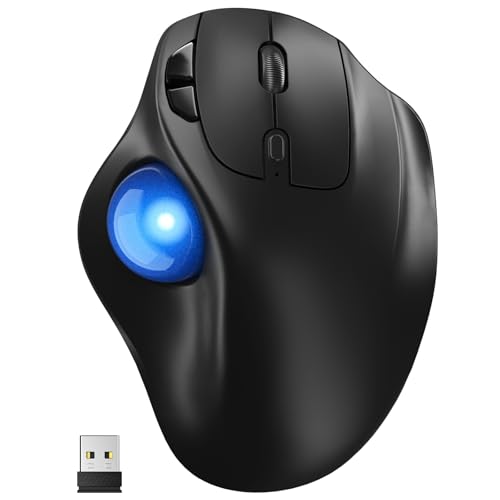


At a Glance
Cutting the cord helps a trackball more than it helps a mouse. A regular wireless mouse still travels across the desk, but a trackball sits in one spot, so the main benefit of wireless is placement. You can set it on a lap tray, a sofa arm, a side table or a standing desk without a cable pulling it sideways. Wireless also lets one device serve a laptop, a desktop and a tablet through a button press, which is especially handy in a home office.
This guide compares six wireless trackballs. The Logitech Ergo M575S and MX Ergo S are the established pair. The TECKNET and Yadkbo both pair with three devices over Bluetooth and a 2.4G receiver, with the TECKNET adding a 16 degree tilt and the Yadkbo running on AAA batteries. The Nulea M501 is a rechargeable budget model, and the Nulea M508 adds a lit ball and a knob for lighting effects.
We evaluated each pick from product specifications and buyer feedback patterns, and we focused on the wireless side of the experience: how you pair it, how many computers it can remember, what powers it and how it behaves when you move around. Remember that a thumb trackball takes a short adjustment period, whichever wireless model you pick.
6 Criteria to Look For Before Buying a Wireless Trackball Mice
Key buying criteria so you get the right fit the first time.
Pairing slots and switching
If you use more than one computer, the number of remembered connections is the most useful wireless spec. The TECKNET, Yadkbo and Nulea M501 each hold three devices, while the Logitech Ergo M575S offers a Bluetooth link and a Logi Bolt receiver. A single button that hops between them saves repeated re-pairing. A one-computer household can ignore the count.
Bluetooth versus receiver
Bluetooth uses no port, and a 2.4G receiver works with computers that lack Bluetooth. The Logitech Ergo M575S, TECKNET and Yadkbo support both styles, which is the safest choice for mixed equipment. A receiver also tends to wake faster after sleep. If your laptop has only USB-C ports, Bluetooth is the cleaner route.
Battery type and routine
The Logitech Ergo M575S takes an AA battery, the Yadkbo two AAA cells, and the Logitech MX Ergo S and Nulea M501 charge. Replaceable cells swap in seconds but must be bought, and rechargeable packs need a cable and a habit. Decide which routine you can keep up with, because a dead trackball in the middle of work is irritating. Keep one spare cell or a short cable within reach either way.
Range and stability
A trackball sits close to the computer, so range rarely matters on a desk, but it helps on a sofa or standing setup. The Yadkbo lists a range of about 33 feet. Keep the receiver in a port near the device, avoid putting it behind a metal case and test the link from your usual seat. If the pointer hesitates, move the receiver to a nearer port.
Tilt and posture
A tilted shell turns the forearm toward a handshake. The Logitech MX Ergo S offers a hinged 20 degrees and the TECKNET a fixed 16 degrees, while the Logitech Ergo M575S, Yadkbo and Nulea models stay flat. Choose a tilt if your wrist complains of twisting, and give yourself a week to adapt. Start with a small angle and raise it only when the hand feels at ease.
Extras and lighting
Some wireless trackballs add features that are not about pointing. The Nulea M508 has an RGB-lit ball with a knob for effects, and the Logitech MX Ergo S has a precision toggle. Lights can look fun but draw the eye in a quiet room, while a precision toggle genuinely helps fine work. Decide whether the extra earns its place.
6 Best Wireless Trackball Mice in 2026
Logitech Ergo M575S Wireless Trackball Mouse
About this pick
The M575S offers two ways to connect, either Bluetooth or the small Logi Bolt USB receiver that ships with it. That choice means it works with a laptop that has no spare port as well as with a desktop that has Bluetooth turned off. Once linked, the connection holds steadily, and the device drives the cursor with a thumb-operated ball while the body stays put. Three buttons can be customized for the shortcuts you use most.
The weak spots are power and shape. It runs on a single AA battery, so you buy and replace cells instead of charging, which some people prefer and others dislike. It is built for the right hand, and the thumb carries the whole steering job. Compared with some rivals it lists only two connection routes, so it will not hop between three computers with a single press.
As a daily companion it is steady and low maintenance. A fresh cell lasts a long time, the ball lifts out for cleaning, and the receiver can be left in place. Against the MX Ergo S it is lighter and cheaper but has no tilt or charging, and against the TECKNET it trades extra pairing slots for a more finished feel. It is the wireless trackball to choose when you want the least fuss.
Best for: One or two computers, with a preference for a polished shell and a replaceable battery.
Check price on AmazonSpecs
- Link: Bluetooth or Logi Bolt
- Power: AA battery
- Control: Thumb ball
Pros
- +Bluetooth and receiver connection options
- +Steady link once paired
- +Three buttons can be customized
- +Replaceable AA battery
Cons
- −Only two connection routes
- −Right-handed thumb design
- −No tilt hinge
Logitech MX Ergo S Advanced Wireless Trackball Mouse
About this pick
The MX Ergo S is the most capable wireless trackball here. It charges over USB-C, so there are no cells to buy, and a hinge sets a 20 degree tilt that turns the hand toward a handshake posture. A button switches between speed and precision modes, which helps when a wireless pointer has to cover a large monitor and then pick a small button. The maker says clicks are much quieter than before.
It is also the heaviest and most expensive of the six. The extra weight keeps it from sliding, but it makes the device less appealing for travel. The hinge takes a little time to set up, and the rechargeable battery needs a charging habit. Like the other Logitech, it is a right-handed thumb design.
For wireless life the key points are charging and stability. A charge lasts long enough that you rarely think about it, and the base stays planted on a desk or tray. Next to the Logitech Ergo M575S it adds a tilt and a precision toggle, and next to the TECKNET it offers a more refined shell. It is the right choice if the trackball will be used for many hours every day.
Best for: Many daily hours of use where charging, tilt and a precision toggle justify the cost.
Check price on AmazonSpecs
- Charging: USB-C
- Tilt: 20 degrees
- Toggle: Speed or precision
Pros
- +USB-C charging, no cells to buy
- +20 degree tilt hinge
- +Precision toggle for small targets
- +Planted weight keeps it steady
Cons
- −Highest cost of the six
- −Heavy for travel
- −Right-handed thumb design
TECKNET Wireless Trackball Mouse with Bluetooth
About this pick
The TECKNET trackball is built for people who juggle several computers. It stores three connections, two on Bluetooth and one on the 2.4G receiver, and a button moves between them quickly. The body sits at a 16 degree vertical angle, which brings the forearm into a more natural posture than a flat shell, and the thumb ball steers the cursor.
It is a lower-priced alternative to the Logitech models and it shows in the finish, with a simpler shell and less polished software. The tilt is fixed rather than adjustable, so you cannot flatten it if you prefer. Buyers who press hard or hold tightly may notice the body less supportive over a long day, and the thumb still handles the steering.
In practice the three-device switching is the highlight. A laptop for work, a personal laptop and a desktop can all share one trackball, and the connection light tells you which is active. Compared with the Logitech Ergo M575S it provides more pairing slots and a tilt for less, and compared with the Yadkbo it adds the angled posture. It is a smart pick for a multi-computer desk.
Best for: Multi-computer desks that want a fixed tilt and three remembered connections.
Check price on AmazonSpecs
- Devices: 3 (BT1, BT2, 2.4G)
- Angle: 16 degrees
- Link: Bluetooth and 2.4G
Pros
- +Remembers three devices
- +16 degree tilt eases forearm twist
- +Bluetooth and 2.4G options
- +Thumb steering keeps the arm still
Cons
- −Tilt is fixed
- −Simpler finish than Logitech
- −Right-handed thumb design
Yadkbo Ergonomic Wireless Trackball Mouse
About this pick
The Yadkbo runs on two AAA batteries with no built-in cell, which the listing frames as a way to avoid the aging of a rechargeable pack. You can connect it three ways, with two Bluetooth slots and one 2.4G receiver, and the stated range is about 33 feet. Five DPI levels let you adjust cursor speed, and the thumb controls replace wrist and arm movement.
Note that the batteries are not included, so you must supply two AAA cells. Without a charging cable the mouse is easy to refresh, but running dry in the middle of a task means keeping spares. The listing describes quiet operation, and its finish is simpler than the premium models. It has no tilt.
The appeal here is simplicity. Pair it once, pick the DPI that suits you, and swap batteries when needed. Compared with the TECKNET it drops the tilt, and compared with the Nulea M501 it avoids charging in favor of cells. It suits someone who would rather replace batteries than plug in a cable.
Best for: People who prefer swapping batteries to charging and want three device slots.
Check price on AmazonSpecs
- Power: 2 AAA batteries
- DPI: 5 levels
- Range: About 33 feet
Pros
- +Two AAA cells swap in seconds
- +Three connection slots
- +Five DPI levels
- +Range of about 33 feet
Cons
- −Batteries not included
- −No tilt
- −Plain finish
Nulea M508 Wireless Trackball Mouse with RGB
About this pick
The Nulea M508 is the decorative option in the group. The ball carries uniform RGB lighting, and a physical knob switches among effects such as flowing water. Beneath the lights is a right-handed shape meant to support a natural palm position, and thumb control steers the cursor while the body stays still.
The lights are optional but may not suit everyone. A buyer who wants a calm desk may find the glow distracting, and the listing offers fewer technical details about batteries and pairing than the others, so confirm the connection on the page. It has no tilt and no extra pairing slots listed.
For ownership, the lighting is a conversation piece rather than a productivity tool. If you want a wireless thumb trackball that adds some personality, it works. Compared with the Nulea M501 it adds the lit ball, and compared with the Logitech Ergo M575S it is plainer in the shell. It suits a gamer-style desk more than a quiet office.
Best for: Desks where a lit trackball adds personality and the thumb ball does the steering.
Check price on AmazonSpecs
- Ball: Uniform RGB
- Control: Thumb ball
- Hand: Right
Pros
- +RGB lighting with a physical effect knob
- +Right-hand sculpted shape
- +Thumb steering keeps the arm still
- +Wireless connection
Cons
- −Lights may distract
- −Fewer stated technical details
- −No tilt hinge
Nulea M501 Wireless Trackball Mouse
About this pick
The Nulea M501 is the plain wireless option that charges rather than takes cells. It connects through Bluetooth or a USB dongle, stores up to three devices and cycles through them with a button on the bottom. Four DPI levels set the cursor speed, and a smooth thumb ball handles steering.
It is a basic device. There is no tilt hinge, the finish is plain, and the underside button is not the easiest to find. A rechargeable battery means a cable and a habit of topping up, and the shape is for the right hand. It also lacks the software polish of the Logitech pair.
As a starter it works well. Three-device switching suits a small office, and the DPI choices are enough to tune the pointer. Compared with the Yadkbo it charges instead of using AAA cells, and compared with the TECKNET it gives up the tilt for a flatter shell. It is a good low-risk way to try wireless trackballs.
Best for: First-time wireless trackball buyers who like charging and want three device slots.
Check price on AmazonSpecs
- Power: Rechargeable
- Devices: 3
- DPI: 4 levels
Pros
- +Rechargeable battery
- +Bluetooth or dongle options
- +Remembers up to three devices
- +Four DPI levels
Cons
- −No tilt hinge
- −Underside switch is hard to find
- −Plain finish
How We Evaluated These Wireless Trackball Mice
Each pick was assessed across 5 criteria weighted for real-world use.
Connection options
We compared Bluetooth, receiver and multi-device support across the six. The TECKNET, Yadkbo and Nulea M501 each hold three connections, and the Logitech Ergo M575S offers Bluetooth plus a Logi Bolt receiver. Our view comes from listing details and buyer feedback patterns, not hands-on bench work.
Power and upkeep
Battery type was weighed as a recurring chore. AA, AAA and rechargeable designs each have trade-offs, and we favored designs whose routine is easy to keep. The Logitech MX Ergo S charges by USB-C, the Yadkbo uses AAA cells, and the Nulea M501 charges internally.
Posture support
Tilt and shell shape were assessed. The Logitech MX Ergo S has an adjustable 20 degree hinge and the TECKNET a fixed 16 degrees. Flat designs earned less credit for long sessions but remain easy to learn.
Pointer control
DPI steps and toggles were counted. The Yadkbo has five levels, the Nulea M501 four and the Logitech MX Ergo S a speed or precision button. Thumb steering needs slow settings for fine tasks, so these tools mattered.
Lineup positioning
The Logitech Ergo M575S leads for balance, the MX Ergo S for features, the TECKNET for tilted multi-device use, the Yadkbo for simple battery swaps, the Nulea M508 for a lit ball and the Nulea M501 for rechargeable value.
How to Choose the Right Wireless Trackball Mice
By How Many Computers You Use
The number of machines decides which wireless trackball suits you.
| Situation | Pick | Why |
|---|---|---|
| One laptop or desktop | Logitech Ergo M575S Wireless Trackball Mouse | Simple Bluetooth or receiver link. |
| Three computers on one desk | TECKNET Wireless Trackball Mouse with Bluetooth | Remembers three connections. |
| Laptop, tablet and phone | Nulea M501 Wireless Trackball Mouse | Three-device button switching. |
| Receiver and Bluetooth backup | Yadkbo Ergonomic Wireless Trackball Mouse | Two Bluetooth slots plus a 2.4G receiver. |
| Heavy single-desk use | Logitech MX Ergo S Advanced Wireless Trackball Mouse | Premium features for long hours. |
By Budget
Tiers are relative inside this lineup.
| Tier | Pick | What you get |
|---|---|---|
| Entry | Yadkbo Ergonomic Wireless Trackball Mouse | Three connections and AAA power. |
| Entry | Nulea M501 Wireless Trackball Mouse | Rechargeable with four DPI levels. |
| Mid | TECKNET Wireless Trackball Mouse with Bluetooth | Tilt and three remembered devices. |
| Mid | Nulea M508 Wireless Trackball Mouse with RGB | A lit ball and knob. |
| Premium | Logitech Ergo M575S Wireless Trackball Mouse | Polished shell and software. |
| Premium | Logitech MX Ergo S Advanced Wireless Trackball Mouse | Tilt, precision toggle and USB-C charging. |
Replaceable Batteries vs Rechargeable
Wireless always means some power routine.
Replaceable batteries
The Logitech Ergo M575S uses an AA cell and the Yadkbo two AAA cells. Swapping takes seconds, and there is no battery aging. You must keep spares on hand, and the cells are an ongoing purchase. Choose this if you dislike cables and charging schedules.
Rechargeable
The Logitech MX Ergo S and Nulea M501 charge instead. There is nothing to buy, but a flat battery means plugging in and waiting. Choose this if you are comfortable with a weekly or monthly charging habit and want to avoid disposable cells.
In short, cells for quick swaps, rechargeable for no ongoing purchases.
By Posture
Pick the shell angle that suits your forearm.
| Preference | Pick | Reason |
|---|---|---|
| Adjustable tilt | Logitech MX Ergo S Advanced Wireless Trackball Mouse | Hinge sets 20 degrees. |
| Fixed gentle tilt | TECKNET Wireless Trackball Mouse with Bluetooth | A 16 degree angle. |
| Flat and familiar | Logitech Ergo M575S Wireless Trackball Mouse | Supportive flat shell. |
| Flat and inexpensive | Nulea M501 Wireless Trackball Mouse | Basic flat thumb design. |
| Flat with a light show | Nulea M508 Wireless Trackball Mouse with RGB | RGB effects on the ball. |
For Sofa and Lap Tray Use Specifically
A trackball is ideal away from a desk, as long as the wireless link is steady.
Look for
Choose a stable body, a reliable link at close range and a battery routine you can manage without a cable nearby. A rechargeable cell that lasts days is convenient, and a replaceable cell is better when you travel.
In this comparison
The Logitech Ergo M575S and Yadkbo suit a sofa because their cells swap on the spot. The Nulea M501 is a rechargeable alternative, and the TECKNET gives a tilted posture for an armrest. The heavier Logitech MX Ergo S stays planted on a tray.
When to Spend More
| Spend more if | Save if |
|---|---|
| You use the trackball for hours daily, making the Logitech MX Ergo S's tilt and charging worthwhile. | You use it a little, so the Nulea M501 is plenty. |
| You want a polished, dependable shell from the Logitech Ergo M575S. | Three connection slots from the Yadkbo cover your needs. |
| You switch among three machines and want a tilt, as on the TECKNET. | You use one computer. |
| You enjoy a lit ball. | You want a calm desk. |
Frequently Asked Questions
How do I choose between Bluetooth and a receiver?
Bluetooth saves a USB port, while a receiver works on computers without Bluetooth and often wakes faster. The Logitech Ergo M575S, TECKNET and Yadkbo support both, so they suit mixed equipment. If your laptop has only USB-C ports, Bluetooth is simpler. Keep the receiver plugged in when you can.
Do wireless trackballs lag?
A good wireless link feels the same as a cord for everyday work. Keep the receiver close and avoid obstacles for the best results. Because a trackball stays put, the distance to the computer is short, which helps reliability.
How long do the batteries last?
It varies by model and use. AA and AAA models can run for months, while rechargeable ones like the Logitech MX Ergo S last days to weeks per charge. Treat maker figures as best-case and carry a spare cell if you travel.
Is a tilted wireless trackball better?
It can reduce forearm twist, which many people find more comfortable. The Logitech MX Ergo S offers an adjustable 20 degrees and the TECKNET a fixed 16 degrees. Flat designs are easier to learn. Try a tilt if your wrist complains of lying flat.
Can I use a wireless trackball with a tablet or phone?
Often yes, if the device supports Bluetooth mice. Models with several pairing slots, like the TECKNET and Nulea M501, switch easily between a laptop and a tablet. Check the listing for supported systems before buying.
Why does the cursor stutter sometimes?
The usual cause is a dirty ball or sensor. Pop the ball out, wipe it with a lint-free cloth and swab the supports. A weak battery or distance from the receiver can also cause lag, so replace or recharge and move closer.
Are RGB trackballs worth it?
They are a cosmetic extra. The Nulea M508 lights the ball and lets you switch effects with a knob, which some people enjoy. It does not make the pointer work better, so choose it for style rather than function.
Bottom Line
best overall: Logitech Ergo M575S Wireless Trackball Mouse - best overall pick in this roundup.
See the full rankings above for all picks with pros, cons, and best-for summaries.
Browse on Amazon
All Prime-eligible options with current pricing.
Shop on Amazon →