6 Best Wi-Fi Extenders for Large Homes in 2026
Six Wi-Fi extenders for big houses, compared by stated coverage, band speed, antennas and Ethernet, plus how to place them across several rooms.


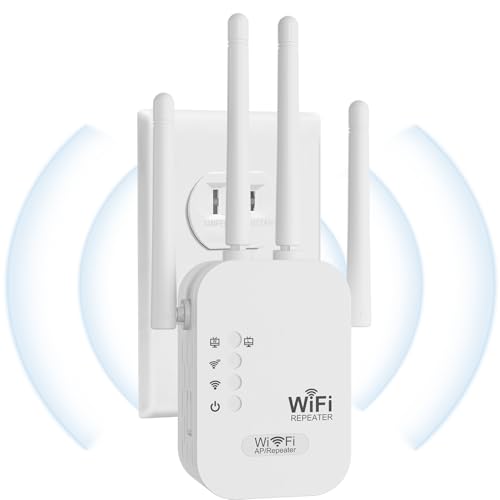
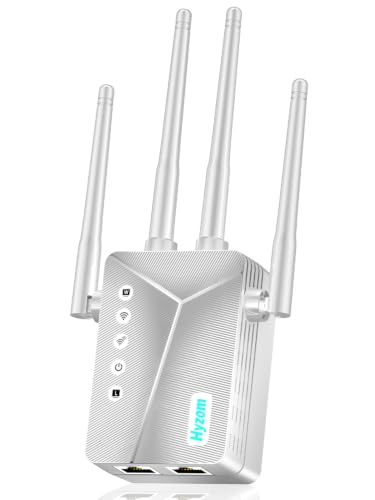
At a Glance
A large home asks more of an extender than a studio does, because the signal has to cross distance, floors and several layers of wall before it reaches the room that complains. The six extenders below span a wide range of stated coverage, from 2,100 sq ft on the TP-Link RE550 to 18,000 sq ft on the Hyzom, and that spread is the first thing worth understanding. We compared them from product specs and buyer feedback, not hands-on lab work, and we treat every square-footage number as a manufacturer claim.
Size is only one half of the decision. A big house also tests how an extender handles speed, because every unit that rebroadcasts a signal gives up part of its throughput to do so, and two or three units in a row compound that cost. The TP-Link AX3000 at 2,400 sq ft pairs Wi-Fi 6 with a 3 Gbps rating, while the 1200 Mbps class units trade speed for larger claims.
Read the coverage figures as a way to rank the picks against one another, then use the placement advice later in this guide to decide how many you actually need.
6 Criteria to Look For Before Buying a Wi-Fi Extenders for Large Home
Key buying criteria so you get the right fit the first time.
Read Coverage Claims With Suspicion
The picks here claim anywhere from 2,100 sq ft to 18,000 sq ft, and the hardware inside them does not differ by anything like that ratio. Square-footage numbers describe open space with no walls, so a framed house will deliver a fraction of the stated figure. The TP-Link RE550 at 2,100 sq ft and the TP-Link AX3000 at 2,400 sq ft are conservative claims, while the Hyzom at 18,000 sq ft is a ceiling. Use these numbers to rank units against each other and then plan on more extenders than the box suggests.
Plan the Chain, Not Just the Unit
In a large home you may need two extenders, and the second one should connect to a strong signal rather than to the first extender's weak edge. Put each unit about halfway to the area it serves, where the incoming signal is still strong. The TP-Link AX3000 can carry a chain better than the 1200 Mbps units because it has a 3 Gbps rating to spend on each hop. Every hop trims throughput, so avoid more than two in a row.
Prioritize the 5 GHz Band
For streaming and video calls in the far rooms, the 5 GHz band is what carries the load, while the 2.4 GHz band is mostly for reach through walls. The PEDUMMY lists 867 Mbps on 5 GHz, the nohzio and PEDUMMY share a 1200 Mbps class, and the TP-Link AX3000 lists up to 2404 Mbps on 5 GHz. If your family streams in several rooms at once, pick a unit with a stronger 5 GHz figure. The Aodcaopul lists only 300 Mbps on 2.4 GHz, so keep it for light-use rooms.
Count and Aim the Antennas
More antennas give you more ways to aim the signal, but only if you actually adjust them. The TP-Link RE550 has three adjustable external antennas, the Hyzom has four high-gain antennas, and the TP-Link AX3000 uses two high-gain directional antennas with beamforming. Directional designs reward patient placement, while multi-antenna designs are more forgiving. Plan to spend a few minutes pointing antennas toward the dead area and checking the signal on a phone.
Add a Cable for Fixed Devices
A wired link is the most reliable way to move video into a far room, and an Ethernet port lets the extender hand off to a TV, console or desktop. The PEDUMMY and the Hyzom both list a wired port, and the PEDUMMY adds an access point mode. For a home theater room or a home office at the end of a long hallway, the cable bypasses the final wireless hop. If your house already has Ethernet runs, choose a unit that can use them.
Check Setup and Security Details
A big house often means the extender is installed in a hard-to-reach spot, so a short setup path saves time. The TP-Link units use WPS or a browser step, the nohzio lists WEP, WPA and WPA/WPA2 security, and TP-Link states a CISA cybersecurity commitment on the RE550 and AX3000 listings. Use WPA2 or newer on your router for the best protection. Avoid units that list only old protocols.
6 Best Wi-Fi Extenders for Large Homes in 2026
TP-Link AX3000 Wi-Fi 6 Dual-Band Range Extender
About this pick
The TP-Link AX3000 is a dual-band Wi-Fi 6 extender with a 3 Gbps total rating, including up to 2404 Mbps on the 5 GHz band. It states coverage up to 2,400 sq ft, which makes it one of the more modest claims here but also one of the more believable ones for its hardware class. Two high-gain directional antennas and beamforming aim the signal toward your devices rather than spraying it evenly in every direction.
In a large home the strength of this model is its speed headroom, since the 5 GHz band has the room to carry video calls and streaming at the far end of a long chain. Its weakness is that two antennas and a 2,400 sq ft rating mean you will want more than one unit for a house with several distant wings. It is the pick for a household with a Wi-Fi 6 router that wants every extended room to feel quick.
Placement matters more than usual with directional antennas, so spend a few minutes pointing them toward the dead area while you watch signal strength in the app. Against the TP-Link RE550, it swaps three antennas and a Wi-Fi 5 design for two directional antennas and Wi-Fi 6, with 300 more sq ft of claimed coverage. Against the Hyzom at 18,000 sq ft, the honest comparison is a verified brand profile with modest claims against a much bigger number you should not take at face value.
Best for: Wi-Fi 6 households that want the fastest extended rooms rather than the largest claimed number.
Check price on AmazonSpecs
- Standard: Wi-Fi 6, dual-band AX3000
- Total bandwidth: 3 Gbps, 2404 Mbps on 5 GHz
- Coverage: Up to 2,400 sq ft
- Antennas: Two high-gain directional
- Signal tech: Beamforming
Pros
- +Wi-Fi 6 with 3 Gbps rating and 2404 Mbps on 5 GHz
- +Directional antennas with beamforming aim at your devices
- +Claims a believable 2,400 sq ft for its class
- +TP-Link states a CISA cybersecurity commitment
Cons
- −Two antennas limit coverage in sprawling layouts
- −Needs a Wi-Fi 6 router to use its full rating
- −Several units are needed for very long floor plans
TP-Link AC1900 RE550 Wi-Fi Range Extender
About this pick
The RE550 is a dual-band Wi-Fi 5 extender with a 1.9 Gbps total rating and coverage up to 2,100 sq ft. Three adjustable external antennas give you more physical control over the signal pattern than the fixed designs here. It is the older-generation answer for a house that still runs a Wi-Fi 5 router and does not need a newer standard.
The tradeoff is generation, because a Wi-Fi 5 extender behind a Wi-Fi 6 router will cap the extended rooms at the older standard. For large homes with plenty of older phones, tablets and smart-home gadgets this is a non-issue, and the three antennas help in layouts with awkward corners. The ceiling shows when many newer devices share the extended band at once.
Setup stays simple, with WPS pairing or a browser step, and the antennas can be rotated once the unit is plugged in. Compared with the TP-Link AX3000 it offers one more antenna but a generation older standard and a smaller 3 Gbps versus 1.9 Gbps rating. Next to the nohzio unit at a claimed 3000 sq ft it states less coverage, though its 1.9 Gbps rating is higher than the 1200 Mbps class.
Best for: Large homes on an existing Wi-Fi 5 router that want adjustable antennas without moving to a new standard.
Check price on AmazonSpecs
- Standard: Wi-Fi 5, dual-band AC1900
- Total bandwidth: Up to 1.9 Gbps
- Coverage: Up to 2,100 sq ft
- Antennas: Three adjustable external
- Security: TP-Link CISA signatory
Pros
- +Three adjustable external antennas for awkward layouts
- +1.9 Gbps rating tops the 1200 Mbps class units here
- +Stated 2,100 sq ft is conservative for its hardware
- +TP-Link lists a CISA cybersecurity commitment
Cons
- −Wi-Fi 5 design caps extended rooms at the older standard
- −Lower coverage claim than the nohzio or PEDUMMY
- −Many newer devices will crowd the extended band
nohzio 1200Mbps Dual Band WiFi Extender
About this pick
The nohzio is a 1200 Mbps dual-band extender that states coverage up to 3,000 sq ft. Its 2.4 GHz side is rated at 300 Mbps, and the listing claims up to 50 percent more bandwidth than a single-band extender. It is described as compatible with any wireless router, cable modem, access point or gateway that has Wi-Fi, so it is not tied to one ecosystem.
The 3,000 sq ft claim sits well above the TP-Link RE550 and AX3000, yet the hardware class is a step below, so treat the number as an upper bound for open layouts. In a large home with thick walls, expect to place it closer to the router than the claim suggests. It is a sensible mid-range reach option when you want universal compatibility and do not need Wi-Fi 6.
Setup is the usual pairing routine with a router button or a browser page, and the listing mentions WEP and WPA/WPA2 security. Next to the PEDUMMY, which shares a 1200 Mbps rating, it claims 2,200 sq ft less coverage but does not advertise an Ethernet port. Against the TP-Link AX3000 it gives up Wi-Fi 6 and about 1.8 Gbps of rated bandwidth in exchange for a larger claimed footprint.
Best for: Large homes with a mixed set of older devices that need broad router compatibility.
Check price on AmazonSpecs
- Rated speed: 1200 Mbps dual-band
- 2.4 GHz band: Up to 300 Mbps
- Coverage: Up to 3,000 sq ft claimed
- Compatibility: Any router, modem or gateway with Wi-Fi
- Security: WEP, WPA and WPA2
Pros
- +States 3,000 sq ft coverage, above the TP-Link picks
- +Works with any router, modem, access point or gateway
- +Lists WEP and WPA/WPA2 security support
- +Dual-band design gives up to 50 percent more bandwidth
Cons
- −1200 Mbps class is a step below the Wi-Fi 6 pick
- −No Ethernet port highlighted in the listing
- −Coverage claim is an open-space best case
PEDUMMY 1200Mbps WiFi Extender Signal Booster
About this pick
The PEDUMMY pairs a 1200 Mbps dual-band design, with 867 Mbps on the 5 GHz band and 300 Mbps on 2.4 GHz, with a stated coverage of up to 5,200 sq ft. The listing also highlights an Ethernet port and an access point mode. Together those features turn it from a plain repeater into a device that can feed a wired smart TV, desktop or game console.
The wired port is the real reason to consider it in a big house. A wired link from a desktop or a streaming box in the far room bypasses the wireless hop between the extender and the device, so the rest of the speed budget stays with the extender-to-router link. The mild downside is that the listing offers less setup detail than the TP-Link pages, so allow a few extra minutes the first time.
Because it supports access point mode, it can also be run from an Ethernet cable if you ever wire the house, which is a path to better speed later. Compared with the nohzio at 3,000 sq ft it claims 2,200 sq ft more coverage at the same 1200 Mbps class. Against the TP-Link AX3000, it gives up Wi-Fi 6 and about 1.8 Gbps of rated bandwidth, but it adds a port and an access point option.
Best for: Large homes with a TV, console or desktop in the far room that can use a cable.
Check price on AmazonSpecs
- Rated speed: 1200 Mbps total
- 5 GHz band: 867 Mbps
- Coverage: Up to 5,200 sq ft claimed
- Wired port: Ethernet LAN port
- Modes: Extender and access point
Pros
- +Ethernet port feeds a TV, console or desktop
- +Access point mode allows a wired backhaul later
- +Lists 867 Mbps on 5 GHz and 300 Mbps on 2.4 GHz
- +Claims 5,200 sq ft, above the 3,000 sq ft nohzio
Cons
- −Setup detail in the listing is thinner than TP-Link
- −5,200 sq ft claim is hard to reach in dense layouts
- −Only 1200 Mbps class without Wi-Fi 6
Aodcaopul Long Range WiFi Extender
About this pick
The Aodcaopul extender states coverage up to 9,789 sq ft and a speed of up to 300 Mbps on the 2.4 GHz band. Setup is described as plugging it in, finding its network on your phone and following the prompt. The listing positions it as a simple repeater for dead zones rather than a Wi-Fi 6 performance unit.
Its big claim should be read alongside its 300 Mbps figure, because a large footprint at a modest speed rating usually means stretching the signal rather than strengthening it. For a large home with a few light-use rooms, such as a spare bedroom or a utility room, that can be perfectly adequate. For demanding use in a distant room, one of the stronger units is the safer choice.
The phone-based setup is friendly for anyone who prefers a short on-screen path to finding router buttons. Compared with the PEDUMMY, it claims 4,589 sq ft more coverage but highlights no Ethernet port in the listing. Against the TP-Link RE550 at 2,100 sq ft and 1.9 Gbps, it is the choice when claimed reach matters more than speed.
Best for: Large homes with light-use rooms where a simple phone setup beats raw speed.
Check price on AmazonSpecs
- 2.4 GHz speed: Up to 300 Mbps
- Coverage: Up to 9,789 sq ft claimed
- Setup: Plug in, join its network on your phone
- Use: Wireless repeater for dead zones
- Processor: Advanced CPU listed
Pros
- +Phone-based setup after plugging in the unit
- +Claims 9,789 sq ft, a large stated footprint
- +Targets dead spots in bedrooms and utility rooms
- +Lists a modern processor for steadier operation
Cons
- −Only 300 Mbps on 2.4 GHz is listed for speed
- −Wide claim at a modest speed suggests stretched signal
- −No Ethernet port highlighted in the listing
Hyzom WiFi Extender Signal Booster, 18,000 Sq Ft
About this pick
The Hyzom lists the biggest coverage figure in this guide, up to 18,000 sq ft, along with four high-gain antennas and a processor called a Bionic Chip. It also includes an Ethernet port and offers WPS or browser-based setup. The listing frames it as a fix for weak signal in bedrooms, garages and basements.
A number that large is the clearest example of why coverage claims need context. It is roughly eight and a half times the 2,100 sq ft claim on the TP-Link RE550, and the hardware class does not justify an eightfold difference in physical range. The antenna count is useful, but the figure should be read as a marketing ceiling for a large open lot rather than a promise for a framed house.
If you want a wired device on the far side of the house, the Ethernet port gives the same benefit as the one on the PEDUMMY, while four antennas offer more adjustment than the TP-Link AX3000's two. The listing says it works with all routers, which broadens compatibility. For a very large home, treat it as a way to try a wide-reach unit first, and expect to pair it with a second extender if rooms remain weak.
Best for: Very large homes where you want four antennas and a wired port and accept a stretched coverage claim.
Check price on AmazonSpecs
- Coverage: Up to 18,000 sq ft claimed
- Antennas: Four high-gain
- Wired port: Ethernet port
- Setup: WPS press or browser guide
- Processor: Bionic Chip listed
Pros
- +Four high-gain antennas for wide adjustment
- +Ethernet port for a wired TV or console
- +WPS press or browser setup for any router
- +Largest stated footprint in the comparison
Cons
- −18,000 sq ft claim far exceeds what hardware can deliver
- −Speed rating is not stated as clearly as TP-Link
- −Likely to need a second unit in framed homes
How We Evaluated These Wi-Fi Extenders for Large Homes
Each pick was assessed across 5 criteria weighted for real-world use.
Stated coverage with a reality check
We recorded each listing's square-footage claim and then applied a skeptical filter, weighting conservative claims such as 2,100 sq ft on the TP-Link RE550 more than extreme ones like 18,000 sq ft on the Hyzom. We assumed open-space figures shrink in framed houses. This made claim credibility part of the score.
Band speed and standard
We compared the Wi-Fi generation and band speeds, from the 3 Gbps TP-Link AX3000 down to the 300 Mbps 2.4 GHz figure on the Aodcaopul. Higher 5 GHz numbers earned credit because far rooms depend on that band. Older standards were noted where they limit newer devices.
Antenna design and aiming
We looked at antenna count and type, including three adjustable antennas on the TP-Link RE550, four on the Hyzom and two directional units on the TP-Link AX3000. More adjustability helps in awkward layouts, while directional designs help when you can aim carefully.
Wired options
We checked for Ethernet ports and access point modes, which matter for a TV or console in a distant room. The PEDUMMY and the Hyzom led this category, while the TP-Link AX3000 and the nohzio did not highlight a port in their pages. A cable can solve the last-hop problem outright.
Setup path and trust signals
We rated setup simplicity and security statements, such as the TP-Link CISA commitment and the nohzio security list. Lineup positioning is clear: the TP-Link AX3000 leads on speed, the Hyzom on claimed reach, and the PEDUMMY on wired flexibility.
How to Choose the Right Wi-Fi Extenders for Large Homes
By Floor Layout
How your rooms are arranged matters as much as the square footage.
| Layout | Best pick | Reason |
|---|---|---|
| Two-story, upstairs office | TP-Link AX3000 Wi-Fi 6 Dual-Band Range Extender | Wi-Fi 6 speed holds up through a floor |
| Long ranch with far bedroom | Aodcaopul Long Range WiFi Extender | Large claimed reach for light-use rooms |
| Basement with a TV | PEDUMMY 1200Mbps WiFi Extender Signal Booster | Ethernet port feeds the television |
| Awkward corners and turns | TP-Link AC1900 RE550 Wi-Fi Range Extender | Three adjustable antennas can be re-aimed |
| Detached wing or big lot | Hyzom WiFi Extender Signal Booster, 18,000 Sq Ft | Four antennas and the widest stated reach |
Start with one unit, test the weakest room, and add a second only where the signal still fails.
By Budget
Relative tiers show where the money goes in this group.
| Tier | Pick | Reason |
|---|---|---|
| Entry | Aodcaopul Long Range WiFi Extender | Simple repeater with 300 Mbps on 2.4 GHz |
| Entry | nohzio 1200Mbps Dual Band WiFi Extender | Dual-band 1200 Mbps with broad compatibility |
| Mid | PEDUMMY 1200Mbps WiFi Extender Signal Booster | Adds an Ethernet port and access point mode |
| Mid | TP-Link AC1900 RE550 Wi-Fi Range Extender | 1.9 Gbps rating and three antennas |
| Premium | TP-Link AX3000 Wi-Fi 6 Dual-Band Range Extender | Wi-Fi 6 and a 3 Gbps rating |
Relative tiers describe positioning only, so check current availability before you decide.
One Big Unit vs Two Moderate Units
Large homes raise a real question about how to split the work.
One big claim
A single wide-reach unit puts everything in one place and avoids a second hop. The Hyzom WiFi Extender Signal Booster, 18,000 Sq Ft and the Aodcaopul Long Range WiFi Extender fall on this side with claimed footprints of 18,000 and 9,789 sq ft. The risk is that the speed rating stays modest at the edge. Pick this side if your layout is open and the far rooms are light-use.
Two moderate units
Two units placed halfway to each weak area keep the signal strong at each hop. The TP-Link AX3000 Wi-Fi 6 Dual-Band Range Extender at 2,400 sq ft and the TP-Link AC1900 RE550 Wi-Fi Range Extender at 2,100 sq ft suit this approach because their claims are realistic. The cost is a second device. Pick this side if the house is framed or multi-story.
Choose the single-unit route for open homes and the two-unit route for framed or multi-story ones.
By Number of Weak Areas
Counting the problem rooms shows how many units to plan for.
| Weak areas | Pick | Reason |
|---|---|---|
| One room only | nohzio 1200Mbps Dual Band WiFi Extender | A 3,000 sq ft claim leaves ample margin |
| Two rooms, same side | TP-Link AC1900 RE550 Wi-Fi Range Extender | Adjustable antennas cover both directions |
| Two rooms, opposite sides | TP-Link AX3000 Wi-Fi 6 Dual-Band Range Extender | Directional aim plus a second unit works well |
| Three or more rooms | Hyzom WiFi Extender Signal Booster, 18,000 Sq Ft | Widest reach, but expect a second unit |
| Wired TV in far room | PEDUMMY 1200Mbps WiFi Extender Signal Booster | Cable removes the last wireless hop |
More than three weak rooms is a sign that a mesh system may fit better than extenders.
For a Basement or Upstairs Office Specifically
Vertical distance weakens signals faster than horizontal distance.
Look for
Look for a strong 5 GHz band, an Ethernet port if you have a desk setup, and a placement spot on the floor between the router and the office. Floors absorb signal, so the extender should sit near a stairwell or open area. Avoid placing it in the basement itself.
In this comparison
The PEDUMMY 1200Mbps WiFi Extender Signal Booster offers a wired port for a desktop, while the TP-Link AX3000 Wi-Fi 6 Dual-Band Range Extender offers 2404 Mbps on 5 GHz for wireless work. The Hyzom WiFi Extender Signal Booster, 18,000 Sq Ft adds both a port and four antennas.
When to Spend More
Premium units help only in specific large-home situations.
| Spend more if | Save if |
|---|---|
| Your router is Wi-Fi 6 and you stream in several rooms, which suits the TP-Link AX3000 Wi-Fi 6 Dual-Band Range Extender | Most devices are older and fit the 1.9 Gbps TP-Link AC1900 RE550 Wi-Fi Range Extender |
| You need a cabled TV or desktop and want the PEDUMMY 1200Mbps WiFi Extender Signal Booster | All your far-room devices are phones and tablets, which suit the nohzio 1200Mbps Dual Band WiFi Extender |
| Your layout has many corners, favoring the three antennas on the TP-Link AC1900 RE550 Wi-Fi Range Extender | The layout is open, where the Aodcaopul Long Range WiFi Extender is enough |
| You want four antennas and a port in the Hyzom WiFi Extender Signal Booster, 18,000 Sq Ft | A single weak room will not use a 4-antenna design |
Frequently Asked Questions
How many extenders does a large home need?
Most large homes need one extender per major weak area, not one for the whole house. A framed house with two weak wings usually wants two units placed halfway to each. Open layouts can sometimes get away with one wide-reach model such as the Aodcaopul Long Range WiFi Extender. Start with one, test the worst room, and add another only if needed.
Is the 18,000 sq ft claim on the Hyzom real?
It is a manufacturer ceiling, and nothing in the listing suggests it applies to a framed house. The TP-Link AC1900 RE550 claims 2,100 sq ft with a stronger rated speed, so the Hyzom's figure is more than eight times larger without matching hardware. Use it as a relative ranking and not a promise. Plan placement using walls and floors, not the box number.
Should I choose Wi-Fi 6 or Wi-Fi 5 for a big house?
Wi-Fi 6 helps when you have many devices and a Wi-Fi 6 router, and the TP-Link AX3000 is the one Wi-Fi 6 option in this group. Wi-Fi 5 units such as the TP-Link AC1900 RE550 are fine for older routers and everyday browsing. Matching the extender to the router matters more than the generation on its own. A weaker extender becomes the bottleneck.
Will an extender work with my internet provider's gateway?
Standalone extenders from third parties generally pair with any router that has Wi-Fi, which includes most provider gateways. The nohzio 1200Mbps Dual Band WiFi Extender lists compatibility with any router, modem, access point or gateway with Wi-Fi. Some provider-branded pods only work with the provider's own gateway, which is a different product. Check that your gateway has WPS or a normal Wi-Fi network before you buy.
Does an Ethernet port really help?
Yes, a cable from the extender to a TV, console or desktop removes the final wireless hop for that device. The PEDUMMY 1200Mbps WiFi Extender Signal Booster and the Hyzom WiFi Extender Signal Booster, 18,000 Sq Ft both list a port. That leaves the wireless link only between the extender and your router. It is the most reliable way to improve video streaming in a far room.
Why does my extended Wi-Fi feel slower than the router?
Extenders improve coverage and not the speed of your internet plan, and rebroadcasting a signal always costs some throughput. A dual-band extender uses its radios for both the link to the router and the link to your devices, which trims the speed at the far end. Moving the unit closer to the router can improve results. A wired option avoids the issue for fixed devices.
When is a mesh system the better answer?
Mesh is the better answer when more than two or three rooms struggle, because the units work together and share one network name. An extender is the cheaper fix for one or two weak areas and often creates a second network name. If your large home has many dead spots, treat the extenders here as a stopgap. A mesh set also handles roaming between rooms more smoothly.
Bottom Line
best overall: TP-Link AX3000 Wi-Fi 6 Dual-Band Range Extender - best overall pick in this roundup.
See the full rankings above for all picks with pros, cons, and best-for summaries.
Browse on Amazon
All Prime-eligible options with current pricing.
Shop on Amazon →