6 Best Wi-Fi 6 Extenders in 2026
Six AX3000 Wi-Fi 6 extenders compared for indoor homes and outdoor yards, with notes on antennas, device limits, Ethernet ports, and matching your router.




At a Glance
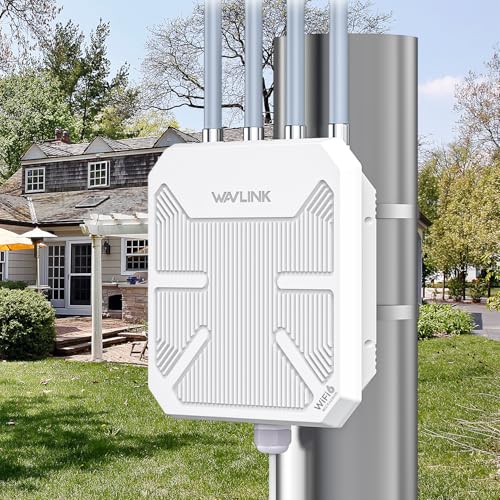
WAVLINK AX3000 Outdoor WiFi 6 Long Range Access Point
↓ See why we picked itAX3000 has become the common label for a mainstream Wi-Fi 6 extender, and the shelf is crowded with boxes that carry it. The number is a combined figure from two bands added together, so it describes a ceiling and not the speed any single phone will see. Under that shared label, the hardware ranges from a compact indoor plug to a weatherproof outdoor unit with five antennas.
This guide sorts six AX3000 models by what they are built to do. One is a brand-backed indoor extender, one is a high-device-count indoor box with four external antennas, one is a listing that also carries an Ethernet port, and three are outdoor-capable units from Wavlink and Mekupc. We evaluated them from product specs and buyer feedback, and we avoid any claim that the listings do not support.
Wi-Fi 6 only pays off when your router and your devices are Wi-Fi 6 as well. If your router is older, a Wi-Fi 6 extender is working below its ability, and the savings from a simpler model are worth taking. Read on to find the fit for your house.
6 Criteria to Look For Before Buying a Wi-Fi 6 Extender
Key buying criteria so you get the right fit the first time.
What AX3000 really means
AX3000 is a combined rating that adds the speeds of both bands, so no single device gets 3000 Mbps. The TP-Link AX3000 splits its total into up to 2,404 Mbps on 5 GHz plus a slower 2.4 GHz band, and the Wavlink access point lists 2,402 Mbps on 5 GHz. Treat the label as a family name for mainstream Wi-Fi 6 hardware. Your internet plan and your router still set the real speed you will see. Compare band speeds instead of the headline when a listing publishes them.
Match your router
A Wi-Fi 6 extender needs a Wi-Fi 6 router to deliver its benefits. With an older router, you are paying for capability that the router cannot supply. The TP-Link AX3000 and the INMUA both make sense behind a Wi-Fi 6 router, while a Wi-Fi 5 router is better served by a simpler extender. Check the router's label before buying. When in doubt, search the model number.
Indoor or outdoor hardware
Three of these six are outdoor-capable, and the difference shows in their build. The Mekupc has an IP67 case and 15kV ESD protection, and the Wavlink units use detachable 8dBi or fixed 7dBi omni antennas. The TP-Link, INMUA, and Oaitree are indoor plug-ins. Do not use an indoor unit outside, and do not buy an outdoor unit for a spare room. Match the hardware to the place.
Device capacity claims
Listings advertise device limits such as 135 for the INMUA and 256 for the Wavlink access point. These are upper bounds that depend on traffic, and few homes come close. A smart-home-heavy household with dozens of low-traffic gadgets benefits more from OFDMA support, which the INMUA lists. Treat the number as a hint about the intended use. A realistic home rarely needs more than the TP-Link's basic capacity.
Ethernet and access point mode
A wired port lets a TV or console skip the wireless link, and access point wiring skips the extender hop entirely. The INMUA lists a gigabit Ethernet port, and the Wavlink access point listing is built around wired deployment. The TP-Link brief does not mention a port, which matters if you plan to cable a device. If you can run a cable to the far room, an access point beats any wireless extender. Check ports before buying.
Security and brand support
An extender stays on your network for years, so support matters. The TP-Link listing cites the CISA cybersecurity commitment. The Oaitree lists WEP among its protocols, which is outdated, so use WPA2 or better on your router. Lesser-known brands may be harder to reach for firmware updates or returns. Weigh that against any price advantage.
6 Best Wi-Fi 6 Extenders in 2026
TP-Link AX3000 WiFi 6 Dual-Band Range Extender
About this pick
TP-Link's version of the AX3000 is the one to measure the others against. It combines dual band Wi-Fi 6 at 3 Gbps with speeds up to 2,404 Mbps on the faster band, and rates its reach at up to 2,400 square feet. Two high-gain directional antennas use beamforming to send the signal toward your devices.
Because its coverage rating is modest and its specs are specific, it is easy to judge honestly. A directional design works best when the weak area lies in one clear direction from the unit, such as a far bedroom, and less well for a central room. The listing also includes the CISA cybersecurity commitment, which signals ongoing attention to a device that stays on your network.
In daily use there is nothing to maintain beyond sensible placement near a strong router signal. Against the INMUA, which lists four external antennas and many more devices, the TP-Link offers two antennas but better documentation. Choose it as the dependable default when you want known specs rather than the biggest claims.
Best for: A Wi-Fi 6 home that wants a documented, no-surprises extender.
Check price on AmazonSpecs
- Wi-Fi standard: Wi-Fi 6 (AX3000)
- Total bandwidth: 3 Gbps
- Fast band speed: Up to 2,404 Mbps
- Rated coverage: Up to 2,400 sq ft
Pros
- +Dual band Wi-Fi 6 with 3 Gbps of total bandwidth
- +Faster band reaches 2,404 Mbps
- +Beamforming directional antennas aim at devices
- +Rated up to 2,400 sq ft with clear specs
Cons
- −Only two antennas, both directional
- −Brief does not list an Ethernet port
INMUA AX3000 WiFi 6 Extender Signal Booster
About this pick
The INMUA is aimed at crowded households. Its listing quotes combined dual band speeds of up to 3000 Mbps, and it says the unit can serve 135 or more devices at once using OFDMA, a Wi-Fi 6 technique that lets the extender talk to several devices efficiently in the same transmission. It also advertises Alexa compatibility.
Four external high-gain antennas help spread the signal across a room, and the listing describes a gigabit Ethernet port for wired speed. That makes it more flexible than the TP-Link, which does not list a port in the listing. The tradeoff is credibility, because the device-count claim reads like a limit on paper and not a measure of everyday performance. Brand recognition is also lower than the TP-Link name.
Setup uses the standard plug and pair routine. Compared with the Oaitree, which also has four antennas, the INMUA adds the wired port and a higher device claim. Choose it for a household with lots of smart devices and a TV or console that can take a cable.
Best for: A smart-home-heavy household with a cabled TV or console.
Check price on AmazonSpecs
- Wi-Fi standard: Wi-Fi 6 (AX3000)
- Combined speed: Up to 3000 Mbps
- Device limit: 135+
- Antennas: 4 external high-gain
- Wired port: Gigabit Ethernet
Pros
- +Gigabit Ethernet port for a TV or console
- +Lists support for 135+ simultaneous devices
- +Four external high-gain antennas
- +OFDMA helps share the radio among devices
Cons
- −Lesser-known brand than the TP-Link
- −Device count is a claim, not a measure
WAVLINK AX3000 Outdoor WiFi 6 Repeater
About this pick
This Wavlink is the pick when Wi-Fi 6 has to reach beyond the house walls. It is described as true AX3000 and complies with the usual IEEE 802.11 family of standards. Four upgraded 8dBi omnidirectional fiberglass antennas detach from the body, and two built-in amplifiers support a claimed reach of 200 to 300 meters.
Omni antennas fill a circle around the unit, so a yard or a campus of small buildings gets even coverage. Detachable antennas can be replaced if one is damaged. The tradeoff is that it is overkill for an apartment, and an outdoor mounting job is more involved than plugging into a wall.
Because it is built for outdoor use, think of it as a mounted piece of network gear rather than a plug-in. Next to the other Wavlink listing, it trades six shorter antennas for four longer ones. Compared with the TP-Link at 2,400 square feet, the outdoor distance claim comes from a different environment and cannot be compared directly. Choose it for a long outdoor run.
Best for: Covering a yard, patio, or small outbuilding with Wi-Fi 6.
Check price on AmazonSpecs
- Wi-Fi standard: Wi-Fi 6 (AX3000)
- Antennas: 4x 8dBi omni, detachable
- Amplifiers: 2 built in
- Claimed range: 200 to 300 meters
Pros
- +Four 8dBi omni antennas detach for replacement
- +Two built-in amplifiers extend outdoor reach
- +AX3000 Wi-Fi 6 across dual bands
- +Claimed 200 to 300 meters in open ground
Cons
- −Mounting makes it heavier work than a plug-in
- −Far more hardware than an indoor room needs
WAVLINK AX3000 Outdoor WiFi 6 Long Range Access Point
About this pick
This listing blurs the line between extender and access point, using both words in its title. It offers 2,402 Mbps on the 5 GHz band, six 7dBi omnidirectional antennas, and two built-in amplifiers. It claims support for 256 or more devices and is positioned for both outdoor and indoor multi-scene use.
The six antennas give it the widest antenna count in the group, and the high device limit suits a busy property such as a shop or a large yard. Using it as an access point, wired to your router, avoids the wireless hop that hurts speed on a plain extender. The tradeoff is that it needs more planning than a plug-in unit, and the listing leaves the cabling details thin.
Compared with the other Wavlink at four 8dBi antennas, this one swaps antenna length for antenna count. Against the INMUA at 135 or more devices, the claimed capacity is nearly double. Choose it when you want a robust, wired access point style deployment.
Best for: A busy property that can run a cable and wants an AP style unit.
Check price on AmazonSpecs
- Wi-Fi standard: Wi-Fi 6 (AX3000)
- 5 GHz speed: 2,402 Mbps
- Antennas: 6x 7dBi omni
- Device limit: 256+
Pros
- +Six 7dBi omni antennas cover a wide circle
- +2,402 Mbps on the 5 GHz band
- +Lists 256+ devices at once
- +Works as an extender or access point
Cons
- −More complex planning than a plug-in unit
- −Listing gives little detail on power options
Mekupc AX3000 Outdoor WiFi 6 Extender Access Point
About this pick
Mekupc leans on durability. The listing describes a waterproof IP67 casing with 15kV ESD protection, which is meant to protect the electronics from static and weather. It is an AX3000 Wi-Fi 6 unit using ax, ac, a, b, g, and n standards, with five high-gain omnidirectional antennas and five built-in power amplifiers.
The extra amplifiers and antennas are meant to push the signal farther than a stock plug-in, and the sealed case suits a mast, an eave, or a barn wall. The tradeoff is that the brand is less established, and you give up the neat, small body of an indoor extender. It is also unnecessary if all you need is a bedroom fix.
Ownership means mounting, cabling, and then leaving it alone. Compared with the Wavlink at six antennas and two amplifiers, the Mekupc offers five of each. Next to the Oaitree, which is an indoor unit, it is the choice for exposed locations. Pick it when weather and static are the main worries.
Best for: An exposed mounting spot where weather and static are concerns.
Check price on AmazonSpecs
- Wi-Fi standard: Wi-Fi 6 (AX3000)
- Antennas: 5 high-gain omni
- Amplifiers: 5 built in
- Protection: IP67, 15kV ESD
Pros
- +IP67 waterproof casing with 15kV ESD protection
- +Five built-in power amplifiers
- +Five high-gain omni antennas
- +AX3000 Wi-Fi 6 across dual bands
Cons
- −Less established brand than TP-Link
- −Mounted hardware is overkill for indoor rooms
Oaitree AX3000 WiFi 6 Extender Signal Booster
About this pick
The Oaitree is the indoor alternative from a lesser-known name, built on AX3000 with four adjustable external antennas. The listing highlights Multi-Link Connectivity and claims low delay and faster speeds than traditional Wi-Fi 5 repeaters. It supports WEP, WPA, and WPA2 security protocols, according to the listing.
Four adjustable antennas let you angle the signal around a room, which can help in an awkward floor plan. The security list includes older WEP, which is a weak protocol, so you should keep your router on WPA2 or better. The tradeoff is that the listing gives few numbers, such as a coverage figure or a fast band speed, so you have less to compare.
Setup is the usual plug and pair routine. Against the TP-Link, the Oaitree gives you two more antennas but fewer published specs. Compared with the INMUA, it offers the same antenna count without the wired port or the high device claim. Choose it when you want a simple indoor Wi-Fi 6 unit at a modest tier.
Best for: A simple indoor Wi-Fi 6 fix at a modest tier.
Check price on AmazonSpecs
- Wi-Fi standard: Wi-Fi 6 (AX3000)
- Antennas: 4 adjustable external
- Feature: Multi-Link Connectivity
- Security: WEP, WPA, WPA2
Pros
- +Four adjustable antennas can be angled by hand
- +Lists Multi-Link Connectivity
- +Supports WPA and WPA2 security protocols
- +AX3000 class Wi-Fi 6 for indoor rooms
Cons
- −Few published numbers to compare in the listing
- −Listing mentions outdated WEP security
How We Evaluated These Wi-Fi 6 Extenders
Each pick was assessed across 5 criteria weighted for real-world use.
Wi-Fi 6 delivery
We looked at how each AX3000 listing publishes its speeds. The TP-Link gives 2,404 Mbps on the faster band and the Wavlink access point gives 2,402 Mbps, while the INMUA, Oaitree, and Mekupc list the combined figure. Clear numbers scored better than vague speed promises.
Antenna and amplifier design
Antenna count and amplifiers shape reach. The Mekupc leads with five antennas and five amplifiers, the Wavlink access point has six 7dBi antennas, the other Wavlink has four 8dBi detachable ones, and the TP-Link has two directional ones. This is based on product specs and buyer feedback.
Environment fit
Each pick was matched to a location. The TP-Link, INMUA, and Oaitree fit indoor rooms, while the Mekupc and both Wavlink units are built for outdoor or mixed use. A unit used in the wrong place earned no credit.
Connectivity options
Wired ports and device capacity were considered. The INMUA lists a gigabit Ethernet port and 135 or more devices, the Wavlink access point lists 256 or more devices, and the TP-Link lists neither in the listing. Options were weighed against realistic home use.
Trust and transparency
Brand record, security statements, and clarity of claims counted. The TP-Link scores well on documented commitments, while the Oaitree is marked down for its WEP mention and sparse numbers. Honest, specific listings beat bold ones.
How to Choose the Right Wi-Fi 6 Extenders
By Where You Need Wi-Fi 6
The location matters more than the shared AX3000 label.
| Situation | Pick | Why |
|---|---|---|
| Far bedroom in a Wi-Fi 6 home | TP-Link AX3000 WiFi 6 Dual-Band Range Extender | Beamforming aims toward one direction |
| Smart home with many gadgets | INMUA AX3000 WiFi 6 Extender Signal Booster | Lists 135+ devices and OFDMA |
| Backyard and patio | WAVLINK AX3000 Outdoor WiFi 6 Repeater | Four 8dBi omni antennas, 200 to 300 m claimed |
| Shop or large property with a cable run | WAVLINK AX3000 Outdoor WiFi 6 Long Range Access Point | Six 7dBi antennas and 256+ devices |
| Barn wall or mast in rough weather | Mekupc AX3000 Outdoor WiFi 6 Extender Access Point | IP67 case and 15kV ESD protection |
Indoor rooms need an indoor unit; do not overbuy outdoor hardware for a bedroom.
By Budget
Tiers are relative because the group mixes indoor and outdoor hardware.
| Tier | Pick | What you get |
|---|---|---|
| Entry | Oaitree AX3000 WiFi 6 Extender Signal Booster | Four antennas with few published numbers |
| Entry to mid | INMUA AX3000 WiFi 6 Extender Signal Booster | Ethernet port and high device claim |
| Mid | TP-Link AX3000 WiFi 6 Dual-Band Range Extender | Clear specs from a known brand |
| Mid to premium | WAVLINK AX3000 Outdoor WiFi 6 Repeater | Detachable 8dBi antennas for outdoors |
| Premium | Mekupc AX3000 Outdoor WiFi 6 Extender Access Point | Five antennas, five amplifiers, IP67 |
Spend more for outdoor durability or reach, not for a bigger label.
Extender Mode vs Access Point Mode
Two of these units are sold with access point wording, and the difference changes performance.
Extender mode
The unit receives the router signal over the air and rebroadcasts it. The TP-Link, INMUA, Oaitree, and the Wavlink repeater work this way, so the wireless hop costs some speed. Choose this when running a cable is not possible. Placement near a strong router signal is critical.
Access point mode
The unit connects to your router by cable and creates a new Wi-Fi signal, avoiding the wireless hop. The Wavlink access point listing and the Mekupc access point listing are built around this. Choose it when you can run a cable to the far location. Speeds are steadier and more predictable.
If a cable can reach the spot, access point style wiring is the stronger setup.
Number of Devices and Rooms
How many things connect decides how much capacity you need.
| Household | Pick | Reasoning |
|---|---|---|
| A few phones and a TV | TP-Link AX3000 WiFi 6 Dual-Band Range Extender | Clear specs, modest load |
| Dozens of smart gadgets | INMUA AX3000 WiFi 6 Extender Signal Booster | 135+ device claim with OFDMA |
| Shop or event space | WAVLINK AX3000 Outdoor WiFi 6 Long Range Access Point | 256+ device claim |
| Awkward floor plan | Oaitree AX3000 WiFi 6 Extender Signal Booster | Four adjustable antennas to aim |
| Open grounds | Mekupc AX3000 Outdoor WiFi 6 Extender Access Point | Five omni antennas and amplifiers |
Most homes never reach the device limits advertised on the box.
For Smart Homes and Streaming Specifically
Smart homes run many small devices, and streaming needs steady bandwidth.
Look for
OFDMA support, a stable 5 GHz link, and an Ethernet port for fixed streaming boxes. Make sure the extender sits where it still hears the router well. Keep the router on WPA2 or better.
In this comparison
The INMUA is the smart-home pick with 135+ devices and a gigabit Ethernet port. The TP-Link is the streaming pick with up to 2,404 Mbps on the fast band. The Oaitree is the budget indoor option for a simple room.
A cabled streaming box is always steadier than a wireless one.
When to Spend More
A higher tier is justified only by a concrete need.
| Spend more if | Save if |
|---|---|
| Your router is Wi-Fi 6, then the TP-Link at 3 Gbps matches it | Your router is older, then a cheaper Wi-Fi 5 extender is enough |
| You need outdoor reach, then the WAVLINK repeater's 200 to 300 m helps | You only cover rooms, then an indoor unit like the Oaitree suffices |
| Weather is harsh, then the Mekupc's IP67 case is worth it | The spot is sheltered, then a standard outdoor unit works |
| You can run a cable, then the WAVLINK access point avoids the wireless hop | You cannot, then the INMUA's wireless mode is enough |
| You want documented security, then choose the TP-Link | You accept a plain listing, then the Oaitree saves money |
Pay for durability, reach, or a cable-friendly design, and skip them when you do not need them.
Frequently Asked Questions
Do I need a Wi-Fi 6 router for a Wi-Fi 6 extender?
Yes, to get the full benefit. A Wi-Fi 6 extender behind an older router will connect, but the link back to the router limits what you gain. The TP-Link AX3000 is best matched with a Wi-Fi 6 router. If your router is Wi-Fi 5, a simpler extender is a better use of your money.
Does AX3000 mean 3000 Mbps to my phone?
No. AX3000 is a combined rating from both bands. A phone connects to one band at a time, and the real speed depends on distance, the router, and your plan. The TP-Link lists up to 2,404 Mbps on its faster band, which is a ceiling and not a typical result.
Can I use an outdoor extender indoors?
Yes, but it is usually more hardware than you need. The Wavlink access point listing even describes outdoor and indoor use. An indoor model like the TP-Link is smaller and simpler to place. Use outdoor units for yards and exposed locations.
What is OFDMA and why does it matter?
OFDMA is a Wi-Fi 6 technique that lets an extender serve several devices in the same transmission. The INMUA lists it for crowded households. It helps most when many small devices are active at once. A home with only a few devices will notice less difference.
Is WEP security a problem?
Yes. WEP is an outdated protocol that is easy to break. The Oaitree listing mentions it among its supported protocols, so keep your router set to WPA2 or better. Check that the extender actually connects using the stronger setting.
Where should I place the extender?
Place it roughly halfway between the router and the weak area, where the router signal is still strong. Putting it inside the dead zone only rebroadcasts a weak signal. Keep it away from microwaves and large metal objects. For outdoor units, mount them high with a clear line of sight.
Should I choose mesh instead?
If several rooms are weak or you want one network name with seamless handoff, mesh is better. A single extender is a good fix for one weak area. Many extenders create a second network name, which can be annoying as you move around the house.
Bottom Line
best overall: TP-Link AX3000 WiFi 6 Dual-Band Range Extender - best overall pick in this roundup.
See the full rankings above for all picks with pros, cons, and best-for summaries.
Browse on Amazon
All Prime-eligible options with current pricing.
Shop on Amazon →