6 Best Universal Remotes Under $20 in 2026
Six universal and replacement TV remotes at the lowest budget tier, compared on brand coverage, setup effort, button layout and what each one cannot control.



At a Glance
A universal remote at the lowest budget tier is a replacement or a simplification, not a smart-home hub. The six picks here fall into three camps: code-list programmable multi-brand remotes, brand-specific infrared replacements that work out of the box, and a big-button model built for easier handling. We evaluated each on compatibility scope, setup effort, button layout, and what the listing says it cannot control.
What you get at this level is dependable infrared control of a TV and sometimes one more device. What you give up is backlighting, a rechargeable battery, learning functions and a deep device library. Most of these remotes also cannot drive streaming sticks or cubes, and that single limit catches more buyers off guard than any other.
These picks reach toward the more capable end of the budget, so you will see more features here than in a bare-bones clicker. Read the compatibility notes first, then match the layout and setup style to the person who will actually be holding the remote.
6 Criteria to Look For Before Buying a Universal Remotes Under $20
Key buying criteria so you get the right fit the first time.
Check brand and device scope
Compatibility is the first filter, because a remote that cannot talk to your TV is useless however well it is built. The EWO'S remote names eight TV brands and starts working in about 3 seconds, while the Generic remote names ten brands including Hitachi, Sanyo and JVC. Look for the exact make of your set in the listing, not just a general claim of universal use. If you need to control a soundbar or streaming stick as well, treat that as a separate requirement and confirm it, since the Acoyer listing explicitly excludes Roku streaming sticks.
Weigh setup effort honestly
There are three styles at this level: no setup, brand-button setup and code-list setup. The LOUTOC Samsung pack and EWO'S remote need no pairing, the Generic remote asks you to hold a brand key for 5 seconds until the LED flashes three times, and the Acoyer relies on a printed code list. A code list is manageable for one TV but tedious for several. Pick the style that matches how patient the main user is, and keep the code sheet if you choose a programmable model.
Look at key size and layout
Remotes are used daily, so button legibility matters more than a feature list. The GE Big Button uses a large simplified keypad, while the RCA 4-Function model uses a four-function design with a multicolored keypad. As a rule, if anyone using the remote wears reading glasses to see the keys, go for the larger legends. A smaller palm-sized body is better only when the user has no trouble with precise presses.
Count how many devices you need
Most basic remotes control a single TV, which is enough for plenty of homes. The GE Big Button controls up to 2 devices, so a TV plus a soundbar or cable box fits. Count the boxes under your screen, and if there are three or more, a budget remote will leave you juggling originals. Be realistic that sub-budget remotes seldom match the four-device reach of GE's higher models.
Think about spare and backup value
Remotes get lost, dropped and sat on, so a spare has a real use. The LOUTOC Samsung pack ships two remotes in one box, which doubles your coverage for a Samsung household. A single universal remote can still serve as a spare for several TVs of different brands, as the Acoyer's eight-brand list shows. Decide whether you want two identical remotes or one remote that can be re-coded to anything.
Mind power, light and durability
At this tier none of the picks lists a backlight, so night use relies on memory or a lamp. The GE Big Button takes 2 AA batteries that you must supply, a common surprise at unboxing. Infrared remotes also need a clear line to the TV, so a cabinet door or a soundbar in the way will break the signal. Check battery type, expect no rechargeable option, and store the remote where it will not be crushed.
6 Best Universal Remotes Under $20 in 2026
Acoyer Universal TV Remote Control
About this pick
The Acoyer is a multi-brand replacement remote that names Samsung, LG, Vizio, Sony, Hisense, Onn, Sharp and RCA among its supported TVs. Its title also lists Roku TVs and TCL, so it covers more of the common living-room brands than a single-maker clone does. It is infrared, which means no pairing step and no app.
Setup is the code-list method. You find the device type in the printed code list, circle every code for your brand, then hold down the setup key and enter codes until the TV responds. That takes a few minutes the first time and is the price of a remote that can adapt to many sets. The listing is explicit that Roku streaming sticks and several soundbars are not supported, so it is a TV remote first.
In daily ownership it behaves like any standard layout: power, volume, channel, number pad and input. Next to the EWO'S pick it asks for more setup effort but spells out its exclusions more clearly, which makes mismatches easier to avoid. Against the Generic pick it names fewer brands, yet its instructions are more detailed. Keep the code sheet in a drawer, because re-programming after a battery swap is the one chore this style of remote can bring back.
Best for: Households with a mainstream TV brand who want a spare that can be re-coded later.
Check price on AmazonSpecs
- Programming: Code list, hold-button method
- Named TV brands: Samsung, LG, Vizio, Sony, Hisense, Onn, Sharp, RCA
- Streaming sticks: Not supported per listing
- Connection: Infrared
Pros
- +Names eight major TV brands in the listing
- +Code-list method lets it adapt to older sets
- +No pairing or app needed for infrared control
- +Listing clearly states which devices it skips
Cons
- −Code entry takes a few minutes at setup
- −Roku streaming sticks are explicitly excluded
- −No backlight for watching in a dark room
EWO'S Universal TV Remote
About this pick
The EWO'S remote is built around one promise: take it out of the package and use it. The listing says it is running in about three seconds, with no pairing and no programming for supported sets. It covers Samsung, Vizio, LG, Hisense, TCL, Philips, Sony and Roku TVs.
The tradeoff of that simplicity is scope. It is a TV remote, and the listing warns it will not control Roku streaming sticks, any brand of TV stick, or cube-style devices. If your main complaint is a lost or cracked original that came with a TV, it is a good fit. If you want one remote for a TV, a soundbar and a streaming box, look elsewhere on this list.
In use, the layout is conventional, so family members pick it up without instructions. It asks less of you than the Acoyer, whose code list takes a few minutes, and it is more tightly focused than the LOUTOC pack that targets Samsung only. Check the model of your TV against the named brands before buying, since a mismatch is the main reason a remote like this gets returned.
Best for: Someone replacing a lost TV remote who wants zero setup.
Check price on AmazonSpecs
- Brands covered: Samsung, Vizio, LG, Hisense, TCL, Philips, Sony, Roku TVs
- Start-up: About 3 seconds per listing
- Pairing: None, infrared
- Not supported: TV sticks and cubes
Pros
- +Listing promises use within about 3 seconds
- +Covers eight TV brands without programming
- +Infrared design needs no pairing step
- +Includes Roku TV among supported sets
Cons
- −Will not control TV sticks or cube devices
- −Controls the TV only, not other devices
- −Brand list is fixed, so odd models may fail
Generic Universal TV Remote Control
About this pick
This unbranded remote names the longest list of TV makers in the group, including older marques such as Hitachi, Sanyo and JVC alongside Samsung, LG, Sony, Sharp, Vizio, Philips and Toshiba. If you own a TV that is a decade or more old, that wider net matters more than a streaming hotkey.
Setup uses a brand-button routine: press the matching brand key for about five seconds until the LED flashes three times. That is quicker than hunting through a printed code sheet, though it may take a few attempts if the first code does not match. Buttons are standard size with no backlight, so low-light use relies on memory of the layout.
The remote is lightweight and compact, which suits a small hand or a couch-cushion life. It reaches further back in time than the EWO'S model, but it lacks that remote's promise of instant start. Compared with the GE Big Button, the keys are smaller and the legends less readable. Because there is no recognizable maker behind it, plan to keep the packaging in case a code never takes.
Best for: Owners of older or lesser-known TV brands needing a broad replacement.
Check price on AmazonSpecs
- Brands named: Samsung, LG, Sony, Sharp, Vizio, Philips, Toshiba, Hitachi, Sanyo, JVC
- Setup: Hold brand button 5 seconds until LED flashes three times
- Backlight: None
- Design: Lightweight and compact
Pros
- +Longest TV brand list among these picks
- +Covers older makers like Hitachi and Sanyo
- +Brand-button setup avoids a printed code book
- +Light and compact for small hands
Cons
- −Setup may take a few attempts to match
- −No backlit keys for dark-room viewing
- −Unbranded, so support options are limited
LOUTOC Samsung Universal Remote, 2-Pack
About this pick
This is a Samsung-only replacement sold as a two-pack, aimed at households that lose remotes or want a backup in the drawer. The listing says it works with Samsung Smart, LED, LCD, HDTV and 3D sets. Both remotes are infrared, so neither needs pairing.
The keypad adds three shortcut buttons, useful for jumping straight into popular streaming apps on a compatible Samsung. The value case is simple: when a single original remote is damaged, you have a second unit instead of a second purchase. That makes it the most practical choice for a shared family room or a rental property with several identical TVs.
It is deliberately narrow. If you own a Vizio in the bedroom and a Samsung in the den, the Acoyer and Generic picks cover both while this one cannot. For a household that is all Samsung, however, it removes code lists entirely, which puts it ahead of the programmable models for people who dislike setup. Before ordering, confirm the TV model family on the listing, since older Samsung sets can use different codes.
Best for: All-Samsung homes that want a backup remote with no programming.
Check price on AmazonSpecs
- Quantity: 2 remotes
- Compatible TVs: Samsung Smart, LED, LCD, HDTV, 3D
- Shortcut keys: 3
- Connection: Infrared, no pairing
Pros
- +Two remotes in the box for backup use
- +No pairing or code entry for Samsung sets
- +Three shortcut keys speed up app access
- +Listing covers Smart, LED, LCD and 3D models
Cons
- −Works with Samsung TVs only, no other brands
- −Shortcut keys depend on the TV supporting them
- −No backlight or learning functions
RCA 4-Function Remote Control
About this pick
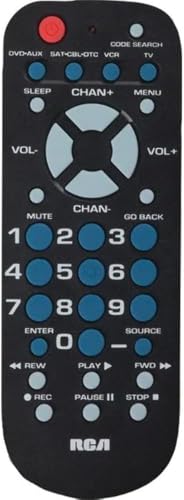
The RCA remote is the plainest option here. The listing highlights a four-function design with menu support and sleep keys, a palm-sized body and a multicolored keypad that helps the eye separate one key from the next. It is built for people who dislike crowded remotes.
What the listing does not give us is a long brand-compatibility list or a code library, so treat it as a straightforward device remote and read the product page carefully for which equipment it targets. That caution is the main tradeoff. The Acoyer and Generic picks tell you exactly which TV makers they support, while this one asks you to confirm before you buy.
In practice, the benefit is cognitive. Fewer keys mean fewer wrong presses, and the colored layout is easy to learn for a guest or a grandparent who only wants power, volume and a menu. It is more compact than the GE Big Button but offers smaller keys, so it suits people who value pocketable size over large legends. Keep expectations modest on features and it does its narrow job well.
Best for: People who want a minimal remote with few keys and a colorful layout.
Check price on AmazonSpecs
- Functions: 4
- Extra keys: Menu and sleep
- Size: Palm-sized
- Keypad: Multicolored keys
Pros
- +Four-function layout keeps the keypad uncluttered
- +Menu and sleep keys are included
- +Palm-sized body fits small hands well
- +Multicolored keys help tell buttons apart
Cons
- −Brand compatibility is not clearly listed
- −No multi-device control described
- −Small keys compared with big-button designs
GE Big Button Universal Remote
About this pick
The GE Big Button is the only pick here designed around readability first. Its keypad is large and simplified, the shape is ergonomic, and the listing positions it for easy navigation. It controls up to two devices, such as a TV and a soundbar, cable box or satellite receiver.
Programming offers two routes: automatic code search or direct code entry, and the listing mentions master volume control as well. Named brands include Samsung, Vizio, LG, Sony, Roku, Apple TV, TCL and Panasonic. Two AA batteries are needed and are not included, so budget a minute for that at unboxing.
The cost of big keys is size, since it is bulkier than the RCA or Generic remotes. It also covers two devices rather than the four that GE's pricier Universal and Rechargeable models can manage, so a full home theater setup will outgrow it. For someone with arthritic fingers, low vision, or simply a preference for large legends, it is the clear step up from the pure budget picks, and a better home for a first universal remote than the code-sheet models.
Best for: Anyone who struggles with small keys and wants two-device control.
Check price on AmazonSpecs
- Devices controlled: Up to 2
- Programming: Auto code search or direct entry
- Batteries: 2 AA, not included
- Brands named: Samsung, Vizio, LG, Sony, Roku, Apple TV, TCL, Panasonic
Pros
- +Large simplified keys are easy to read
- +Controls up to two devices from one remote
- +Auto code search plus direct code entry
- +Names Roku and Apple TV among brands
Cons
- −Bulkier than other remotes in this group
- −Limited to two devices, not four
- −Batteries are not included in the box
How We Evaluated These Universal Remotes Under $20
Each pick was assessed across 5 criteria weighted for real-world use.
Compatibility scope
We read each listing for the brands and device types it names and for the exclusions it admits to. The Generic remote leads on named TV makers with ten, while the EWO'S pick lists eight and the Acoyer lists eight. Remotes that stay quiet about compatibility, such as the RCA 4-Function model, were scored with more caution.
Setup effort
Each pick was scored on the steps between the box and a working TV. Out-of-the-box infrared models such as the LOUTOC pack and EWO'S remote score highest, brand-button programming on the Generic remote sits in the middle, and the Acoyer code-list method asks the most patience. This is based on product specs and buyer feedback, not on timed bench work.
Layout and legibility
We compared key size, spacing and color cues described on each page. The GE Big Button leads here with large simplified keys, the RCA remote follows with its multicolored four-function keypad, and the compact remotes score lower for users with limited dexterity or vision.
Device coverage
We looked at how many devices a remote can control and how it chooses them. The GE Big Button handles up to two devices through automatic code search or direct entry, while most other picks are focused on a single TV. Extra credit was given where the listing names streaming and audio gear.
Value within the budget
Because every pick sits at the bottom price tier, value was judged by what each remote adds beyond a bare clicker. The LOUTOC pack adds a second remote, the GE model adds big keys and two-device control, and the Acoyer adds a broad code library. Picks near the top of the budget were expected to justify that with more features.
How to Choose the Right Universal Remotes Under $20
By Setup Style
How much effort you will tolerate decides which of these remotes feels like a bargain and which feels like homework.
| Situation | Pick | Why |
|---|---|---|
| You want it working immediately | EWO'S Universal TV Remote | About 3 seconds to start, no pairing or code entry |
| You are happy to enter a code once | Acoyer Universal TV Remote Control | Code-list method adapts to many brands |
| You prefer pressing a brand key | Generic Universal TV Remote Control | Hold the brand key for 5 seconds until the LED flashes |
| Everything in the house is Samsung | LOUTOC Samsung Universal Remote, 2-Pack | No programming and a second remote included |
| You want automatic code finding | GE Big Button Universal Remote | Auto code search or direct code entry |
If a code never works, the brand may be listed under a different model family, so try the next code on the sheet.
By Budget
Within this lowest price cap, the tiers are about features added, not quality of materials.
| Tier | Pick | What you get |
|---|---|---|
| Entry | RCA 4-Function Remote Control | A plain four-function remote with menu and sleep keys |
| Entry | Generic Universal TV Remote Control | The widest brand list for the least outlay in the group |
| Mid | Acoyer Universal TV Remote Control | Eight named brands and a printed code library |
| Mid | LOUTOC Samsung Universal Remote, 2-Pack | Two remotes for backup coverage |
| Premium | GE Big Button Universal Remote | Two-device control and large keys from an established maker |
The premium tier here is still the bottom of the overall remote market, so expect no backlight or rechargeable battery at any of these.
Programmable vs Fixed-Brand Remotes
The core mechanism is whether the remote carries a library of codes or one preset code set.
Programmable
A programmable remote stores many manufacturer codes and you point it at your brand. The Acoyer Universal TV Remote Control, Generic Universal TV Remote Control and GE Big Button Universal Remote fall here. Choose this side if your TV maker is uncommon or you want one remote to be re-coded for another room later.
Fixed-brand
A fixed-brand replacement ships ready for one maker or a short list. The LOUTOC Samsung Universal Remote, 2-Pack and EWO'S Universal TV Remote sit here, with the EWO'S model covering eight brands in its listing. Choose this side if you want no setup and your TV brand is clearly on the list.
Pick programmable for flexibility and fixed-brand for speed.
By User Dexterity and Vision
The best remote is the one the user can read and press without frustration.
| User | Pick | Why |
|---|---|---|
| Low vision or reading glasses | GE Big Button Universal Remote | Large simplified keys with ergonomic shape |
| Small hands, minimal needs | RCA 4-Function Remote Control | Palm-sized body with four functions |
| Child or guest learning fast | RCA 4-Function Remote Control | Multicolored keypad separates keys by eye |
| Cluttered remote complaints | LOUTOC Samsung Universal Remote, 2-Pack | Three shortcut keys add a few clear, direct options |
For Replacing a Broken Original Specifically
Replacing a lost or damaged original is the most common reason people buy a remote at this level.
Look for
Confirm the TV maker and series on the listing, check whether the remote needs programming, and note any listed exclusions such as streaming sticks. Choose a remote that matches how the original behaved, including the keys you used daily.
In this comparison
For a Samsung, the LOUTOC Samsung Universal Remote, 2-Pack is the closest match and gives you a spare. For other brands, the EWO'S Universal TV Remote needs the least setup and the Acoyer Universal TV Remote Control gives the most code flexibility.
When to Spend More
A higher budget tier mainly buys convenience features.
| Spend more if | Save if |
|---|---|
| You need backlit keys for a dark room, which none of the picks here list | You mostly watch with lights on, so the Generic Universal TV Remote Control is enough |
| You control three or four devices, beyond the two on the GE Big Button Universal Remote | You only change TV volume and channel with the EWO'S Universal TV Remote |
| You want a rechargeable battery instead of AA cells | You are fine swapping batteries in the Acoyer Universal TV Remote Control |
| You need streaming sticks controlled, which the Acoyer and EWO'S listings exclude | Your streaming device ships with its own remote you already like |
Upgrade only for a feature you will use every day.
Frequently Asked Questions
Which of these remotes is easiest to set up?
The EWO'S Universal TV Remote and the LOUTOC Samsung pack need no pairing or programming, since both are infrared replacements. The EWO'S listing says it starts working in about 3 seconds. The Generic remote needs a 5 second brand-key hold, and the Acoyer needs a code list. Confirm your TV brand is on the list first.
Will these remotes work with my Roku or Fire stick?
Most will not. The Acoyer and EWO'S listings both say Roku streaming sticks and other TV sticks are not supported. A Roku TV is different, because the EWO'S listing names Roku TVs as supported. Keep the remote that came with any stick.
Is a two-pack worth it for one TV?
It can be, if remotes tend to disappear in your home. The LOUTOC Samsung pack gives you a backup for a Samsung set without a second order. If you have different brands in different rooms, one programmable remote like the Acoyer is more useful than two identical ones.
Do cheap universal remotes need to be re-programmed?
Sometimes. Programmable remotes that store a code, such as the Acoyer and Generic models, can lose it if the batteries are out for a long time. Keep the code sheet and note the working code on a sticky label. Fixed-brand remotes such as the EWO'S model avoid the issue.
Why do the buttons not work from the side?
These remotes use infrared, which needs a fairly direct line to the TV sensor. A soundbar, cabinet door or decorative object can block the beam. Point the remote at the sensor and check that nothing sits in front of it before assuming the unit is faulty.
Is the GE Big Button remote a true universal remote?
It is a universal remote that controls up to two devices, with automatic code search and direct code entry. Its listing names brands such as Samsung, Vizio, LG, Sony, Roku and Apple TV. It does not reach the four-device scope of some pricier GE models, so count your devices first.
What does spending more usually add?
The common upgrades are backlit keys, a rechargeable battery, four-device control and streaming hotkeys. None of the picks here list a backlight. If you only need to replace a lost TV remote, the extra features are rarely worth the step up. If you watch in the dark every night, they are.
Bottom Line
best overall: Acoyer Universal TV Remote Control - best overall pick in this roundup.
See the full rankings above for all picks with pros, cons, and best-for summaries.
Browse on Amazon
All Prime-eligible options with current pricing.
Shop on Amazon →