6 Best Talking Clocks Under $50 in 2026
Six larger talking clocks compared on loudness, button design, reminders and displays, showing what a bigger budget adds over the simplest button clocks.


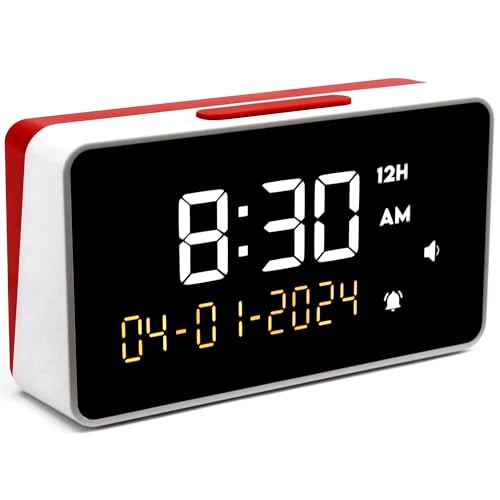
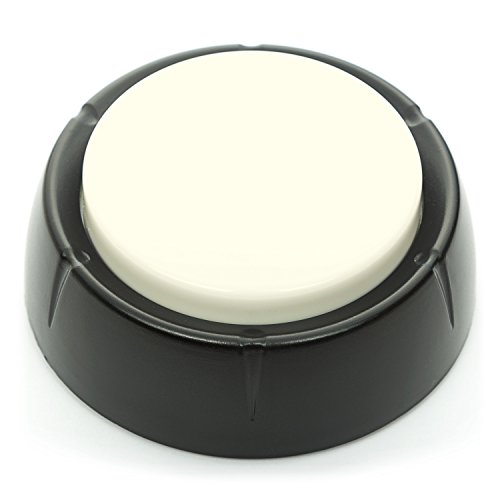

At a Glance
Move up from the cheapest talking clocks and the choices get more interesting. Some models shout at a stated 85 dB, others add a lit display with reminders, and a few keep the pure press-and-listen format with a better button and clearer voice. This guide covers six clocks near the top of the budget and explains what each extra feature is worth.
We evaluated every clock from its listed specifications and the way the maker describes it. We did not run hands-on trials, so scores reflect published features and common buyer themes. Where a listing was vague, we flagged it rather than filling the gap with assumptions.
A useful rule runs through all six picks: simpler is not always worse. A two-press button clock is perfect for someone who wants no menus, while a feature-rich clock with a remote suits a person who likes to organize the day. Decide which of those people you are shopping for and the rest of the choice gets easy.
6 Criteria to Look For Before Buying a Talking Clocks Under $50
Key buying criteria so you get the right fit the first time.
Stated loudness figures
Loudness is the first thing that fails in a noisy home, yet few listings give a number. The Top Life Extra Loud states 85 dB, the GOLOZA lists ten volume levels, and the Cirbic Extra Large offers High and Low. Prefer a clock with a stated figure or many steps over one that says only loud. Test it at night as well, since the same level can be startling in a quiet room.
Button size and feel
A large, obvious button reduces fumbling. The Cirbic Extra Large has the biggest in this guide, the Top Life Red and White offers a high contrast one, and the Cirbic Large uses a white tap button. The MASSII and GOLOZA rely on several smaller controls. Choose a single big button if precision is difficult.
Display versus voice only
A display helps when you want to see the time without pressing anything. The GOLOZA has a 7-inch lit screen and the MASSII has a dimmable HD display, while the Top Life and Cirbic clocks are voice only. A screen adds features and also setup effort. Voice-only clocks are simpler and fit users who rarely look at a face.
Reminders and alarm depth
Reminders are useful for a routine, though they add menus. The MASSII lists 27 alarms and 20 custom reminders, and the GOLOZA lists unlimited alarms plus three medicine reminders. The other four clocks keep to a single alarm at most. Count the reminders you will really use and buy no more than that.
Setup guidance and accident protection
A spoken setup guide avoids frustration. The Cirbic Large provides audio instructions through a bottom button that also prevents accidental changes, and the Cirbic Extra Large guides alarm setup by voice. The Top Life Extra Loud lists little setup help. Ask whether you will set the clock once or adjust it daily.
Placement and power
A clock that needs a plug and a flat surface behaves differently from a battery button clock. The MASSII and GOLOZA are digital displays meant to sit in one place, while the Cirbic and Top Life clocks are simple desk units. Think about cord reach, shelf space and what happens during a power cut. If you want one beside the bed, check the nearest outlet first.
6 Best Talking Clocks Under $50 in 2026
Top Life Talking Clock, Red and White
About this pick
This Top Life clock keeps things refreshingly simple. A press speaks the time in plain English, and a second press adds the day, date and year, so the full picture of the day arrives in two taps. The red and white color scheme gives the button a high contrast look that is easy to spot on a crowded table.
What it leaves out is as telling as what it includes. There are no reminders, no extra alarms and no menus to wade through, which suits people who want a gadget that does one thing well. The listing gives limited volume detail, so check how loud it gets for your room before relying on it from across the house.
It is the safest first buy in this group because there is almost nothing to learn. Compared with the Top Life Extra Loud clock, it offers the same routine without a dedicated loud mode. Compared with the GOLOZA, it skips reminders and a lit display, which makes it easier to use but less ambitious.
Best for: Anyone who wants the plainest two-press routine and no menus.
Check price on AmazonSpecs
- First press: Announces the time
- Second press: Announces day, date and year
- Design: Red and white high contrast
- Reminders: None
- Controls: One main button
Pros
- +Second press adds day, date and the year
- +Red and white design stands out on a table
- +Almost no learning curve for a new owner
- +Made with hearing and vision limits in mind
Cons
- −No reminders or extra alarms at all
- −Listing gives limited volume detail
- −No display to glance at between presses
GOLOZA 7-Inch Digital Talking Clock
About this pick
GOLOZA is the full-featured clock here, combining a 7-inch lit display with spoken time and date. It lists ten volume levels, a dimmable screen with ten color modes, unlimited alarms and three daily reminders aimed at medication routines. It will also begin reminding you about birthdays and holidays three days ahead.
The volume range is the largest in the group, so you can set it exactly where a quiet bedroom or a busy kitchen needs it. The same flexibility means more buttons and more menus than the simple clocks, so the first setup takes patience. The maker lists no resolution or dimmer detail, so judge the display by how you use it, not by a spec.
Think of it as a small command center for the day rather than a simple talking button. Against the MASSII, it is more compact and focused, while MASSII adds a remote and more alarms. Against the Cirbic Extra Large, it trades a single obvious button for features, which suits an organized user better than a first-timer.
Best for: People who want reminders, many alarms and a display alongside spoken time.
Check price on AmazonSpecs
- Display: 7-inch with color modes
- Volume: 10 levels
- Reminders: 3 medicine reminders
- Alarms: Unlimited
- Event alerts: Start 3 days before holidays and birthdays
Pros
- +Ten volume levels allow fine loudness tuning
- +Three reminders support a daily routine
- +Unlimited alarms avoid a slot ceiling
- +Event alerts begin three days ahead
Cons
- −More menus than a press-and-listen clock
- −No dimmer or resolution numbers are listed
- −Takes longer to set up on day one
Cirbic Extra Large Talking Button Clock
About this pick
Cirbic builds this model around an oversized blue button that is hard to miss, even with limited vision or unsteady hands. One press says the time, a second says the date, and a High or Low voice setting lets you adapt the loudness. Alarm setup comes with spoken instructions rather than written ones.
The big button is the entire point. It makes the clock easy to find in the dark and easy to press without precision, which helps in a shared home or a care setting. The tradeoff is the two-level volume, which is coarser than the GOLOZA's ten, and the body is too large to carry comfortably.
Because color and language versions look nearly identical in the listings, double-check you are ordering the English model. In use, it is the closest thing to a purpose-built accessibility button in this guide. Compared with the Cirbic Large, it has a bigger target but a gentler voice. Compared with the Top Life clocks, it gives you a bigger press area.
Best for: Users who need the largest, most obvious button to press.
Check price on AmazonSpecs
- Button: Extra large, blue, high contrast
- Operation: Press once for time, again for date
- Voice settings: High and Low
- Alarm: Set with audio instructions
- Carry: Too large for a pocket
Pros
- +Extra large button is easy to find and press
- +Press once for time, again for the date
- +High and Low settings suit different hearing
- +Alarm setup is guided by spoken steps
Cons
- −Too large to carry comfortably in a pocket
- −Only two volume levels, not fine tuning
- −Color and language versions look near identical
Top Life Extra Loud Talking Clock
About this pick
Top Life Extra Loud is the clock to pick when volume is the main concern. The listing states an 85 dB loud setting that carries across a room, with a normal setting for quieter moments. As with its sibling, a first press gives the time and a second adds the day, date and year, and the design stays clean and minimal.
The 85 dB figure is the only concrete loudness number in this guide, which makes comparison easy. It is useful for someone who needs the voice to cut through a television or kitchen noise. The cost is that the loud setting can startle you at night, and the listing says little about spoken setup, so a helper may be useful on day one.
Place it where the voice has room to travel, and use the normal setting at night. Compared with the Top Life Red and White model, it adds a loud mode but loses nothing else. Compared with the Cirbic Large, it offers a clear dB figure but no spoken setup guidance.
Best for: Homes where the voice must carry over background noise.
Check price on AmazonSpecs
- Loud mode: 85 dB
- Normal mode: Available
- Second press: Day, date and year
- Controls: Single button
- Design: Clean, minimal
Pros
- +85 dB loud setting reaches across a room
- +Normal volume setting is also available
- +Second press gives day, date and year
- +Clean design keeps controls to a minimum
Cons
- −Little stated support for spoken setup
- −Loud mode can startle you at night
- −No display and no reminder features
Cirbic Large Talking Alarm Clock
About this pick
The Cirbic Large announces the time in a loud male North American voice, and a second tap adds the day and date. Setup runs through a single button on the underside, with spoken instructions that walk you through the time, date and alarm. Placing the setup control on the bottom keeps it out of the way so nobody changes the settings by accident.
That design choice is a double-edged one. It prevents accidental resets, which is a real plus in a shared home, but it also means turning the clock over every time you want to adjust something. The loud voice cuts through background noise, though it could disturb a sleeping partner, and the listing does not mention a High and Low switch.
Expect a clock that behaves predictably once configured. Compared with the Cirbic Extra Large, it has a smaller white button but a louder voice. Against the Top Life Extra Loud, it offers guided audio setup where the Top Life offers a stated dB figure.
Best for: Households that want guided spoken setup and protection from accidental changes.
Check price on AmazonSpecs
- Voice: Loud male, North American
- Operation: One tap for time, second for day and date
- Setup: Bottom button with audio instructions
- Alarm: Included
- Button: White tap button
Pros
- +Loud male voice cuts through background noise
- +Guided audio setup covers time, date and alarm
- +Bottom setup button prevents accidental changes
- +One tap on the white button speaks the time
Cons
- −Turning it over to adjust settings is awkward
- −Loud voice may disturb a sleeping partner
- −Listing mentions no High and Low switch
MASSII Digital Talking Clock with Remote
About this pick
MASSII is the busiest clock in this guide. It speaks the time and date aloud, shows them on a digital display and offers 27 alarms, 20 custom reminders and seven timer cycles. A ten-level dimmer and a blue-light-free screen make it comfortable at night, and automatic daylight saving adjustment means one fewer chore twice a year.
The included remote is a quiet standout, because it lets you control the clock from a chair without reaching across a table. The cost of this depth is complexity, since there are far more steps to learn than with any button clock, and the listing leaves room to confirm how loud and clear the speech is before you rely on it.
It rewards a user who enjoys setting a routine and ignores one who wants a quick press. Compared with the GOLOZA, it offers more alarms and a remote but a bigger learning curve. Compared with the Top Life clocks, it gives you a screen and a system rather than a simple voice.
Best for: Organized users who want many alarms, reminders and a remote.
Check price on AmazonSpecs
- Alarms: 27
- Reminders: 20 custom
- Dimmer: 10 levels
- Daylight saving: Automatic adjustment
- Control: Included remote
Pros
- +27 alarms and 20 custom reminders
- +Remote controls the clock from a chair
- +Automatic daylight saving adjustment
- +Ten-level dimmer suits dark rooms
Cons
- −More setup steps than any button clock
- −Speech volume and clarity need checking
- −Overkill for a simple time check
How We Evaluated These Talking Clocks Under $50
Each pick was assessed across 5 criteria weighted for real-world use.
Loudness and clarity
We favored clocks with stated loudness figures or many volume steps. The Top Life Extra Loud leads with its 85 dB mode and the GOLOZA leads on step count. Clocks without any loudness data lost ground.
Simplicity of use
We rewarded clocks that can be used in one or two presses. The Top Life Red and White and Cirbic Extra Large lead here. The MASSII ranked lowest because of its many menus.
Feature depth
We counted alarms, reminders, remotes and displays. The MASSII leads with 27 alarms and a remote, and the GOLOZA follows with medicine reminders. Button clocks received credit only for what their listings actually promise.
Setup support
We looked for spoken guidance and accident prevention. The Cirbic Large and Cirbic Extra Large lead for audio instructions. The Top Life Extra Loud scored lower because its listing states little about setup.
Fit for different homes
We matched each clock to a household type, from quiet bedrooms to noisy living rooms. Loud clocks suited the open room, and compact clocks suited the bedside. Each pick had to serve a clear user to earn a place.
How to Choose the Right Talking Clocks Under $50
By Type of User
The best clock depends on how comfortable the owner is with controls.
| User | Pick | Why |
|---|---|---|
| Wants nothing to learn | Top Life Talking Clock, Red and White | Two presses give time and then day, date and year |
| Needs a huge target to press | Cirbic Extra Large Talking Button Clock | Oversized blue button |
| Likes to organize the day | MASSII Digital Talking Clock with Remote | 27 alarms, 20 reminders and a remote |
| Wants medicine reminders | GOLOZA 7-Inch Digital Talking Clock | Three medicine reminders and unlimited alarms |
| Hears poorly in a noisy room | Top Life Extra Loud Talking Clock | 85 dB loud setting |
Choose for the person who will use it every day, not for the person buying it.
By Budget
Within this cap, tiers describe how much capability sits behind the voice.
| Tier | Pick | What you get |
|---|---|---|
| Entry tier within the cap | Top Life Talking Clock, Red and White | A plain two-press voice clock |
| Lower-mid tier | Cirbic Extra Large Talking Button Clock | A huge button with High and Low volume |
| Mid tier | Top Life Extra Loud Talking Clock | A stated 85 dB mode |
| Upper-mid tier | Cirbic Large Talking Alarm Clock | Guided audio setup and a loud voice |
| Top of the cap | MASSII Digital Talking Clock with Remote | A display, remote and deep alarm system |
Spending near the cap mostly buys features, not a clearer voice.
Button Clock vs Digital Display Clock
Two different philosophies sit in this guide.
Button clocks
Button clocks stay silent until pressed and then speak. The Top Life pair and Cirbic pair fit here. They keep life simple, need almost no setup and rarely go wrong.
Display clocks
Display clocks show time all day and add alarms and reminders. The GOLOZA and MASSII belong here. They help an organized user but demand more setup and a nearby outlet.
If anyone in the home dislikes menus, lean toward a button clock.
Volume Strategy
Loudness needs differ in the bedroom and the living room.
| Situation | Pick | Reason |
|---|---|---|
| Fine tuning for several listeners | GOLOZA 7-Inch Digital Talking Clock | Ten volume levels |
| One strong setting plus a normal mode | Top Life Extra Loud Talking Clock | 85 dB and normal |
| Simple High or Low choice | Cirbic Extra Large Talking Button Clock | Two voice settings |
| Loud voice with locked settings | Cirbic Large Talking Alarm Clock | Loud male voice and a bottom setup button |
Test the lowest volume at night so it is audible but gentle.
For a Daily Routine Specifically
A routine clock needs reminders, not just an announcement.
Look for
Look for several alarms, named reminders and a display that dims. A remote is a bonus if reaching the clock is difficult.
In this comparison
The MASSII Digital Talking Clock with Remote leads with 27 alarms and 20 reminders. The GOLOZA 7-Inch Digital Talking Clock offers three medicine reminders and unlimited alarms.
Set reminders with a helper the first time so the routine feels natural.
When to Spend More
These clocks cover a lot, but some situations call for more.
| Spend more if | Save if |
|---|---|
| You need professional-grade care features beyond the GOLOZA 7-Inch Digital Talking Clock | Three reminders on the GOLOZA 7-Inch Digital Talking Clock are enough |
| You want a larger numeral display than the MASSII Digital Talking Clock with Remote offers | Voice plus a dimmable screen on the MASSII is enough |
| You need a louder voice than the Top Life Extra Loud Talking Clock | An 85 dB mode on the Top Life Extra Loud Talking Clock fits your room |
| You want guided setup for every setting beyond the Top Life Talking Clock, Red and White | A two-press routine on the Top Life Talking Clock, Red and White is all you need |
Most people are well served by the simpler clocks, so upgrade only for a specific gap.
Frequently Asked Questions
Which is best for someone who dislikes technology?
The Top Life Talking Clock, Red and White is the gentlest option, with a single press for time and a second for the date. The Cirbic Extra Large offers a bigger button if hands are less precise. Avoid the MASSII unless someone can help with setup.
How loud is 85 dB?
It is similar to busy traffic heard from inside a car, loud enough to carry across a room. The Top Life Extra Loud lists this figure, along with a normal setting. Use the normal setting at night to avoid startling anyone.
Do display clocks need an outlet?
Digital display clocks like the GOLOZA and MASSII generally need a power source for the screen. The simple button clocks are usually battery-based. Check the listing for your chosen model and keep it near an outlet if it needs one.
Are medicine reminders reliable?
A reminder is a helpful nudge, not a safeguard. The GOLOZA lists three medicine reminders, which can support a routine. Keep any pillbox or doctor guidance as the primary system.
Can a remote help?
Yes, for someone who finds it hard to reach the clock. The MASSII includes a remote that controls its functions from a chair. Check that the buttons are large enough for comfortable use.
Why do some clocks have a setup button on the bottom?
It prevents accidental changes by keeping the control out of casual reach. The Cirbic Large uses this design with spoken instructions. The downside is that you must flip the clock to change anything.
Is a simpler clock really enough?
For many people, yes. A two-press clock answers the main question quickly and rarely fails. Add features only if you will use them daily, since each extra menu is one more thing to learn.
Bottom Line
best overall: Top Life Talking Clock, Red and White - best overall pick in this roundup.
See the full rankings above for all picks with pros, cons, and best-for summaries.
Browse on Amazon
All Prime-eligible options with current pricing.
Shop on Amazon →