6 Best Talking Clocks for Seniors in 2026
Six talking clocks for seniors compared on voice clarity, volume range, button size and setup, with picks for low vision and hearing loss.



At a Glance
A talking clock solves a small problem that quietly erodes independence: not being sure of the time or the day. For an active adult whose eyesight is fading, or a parent who sometimes loses track of the date, one press and a clear voice replaces squinting at a tiny display. The best models are not gadgets so much as reliable household tools that anyone in the family can set up in a few minutes.
This lineup covers two very different styles of talking clock. Some are big single-button units that say the time on one press and the date on the next, with almost nothing else to learn. Others are large display clocks that add alarms, reminders and automatic daylight saving changes, which suit people who want prompts as well as announcements.
We evaluated each pick based on product specs and buyer feedback, focusing on voice, volume, button or screen size, and how many steps stand between unboxing and a working clock. Every pick below is an everyday home product, not a medical device, and the guide is written for the person using the clock and the family member setting it up.
6 Criteria to Look For Before Buying a Talking Clocks for Senior
Key buying criteria so you get the right fit the first time.
Voice clarity and tone
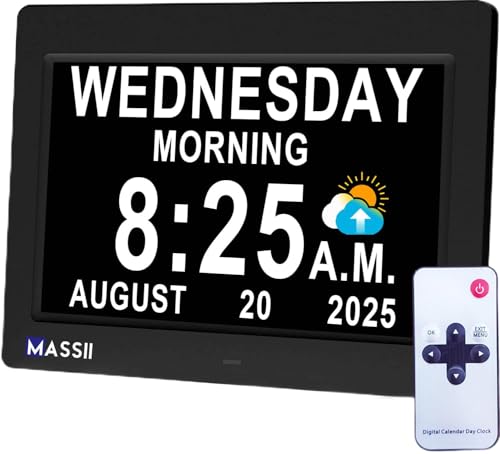
A talking clock is only useful if the voice is understood on the first press. Many listeners find a lower male voice easier to hear, though it varies by person. Look for a clearly articulated, natural sounding voice rather than a robotic one, and avoid models that cannot be previewed in a store or described by buyers. In this lineup the Cirbic Large Talking Alarm Clock uses a loud male voice with a North American accent, while the MASSII Dementia Clock speaks the time and date in English alongside a large screen.
Volume range and control
Hearing differs from person to person, so volume range matters as much as the loudest setting. Check that the default is not startlingly loud, and prefer a clock with at least a high and low switch. The Top Life reaches 85 dB for people who cannot hear quieter clocks, the GOLOZA offers 10 volume levels for fine tuning, and the Cirbic Extra Large Talking Button Clock gives two voice settings. A very loud ceiling is only a benefit if there is also a gentler setting for night.
Steps to set it up
The number of presses between unboxing and a working clock decides whether the person will ever use it unaided. Count the steps to set the time and alarm, and look for spoken setup prompts that guide you through. The Cirbic Large Talking Alarm Clock uses one button with audio instructions, and its setup button sits on the bottom. The ORKA and MASSII need more steps because they offer recorded messages and 27 alarms, so plan on a helper for the first session.
Button or screen visibility
People with low vision need a control they can find by touch and a display they can read without strain. A large button of strong contrast, such as the blue Cirbic Extra Large Talking Button Clock, can be located in a dim room. For a screen, high contrast and adjustable brightness matter more than size alone, and the MASSII Dementia Clock offers 10 dimmer levels on a 1280x800 IPS panel. The ORKA adds an extra large display that shows the day of the week.
Power source and upkeep
Battery clocks are portable but eventually need new cells, and a dead clock gives no warning to someone who cannot see it. AC powered units avoid that, yet they need an outlet near the bedside. The ORKA runs on AC and is not battery operated, which suits a permanent spot. Check what happens during a power cut: the MASSII line includes automatic daylight saving, which only helps if the clock keeps its settings.
Reminders versus simplicity
Reminders for medication, birthdays and appointments help people who like prompts, but every extra function is another thing to learn and another way to get confused. If the clock is mainly for orientation, a single-button model is calmer. For schedule support, the GOLOZA adds 3 medicine reminders and alerts that begin 3 days before holidays. The MASSII Dementia Clock goes further with 27 alarms, so match the feature count to the person who will actually use it.
6 Best Talking Clocks for Seniors in 2026
MASSII Dementia Clock with Voice Announcement
About this pick
The MASSII is the most complete talking clock here, pairing a vivid 1280x800 IPS screen with a voice that speaks the date and time. Its auto daylight saving setting means nobody has to climb onto a chair twice a year to change it. A sleep trainer mode and 10 brightness levels let the display fade at night and brighten in the morning, so it works as a bedside clock as well as a table clock.
The trade for all that capability is a longer feature list than the single-button clocks carry. With 27 alarms and custom reminders for events such as birthdays or appointments, there is more to configure, and a person who only wants to hear the time will use a fraction of it. It suits someone who wants the clock to prompt them through the day, or a family member who will program the reminders once and leave them.
In ownership terms, expect a one-time setup session with a helper, after which daily use is simple. Compared with the Cirbic Extra Large Talking Button Clock, which needs only one press, the MASSII demands more initial effort but shows the day and date on a large screen as well as announcing them. It also offers far more alarms than the GOLOZA, which centres on three medicine reminders, so it is the better fit for a busy schedule.
Best for: Someone who wants announcements, a big readable screen and flexible reminders in one clock.
Check price on AmazonSpecs
- Alarms: 27
- Screen: 1280x800 IPS
- Dimmer: 10 levels
- Daylight saving: Automatic
Pros
- +Large HD screen shows day and date clearly
- +Auto daylight saving removes twice-yearly resets
- +27 alarms cover medication, meals and visits
- +10 dimmer levels suit bedside use at night
Cons
- −Many features mean a longer first setup
- −More buttons than a single-button talking clock
Cirbic Extra Large Talking Button Clock
About this pick
The Cirbic is built around one extra large, high contrast blue button. Press it once and the clock announces the current time, press it again and it gives the date. There is no screen to decode and no menu to remember, which is exactly why it works for people with low vision, dementia or reduced hearing.
Its alarm is easy to set because the clock talks you through the steps with audio instructions. A two-position voice setting, high or low, covers most hearing levels without a dial to fiddle with. The limits are the obvious ones: it has no day-long display, no medication prompts and no automatic daylight saving, so the person using it or a helper must reset it by hand when the clocks change.
In daily life it sits on a nightstand or kitchen counter and gets pressed by feel. Against the MASSII, it trades 27 alarms for near-zero learning curve, and against the Top Life, which reaches 85 dB, the Cirbic offers only two volume settings. If your goal is one dependable action that never confuses anyone, this is the cleanest answer in the lineup.
Best for: Anyone who wants one big button and nothing else to learn.
Check price on AmazonSpecs
- Controls: One large button
- Voice settings: High and low
- Alarm: Yes, audio setup
Pros
- +One extra large button is easy to find by touch
- +Audio instructions guide alarm setup step by step
- +High and low voice settings cover most hearing
- +Blue high contrast body stands out on a nightstand
Cons
- −Listing shows no automatic daylight saving
- −Listing shows no medication reminder feature
Top Life Extra Loud Talking Clock
About this pick
Top Life targets the hard of hearing directly with a voice that reaches 85 dB while still offering a normal volume. Press the button once for the time and again for the day, date and year, so one action tells you the whole picture. The design is plain on purpose and the maker positions it for seniors, people with Alzheimer's and anyone with a visual impairment.
Volume is its defining strength, and also its main caution. At 85 dB it is the loudest voice in this comparison, which helps people without hearing aids but can startle a sleeping partner if left on the high setting. It does not add a long alarm list or reminders, so it rewards people who care most about being able to hear it from across a room.
Placement matters more with this clock than with most: keep it within easy reach but away from the pillow if the high setting is in use. Where the Cirbic Extra Large Talking Button Clock gives two voice levels, the Top Life gives you a genuinely loud top end. It is simpler than the GOLOZA, which offers 10 volumes, but louder at its ceiling, so choose it when sheer audibility is the priority.
Best for: People with hearing loss who need a clock they can hear without hearing aids.
Check price on AmazonSpecs
- Maximum volume: 85 dB
- Announces: Time, day, date, year
- Controls: Single press
Pros
- +85 dB top volume is audible across a room
- +Press again for day, date and year together
- +Normal volume setting avoids startling at night
- +Plain layout keeps the number of controls low
Cons
- −No long alarm list or reminder system
- −High setting can disturb a sleeping partner
GOLOZA 7-Inch Digital Dementia Clock
About this pick
The GOLOZA is a 7-inch talking clock that speaks the time at a press and adds a layer of memory support on top. It includes three dedicated medicine reminders, unlimited alarms, and birthday and holiday alerts that begin three days before the event. Ten volume levels let a family fine tune loudness for the room and the listener.
That combination makes it a good fit for someone whose routine matters more than the clock face. The cost is the learning curve, since a feature set this broad needs a patient first hour, and the 7-inch screen is smaller than the 11.5-inch models elsewhere in this guide. It also reads better as a table clock than a clock across a large living room.
Ownership is mostly about the setup of reminders, after which it behaves like an ordinary talking clock. Compared with the MASSII Dementia Clock, which has 27 alarms and a larger IPS panel, the GOLOZA focuses its attention on medicine and event prompts. Compared with the ORKA, it has no recordable voice messages but does offer far more volume steps.
Best for: Families who want medicine and event reminders alongside a talking clock.
Check price on AmazonSpecs
- Display size: 7 inch
- Volume levels: 10
- Medicine reminders: 3
- Alarms: Unlimited
Pros
- +Three medicine reminders keep a pill routine on track
- +Alerts start 3 days before birthdays and holidays
- +10 volume levels allow fine loudness control
- +Unlimited alarms avoid running out of slots
Cons
- −7-inch screen is smaller than the big MASSII models
- −Wide feature set needs a careful first setup
ORKA Talking Clock with Recordable Reminders
About this pick
The ORKA lets you record your own alarm messages, so the reminder is a familiar voice saying take your pills rather than a stock chime. Its extra large display shows the day of the week, which helps anyone who loses track of which day it is. The maker positions it for dementia, hearing difficulty and low vision.
A personal recording is the feature that sets it apart, and it is why family members like it for medication. The practical catch is power: the ORKA runs on AC and is not battery operated, so it needs an outlet and a stable spot, and it will not travel easily. That also means no battery changes, which for many households is a relief.
You plug it in, record the messages once, and set the volume to taste. Against the Cirbic Large Talking Alarm Clock, which uses batteries and talks you through setup, the ORKA asks for an outlet but offers personalised speech. Compared with the GOLOZA and its 3 medicine reminders, the ORKA is better when hearing a loved one's voice matters more than a long list of automated prompts.
Best for: Caregivers who want reminders spoken in a familiar voice.
Check price on AmazonSpecs
- Power: AC powered, not battery
- Messages: Voice recordable
- Display: Extra large, day shown
Pros
- +Record reminders in a familiar family voice
- +Large display shows the day of the week
- +AC power means no batteries to replace
- +Adjustable volume suits different listeners
Cons
- −Needs an outlet, so it is hard to move around
- −Recording messages adds a setup step
Cirbic Large Talking Alarm Clock
About this pick
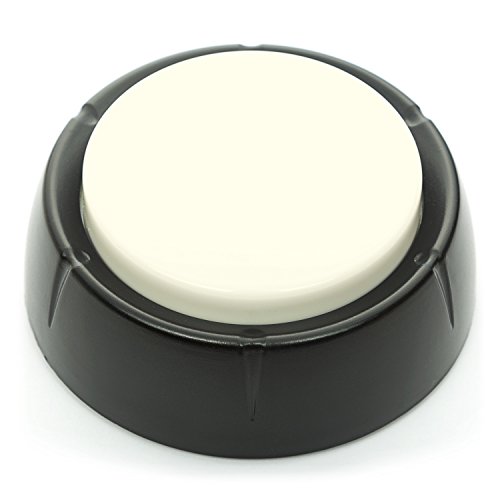
This Cirbic uses a white button: one tap gives the time in a clear, loud male voice and a second tap gives the day and date. Its North American accent is a plus for listeners who struggle with unfamiliar speech patterns. Lower voices carry well for many people with high frequency hearing loss, though it varies by person.
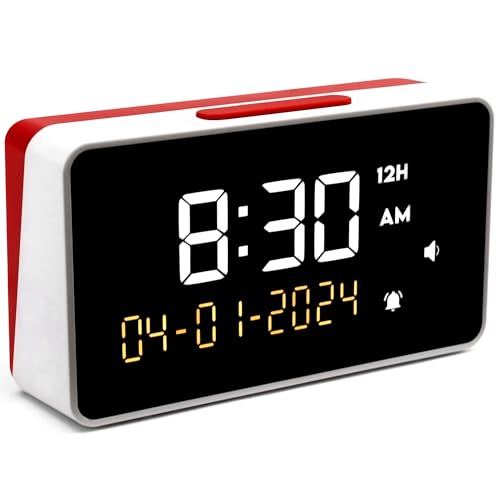
Setup uses a single button with audio instructions, and the setup control sits on the bottom of the clock, so it is hard to bump by accident. That placement is smart for dementia care, where an exposed setting button can be pressed over and over. The tradeoffs are that it has no date display built around a large screen, no medication prompts and no automatic daylight saving.
On a bedside table it reads as an ordinary alarm clock that talks when asked. Compared with the blue Cirbic Extra Large Talking Button Clock, which offers a high and low voice setting, this model concentrates on one loud male voice. It is closer to the Top Life in purpose, though the Top Life states 85 dB and this one does not publish a number.
Best for: Listeners who hear a deep, loud male voice better than other tones.
Check price on AmazonSpecs
- Voice: Loud male, North American
- Setup: One button with audio prompts
- Announces: Time, day, date
Pros
- +Loud male voice carries well for many listeners
- +Setup button on the bottom resists accidental presses
- +One tap time and second tap date are easy to learn
- +Audio instructions remove the need for a manual
Cons
- −No published decibel figure for the volume
- −Listing shows no reminders or daylight saving
How We Evaluated These Talking Clocks for Seniors
Each pick was assessed across 5 criteria weighted for real-world use.
Voice and announcement quality
We looked at how each clock speaks, including accent, gender of voice and what is announced on each press. Clocks that give the time first and the date second were scored highest for orientation. Based on specs and buyer feedback, the Cirbic Large Talking Alarm Clock led on a loud male voice, while the Top Life led on stated volume at 85 dB.
Ease of daily use
We weighed how many actions the average day requires. A single press for the time is the ideal, and the Cirbic Extra Large Talking Button Clock is the cleanest example. Clocks that bury core functions in menus lost points, as did those without spoken setup prompts.
Setup and reset burden
A clock that needs a long first session, or frequent resets, creates work for the family. We compared audio guided setup, automatic daylight saving and battery or AC power. The MASSII Dementia Clock earns credit for automatic daylight saving, whereas the Cirbic models and the Top Life must be changed by hand.
Visibility and display
Where a clock has a screen, we considered size, contrast and dimming. The MASSII Dementia Clock leads here with a 1280x800 IPS screen and 10 dimmer levels, followed by the ORKA with its extra large display and day of week. The GOLOZA is smaller at 7 inches.
Reminder and memory support
Not every household needs reminders, so we separated clocks that offer them from those that do not. The GOLOZA stands out for 3 medicine reminders, the ORKA for recordable messages, and the MASSII Dementia Clock for 27 alarms. Single-button models were scored on how well they stay simple instead.
How to Choose the Right Talking Clocks for Seniors
By Main Need
Match the clock to the person's biggest everyday difficulty rather than to the longest feature list.
| Situation | Pick | Why |
|---|---|---|
| Low vision, wants one control | Cirbic Extra Large Talking Button Clock | One extra large blue button announces time, then date |
| Hearing loss without aids | Top Life Extra Loud Talking Clock | Voice reaches 85 dB for a hard of hearing listener |
| Needs medicine prompts | GOLOZA 7-Inch Digital Dementia Clock | Three medicine reminders plus unlimited alarms |
| Wants a loved one's voice | ORKA Talking Clock with Recordable Reminders | Records your own spoken messages |
| Wants everything on a big screen | MASSII Dementia Clock with Voice Announcement | 1280x800 IPS screen with 27 alarms |
If two needs compete, such as low vision and a pill routine, choose the clock that covers the more risky one first.
By Budget
Without quoting prices, think in tiers by how much function you are paying for.
| Tier | Pick | What you get |
|---|---|---|
| Entry | Cirbic Large Talking Alarm Clock | Loud male voice and a single-button setup |
| Entry | Cirbic Extra Large Talking Button Clock | One big button with high and low voice settings |
| Mid | Top Life Extra Loud Talking Clock | 85 dB voice and time plus date on a press |
| Mid | GOLOZA 7-Inch Digital Dementia Clock | 10 volumes and 3 medicine reminders |
| Premium | MASSII Dementia Clock with Voice Announcement | 27 alarms, auto daylight saving and an IPS screen |
The ORKA sits between mid and premium because the recording feature adds convenience but also needs an outlet.
Button Clock vs Screen Clock
These two designs solve the problem in different ways.
Button clock
A button clock keeps the interface to one action and announces by voice only. The Cirbic Extra Large Talking Button Clock, the Cirbic Large Talking Alarm Clock and the Top Life fall on this side. Choose it for someone who wants no decisions and mostly relies on hearing.
Screen clock
A screen clock adds a large display with the date, alarms and reminders. The MASSII Dementia Clock, the GOLOZA and the ORKA belong here. Choose it for someone who reads the screen comfortably and benefits from prompts through the day.
If you cannot decide, a button clock is the safer first purchase because it rarely confuses anyone.
By Power Source
Where a clock gets its power affects reliability and placement.
| Power preference | Pick | Reason |
|---|---|---|
| Never change batteries | ORKA Talking Clock with Recordable Reminders | AC powered, not battery operated |
| Wants to move it between rooms | Cirbic Extra Large Talking Button Clock | Compact button unit without a cord requirement |
| Automatic settings after the clocks change | MASSII Dementia Clock with Voice Announcement | Automatic daylight saving adjustment |
| Bedside use with a dimmable face | MASSII Dementia Clock with Voice Announcement | 10 brightness levels for night |
Whichever you choose, write the date of the last battery or reset on the underside as a simple reminder.
For Dementia Care Specifically
Orientation clocks need to be clear, predictable and hard to disturb.
Look for
Look for a large display of the day and date, a voice that speaks them, and controls that are hard to change by accident. A setup button placed out of reach, as on the Cirbic Large Talking Alarm Clock, reduces mistakes. Keep reminders few so that they do not overwhelm.
In this comparison
The MASSII Dementia Clock combines a big screen with announcements, and the ORKA adds recordable voice messages and a visible day of the week. The GOLOZA's 3 medicine reminders suit people who also manage pills. Single-button models work best in the early stages.
Place any orientation clock where it is seen first on waking and keep its location the same every day.
When to Spend More
Extra features only pay off when the person will actually use them.
| Spend more if | Save if |
|---|---|
| You want automatic daylight saving, as on the MASSII Dementia Clock | The person only needs to hear the time, so a Cirbic button clock is enough |
| Medicine routines matter, so the GOLOZA with 3 reminders is worth it | A pill organiser and phone alarm already handle medication |
| A familiar voice would help, making the ORKA worthwhile | A stock voice is perfectly understood and recordings add confusion |
| Hearing loss is significant and the Top Life at 85 dB is needed | Hearing is mild and a high and low switch is enough |
A simple clock that gets used daily beats a feature rich one that sits unused.
Frequently Asked Questions
How do I choose between a button clock and a screen clock?
Start with how the person uses a clock now. If they glance at a display often, a screen clock like the MASSII Dementia Clock with its 1280x800 IPS panel works well. If they struggle to read any display, a button model such as the Cirbic Extra Large Talking Button Clock is better. Many families end up with one of each, a screen clock in the living room and a button clock by the bed.
Are talking clocks only for people with vision loss?
No, they also help people who lose track of the day or date. Clocks that announce the day, date and year, like the Top Life, give orientation without needing to read anything. They are useful for active adults who simply want a quicker answer. They are everyday home products, not medical devices.
How loud should a talking clock be?
It depends on the listener's hearing and the room. The Top Life reaches 85 dB, which suits people who do not use hearing aids, while the GOLOZA allows 10 steps so you can find a comfortable level. Always check there is a lower setting, since a loud default can be startling. Test it from where the person will usually sit.
Do talking clocks change for daylight saving automatically?
Some do and some do not. The MASSII Dementia Clock includes an automatic daylight saving adjustment, while the Cirbic models and the Top Life rely on a manual change. If resetting is a burden for the household, choose an automatic one. Otherwise note the date twice a year on a calendar.
Is a talking clock a replacement for medication reminders?
It can support them but should not be the only safeguard. The GOLOZA has 3 medicine reminders and the ORKA can speak a recorded message, which makes both helpful. A pill organiser and a caregiver check remain sensible backups. Speak to a pharmacist about the best routine for any specific medicine.
What is the biggest mistake buyers make with talking clocks?
The most common error is buying the longest feature list. A clock with 27 alarms is wasted if the person only wants to hear the time. Another is ignoring placement, since a clock hidden across the room defeats the purpose. Keep the clock within reach and in a spot that does not change.
How long do the batteries last in a talking clock?
Battery life depends on how often the voice is triggered and the volume used. Clocks that run on AC, like the ORKA, avoid the question entirely. For battery models such as the Cirbic clocks, replace the cells on a set schedule rather than waiting for the voice to fade. A weak voice is often the first sign.
Bottom Line
best overall: MASSII Dementia Clock with Voice Announcement - best overall pick in this roundup.
See the full rankings above for all picks with pros, cons, and best-for summaries.
Browse on Amazon
All Prime-eligible options with current pricing.
Shop on Amazon →