6 Best Talking Clocks for Blind Users in 2026
Six talking clocks for blind users compared on spoken setup, button feel, voice and volume, with picks for home use, bedside alarms and travel.


At a Glance
For someone who cannot see a clock face, the whole device has to work through sound and touch. That changes what matters. A pretty display is irrelevant, while a button that can be found in the dark, a voice that is easy to understand and a setup process that can be completed without sighted help become the main points of difference.
We looked at six talking clocks that are marketed to blind and low vision users and compared them based on product specs and buyer feedback. They range from big single-button desk clocks to a two-pack of keychain clocks meant to travel. We paid close attention to whether the clock speaks its own setup instructions, how many volume choices it gives, and how the voice sounds.
Independence is the underlying goal. The best clock is the one a person can turn on, set, adjust and use daily without asking anyone to read a screen for them. The sections below explain how to check for that and which pick suits which circumstance.
6 Criteria to Look For Before Buying a Talking Clocks for Blind User
Key buying criteria so you get the right fit the first time.
Spoken setup instructions
A clock that talks you through setup removes the single biggest barrier for blind users. Without it, the time and alarm must be set by someone who can read buttons and a manual. The NADOBA Talking Clock for Blind Elderly speaks prompts for the time, date and alarm, and the Cirbic Extra Large Talking Button Clock gives audio instructions for the alarm. The BATVOX Large Talking Button Clock offers audio prompts or a printed manual, so check which is available.
Findability by touch
A blind user has to locate the control by feel every time. Raised or very large buttons help, and a consistent placement on a nightstand helps more. The NADOBA has a raised button, while the Cirbic relies on an extra large flat button. Avoid clocks where the main control is small or flush with the case.
Voice quality and character
Clarity matters more than anything because the voice is the only display. Some listeners prefer lower pitched voices. The memo24 Talking Button Alarm Clock uses a clear English male voice, and the NADOBA uses a clear North American English voice. If possible, check a sample or return policy, since personal preference varies.
Volume range and hearing needs
Many blind users also have reduced hearing, so volume range is more than a convenience. A two-position switch is simple but limited, while keys give finer steps. The Top Life Extra Loud Talking Clock reaches 85 dB with a normal setting too, and the BATVOX offers key-based volume control. Pick the range that matches the person's hearing, and test it in the room where it will sit.
What the clock announces
The time is the minimum, but the day and date matter for planning. Most button clocks give the time first and the date on a second press. The memo24 announces the time, day of the week and date. A clock that omits the day leaves the user guessing, so confirm what is spoken.
Portability versus a fixed clock
Decide whether the clock is a bedside fixture or a companion. Keychain clocks such as the Awaiymi 2 Pack Talking Keychain Clock fit a pocket and come as a pair. Desk clocks like the NADOBA and Top Life are louder and steadier but stay put. Many people end up with one of each.
6 Best Talking Clocks for Blind Users in 2026
NADOBA Talking Clock for Blind Elderly
About this pick
The NADOBA leads for blind users because it is designed around touch and sound from the first step. Its large button is raised, so a hand finds it without searching, and a single press speaks the time and date. Spoken prompts then guide the user through setting the time, the date and the alarm.
That voice-guided setup is the difference between a clock a person can configure alone and one that needs a helper. A side switch chooses high or low volume, so the setting can be confirmed by feel. The drawback is that two volume positions is a limited range, and it does not offer reminders or other extras.
In use it is a quiet, dependable fixture. It beats the memo24 Talking Button Alarm Clock on setup, since the NADOBA walks through every step aloud, while the memo24 is more basic on prompts. Keep it in a fixed spot such as the left side of a nightstand, and the raised button becomes a reliable landmark.
Best for: A blind user who wants to set and adjust the clock without sighted help.
Check price on AmazonSpecs
- Button: Large and raised
- Setup: Voice-guided
- Volume control: Side switch, high or low
- Voice: North American English
Pros
- +Spoken prompts guide the entire setup
- +Raised button is easy to find by touch
- +Side volume switch is checkable by feel
- +Clear North American English voice
Cons
- −Only two volume positions
- −No reminders beyond the alarm
Cirbic Extra Large Talking Button Clock
About this pick
The Cirbic wraps everything around a single extra large button. One push gives the time and a second push gives the date. Though contrast is aimed at people with some sight, the sheer size of the button also helps blind users locate it by touch.
It includes an alarm that is set with audio instructions, so no screen reading is needed. There are two voice settings, High and Low, which cover most needs. The compromise is that the button is flat and large rather than raised, and the clock has fewer extras than clocks with reminders.
Ownership is easy because there is nothing to clean beyond wiping the case. Compared with the NADOBA Talking Clock for Blind Elderly, which adds a raised button and a physical side switch, the Cirbic relies on size alone for findability. Choose it when the user has some residual vision and values a large, bright target.
Best for: A blind or low vision user with some residual sight who wants a large target.
Check price on AmazonSpecs
- Button: Extra large, high contrast blue
- Voice settings: High and Low
- Alarm setup: Audio instructions
- Second press: Date
Pros
- +Very large button is easy to locate
- +Alarm setup uses audio instructions
- +High and low voice settings are quick to switch
- +Press once for time and again for date
Cons
- −Button is large but not raised
- −No extras like reminders or chimes
memo24 Talking Button Alarm Clock
About this pick
The memo24 speaks in a clear English male voice, which many listeners find easier to understand than a higher pitched one. A single press announces the time, the day of the week and the date. The red button stands out strongly against the base, which helps anyone with partial sight.
Two volume positions, high and low, let the owner adapt to different hearing. It is intended for blind and visually impaired users as well as elderly people and those with dementia. The tradeoff is that the listing offers no information about guided setup, so setting the clock may need a bit of help the first time.
Because it is a button clock with no display, the memo24 is simple to live with. Compared with the BATVOX Large Talking Button Clock, which includes volume control and a warning to turn the volume down before first use, the memo24 uses a plain two-position choice. If voice character is the deciding factor, this is the pick to try.
Best for: A listener who finds a lower male voice easier to understand.
Check price on AmazonSpecs
- Voice: Clear English male
- Button color: Red, high contrast
- Volume: High or low
- Announces: Time, day of week, date
Pros
- +Clear male voice is easy to follow
- +Announces time, day and date on one press
- +Red button contrasts strongly with the base
- +Two volume positions cover most hearing
Cons
- −No stated spoken setup guidance
- −Volume has only two choices
BATVOX Large Talking Button Clock
About this pick
The BATVOX offers real volume control through keys on the base. That gives it more flexibility than a clock with only a high and low switch. A large button announces the time on the first press and the date and day of the week on the second.
Setup follows audio prompts or a printed manual, and the button has high contrast between its color and the silver base. One caution from the listing is to turn the volume down with the minus key at the bottom before first use, because the default can be loud. That is a small quirk, but a blind user needs a helper to find the key the first time.
In daily use it is a good compromise between a bare button clock and a full organizer. The BATVOX gives finer volume control than the Cirbic Extra Large Talking Button Clock, which has only two settings. The keys are on the underside, so they are hard to press by accident but also harder to find without being shown.
Best for: A user who wants volume steps instead of a simple high and low choice.
Check price on AmazonSpecs
- Volume: Adjustable with minus key
- Announces: Time, then date and day
- Alarm: Included
- Setup: Audio prompts or manual
Pros
- +Volume keys allow more than two levels
- +Audio prompts or a manual guide the setup
- +Announces day of the week with the date
- +High contrast button against a silver base
Cons
- −Default volume can be loud at first use
- −Volume keys sit under the base
Awaiymi 2 Pack Talking Keychain Clock
About this pick
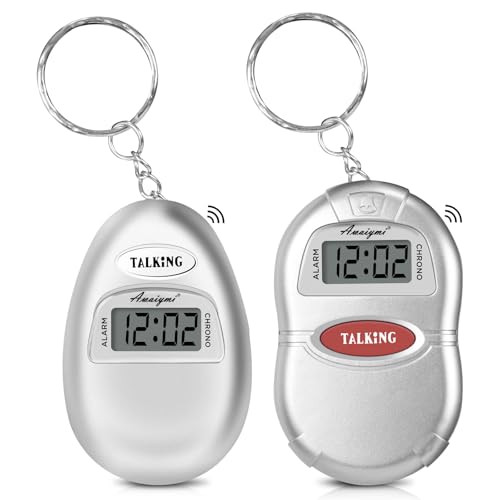
The Awaiymi is made for a person on the move. Each clock is small enough to hang from a keyring, and one press of the talking button announces the time. Because it travels easily, it works in places where a desk clock cannot go.
The pack comes with two units, so one can stay at home and one can go out. It also acts as a small battery-operated alarm clock, which is useful for a nap or a trip. The compromise is volume and size, because a small speaker works best near the ear and is easy to lose if it falls off a bag.
For a blind user it is best thought of as a companion rather than a primary clock. Unlike the NADOBA Talking Clock for Blind Elderly, which stays on a table, the Awaiymi is with you at the bus stop or in a waiting room. Clip one to a bag strap where your hand knows to find it.
Best for: A blind user who wants the time on a keyring or in a pocket.
Check price on AmazonSpecs
- Pack: 2 clocks
- Form: Keychain
- Time check: One press
- Extra: Alarm clock function
Pros
- +Two clocks come in one pack
- +Keychain size fits a pocket or bag
- +One press speaks the time
- +Alarm function helps on trips
Cons
- −Small speaker is quiet in noisy places
- −Easy to misplace if left unattached
Top Life Extra Loud Talking Clock
About this pick
The Top Life is the loudest clock here, with an 85 dB setting that carries across a room. A press speaks the time and a second press gives the day, date and year. A normal volume setting is also available for quiet moments.
That loudness matters for blind users who also have some hearing loss, since they depend on sound entirely. The design is clean and simple, so there is little to confuse. The tradeoff is that its listing says little about spoken setup, so a user may need help configuring it initially.
In a home it works as a hallway or kitchen clock where noise competes with speech. Compared with the Awaiymi 2 Pack Talking Keychain Clock, which is meant to be held close, the Top Life can be heard from the next room. Its simplicity is a plus, though the NADOBA is the stronger choice for solo setup.
Best for: A blind user with some hearing loss who needs a loud, simple clock.
Check price on AmazonSpecs
- Loud volume: 85 dB
- Normal volume: Available
- First press: Time
- Second press: Day, date and year
Pros
- +85 dB loud setting is audible across a room
- +Normal volume setting also available
- +Second press gives day, date and year
- +Clean design with minimal controls
Cons
- −Little stated support for spoken setup
- −Loud setting can be startling at night
How We Evaluated These Talking Clocks for Blind Users
Each pick was assessed across 5 criteria weighted for real-world use.
Accessibility of setup
We evaluated whether a blind user could set the clock without sighted help. The NADOBA and Cirbic offer spoken instructions, and the BATVOX offers audio prompts. Clocks that rely on a manual lost points because a blind user cannot read it.
Touch findability
Based on product specs and buyer feedback, we judged how easily the main control can be found by feel. The NADOBA's raised button scored highest, followed by the very large Cirbic button. Small or flat controls scored lower.
Voice clarity and loudness
We compared voice character and volume options. The Top Life leads at 85 dB, the BATVOX offers key-based volume steps, and the memo24 has a male voice many find clear. We favored clocks that suit hearing loss without being harsh.
Information announced
We checked whether each clock gives time, day and date. The memo24 and BATVOX announce the day of the week, and the Top Life gives the year too. Clocks that only give the hour scored lower.
Everyday practicality
We weighed size, portability and extras. The Awaiymi leads for travel with a two-pack, while desk clocks lead on steady home use. A clock must fit the way a person actually lives to earn a strong score.
How to Choose the Right Talking Clocks for Blind Users
By Setup Independence
The more a clock explains itself aloud, the less help it needs.
| Situation | Pick | Why |
|---|---|---|
| Sets everything alone | NADOBA Talking Clock for Blind Elderly | Spoken prompts for time, date and alarm |
| Wants an alarm set by voice | Cirbic Extra Large Talking Button Clock | Alarm setup uses audio instructions |
| Comfortable with prompts or a manual | BATVOX Large Talking Button Clock | Audio prompts or printed manual |
| A relative will set it up once | memo24 Talking Button Alarm Clock | Simple operation after setup |
| Hears well but moves around | Awaiymi 2 Pack Talking Keychain Clock | Press one button for the time |
If a sighted helper will set up the clock, simple operation matters more than guided setup.
By Budget
Prices vary, so these tiers are relative.
| Tier | Pick | What you get |
|---|---|---|
| Entry | Awaiymi 2 Pack Talking Keychain Clock | Two portable clocks |
| Entry | memo24 Talking Button Alarm Clock | Male voice and basic alarm |
| Mid | Cirbic Extra Large Talking Button Clock | Large button with spoken alarm setup |
| Mid | BATVOX Large Talking Button Clock | Volume keys and prompts |
| Premium | NADOBA Talking Clock for Blind Elderly | Raised button and full voice-guided setup |
Spend on guided setup if the user will configure the clock alone.
Raised Button vs Oversized Button
Two ways to make a control easy to find.
Raised button
A raised button sticks up from the case, so fingers find its edge without searching. The NADOBA falls on this side. Choose it when the user relies fully on touch.
Oversized button
An oversized button is easy to hit even if the aim is off. The Cirbic, BATVOX and memo24 fall on this side. Choose it when the user has some sight or a less precise reach.
Either works if the clock always sits in the same spot.
By Where You Use It
Placement changes which clock is best.
| Where it lives | Pick | Reason |
|---|---|---|
| Bedside | NADOBA Talking Clock for Blind Elderly | Raised button found in the dark |
| Noisy kitchen | Top Life Extra Loud Talking Clock | 85 dB cuts through noise |
| Living room table | BATVOX Large Talking Button Clock | Volume keys for finer adjustment |
| Handbag or travel | Awaiymi 2 Pack Talking Keychain Clock | Keychain fits a pocket |
| Quiet study | memo24 Talking Button Alarm Clock | Low volume position and clear voice |
A second clock in a different room often helps more than a fancier one.
For Combined Hearing Loss Specifically
When hearing is also reduced, sound is the whole interface.
Look for
Look for a high maximum volume, a clear steady voice and an easy way to change the level. A physical control is better than a menu.
In this comparison
The Top Life Extra Loud Talking Clock reaches 85 dB. The BATVOX Large Talking Button Clock gives key-based volume control, and the NADOBA has a physical high and low switch.
Check the loud setting at first use so it does not startle.
When to Spend More
A few cases justify the extra cost.
| Spend more if | Save if |
|---|---|
| Independence in setup matters, which favors the NADOBA Talking Clock for Blind Elderly | A relative sets it up, so the memo24 Talking Button Alarm Clock works |
| You want finer volume steps from the BATVOX Large Talking Button Clock | A two-position switch is enough |
| Hearing loss needs 85 dB, as on the Top Life Extra Loud Talking Clock | Normal volume is plenty |
| You need a spare for travel, like the Awaiymi 2 Pack Talking Keychain Clock | You only use it at home |
| A large target helps, as on the Cirbic Extra Large Talking Button Clock | A smaller button works fine |
Spend where the clock removes a daily dependence on others.
Frequently Asked Questions
What should a blind person look for in a talking clock?
Prioritize a button that is easy to find by feel, a clear voice and spoken setup instructions. Those three things determine whether the clock can be used independently. The NADOBA Talking Clock for Blind Elderly covers all three, with a raised button and voice-guided setup. Extras like reminders matter less than basic usability.
Can a blind user set the time without help?
Only if the clock speaks its setup steps. The NADOBA and Cirbic provide spoken guidance, and the BATVOX offers audio prompts. Clocks that rely on a printed manual will need a sighted helper. Check the listing before buying. A useful test is to look for the words voice-guided or audio instructions, which describe setup that happens by ear. Even then, ask a helper to confirm the first alarm works, because one confirmed alarm builds trust in the process. After that, the user can usually adjust the time alone after a battery change.
Are keychain talking clocks accurate and loud enough?
They report the time just as well, but their small speakers are quiet in loud places. The Awaiymi 2 Pack Talking Keychain Clock works best held near the ear. For a home clock, a louder desk model is better. A keychain is a good second clock.
Which voice is easiest to understand?
It varies by listener. Many people find lower, steady voices clearer, which is why the memo24 uses a male English voice. The NADOBA uses clear North American English. If you can, ask the person to listen to a sample first.
How loud should the clock be?
Loud enough to hear over normal household sound but not so loud it startles. The Top Life Extra Loud reaches 85 dB and also has a normal volume. The BATVOX lets you step the volume with keys. Test the level at first use. Hard floors and bare walls make speech echo, so a setting that sounds right in a carpeted bedroom may be too much in a tiled hallway. If the clock will sit near a television or radio, the loud Top Life setting is usually the better starting point. Make a habit of re-checking the volume after any battery change, since some clocks reset to a default.
Does a talking clock need batteries?
Many do, so keep spares nearby and replace them on a schedule. A clock that goes silent unexpectedly is a nuisance for someone who depends on it. Consider labeling the spare batteries by touch. Replace batteries before they fail. A simple routine is to swap them at the same time each year, such as when the clocks change for daylight saving. Store the spares in a labeled drawer so the user can find them without help. If the voice starts to sound slow or distorted, that is usually a sign the cells are weak and should be replaced soon.
Is a talking clock better than a smartphone?
A phone can speak the time, but it takes several steps. A talking clock is one press, always in the same place. Many users keep both. The clock is the dependable fallback. Phones also run down, update at awkward moments and need a screen reader that some users find tiring for a simple question. A dedicated clock answers instantly with no menus. It also works as a shared reference in a home where several people ask the same question.
Bottom Line
best overall: NADOBA Talking Clock for Blind Elderly - best overall pick in this roundup.
See the full rankings above for all picks with pros, cons, and best-for summaries.
Browse on Amazon
All Prime-eligible options with current pricing.
Shop on Amazon →