6 Best Talking Clocks in 2026
Six easy talking clocks compared for button size, voice volume, alarms and setup, so you can pick one that announces the time without squinting at a display.


At a Glance
A talking clock solves a small daily annoyance that adds up: squinting at a dim display, hunting for glasses, or asking someone else what time it is. The idea is simple, press a button and a voice tells you the time, and press again for the day and date. What separates a good one from a frustrating one is rarely the voice itself. It is how big the button is, how loud the speaker gets, and how many steps it takes to set the time in the first place.
We evaluated six talking clocks from the Amazon lineup based on product specs and buyer feedback, and we sorted them by how they fit real routines. Some are bold single-button desk clocks, one is a 7-inch display with reminders, one is a small desk clock with a large digital readout, and one is a keychain pair that rides in a bag. Each earns its place for a different kind of person, from someone with mild hearing loss to a traveler who wants the time without pulling out a phone.
Use the comparison to match the clock to the person, not to the longest feature list. A plain one-button clock is often the better gift than a clock with a dozen alarms, because simple things get used every day. The sections below cover what to check before buying, how we scored each pick, and which clock fits which situation.
6 Criteria to Look For Before Buying a Talking Clock
Key buying criteria so you get the right fit the first time.
Button size and findability
The button is the whole interface, so it has to be easy to hit without looking. Look for a large target, strong color contrast and ideally a raised shape that can be found by touch. The Cirbic Extra Large Talking Button Clock uses a big blue button for exactly this, and the NADOBA Talking Clock for Blind Elderly adds a raised button. A small keychain model like the Awaiymi 2 Pack trades button size for portability, so it suits pocket use rather than a nightstand.
Voice loudness and control
A talking clock is only useful if it can be heard in the room where it lives. Check whether volume is a dial, a set of levels or a simple high and low switch. The Top Life Extra Loud reaches 85 dB, while the GOLOZA 7-Inch offers 10 volume levels for fine tuning. A two-position switch like the Cirbic's is simpler but can leave a person with moderate hearing loss stuck between settings.
How the clock gets set
Most frustration happens during setup, not daily use. Spoken prompts let a user set the time, date and alarm without reading tiny text. The NADOBA and the Cirbic both use audio instructions, which keeps setup independent. A screen-based clock like the HearEsy Talking Alarm Clock works well for partially sighted users but depends on small controls to change settings.
Date and day announcements
Knowing the day matters as much as the hour for many users. Good single-button clocks give the time on the first press and the day and date on the second. The Top Life Extra Loud announces day, date and year on its second press, which helps people who lose track of the calendar. Clocks that only announce the hour miss this benefit entirely.
Reminders versus simplicity
Extra reminders are only an advantage if someone will set them up. The GOLOZA offers 3 medicine reminders, unlimited alarms and birthday alerts that begin 3 days ahead. That is valuable for a person managing routines but overkill for someone who wants a clean press-and-hear device. Match the feature set to the person's habits rather than to the longest list.
Power source and placement
Batteries make a clock portable but add a replacement chore. The HearEsy is battery operated and compact at 4.1 x 1.5 x 2.4 inches, so it can sit anywhere without a cord. Keychain clocks such as the Awaiymi are also battery-based and meant to move around. Decide whether the clock stays in one place or travels, then choose the form that fits.
6 Best Talking Clocks in 2026
Top Life Extra Loud Talking Clock
About this pick
The Top Life Extra Loud earns the top spot because it does the core job without fuss. Press the button and it announces the time, press again and it gives the day, date and year. The design is clean and uncluttered, so there is nothing to misread or accidentally change.
The headline feature is its very loud 85 dB volume, which lets the time and date be heard even by someone who is hard of hearing. A normal volume setting is also available, so it does not have to shout in a quiet bedroom. The tradeoff is that it is a talker first and an organizer last, so you will not find the medicine reminders or birthday alerts that some pricier models include.
In daily ownership the appeal is how little attention it needs. It has far fewer controls than the GOLOZA 7-Inch Talking Dementia Clock, which offers 10 volume levels and several reminder types, so there is less to learn and less to get wrong. At 85 dB it is also louder than anything else in this group that lists a measured figure, which makes it the safer pick for a hallway or a noisy kitchen.
Best for: Someone who wants a plain press-for-the-time clock that is loud enough for hearing loss.
Check price on AmazonSpecs
- Loudest volume: 85 dB
- First press: Time
- Second press: Day, date and year
- Control style: Single button
Pros
- +Very loud 85 dB output for hard-of-hearing users
- +Second press gives day, date and year
- +Normal volume option for quiet rooms
- +Clean single-button design with little to learn
Cons
- −No medication or custom reminders
- −Loud setting can startle in a quiet room
Cirbic Extra Large Talking Button Clock
About this pick
The Cirbic is built around one oversized blue button that is easy to see and easy to find by feel. A single push gives the current time and a second push gives the date, which keeps the interaction as short as it can be. The blue-on-base contrast helps people with low vision locate it quickly, even when they are not looking straight at it.
It includes an alarm, and the setup is guided by audio instructions rather than a tiny menu. Two voice settings, High and Low, cover most hearing needs without a full volume dial. The compromise is that two settings are blunter than the GOLOZA's 10 levels, so a person who needs something in between may find one setting too quiet and the other too loud.
Ownership is easy because there is no display to dim or clean. Compared with the Top Life Extra Loud at 85 dB, the Cirbic is the better match when finding the button matters more than raw volume. Place it on a nightstand or kitchen counter where the big blue target is always in the same spot, and it becomes a reflex.
Best for: Someone with low vision who needs a button they can find at a glance or by touch.
Check price on AmazonSpecs
- Button: Extra large, blue, high contrast
- Voice settings: High and Low
- Alarm: Included, audio instructions
- Announcements: Time, then date
Pros
- +Oversized blue button is easy to spot and press
- +Audio instructions guide the alarm setup
- +Two voice settings fit most hearing needs
- +Simple press-for-time-then-date flow
Cons
- −Only two volume steps, no fine adjustment
- −No reminders beyond the basic alarm
GOLOZA 7-Inch Talking Dementia Clock
About this pick
The GOLOZA is the most capable clock here, with a large 7-inch display and a button press that announces the time. It offers 10 volume levels, which is the finest control in this lineup. Beyond the basics it supports unlimited alarms and 3 medicine reminders, so one device covers wake-ups and daily routines.
It also starts birthday and holiday reminders 3 days before the event, which is a thoughtful touch for anyone who loses track of dates. The tradeoff is complexity. More features mean more setup steps, and a person who only wants to hear the time may never use most of them. It is the right choice when the clock has to do the job of a calendar and a pill prompt.
Day to day, the large screen means the time is readable even without pressing anything. Compared with the Cirbic Extra Large Talking Button Clock, which has two voice settings and one job, the GOLOZA asks for a one-time setup session from a family member. After that it runs by itself, which suits a household where an adult child sets things up during a visit.
Best for: Someone who wants the time, date and medicine prompts in one large clock.
Check price on AmazonSpecs
- Display size: 7 inches
- Volume levels: 10
- Medicine reminders: 3
- Birthday and holiday alerts: Start 3 days early
Pros
- +Ten volume levels allow precise loudness tuning
- +Three medicine reminders plus unlimited alarms
- +Holiday alerts begin three days ahead
- +Large 7-inch display readable at a glance
Cons
- −Setup takes longer than a one-button clock
- −More features than a casual user needs
NADOBA Talking Clock for Blind Elderly
About this pick
The NADOBA is designed so that nothing requires sight. The large button is raised, so it is easy to find by touch, and one press announces the time and date in clear North American English. Spoken prompts walk the user through setting the time, the date and the alarm step by step.
A side switch toggles between high and low volume, so the setting is physical and can be checked by touch rather than through a screen. The drawback is that the volume choice is only two positions, the same as the Cirbic, so it does not offer the fine control of the GOLOZA. It also lacks reminder features, which keeps it simple but limits its use as an organizer.
In a household the practical advantage is independence during setup. Unlike the HearEsy Talking Alarm Clock, whose large digital numbers assume the user can see a display, the NADOBA can be configured entirely by ear. That makes it the strongest choice when the person using it will set the clock themselves.
Best for: A person who is blind or has very low vision and wants to set the clock themselves.
Check price on AmazonSpecs
- Button: Large, raised
- Setup: Spoken step-by-step prompts
- Volume: Side switch, high or low
- Voice: Clear North American English
Pros
- +Spoken prompts guide time, date and alarm setup
- +Raised button is easy to find by touch
- +Side switch makes volume checkable by feel
- +Clear North American English voice
Cons
- −Only high or low volume choices
- −No medicine or custom reminder features
HearEsy Talking Alarm Clock
About this pick
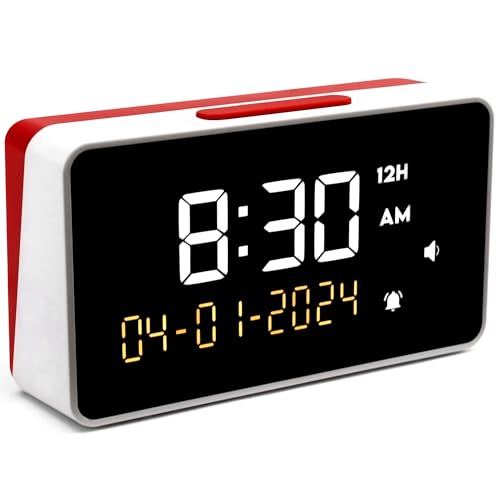
The HearEsy combines a large digital display with a talking function, so a person can either glance at the time or press the top button to hear it. Measuring 4.1 x 1.5 x 2.4 inches, it is compact enough for a nightstand. A bright backlight helps in dim rooms, and the announcement is described as loud and clear.
Useful settings include a 12 or 24 hour format and an hourly chime that can run around the clock or only from 7am to 9pm. The alarm is loud and can be snoozed or stopped. The tradeoff is that this is a conventional alarm clock with speech added, so setting it relies on small controls and a screen, which makes it less friendly for someone who cannot see well.
Powered by batteries, it can sit anywhere without a cord. Next to the Awaiymi 2 Pack Talking Keychain Clock, the HearEsy is a fixed home piece, with a larger readout and a more traditional alarm. It suits a person who sees a bit and wants speech as a backup, not as the only way to know the time.
Best for: Someone with partial sight who wants a big readout plus a spoken time.
Check price on AmazonSpecs
- Size: 4.1 x 1.5 x 2.4 inches
- Time format: 12 or 24 hour
- Chime option: Hourly, 7am to 9pm
- Power: Battery operated
Pros
- +Large digital numbers with a bright backlight
- +Hourly chime can be limited to 7am to 9pm
- +Switch between 12 and 24 hour formats
- +Compact 4.1 x 1.5 x 2.4 inch body
Cons
- −Setup relies on a screen and small controls
- −Battery power means periodic replacement
Awaiymi 2 Pack Talking Keychain Clock
About this pick
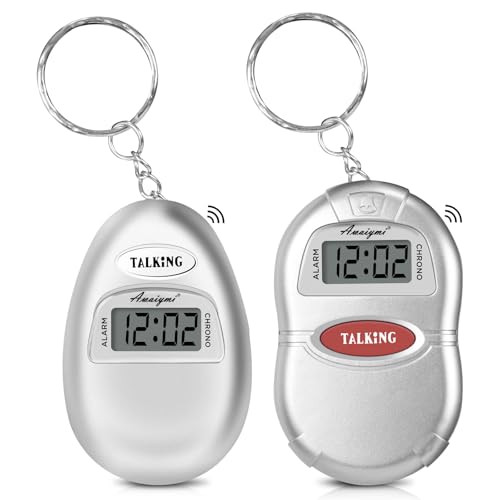
The Awaiymi is the only pick built to travel. Each clock is small enough to clip onto a keyring or drop into a pocket, and a single press of the talking button announces the time. The pack includes two, so one can live at home and one can ride in a bag or by the bed.
It also doubles as a small battery-operated alarm clock, which is handy for a nap or a short trip. The compromise is size: a small body means a small speaker, so it is not the clock to place across a noisy room. It also has less display and fewer features than the larger desk models in this comparison.
For ownership, the keychain form means it stays close and gets used often, which is the whole point. Compared with the Top Life Extra Loud Talking Clock at 85 dB, the Awaiymi trades volume for portability, so it works best held near the ear. Two in the box makes it a practical shared or backup purchase.
Best for: Someone who wants a time check in a pocket, purse or on a keyring.
Check price on AmazonSpecs
- Pack size: 2 clocks
- Form: Keychain
- Time check: One press of the talking button
- Alarm: Included
Pros
- +Two clocks included in a single pack
- +Clips to keys or fits in a pocket
- +One press announces the time
- +Built-in alarm for naps and travel
Cons
- −Small speaker is quiet in loud rooms
- −Fewer features than larger desk clocks
How We Evaluated These Talking Clocks
Each pick was assessed across 5 criteria weighted for real-world use.
Ease of operation
We evaluated how many presses or steps are needed to hear the time and date. Single-button designs like the Top Life Extra Loud and the Cirbic scored highest. Clocks needing menus lost points. This criterion carried the most weight because ease is the reason to own one.
Audio clarity and volume
Based on product specs and buyer feedback, we compared volume range and voice clarity. The Top Life leads with 85 dB, the GOLOZA leads on fine control with 10 levels, and the NADOBA and Cirbic use two settings. We favored models that serve both quiet rooms and hard-of-hearing users.
Setup independence
We checked whether a user can configure the clock without help. Spoken setup on the NADOBA and Cirbic earned strong marks, while screen-driven setup on the HearEsy scored lower for low vision users. Setup that a family member must do once, as with the GOLOZA, sits in the middle.
Feature usefulness
Extras such as medicine reminders, birthday alerts and hourly chimes were weighed against added complexity. The GOLOZA offers the broadest set, the HearEsy has chime options, and the Awaiymi adds portability. We rewarded features that help daily life and penalized clutter.
Fit and durability of form
We considered size, placement and power. The HearEsy suits a nightstand at 4.1 x 1.5 x 2.4 inches, the Awaiymi suits a pocket or keyring, and the large-display GOLOZA suits a shelf or desk. Each pick leads in a different form, and no single design fits every room.
How to Choose the Right Talking Clocks
By Who Will Use It
The best talking clock depends on the person more than the product.
| Situation | Pick | Why |
|---|---|---|
| Hard of hearing, wants simplicity | Top Life Extra Loud Talking Clock | 85 dB output and a single button |
| Low vision, needs a findable button | Cirbic Extra Large Talking Button Clock | Extra large blue high-contrast button |
| Blind, sets the clock alone | NADOBA Talking Clock for Blind Elderly | Spoken setup and a raised button |
| Manages medicine and dates | GOLOZA 7-Inch Talking Dementia Clock | 3 medicine reminders and 10 volume levels |
| Travels often | Awaiymi 2 Pack Talking Keychain Clock | Two keychain clocks that fit a pocket |
If you are buying for someone else, pick the clock they will press without thinking about it.
By Budget
Prices shift often, so think in tiers rather than amounts.
| Tier | Pick | What you get |
|---|---|---|
| Entry | Awaiymi 2 Pack Talking Keychain Clock | Two portable clocks with one-press time |
| Entry | Top Life Extra Loud Talking Clock | Loud single-button operation |
| Mid | Cirbic Extra Large Talking Button Clock | Large button and spoken alarm setup |
| Mid | NADOBA Talking Clock for Blind Elderly | Raised button and voice-guided setup |
| Premium | GOLOZA 7-Inch Talking Dementia Clock | Large display, reminders and 10 volume levels |
A premium feature set only pays off if the person will actually use the reminders.
Button Clock vs Display Clock
Two designs dominate this category.
Button clocks
A button clock has almost no display and relies on speech, so there is little to misread. The Top Life Extra Loud, Cirbic and NADOBA fall on this side. Choose this if the person finds screens hard to read and wants the simplest possible interaction.
Display clocks
A display clock shows the time continuously and adds speech on demand. The HearEsy and the 7-inch GOLOZA fall on this side. Choose this if the person has some sight and wants to glance at the time as well as hear it.
People with partial sight tend to prefer a display clock, while those with little sight do better with a button clock.
By Portability
Where the clock lives changes which design makes sense.
| Where it lives | Pick | Reason |
|---|---|---|
| Nightstand | HearEsy Talking Alarm Clock | Compact 4.1 x 1.5 x 2.4 inch body with backlight |
| Kitchen counter | Top Life Extra Loud Talking Clock | 85 dB cuts through appliance noise |
| Living room shelf | GOLOZA 7-Inch Talking Dementia Clock | Large 7-inch display visible from a chair |
| Handbag or keyring | Awaiymi 2 Pack Talking Keychain Clock | Keychain form fits a pocket |
| Bathroom or hall | Cirbic Extra Large Talking Button Clock | Big button is quick to hit in passing |
Putting a second clock in another room often beats buying a single fancier one.
For Hearing Loss Specifically
Volume and voice quality matter most here.
Look for
Look for a high maximum volume or many volume steps, plus a clear, steady voice. A speaker that can reach about 85 dB or a clock with multiple volume levels gives you room to adjust over time.
In this comparison
The Top Life Extra Loud Talking Clock leads at 85 dB. The GOLOZA 7-Inch Talking Dementia Clock offers 10 volume levels for fine tuning. The Cirbic and NADOBA offer high and low settings only.
Test the loud setting in the room where it will live, since hard floors increase echo.
When to Spend More
Sometimes the extra features justify the step up.
| Spend more if | Save if |
|---|---|
| You want medicine prompts, as on the GOLOZA 7-Inch Talking Dementia Clock | You only need the time, so the Top Life Extra Loud Talking Clock is enough |
| You need fine volume control from 10 levels on the GOLOZA | Two settings on the Cirbic Extra Large Talking Button Clock are enough |
| The user must set it up alone, which favors the NADOBA Talking Clock for Blind Elderly | A relative sets it up once, so a simpler clock works |
| You want a large readout and chimes, as on the HearEsy Talking Alarm Clock | A spoken time alone satisfies, so the button clocks suffice |
| You will use clocks in several places, such as the Awaiymi 2 Pack Talking Keychain Clock | One clock stays in one room |
Spend on the feature the user will touch every day, not the one that looks impressive on the box.
Frequently Asked Questions
How do I choose between a button clock and a display clock?
Start with how well the person sees. If they cannot read a screen, a button clock like the Cirbic Extra Large Talking Button Clock or NADOBA is easier. If they see a little, a display clock like the HearEsy Talking Alarm Clock or the 7-inch GOLOZA adds a glanceable readout. Many households end up with one of each.
Are talking clocks only for blind people?
No. Many people use them because they dislike squinting, are hard of hearing, or want a quick time check without fetching glasses. A clock like the Top Life Extra Loud Talking Clock is popular precisely because it removes effort. Think of it as a convenience as much as an accessibility tool.
How loud is loud enough?
That depends on the room and the person's hearing. The Top Life Extra Loud reaches 85 dB, which suits a hall or kitchen, while a bedroom may only need a normal setting. The GOLOZA's 10 volume levels let you find the right balance. Test it where it will sit before committing.
Do talking clocks need batteries or a plug?
Most compact models, including the HearEsy and Awaiymi, run on batteries and can go anywhere. That means swapping batteries from time to time, so keep spares nearby. Check the listing for the power source before you buy, since it affects where the clock can sit.
Can a talking clock remind someone to take medicine?
Some can. The GOLOZA offers 3 medicine reminders alongside unlimited alarms, and it begins birthday and holiday alerts 3 days early. Simpler clocks do not have this feature. A reminder is only effective if it is set up correctly, so plan a setup session.
Is a keychain clock a good main clock?
Usually not. A keychain clock like the Awaiymi has a small speaker and a small body, so it works best held close. It is a great second clock for travel or a bag. For a primary bedside clock, a louder desk model is a better fit.
What is the most common setup mistake?
People often skip the setup instructions and end up with the wrong time or a mismatched alarm. Clocks with spoken prompts, such as the NADOBA and Cirbic, make this easier because they tell you each step. Take a few minutes to set the time, date and alarm carefully the first time.
Bottom Line
best overall: Top Life Extra Loud Talking Clock - best overall pick in this roundup.
See the full rankings above for all picks with pros, cons, and best-for summaries.
Browse on Amazon
All Prime-eligible options with current pricing.
Shop on Amazon →