6 Best Smart Alarm Clocks Under $30 in 2026
Six alarm clocks under $30 that add wireless charging, white noise, Bluetooth or a 5 inch auto-set screen, compared on features that matter at the bedside.



At a Glance
Emerson SmartSet Wireless Charging Alarm Clock Radio
↓ See why we picked itNear the top of this budget range, an alarm clock stops being only a clock. You can find models that charge a phone on top, play white noise, stream from Bluetooth or show a screen big enough to read without glasses. Those extras are where the real choice lies, because the basics of timekeeping are now covered by almost every product here.
Our six picks each lead with a different extra. One adds a 10W Qi charging pad, one doubles as a sound machine with 24 sounds, two use large auto-set LCD screens, and two are Emerson radios with Bluetooth or USB-C. We evaluated them from listing specs and buyer feedback, looking at what each extra actually delivers, what it complicates and which sleeper it suits.
A feature you never use is wasted money, so read the picks as answers to specific habits: charging your phone overnight, masking noise, or just seeing the time clearly.
As a rule of thumb, one extra is a bargain and three is clutter. Decide which single feature you would miss most, buy the clock that does it best, and let the rest of the spec sheet be a bonus rather than the reason you choose.
6 Criteria to Look For Before Buying a Smart Alarm Clocks Under $30
Key buying criteria so you get the right fit the first time.
Which extra you will use
Extras only help if they match a habit. The wireless charging Emerson adds a 10W pad and a 2.1A USB port, the Buffbee adds 24 sounds, and the DreamSky models add large screens. Pick the single extra that fixes a nightly annoyance. Paying for features you never touch is the easiest mistake at this cap.
Wireless charging compatibility
A Qi pad needs a phone that supports it and a case thin enough to pass power through. The 10W Emerson delivers up to 10 watts, which is plenty for overnight use. Thick or metal cases can block charging entirely. Test the alignment on first night, and use the 2.1A USB port if the pad does not suit your case.
Screen size and dimming
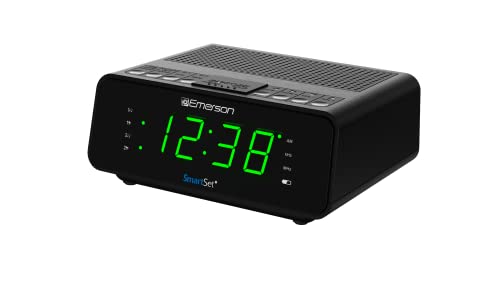
The DreamSky 5 inch is the biggest readout here, the 4.3 inch model follows, and the Emerson Bluetooth shows 1.4 inches. Bigger screens are easier on eyes but throw more light, so look for a wide dimmer range. The 5 inch DreamSky dims almost fully. If you rarely check the time at night, a smaller display is fine.
Noise masking and wake tones
A sound machine such as the Buffbee offers 24 sounds that can mask traffic or a snoring partner. Its gradual alarm tones are gentler than a buzzer. The tradeoff is more menu steps than the Emerson clocks. If you only need an alarm, a plain model is quicker to use.
Bluetooth and radio
Bluetooth 5.1 on the Emerson models reaches about 10 meters, which covers a normal bedroom. The CKS1401 sticks to AM and FM, while the Buffbee and DreamSky offer neither. Pairing is a one-time task, but it is one more thing to troubleshoot. Choose radio for simplicity and Bluetooth for podcasts.
Time zone and daylight saving
A clock that sets itself still needs the right zone. The 5 inch DreamSky supports seven USA zones, the 4.3 inch model supports four, and Emerson relies on SmartSet. If you live outside the main zones, check the listing. Automatic daylight saving matters more than any extra feature.
6 Best Smart Alarm Clocks Under $30 in 2026
Emerson SmartSet Wireless Charging Alarm Clock Radio
About this pick
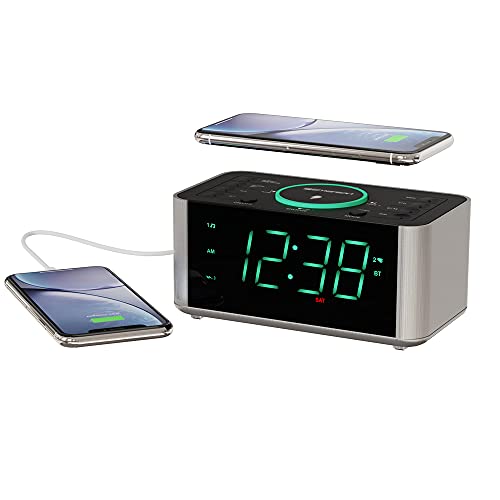
This Emerson puts a 10W Qi charging pad on top of the clock, so you drop a compatible phone on it and it charges without a cable. A separate USB port rated 2.1A at 5V can charge a second device, such as a tablet or earbuds case, at the same time. Bluetooth 5.1 and an aux input let you play audio wirelessly or by wire, and PLL tuning handles the FM radio. The pad is the headline: it removes the nightly cable fumble and keeps the nightstand tidy. The tradeoffs are practical, because the phone must support Qi and a thick case can block charging, and the radio is FM only with no AM band listed. A busier feature set also means more buttons to learn. In ownership, it works as a charging dock, speaker and alarm in one box. Against the Emerson Bluetooth model with a cable-only USB port, it is the step up for people who value a pad. Against the CKS1401, it adds Bluetooth and charging but loses the simple USB-C focus. It is the best all-round choice if your phone sleeps beside you.
Best for: Phone users who want to drop and charge overnight.
Check price on AmazonSpecs
- Wireless charging: 10W Qi
- USB port: 2.1A at 5V
- Bluetooth: 5.1
- Audio in: Aux input
- Radio: PLL FM
Pros
- +Ten watt Qi pad charges a phone by dropping it on
- +USB port adds 2.1A for a second device
- +Bluetooth 5.1 pairs and plays easily
- +Aux input supports wired audio sources
Cons
- −Needs a Qi phone and a thin case
- −FM only, with no AM band listed
- −More buttons than a plain clock radio
Buffbee Alarm Clock with Sound Machine
About this pick
Buffbee combines an alarm clock with a white noise machine, offering 24 sounds including nature tones to help you fall asleep and block street noise. The alarm uses softer options such as birdsong, waves, brook and piano, in addition to a plain beep, and it starts gently rather than with a harsh buzzer. It is aimed squarely at people who wake easily to noise. One device replaces two, which clears space and a power outlet. The tradeoff is menu complexity: a sound machine adds settings, and fiddling with them half asleep is harder than pressing one button on a plain clock. The listing does not mention a radio or phone charging. Day to day, you choose a sound, set a timer and let it run. Against the Emerson models, the Buffbee swaps a tuner for masking sounds, and against the DreamSky it offers audio rather than a big screen. If street noise or a snoring partner keeps you up, this clock solves a real problem the others ignore.
Best for: Light sleepers who need noise masking and a soft wake-up.
Check price on AmazonSpecs
- Sounds: 24 calming sounds
- Wake-up: Gradual soft tones
- Alarm tones: Birdsong, waves, beep, brook, piano
- Function: Alarm plus sound machine
- Radio: Not listed
Pros
- +Twenty-four sounds mask street and household noise
- +Gentle alarm tones ease you awake
- +One device replaces a clock and a sound machine
- +Nature tones include birdsong, waves and piano
Cons
- −Extra sound settings add menu complexity
- −No radio or phone charging is listed
DreamSky 5 Inch Auto Set Alarm Clock with Battery Backup
About this pick
The 5 inch DreamSky is the largest display in this guide, showing the time, date and temperature in digits you can read from across the room. A near full-range dimmer lets you turn it down for sleep, and the clock sets itself as soon as it is plugged in. Auto daylight saving and a choice of seven USA time zones cover most of the country, and a long-lasting button cell holds settings during outages. It is the best answer for failing eyesight, because the digits are huge and the controls are few. The tradeoff is the glow: an LCD this size can fill a small room unless you dim it fully, and there is no radio, Bluetooth or charging. Ownership is almost invisible, which suits it. Against its smaller 4.3 inch sibling, this version adds screen size and more time zones. Against the Emerson Bluetooth with 1.4 inches, it trades audio for readability. Buy it when the main job is seeing the time.
Best for: Anyone with low vision or a clock across the room.
Check price on AmazonSpecs
- Display: 5 inch LCD
- Shows: Time, date, temperature
- Dimmer: Almost full range
- Time zones: Seven USA zones
- Backup: Button cell
Pros
- +Five inch screen shows time, date and temperature
- +Dimmer runs almost the full brightness range
- +Seven USA time zones cover most of the country
- +Button cell backup holds settings in outages
Cons
- −Large LCD can light a small bedroom
- −No radio, Bluetooth or charging features
DreamSky 4.3 Inch Auto Set Alarm Clock
About this pick
This DreamSky is the middle step, a 4.3 inch LCD with blue digits that shows time, date and temperature and sets itself on plug-in. Automatic daylight saving removes the twice-yearly chore, and a button cell protects settings during outages. The display is adjustable, so you can tame the blue glow for sleeping. Its value is in being almost as readable as the 5 inch version in a smaller footprint. The trade is a four-zone limit, which may not cover every region, and the blue light can feel bright if you skip dimming. As with its sibling, there is no audio. Expect little more than a plug and a reset every couple of years for the cell. Compared with the 5 inch model it saves desk space, and compared with the Emerson CKS1401 it offers a far larger readout and no radio. It fits a nightstand that cannot take the biggest clock.
Best for: Buyers who want a big readout in a tighter footprint.
Check price on AmazonSpecs
- Display: 4.3 inch LCD
- Digits: Blue
- Time zones: Four USA zones
- Daylight saving: Automatic
- Backup: Button cell
Pros
- +4.3 inch screen is easy to read at a glance
- +Automatic daylight saving saves a manual change
- +Button cell protects settings in a power cut
Cons
- −Only four USA time zones are selectable
- −Blue light can feel bright without dimming
Emerson SmartSet Bluetooth Dual Alarm Clock Radio
About this pick
The Bluetooth Emerson is the balanced middle option, with a 1.4 inch orange display, auto-dim and a USB port rated 1.5A. Bluetooth 5.1 lets you stream from a phone across about 10 meters, and SmartSet restores the date and time after outages. It is a no-fuss way to get wireless audio at the bedside without a pad or extra gear. The orange digits are gentle on night vision, and the auto-dim mode follows the room light. Charging needs a cable, and setup involves pairing, but after the first time it behaves like any other clock. Compared with the wireless charging Emerson at 10W it skips the pad but keeps the price of entry lower. Compared with the Buffbee it plays your own audio instead of built-in sounds. Choose it if you listen to podcasts at night.
Best for: Listeners who want wireless audio without paying for a charging pad.
Check price on AmazonSpecs
- Display: 1.4 inch orange LED
- Bluetooth: 5.1, about 10 meters
- Dimming: 3 levels plus auto
- USB port: 1.5A at 5V
- Radio: FM
Pros
- +Bluetooth 5.1 streams phone audio over 10 meters
- +1.4 inch orange display suits night vision
- +Auto-dim adapts to the room light
- +USB port charges at 1.5A overnight
Cons
- −Charging needs a cable, not a pad
- −Pairing adds a one-time setup step
Emerson CKS1401 SmartSet Alarm Clock Radio
About this pick
The CKS1401 is the plain one: a 0.9 inch white LED, a four-level dimmer and a graduated alarm that raises the volume step by step. SmartSet sets the time on plug-in, and a USB-C port connects to a modern phone cable. The radio covers AM and FM. Its virtue is restraint. There is no Bluetooth to pair and no pad to align, so the controls remain small in number. The smaller display and lack of wireless audio are the cost. Against the 10W charging Emerson it is less capable but easier. Against the DreamSky models it has a much smaller readout but includes a radio. Pick it for a bedroom where simple wins, particularly if the person using it dislikes menus, small pairing screens or anything that needs a phone nearby before it will behave. It also makes a sensible second clock for a guest room or a home office, where a dependable radio and a gentle alarm are all anyone asks for.
Best for: Anyone who wants a gentle alarm and a radio with few buttons.
Check price on AmazonSpecs
- Display: 0.9 inch white LED
- Dimmer: 4 levels
- Wake-up: Graduated volume
- Port: USB-C
- Radio: AM/FM
Pros
- +Alarm volume rises gradually instead of blasting
- +Four-level dimmer runs from high down to low
- +USB-C port suits current phone cables
Cons
- −Display is smaller than the Bluetooth models
- −No Bluetooth is listed, so no wireless audio
How We Evaluated These Smart Alarm Clocks Under $30
Each pick was assessed across 5 criteria weighted for real-world use.
Value of the extra
We judged how well each clock delivers its signature feature. The Emerson 10W pad, the Buffbee's 24 sounds and the DreamSky 5 inch screen each lead in their lane. A feature that works as described scored higher than one with caveats.
Everyday readability
We compared screen sizes, from 5 inches down to 0.9 inches, and dimming ranges. Larger, dimmable displays scored higher. Colour was considered because orange and green are kinder at night than blue.
Setup simplicity
We looked at how many steps each clock needs. The CKS1401 and DreamSky models set themselves, while the Bluetooth and charging models need pairing. Simpler setups earned points for older users.
Outage recovery
We checked for auto time setting and backup cells. DreamSky includes a button cell and Emerson uses SmartSet. Clocks without either lost points.
Value near the cap
We asked whether each pick offers something cheaper clocks cannot. The charging pad, the sound machine and the largest screen all clear that bar. Picks that mostly repeat basics scored lower.
How to Choose the Right Smart Alarm Clocks Under $30
By Nightly Habit
Match the clock to the thing that bothers you most at night.
| Habit | Pick | Why |
|---|---|---|
| Phone cable fumbling | Emerson SmartSet Wireless Charging Alarm Clock Radio | 10W Qi pad on top |
| Noise keeps you awake | Buffbee Alarm Clock with Sound Machine | 24 masking sounds and soft wake tones |
| Cannot read small digits | DreamSky 5 Inch Auto Set Alarm Clock | 5 inch LCD with date and temperature |
| Podcasts to fall asleep | Emerson SmartSet Bluetooth Dual Alarm Clock Radio | Bluetooth 5.1 audio |
| Harsh alarms | Emerson CKS1401 SmartSet Alarm Clock Radio | Gradual volume rise |
One strong feature beats five average ones.
By Budget
Tiers inside the cap follow how many extras you add.
| Tier within the cap | Pick | What you get |
|---|---|---|
| Lower end | DreamSky 4.3 Inch Auto Set Alarm Clock | Big readout and backup cell, nothing more |
| Lower end | Emerson CKS1401 SmartSet Alarm Clock Radio | Radio, USB-C and gentle wake-up |
| Middle | Emerson SmartSet Bluetooth Dual Alarm Clock Radio | Bluetooth and a bigger display |
| Middle | DreamSky 5 Inch Auto Set Alarm Clock | The biggest screen and seven zones |
| Near the cap | Buffbee Alarm Clock with Sound Machine | Alarm and white noise in one |
| Near the cap | Emerson SmartSet Wireless Charging Alarm Clock Radio | 10W charging, Bluetooth and aux |
Audio Clock vs Display Clock
Two design philosophies split this lineup.
Audio-first clocks
The charging Emerson, the Bluetooth Emerson, the CKS1401 and the Buffbee focus on sound, whether music, radio or masking. They carry more controls and a bulkier case. Pick them if sound is part of falling asleep or waking.
Display-first clocks
The two DreamSky models focus on a big, readable screen with auto time. They are quiet and simple, with no audio at all. Pick them if you mainly check the time and want it effortless.
You can pair a display clock with a separate speaker if you want both.
By Charging Needs
Charging features differ more than they first appear.
| Need | Pick | Reason |
|---|---|---|
| Cable-free phone charging | Emerson SmartSet Wireless Charging Alarm Clock Radio | 10W Qi pad |
| Second device at 2.1A | Emerson SmartSet Wireless Charging Alarm Clock Radio | USB port rated 2.1A |
| Simple overnight top-up | Emerson SmartSet Bluetooth Dual Alarm Clock Radio | USB at 1.5A |
| Modern cable | Emerson CKS1401 SmartSet Alarm Clock Radio | USB-C port |
| No charging needed | Buffbee Alarm Clock with Sound Machine | Focus on sound, not charging |
For Light Sleepers Specifically
Sleep quality depends on dark, quiet and gentle wake-ups.
Look for
Choose a clock with a wide dimmer range, gentle alarm tones and a way to mask noise. Avoid bright blue displays and loud fixed buzzers. Keep the clock out of your direct line of sight.
In this comparison
The Buffbee with 24 sounds and soft tones is the best fit, the CKS1401 provides a gradual ramp, and the 5 inch DreamSky dims almost fully. The orange Emerson is gentler than the blue DreamSky glow.
When to Spend More
A bigger budget buys a smarter, more integrated device.
| Spend more if | Save if |
|---|---|
| You want voice control or a smart display, which none of these offer | A reliable alarm with SmartSet is enough |
| You want 15W charging or an AirPods stand beyond the 10W Emerson pad | 10W is plenty for an overnight charge |
| You want a true sunrise light with your alarm | The Buffbee's soft tones wake you well enough |
| You want a louder speaker than a clock radio | The Bluetooth Emerson is loud enough for a bedroom |
Higher tiers add integration; this one is about the right single feature.
Frequently Asked Questions
Does the wireless charging pad work through a phone case?
Usually, if the case is thin and not metal. The 10W Emerson needs a Qi-compatible phone, and thick or magnetic-ring cases can block charging. Test on the first night, and use the USB port if the pad does not suit your case.
Is a sound machine clock worth it?
It is if noise keeps you awake. The Buffbee offers 24 sounds and a gentle wake-up in one device. If you sleep fine, a plain clock is simpler and quicker to operate.
Which has the biggest display?
The DreamSky 5 inch, followed by the 4.3 inch DreamSky. Both show time, date and temperature. The Emerson models are much smaller.
Do these clocks need Wi-Fi?
No. None of them uses Wi-Fi or an app. The Emerson Bluetooth and charging models use Bluetooth only for audio, which keeps them working even if apps change.
How do I stop a bright display from keeping me awake?
Use the dimmer to its lowest level, turn the clock away or choose an orange display. The 5 inch DreamSky dims almost fully, and the Emerson Bluetooth has auto-dim. If it still glows, place it behind a book.
What happens during a power cut?
The DreamSky models hold settings on a button cell, and Emerson SmartSet restores the time on return. Check the time after any long outage. Replace backup cells yearly.
Is Bluetooth hard to set up?
It takes a minute to pair the first time. After that the phone reconnects automatically within about 10 meters. If pairing fails, remove the clock from your phone's list and try again.
Bottom Line
best overall: Emerson SmartSet Wireless Charging Alarm Clock Radio - best with wireless charging pick in this roundup.
See the full rankings above for all picks with pros, cons, and best-for summaries.
Browse on Amazon
All Prime-eligible options with current pricing.
Shop on Amazon →