5 Best Powerline Wi-Fi Extenders in 2026
Five powerline Wi-Fi extender kits that send your network through house wiring, from AV1000 to AV1300, with notes on pairing, passthrough, and Wi-Fi 6.



At a Glance
A powerline kit solves the dead room problem in a different way from a plain plug-in extender. One adapter connects to your router by cable and sends the network through the electrical wiring in your walls. A second adapter, placed in the far room, picks that signal up and turns it into a wired port, a Wi-Fi hotspot, or both.
That wiring-assisted approach matters when walls, floors, or distance defeat wireless rebroadcasting. Because the hard part of the journey travels through copper instead of the air, the far room gets a fresh signal rather than a weakened copy. Results still depend on the age and layout of the house wiring, so expect variation.
We evaluated five kits using product specs and buyer feedback. Four are TP-Link kits that differ in powerline rating and Wi-Fi generation, and one is a Tenda kit with gigabit ports. We also point out where a conventional wireless extender is the more sensible purchase.
6 Criteria to Look For Before Buying a Powerline Wi-Fi Extender
Key buying criteria so you get the right fit the first time.
How a powerline kit works
A kit has two adapters, and the first connects to your router by cable and sends the data through the house wiring. The second adapter, in the far room, turns that signal back into a wired port and often a Wi-Fi hotspot. The TP-Link TL-WPA7817 kit includes both adapters and pairs them in a plug, pair, and play process. Because the main trip happens through copper, walls and floors affect the signal less than they affect Wi-Fi. Check that you plan to use both adapters on the same home's wiring.
Powerline rating
Labels such as AV1000 and AV1300 describe the powerline link, and they are theoretical ceilings. The TP-Link AV1300 kit carries the highest label here, while the TP-Link AV1000 kits and the Tenda AV1000 sit one tier below. Real speeds are lower and depend on the quality of your wiring. A higher rating helps most when the far room has a wired TV or console. For light browsing, an AV1000 kit is typically enough.
Wi-Fi at the remote end
The hotspot on the second adapter decides what phones and laptops get. The TP-Link AX1500 kit adds Wi-Fi 6, the TP-Link AV1300 and AV1000 kits add AC1200 with 867 Mbps on 5 GHz, and the Tenda adds AC650. A hotspot slower than the powerline link becomes the bottleneck for wireless devices. Match this to the devices you will actually use in that room. If most devices are cabled, hotspot speed matters less.
Passthrough outlet
A passthrough adapter has an electrical socket built into its front, so it does not consume a wall outlet. The TP-Link AV1300 and AV1000 passthrough kits include this, which helps in rooms with only one or two sockets. Without it, an adapter occupies the outlet outright and may block a neighboring one. This detail is easy to miss in listings. Look for the word passthrough if outlets are scarce.
Reach and wiring limits
Stated reach is 980 feet for the TP-Link AX1500 kit and 750 feet for the others, measured along the wiring and not in a straight line. Powerline works best when both adapters share the same electrical system, and plugging into a surge strip can reduce the signal. If the router and far room sit on different circuits or panels, results may be weaker. Test with the adapters placed directly in wall outlets. Keep the receipt in case your wiring does not cooperate.
Compare against a plain extender
A wireless extender is cheaper and simpler when the dead room is only one wall away. A powerline kit shines when distance, floors, or masonry defeat wireless rebroadcasting. The TP-Link RE-series extenders in other guides reach 1,500 to 2,400 square feet by air, while kits like the TL-WPA7817 travel up to 980 feet by wire. Pick the kit when a wired port and a fresh signal matter. Otherwise a plain extender is enough.
5 Best Powerline Wi-Fi Extenders in 2026
TP-Link AV1000 Powerline + AX1500 Wi-Fi 6 Kit
About this pick
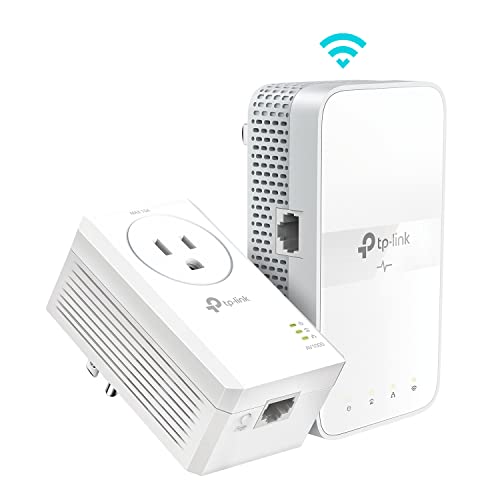
The TL-WPA7817 kit is the only Wi-Fi 6 option in this group and the one with the longest stated powerline reach. It ships with two adapters that pair automatically, and the listing describes a plug, pair, and play process. The powerline side uses HomePlug AV2 at AV1000 speed, with a rated reach of up to 980 feet across the home's wiring.
The remote adapter adds an AX1500 Wi-Fi 6 hotspot, which gives phones and laptops in the far room a modern wireless connection. A newer standard also helps when several devices compete, though the AX1500 figure is lower than the AX3000 class of standalone extenders. The tradeoff is that the powerline speed, not the Wi-Fi rating, usually sets the true ceiling of the far room.
Ownership is straightforward because you plug one adapter near the router, connect it with a cable, and place the second adapter where coverage is needed. Compared with the AV1300 kit at 750 feet, this one claims 230 more feet but a lower powerline label. Pick it when you want the newest wireless standard at the end of the wire. Keep the first adapter in a wall outlet close to the router, since a long cable between router and adapter wastes the benefit of the kit. The pair button needs to be pressed on both units within a short window, and the lights tell you when the link is up.
Best for: Homes with a Wi-Fi 6 router and a long wiring run to a far room.
Check price on AmazonSpecs
- Powerline standard: AV1000 (HomePlug AV2)
- Wi-Fi: AX1500 Wi-Fi 6
- Powerline range: Up to 980 feet
- In the box: Two adapters (TL-WPA7817 KIT)
Pros
- +AX1500 Wi-Fi 6 hotspot at the remote adapter
- +HomePlug AV2 with AV1000 powerline speed
- +Longest stated reach at up to 980 feet
- +Two adapters ship pre-paired in the kit
Cons
- −Powerline speed still caps the far room
- −Wi-Fi 6 gains need compatible devices
TP-Link AV1300 Powerline WiFi Extender Kit Passthrough
About this pick
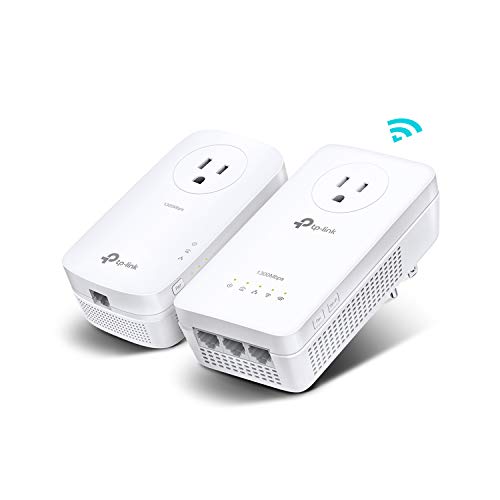
This kit raises the powerline rating to AV1300, the highest in the group. It is built on HomePlug AV2 and extends wired connectivity across the home by up to 750 feet. The Wi-Fi side is AC1200, with 867 Mbps on the 5 GHz band and 300 Mbps on 2.4 GHz, which is enough for HD streaming and online play.
The passthrough design is the practical detail. A passthrough adapter has its own outlet built in, so it does not cost you a plug on a crowded wall. That matters for rooms where outlets are scarce. The tradeoff is that it is a Wi-Fi 5 kit, so a Wi-Fi 6 router and phones will not use their newest features through the hotspot.
In use you pair the adapters, place the second where you need the hotspot, and can wire in a TV or console. Next to the AV1000 AC1200 kit at the same 750 feet, the AV1300 offers a higher powerline rating at the same wireless class. Choose it when wired speed in the far room is the priority. A gamer or a remote worker moving large files will notice the higher label more than a casual browser will. Keep in mind that the 750 foot figure follows the wiring path, which usually winds farther than the straight distance between rooms.
Best for: A far room that needs the fastest powerline link and a hotspot.
Check price on AmazonSpecs
- Powerline standard: AV1300 (HomePlug AV2)
- Wi-Fi: AC1200: 867 Mbps 5 GHz, 300 Mbps 2.4 GHz
- Powerline range: Up to 750 feet
- Outlet: Passthrough
Pros
- +AV1300 is the highest powerline rating here
- +Passthrough outlet saves a wall socket
- +AC1200 hotspot adds 867 Mbps on 5 GHz
- +Extends wired connectivity up to 750 feet
Cons
- −Wi-Fi 5 hotspot trails the Wi-Fi 6 kit
- −Shorter stated reach than the AX1500 kit
TP-Link AV1000 Powerline WiFi Extender Kit Passthrough
About this pick
This is the middle of the TP-Link range, pairing AV1000 powerline speed with an AC1200 hotspot. The listing notes that HomePlug AV2 delivers its speed over existing electrical wiring and reaches up to 750 feet. Wi-Fi is the familiar 867 Mbps on 5 GHz and 300 Mbps on 2.4 GHz.
The passthrough outlet keeps a plug free, and a port on the remote adapter lets you wire a smart TV or console. The honest limitation is that AV1000 sits a rung below the AV1300 kit, and the Wi-Fi 5 hotspot sits below the Wi-Fi 6 kit. For many homes that is exactly the right balance, since a cheaper kit can still deliver a clean signal to a bedroom.
You plug in, press the pair buttons, and move the second adapter to the room that needs help. Compared with the AV1300 option at the same 750 feet, you give up some powerline rating but pay a lower tier. It suits a household that wants a dependable result without chasing the top spec. If the link light stays weak after pairing, move the remote adapter to a different outlet in the same room before blaming the kit. Outlets on different breaker circuits often behave differently.
Best for: A bedroom or office that needs a reliable, mid-tier fix.
Check price on AmazonSpecs
- Powerline standard: AV1000 (HomePlug AV2)
- Wi-Fi: AC1200: 867 Mbps 5 GHz, 300 Mbps 2.4 GHz
- Powerline range: Up to 750 feet
- Outlet: Passthrough
Pros
- +AV1000 HomePlug AV2 over existing wiring
- +AC1200 hotspot gives 867 Mbps on 5 GHz
- +Passthrough outlet keeps a wall socket free
- +Reaches up to 750 feet across the house wiring
Cons
- −One rung below the AV1300 kit on powerline rating
- −Wi-Fi 5 hotspot lacks Wi-Fi 6 efficiency
TP-Link Powerline WiFi Extender AC1200 Dual Band
About this pick
This listing sits close to the AV1000 passthrough kit, with the same AV1000 powerline speed and AC1200 dual band wireless. It is described as a network extender that moves the connection through the home's electrical system. The Wi-Fi side offers 867 Mbps on 5 GHz and 300 Mbps on 2.4 GHz, and the reach is rated up to 750 feet.
One difference from the previous kit is that this listing does not highlight a passthrough outlet. That means the adapters may occupy a socket outright. For a buyer who simply wants working Wi-Fi in a back room, the missing passthrough is a small compromise. The kit is a straightforward fit for streaming and everyday browsing.
Setup follows the same plug and pair routine. Because it shares so many specs with the passthrough kit, the choice often comes down to which listing is available and whether you value the pass-through outlet. Against the Tenda kit at AC650, this one offers a stronger wireless side. Choose it when you want the TP-Link name at the simplest tier. Read the product page closely before ordering so you know whether you are getting a passthrough design. Matching the exact kit name to the model number on the box avoids an accidental mix of older and newer adapters.
Best for: A back room that just needs steady Wi-Fi without extras.
Check price on AmazonSpecs
- Powerline standard: AV1000 (HomePlug AV2)
- Wi-Fi: AC1200 dual band
- 5 GHz speed: 867 Mbps
- Powerline range: Up to 750 feet
Pros
- +AC1200 dual band with 867 Mbps on 5 GHz
- +AV1000 HomePlug AV2 powerline speed
- +Rated up to 750 feet over home wiring
- +Familiar brand with a clear spec list
Cons
- −Passthrough outlet is not highlighted in the listing
- −Specs overlap with the passthrough kit above
Tenda AV1000 Powerline Kit with Gigabit Ports AC650
About this pick
Tenda pitches this kit at hard-to-reach areas such as basements, garages, and upstairs rooms. It uses HomePlug AV2 for up to 1000 Mbps on the powerline side and adds gigabit Ethernet ports for a stable wired connection. The wireless side is AC650 dual band, a clear step below the AC1200 TP-Link kits.
The gigabit ports are the reason to consider it, because smart TVs, consoles, and desktop computers can connect by cable at full speed. The AC650 hotspot is modest, so phones and tablets in the far room will see lower wireless speeds than on the TP-Link kits. The tradeoff is therefore wired strength against wireless weakness.
Setup is plug and play, and the listing treats pairing as an automatic step. Compared with the TP-Link AV1000 AC1200 kit, the Tenda gives up wireless capability but spotlights the wired ports. Choose it when most of the far-room devices are cabled rather than wireless. A small switch can multiply the ports if you have several wired devices, which is a cheap way to build a home office corner. Keep an eye on the hotspot, which is meant for light phone use rather than heavy streaming.
Best for: A far room with a cabled TV, console, or desktop.
Check price on AmazonSpecs
- Powerline standard: AV1000 (HomePlug AV2)
- Wired speed: Up to 1000 Mbps
- Ports: Gigabit Ethernet
- Wi-Fi: AC650 dual band
Pros
- +Gigabit Ethernet ports for cabled devices
- +HomePlug AV2 with up to 1000 Mbps
- +Aimed at basements, garages, and upstairs
- +Plug and play setup
Cons
- −AC650 Wi-Fi is slower than the AC1200 kits
- −No Wi-Fi 6 support for newer phones
How We Evaluated These Powerline Wi-Fi Extenders
Each pick was assessed across 5 criteria weighted for real-world use.
Powerline link
We compared the powerline rating and stated reach of each kit. The TP-Link AV1300 leads on rating, the TP-Link AX1500 kit leads on reach at 980 feet, and the AV1000 kits and the Tenda sit in the middle. These ratings are published ceilings, not measured results.
Remote Wi-Fi
The hotspot on the second adapter was weighed next. The AX1500 Wi-Fi 6 kit is the most modern, the AC1200 TP-Link kits provide 867 Mbps on 5 GHz, and the Tenda's AC650 is the weakest of the group. This is based on product specs and buyer feedback.
Wired options
Ports and passthrough design were considered. The Tenda highlights gigabit Ethernet ports, and two TP-Link kits highlight a passthrough outlet. A kit that helps both wired and wireless devices scored higher than one that supports only one.
Setup effort
Powerline kits should pair with little fuss. The TL-WPA7817 kit describes plug, pair, and play, and the Tenda describes plug and play. Kits that need heavy configuration would lose points, but none here do.
Fit for the job
Each kit was matched to a typical problem. The AX1500 suits a Wi-Fi 6 home with a far room, the AV1300 suits wired speed, the AV1000 passthrough suits a balanced fix, and the Tenda suits a cabled setup. Value was judged by how closely a kit solves its target problem.
How to Choose the Right Powerline Wi-Fi Extenders
By What the Far Room Needs
The best kit depends on whether the far room mostly uses cables or Wi-Fi.
| Situation | Pick | Why |
|---|---|---|
| Wi-Fi 6 phones and laptops in the far room | TP-Link AV1000 Powerline + AX1500 Wi-Fi 6 Kit | AX1500 hotspot with a 980 foot reach |
| Wired console and fast streaming | TP-Link AV1300 Powerline WiFi Extender Kit Passthrough | Highest AV1300 powerline rating |
| General bedroom fix, outlets scarce | TP-Link AV1000 Powerline WiFi Extender Kit Passthrough | Passthrough outlet and 867 Mbps on 5 GHz |
| Simple back-room Wi-Fi | TP-Link Powerline WiFi Extender AC1200 Dual Band | AC1200 dual band at AV1000 |
| Several cabled devices | Tenda AV1000 Powerline Kit with Gigabit Ports AC650 | Gigabit Ethernet ports |
If you are unsure, count how many devices in that room use a cable.
By Budget
Tiers are relative, because powerline kits cluster close together.
| Tier | Pick | What you get |
|---|---|---|
| Entry | Tenda AV1000 Powerline Kit with Gigabit Ports AC650 | Gigabit ports with a modest hotspot |
| Entry to mid | TP-Link Powerline WiFi Extender AC1200 Dual Band | AV1000 plus AC1200 from a known brand |
| Mid | TP-Link AV1000 Powerline WiFi Extender Kit Passthrough | Adds a passthrough outlet |
| Mid to premium | TP-Link AV1300 Powerline WiFi Extender Kit Passthrough | Top powerline rating |
| Premium | TP-Link AV1000 Powerline + AX1500 Wi-Fi 6 Kit | Wi-Fi 6 hotspot and 980 foot reach |
Higher tiers buy a newer hotspot or faster wiring link, not extra rooms.
Powerline Kit vs Plain Wireless Extender
These two approaches fix the same symptom through different paths.
Powerline kit
The signal travels through the electrical wiring, so walls and floors matter less. Kits such as the TP-Link TL-WPA7817 and the Tenda AV1000 deliver a wired port in the far room, plus a hotspot on some models. Results depend on your wiring and whether both adapters share a circuit. Choose this when distance or masonry defeats wireless.
Wireless extender
A plain extender rebroadcasts over the air and needs a decent router signal at its location. It is cheaper and simpler when the dead room is nearby. Kits cannot beat that when walls are thin. Choose this when the weak room is close and a cable run is unnecessary.
In a large or older home, the powerline kit often wins; in a small apartment, the plain extender does.
Wi-Fi Generation at the Far Room
The hotspot standard decides what phones and laptops experience.
| Devices | Pick | Reasoning |
|---|---|---|
| Newer phones and laptops | TP-Link AV1000 Powerline + AX1500 Wi-Fi 6 Kit | Wi-Fi 6 hotspot |
| Mixed older and newer devices | TP-Link AV1300 Powerline WiFi Extender Kit Passthrough | AC1200 with 867 Mbps on 5 GHz |
| Streaming and browsing | TP-Link AV1000 Powerline WiFi Extender Kit Passthrough | AC1200 is plenty |
| Mostly cabled devices | Tenda AV1000 Powerline Kit with Gigabit Ports AC650 | Wireless matters less |
| Basic Wi-Fi for guests | TP-Link Powerline WiFi Extender AC1200 Dual Band | Dual band with simple setup |
Do not pay for a Wi-Fi 6 hotspot if few devices can use it.
For Home Offices and Garages Specifically
Outbuildings and offices have different wiring and device mixes.
Look for
A wired port for a desktop or printer, a stated reach that covers your wiring run, and a passthrough outlet if sockets are tight. Plug the adapters straight into wall outlets and avoid power strips. For a garage on a separate circuit, test before committing.
In this comparison
The Tenda AV1000 suits a cabled desktop with its gigabit ports. The TP-Link AV1300 offers the fastest powerline link for a heavy user. The TP-Link AX1500 kit covers the longest wiring run at 980 feet and adds modern Wi-Fi.
Keep the receipt, since wiring varies and an untested kit may not work in every house.
When to Spend More
Premium kits justify themselves in a few specific cases.
| Spend more if | Save if |
|---|---|
| You have Wi-Fi 6 devices, then the TP-Link AX1500 kit adds a modern hotspot | Your devices are older, then the AV1000 AC1200 kit is enough |
| You push large files over cable, then the AV1300 kit gives headroom | You mostly browse, then the AV1000 kit is fine |
| Outlets are scarce, then a passthrough kit saves a socket | You have spare outlets, then the plain AC1200 kit is enough |
| The wiring run is long, then 980 feet of reach helps | The run is short, then 750 feet is ample |
| You need several wired devices, then the Tenda's gigabit ports help | You only need wireless, then the TP-Link hotspots are stronger |
Spend on the feature your far room actually uses.
Frequently Asked Questions
Does a powerline kit work in every house?
Not always. Results depend on the age and layout of your electrical wiring, and the two adapters generally need to share the same wiring system. Plugging into a surge strip or a heavy appliance outlet can reduce performance. Test the kit soon after purchase and keep the receipt.
Is a powerline kit better than a Wi-Fi extender?
It depends on the home. A kit sends the signal through wiring, so walls and floors matter less, and it provides a wired port. A plain wireless extender is simpler and cheaper for a weak room that is close to the router. In bigger or older homes, the powerline kit often performs more consistently.
What does AV1000 or AV1300 mean?
These labels describe the theoretical ceiling of the powerline link, based on the HomePlug AV2 standard. Real speed is lower and varies with wiring quality. The TP-Link AV1300 kit has the highest label here. For most homes, either rating is enough for streaming.
What is a passthrough outlet?
It is an electrical socket built into the adapter, so plugging in the adapter does not cost you a wall outlet. The TP-Link AV1300 and AV1000 passthrough kits include one. This helps in rooms with only a couple of sockets. Without passthrough, the adapter blocks the outlet.
Can I use a power strip with the adapters?
It is best to plug them directly into the wall. Power strips and surge protectors can filter the signal the adapters rely on. If you must use a strip, choose one that is marked as safe for powerline devices. Direct wall outlets give the cleanest results.
Will a powerline kit speed up my internet?
No. Like any extender, it improves coverage and connection stability but cannot raise your internet plan speed. If your plan is slow, the far room will be slow too. The benefit is a steadier link where Wi-Fi was weak.
Do both adapters need to be the same brand?
Adapters from the same kit are paired out of the box, so use them together. Mixing brands can work if both follow the HomePlug AV2 standard, but the pairing step is less predictable. Mixing a faster adapter with a slower one limits the link to the slower unit. When in doubt, keep a matched pair.
Which kit suits a smart TV or console?
Any kit with a wired port helps, but the Tenda with gigabit ports and the TP-Link AV1300 are the strongest on the wired side. A cabled device avoids the wireless hotspot entirely. Use the hotspot only for phones and laptops.
Bottom Line
best overall: TP-Link AV1000 Powerline + AX1500 Wi-Fi 6 Kit - best overall pick in this roundup.
See the full rankings above for all picks with pros, cons, and best-for summaries.
Browse on Amazon
All Prime-eligible options with current pricing.
Shop on Amazon →