6 Best Orbi Wi-Fi Extenders in 2026
Six NETGEAR Orbi satellites and mesh kits that stretch your home Wi-Fi, with clear notes on which satellite works with which Orbi router before you buy.


At a Glance
Orbi does not really sell extenders in the usual sense. NETGEAR's answer to a dead zone is a satellite, a second box that talks to your Orbi router and shares its network name. That is why this guide is organized around compatibility first, because the most common Orbi buying mistake is picking a satellite that cannot pair with the router already on the shelf.
The upside of the satellite approach is that nothing about your daily Wi-Fi changes. You keep one network name, devices move between boxes without a manual switch and the app handles the pairing. The downside is the lock-in: the listings below say outright that a given satellite works only with a specific Orbi series, so a Wi-Fi 6 satellite will not rescue a Wi-Fi 7 system.
We narrowed the lineup to six items that cover the real situations: a wall-plug satellite, a Wi-Fi 6 tri-band satellite, two Wi-Fi 7 add-ons, a starter router kit and a three-pack Wi-Fi 7 system. Each is judged from product specs and buyer feedback in the listings, with attention to which router it needs.
6 Criteria to Look For Before Buying a Orbi Wi-Fi Extender
Key buying criteria so you get the right fit the first time.
Router compatibility first
Orbi satellites pair only with specific Orbi systems, so confirm your model number before comparing speeds. A mismatch is the single most common reason these purchases get returned. Look for the exact model names in the listing and match them against the label on your router. The Orbi 360 Series Add-On Satellite names RBE361, RBE362 and RBE363, while the Orbi 770 Series Add-On Satellite names RBE771, RBE772 and RBE773.
Satellite or starter kit
If you already own an Orbi router, a single satellite is the cheapest path to more coverage. If you do not, you need a router-plus-satellites kit because a lone satellite has nothing to connect to. Decide first whether you are expanding or starting from zero. The Orbi RBK13 Mesh System is a complete kit that includes the router, whereas the Orbi RBS750 Tri-Band Satellite is an add-on for an existing Wi-Fi 6 system.
Coverage added per unit
Satellite coverage figures describe best-case open space, so treat them as comparative numbers. Count walls and floors between the router and the target room and plan a satellite about halfway between them. A bigger number buys flexibility, not a guarantee. The Orbi Wall-Plug Satellite adds 1,500 square feet, the Orbi 360 Series Add-On Satellite adds up to 2,000, the Orbi RBS750 up to 2,500 and the Orbi 770 Series Add-On Satellite up to 2,750.
Dual band or tri-band backhaul
Backhaul is the wireless link between the satellite and the router, and it competes with your devices if the radios are shared. Tri-band systems reserve a third radio for that link, which helps when many people are online. For a quiet home, dual band is usually enough. The Orbi 770 Series and RBS750 are tri-band, while the Orbi 360 Series Add-On Satellite is dual band with Enhanced Backhaul.
Wi-Fi generation match
A satellite should match the generation of the router it joins, since the pair will behave as the slower of the two. Paying for Wi-Fi 7 only makes sense if your router is Wi-Fi 7 and some of your devices are too. Spending on the latest tier for old devices rarely pays back. The Orbi RBS750 belongs to Wi-Fi 6 at AX4200, while the 360 and 770 satellites are Wi-Fi 7 at up to 5 Gbps and 11 Gbps.
Form factor and placement
A slim plug-in unit hides in an outlet, while a tower-style satellite needs a shelf and a power cord. Outlets near the middle of a long hallway are often better locations than a shelf in a corner. Choose the form that fits where the unit needs to go, not where it looks tidy. The Orbi Wall-Plug Satellite is designed for a standard outlet, while the Orbi RBS750 and the 770 satellite are shelf-style boxes.
6 Best Orbi Wi-Fi Extenders in 2026
NETGEAR Orbi 770 Series WiFi 7 (3-Pack)
About this pick
The Orbi 770 Series 3-pack is the complete answer for a big house: a router and satellites that blanket up to 8,000 square feet, according to the listing. It uses tri-band technology with Enhanced Backhaul and quotes speeds up to 11 Gbps, which is the highest figure in this comparison. Because the satellites are part of the kit, there is no compatibility guessing.
The tradeoff is scope. This is a whole-system replacement, so it makes sense only if you are willing to swap your current router rather than patch it. Wi-Fi 7 speed is also wasted on phones and laptops that cannot use it, and a house of 2,000 square feet does not need this much hardware.
Ownership is about as easy as mesh gets: place the router at the modem and put each satellite where the signal is still solid. The set is physically bulky compared with a wall-plug unit, so expect to dedicate shelf space. Against the 2-pack version of the Orbi 770, which the listing rates for 5,500 square feet, the three-pack extends reach, and next to the Orbi RBK13 at 4,500 square feet it is a full generation newer.
Best for: Large homes ready to replace their router with a top-tier Wi-Fi 7 mesh.
Check price on AmazonSpecs
- Standard: Wi-Fi 7 tri-band
- Coverage: Up to 8,000 sq ft
- Top speed: Up to 11 Gbps
- Kit: Router + satellites, 3-pack
Pros
- +Claims up to 8,000 sq ft of coverage
- +Tri-band design with Enhanced Backhaul
- +Top speeds quoted up to 11 Gbps
- +Satellites included, no pairing guesswork
Cons
- −Replaces your router rather than adding to it
- −More system than a small home can use
NETGEAR Orbi RBS750 Tri-Band Satellite
About this pick
The RBS750 is an add-on satellite for Orbi Wi-Fi 6 systems, with the listing naming the RBK752 as its compatible partner. Each satellite is said to add up to 2,500 square feet and delivers AX4200 speeds, quoted at up to 4.2 Gbps for streaming, gaming and video conferencing. As a tri-band unit it reserves a dedicated lane for the link back to the router.
The obvious constraint is compatibility. It is meant for a Wi-Fi 6 Orbi system, so it makes little sense to buy it for a newer Wi-Fi 7 router or for a third-party brand. Anyone starting from scratch should consider a full kit rather than a lone satellite.
In use it is a standalone box with a power cord, positioned about halfway to the weak area and managed from the same app as the router. For an owner of a matching system, it is the most direct way to grow coverage. Compared with the Orbi Wall-Plug Satellite at 1,500 square feet it adds a lot more reach, while the Orbi 770 Series satellite at 2,750 square feet belongs to a newer Wi-Fi 7 system.
Best for: Owners of an Orbi Wi-Fi 6 system who need more coverage in one more area.
Check price on AmazonSpecs
- Standard: Wi-Fi 6 tri-band
- Speed: AX4200 (up to 4.2 Gbps)
- Added coverage: Up to 2,500 sq ft
- Compatible system: RBK752 Orbi Wi-Fi 6
Pros
- +Adds up to 2,500 sq ft per satellite
- +Tri-band design reserves a backhaul lane
- +AX4200 speed handles video calls and gaming
- +Same app and network name as your Orbi router
Cons
- −Only pairs with the matching Orbi Wi-Fi 6 system
- −Needs an outlet and shelf, not a slim plug
NETGEAR Orbi 770 Series Add-On Satellite
About this pick
This add-on satellite is built exclusively for Orbi 770 Series Wi-Fi 7 systems, and the listing names the RBE771, RBE772 and RBE773 as the supported models. Each unit adds up to 2,750 square feet and uses tri-band technology with Enhanced Backhaul to keep speeds steady across every device. The top speed quoted for the family is up to 11 Gbps.
Its limitation is its exclusivity. If your router is anything other than a 770 Series, this satellite does nothing for you, and you pay a premium price tier for a feature you may not be able to use. It also delivers the best results when your devices speak Wi-Fi 7, which many households have not yet adopted.
Setup involves a plug-in unit placed in the middle of the gap between router and dead zone, then confirmation through the app. It is the right way to extend a 770 kit without replacing it. Next to the Orbi 360 Series satellite at 2,000 square feet it adds more range and a third band, and next to the Orbi RBS750 it is the Wi-Fi 7 successor for a different router family.
Best for: Orbi 770 owners who need to extend a premium tri-band system into one more zone.
Check price on AmazonSpecs
- Standard: Wi-Fi 7 tri-band
- Added coverage: Up to 2,750 sq ft
- Top speed: Up to 11 Gbps
- Works with: RBE771, RBE772, RBE773
Pros
- +Adds up to 2,750 sq ft per satellite
- +Tri-band with Enhanced Backhaul
- +Wi-Fi 7 with speeds quoted up to 11 Gbps
- +Pairs cleanly with the three named 770 models
Cons
- −Useless without an Orbi 770 Series router
- −Wi-Fi 7 benefits need compatible devices
NETGEAR Orbi 360 Series Add-On Satellite
About this pick
The Orbi 360 Series satellite is the entry point to Wi-Fi 7 mesh growth. The listing says it works only with Orbi 360 Series systems (RBE361, RBE362 and RBE363) and adds up to 2,000 square feet from the front door to the back room. It is a dual-band unit with Enhanced Backhaul, with the family quoted at up to 5 Gbps.
The compromise is band count. Dual-band designs share radios between backhaul and devices, so its throughput will not match a tri-band satellite in a crowded house. The exclusivity rule applies too, so it does not rescue an RBK13 or any older Orbi router.
Physically it is a plug-in satellite set up through the app, ideally midway between router and weak area. The simple price-to-benefit ratio is what makes it attractive to Orbi 360 owners. Compared with the Orbi 770 Series satellite at 2,750 square feet it covers less, but it asks for less commitment, and against the Orbi Wall-Plug Satellite at 1,500 square feet it is newer and stronger.
Best for: Orbi 360 owners who want an economical Wi-Fi 7 expansion.
Check price on AmazonSpecs
- Standard: Wi-Fi 7 dual band
- Added coverage: Up to 2,000 sq ft
- Top speed: Up to 5 Gbps
- Works with: RBE361, RBE362, RBE363
Pros
- +Adds up to 2,000 sq ft per satellite
- +Wi-Fi 7 with speeds quoted up to 5 Gbps
- +Enhanced Backhaul helps keep speeds consistent
- +Pairs with the three named 360 Series models
Cons
- −Dual band shares radios between link and devices
- −Only works with Orbi 360 Series systems
NETGEAR Orbi RBK13 Mesh System
About this pick
The RBK13 is a router replacement that bundles one router and two satellites to cover up to 4,500 square feet. The listing says it works with all internet providers, so long as you have a separate modem or gateway, and it includes a 1 Gigabit Ethernet port for a wired computer or streaming player. It is the mesh kit to choose when you are starting fresh rather than adding to an Orbi system.
Its age shows in the lack of a newer standard in the listing, and speed figures are not highlighted here. For a house with a handful of users it is plenty, but it will not satisfy a household moving to Wi-Fi 7 devices. Any satellites you buy later must match its Orbi family, which narrows the upgrade path.
Setup is guided by the app and the kit is physically larger than a plug-in booster. Placing the satellites about halfway between the router and the far rooms gives the best result. Compared with the Orbi Wall-Plug Satellite, which only adds 1,500 square feet to an existing Orbi, the RBK13 gives you a whole network, and against the Orbi 770 Series 3-pack at 8,000 square feet it is a smaller, simpler system.
Best for: Households replacing a weak router with a straightforward mesh kit.
Check price on AmazonSpecs
- Kit: 1 router + 2 satellites
- Coverage: Up to 4,500 sq ft
- Wired port: 1 Gigabit Ethernet
- Requires: Separate modem or gateway
Pros
- +Router plus two satellites for up to 4,500 sq ft
- +Works with all internet providers
- +1 Gigabit Ethernet port for a wired device
- +Complete kit with no compatibility check
Cons
- −Older design with no newer standard highlighted
- −Needs a separate modem or gateway
NETGEAR Orbi Wall-Plug Satellite
About this pick
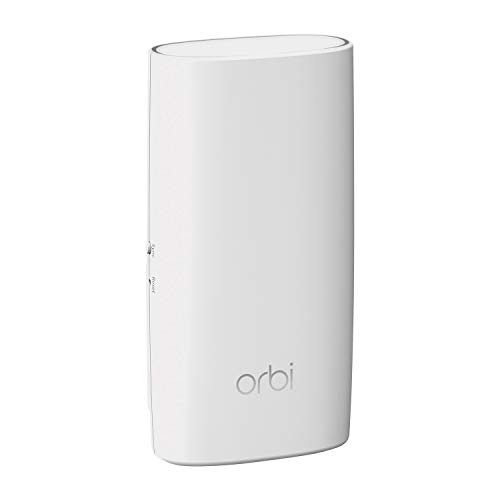
The Orbi Wall-Plug Satellite is the most discreet way to extend an Orbi network. The listing describes a slim satellite that plugs straight into a standard outlet and adds 1,500 square feet of coverage, with the fastest speeds when paired with an RBK33. It shares the main Orbi network name, so there is nothing new to log into.
The constraint is stated up front: it works only with an Orbi Whole Home Mesh router. It also covers the smallest area in this lineup, so it fits a bedroom or hallway fix rather than an entire floor. Buyers with a different brand of router should look elsewhere.
Because it is a wall plug, installation is the quickest of the group: choose an outlet roughly midway to the weak area and plug it in. There is no shelf space to find and no cord to hide. Against the Orbi RBS750 at 2,500 square feet it covers less ground, but it asks for no desk or shelf space, and against the Orbi 360 Series satellite at 2,000 square feet it is the more modest, more discreet choice.
Best for: Existing Orbi owners who want a discreet plug-in fix for one hallway or bedroom.
Check price on AmazonSpecs
- Form: Slim wall-plug satellite
- Added coverage: 1,500 sq ft
- Pairs with: Orbi Whole Home Mesh router
- Power: Standard electrical outlet
Pros
- +Slim body plugs directly into an outlet
- +Adds 1,500 sq ft to your Orbi network
- +Shares the Orbi network name, no second login
- +Quickest installation of the six
Cons
- −Works only with an Orbi Whole Home Mesh router
- −Smallest added coverage of the group
How We Evaluated These Orbi Wi-Fi Extenders
Each pick was assessed across 5 criteria weighted for real-world use.
Router compatibility
We read each listing for the exact router series it names and treated clarity as a strength. The Orbi 360 Series and 770 Series satellites list their supported model numbers, which makes them easy to verify. Units that work with only one family were graded on how easily a buyer can tell if they qualify.
Speed and band layout
We compared quoted speeds and band counts from the listings. The Orbi 770 Series leads at up to 11 Gbps with tri-band hardware, the Orbi RBS750 offers AX4200, and the Orbi 360 Series tops at 5 Gbps in dual band. We treated every speed claim as a ceiling and not a promise.
Coverage per box
We weighed what each product adds to an existing network, using the best-case figures from the listings. The Orbi 770 Series satellite reaches 2,750 square feet, the Orbi RBS750 2,500, the Orbi 360 satellite 2,000 and the Wall-Plug 1,500. Kits such as the Orbi RBK13 were scored on total coverage of 4,500 square feet instead.
Ease of setup
We looked at app-based pairing, outlet or shelf requirements and any extra hardware such as a modem. The Wall-Plug Satellite scored highest for its simple plug-in design. The RBK13 earned credit for working with all internet providers but lost some because it needs a separate modem or gateway.
Fit for the household
We matched each product to a typical situation instead of ranking everything on one scale. The Orbi 770 Series 3-pack serves large homes, the Orbi RBK13 serves starters, and the single satellites serve owners of specific Orbi systems. A pick scored well when its target buyer is obvious.
How to Choose the Right Orbi Wi-Fi Extenders
By Router You Own
Compatibility decides everything, so start from your router's model number.
| If you own | Pick | Why |
|---|---|---|
| Orbi Wi-Fi 6 (RBK752) | NETGEAR Orbi RBS750 Tri-Band Satellite | Named as compatible and adds up to 2,500 sq ft |
| Orbi 360 Series (RBE361/362/363) | NETGEAR Orbi 360 Series Add-On Satellite | Built exclusively for that series |
| Orbi 770 Series (RBE771/772/773) | NETGEAR Orbi 770 Series Add-On Satellite | Adds up to 2,750 sq ft on tri-band |
| Orbi Whole Home Mesh router | NETGEAR Orbi Wall-Plug Satellite | Plugs into an outlet and adds 1,500 sq ft |
| No Orbi at all | NETGEAR Orbi RBK13 Mesh System | Complete router plus two satellites |
Check the model label on the router before ordering any satellite.
By Budget
Relative tiers show where each box sits before you check specifics.
| Tier | Pick | What you get |
|---|---|---|
| Entry | NETGEAR Orbi Wall-Plug Satellite | Smallest added coverage at 1,500 sq ft, simplest install |
| Entry kit | NETGEAR Orbi RBK13 Mesh System | Full mesh for up to 4,500 sq ft |
| Mid | NETGEAR Orbi 360 Series Add-On Satellite | Wi-Fi 7 dual band at 2,000 sq ft |
| Upper mid | NETGEAR Orbi RBS750 Tri-Band Satellite | Wi-Fi 6 tri-band at 2,500 sq ft |
| Premium | NETGEAR Orbi 770 Series WiFi 7 (3-Pack) | Tri-band Wi-Fi 7 for up to 8,000 sq ft |
Matching your existing router is more valuable than buying the highest tier.
Wall Plug vs Shelf Satellite
The shape of the unit changes where you can put it, and where it works best.
Wall plug
A plug-in unit sits flush against an outlet and needs no shelf or cord, which makes it ideal for hallways and bedrooms. Its cost is limited coverage and power. The NETGEAR Orbi Wall-Plug Satellite at 1,500 square feet is the only example here. Choose it when you need a quiet fix for one nearby area.
Shelf satellite
A larger satellite includes more antennas and more radios, which allows tri-band backhaul and more reach. It needs a flat surface and an outlet. The NETGEAR Orbi RBS750, Orbi 360 Series Add-On Satellite and Orbi 770 Series Add-On Satellite all belong here. Choose it when coverage and speed matter more than discretion.
By Wi-Fi Generation
The satellite should match the generation of the router it joins.
| Generation | Pick | Best when |
|---|---|---|
| Wi-Fi 6 | NETGEAR Orbi RBS750 Tri-Band Satellite | Your system is a Wi-Fi 6 Orbi at AX4200 |
| Wi-Fi 7, dual band | NETGEAR Orbi 360 Series Add-On Satellite | You want Wi-Fi 7 growth at up to 5 Gbps |
| Wi-Fi 7, tri-band | NETGEAR Orbi 770 Series Add-On Satellite | You need dedicated backhaul at up to 11 Gbps |
| Older mesh | NETGEAR Orbi RBK13 Mesh System | You are starting simple and need broad ISP support |
Mixing generations is not supported by the listings, so do not try.
For Larger Homes Specifically
A big house needs more than one boost, so look at total coverage.
Look for
Look for a kit that states a total coverage number and includes enough satellites for your layout. Tri-band backhaul helps when many devices share the network. Plan nodes about halfway between each other rather than clustering them.
In this comparison
The NETGEAR Orbi 770 Series WiFi 7 (3-Pack) claims up to 8,000 square feet and is the largest option, while the NETGEAR Orbi RBK13 Mesh System claims 4,500 square feet. Existing owners can stack NETGEAR Orbi 770 Series Add-On Satellite units at 2,750 each.
When to Spend More
Spending more is worthwhile only when it solves a defined problem.
| Spend more if | Save if |
|---|---|
| Your house is large or multi-story, the NETGEAR Orbi 770 Series WiFi 7 (3-Pack) fits | Your home is medium and you are starting out, the NETGEAR Orbi RBK13 Mesh System is enough |
| Many devices share the network, choose the tri-band NETGEAR Orbi RBS750 Tri-Band Satellite | Only a few devices use the far room, the NETGEAR Orbi Wall-Plug Satellite is enough |
| You own an Orbi 770, the NETGEAR Orbi 770 Series Add-On Satellite keeps backhaul fast | You own an Orbi 360, the NETGEAR Orbi 360 Series Add-On Satellite is the economical match |
A satellite that cannot pair with your router is a wasted purchase at any tier.
Frequently Asked Questions
Can I use any Orbi satellite with any Orbi router?
No. The listings are explicit that each satellite pairs only with a specific Orbi series. The Wall-Plug Satellite works with an Orbi Whole Home Mesh router, the RBS750 with an Orbi Wi-Fi 6 system, and the 360 and 770 add-ons with their own series. Always check the model number on your router before buying.
Is an Orbi satellite better than a regular extender?
For Orbi owners it usually is, because the satellite shares your existing network name and the same app. A regular extender often creates a second network that you must switch to. The tradeoff is that you can only use a satellite with a compatible Orbi router. If you own another brand, a standalone extender is the correct tool.
How many satellites do I need?
Start with one and place it about halfway between the router and the weak area. Add a second only if another distant zone remains poor. The listings give best-case coverage per unit, from 1,500 square feet for the Wall-Plug Satellite to 2,750 for the 770 add-on. Walls and floors will cut real-world reach.
Does a satellite make my internet plan faster?
No. A satellite improves how well Wi-Fi reaches a room, but it cannot raise the speed your provider delivers. If the connection at the router is slow, the satellite will carry that slowness farther. The quoted speeds, such as up to 11 Gbps for the 770 family, describe the wireless ceiling and not your plan.
Do I need Wi-Fi 7 for an Orbi satellite to be useful?
No. If you own an Orbi Wi-Fi 6 system, the RBS750 satellite is the matching upgrade, and Wi-Fi 6 is plenty for streaming and video calls. Wi-Fi 7 gains show up mainly when your devices support it. Buy the generation that matches your router and then add devices over time.
Where should I place the wall-plug satellite?
Choose an outlet roughly midway between the router and the dead zone, where the signal is still strong. Avoid plugging it into a spot behind a large metal object or beside a microwave. A satellite placed inside the dead zone only repeats a weak signal. The app can help confirm the link is good.
Can I start with the RBK13 and add newer satellites later?
The listings say satellites work with specific Orbi series, and the RBK13 belongs to an older family, so the newer 360 and 770 add-ons are not described as compatible with it. Plan to buy more units of the same family if you want to expand the RBK13. If you want Wi-Fi 7 later, a new system will be the realistic route.
Bottom Line
best overall: NETGEAR Orbi 770 Series WiFi 7 (3-Pack) - best overall pick in this roundup.
See the full rankings above for all picks with pros, cons, and best-for summaries.
Browse on Amazon
All Prime-eligible options with current pricing.
Shop on Amazon →