6 Best Mesh Wi-Fi Extenders in 2026
Five mesh and mesh-style Wi-Fi extenders compared, from eero and Nest add-ons to NETGEAR Smart Roaming, with clear advice on one network name and roaming.





At a Glance
The phrase mesh Wi-Fi extender covers a few very different products, and mixing them up is the most common way people end up frustrated. Some are add-on pods that only work with a matching mesh system, some are standalone extenders that borrow the roaming idea, and some are full mesh kits that happen to include an extender role. Knowing which one you are buying matters more than any speed number.
The big payoff of a mesh style setup is a single network name and automatic handoff, so your phone moves to the strongest signal as you walk instead of clinging to a weak one. A traditional extender usually creates a second network name and leaves you to switch manually. That difference is what this guide is built around.
We evaluated five options based on product specs and buyer feedback, sorting them by how they join your network, how many rooms they can realistically cover and what they require from your existing router.
6 Criteria to Look For Before Buying a Mesh Wi-Fi Extender
Key buying criteria so you get the right fit the first time.
True mesh versus mesh style
Real mesh means every node shares one name and a coordinated handoff, while mesh style extenders only imitate it. The Google Nest Wifi 2 pack and the eero 6 add-on are built as mesh, whereas the NETGEAR EAX15 uses Smart Roaming on top of your own router. A classic extender like the TP-Link RE550 has no such handoff. Decide first whether roaming matters for your phones and laptops before comparing any other spec.
Ecosystem requirement
Some add-ons only work with their own system, so read the requirement line before you buy. The eero 6 extender needs an existing eero network, and adding it to a different router simply will not work. The NETGEAR EAX15 and TP-Link RE550 pair with a standard router. If you do not own a mesh system today, choose a pick that does not demand one.
Coverage per unit
Listed coverage tells you how many units you may need. The eero 6 and EAX15 each state up to 1,500 square feet, the RE550 states 2,100, and the Frontier Secure Air 4920 and Nest Wifi set state no figure. For a larger house, plan on a node roughly every 1,500 square feet in open space and fewer through walls. Add pods or switch to a kit if more than two rooms are weak.
Wi-Fi generation
A mesh node only helps if its generation matches your router, and a slower node can drag the whole chain. The EAX15 and eero 6 are Wi-Fi 6, while the Frontier Secure Air 4920 and RE550 are Wi-Fi 5. A Wi-Fi 6 router with a Wi-Fi 5 node means devices near that node connect at Wi-Fi 5 speeds. Match generations where you can.
Wired backhaul and ports
Ethernet ports let TVs and consoles connect by cable, which often beats a second wireless hop. The Frontier Secure Air 4920 lists Ethernet ports, and several non-mesh listings also include one. A wired port matters most when the device that suffers from poor Wi-Fi is stationary. Check the number of ports in each listing.
Setup and app control
A good app turns a networking chore into five minutes. The eero app, the Nighthawk app on the EAX15 and WPS pairing on the extenders each lower the barrier. The eero app also lets you manage your network remotely. Choose the app experience that fits how comfortable you are with settings.
6 Best Mesh Wi-Fi Extenders in 2026
NETGEAR Nighthawk Wi-Fi 6 Extender EAX15
About this pick
The EAX15 is a Wi-Fi 6 extender rated at 1.8 Gbps for up to 1,500 square feet, and its feature that matters most here is Smart Roaming. According to the listing, it keeps your existing network name and moves each device to the strongest signal automatically, so there is no second network to join. Setup runs through the Nighthawk app or a WPS press on both the router and the extender.
That makes it the closest thing to mesh behavior without buying an entire mesh kit. It works with the router you already own, which is a big advantage if your current router is fine and only one area is weak. The limit is that it is a single extender, so it handles one dead zone well but is not designed to blanket a large house with several nodes.
Day to day it behaves like a plug in appliance, and the single network name means your phone and laptop roam without prompts. Compared with the eero 6 add-on at the same 1,500 square feet, it does not require a matching mesh system, and next to the TP-Link RE550 at 2,100 square feet it trades some reach for the seamless roaming feature.
Best for: Existing router, one dead zone, one network name
Check price on AmazonSpecs
- Wi-Fi standard: Wi-Fi 6, 1.8 Gbps
- Coverage: Up to 1,500 sq ft
- Roaming: Smart Roaming, one name
- Setup: Nighthawk app or WPS
Pros
- +Smart Roaming keeps your current network name
- +Wi-Fi 6 at 1.8 Gbps matches newer routers
- +Works with the router you already own
- +Nighthawk app or WPS makes setup simple
Cons
- −Single unit, so it fixes one area at a time
- −Rated for 1,500 sq ft, less than the RE550
Amazon eero 6 Mesh Add-On Extender
About this pick
The eero 6 extender is an add-on pod rather than a standalone device, and the listing is clear that it requires an existing eero mesh network. Each unit adds up to 1,500 square feet of Wi-Fi 6 coverage, and you can add as many as you need to maximize coverage. The eero app walks you through setup and lets you manage your network from anywhere, with free customer support mentioned in the listing.
If you already have eero, this is the cleanest upgrade because the pod joins as part of a real mesh with one name and automatic handoff. If you do not, it is a dead end, because it will not pair with an arbitrary router. That requirement is the whole story, and it is the main reason to read the listing carefully before buying.
Ownership is easy once the network exists: plug in, follow the app, and the pod takes its place. Compared with the NETGEAR EAX15, which has the same 1,500 square feet but works with any router, the eero is more integrated but less flexible. Against the Google Nest Wifi set, it stays inside its own ecosystem rather than replacing your router.
Best for: Homes that already run an eero system
Check price on AmazonSpecs
- Wi-Fi standard: Wi-Fi 6
- Coverage: Up to 1,500 sq ft each
- Requirement: Existing eero mesh system
- Setup: eero app
Pros
- +Joins as part of a real eero mesh
- +Add as many pods as you need for coverage
- +eero app handles setup and remote management
- +Wi-Fi 6 coverage up to 1,500 square feet each
Cons
- −Useless without an existing eero network
- −Locks you further into the eero ecosystem
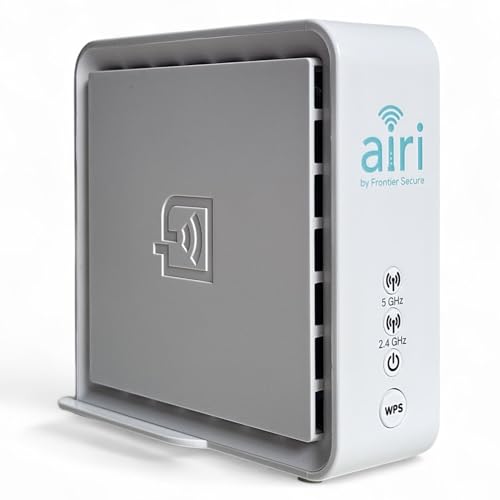
Frontier Secure Air 4920 Smart Mesh Extender
About this pick
The Frontier Secure Air 4920 is a dual band Wi-Fi 5 mesh extender that supports both 2.4 GHz and 5 GHz using 802.11ac. The listing highlights Smart Mesh technology that gives you unified Wi-Fi and smooth roaming as you move from room to room, and it targets dead zones in garages, basements and upstairs rooms. It also includes Ethernet ports for wired devices.
The Ethernet ports are the differentiator. A smart TV, a streaming box or a desktop can plug in directly, which is often steadier than a second wireless hop. It is Wi-Fi 5 rather than Wi-Fi 6, so it will not match the EAX15's headroom, and the listing gives no coverage figure, which makes it harder to size for a big house.
As an owner you are buying a practical, utilitarian unit rather than a flashy one. The listing does not state a square footage, so check that your layout matches the dead zones it describes. Compared with the eero 6 add-on, it is less tied to a single ecosystem in wording, and against the RE550 it adds mesh behavior in exchange for fewer stated antennas.
Best for: Dead zones with wired TVs or consoles
Check price on AmazonSpecs
- Wi-Fi standard: Wi-Fi 5, 802.11ac
- Bands: 2.4 GHz and 5 GHz
- Wired: Ethernet ports
- Design: Smart Mesh extender
Pros
- +Ethernet ports give wired devices a steady link
- +Smart Mesh aims for unified Wi-Fi and roaming
- +Targets garages, basements and upstairs rooms
- +Dual band 2.4 GHz and 5 GHz on 802.11ac
Cons
- −Wi-Fi 5 only, trailing the EAX15 on headroom
- −Listing gives no coverage figure to size by
Google Nest Wifi 2 Pack Mesh System
About this pick
The Nest Wifi 2 pack is a full mesh system rather than a simple add-on. One unit plugs into your internet provider's modem to create the Wi-Fi network, and the other extends it to keep your connection strong. Google describes the system as scalable and flexible, with the devices working together to blanket your home in fast Wi-Fi.
This is the pick for someone willing to replace their router rather than patch it. You get one network name and automatic handoff by design, because the whole system is mesh from the start. The cost is that you replace your existing router instead of keeping it, and the listing gives no square footage or speed class that we could quote.
Setup involves moving your internet connection to the new router unit, then placing the second unit between the router and the weak area. Compared with the eero 6 add-on, which needs an existing eero system, the Nest Wifi set ships ready to run. Against the NETGEAR EAX15, it covers more rooms but demands a bigger change to your network.
Best for: Replacing a weak router with a true mesh
Check price on AmazonSpecs
- In the box: 2 units
- Roles: 1 router, 1 extender
- Design: Scalable mesh
- Connects to: Your internet provider's modem
Pros
- +Two units arrive ready to form a mesh
- +One router and one extender point in the box
- +Scalable system that can grow with the home
- +Single network name by design
Cons
- −Replaces your router instead of adding to it
- −Listing gives no coverage or speed numbers
TP-Link AC1900 Range Extender RE550
About this pick
The RE550 is not a mesh product in the listing, but it earns a place as the benchmark for a traditional extender. It offers 1.9 Gbps of total dual band bandwidth, three adjustable external antennas and up to 2,100 square feet of rated coverage. The listing also notes TP-Link's participation in the CISA secure by design pledge.
It is here to show the tradeoff. You get more rated area than any mesh-style option in this guide, but you do not get the promised single network name and automatic handoff that Smart Roaming or a mesh kit provide. For a stationary device such as a TV that is rarely an issue, and for phones it can mean switching networks by hand.
Setup is the usual WPS or browser pairing. Compared with the NETGEAR EAX15 at 1,500 square feet, it covers about 600 square feet more but lacks the seamless name. Against the eero 6 add-on, it works with any router but gives up true mesh behavior.
Best for: Large area where roaming is not important
Check price on AmazonSpecs
- Speed class: AC1900, 1.9 Gbps total
- Coverage: Up to 2,100 sq ft
- Antennas: 3 adjustable external
- Type: Standard dual band extender
Pros
- +Largest rated area in this lineup at 2,100 sq ft
- +Three antennas let you aim the signal
- +Works with any router that has Wi-Fi
- +1.9 Gbps total bandwidth across two bands
Cons
- −Not mesh, so devices may need manual switching
- −Wi-Fi 5 only, no Wi-Fi 6 headroom
TP-Link AC1200 Wi-Fi Extender RE315
About this pick
The RE315 is a smaller AC1200 extender with 1.2 Gbps of total bandwidth, 867 Mbps on the 5 GHz band and two adjustable external antennas. TP-Link rates it for up to 1,500 square feet and credits Adaptive Path Selection for picking a stronger route back to the router. Like the RE550, it is a classic extender rather than a mesh product.
It makes the list as the low commitment way to try the extender idea before paying for mesh. If one bedroom or a den is the only weak spot, it solves the problem and keeps your current router. The tradeoff is the same as any non mesh unit: a second network name may appear, and phones will not hand off by themselves.
The antennas fold and angle toward the target room, which helps when the first outlet is not ideal. Compared with the NETGEAR EAX15, which also covers 1,500 square feet, it lacks Wi-Fi 6 and Smart Roaming. Against the RE550 at 2,100 square feet and 1.9 Gbps, it is the smaller and simpler of the two TP-Link units.
Best for: One weak room on a Wi-Fi 5 router
Check price on AmazonSpecs
- Speed class: AC1200, 1.2 Gbps total
- Coverage: Up to 1,500 sq ft
- Antennas: 2 adjustable external
- Type: Standard dual band extender
Pros
- +Two adjustable antennas aim signal at the dead zone
- +867 Mbps on 5 GHz keeps streaming smooth
- +Works with any router that has Wi-Fi
- +Rated for up to 1,500 sq ft of open space
Cons
- −Not mesh, so a second network name may appear
- −Wi-Fi 5 only, trailing the EAX15 and eero 6
How We Evaluated These Mesh Wi-Fi Extenders
Each pick was assessed across 5 criteria weighted for real-world use.
Roaming and network name
We judged whether each product keeps one network name and moves devices automatically. The eero 6 and Nest Wifi are mesh by design, the EAX15 uses Smart Roaming, and the RE550 is a standard extender that does not promise either. This criterion carried the most weight for a mesh focused guide.
Ecosystem flexibility
We checked how much each pick demands from your existing router. The EAX15 and RE550 pair with a standard router, the eero 6 requires an eero system, and the Nest Wifi replaces your router. Flexibility earned credit because most readers already own a router.
Coverage and generation
We compared stated square footage and Wi-Fi standard. The RE550 leads on area at 2,100 sq ft, while the EAX15 at 1.8 Gbps and the eero 6 lead on Wi-Fi 6. Products with no stated area were noted as harder to size.
Wired options
We looked at Ethernet ports for TVs and consoles. The Frontier Secure Air 4920 is the unit that lists them in the mesh group, which matters for stationary devices in a far room.
Setup effort
We scored how guided the setup feels. The eero app and Nighthawk app lead, and WPS pairing is a quick fallback on the extenders. Kits that replace a router take more effort than a simple plug in unit.
How to Choose the Right Mesh Wi-Fi Extenders
By Your Current Setup
What you already own decides most of the choice.
| Your situation | Best pick | Why |
|---|---|---|
| You already run eero | Amazon eero 6 Mesh Add-On Extender | Joins your existing system with up to 1,500 sq ft added |
| Standard router, one dead zone, want one name | NETGEAR Nighthawk Wi-Fi 6 Extender EAX15 | Smart Roaming keeps your current network name |
| Weak router you are ready to replace | Google Nest Wifi 2 Pack Mesh System | Two units form a mesh from day one |
| Wired TV in the weak room | Frontier Secure Air 4920 Smart Mesh Extender | Ethernet ports give a cable connection |
| Large area, no roaming needed | TP-Link AC1900 Range Extender RE550 | 2,100 sq ft rated, three adjustable antennas |
By Budget
Relative tiers keep things honest, because pricing shifts often.
| Tier | Pick | Notes |
|---|---|---|
| Entry | TP-Link AC1900 Range Extender RE550 | No mesh, but strong rated coverage for the cost of one unit |
| Entry to mid | Frontier Secure Air 4920 Smart Mesh Extender | Adds mesh behavior and Ethernet ports on Wi-Fi 5 |
| Mid | NETGEAR Nighthawk Wi-Fi 6 Extender EAX15 | Wi-Fi 6 with Smart Roaming and no ecosystem lock |
| Mid to premium | Amazon eero 6 Mesh Add-On Extender | Cost multiplies as you add pods, and it needs an eero system |
| Premium | Google Nest Wifi 2 Pack Mesh System | A full system that replaces your router |
Add-On Pod vs Standalone Extender
Where the unit gets its network decides how flexible it is.
Add-on pod
An add-on pod joins a system you already own and behaves as a true mesh node with one name and automatic handoff. The Amazon eero 6 Mesh Add-On Extender is the clear example, and the Google Nest Wifi 2 pack extends this idea into a full kit. Pick this side if you already own the matching system or are ready to replace your router.
Standalone extender
A standalone extender pairs with whatever router you have and rebroadcasts its signal. The NETGEAR EAX15, TP-Link RE550 and Frontier Secure Air 4920 fall here, though only the EAX15 and Frontier unit promise smooth roaming. Pick this side if you want to keep your router and fix one area.
If you have no mesh system today, standalone is almost always the simpler start.
How Many Rooms Are Weak
The number of dead rooms decides whether one unit is enough.
| Weak areas | Pick | Reason |
|---|---|---|
| One nearby room | NETGEAR Nighthawk Wi-Fi 6 Extender EAX15 | One 1,500 sq ft node handles a single gap |
| One far room or garage | Frontier Secure Air 4920 Smart Mesh Extender | Targets garages and basements, with wired ports |
| Two rooms in an eero home | Amazon eero 6 Mesh Add-On Extender | Add a second pod for 1,500 sq ft more |
| Three or more rooms | Google Nest Wifi 2 Pack Mesh System | A true mesh handles several gaps better than one extender |
| One very long hallway | TP-Link AC1900 Range Extender RE550 | 2,100 sq ft rating suits a long run |
For Phones and Laptops That Move Specifically
Anyone who carries a device between rooms cares most about handoff.
Look for
Look for one shared network name and a roaming feature, not just a signal boost. Mesh systems and Smart Roaming extenders move your device to the strongest signal on their own. A classic extender with a second name leaves the switching to you.
In this comparison
The Google Nest Wifi 2 Pack Mesh System and Amazon eero 6 Mesh Add-On Extender are true mesh, and the NETGEAR Nighthawk Wi-Fi 6 Extender EAX15 offers Smart Roaming on your own router. The TP-Link AC1900 Range Extender RE550 is the one to skip for roaming.
When to Spend More
A mesh kit costs more than a single extender, but sometimes it is the right call.
| Spend more if | Save if |
|---|---|
| Several rooms are weak, favoring the Google Nest Wifi 2 Pack Mesh System | Only one room is weak, so the NETGEAR EAX15 will do |
| You already use eero and want the eero 6 add-on for seamless coverage | You have a standard router and the RE550 covers 2,100 sq ft |
| You carry devices between rooms and want true roaming | Devices are stationary, such as a TV on the Frontier Secure Air 4920 |
| Your router is Wi-Fi 6 and you need matching nodes | Your router is Wi-Fi 5 and no upgrade is planned |
Frequently Asked Questions
What is the difference between a mesh extender and a regular extender?
A regular extender rebroadcasts your router's signal, often under a second network name. A mesh extender shares one name and hands devices off automatically. The eero 6 and Nest Wifi are built as mesh, while the NETGEAR EAX15 offers Smart Roaming on a standard router. The TP-Link RE550 is a regular extender.
Can I add an eero extender to any router?
No. The eero 6 extender requires an existing eero mesh network, and it will not pair with other routers. If you do not own an eero system, a standalone pick such as the NETGEAR EAX15 is a better fit. Read the requirement line on any add-on before buying.
How many extender units do I need?
Plan on roughly one node per 1,500 square feet in open space, based on the eero 6 and EAX15 ratings. Walls and floors reduce that, so a house with many rooms may need more. If three or more rooms are weak, a mesh kit like the Nest Wifi 2 pack is a better answer than stacking extenders.
Will a mesh extender make my internet faster?
No, it extends coverage but does not raise the speed of your plan. It improves the signal in rooms that were weak. Speeds depend on your plan, your router and the extender's own generation. Matching Wi-Fi 6 nodes to a Wi-Fi 6 router avoids a bottleneck.
Is a mesh system overkill for a small home?
Often, yes. If only one room is weak, a single extender such as the NETGEAR EAX15 at 1,500 square feet is enough. A mesh system makes sense when several rooms are weak or when you want to replace an older router. Start small and add later if needed.
Can I mix a mesh pod with a standalone extender?
It is possible to run both, but it is rarely a good idea. Each device would see two systems with different names and different handoff logic, so phones may cling to the wrong one. If you own an eero system, stay with the eero 6 add-on, and if you use a standard router, stay with one standalone unit such as the TP-Link RE315 or the EAX15. Keeping one approach avoids confusing roaming behavior.
Does Smart Roaming work as well as true mesh?
It is close for most households. The EAX15 keeps your existing network name and moves devices to the strongest signal, according to the listing. A true mesh coordinates all nodes together, which can be smoother in a larger house. For one dead zone, Smart Roaming is usually sufficient.
Bottom Line
best overall: NETGEAR Nighthawk Wi-Fi 6 Extender EAX15 - best overall pick in this roundup.
See the full rankings above for all picks with pros, cons, and best-for summaries.
Browse on Amazon
All Prime-eligible options with current pricing.
Shop on Amazon →