6 Best Long-Range Wi-Fi Extenders in 2026
Six long-range Wi-Fi extenders for yards, garages, and big houses, from indoor 2,100 sq ft boxes to outdoor models with detachable antennas and PoE.




At a Glance
Long range means two very different things on a shopping page. For some buyers it is a bigger indoor footprint, where a single plug-in box has to cover a sprawling ranch or a two-story house. For others it is distance outdoors, such as a workshop, a detached garage, or a patio at the far end of a lot.
The six models below split along that line. Three are indoor plug-in units whose claims run from 2,100 square feet up to 18,000, and three are outdoor Wavlink units with detachable antennas and weatherproof housings. We evaluated them from product specs and buyer feedback, paying attention to which claims describe a real hardware advantage and which are simply large numbers on a listing.
Keep one caution in mind as you read. Range figures are measured in open space with nothing in the way, and no extender reaches farther than the signal it can hear from your router. Pair the right model with the right placement, and long range becomes useful instead of aspirational.
6 Criteria to Look For Before Buying a Long-Range Wi-Fi Extender
Key buying criteria so you get the right fit the first time.
Indoor or outdoor reach
Decide first whether you are fixing a bigger indoor footprint or crossing open ground to a yard or a building. Indoor plug-in units like the TP-Link RE550 at 2,100 square feet work through walls, while outdoor units like the Wavlink AX3000 claim 200 to 300 meters of open reach. Using an indoor box for a detached garage usually disappoints, because it lacks weather protection and the amplifiers outdoor work needs. The reverse mistake is buying an outdoor unit to cover a bedroom, which wastes its strengths. Match the hardware class to the terrain before comparing anything else.
Antennas and amplifiers
Antenna count and gain shape how far and how widely the signal travels. The Wavlink models use four 8dBi omni antennas with two built-in amplifiers, and the Hyzom lists four high-gain antennas. Detachable antennas, as on the Wavlink AX3000, can be replaced if one is damaged or swapped for a different type. Omni antennas cover a circle, while the TP-Link AX3000 uses two directional antennas that favor one direction. Choose omni for a yard in the middle of the property and directional for a single far wing.
Treat huge numbers cautiously
Square footage and device-count claims are measured in ideal conditions, and a single extender cannot honestly cover 18,000 square feet through real walls. The Hyzom claims that figure while the TP-Link RE550 claims 2,100, so the headline values tell you little about real performance. Look instead at published bandwidth and standards, which let you judge the speed you will see. A reasonable rule is to discount any claim above about 5,000 square feet by at least half. The more specs a listing publishes, the easier it is to trust.
Power and mounting plan
Long range often means a spot far from an outlet. The Wavlink BE5100 supports active and passive Power over Ethernet in the 802.3af and 802.3at standards, so one cable can carry both data and power to a pole or eave. Indoor units like the TP-Link AX3000 simply plug into a wall socket. Decide where the unit will live before you buy, then check that your power source and mounting hardware match. A weatherproof rating, such as IP67 on the Wavlink AX1800, matters for anything left outside.
Generation and backhaul
A long-range link still cannot beat the Wi-Fi generation it speaks. The Wavlink BE5100 reaches 4,323 Mbps on 5 GHz with Wi-Fi 7, the AX3000 models reach Wi-Fi 6 speeds, and the TP-Link RE550 sits at 1.9 Gbps on Wi-Fi 5. Match the extender to your router, since a Wi-Fi 7 box gains little behind an older router. Distance also reduces speed on any wireless hop, so expect lower rates at the far edge. For fixed outbuildings, a wired backhaul beats any wireless range claim.
Placement beats raw power
An extender can only rebroadcast the signal it receives, so its own range starts where the router signal is still strong. Put the unit about halfway between the router and the area you want to cover, ideally with a clear line of sight. Mounting an outdoor unit high, as with the Wavlink AX1800, helps the signal clear bushes, fences, and cars. A powerful antenna placed in a weak spot rebroadcasts a weak signal. Test two or three positions before drilling anything.
6 Best Long-Range Wi-Fi Extenders in 2026
WAVLINK BE5100 WiFi 7 Outdoor Extender
About this pick
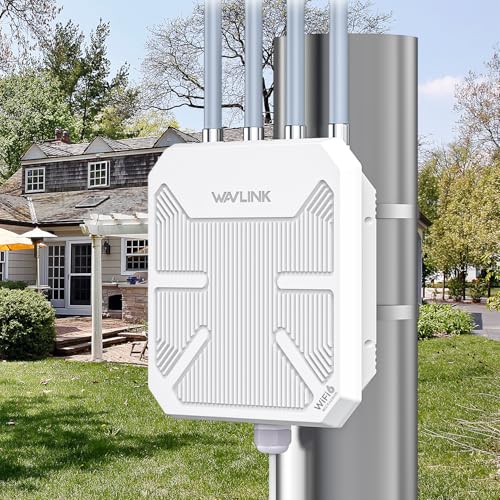
The BE5100 is the most advanced box in this group and the only one on Wi-Fi 7. Its listing quotes 4,323 Mbps on the 5 GHz band and 688 Mbps on 2.4 GHz, with a four stream design. Four detachable 8dBi omnidirectional fiberglass antennas and two built-in high-power amplifiers produce the claimed reach of up to 300 meters.
What sets it apart is how it is powered. It accepts both active and passive Power over Ethernet and supports the 802.3af and 802.3at standards, so a single network cable can carry data and power to a roof or mast. That is a significant installation advantage for a spot with no nearby outlet. The tradeoff is cost of complexity, because you need a PoE injector or switch and some comfort with outdoor mounting.
Daily ownership is more of a small project than a plug-and-go chore. Next to the TP-Link AX3000 at 2,400 square feet, the Wavlink claims a distance of 300 meters, though the two figures describe different environments and cannot be compared directly. Choose this when you want to link a distant building and your router is ready for modern speeds.
Best for: Linking a distant outbuilding with one cable for power and data.
Check price on AmazonSpecs
- Wi-Fi standard: Wi-Fi 7 (802.11be)
- 5 GHz speed: 4,323 Mbps
- 2.4 GHz speed: 688 Mbps
- Claimed range: Up to 300 meters
- Power: 802.3af/at PoE supported
Pros
- +Wi-Fi 7 delivers 4,323 Mbps on the 5 GHz band
- +Active and passive PoE simplifies outdoor power
- +Four detachable 8dBi antennas can be swapped
- +Two built-in amplifiers support the 300 meter claim
Cons
- −Needs a PoE source or adapter and mounting
- −Wi-Fi 7 speeds need a compatible router and clients
WAVLINK AX3000 Outdoor WiFi 6 Extender
About this pick
This Wavlink takes the same outdoor idea and puts it on Wi-Fi 6. The listing promises true AX3000 speed over dual bands, four 8dBi omnidirectional detachable fiberglass antennas, and two built-in amplifiers. Those parts support a stated reach of 200 to 300 meters in open ground.
Fiberglass omni antennas spread the signal in a wide circle around the unit, which is ideal for a yard or a campsite but less so for a long narrow link. Detachable antennas are also a repair advantage, because a damaged one can be replaced without buying a new extender. The tradeoff is that it is designed for outdoor deployment, so an apartment owner with a single dead bedroom gets no real benefit from the extra hardware.
Expect to mount the unit and run a cable for power. Compared with the Wavlink BE5100, you give up Wi-Fi 7 and the 4,323 Mbps ceiling but keep the same antenna design. Against the AX1800 outdoor model, you gain the AX3000 class bandwidth and a shorter detachable antenna set. It is a sensible middle choice for a Wi-Fi 6 household.
Best for: A Wi-Fi 6 household covering a yard, patio, or garage.
Check price on AmazonSpecs
- Wi-Fi standard: Wi-Fi 6 (AX3000)
- Antennas: 4x 8dBi omni, detachable
- Amplifiers: 2 built in
- Claimed range: Up to 200 to 300 m
Pros
- +Wi-Fi 6 AX3000 class speeds across dual bands
- +Four 8dBi omni antennas detach for replacement
- +Two built-in amplifiers lift the 200 to 300 m reach
- +Outdoor-oriented build for yards and sheds
Cons
- −Overbuilt for a single indoor dead room
- −Range claim holds only in open, clear ground
WAVLINK AX1800 Outdoor WiFi 6 Extender IP67
About this pick
The AX1800 is the lowest tier of the Wavlink group, and its pitch is simple: Wi-Fi coverage beyond the walls of the house. It carries an IP67 weatherproof rating, which means the case is sealed against dust and temporary immersion. The speed split is 1,201 Mbps on the 5 GHz band and 574 Mbps on 2.4 GHz, for a combined AX1800 class.
The listing also notes compatibility with Starlink, a useful flag for rural owners whose router is a satellite kit and whose outbuildings sit far from the dish. Unlike the other outdoor models, the listing does not list a specific antenna count, so you have less to compare. The tradeoff is that AX1800 speeds leave less headroom for several simultaneous video streams across a large yard.
If your goal is to reach a deck, a porch, or a small workshop, it avoids the heavier hardware of the BE5100. Against the AX3000 outdoor unit, you give up bandwidth but keep the weatherproof housing. Choose it when range outdoors matters more than top speed.
Best for: Satellite internet owners extending coverage to a deck or workshop.
Check price on AmazonSpecs
- Wi-Fi standard: Wi-Fi 6 (AX1800)
- 5 GHz speed: 1,201 Mbps
- 2.4 GHz speed: 574 Mbps
- Weather rating: IP67
Pros
- +IP67 weatherproof case is built to stay outdoors
- +Wi-Fi 6 with 1,201 Mbps on the 5 GHz band
- +Listing states Starlink compatibility
- +Entry tier for outdoor extension
Cons
- −AX1800 class leaves less headroom for heavy use
- −Antenna count is not stated in the listing
Hyzom WiFi Extender Signal Booster, 18,000 Sq Ft
About this pick
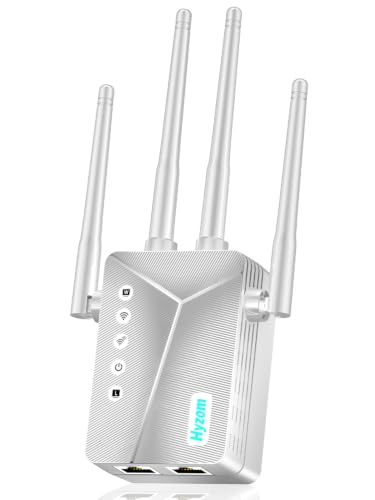
Hyzom leads the indoor group with the biggest number on the page, a claimed coverage of up to 18,000 square feet. It uses four high-gain external antennas and a chip the listing calls a Bionic Chip, and it adds an Ethernet port for a wired device. Setup can be done with a WPS push or through a browser, so there is no app to install.
That combination is attractive for a large two-story home where the router sits at one end. The tradeoff is credibility, because an 18,000 square foot figure is far beyond what any single plug-in box delivers through real walls, and the listing gives no Wi-Fi generation or band speeds. Treat the number as a ranking signal inside the brand's own lineup, not as a promise.
In practice the four antennas can be angled to favor a particular direction, and the Ethernet port helps a TV or computer in the weak room. Compared with the TP-Link RE550 at 2,100 square feet and 1.9 Gbps, the Hyzom claims about eight times the area but publishes far fewer specs. Choose it as a feature-packed budget option, with realistic expectations.
Best for: Large houses that need an Ethernet port and aimable antennas.
Check price on AmazonSpecs
- Claimed coverage: Up to 18,000 sq ft
- Antennas: 4 high-gain external
- Wired port: Ethernet
- Setup: WPS or browser
Pros
- +Four high-gain antennas can be angled by hand
- +Ethernet port supports a wired TV or PC
- +Setup works through WPS or a browser
- +Headline claim of 18,000 sq ft is the highest here
Cons
- −No Wi-Fi generation or speeds listed in the listing
- −The 18,000 sq ft figure is not realistic indoors
TP-Link AX3000 WiFi 6 Range Extender
About this pick
TP-Link rates this extender for 2,400 square feet, a figure far more modest than some rivals but easier to believe. The hardware pairs Wi-Fi 6 with 3 Gbps of total bandwidth, including speeds up to 2,404 Mbps on the faster band. Two high-gain directional antennas with beamforming concentrate the signal toward your devices instead of leaking it in every direction.
Directional design suits a house where the weak area lies in one direction, such as a back bedroom or a finished basement. It is less suited to a room that sits in the middle of the footprint. TP-Link also states its commitment to the CISA cybersecurity pledge, a point of reassurance for a device that sits on your network all year.
Setup uses the standard pair and place routine. Against the Hyzom at 18,000 claimed square feet, the TP-Link claims far less area, yet it publishes the bandwidth and standard that let you judge it. Next to the Wavlink AX3000 outdoor model, it trades the long reach and detachable antennas for a tidy, plug-in indoor footprint. Choose it when a believable indoor figure matters most.
Best for: Wi-Fi 6 households with one far-off wing or floor to cover.
Check price on AmazonSpecs
- Wi-Fi standard: Wi-Fi 6 (AX3000)
- Total bandwidth: 3 Gbps
- Rated coverage: Up to 2,400 sq ft
- Antennas: 2 high-gain directional
Pros
- +Wi-Fi 6 with 3 Gbps of total bandwidth
- +Beamforming directional antennas aim the signal
- +Rated up to 2,400 sq ft, easy to believe
- +Cites the CISA cybersecurity commitment
Cons
- −Directional aim can miss rooms behind it
- −Indoor only, no outdoor weather rating
TP-Link AC1900 Range Extender RE550
About this pick
The RE550 is the plain, well-documented option in a field full of big claims. It is an AC1900 dual band unit with 1.9 Gbps of total bandwidth, three adjustable external antennas, and a rated coverage of up to 2,100 square feet. Its listing is also labeled a dual band wireless repeater, which tells you the same device goes by several names.
The three antennas give it a physical size advantage over compact plugs, and angling them toward the target area is the simplest way to make the most of the signal. The tradeoff is that it relies on Wi-Fi 5, so a Wi-Fi 6 router cannot use its latest efficiency features. TP-Link also notes the CISA cybersecurity commitment on this model.
In practice it fits a larger indoor home where you want known specs and a recognized brand. Compared with the TP-Link AX3000 at 2,400 square feet, you give up 300 square feet and Wi-Fi 6, which for many routers does not matter. Choose it when your router is Wi-Fi 5 and you want a clear, stated spec sheet.
Best for: Wi-Fi 5 homes wanting a documented, brand-backed indoor unit.
Check price on AmazonSpecs
- Wi-Fi standard: Wi-Fi 5 (AC1900)
- Total bandwidth: 1.9 Gbps
- Rated coverage: Up to 2,100 sq ft
- Antennas: 3 adjustable external
Pros
- +AC1900 delivers 1.9 Gbps of total bandwidth
- +Three antennas can be angled toward the weak area
- +Rated up to 2,100 sq ft with clear specs
- +Brand lists a cybersecurity commitment
Cons
- −Wi-Fi 5 does not use newer router efficiencies
- −Larger body than compact plug-in rivals
How We Evaluated These Long-Range Wi-Fi Extenders
Each pick was assessed across 5 criteria weighted for real-world use.
Reach design
We looked at antenna count, gain, and amplifiers as the physical basis for range. The Wavlink BE5100 and AX3000 lead with four 8dBi antennas and two amplifiers each, the Hyzom lists four high-gain antennas, and the TP-Link models use two or three. Claims were weighed against that hardware.
Claim credibility
Square footage and distance figures were treated skeptically. We favored listings that publish bandwidth and standards, like the TP-Link AX3000 at 3 Gbps, over those with only a large number like the Hyzom at 18,000 square feet. This is based on product specs and buyer feedback, not field measurement.
Wireless speed class
Wi-Fi generation and band speeds set the ceiling. The Wavlink BE5100 at 4,323 Mbps on 5 GHz leads, the Wavlink AX3000 and TP-Link AX3000 follow on Wi-Fi 6, the Wavlink AX1800 gives 1,201 Mbps, and the TP-Link RE550 gives 1.9 Gbps total on Wi-Fi 5.
Installation and power
Mounting and power options were scored for practicality. PoE on the Wavlink BE5100, the IP67 rating on the Wavlink AX1800, and plug-in simplicity on the TP-Link units each addressed a different site. Extra effort at install time counted against a pick only if its benefit was unclear.
Support and security
Brand track record, documented security statements, and setup flexibility were considered. The TP-Link RE550 and AX3000 cite the CISA commitment, while the Hyzom offers WPS or browser setup without an app. Anonymous listings with vague specs scored lower.
How to Choose the Right Long-Range Wi-Fi Extenders
By Where You Need Range
The location of the weak area decides which class of hardware makes sense.
| Situation | Pick | Why |
|---|---|---|
| Detached garage or barn, cable available | WAVLINK BE5100 WiFi 7 Outdoor Extender | PoE carries data and power over one cable |
| Backyard and patio, Wi-Fi 6 router | WAVLINK AX3000 Outdoor WiFi 6 Extender | Four 8dBi omni antennas cover a wide circle |
| Deck or small workshop, satellite internet | WAVLINK AX1800 Outdoor WiFi 6 Extender IP67 | IP67 case and stated Starlink compatibility |
| Large two-story house, Wi-Fi 5 router | TP-Link AC1900 Range Extender RE550 | Three antennas and a rated 2,100 sq ft |
| One far wing of a Wi-Fi 6 home | TP-Link AX3000 WiFi 6 Range Extender | Directional beamforming aims toward the wing |
If the area sits outside the building, an outdoor rated unit is safer than an indoor plug.
By Budget
Tiers are relative, since outdoor hardware and plug-in boxes serve different jobs.
| Tier | Pick | What you get |
|---|---|---|
| Entry | Hyzom WiFi Extender Signal Booster | Four antennas and Ethernet, with few published specs |
| Entry to mid | WAVLINK AX1800 Outdoor WiFi 6 Extender IP67 | Weatherproof Wi-Fi 6 at 1,201 Mbps on 5 GHz |
| Mid | TP-Link AC1900 Range Extender RE550 | Clear 1.9 Gbps spec from a known brand |
| Mid to premium | TP-Link AX3000 WiFi 6 Range Extender | Wi-Fi 6 with 3 Gbps and beamforming |
| Premium | WAVLINK BE5100 WiFi 7 Outdoor Extender | Wi-Fi 7, 4,323 Mbps on 5 GHz, and PoE |
The most expensive tier buys capability for outdoor links, not extra rooms indoors.
Omnidirectional vs Directional Antennas
How the antenna spreads the signal changes where the extra range actually appears.
Omnidirectional
An omni antenna radiates in a circle around the unit, which suits a unit mounted in the middle of a yard. The WAVLINK AX3000 and the WAVLINK BE5100 both use four 8dBi omni fiberglass antennas, and the Hyzom lists four high-gain antennas. Choose these when devices sit on all sides, such as a patio, a pool area, and a shed.
Directional
A directional antenna focuses energy into a beam, which gives a stronger signal in one direction and less behind it. The TP-Link AX3000 uses two high-gain directional antennas with beamforming, and the RE550 offers three adjustable antennas you can angle. Pick these when the weak spot lies in one clear direction, like a far bedroom wing.
Omni for a hub in the middle of the property, directional for a single far target.
Power and Weather Needs
Long-range deployments often live outside, so the power and protection plan matters.
| Need | Pick | Detail |
|---|---|---|
| Single cable for power and data | WAVLINK BE5100 WiFi 7 Outdoor Extender | Active and passive PoE, 802.3af and 802.3at |
| Sealed against rain and dust | WAVLINK AX1800 Outdoor WiFi 6 Extender IP67 | IP67 weatherproof housing |
| Replaceable antennas | WAVLINK AX3000 Outdoor WiFi 6 Extender | Four detachable 8dBi antennas |
| Indoor outlet only | TP-Link AC1900 Range Extender RE550 | Plugs into a wall socket, no mounting |
| Indoor with a wired TV | Hyzom WiFi Extender Signal Booster | Built-in Ethernet port |
Plan the cable path and the mounting spot before the unit arrives.
For Outbuildings and Yards Specifically
A shed or yard needs different traits than an extra bedroom.
Look for
A weatherproof case, detachable antennas, and a power plan that does not rely on a nearby outlet. Clear line of sight to the main house matters more than raw gain. Aim to mount the unit as high as practical so the signal clears obstacles.
In this comparison
The WAVLINK BE5100 offers PoE and four 8dBi antennas for the most demanding link. The WAVLINK AX3000 gives 200 to 300 meters of claimed reach with detachable antennas at Wi-Fi 6. The WAVLINK AX1800 is the IP67 entry for a deck or shed on a lighter workload.
For a fixed building, a cable backhaul will beat any wireless claim.
When to Spend More
A higher tier is worth it only when the extra hardware solves a real problem.
| Spend more if | Save if |
|---|---|
| You need one-cable power, then the WAVLINK BE5100 with PoE is the sensible buy | An outlet is nearby, then the WAVLINK AX1800 avoids the extra complexity |
| You have a Wi-Fi 6 router, then the TP-Link AX3000 at 3 Gbps keeps pace | Your router is Wi-Fi 5, then the TP-Link RE550 at 1.9 Gbps is enough |
| You want swappable antennas, then the WAVLINK AX3000 lets you replace them | You will never change them, then the Hyzom's fixed four antennas work |
| You want published specs and a security statement, then choose a TP-Link | You accept a plain listing, then the Hyzom adds Ethernet for less |
| Many streaming devices share the link, then the BE5100's 4,323 Mbps helps | Mostly browsing, then the AX1800's 1,201 Mbps is ample |
Spend where the hardware solves a named problem, and save where a bigger number is only a claim.
Frequently Asked Questions
How far can a Wi-Fi extender really reach?
Figures like 300 meters or 18,000 square feet are best-case numbers measured in open space with no walls or interference. Through a house the usable distance is much smaller. Outdoor models such as the WAVLINK AX3000 are rated for 200 to 300 meters with a clear line of sight. Treat any claim as an upper bound, not a promise.
Should I buy an indoor or outdoor extender?
Buy outdoor hardware if the unit will live outside or must reach across open ground, such as to a barn or garage. The WAVLINK AX1800 carries an IP67 rating for that reason. An indoor model like the TP-Link RE550 is simpler and cheaper for a large house. Putting an indoor unit outside will shorten its life.
What does PoE do on the WAVLINK BE5100?
Power over Ethernet sends electricity along the same network cable that carries data. The BE5100 supports active and passive PoE, including 802.3af and 802.3at, so a roof or pole mount needs only one cable. You do need a PoE injector or a PoE switch at the other end. It removes the need for an outdoor outlet.
Does a higher dBi antenna always mean better signal?
Not always. Higher gain focuses the signal into a flatter pattern, which can extend horizontal distance but weaken coverage above and below the unit. The WAVLINK models use 8dBi omni antennas, which suit a yard but may leave a second floor with less signal. Check the antenna type, not just the number.
Will a long-range extender make my internet faster?
No. It extends the signal to new places but cannot raise the speed of your internet plan. Distance also lowers the link rate, so the far edge of coverage will run slower than the middle. A wired connection to the extender is the best way to keep speed high.
Can I use these with satellite internet?
Many can, because they connect to any router that broadcasts Wi-Fi. The WAVLINK AX1800 lists Starlink compatibility specifically. Confirm that your satellite router supports Wi-Fi extension or access point features. Place the extender where it still receives a strong signal from the router.
How do I pick between 2.4 GHz and 5 GHz at distance?
The 2.4 GHz band travels farther and passes through walls better, while 5 GHz is faster but fades sooner. At the far edge of coverage, devices often do better on 2.4 GHz. The WAVLINK BE5100 pairs 688 Mbps on 2.4 GHz with 4,323 Mbps on 5 GHz. Let devices near the extender use 5 GHz and distant ones use 2.4 GHz.
Bottom Line
best overall: WAVLINK BE5100 WiFi 7 Outdoor Extender - best future-ready outdoor pick pick in this roundup.
See the full rankings above for all picks with pros, cons, and best-for summaries.
Browse on Amazon
All Prime-eligible options with current pricing.
Shop on Amazon →