6 Best Large-Key Calculators in 2026
Compare six large-key desk calculators by keytop shape, press feel, display size, and power so your fingers land on the right digit every time.


At a Glance
When people search for a large-key calculator, they are usually not chasing a bigger screen first. They want keytops they can find without looking, press without clipping a neighbor, and trust after a long afternoon of sums. That changes what matters: key width, key shape, and feel rise above everything else, with the display a close second.
The six desk models below were chosen from the product listings for their key design. One uses computer style keytops, one has recessed wells, one has mechanical switches, one adds a full memory key set, and one pairs giant keys with a 5-inch screen. We evaluated them from specs and buyer feedback, so treat the key feel notes as a reading of the listings rather than a hands-on report.
Use the criteria and the scenario tables to decide which key style suits your hands, then check the power and display notes before you commit.
6 Criteria to Look For Before Buying a Large-Key Calculator
Key buying criteria so you get the right fit the first time.
Keytop width and shape
The width of the keytop sets how much margin you have for a sloppy press, and the shape decides whether your finger slides or settles. Aim for tops wide enough that your fingertip sits inside the edges, not across two keys. The M&G uses embedded keys with a raised design, the pendancy uses giant response buttons, and the CATIGA lists big sensitive buttons. A flat, tiny key is the one to avoid, whatever the screen size.
Press feel and feedback
Feedback is how you know a digit registered without checking the screen. Soft keys are quiet but give little confirmation, while mechanical switches give a click you can hear and feel. The Mr. Pen in pink and the standard Mr. Pen both use mechanical switches, while the Comix uses computer style keys closer to a laptop. If your eyes tire quickly, favor a model that gives clear feedback.
Light press versus firm press
Hands that tire or tremble prefer a key that registers on a light touch, and a firm key can cause fatigue over a long session. CATIGA describes its keys as sensitive, which suggests a lighter registration threshold. A firm key resists accidental brushes but demands more finger force. Think about the strength you have at the end of the day, not at the start.
Key count and label clutter
Every added label gives your eye another thing to filter before it finds the right key. The CATIGA keeps to four basic functions, which leaves visual room around each key. The HIHUHEN adds MC, MR, M+, M-, percent, and square root, which is useful but busy. Choose the layout that matches your weekly routine, not your ideal one.
Color cues for finding functions
Color groups can replace reading labels when your eyes are tired. The pendancy separates keys with orange, blue, and gray, so a quick glance tells you where equals and clear sit. Single color keypads rely on label contrast, which varies by lighting. If you often hunt for the same two keys, color grouping saves time.
Power that does not interrupt
A dead calculator mid-task is worse than a small screen. Dual power models with a solar cell and battery fit most rooms, but the split differs. The Comix runs mainly on one AA and treats solar as a helper, while the M&G ships with an AAA and the HIHUHEN with one AA beside the solar cell. Keep a spare, and look for auto power-off where listed to save the cell.
6 Best Large-Key Calculators in 2026
Comix 12 Digit Large Button Desk Calculator
About this pick
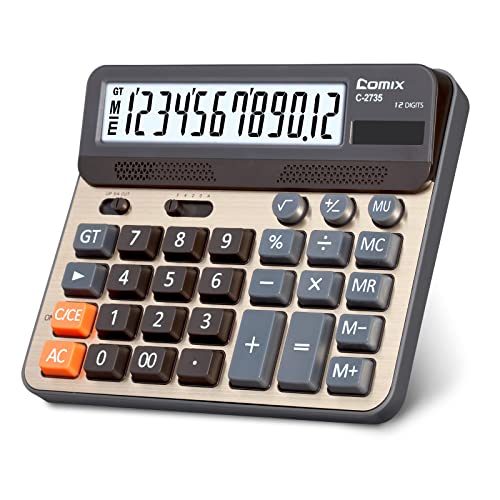
Comix builds this desk calculator around computer style keys, the kind that mimic a laptop or office keypad. The listing calls the touch feel super comfortable, and the keytops are sized for real fingers instead of the thumbnail buttons on a pocket model. Twelve digits on the large LCD handle everything from a grocery tally to a quarterly estimate.
The power setup is worth reading closely. It runs on one AA battery that comes in the package, and the solar panel is only an auxiliary source, so the battery does the real work. That means you should plan to replace the cell eventually, unlike a solar-first design.
If you already type on a computer, these keys will feel familiar, so there is almost no adjustment period. They are less distinctive than the recessed wells on the M&G, which guide a finger more firmly. Next to the Mr. Pen, the Comix sounds softer and feels more like a regular keyboard than a clicky switch board.
Best for: Keyboard users who want familiar computer style keytops on a plain, readable desk calculator.
Check price on AmazonSpecs
- Display: 12 digit large LCD
- Keys: Computer key design
- Power: AA battery plus solar
- Battery: One AA included
Pros
- +Computer style keytops feel familiar to keyboard users
- +Twelve digit display is easy to read on a desk
- +AA battery arrives in the package for instant use
- +Softer press than a mechanical switch calculator
Cons
- −Solar panel is only an assist, so the AA does the work
- −Keytops are less guiding than recessed wells
HIHUHEN Big Button Electronic Calculator
About this pick
HIHUHEN puts a lot of keys on a big-button face, which is unusual because bigger keys usually mean fewer of them. Alongside the digits you get plus and minus sign control, percent, square root, and CE and C for partial or full clearing. A Japanese LCD with twelve digits sits above it all.
The four memory keys, MC, MR, M+, and M-, make it a real bookkeeping tool rather than a plain adder. The catch is that a crowded key field takes longer to learn, and a person who wants only digits may feel the extra labels are clutter. Rounding and decimal place controls need a one-time setup, and a forgotten switch can make an answer look off.
One AA battery is included next to the solar cell, so it works right out of the box. If your priority is raw key size with a minimal set, the CATIGA 12 Digit Desk Calculator is simpler to read at a glance. If you track a running subtotal, this is the large-key model that supports it best.
Best for: People who need memory and rounding functions but still want big, readable keys.
Check price on AmazonSpecs
- Keys: Big button layout
- Display: Japanese LCD, 12 digits
- Memory: MC, MR, M+, M-
- Power: Solar and 1 AA battery
Pros
- +Four memory keys keep a running subtotal in hand
- +CE and C keys clear one entry or the whole sum
- +Rounding and decimal setting give control over output
- +AA battery included alongside the solar panel
Cons
- −More labels mean a longer learning curve
- −Decimal or rounding switch left wrong skews answers
CATIGA 12 Digit Big Button Calculator
About this pick
CATIGA describes its keys as sensitive, which usually means a light press registers instead of requiring a hard push. They are big, and with only four function keys on the face, the layout gives each button plenty of room. The large LCD shows twelve digits, so a long total never runs out of space.
The four function design is the main reason to choose it. There is no memory or percent row to misread, so someone who dislikes menus and extra labels will find it calm. The compromise is that anyone who wants a percent key or running memory has to look at the HIHUHEN or accept a workaround.
A solar panel runs the unit, with a battery in the box as a backup for dim light. Because the keys respond to a lighter press, tired or arthritic hands may find it gentler than a firm-click model. Compared with the pendancy at 5 inches, it is the lower-profile choice, while the Mr. Pen offers stronger tactile feedback.
Best for: Users who want large, light-pressing keys on the least cluttered face.
Check price on AmazonSpecs
- Keys: Big sensitive buttons
- Display: 12 digit large LCD
- Functions: 4 basic functions
- Power: Solar plus included battery
Pros
- +Sensitive keys register without a hard push
- +Only four function keys, so each button gets space
- +Large LCD fits twelve digits for long totals
- +Solar panel with a battery included in the box
Cons
- −No percent, memory, or rounding keys at all
- −Feedback is quieter than a mechanical switch
M&G Recessed Big Button Calculator
About this pick
M&G is the model to look at when key geometry is the whole point. The big buttons are embedded in the panel with a raised design, so each keytop has a defined edge that a finger can feel. The listing says the shape makes input accurate and fast, and sturdy plastic keys back up the long-term durability claim.
That edge is the difference between a key you hit and a key you find. People with a slight tremor or numb fingertips may appreciate being guided, while fast typists might miss the flat glide of a computer style key. The display is a large twelve digit LCD, though not the oversized screen you get from the pendancy.
It uses dual power, with an AAA battery in the package and a solar cell for lit rooms. Against the Comix, the M&G holds your finger more firmly and the Comix feels more like typing. Against the CATIGA, the M&G offers a clearer sense of where each key ends.
Best for: Anyone who wants to feel the edge of each key and avoid sliding onto a neighbor.
Check price on AmazonSpecs
- Keys: Recessed, raised design
- Display: 12 digit large LCD
- Power: Solar and AAA battery
- Key material: Sturdy plastic
Pros
- +Embedded keys give each digit a defined edge to feel
- +Sturdy plastic keytops hold up to daily pressing
- +AAA battery in the package plus a solar cell
- +Large twelve digit LCD for everyday totals
Cons
- −Fast typists may miss the flat glide of keyboard keys
- −Display is not as large as the 5 inch models
pendancy Giant Key 5-Inch Calculator
About this pick
The pendancy is the broadest calculator on this list, pairing giant response buttons with a 5-inch twelve digit LCD. Its display tilts at 30 degrees and the key groups come in orange, blue, and gray, so function keys visually separate from numerals. For a person who finds the other keys too small, this is the one that answers with scale.
Color coding is a key-finding aid. You learn that the orange group holds one kind of action and the gray group another, so your eye jumps to the right area before your finger moves. The body is ABS engineering plastic, which the listing calls light but impact resistant, and that light weight means it can shift if you press with force.
It works best as a permanent desk fixture rather than a drawer item. Compared with the Mr. Pen at 6.2 by 4.4 inches, the pendancy occupies more room but offers far bigger digits. The CATIGA is the quieter, plainer rival when you want large keys without the screen footprint.
Best for: People who need the largest keys and screen together, plus color cues for finding functions.
Check price on AmazonSpecs
- Keys: Giant response buttons
- Display: 5 inch LCD, 12 digits
- Key colors: Orange, blue, gray
- Body: ABS engineering plastic
Pros
- +Giant response keys give the biggest press target here
- +Orange, blue, and gray groups guide your eye fast
- +5 inch LCD with a 30 degree tilt faces you
- +ABS engineering plastic body stays light
Cons
- −Takes more desk space than any other model here
- −Light body can slide around under a firm key press
Mr. Pen Mechanical Switch Calculator (Pink)
About this pick
The Mr. Pen in pink takes the key question in a different direction: instead of guiding a finger with shape, it uses a switch under each key that clicks like a mechanical keyboard. The listing says the feel is responsive and satisfying, similar to a keyboard. Pressing a key gives you sound and a tactile bump, so you can confirm a digit by ear.
That click is a double-edged feature. For a person who cannot read the screen quickly, the sound is reassurance, but in a quiet office the noise carries. The body measures 6.2 by 4.4 inches, so it takes a modest slice of the desk, and the large LCD shows twelve digits.
Basic numerical work is the intended use, covering home, school, and office. Next to the Comix, the Mr. Pen is crisper and louder, and next to the HIHUHEN it offers far fewer functions. The pink finish is the only difference from the standard version, so choose it on taste.
Best for: People who want to hear and feel each key press as proof the digit registered.
Check price on AmazonSpecs
- Keys: Mechanical switches
- Display: 12 digit large LCD
- Size: 6.2 x 4.4 inches
- Color: Pink
Pros
- +Click under every key confirms a press by sound
- +Compact 6.2 x 4.4 inch body leaves desk room
- +Twelve digit large LCD handles basic sums with ease
- +Pink finish suits a cheerful home or study desk
Cons
- −Loud click carries in a quiet shared space
- −Offers only basic arithmetic, with no memory or percent
How We Evaluated These Large-Key Calculators
Each pick was assessed across 5 criteria weighted for real-world use.
Keytop size and edge design
We compared how each listing describes its key shape, from embedded and raised tops to giant response buttons. The M&G and the pendancy score highest because their shapes and sizes are stated outright. A model that only says big buttons gets credit for size but not for shape. We did not physically measure keytops, so scores reflect specs and buyer feedback.
Press feedback
Feedback was scored on how clearly a press can be confirmed without looking. The Mr. Pen leads with mechanical switches and a click, and the Comix follows with computer style keys. Softer models such as the CATIGA were rated on sensitivity rather than click. A quiet, light key is a real plus for some hands, so it is not scored as a weakness by default.
Layout clarity
A large key is less useful if the face is crowded with tiny labels. The CATIGA scores best here with four functions, and the HIHUHEN trades clarity for capability with memory, percent, and square root keys. Color grouping on the pendancy earns a point for helping the eye. We weighed learning effort alongside raw key count.
Display support
Large keys help less when the screen is faint, so the display was scored as a supporting factor. The pendancy leads at 5 inches with a 30 degree tilt, and the others show twelve digits on large LCDs. We checked whether listings mention an angled screen. Display counted for less than key design in this guide.
Lineup positioning
The pendancy leads on size with giant keys and a 5-inch screen, the M&G leads on key edge with its embedded design, and the Mr. Pen leads on feedback. The HIHUHEN leads on function count with four memory keys, while the CATIGA leads on simplicity. The Comix sits in the middle with familiar computer style keytops. Each pick wins on a different key trait.
How to Choose the Right Large-Key Calculators
By Key Style
Match the style of key to the way your hands behave.
| Situation | Pick | Reason |
|---|---|---|
| You type on a computer all day | Comix 12 Digit Large Button Desk Calculator | Computer style keys feel like the keyboard you know |
| Your finger slides off keys | M&G Recessed Big Button Calculator | Embedded keys with a raised edge guide your fingertip |
| You want to hear each press | Mr. Pen Mechanical Switch Calculator (Pink) | Mechanical switches click under every key |
| You need the largest target of all | pendancy Giant Key 5-Inch Calculator | Giant response buttons with a 5 inch LCD |
| Light touch is easier on your hands | CATIGA 12 Digit Big Button Calculator | Keys are described as sensitive and big |
If two styles tempt you, pick the one that fixes your most frequent mistake.
By Budget
These tiers follow feature level, since prices move. Check the live listing before buying.
| Tier | Pick | What you get |
|---|---|---|
| Entry | CATIGA 12 Digit Big Button Calculator | Big sensitive keys, four functions, and a battery included |
| Entry to mid | Comix 12 Digit Large Button Desk Calculator | Computer style keys with an AA battery in the package |
| Mid | M&G Recessed Big Button Calculator | Embedded raised keys and dual power |
| Mid to premium | HIHUHEN Big Button Electronic Calculator | Four memory keys, percent, and rounding control |
| Premium | pendancy Giant Key 5-Inch Calculator | Giant keys, color groups, and a 5 inch tilted screen |
The Mr. Pen in pink sits near the mid tier, chosen mainly for its click.
Recessed Keys vs Flat Computer Keys
These two layouts solve missed presses from opposite directions.
Recessed keys
Each key sits in a well with a raised rim that catches your fingertip, which stops you from rolling onto a neighbor. The M&G Recessed Big Button Calculator is the clearest example here, and the pendancy Giant Key 5-Inch Calculator adds color groups to help you find the area. Pick this side if accuracy matters more than speed.
Flat computer keys
Flat keytops sit at the same level and let your finger glide across them, which suits fast typing. The Comix 12 Digit Large Button Desk Calculator uses this style, and the CATIGA 12 Digit Big Button Calculator is a light press cousin. Pick this side if you are a confident keyboard user.
Shaky aim wants recessed keys, steady fast hands want flat ones.
By Number of Functions
More keys help if you use them and hurt if you do not.
| Situation | Pick | Reason |
|---|---|---|
| Plain add and subtract only | CATIGA 12 Digit Big Button Calculator | Four function face with room around every key |
| Running totals across several bills | HIHUHEN Big Button Electronic Calculator | MC, MR, M+, M- keep subtotals |
| Occasional percent and sign change | HIHUHEN Big Button Electronic Calculator | Percent, square root, and plus or minus keys |
| Basic sums with a click | Mr. Pen Mechanical Switch Calculator (Pink) | Basic functions with a mechanical feel |
Do not pay for memory keys you will never press.
For Arthritic or Tired Hands Specifically
Joint pain and fatigue change what a good key feels like.
Look for
Keys that register on a light press, wide keytops that do not need precise aim, and a body that stays put on the desk. A shallow press travel also saves effort. Avoid anything that demands hard strikes.
In this comparison
The CATIGA 12 Digit Big Button Calculator lists sensitive big buttons, which fits a light touch. The pendancy Giant Key 5-Inch Calculator offers the widest targets, though its light body can slide. The M&G Recessed Big Button Calculator guides your finger so a weak press still lands in the right place.
Rest the heel of your hand on the desk while pressing, which steadies aim and spares the wrist.
When to Spend More
| Spend more if | Save if |
|---|---|
| Large target size is your main complaint, the pendancy Giant Key 5-Inch Calculator has the biggest keys | Normal large keys already work, the CATIGA 12 Digit Big Button Calculator covers basics |
| You track subtotals, the HIHUHEN Big Button Electronic Calculator adds four memory keys | You never use memory, the Comix 12 Digit Large Button Desk Calculator is enough |
| You mis-hit keys often, the M&G Recessed Big Button Calculator guides your fingertip | Your aim is steady, a flat key model avoids paying for a shape you do not need |
| You depend on audible confirmation, the Mr. Pen Mechanical Switch Calculator (Pink) clicks | You share a quiet room, a soft key model avoids noise |
Spend on the key trait that removes your most common error.
Frequently Asked Questions
What counts as a large-key calculator?
There is no formal standard, so listings use words like big button, giant response key, and large key. In practice it means keytops wider than those on a pocket calculator, with gaps that reduce overlap. Check the stated key style, not just the word big. The pendancy and M&G are the clearest examples in this group.
Are large keys always better than a large screen?
Not always. If you hit the wrong key often, key size and shape come first. If you misread digits, a bigger display such as the pendancy's 5-inch LCD matters more. Most people benefit from both, so look for a model that gets each one reasonably right.
Which key style is best for shaky hands?
Embedded or recessed keys tend to help, because a raised rim catches the finger and limits slipping. The M&G uses a raised, embedded design. Light-press keys such as the CATIGA's also reduce the force needed. A heavier body that does not slide is a helpful extra.
Does a louder click mean a better calculator?
No, it simply means a different feel. The Mr. Pen gives audible feedback that some people love and others find tiring. A soft key can be just as accurate if the screen is clear. Choose by your environment and preference.
Why does the Comix rely mostly on its battery?
The listing says the solar panel is auxiliary, with an AA battery as the main supply. That is fine for a desk model, but it means you should keep a spare cell around. A solar-first design reduces battery changes but needs better light. Check which source each listing treats as primary.
Are memory keys worth having on a large-key model?
They are useful if you keep running totals, because MC, MR, M+, and M- store a subtotal while you work something else. The HIHUHEN is the large-key pick with all four. They do add labels to the face, so skip them if you only add and subtract.
How do I stop wrong-key presses with any calculator?
Position it squarely in front of you, rest your hand on the desk, and press with the pad of the finger rather than the tip. Slow down on entry and glance at the screen before pressing equals. A model with a defined key edge helps further. These small habits matter more than any single spec.
Bottom Line
best overall: Comix 12 Digit Large Button Desk Calculator - best computer-style keys pick in this roundup.
See the full rankings above for all picks with pros, cons, and best-for summaries.
Browse on Amazon
All Prime-eligible options with current pricing.
Shop on Amazon →