6 Best Large Button Calculators Under $20 in 2026
Six large button desk calculators with 12 digit displays, solar plus battery power and clear key spacing, matched to who each one suits at a tight budget.

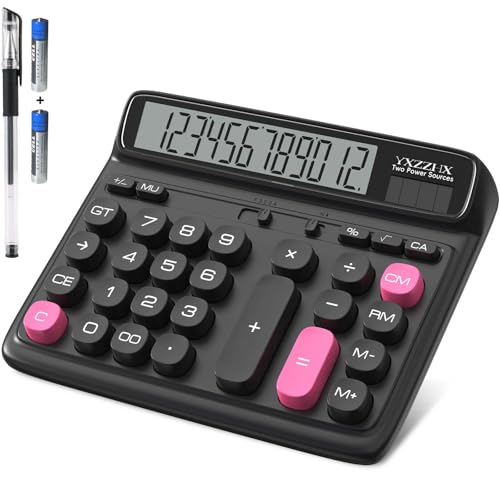


At a Glance
A calculator is one of the few tools where a small improvement in size changes the whole experience. Bigger digits mean you stop squinting, and wider keys mean you stop hitting the neighbor of the key you wanted. At this budget, nearly every model promises both, so the real job is telling the genuinely roomy designs from the ones that simply print the words on the box.
All six calculators here use a 12 digit LCD and a solar plus battery power arrangement, which removes the most common annoyance of cheap models: a dead cell at tax time. What separates them is how they handle the keys. Some give you a strict four function layout with nothing to learn, one adds memory and percent keys, and two stretch the screen to a full 5 inches.
We evaluated each pick from its listing specs and the strengths and weaknesses that buyers repeatedly describe. Below you will find what you gain at this price level, what you give up compared with a pricier talking or dual-line model, and which pick fits which kind of user.
6 Criteria to Look For Before Buying a Large Button Calculators Under $20
Key buying criteria so you get the right fit the first time.
Screen size and digit height
The display is the first thing that tires your eyes, and a larger digit is the cheapest way to reduce strain. Most 12 digit models fit a long number in a small window, so look for a screen that is wide as well as tall. The pendancy and the yxzzhx both use a 5 inch LCD, which is noticeably bigger than the standard panels on the M&G or the DXNIKAM. If you read results from more than an arm's length away, one of those two is the sensible start. A bigger screen also tends to come with a larger body, so check your desk space.
Key size and edge guidance
Wrong key presses come from keys that are too small or keytops that offer no edge for the finger to find. Recessed or raised keys help because your fingertip senses the border before it presses. The M&G uses embedded keys with a raised design, while the CATIGA uses large round keys that are friendly but give less edge feedback. For people with reduced finger sensitivity, a defined edge is worth more than a flashy color scheme. If you want both, the pendancy pairs giant keys with color coding.
Four function or extra keys
A strict four function layout removes decision-making, which is ideal if you only add, subtract, multiply and divide. Extra keys such as memory, percent and square root are only an advantage if you will actually use them. The HIHUHEN includes MC, MR, M+ and M- plus percent and square root, and it adds a rounding setting that is easy to leave on by accident. The CATIGA, the DXNIKAM and the M&G keep to the basics. Pick the layout that matches your real tasks rather than the one with the longest feature list.
Power source and battery in the box
Solar plus battery power is standard at this level, but the details differ. The yxzzhx ships with 2 AA batteries, the HIHUHEN with one AA, and the M&G with an AAA. Solar panels work well in a bright room but need a battery backup in a dim corner. A model that includes its battery lets you use it on day one and gives you a known cell size to replace later. If your desk is lit mostly by a window, the solar cell will carry most of the load.
Base stability and weight
A light calculator can slide away from you when you press a firm key, which is more annoying than it sounds. Anti-slip feet fix this at almost no cost, and the DXNIKAM is the only pick here that lists them, with two foot pads. The pendancy is made of light ABS plastic that can shift on a smooth desk. If your chosen model has no feet, a thin rubber mat or shelf liner under it works as a free fix. Stability matters most for anyone who presses hard or has a tremor.
Display angle and viewing position
A tilted display lets you read the screen without bending your neck. The pendancy sets its LCD at 30 degrees, and the yxzzhx and the CATIGA also tilt the screen toward the user. A flat panel reflects overhead light and forces you to lean forward. Choose a tilted model if the calculator will live on a desk and be read from a seated position, and consider a flat model only if you will hold it in your hand.
6 Best Large Button Calculators Under $20 in 2026
pendancy 5-Inch LCD Desktop Calculator
About this pick
The pendancy is built around a 5 inch LCD that sits at a 30 degree angle, so the digits face you directly when you are seated at a desk. That is a bigger screen than the compact 12 digit models on this list, and it is the single biggest comfort upgrade you can get without paying for a talking unit. The giant response keys are color coded in orange, blue and gray against a silver panel, which lets you find the operator keys by hue rather than by reading small symbols.
The tradeoff is the body. It is made of light ABS plastic, which keeps it easy to move but means it can shift on a smooth desk if you press hard. It also has no voice output, so someone whose vision is too poor for even a 5 inch screen will still need a talking model at a higher spend.
In ownership terms it is the most straightforward pick here for anyone who wants to read results at a glance. Its screen is wider than the 12 digit readout on the HIHUHEN, and its color scheme is more helpful than the plain DXNIKAM, though the DXNIKAM adds anti-slip feet that the pendancy does not list. If you place it on a rubber mat or a non-slip pad, the sliding issue mostly disappears.
Best for: Readers who want the largest, easiest-to-see display in the lineup.
Check price on AmazonSpecs
- Display: 5 inch LCD, 12 digits
- Display angle: 30 degrees
- Body: ABS engineering plastic
- Key colors: Orange, blue and gray on silver
Pros
- +5 inch LCD gives the largest readout in this group
- +Color coded key groups can be found by hue alone
- +30 degree tilt faces you when seated at a desk
- +Giant response keys give wide press targets
Cons
- −No voice output if the screen is still unreadable
- −Light ABS body can slide under a firm press
yxzzhx 5-Inch Two-Way Power Desktop Calculator
About this pick
The yxzzhx is the second 5 inch model in this group, and it pairs that big screen with two AA batteries in the box so it works the moment you open the package. The tilted display is designed to line up with your line of sight, which reduces the hunching that comes from reading a flat screen at arm's length. Solar power takes over in a bright room, so the batteries should last a long time under normal use.
The weak point is the keys. The listing does not describe them as specially oversized, so they are standard desktop size beneath a very large display. People who mostly struggle with reading the screen will be happy, while people who struggle with pressing small keys will do better with the M&G or the CATIGA round-key model. The wide body can also be nudged on a slippery surface.
Compared with the pendancy it gives up the color coded key panel and the giant key claim, but it ships with batteries and keeps the same screen size. Compared with the DXNIKAM it has a far bigger display but no listed foot pads. It suits a buyer who treats the screen as the main feature and can accept ordinary key sizes.
Best for: Buyers who want a 5 inch screen with batteries already included.
Check price on AmazonSpecs
- Display: 5 inch LCD, 12 digits
- Power: Solar or battery
- Batteries: 2 AA included
- Screen angle: Tilted for desk viewing
Pros
- +5 inch LCD shows twelve large digits at a glance
- +Screen tilt reduces hunching and neck strain
- +Two AA batteries are provided for immediate use
- +Solar power cuts how often cells need changing
Cons
- −Keys are not specially oversized like the pendancy
- −Wide body can be nudged on a slippery desk
M&G 12 Digit Desk Calculator with Embedded Big Buttons
About this pick
The M&G focuses on the part of a calculator that causes the most errors: the keys themselves. Each button sits in an embedded recess with a raised top, so your finger finds the edge of the key before it presses, which helps when your fingertips are less precise. The 12 digit LCD is large enough for ordinary sums, and the AAA battery in the box backs up the solar cell.
Because the keys are recessed, typing speed drops a little compared with a flat key layout. If you enter long columns of numbers all day, the extra travel will feel slower. It also stays with the basics, so there is no memory or percent function beyond what the standard keys offer.
The quiet press suits shared rooms and late evenings, which is a real advantage over a click-heavy mechanical design. It beats the CATIGA round-key model for edge guidance, since round keys give a finger less to catch on. It does not match the pendancy for screen size, so choose it when key accuracy matters more than reading distance.
Best for: People who mis-press keys and want clearly defined key edges.
Check price on AmazonSpecs
- Display: 12 digit LCD
- Power: Solar plus AAA battery
- Key style: Embedded, raised keytops
- Battery: AAA included
Pros
- +Embedded keys give each digit a defined edge
- +Raised key design supports accurate input
- +AAA battery is included with the solar cell
- +Quiet press suits shared rooms and late evenings
Cons
- −Slightly slower for fast flat key typing
- −No memory or percent functions beyond the basics
HIHUHEN 12 Digit Solar and Battery Calculator
About this pick
The HIHUHEN is the most capable calculator on this list, with memory keys (MC, MR, M+ and M-), a percent key, a square root key and a plus/minus toggle. It also lets you set rounding and the number of decimal places, which is useful for household budgets or tip calculations where you want a fixed number of decimals. The 12 digit LCD is a Japanese panel, and one AA battery ships alongside the solar cell.
More keys means a busier face than the strict four function models, and the rounding or decimal switch can confuse someone who never touches it. The keys are big enough for comfortable use, but they are not described as extra-large in the way the pendancy is, so this is a function-first choice rather than a legibility-first choice.
If you track a running subtotal, nothing else in the group comes close, since the DXNIKAM, the CATIGA and the M&G all leave memory out. It also has CE and C keys that separate fixing a single entry from clearing everything, which saves frustration after a typo. Choose it when you add up bills or do percentage work and want features at the same budget as a plain model.
Best for: Anyone who needs memory, percent and square root on a big-key unit.
Check price on AmazonSpecs
- Display: 12 digit Japanese LCD
- Power: Solar plus 1 AA
- Memory keys: MC, MR, M+, M-
- Extra keys: Percent, square root, plus/minus
Pros
- +Memory keys let you hold a subtotal while working
- +CE and C separate a one entry fix from full clear
- +Percent and square root cover everyday extras
- +One AA battery ships alongside the solar panel
Cons
- −A busier key face than the strict four function models
- −Rounding or decimal switch can confuse new users
CATIGA 12 Digit Desktop Calculator with Round Keys
About this pick
The CATIGA uses large round keys that look friendly and register quickly, with an angled 12 digit LCD that reduces eye strain when you sit at a desk. It offers four function operation only, so there is no menu to learn and no extra key to press by accident. The solar plus battery arrangement keeps upkeep low.
Its styling is playful, with a look aimed at students and daily users, and that may not suit a formal office desk. Round keys also give less edge guidance than the recessed keys on the M&G, so a person who slides a finger across the panel could land on the wrong key more easily.
For a child, a first-time user, or someone who simply wants a calculator that does sums with no learning curve, it is a safe choice. It is simpler than the HIHUHEN and has a smaller display than the pendancy or yxzzhx. Pick it when approachability counts more than screen size or extra functions.
Best for: New users, students and anyone who wants the simplest layout.
Check price on AmazonSpecs
- Display: Angled 12 digit LCD
- Keys: Large round, 4 function
- Power: Solar and battery
- Use case: Study and daily home use
Pros
- +Big round keys feel welcoming and register quickly
- +Large angled LCD reduces eye strain on a desk
- +Four function operation keeps usage uncomplicated
- +Dual solar and battery power limits upkeep
Cons
- −Cute styling may not suit a formal office desk
- −Round keys offer less edge guidance than recessed ones
DXNIKAM 12 Digit 4 Function Desk Calculator
About this pick
The DXNIKAM keeps things plain: a large 12 digit screen set at an ergonomic angle, big responsive buttons, and a four function layout with no menus. Its standout feature is the pair of anti-slip foot pads, which stop the calculator from drifting while you press the keys. That matters because the cheapest lightweight models tend to skate across a desk the harder you press.
There are no memory keys, so you cannot hold a subtotal while working through a second calculation. The plain look also offers no color cues, which means you rely on reading the key labels, unlike the color coded pendancy.
The dual solar and battery supply keeps it running with little attention. Against the HIHUHEN it is less capable, but it is calmer to use because it has fewer keys. Against the yxzzhx it has a smaller screen but a steadier footing, so it fits people who care about a stable base and an uncluttered layout.
Best for: Buyers who want a stable, no-fuss basic calculator.
Check price on AmazonSpecs
- Display: 12 digit large display
- Layout: 4 function
- Power: Solar plus battery
- Feet: Two anti-slip foot pads
Pros
- +Four function layout leaves no menus to puzzle over
- +Ergonomic angle on a large twelve digit screen
- +Two anti-slip foot pads keep it from drifting
- +Dual solar and battery supply keeps it running
Cons
- −No memory keys for tracking a running subtotal
- −Plain look offers no color cues to find keys
How We Evaluated These Large Button Calculators Under $20
Each pick was assessed across 5 criteria weighted for real-world use.
Display legibility
We compared the stated screen sizes and digit counts from each listing. The pendancy and yxzzhx lead with a 5 inch LCD, while the other four use a standard 12 digit panel. We also weighed whether the display is angled, since a tilted screen is easier to read from a seated position.
Key size and layout
We looked at how each listing describes its keys, from the giant response buttons on the pendancy to the embedded, raised keys on the M&G and the round keys on the CATIGA. Key spacing and edge guidance carried the most weight. We also noted which layouts are strict four function and which add memory keys.
Power and upkeep
Every pick combines solar and battery power, so we compared the batteries included and the cell types. The yxzzhx supplies 2 AA cells, the HIHUHEN supplies one AA and the M&G supplies an AAA. We treated a battery in the box as a practical advantage.
Stability and build
We checked which listings mention a stable base or sturdy materials. The DXNIKAM lists two anti-slip foot pads, the M&G mentions sturdy plastic keys, and the pendancy uses ABS engineering plastic. Lighter bodies were marked down where nothing keeps them in place.
Value at this budget
Lineup positioning matters here: the HIHUHEN delivers the most functions, the pendancy delivers the biggest screen, and the DXNIKAM delivers the simplest stable layout. We judged each pick on how much real benefit it gives compared with a plain small calculator, and we marked down any pick whose extras are likely to go unused.
How to Choose the Right Large Button Calculators Under $20
By Main Difficulty
Match the pick to the thing you actually struggle with.
| Your situation | Best pick | Why |
|---|---|---|
| Small digits are hard to read | pendancy 5-Inch LCD Desktop Calculator | Its 5 inch LCD at a 30 degree angle is the largest readout here. |
| Fingers hit the wrong key | M&G 12 Digit Desk Calculator with Embedded Big Buttons | Recessed, raised keys give a finger a defined edge. |
| Calculator slides on the desk | DXNIKAM 12 Digit 4 Function Desk Calculator | Two anti-slip foot pads hold it in place. |
| You need a running subtotal | HIHUHEN 12 Digit Solar and Battery Calculator | MC, MR, M+ and M- keep a value in memory. |
| You want zero setup | yxzzhx 5-Inch Two-Way Power Desktop Calculator | Includes 2 AA batteries and a large tilted screen. |
If you cannot name your main difficulty, start with the pendancy, since screen size helps almost everyone.
By Budget
Within this cap there are two practical tiers, and they trade functions against comfort.
| Tier within the cap | Best pick | What you get |
|---|---|---|
| Lower end | DXNIKAM 12 Digit 4 Function Desk Calculator | A stable, plain four function unit with anti-slip feet. |
| Lower end | CATIGA 12 Digit Desktop Calculator with Round Keys | A friendly round-key layout with an angled 12 digit LCD. |
| Mid range | M&G 12 Digit Desk Calculator with Embedded Big Buttons | Recessed raised keys and a battery in the box. |
| Near the cap | pendancy 5-Inch LCD Desktop Calculator | The biggest screen plus color coded giant keys. |
| Near the cap | HIHUHEN 12 Digit Solar and Battery Calculator | Memory, percent, square root and rounding control. |
Spending near the cap buys a bigger screen or more functions, not a better-quality mechanism.
Big Screen vs Big Keys
These are two different ways to make a calculator easier to see and use.
Big screen
A 5 inch LCD shows each digit at a larger size so you can read results from farther away. The pendancy and the yxzzhx follow this route. Choose it if reading is your main problem and your fingers are comfortable with standard keys.
Big keys
Oversized or recessed keys cut mis-presses and make it easier to find a key without looking. The M&G and the CATIGA follow this route, and the pendancy has giant keys too. Choose it if you press the wrong key often or have reduced finger sensitivity.
The pendancy is the only pick that lists both a 5 inch screen and giant keys.
Basic vs Memory Models
More functions are a benefit only if you use them.
| Need | Pick | Reason |
|---|---|---|
| Only add and subtract | CATIGA 12 Digit Desktop Calculator with Round Keys | Four function only, so nothing to learn. |
| Percent for tips and discounts | HIHUHEN 12 Digit Solar and Battery Calculator | It has a dedicated percent key and square root. |
| Fixed decimals for budgeting | HIHUHEN 12 Digit Solar and Battery Calculator | A rounding and decimal place setting is built in. |
| Calm layout with few keys | DXNIKAM 12 Digit 4 Function Desk Calculator | No memory keys to confuse the layout. |
If you never use memory keys on your current calculator, skip the HIHUHEN.
For Household Bills Specifically
Bill paying means long columns of numbers, so accuracy beats speed.
Look for
A 12 digit display so totals fit, distinct keys that prevent errors, and either a memory function or a layout that does not confuse you. A battery in the box is a bonus.
In this comparison
The HIHUHEN suits anyone who wants to hold a subtotal, the M&G suits anyone who values key accuracy, and the pendancy suits anyone who needs to read the final total at a glance.
Write the total down before clearing, because no model in this group has a printout.
When to Spend More
A higher spend changes the category of calculator, not just the quality.
| Spend more if | Save if |
|---|---|
| You need spoken digits, since none of these six has voice output | A 5 inch screen like the pendancy's is already large enough for you |
| You want a two-line display that shows the entry and the result | You are fine with a single 12 digit line on the M&G or DXNIKAM |
| You use a calculator for hours every day and want a premium key feel | You do occasional sums and basic keys such as the CATIGA's are enough |
| You need printing or tape for records | You only need the HIHUHEN's memory and percent keys |
These six are strong for reading and pressing, but they stop at the display and the keys.
Frequently Asked Questions
Which of these is best if I mostly struggle to read the numbers?
The pendancy is the first choice because its 5 inch LCD is the largest readout in the group and tilts at 30 degrees. The yxzzhx is the alternative with the same screen size and 2 AA batteries included. Both show twelve digits at a larger size than the compact models. If reading is still a struggle, a talking calculator at a higher spend is the next step.
Are solar calculators reliable in a dim room?
Solar panels work best in normal room lighting and can fade in a dark corner, which is why every model here also takes a battery. The yxzzhx ships with 2 AA cells, while the HIHUHEN includes one AA and the M&G includes an AAA. In a well-lit space the battery barely gets used. If your desk is dim, expect to change the battery occasionally.
Do I need memory keys?
Only if you hold a subtotal while doing another calculation, such as adding up bills before comparing them with a budget. The HIHUHEN is the only pick with MC, MR, M+ and M- keys. The DXNIKAM and CATIGA leave them out on purpose to keep the layout simple. If you have never used memory keys, you probably do not need them.
Why does my calculator slide when I press the keys?
Lightweight bodies move when you press hard because nothing resists the push. The DXNIKAM is the only one here that lists two anti-slip foot pads, and the pendancy is made of light ABS plastic that can shift. A thin rubber mat or a sheet of shelf liner under any calculator solves the problem. Pressing with a slightly lighter touch also helps.
Are round keys easier than square keys?
Round keys look inviting and are easy to press, but they offer less edge guidance than a recessed square key. The CATIGA uses round keys and suits beginners well. The M&G has embedded raised keys that guide your finger. If you often press a neighboring key, the M&G is the safer pick.
Is a mechanical switch calculator worth it for large buttons?
Mechanical switches add a loud, clear click on each press, which some people love and others find tiring in a quiet home. Those models are usually compact, so the keys end up smaller than on the larger desk models. If your priority is oversized keys and a big screen, the pendancy or M&G is a better fit. Mechanical feel is a preference, not an accessibility feature.
How long should a calculator at this budget last?
A basic solar calculator has few moving parts, so it can last for years if the keys are not abused. The usual failure is a worn battery or a key that stops registering, not the screen. Keep it out of damp spots and avoid pressing with the end of a pen. If a key goes bad, replacing it at this price level is simpler than repairing it.
Bottom Line
best overall: pendancy 5-Inch LCD Desktop Calculator - best overall pick in this roundup.
See the full rankings above for all picks with pros, cons, and best-for summaries.
Browse on Amazon
All Prime-eligible options with current pricing.
Shop on Amazon →