6 Best Large-Button Calculators for Low Vision in 2026
Six large-button calculators for visually impaired users, comparing talking models, dual-line screens, 5-inch displays, and key size and contrast.



At a Glance
The Low Vision Store Two-Line Talking Calculator
↓ See why we picked itA calculator for low vision has two jobs: show numbers big enough to read, or say them out loud when reading fails. Large keys then keep your fingers on target while you work. The six picks below split into talking models and big-screen silent models, so you can choose the support that matches how much sight you rely on.
We evaluated each pick from the product listings and buyer feedback, focusing on voice output, dual-line displays, screen size and angle, key size, and power. Four of the six speak, one offers a 5-inch silent screen, and one is a simple eight digit unit for those who need only big keys. We treat these as everyday household tools, not medical devices, and we make no medical claims.
Decide first whether you need to hear your entries, then use the tables to narrow to the right model.
6 Criteria to Look For Before Buying a Large-Button Calculators for Low Vision
Key buying criteria so you get the right fit the first time.
Speech versus screen reading
The most important question is whether you can read the screen at all. If digits blur even at a large size, a talking calculator is the right tool. The Low Vision Store, Cirbic, iPepul, and MAUJOY all speak, while the pendancy and CATIGA 8 Digit rely on sight. If you can read a 5-inch display, a silent model avoids the noise.
What the voice actually announces
Not every talking calculator speaks the same things. The Low Vision Store model announces numbers, functions, and results, while the iPepul reads numbers and results after each input. Hearing the function key lets you catch a wrong operator before equals. Check what the listing says, since a result-only voice leaves a gap.
Volume range and quiet use
A voice you cannot turn down becomes a nuisance, and a voice you cannot turn up fails in a noisy room. The Cirbic runs from mute to loud, which is the widest stated range here. Think about a library, a kitchen, and a shared office. If you work around others, volume control matters more than any other voice feature.
Display lines and angle
A two-line display shows your current entry above the previous result, which helps catch errors. The iPepul sits at a fixed 45 degree angle, the pendancy at 30 degrees, and the CATIGA 8 Digit uses a tilted screen. A steeper tilt helps a low seated reader, but a fixed angle cannot be changed. Match the angle to the chair and desk you will actually use.
Key size, contrast, and color
For partial sight, key contrast helps as much as size. The Cirbic lists high contrast oversized keys, the pendancy uses orange, blue, and gray groups, and the CATIGA 8 Digit lists large responsive buttons. Aim for keys you can find by color or feel, not just by reading a label. Avoid low contrast keys where labels fade into the body.
Digit count versus digit size
More digits on a fixed screen width usually means smaller numerals. The CATIGA 8 Digit trades four digits for bigger ones, while the others offer twelve. Household sums rarely need more than eight. If your use is shopping and bills, fewer, larger digits are a smart tradeoff.
6 Best Large-Button Calculators for Low Vision in 2026
The Low Vision Store Two-Line Talking Calculator
About this pick
This is the only listing here that says it was built for people with low vision, including seniors and those who cannot see the screen at all. Its two-line LCD is large and shows your inputs and your results at the same time. The voice announcement speaks numbers, function keys, and results, so you hear the whole operation and not only the answer.
Hearing the function key as well as the digit is the detail that matters. If you press the plus key by mistake, the speech tells you before you reach equals. The listing gives fewer specifics about key size and power than the others, so buyers should read the full page before ordering.
It is a purpose-built aid, so there is little decoration to learn around. Plan on keeping the volume down in shared rooms, since every key announces itself. Compared with the iPepul, this unit announces functions explicitly, and compared with the Cirbic, it leans harder on an accessibility identity than on keypad extras.
Best for: People who cannot rely on the screen and want every key press announced out loud.
Check price on AmazonSpecs
- Display: Large two-line LCD
- Voice: Announces numbers, functions, results
- Audience: Seniors, low vision, blind users
- Layout: Inputs and results shown together
Pros
- +Speaks function keys as well as digits and results
- +Large two-line LCD shows inputs and results together
- +Built around low vision use rather than adapted to it
- +Simple operation with little to learn around
Cons
- −Listing gives few details on key size and power
- −Every key press is audible in a shared room
Cirbic Loud and Clear Talking Calculator
About this pick
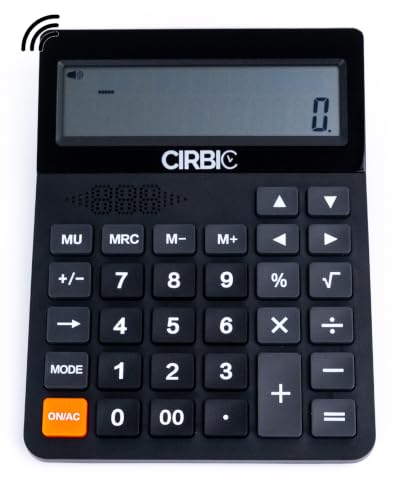
The Cirbic talking desk calculator is marketed for visually impaired users and gives you speech with a wide volume range. You can mute it for quiet work or push it loud for a noisy room. It announces numbers and results, and its dual-line LCD keeps the current entry and last answer in view.
What sets it apart is the high contrast key set. Keys that stand out against the body are easier to locate by sight for those with partial vision, and oversized tops reduce mispresses. It does not list a stated screen tilt or specific dimensions, so shoppers who care about angle will need to check the listing photos.
For day to day use, the mute to loud range is useful in a library, a waiting room, or a bustling kitchen. Compared with the MAUJOY it puts more emphasis on volume range, while compared with the pendancy it trades screen scale for voice. If you want a talking calculator that is also friendly to partial sight, this is a strong fit.
Best for: People with partial sight who want speech and high contrast keys together.
Check price on AmazonSpecs
- Voice: Numbers and results
- Volume: Mute to loud
- Display: Large dual-line LCD
- Keys: Oversized, high contrast
Pros
- +Volume adjusts from mute to loud for any setting
- +High contrast keys stand out against the body
- +Dual-line LCD keeps entry and last result visible
- +Oversized keys reduce mispresses on every entry
Cons
- −Listing gives no stated screen tilt or dimensions
- −Voice may disturb others in a quiet shared room
iPepul 2-Line Talking Desktop Calculator
About this pick
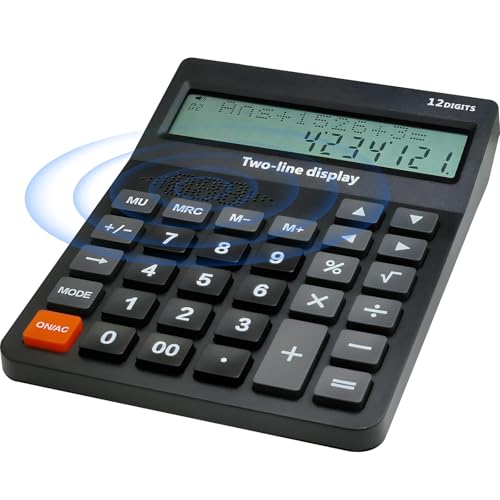
iPepul combines a voice broadcast function with a two-line, twelve digit LCD set at a fixed 45 degree angle. After each input, the calculator reads out the numbers and results. The steep tilt is meant to reduce neck strain, which suits those who bend to see the screen.
The fixed 45 degree angle is steeper than the 30 degree tilt of the pendancy, so a person seated low may find the view more direct. The keys are large and the layout is limited to four functions, which cuts down on confusion. The downside is that a fixed angle cannot be adjusted if your seat and desk do not match it.
The voice reads after each input, so you hear a digit before you press the next. That steady feedback makes a typo easy to catch. Compared with the Low Vision Store model, the iPepul gives you an explicit angled screen, but the Low Vision Store speaks function keys too.
Best for: People who sit low or bend to see the screen and also want digits read aloud.
Check price on AmazonSpecs
- Voice: Reads numbers and results
- Display: 2 line, 12 digits
- Angle: Fixed 45 degrees
- Functions: 4 function
Pros
- +Reads numbers and results aloud after each input
- +Fixed 45 degree display faces a seated reader
- +Two-line 12 digit LCD shows previous calculation
- +Four function layout keeps the key face plain
Cons
- −Fixed tilt cannot adjust to different desk heights
- −Four functions only, with no percent or memory
MAUJOY Talking Desk Calculator
About this pick
MAUJOY builds a high quality voice broadcasting system into a desk calculator aimed at visually impaired users. It offers real-time audio feedback, a twelve digit dual-line display, and big buttons. Beyond addition, subtraction, multiplication, and division, it handles percentages and square roots.
Percent and square root are the reason to pick it over the more basic talking models. Someone working out a discount or a tax rate can do it without a second device. The tradeoff is a slightly fuller key face to learn, and the listing leaves out specifics such as screen angle and battery type.
In daily use, the audio keeps pace with your input, so you can check each digit before you proceed. Keep the volume modest when others are nearby. Against the iPepul, the MAUJOY offers percent and square root where the iPepul stays at four functions, and against the Cirbic it competes on functions rather than volume range.
Best for: Talking calculator users who also need percent and square root for discounts or rates.
Check price on AmazonSpecs
- Voice: Real-time audio
- Display: 12 digit, dual line
- Operations: Add, subtract, multiply, divide
- Extras: Percent, square root
Pros
- +Percent and square root go beyond basic four functions
- +Real-time audio matches each press as you go
- +Twelve digit dual-line display shows history
- +Big buttons help limit wrong-key presses
Cons
- −Listing omits screen angle and battery details
- −Fuller key face takes longer to learn than basic units
pendancy 5-Inch Big Number Calculator
About this pick
If you have some sight and prefer silence, the pendancy gives you a 5-inch LCD with twelve large digits. The display is tilted at 30 degrees so it faces you at the desk. Keys are giant and color coded, which helps locate the right group by hue.
Color grouping is a quiet aid for low vision. Orange, blue, and gray key sets let you find the operator area without reading labels. The pendancy does not speak, so a person who cannot read even a 5-inch screen will want a talking model instead.
The body is lightweight ABS plastic, which is easy to move but can slide when you press hard. Put it on a mat or a nonslip surface if you notice that. Compared with the talking picks here, it offers the largest silent display, and compared with the CATIGA 8-digit model it brings far more screen at the cost of desk space.
Best for: People with usable sight who want a huge silent screen and color cues for the keys.
Check price on AmazonSpecs
- Display: 5 inch LCD, 12 digits
- Angle: 30 degrees
- Keys: Giant, color coded
- Voice: None
Pros
- +5 inch LCD gives the biggest silent display here
- +Color coded key groups can be found by hue alone
- +30 degree tilt faces you when seated at a desk
- +Giant response keys give wide press targets
Cons
- −No voice output if the screen is still unreadable
- −Light ABS body can slide under a firm press
CATIGA 8 Digit Solar Big Button Calculator
About this pick
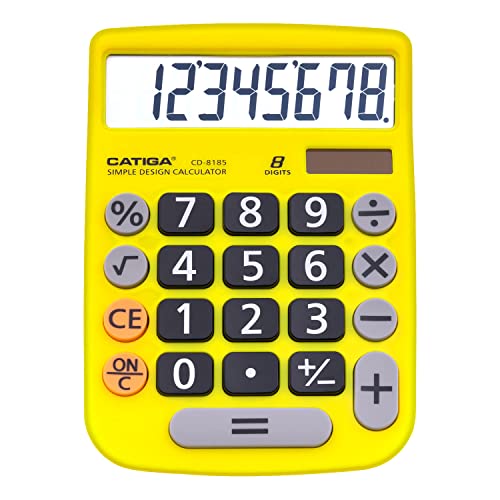
CATIGA's eight digit model is the stripped down option, with a large screen, a tilted display, and large responsive buttons. Spacious key sizes mean your fingers are less likely to hit the wrong number. The body is sturdy plastic built for everyday use.
Eight digits is fewer than the twelve found on the other picks, and for most household sums that is still plenty. What you gain in return is larger numerals per screen width and a lighter learning load. Power is solar, so you should place it where light reaches the panel.
It does not speak and it does not magnify beyond a large standard screen, so it is not for severe vision loss. It does suit someone who needs big keys and a calm layout more than a talking assistant. Compared with the pendancy, it is smaller and quieter to use, and compared with the talking models it offers no audio but asks for much less attention.
Best for: People who need roomy keys and an easy to read display but no speech.
Check price on AmazonSpecs
- Display: 8 digit, tilted
- Keys: Large responsive buttons
- Power: Solar
- Body: Sturdy premium plastic
Pros
- +Large responsive buttons make wrong-key presses less likely
- +Tilted, angled screen reduces how far you lean in
- +Solar power means no routine battery changes
- +Sturdy plastic body is built for everyday use
Cons
- −Eight digits is fewer than the twelve on other picks
- −No speech, so it is not for severe vision loss
How We Evaluated These Large-Button Calculators for Low Vision
Each pick was assessed across 5 criteria weighted for real-world use.
Voice and spoken feedback
We read what each listing says the voice announces: digits, function keys, or only results. The Low Vision Store scored highest for naming functions as well. The Cirbic, iPepul, and MAUJOY announce numbers and results, and volume control was counted separately. Silent models were judged in a different category rather than penalized.
Display readability
We weighed screen size, line count, and angle. The pendancy leads silent models at 5 inches and 30 degrees, and the iPepul has a fixed 45 degree angle with two lines. The Cirbic, MAUJOY, and Low Vision Store all list dual or two-line displays. We did not measure digit height, so scores reflect specs and buyer feedback.
Key size and contrast
Key size, contrast, and color cues were scored together as a finding aid for partial sight. The Cirbic earned marks for high contrast, the pendancy for color grouping, and the CATIGA 8 Digit for spacious responsive buttons. Listings that did not mention contrast were scored on size alone. We favored layouts that avoid tiny labels.
Ease of use and learning
A calculator that needs a long manual defeats the purpose. The iPepul with four functions and the CATIGA 8 Digit score best for simplicity. The MAUJOY adds percent and square root, which adds a little learning. Everything was weighed against how little someone must memorize.
Lineup positioning
The Low Vision Store leads on accessibility, with spoken functions and a low vision focus, and the Cirbic leads on volume range. The iPepul leads on screen angle with a fixed 45 degrees, the MAUJOY on functions, and the pendancy on silent screen size at 5 inches. The CATIGA 8 Digit leads on simplicity. Choose by which gap in your vision matters most.
How to Choose the Right Large-Button Calculators for Low Vision
By How Much Sight You Use
Pick the amount of support that matches what you can still read.
| Situation | Pick | Reason |
|---|---|---|
| You cannot read the screen at all | The Low Vision Store Two-Line Talking Calculator | Speaks numbers, functions, and results |
| You see shapes but not digits | Cirbic Loud and Clear Talking Calculator | Voice plus high contrast oversized keys |
| You read large digits with effort | pendancy 5-Inch Big Number Calculator | 5 inch LCD with a 30 degree tilt |
| You read fine but miss keys | CATIGA 8 Digit Solar Big Button Calculator | Large responsive buttons and a tilted screen |
| You want speech and a steep angle | iPepul 2-Line Talking Desktop Calculator | Voice broadcast with a fixed 45 degree display |
If you move between two rows, choose the one with speech and mute it when you do not need it.
By Budget
These tiers rank by feature set, not price. Verify the live listing before purchase.
| Tier | Pick | What you get |
|---|---|---|
| Entry | CATIGA 8 Digit Solar Big Button Calculator | Big keys, tilted screen, solar power, no speech |
| Entry to mid | pendancy 5-Inch Big Number Calculator | Huge silent display and color coded keys |
| Mid | iPepul 2-Line Talking Desktop Calculator | Voice broadcast, two lines, 45 degree angle |
| Mid to premium | MAUJOY Talking Desk Calculator | Voice plus percent and square root |
| Premium | The Low Vision Store Two-Line Talking Calculator | Low vision design that speaks functions too |
The Cirbic fits between the mid and premium tiers when volume control and contrast are priorities.
Talking vs Large-Screen Silent
You are choosing between hearing the answer and seeing it very large.
Talking models
A built-in voice reads digits and results aloud, so you can confirm without seeing. The Low Vision Store Two-Line Talking Calculator, Cirbic Loud and Clear Talking Calculator, iPepul 2-Line Talking Desktop Calculator, and MAUJOY Talking Desk Calculator all speak. Choose this side if reading digits is unreliable.
Large silent screens
A huge display with big keys lets you keep working quietly if you can still read bold numbers. The pendancy 5-Inch Big Number Calculator and the CATIGA 8 Digit Solar Big Button Calculator fall on this side. Choose it if you work around others and can read a screen.
A talking unit can be muted, so it covers both cases if you are unsure.
By Display Setup
Angle and line count change how quickly you find your place.
| Situation | Pick | Reason |
|---|---|---|
| You sit low and look up at the desk | iPepul 2-Line Talking Desktop Calculator | Fixed 45 degree display faces you |
| You want entry and last result together | Cirbic Loud and Clear Talking Calculator | Large dual-line display |
| You want a gentler 30 degree tilt | pendancy 5-Inch Big Number Calculator | 30 degrees with a 5 inch LCD |
| You prefer fewer digits at a bigger size | CATIGA 8 Digit Solar Big Button Calculator | Eight digits on a large tilted screen |
Tape a small reference mark by the key you press most to find it by touch.
For Shopping and Daily Money Math Specifically
Discounts, tips, and totals need a few special keys.
Look for
A percent key for sale prices, a clear key you can find by feel, and speech that confirms each entry. Eight to twelve digits is more than enough. A mute option keeps public use polite.
In this comparison
The MAUJOY Talking Desk Calculator is the best match, with percent and square root plus voice. The Cirbic Loud and Clear Talking Calculator suits noisy stores or kitchens with its volume range. The CATIGA 8 Digit Solar Big Button Calculator is a plain choice if you just add up a list.
Say the total aloud before you pay, so the voice and your memory both agree.
When to Spend More
| Spend more if | Save if |
|---|---|
| You cannot read digits, The Low Vision Store Two-Line Talking Calculator speaks functions too | You read a bold screen, the pendancy 5-Inch Big Number Calculator is silent and large |
| You need percent and square root, the MAUJOY Talking Desk Calculator adds them | You only add, the iPepul 2-Line Talking Desktop Calculator stays at four functions |
| You switch between quiet and noisy rooms, the Cirbic Loud and Clear Talking Calculator has wide volume | You only use one quiet room, a simpler model works |
| You need the largest silent screen, the pendancy gives 5 inches | You need big keys only, the CATIGA 8 Digit Solar Big Button Calculator covers it |
Buy speech if you need it and skip it if you do not.
Frequently Asked Questions
Do I need a talking calculator if I have low vision?
Not always. If a 5-inch screen like the pendancy's is readable, a silent model works and avoids noise. If digits blur or you have to guess, speech is the better aid. Many talking models can be muted, so they cover both cases.
What is the difference between voice that reads results and voice that reads functions?
A result-only voice speaks the answer, while a fuller voice also names the keys you press. The Low Vision Store model announces numbers, functions, and results, which helps you catch a wrong operator. Models like the iPepul read numbers and results after each input. Pick the fuller option if you often press the wrong operator.
Why does a two-line display help?
The top line shows your running calculation while the bottom shows the current entry or result, so you can check work without redoing it. The Cirbic, iPepul, MAUJOY, and Low Vision Store models all list dual or two-line screens. It is especially useful when voice and eyes both contribute. Single line screens force you to remember earlier steps.
Are color coded keys really useful for low vision?
They can be, because color groups help you find an area without reading labels. The pendancy uses orange, blue, and gray groups. Contrast matters too, so the Cirbic's high contrast keys offer a similar benefit in another form. Combine color with a firm sense of key position.
Does the screen angle matter if I mostly listen?
Less, but it still helps on days when your sight is better. A 45 degree iPepul display or a 30 degree pendancy display faces you, which saves your neck. Talking models are often used with partial sight, so the screen is not irrelevant. If you only listen, angle is a minor factor.
Will a solar calculator work in a dim room?
Solar alone may struggle in poor light, which is why many models add a battery. The CATIGA 8 Digit relies on solar power, so place it by a window or under a lamp. Check each listing for power details, and keep a spare cell on hand.
Should I buy one of these for a family member?
Ask what frustrates them now: reading digits, hitting keys, or hearing the answer. Then match the pick, using the tables above. A talking unit is a safe choice if they are unsure, since the volume can be turned down. Let them try it and keep the return window in mind.
Bottom Line
best overall: The Low Vision Store Two-Line Talking Calculator - designed with low vision in mind pick in this roundup.
See the full rankings above for all picks with pros, cons, and best-for summaries.
Browse on Amazon
All Prime-eligible options with current pricing.
Shop on Amazon →